Farming Simulator 25 mods
77,695 results- 15 per page
- 30 per page
- 45 per page
- 60 per page
-
See more per page
Bigger pages, fewer clicks - and no ads anywhere.
Go Pro
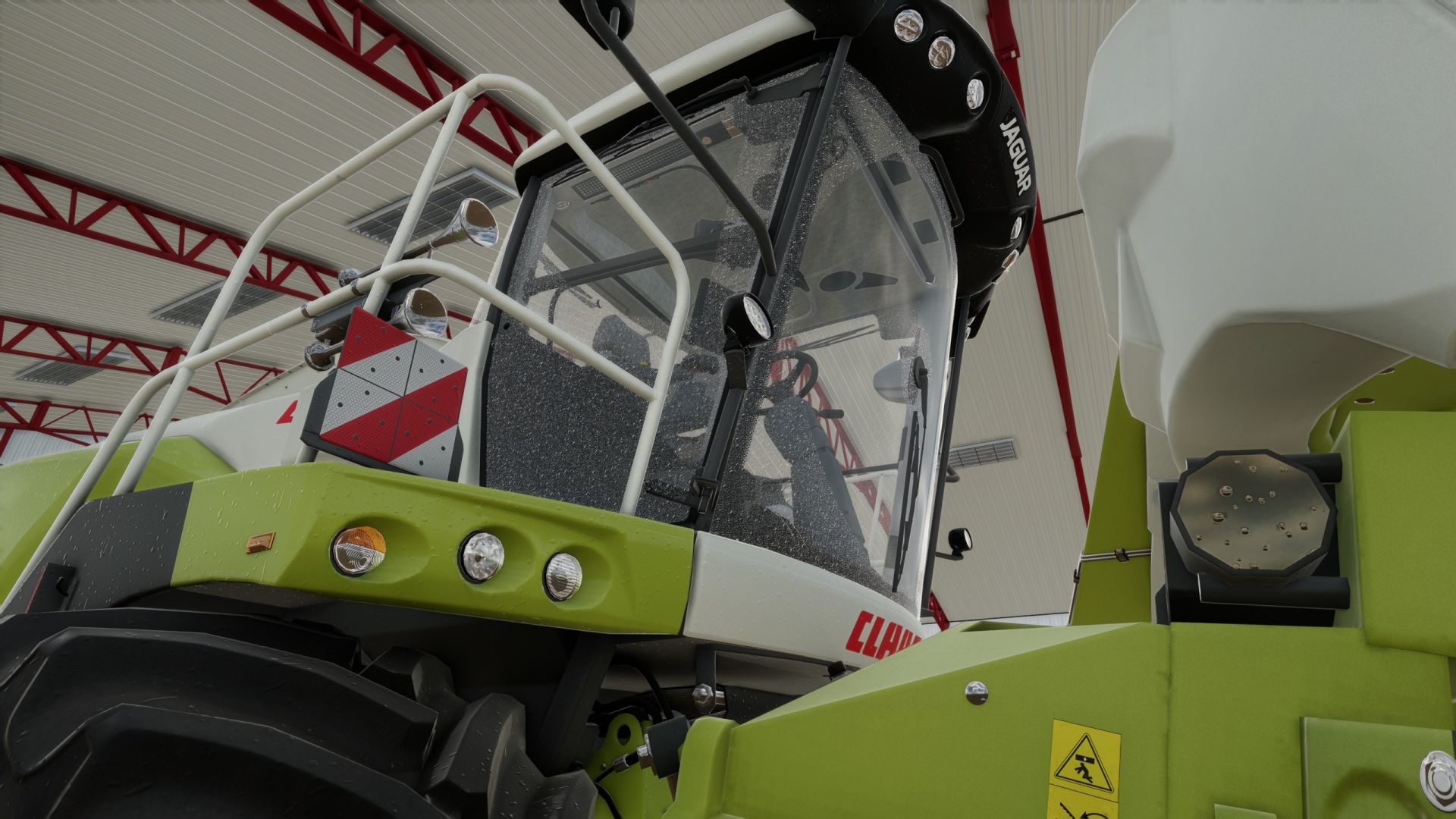
Realistic window rain and dust BETA 3 v1.0
Realistic window rain and dust BETA 3 v1.0 Realistic rain on windows with dust that slowly washes away when it rains. Has manually working wipers that can be remapped to your liking. Window droplets also form when pressure washed and slowly dries afterwards. List of working base game vehicles so far as i am working on adding more to the list. Agrifac LightTraxx (Glass Fixed) – Included Antonio Carraro Mach 4 R Case IH Axial-Flow 7160 Case IH Farmall 120 C Case IH Puma 185 CVXDrive Challenger MT665 Claas Arion 530 Claas Evion 450 Claas Jaguar 990–930 (mod pack) Claas Lexion 620–670 C53 (mod pack) Claas Lexion 750–770 C56–C59 (mod pack) Deutz-Fahr 6115 C RVshift Deutz-Fahr 8280 TTV Dewulf ZK IV SE Fendt 512 Vario Fendt 700 Vario series, including 720 Fiat 160-90 Gregoire GL 8.4 IMPEX Hannibal T50 International Transtar II Iseki HJ6130 Iseki TJW 1233 JCB 435S Stage V CB Fastrac iCON 4000 (Highlands DLC) John Deere 3650 John Deere 6M 95 John Deere 6R 145 John Deere 6R 230/250 John Deere 9RX 770 John Deere 9700 / 9000 series John Deere 1270G John Deere 848L-II John Deere R4045 (mod) Komatsu 951 Krone BiG X 1180 Kubota M8-181 Landini REX 4-070 GT Lindner Lintrac 130 Lizard Pickup 2017 Mack Anthem 6×4, MP7 425 Mack Anthem 6×4, MP8 505 Mack Super-Liner 6×4 Massey Ferguson 7S 155 Massey Ferguson 9S.285 New Holland L318 Oxbo MKB-4TR Pfanzelt Felix Ponsse Bison Active Frame Rottne F20D Schaeffer 9660 T-2 Sennebogen 340 G (Glass Fixed) – Included Valtra T195 — Vermeer ZR5-1200 Volvo L120H Zetor Crystal 16045 Zetor Forterra HSX 120 Zetor Proxima HS80 This is a beta build so there may be issues with unfixed vehicles. BETA 3 Added Beans and Alpaca DLC vehicles and multiplayer functionality. Base game vehicles added Massey Ferguson MF 8570 Deutz-Fahr AgroStar 8.31 John Deere 8R John Deere 9R John Deere S7 John Deere 7R Case IH Magnum 340 Fendt 1038 / 1000 Vario John Deere 3650 John Deere 9RX 770 Author: Showgunn84 Report bugs in the comments and help modders improve this mod. Always check the comments, you can find a solution. DOWNLOAD MOD
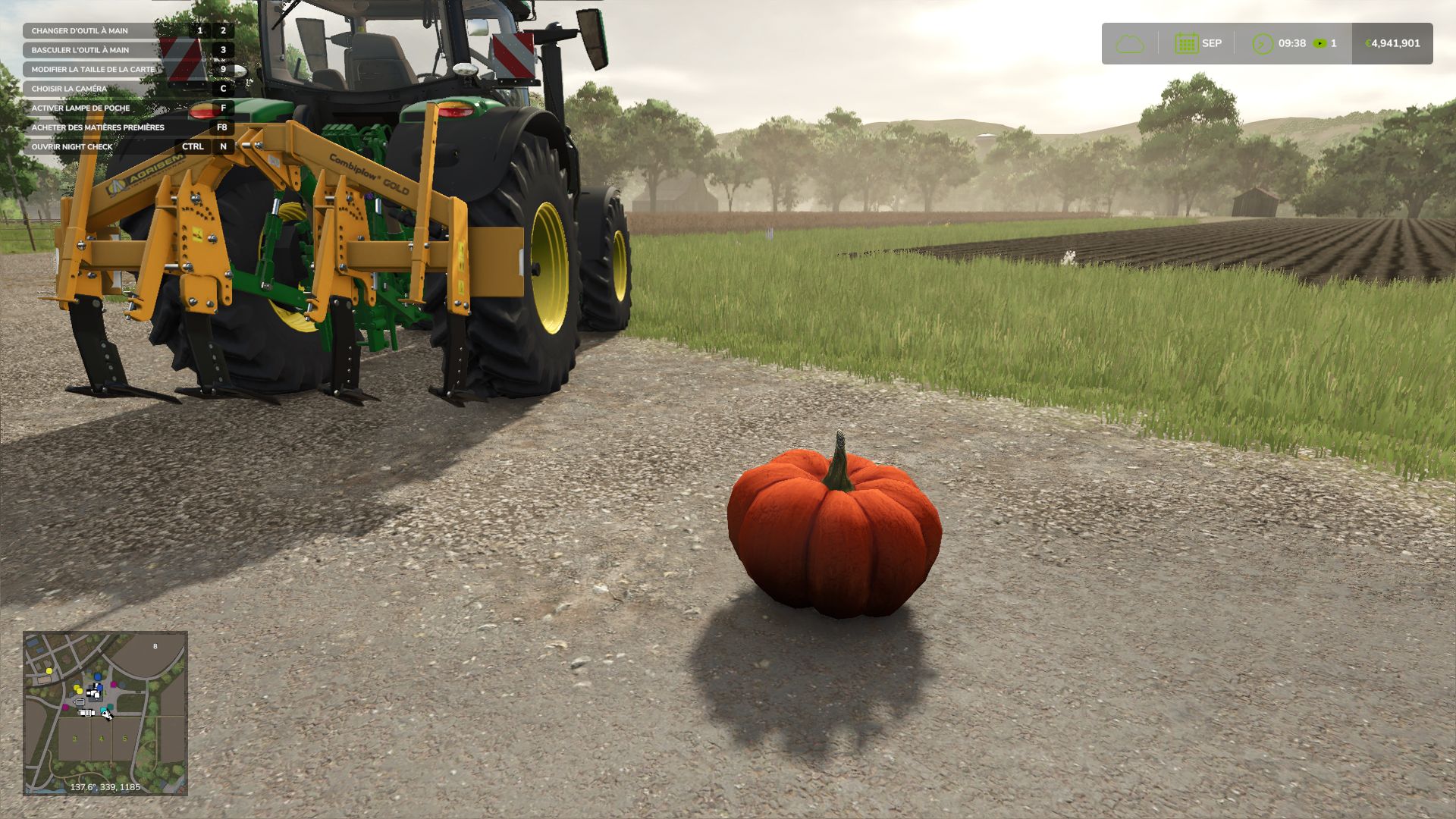
Halloween Hunt FS25
Celebrate Halloween on your farm with Halloween Hunt! Pumpkins appear near players. Find them and approach on foot to within 1.8 m to collect them and earn money for your farm. Rewards depending on the economic difficulty: • Easy: €10,000 • Normal: €5,000 • Hard: €2,500 Settings: • Interval: 1, 2, 5, 10, 15 or 30 real-time minutes. • Maximum radius: 10, 20, 35, 50, 75, 100 or 150 metres. • Enable / disable the hunt. • Settings are saved automatically. A native FS25 notification announces the appearance and collection. Placement searches for a location without obstacles, away from water and steep slopes. The pumpkin may be hiding in the grass! Single-player and multiplayer servers: • One active pumpkin per farm. • Players on the same farm share the hunt. • Payment is controlled by the server and is made only once. • Positions and settings are synchronised for joining players. • Settings can be modified by the host. On a dedicated server, edit modSettings/FS25_HalloweenHunt.xml in the server profile before starting it. Clients can view the settings. • Install the same ZIP on the server and clients. Key: Left Ctrl + P to open the settings, on foot or in a vehicle. The key can be changed in the game controls. By default: one appearance after 5 minutes, within a maximum radius of 35 m. The next timer starts after collection. Pumpkins remain available all year round. Active pumpkins are not saved; a reloaded game starts a full timer again. Installation: place FS25_HalloweenHunt.zip in the mods folder without extracting it and activate it when loading the game. PC / Mac only. French and English interface. Version 1.1.0.0: new icon, server support, corrected accents, adjustable radius and native notifications. The single-player mode has been tested in-game. Network exchanges have been checked in simulation; the new server version has not yet been validated in a real multiplayer session. Author: Olicatam Pumpkin model: hooded_kian, OpenGameArt, CC0 licence.
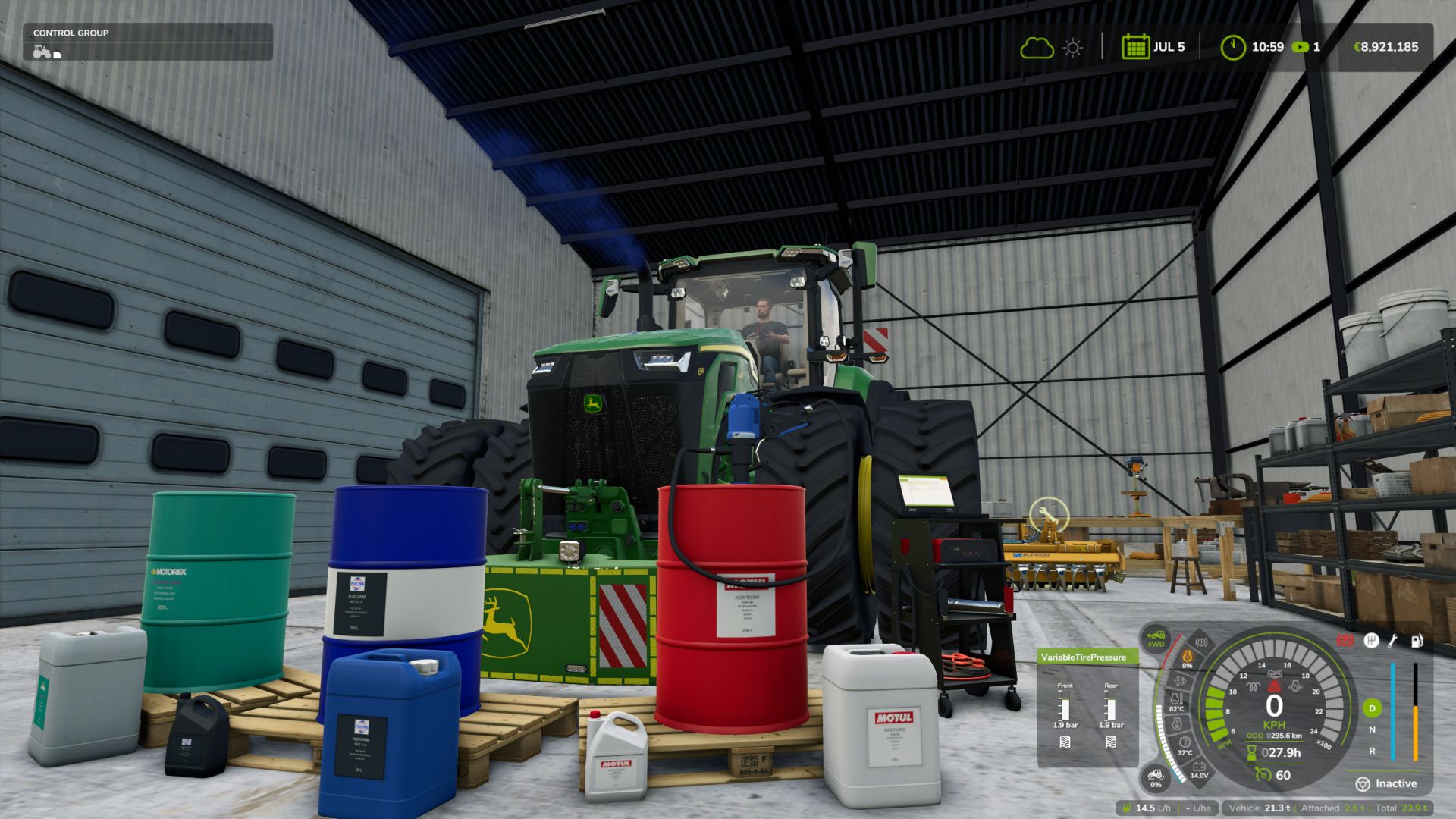
Realistic Mechanical Systems BETA 4 v1.0
Realistic Mechanical Systems BETA 4 v1.0 Your machines age. Their maintenance matters. RMS brings mechanical simulation to Farming Simulator 25. Your driving, the work performed and maintenance influence the reliability, performance and expenses of your fleet. MECHANICS THAT COME ALIVE Progressive wear and breakdowns Up to eight distinct mechanical systems, made up of the actual parts that fail in them. The part that breaks is the one your usage has worn out. Unusual noises, unstable engine speed, smoke and loss of power alert you to the condition of your machines. Engine temperatures and behavior Cold weather, workload, fouling and mechanical condition influence warm-up, starting and exhaust smoke. Recent diesel engines regenerate their particulate filters and have their own AdBlue failures. Transmission and parking brake 2WD, 4WD and AUTO modes and differential locks on tractors. Parking brake on all machines, automatic on recent CVTs and Powershifts. Electric vehicles Electric motor, traction battery that loses capacity with age and range in cold weather, power electronics: each electric machine has its own components. TAKE CARE OF YOUR EQUIPMENT Maintenance on foot Check the levels, top up the fluids, clean with the air blow gun and use the grease gun. A heavily clogged filter must be replaced in the workshop. Charging and jump-start assistance Use jump leads or the Telwin Doctor Charge 155 Connect on a trolley. Recharge while you work elsewhere or choose START to assist with starting. Charging follows the speed of the game time. Diagnostic tool Available as an option on the Telwin trolley, it reads the machine’s fault codes. The code indicates what the machine is measuring; the inspection identifies the faulty part. Farm and mobile workshops need it for electronic work. Complete workshop Inspection, maintenance, repair, overhaul and repainting. Compare prices, durations and the quality of original, aftermarket or used parts before starting the work. 24-month warranty or until the hour limit, with extensions available when purchasing new. EVERY MACHINE HAS ITS STORY Consult reports, maintenance due dates and the history of repairs. Age, hours and mechanical condition influence vehicle value. A used machine may hide defects: its maintenance history can be consulted at the dealership before purchase. Workers adapt their driving to overloading to protect the equipment, including when using Courseplay and AutoDrive.a SINGLEPLAYER • MULTIPLAYER • DEDICATED SERVERS • 27 LANGUAGES Author: Squallqt Report bugs in the comments and help modders improve this mod. Always check the comments, you can find a solution. DOWNLOAD MOD
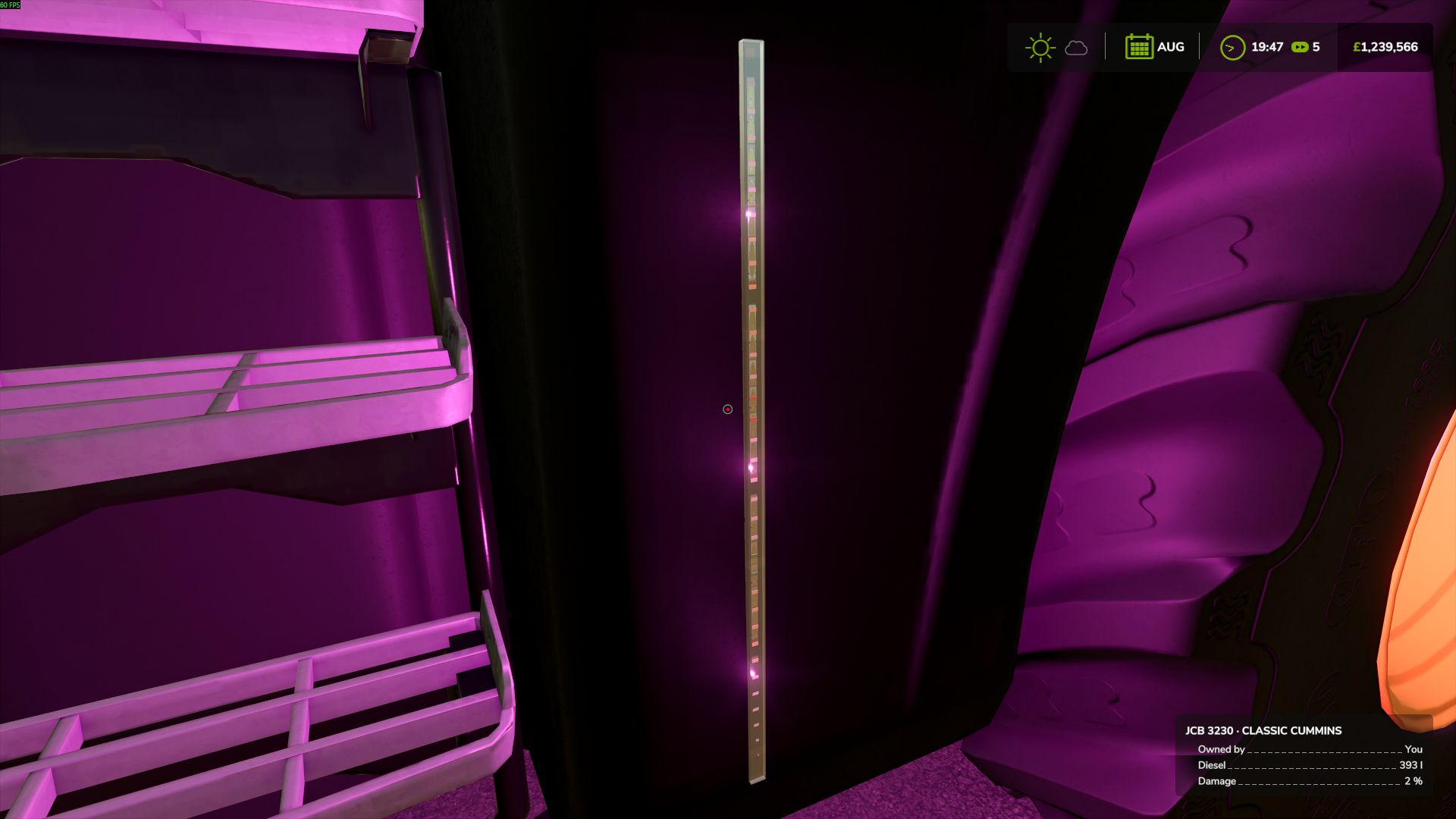
Dynamic Colour LED Strip (Prefab) FS25
LM Modding presents the Dynamic Colour LED Strip Prefab for Farming Simulator 25. Add a custom lighting touch to your vehicles with this versatile LED strip prefab, designed for use on tractors, JCB machinery, trucks and other compatible vehicles. Featuring 10 selectable lighting settings, the prefab allows you to switch between colours in game using a keyboard key. Whether you want a clean white glow, a classic amber finish or something more colourful, you can choose the look that suits your vehicle. Available Colour Settings White Red Green Blue Amber Cyan Magenta Purple Warm White Off What's Included 3D LED strip model Textures for a realistic appearance Lua scripts for in game colour switching 10 selectable colour settings Designed for integration into compatible vehicle mods The prefab provides modders with a flexible lighting solution that can be integrated into their own projects, offering greater customisation and the ability to create unique vehicle lighting setups. One LED strip. Ten settings. Endless possibilities.
Number of players on servers V1.1.1
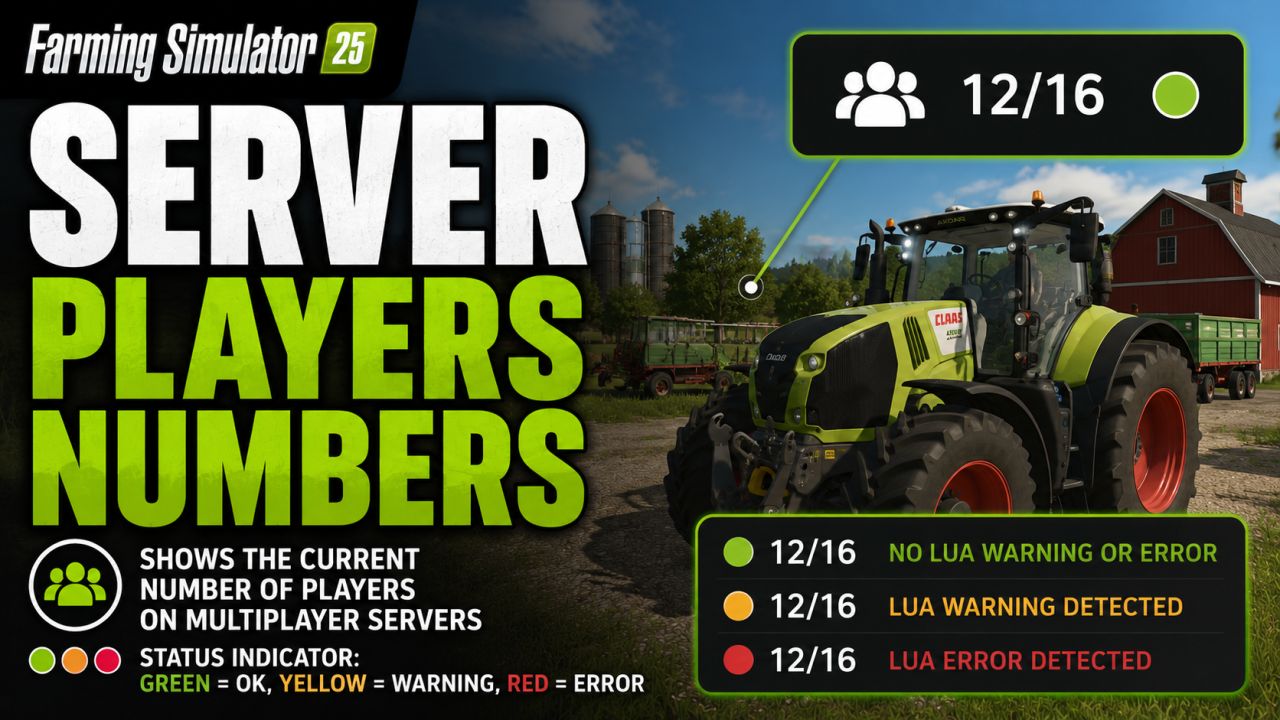
Number of players on servers V1.1.1 Number of players on servers Displays the current number of players directly in the HUD on multiplayer servers. The display consists of a compact player count with a status indicator: Green: no Lua warning or Lua error detected ; Yellow: Lua warning detected; Red: Lua error detected The status point can be reset in the game settings if a detected message has been reviewed and is non-critical. Note: In single-player mode, the HUD display will be automatically hidden if the mod was accidentally activated there. Further detections may be added later if log data can be analyzed more cleanly in the game. V1.1.1.0 Settings now also work for admins on dedicated servers “Show warnings” can now also be toggled by admins on dedicated servers The “Reset status” button now looks like the in-game buttons Separate explanatory texts for both settings Author: Nalathan Report bugs in the comments and help modders improve this mod. Always check the comments, you can find a solution. DOWNLOAD MOD
Seed Treater Pack V1.0.1
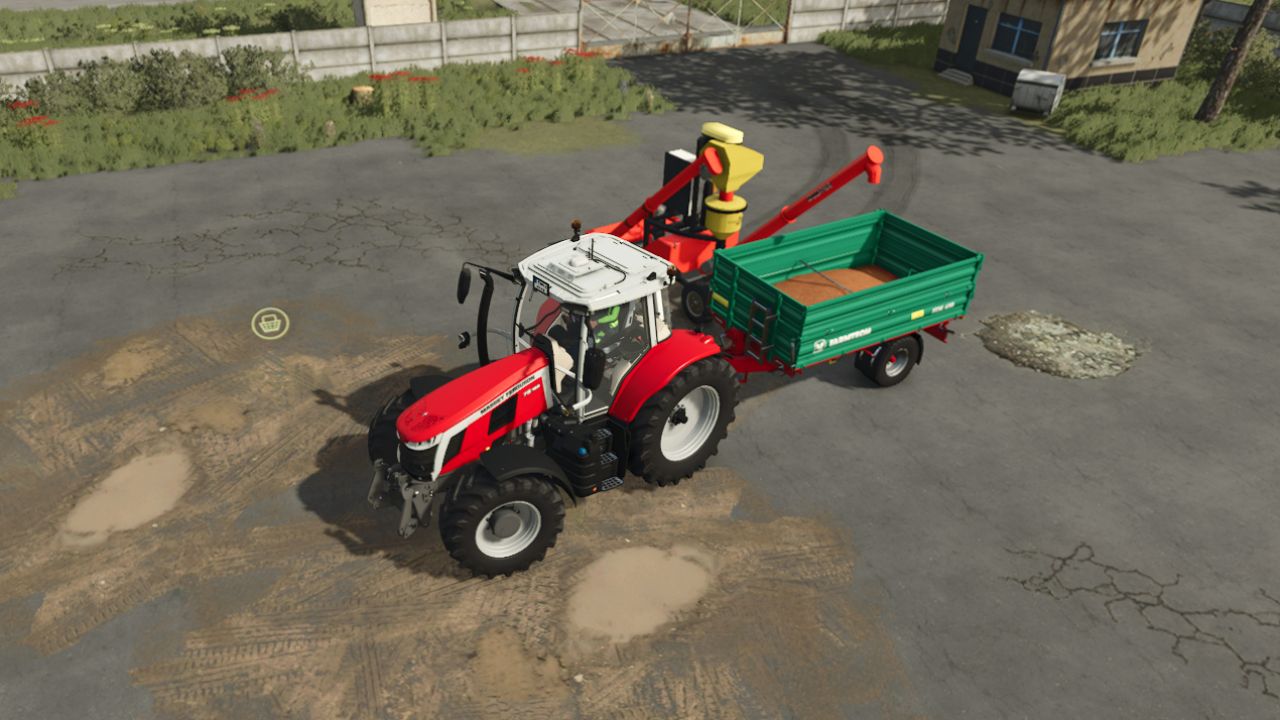
Seed Treater Pack V1.0.1 Simply pour seed treatment liquid into the mobitox-E super- and press the b button to pick up the seed from the ground. AND the trailer must be moved under the pipe and the seed will be ready, which can be used later for sowing. It is worth downloading another mod, a packaging mod to pack your seeds into a bigbag. V1.0.1.0 Added the following seed treatment conversions: – WHEAT -> SEED_WHEAT – OILSEEDRADISH -> SEED_OILSEEDRADISH – GRASS -> SEED_GRASS – SUGARBEET -> SEED_SUGARBEET – COTTON -> SEED_COTTON – POTATO -> SEED_POTATO – BEETROOT -> SEED_BEETROOT – CARROT -> SEED_CARROT – PARSNIP -> SEED_PARSNIP – GREENBEAN -> SEED_GREENBEAN – FIELDGRASS -> SEED_FIELDGRASS – GREENRYE -> SEED_GREENRYE – HUMUSACTIVE -> SEED_HUMUSACTIVE – MUSTARD -> SEED_MUSTARD – RYE -> SEED_RYE – SILAGEMAIZE -> SEED_SILAGEMAIZE – SPELT -> SEED_SPELT – TRITICALE -> SEED_TRITICALE – VETCHRYE -> SEED_VETCHRYE – CLOVER -> SEED_CLOVER – ONION -> SEED_ONION – ALFALFA -> SEED_ALFALFA – SUMMERWHEAT -> SEED_SUMMERWHEAT – SUMMERBARLEY -> SEED_SUMMERBARLEY – WINTERWHEAT -> SEED_WINTERWHEAT – WINTERBARLEY -> SEED_WINTERBARLEY – FIELDBEAN -> SEED_FIELDBEAN – PEA -> SEED_PEA – RICELONGGRAIN -> SEED_RICELONGGRAIN – SPINACH -> SEED_SPINACH – BARLEY -> SEED_BARLEY – OAT -> SEED_OAT – CANOLA -> SEED_CANOLA – SORGHUM -> SEED_SORGHUM – SUNFLOWER -> SEED_SUNFLOWER – SOYBEAN -> SEED_SOYBEAN – MAIZE -> SEED_MAIZE Required mods: Realistic Seeder Author: honved4 Report bugs in the comments and help modders improve this mod. Always check the comments, you can find a solution. DOWNLOAD MOD

FS25 Polish-style building with a garage
FS25 Polish-style building with a garage Polish-style building with a garage Cost – 25,000 Daily upkeep – 250 Converted from FS 22
Auto Bale Wrapper FS25
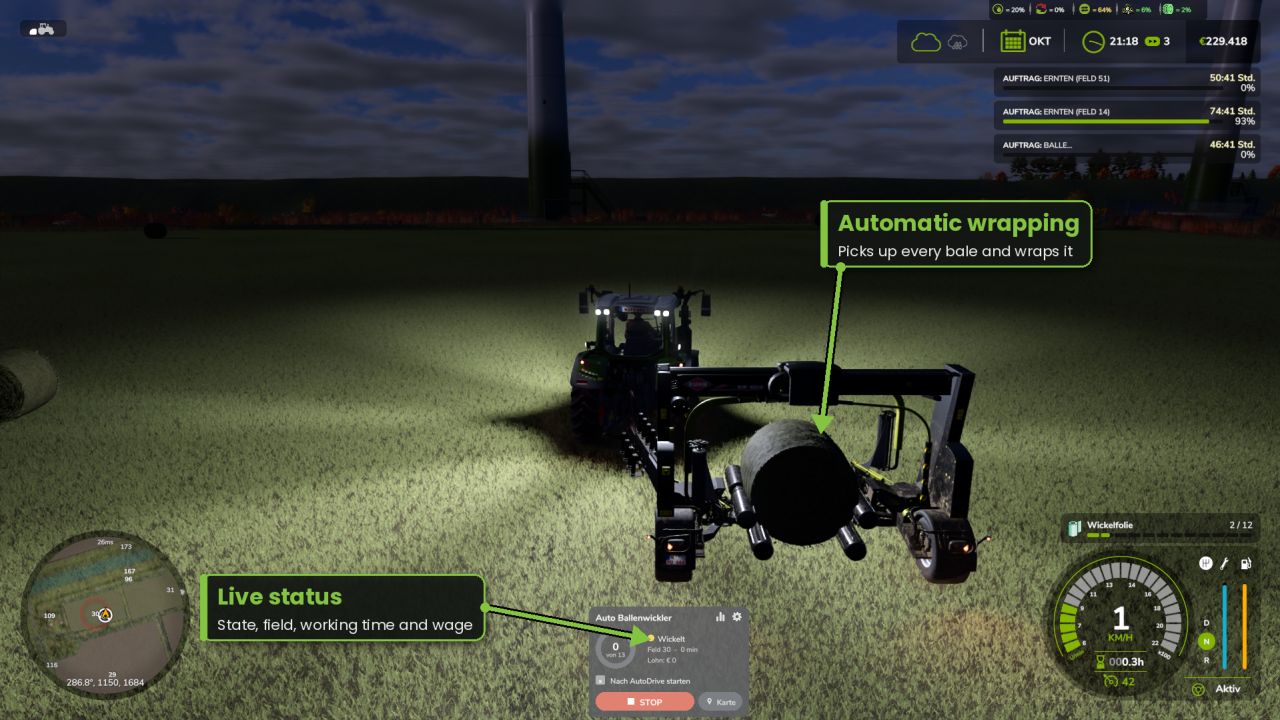
AUTO BALE WRAPPER v1.2.0.0 Your own AI assistant for trailed, self-loading round bale wrappers. Simply attach the wrapper and press Start – the assistant finds all unwrapped bales in the field, wraps them and stops as soon as everything is done. No courses, no setup. FEATURES - Finds all unwrapped bales in the field (round and square bales) and skips wrapped bales - Plans its own routes around bales, trees and obstacles while staying in the field - Dynamic speed: fast on straights, slower in curves, brakes late before the bale - Obstacle sensor for vehicles, players and objects - Multiple assistants on one field automatically share the bales - Unloading point on the map: select a point and direction, and the bales will be placed neatly in a row - Optional: place bales at the edge of the field - Statistics: bales, working time and driver wage – total and per field - AutoDrive handover: starts automatically as soon as AutoDrive reaches the field - Adjustable driver wage (0–100%), 6 HUD colors, automatic lighting - Modern, movable HUD with progress ring - Suitable for multiplayer and dedicated servers CONTROLS Ctrl+J start/stop | Ctrl+L mouse cursor | Ctrl+K show/hide HUD (changeable in the controls menu) REQUIREMENTS No additional mods required. AutoDrive is optional. In multiplayer, all players need the mod. - NEW: Front mounted bale wrappers are supported (e.g. Göweil G1015) - The helper detects automatically if the wrapper is towed or front mounted - Front wrapper is lowered automatically at start (like key V) and raised again at the end - Front wrapper backs off quickly (10 km/h) after wrapping and takes the nearest bales first - Shorter, smoother approach to the bale with a front wrapper - French translation for title and description - New mod icon - Cleanup for the GIANTS ModHub (TestRunner fixes, no change in driving) The mod has been submitted to the official GIANTS ModHub and will be available there after GIANTS has checked it. New: - Detour: if a bale can only be reached the long way round (pond, ditch, group of trees), the helper finds a way around it and drives it without stopping - Water and ditches next to the field are detected and never driven through - Adjustable curve speed in the settings (default 14 km/h, was 11 km/h) Optional: Autodrive von @Iwan1803 https://www.kingmods.net/de/ls25/mods/60430/autodrive Improved: - The helper always takes the nearest bale (no more driving across the field) - With several helpers, each one prefers the bales closest to it - If there is no room to reverse, the helper pulls forward a bit and searches again - Smoother braking before curves Fixed: - Bales far away on large fields (over 400 m) were not found and left behind - After a detour, bales were wrongly counted as unreachable 1.0.12.0 - New: The rig is locked while reversing, so the wrapper can no longer jackknife - New: The helper steers against jackknifing and straightens the rig before reversing - New: When starting next to the field (e.g. after AutoDrive hand-over), the helper may cross the field edge to get onto the field - Improved: Before reporting "bales not reachable", the helper now makes up to 3 completely new attempts (short pause, forgets failed attempts and temporary obstacles) - no more manual restart needed - New: When reversing, the helper first straightens the rig if needed and locks the hitch, so the tractor can no longer jackknife into its own wrapper - New: Reversing stops automatically if the rig starts to jackknife
Scania 164G FS25
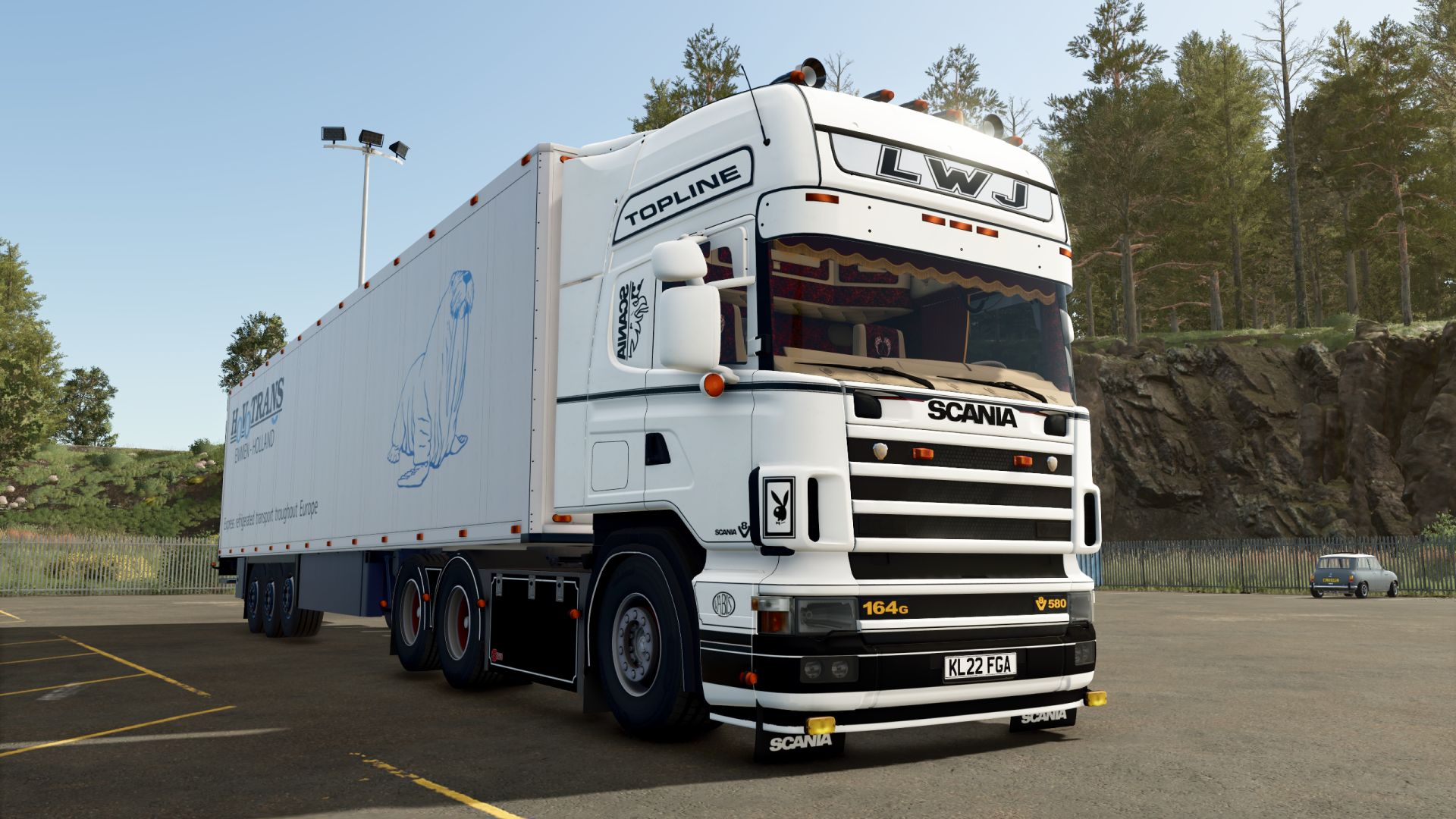
- Starting price 42.000$ - Power 580hp - Speed 90 km/h - Selectable license plate. - Animated pedals, steering column, turn signal lever and dashboard panel. - Lift axle control. - Passenger support. - Added interior animations: pedals, steering column, turn signal lever, and dashboard panel are now animated. - Improved interior lighting and materials. - Added mirrors. - Added passenger support. - Added controls for the lift axle. - Fixed decals on the seat. - Numerous visual improvements. - Connecting hoses have been added. - Lighting has been improved. - Flashing lights added. - Functional interior dome lights added. - The taillights have been improved.
GPS Plus V1.0.2.1
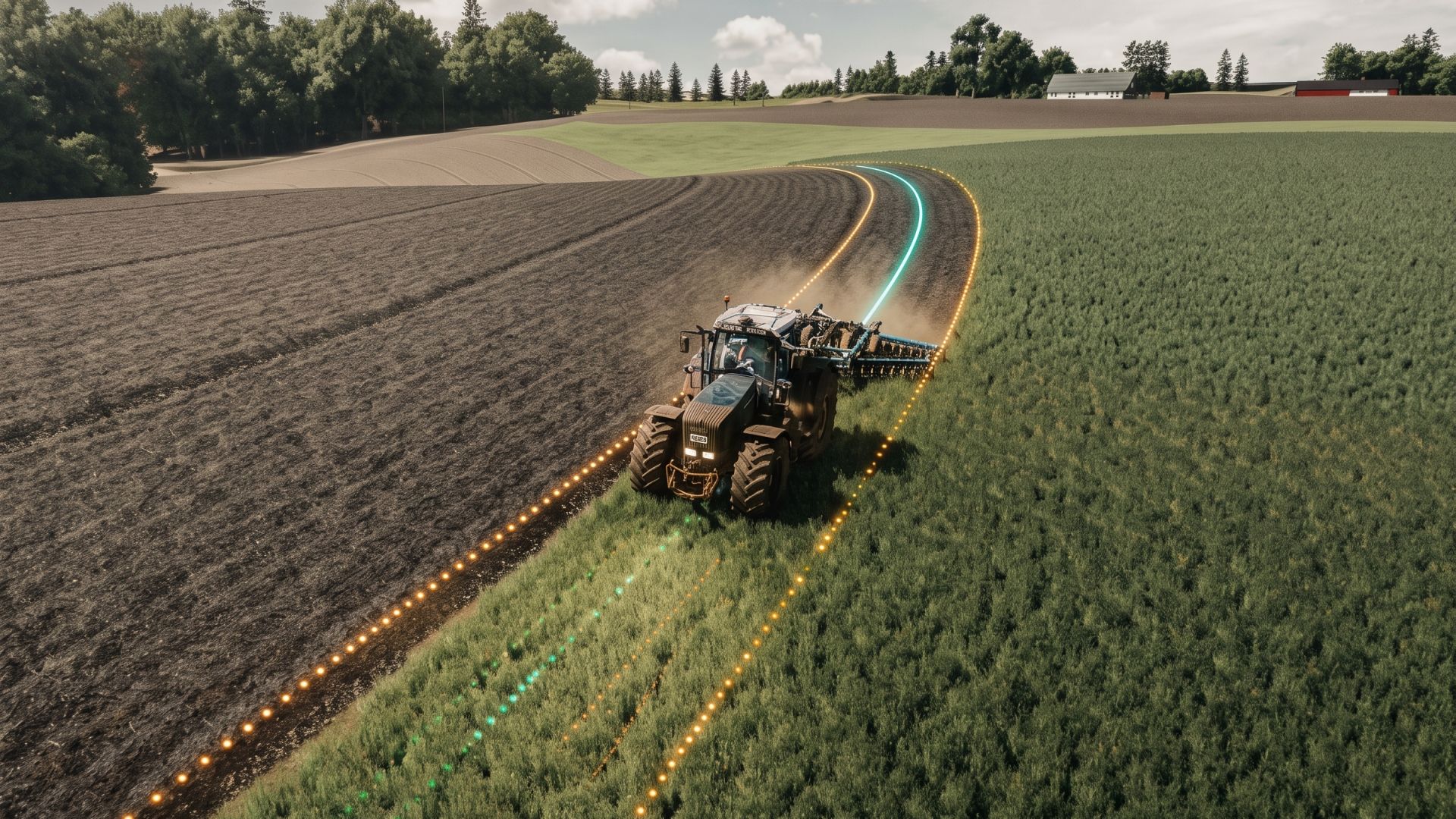
GPS Plus V1.0.2.1 Your GPS on CURVES! Take your farm’s efficiency to the next level with GPS Plus! Eliminate overlapping passes, skipped rows and wasted seed, fertilizer and fuel. Developed by Allan Beneck, GPS Plus equips all tractors, harvesters and sprayers with centimeter-precise guidance for Farming Simulator 25. Set your guidance line in seconds and let automated steering take control while you easily manage your speed and equipment. Key features: Straight AB lines: Mark point A and point B to create perfectly parallel lines across the field. Instant steering mode: Instantly create a guidance line following the vehicle’s current direction with a single key press — no need to drive to the opposite side of the field. Fine angle adjustment (0.5°): Rotate your guidance lines in 0.5° increments for precise alignment with roads, fences and field boundaries. Lateral line offset: Move your active track 10 cm to the left or right during work to compensate for terrain changes without resetting the line. Smooth curve recording (curved AB mode): Record irregular contours, terraced slopes or riverbanks. The custom algorithm applies cubic spline smoothing and tangential extension. Automatic implement width detection: With one click, attached implements (planters, cultivators, sprayers, headers) are automatically analyzed and the exact working width is set. Manual adjustment in 0.1 m increments is also available. Automatic headland turns: When you reach the end of the field, press the turn shortcut and your machine will perform a clean 180° turn directly into the next pass. CONTROLS AND SHORTCUTS: Right Shift + ; — Set point A / B (AB line) Right Shift + L — Straight line in the current heading Right Shift + ‘ — Set curved A / B line Left Alt + W — Toggle steering / autopilot Left Alt + A / D — 180° headland turn (left / right) Left Alt + I — Automatically detect implement width Left Alt + = / – — Adjust width (+ / – 10 cm) Left Alt + Up / Down — Rotate heading (+ / – 0.5°) Left Alt + Left / Right — Offset line (+ / – 10 cm) Left Alt + H — Toggle guidance line visibility Left Alt + Backspace – Reset guidance lines Feedback and suggestions are always welcome! If you find any bugs, vehicle incompatibilities or have ideas for future improvements, leave a comment on KingMods. V1.0.2.1 Bug Fix Fixed an error that prevented the autopilot from being disengaged when turning the steering wheel (for steering wheels only). Author: Beneck Report bugs in the comments and help modders improve this mod. Always check the comments, you can find a solution. DOWNLOAD MOD
Farmland Splitter FS25
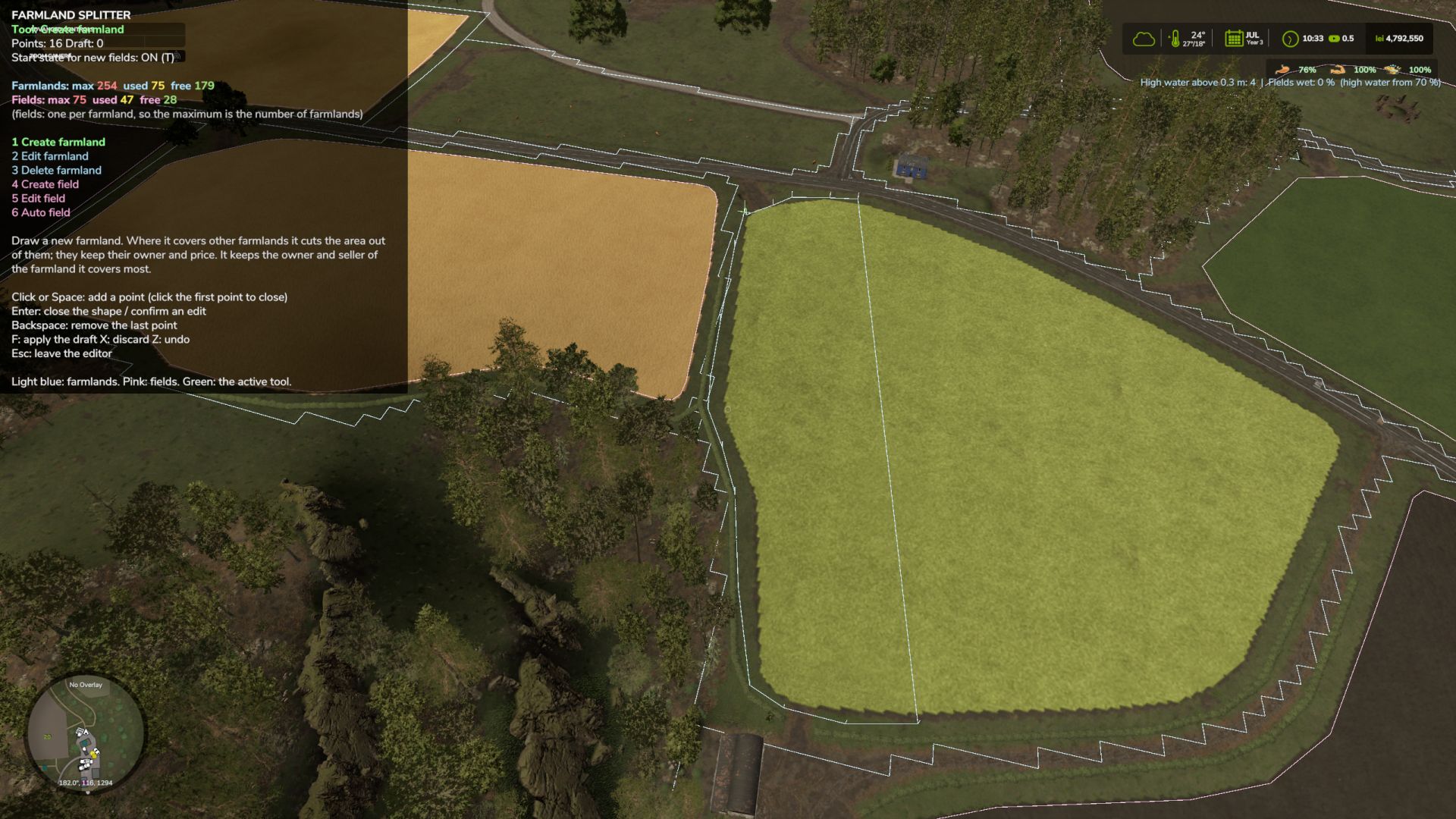
Ever wanted to reshape the map's farmlands or split big fields directly from inside the game? Farmland Splitter brings map-editing capabilities straight into your gameplay session! With this tool, you can redefine, cancel, or create new farmlands from scratch (within the available ID limits). You could literally take a blank map and build your own custom map layout directly in-game—leveraging FS25's extensive placeables library and terrain editing tools, now combined with fully customizable farmlands. 🔑 Key Features: Single Player, Pc Only!! In-Game Customization: Create, modify, or delete farmlands and field boundaries dynamically. Safe & Non-Destructive: All changes are stored safely inside your savegame folder. The original map files remain completely untouched! Intuitive Interface: Features a clean, self-explanatory menu. Bonus Feature: The boundaries of your purchased farmland (or combined/merged adjoining lands) will now be visible directly in the construction menu. Blank Canvas Friendly: Perfect for custom map projects or heavily tailored career saves. 🎮 How to Use: Open Menu: Press Right Shift + Right Ctrl + F12. Use the number keys assigned to the task you want from the left menu. Navigate & Edit: Use the simple on-screen controls to adjust farmlands. Apply Changes: ⚠️ Important: Any modification will only take effect after pressing the F key. Exit Menu: Press Esc. 🛠️ What's Coming Next? (In Development) This mod is part of a larger toolkit I'm working on to make full in-game map creation a reality. Currently in progress: In-game Pedestrian & Traffic Spline Creator Savegame-to-Map Compiler: A lightweight standalone tool that automatically integrates your saved game edits directly into a publishable map file. Together with existing placeable systems and terrain tools, full map creation without leaving the game is almost here! Minor Tweaks & Bug Fixes Auto-Create Fields: Added the function for the automatic creation of fields inside a farmland, respecting the safety margins imposed by the game engine. Bonus Feature: The boundaries of your purchased farmland (or combined/merged adjoining lands) will now be visible directly in the build menu. Beta 0.0.6.0 What's Changed Tools & Keybindings (Keys 1–5) 1. Create farmland 2. Edit farmland 3. Delete farmland 4. Create field 5. Edit field Cutting and extending have been removed, and the dedicated "delete field" option is gone. A field is now only deleted alongside its parent farmland. Colors Farmland: Everything related to farmlands (boundaries, drawn shapes, deletion markers) is light blue. Fields: Everything related to fields is pink. Active Tool & Cursor: Displayed in green. Counter UI Farmlands: Formatted as Farmlands: max used free (e.g., max 254 in red, used 244 in yellow, and free 10 in green). Fields: Follows the exact same format. The maximum limit matches the number of farmlands, as you can have at most one field per farmland.
Factory Direct Delivery FS25
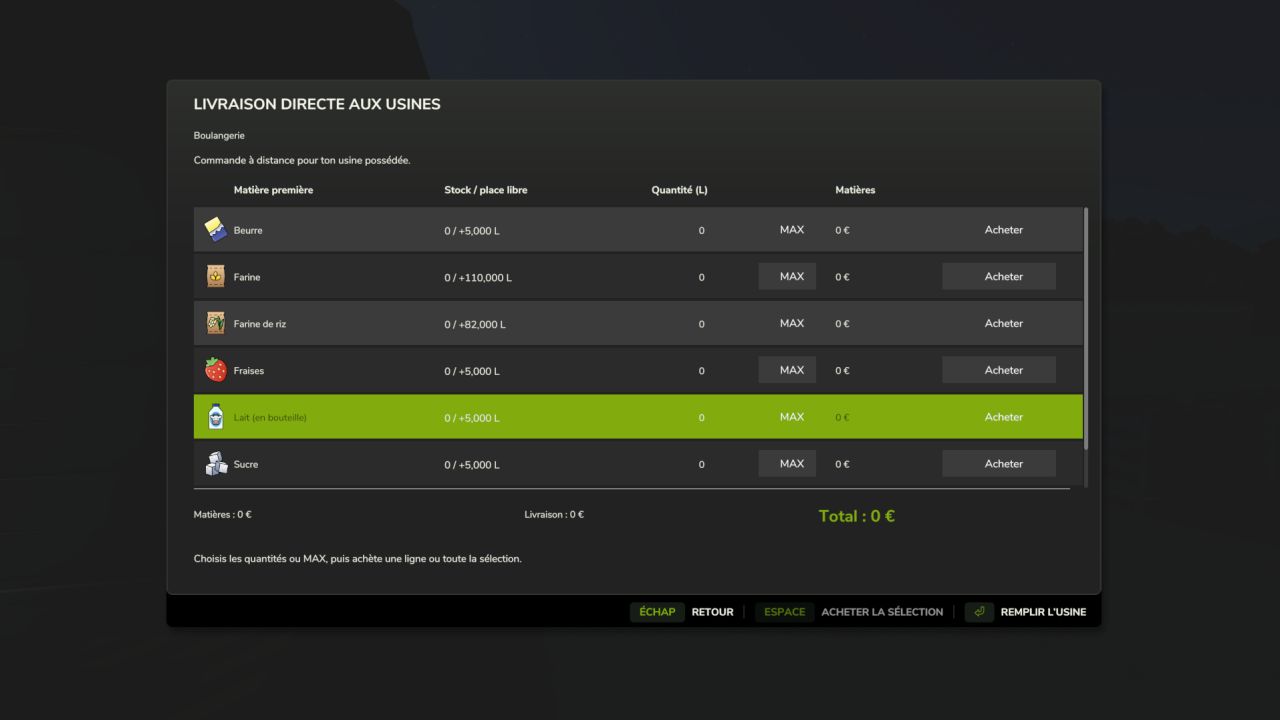
Factory Delivery lets you purchase and have raw materials delivered directly to your factories from the Productions menu. Select an owned factory, then click “Buy raw materials”. The window displays all its inputs with the current stock, available space, quantity to order, MAX and Buy. Features: • Remote purchasing from the Productions menu. • Individual or group purchase of several materials. • MAX per material and a “Fill the factory” button. • Detailed quote: materials, delivery fees and total. • Quantities and prices are locked when clicking Buy, even while the factory is producing. • Payment and stock addition upon unloading. • Arrival, unloading and departure animation with the in-game International CV Series. • Support for shared storage. • 27 localization files. • F8 remains available on foot near the factory. Default pricing: in-game price × 1.35; delivery at 150 + 12 per 1,000 litres, with a single fixed fee per order. Settings are available in settings.xml. Compatibility: single-player and multiplayer on PC/Mac, dedicated servers supported, for owned factories using the standard production system. The truck is an animation synchronized between clients, with no collision, and does not travel on roads. A grouped order is represented by a single visual delivery. Installation: place the ZIP file without extracting it in the mods folder and activate the mod when loading the savegame. For an update, replace the old ZIP and keep only one copy. Script author and creator of the added assets: Olicatam. The truck and its textures are loaded from FS25; game assets are not redistributed. Presentation icon illustrated with AI assistance; in-game screenshots by Olicatam. NEW IN 1.2.0.0 — MULTIPLAYER • Quotes are generated by the server, then require personal confirmation valid for two minutes. • The server checks the owning farm and the player’s vehicle purchase permission. • Stocks and payments are modified only by the server, upon unloading. • Only one active order per factory, to prevent concurrent orders. • Synchronization of trucks and deliveries in progress for joining players. • Works on dedicated servers without graphical loading of trucks on the server side. • If the available space decreases before arrival, only the quantity that can actually be delivered is charged. Install exactly the same ZIP on the server and all clients. 84 automated checks passed, including simulated network exchanges; a test in a real multiplayer session is still required. Multiplayer and dedicated server support. Quotes and confirmations validated by the server, farm and purchase-right verification, payments and inventories processed exclusively server-side. Protection against reusing a confirmation and concurrent orders on the same factory. Synchronized trucks and deliveries visible to joining players. 27 languages retained. The same ZIP is required on the server and clients. 84 automated checks; a real multiplayer session still needs to be confirmed.
Night Check FS25
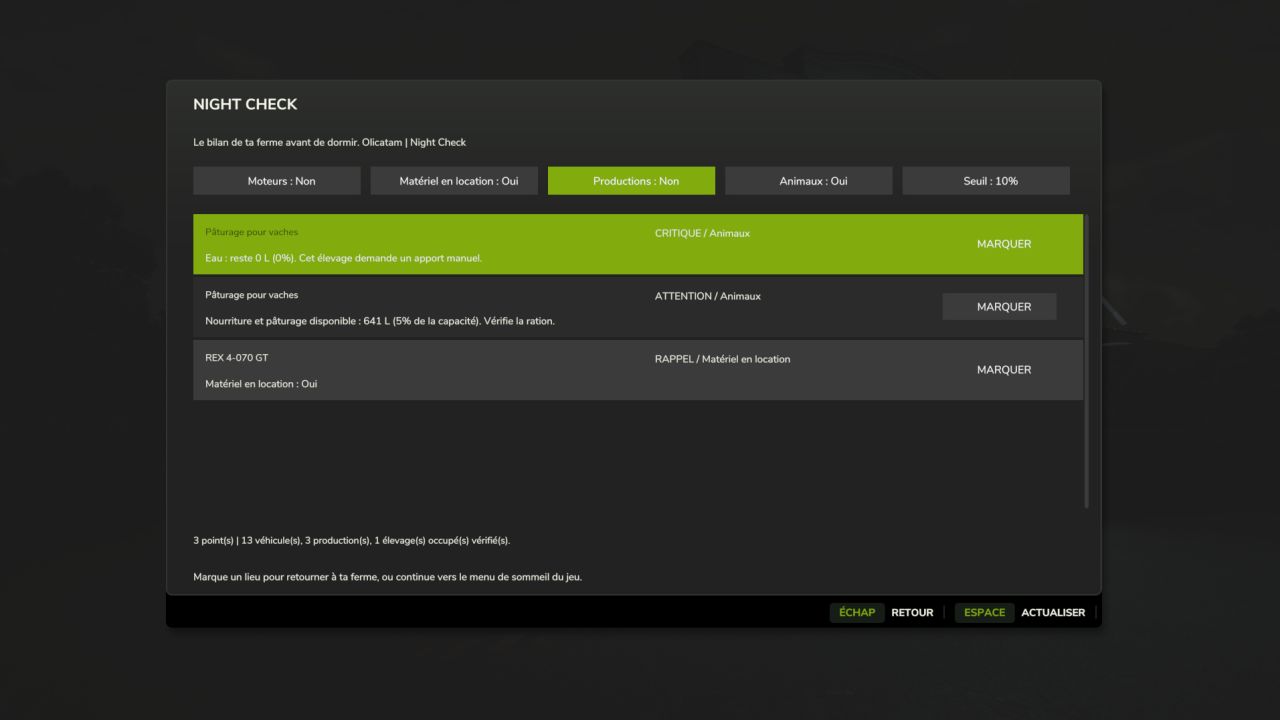
NIGHT CHECK — Your farm summary before going to sleep An engine left running, a machine still rented, a production running short of raw materials or livestock lacking water? Night Check gathers the points to check in a Farming Simulator 25-style window, before opening the usual sleep menu. FEATURES • Engines: detects running engines and distinguishes machines being used by an active worker. • Rented equipment: displays equipment that is still rented. • Productions: monitors the raw materials for active recipes and output stocks that are close to full. Disabled recipes and outputs sold directly are excluded from the corresponding alerts. • Animals: checks food, available pasture, water to be supplied manually and straw in occupied animal husbandries. Straw remains a simple reminder. • Alerts sorted by priority: critical, warning and reminder. • Mark button to set a vehicle or building as a destination on the map, if its marker is available. • Categories can be enabled separately and the threshold can be set to 5%, 10% or 20%. • Refresh button to reread the farm status. USAGE The summary is displayed when you request to sleep from a normal sleep point. On foot, Left Ctrl + N can also be used to view it at any time. The shortcut can be changed in the game controls. Continuing to sleep then opens the game's usual menu. Esc / Back cancels the request. Opening the summary manually does not allow you to sleep remotely. LANGUAGES Translated into the 27 languages and regional variants recognized by FS25. The language is selected automatically according to the game language. COMPATIBILITY PC/Mac single-player and multiplayer. On a server, the local summary only covers the player's farm and uses the data synchronized by FS25. Votes, permissions and sleep restrictions remain managed by the native menu. On a dedicated server, the mod does not create a server-side menu; each player has their own summary on the client side. Works with GIANTS' standard vehicle, production and husbandry systems. Custom systems from certain mods may require adaptation. The thresholds correspond to stock levels, with no estimate of remaining duration. No stock, payment or engine is modified automatically. No required mods. Compatible with Factory Delivery. INSTALLATION Place FS25_NightCheck.zip in the Farming Simulator 25 mods folder without extracting it, then activate Night Check for your savegame. Version: 1.1.0.0 Author: Olicatam MULTIPLAYER UPDATE Install exactly the same ZIP on the server and the clients. Summary settings remain specific to each player. 48 automated checks completed successfully; a test in a real session with multiple players still remains to be carried out. Multiplayer support: overview limited to the player's farm, local settings, and retention of the native sleep menu with its votes and permissions. No menu created on a dedicated server. Protection against returning to sleep when changing farms. 27 languages retained. The same ZIP is required on the server and all clients. 48 automated checks; a real multiplayer session remains to be confirmed.
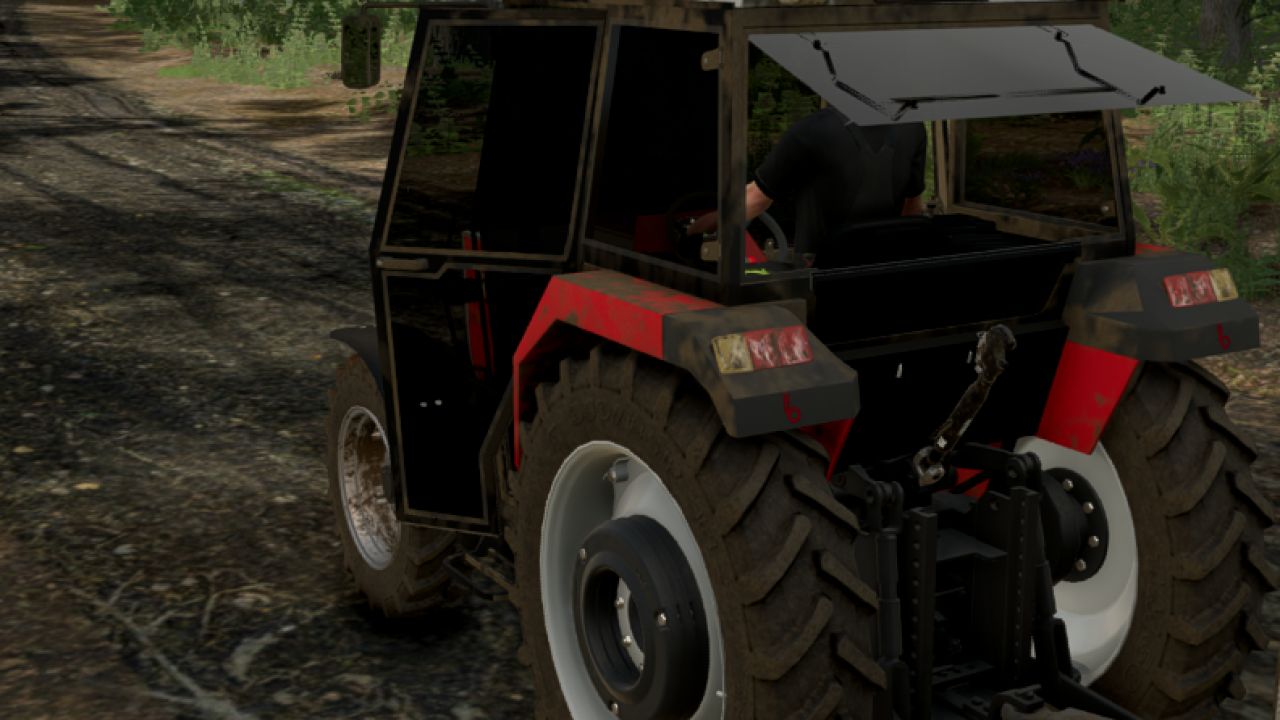
Başak 2022 Model BK 2075 FS25
Wheel selection option front loader selection option cab interior control is currently available later, interior controls for opening all hoods will be added Diesel refueling was fixed, the dashboard was changed, lighting issues were resolved, and the speedometer error on the display was fixed.
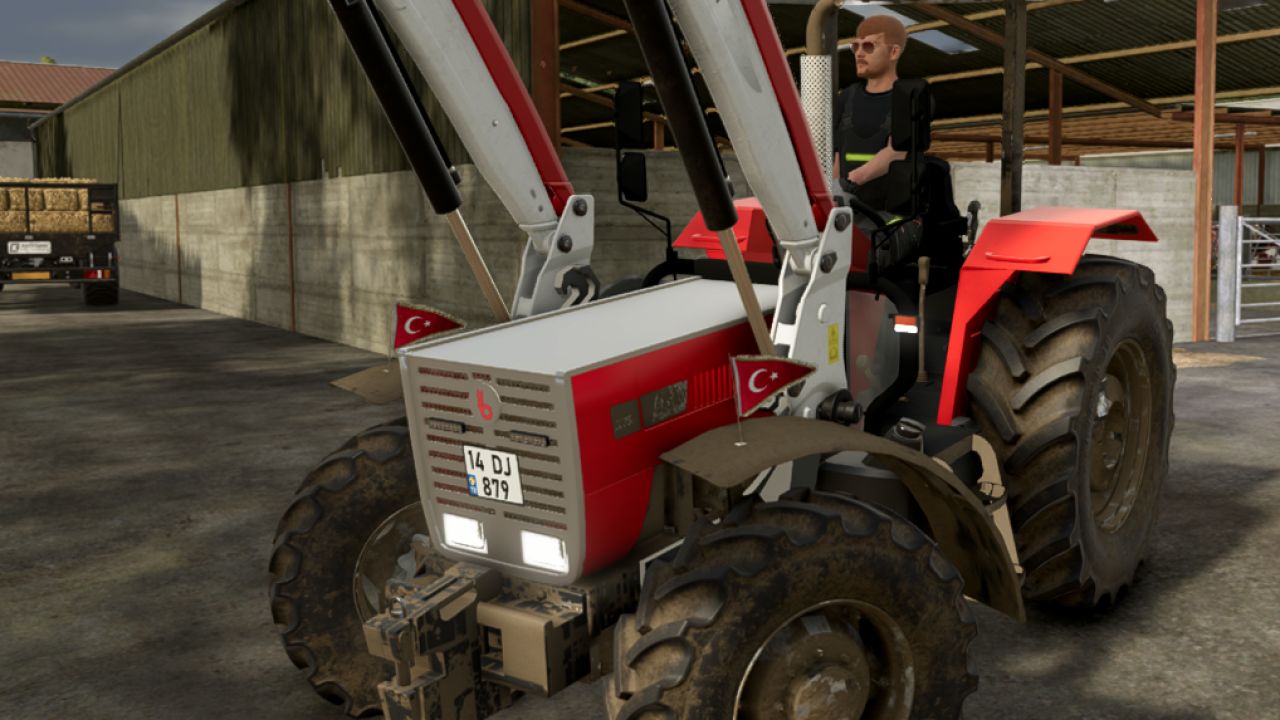
Başak 2075 BK Tenteli FS25
There is currently an option to select a front loader and an option to select a weight. Later on, IC control for the hoods and an option to select wheels will be added. Diesel refueling issue fixed
- 15 per page
- 30 per page
- 45 per page
- 60 per page
-
See more per page
Bigger pages, fewer clicks - and no ads anywhere.
Go Pro