Farming Simulator 25 mods
77,695 results- 15 per page
- 30 per page
- 45 per page
- 60 per page
-
See more per page
Bigger pages, fewer clicks - and no ads anywhere.
Go Pro

Night Check V1.1
NIGHT CHECK — Your farm overview before going to sleep An engine left running, a machine still rented, a factory running short of raw materials or livestock lacking water? Night Check gathers the points to check in a Farming Simulator 25-style window, before opening the usual sleep menu. FEATURES • Engines: identifies running engines and distinguishes machines being used by an active worker. • Rented equipment: displays equipment that is still rented. • Productions: monitors the raw materials for active recipes and output stocks nearing saturation. Disabled recipes and outputs sold directly are excluded from the corresponding alerts. • Animals: checks food, available pasture, water to be supplied manually and straw in occupied animal husbandries. Straw remains a simple reminder. • Alerts sorted by priority: critical, attention and reminder. • Mark button to set a vehicle or building as a destination on the map, if its marker is available. • Categories can be enabled separately and the threshold can be set to 5%, 10% or 20%. • Refresh button to reread the farm status. USE The overview is displayed when you request to sleep from a normal sleeping spot. On foot, Left Ctrl + N also allows you to view it at any time. The shortcut can be changed in the game controls. Continuing to sleep then opens the usual game menu. Esc / Back cancels the request. Opening the overview manually does not allow you to sleep remotely. LANGUAGES Translated into the 27 languages and regional variants recognized by FS25. The language is selected automatically according to the game language. COMPATIBILITY PC/Mac single-player only: multiplayer and dedicated servers are not supported. Works with the standard GIANTS systems for vehicles, productions and animal husbandries. Custom systems used by certain mods may require adaptation. The thresholds correspond to stock levels, with no estimate of remaining duration. No stock, payment or engine is modified automatically. No mods required. Compatible with Factory Delivery. To start download click the filename. To open archive files use one of these programs: WinRAR, 7-Zip, WinZip. Some mod archives may need to be extracted before the mods will work.

Başak 2022 Model BK 2075 V1.0
Wheel option front loader option weight option There are currently some issues with the lights and the speedometer on this tractor. I will try to fix them as soon as possible. For now, I wanted to release it after doing this much. To start download click the filename. To open archive files use one of these programs: WinRAR, 7-Zip, WinZip. Some mod archives may need to be extracted before the mods will work.
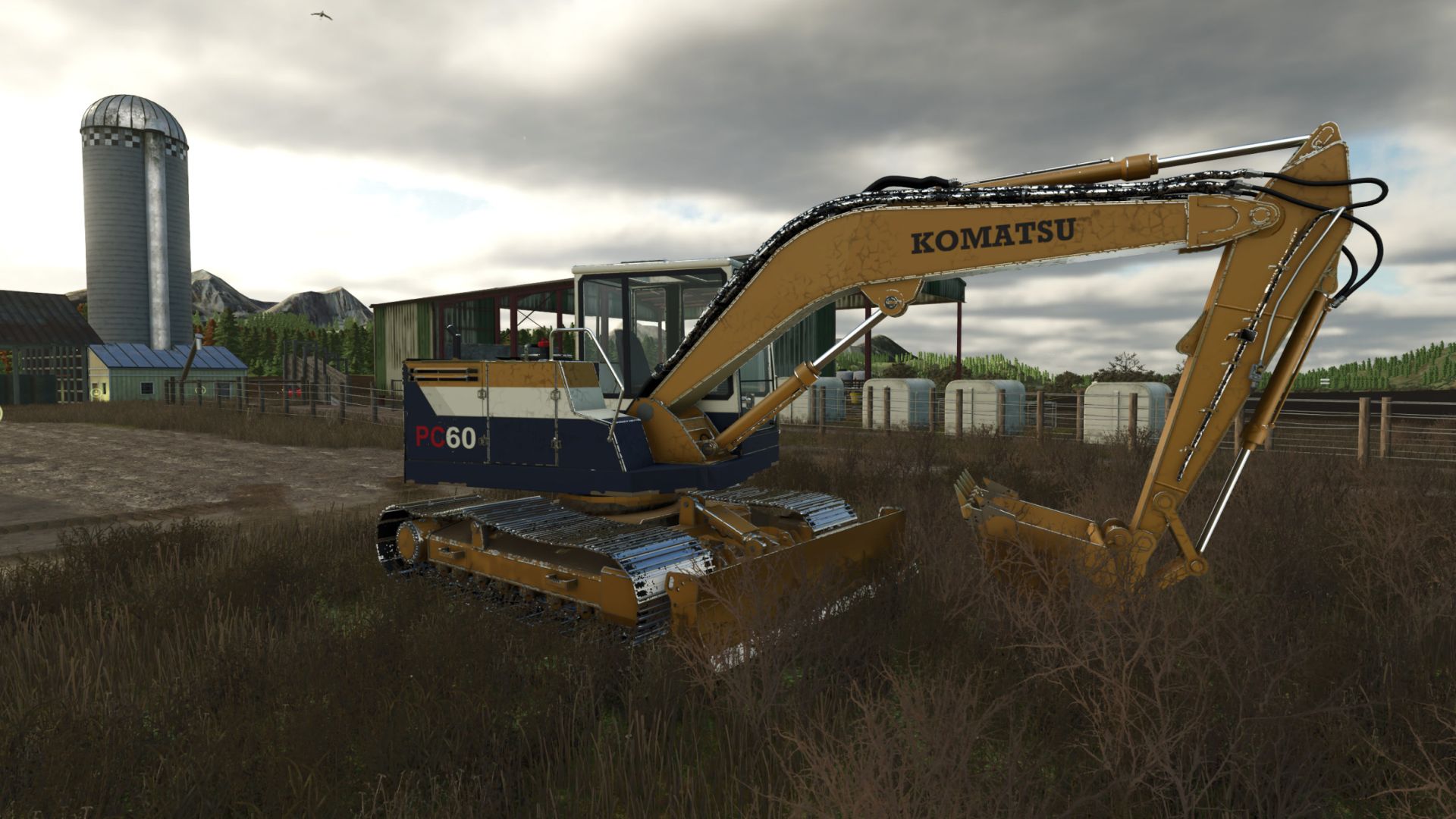
Komatsu PC 60 Serie V1.0.0.2
Komatsu PC 60 Serie V1.0.0.2 V1.0.0.2 Wir haben Kollisionskontrollsysteme für den Eimer mit Tastenkombinationen hinzugefügt. Die Animation für das Entladen wurde korrigiert. Erhöhen Sie die Nivellierungskraft der Klinge beim Nivellieren verschiedener Fruchtsorten. Die Controller-Standardeinstellungen wurden getestet, um sicherzustellen, dass sie funktionieren. Getestete Maschine mit aktueller Terra-Farm-Datei von GitHub (FS25_0_TerraFarm) V1.0.0.1 Es wurden Standardsteuerungselemente und eine einfachere Steuerung zum Umschalten zwischen Schaufel und Messer für Terra Farm hinzugefügt. Komatsu PC60 – 1990 und 1995 Bringen Sie mit dem PC60-Bagger klassische Komatsu-Maschinen auf Ihren Bauernhof. Wählen Sie zwischen zwei von den jeweiligen Jahren inspirierten Lackierungen, bedienen Sie jede Raupe unabhängig und bewältigen Sie Aushub-, Planier- und Materialumschlagsarbeiten mit Unterstützung von TerraFarm. Zwei-Jahres- und Farbkonfigurationen 1990: Gelbe Karosserie mit weißem Fahrerhausdach, weißem Seitenstreifen, marineblauen Verkleidungen und schwarzem Komatsu-Schriftzug. 1995: Klassische gelbe Lackierung mit blauem Komatsu-Schriftzug und vertikalen PC60-Seitengrafiken. Beide Ausführungen sind im Shop enthalten und auswählbar. Jede verfügt über eine eigene Lackierung und Dekorgestaltung mit progressiver Abnutzung und abwaschbarem Schmutz. In-Game-Spezifikationen Spezifikation Motor: Komatsu 4D95L Diesel Leistung 55 PS Motordrehzahl 800–2.200 U/min Höchstgeschwindigkeit 4,5 km/h vorwärts und rückwärts Kraftstoffkapazität 500 l Diesel Fassungsvermögen des Eimers: 2.000 l Grundpreis im Geschäft: 38.500 US-Dollar Lieferumfang Baggerlöffel und Frontplanierschild Dies sind die für die Modifikation konfigurierten Spezifikationen. Beide Lackierungen haben die gleichen mechanischen Spezifikationen. Merkmale Unabhängige, isolierte Gleissteuerung: Jedes Gleis kann separat vorwärts oder rückwärts gefahren werden, um präzise Positionierung und gegenläufige Drehungen zu ermöglichen. Standardmäßige Tastaturansteuerung und Unterstützung für die Eingaben Ihres zugewiesenen Controllers. Animierte einzelne Kettenplatten, Kettenräder und Rollen. Arbeitsarm, Stiel, Schaufel und Planierschild. Animierte Hydraulikzylinder, Schläuche und Schaufelgestänge. Inklusive Aushubschaufel mit Aufnahme- und Entladefunktion für Schüttgut. TerraFarm-Integration für Schaufel und Schild. Fortschreitender Lackverschleiß, separat ansammelnder Schmutz und abwaschbarer Streckenschlamm. Öffnende Fahrerhaustür und Wartungsklappen mit detailliertem Motorraum. Animierte Bedienelemente im Fahrerhaus, funktionierender Scheibenwischer und lastabhängige Abgaseffekte. Unabhängige Track-Tastenbelegung Verwenden Sie den Ziffernblock für die isolierten Spuren. (Oder ändern Sie die Tastenbelegung.) Standard -Aktionsschlüssel Linke Spur nach vorne, Ziffernblock 7 Linke Spur umgekehrter Nummernblock 1 Rechts abbiegen auf Nummer 9 Rechte Spur, umgekehrter Nummernblock 3 Kombinierte Spureingänge: Nummernblock 7 + 9: Beide Spuren vorwärts. Nummernblock 1 + 3: Beide Spuren rückwärts. Ziffernblock 7 + 3: Gegendrehen zum Rechtsdrehen. Ziffernblock 1 + 9: Gegendrehen zum Linksdrehen. Die Kettenrichtung bezieht sich auf die Fahrtrichtung des Fahrwerks. Durch Drehen des Führerstands wird die Kettenzuordnung nicht umgekehrt. Erforderliche Mods: TerraFarm Tags: Erforderliche ModsIhren BauernhofPSVerwenden Sie
Halloween Hunt V1.1
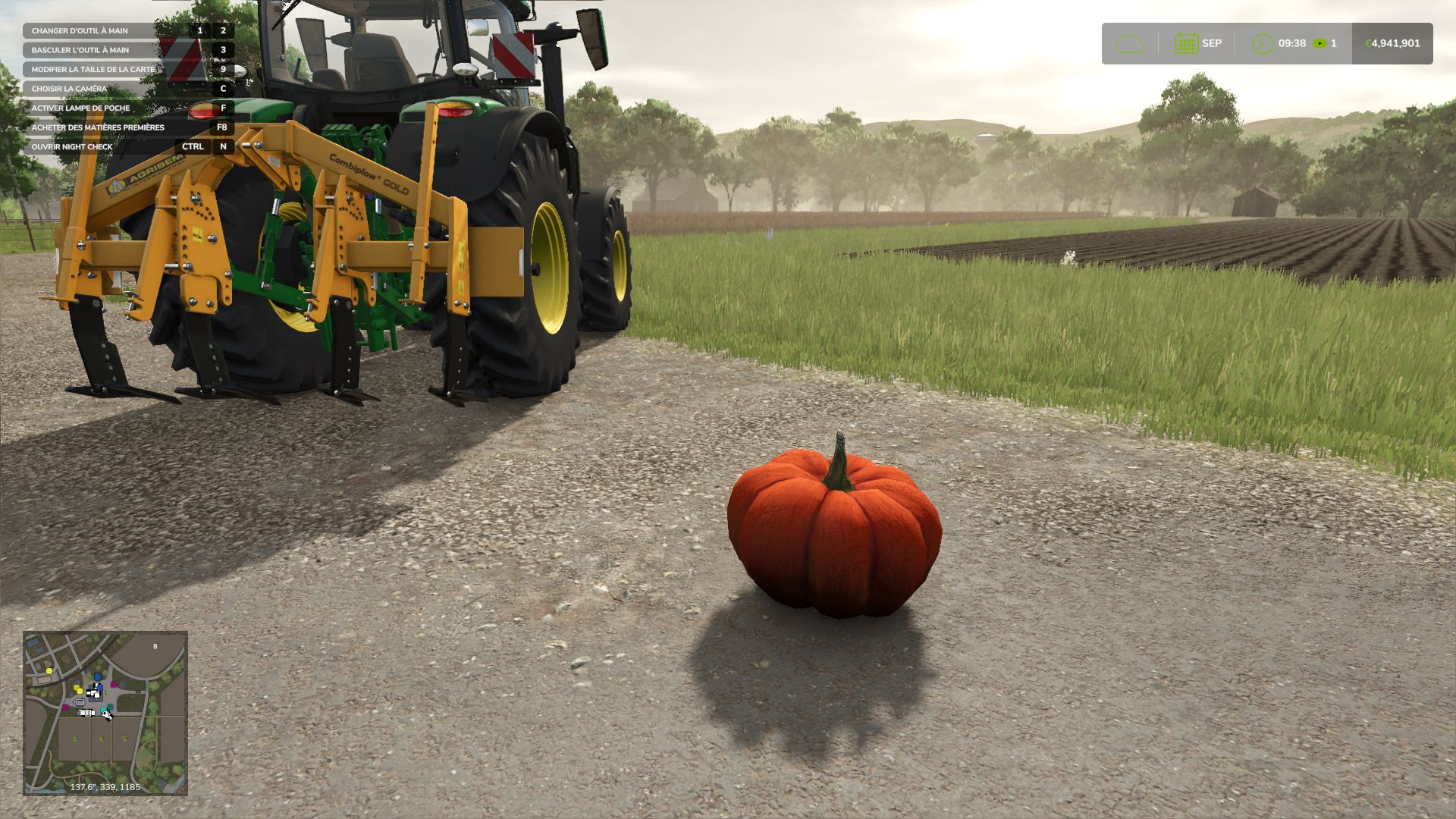
Halloween Hunt V1.1 Celebrate Halloween on your farm with Halloween Hunt! Pumpkins appear near players. Find them and approach on foot to within 1.8 m to collect them and earn money for your farm. Rewards depending on the economic difficulty: Easy: €10,000 Normal: €5,000 Hard: €2,500 Settings: Interval: 1, 2, 5, 10, 15 or 30 real-time minutes. Maximum radius: 10, 20, 35, 50, 75, 100 or 150 metres. Enable / disable the hunt. Settings are saved automatically. A native FS25 notification announces the appearance and collection. Placement searches for a location without obstacles, away from water and steep slopes. The pumpkin may be hiding in the grass! Single-player and multiplayer servers: One active pumpkin per farm. Players on the same farm share the hunt. Payment is controlled by the server and is made only once. Positions and settings are synchronised for joining players. Settings can be modified by the host. On a dedicated server, edit modSettings/FS25_HalloweenHunt.xml in the server profile before starting it. Clients can view the settings. Install the same ZIP on the server and clients. Key: Left Ctrl + P to open the settings, on foot or in a vehicle. The key can be changed in the game controls. By default: one appearance after 5 minutes, within a maximum radius of 35 m. The next timer starts after collection. Pumpkins remain available all year round. Active pumpkins are not saved; a reloaded game starts a full timer again. Installation: place FS25_HalloweenHunt.zip in the mods folder without extracting it and activate it when loading the game. PC / Mac only. French and English interface. Version 1.1.0.0: new icon, server support, corrected accents, adjustable radius and native notifications. The single-player mode has been tested in-game. Network exchanges have been checked in simulation; the new server version has not yet been validated in a real multiplayer session. Author: Olicatam Report bugs in the comments and help modders improve this mod. Always check the comments, you can find a solution. DOWNLOAD MOD
Dynamic Colour LED Strip (Prefab) V1.0
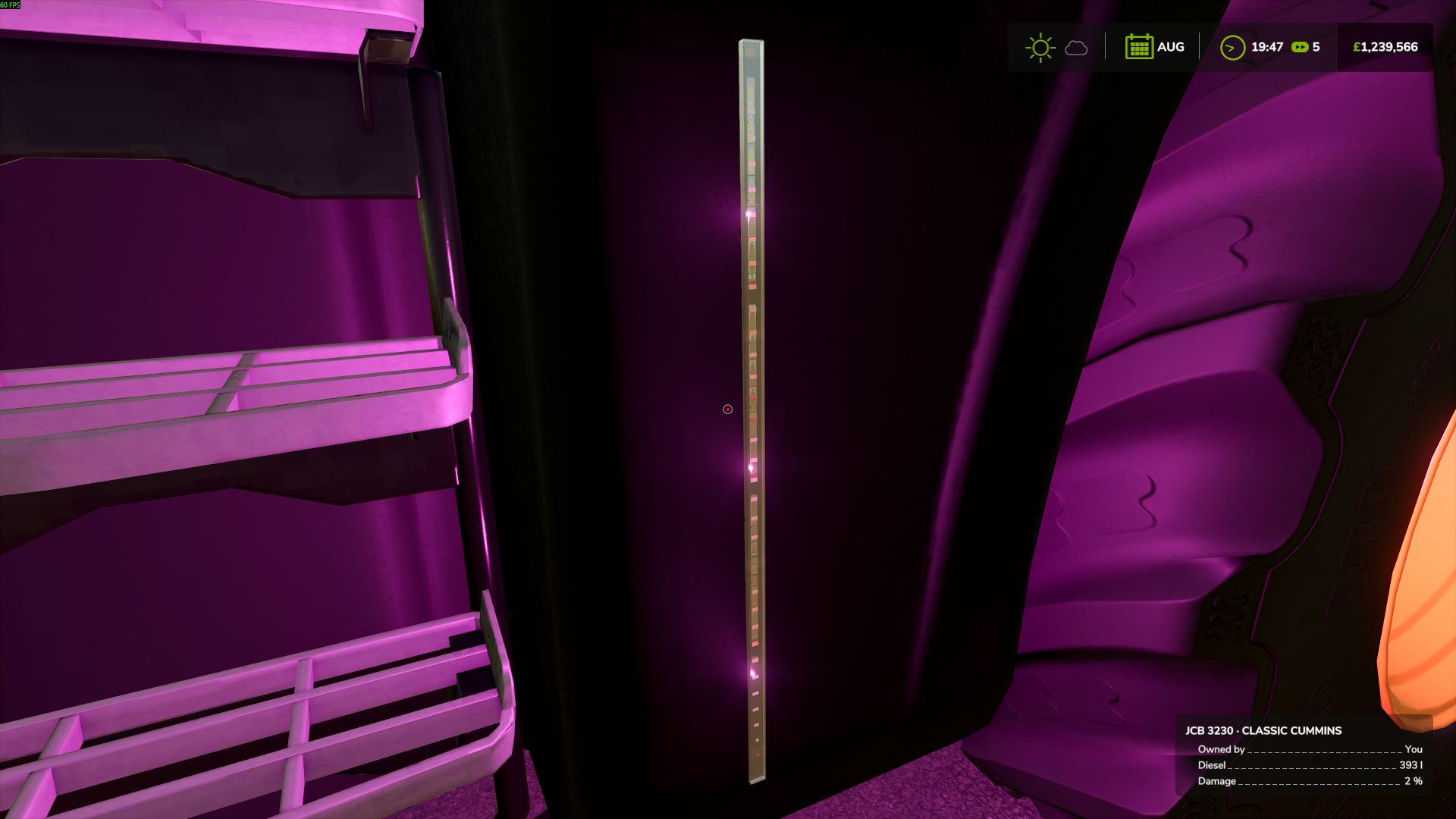
Dynamic Colour LED Strip (Prefab) V1.0 LM Modding presents the Dynamic Colour LED Strip Prefab for Farming Simulator 25. Add a custom lighting touch to your vehicles with this versatile LED strip prefab, designed for use on tractors, JCB machinery, trucks and other compatible vehicles. Featuring 10 selectable lighting settings, the prefab allows you to switch between colours in game using a keyboard key. Whether you want a clean white glow, a classic amber finish or something more colourful, you can choose the look that suits your vehicle. Available Colour Settings White Red Green Blue Amber Cyan Magenta Purple Warm White Off What’s Included 3D LED strip model Textures for a realistic appearance Lua scripts for in game colour switching 10 selectable colour settings Designed for integration into compatible vehicle mods The prefab provides modders with a flexible lighting solution that can be integrated into their own projects, offering greater customisation and the ability to create unique vehicle lighting setups. One LED strip. Ten settings. Endless possibilities. Author: LM Modding Store Report bugs in the comments and help modders improve this mod. Always check the comments, you can find a solution. DOWNLOAD MOD

Realistic Mechanical Systems V Beta 4
Realistic Mechanical Systems — First Public Release Realistic Mechanical Systems (RMS) is a complete mechanical condition, maintenance and reliability system for Farming Simulator 25. RMS is designed to make vehicle ownership matter over the long term. Instead of treating damage as a single percentage, the mod models multiple mechanical systems independently and lets their condition affect maintenance, diagnostics, reliability and operating costs. This first public version introduces the core foundation of RMS, including: Individual mechanical systems and component wear Vehicle condition and maintenance tracking Mechanical diagnostics and repair estimates Scheduled and corrective maintenance procedures Engine, drivetrain, electrical, hydraulic and thermal systems Persistent fluid levels and servicing Breakdowns and component failures Pre-shift inspections Full technical records and maintenance history Vehicle fleet overview Multiplayer and dedicated-server support RMS has been designed around long-term gameplay. Vehicle age, operating hours, maintenance history and mechanical condition progressively build a unique history for every machine in your fleet. The interface was also completely redesigned around this workflow: inspect the vehicle, identify problems, plan the work, carry out maintenance and keep a permanent technical record of what has happened to the machine. Version 0.10.0.0 is the first public milestone of RMS. The project is still under active development and some planned systems are not yet implemented. The 1.0-beta1 milestone will be reached once the complete initial mechanical feature set is operational. I prefer releasing RMS now so it can be tested on a wider range of machines, maps, multiplayer servers and mod combinations while development continues. Bug reports and detailed feedback are therefore very welcome. RMS will continue to evolve, but the goal will remain the same: mechanical depth without arbitrary penalties — systems should react to what the machine is actually doing. Thank you to everyone testing RMS and helping improve it. Beta 3 Simplified the reliability and ease of maintenance ratings Renamed the maintenance levels after their interval in hours and added deadlines in hours or months Vehicle service intervals now follow the Maintenance spacing setting Repair time and labour costs now depend on the work and its access Mobile workshop restrictions now depend on the selected work, with reasons shown for refusals Improved the RMS screens: reworked Mechanical Dashboard, side-by-side work orders with a detailed quote, wear in the inspection report Reworked engine and oil temperatures Reworked wear under heavy load: reduced during normal driving and progressive at low RPM Changed engine overheating protection to reduce power in two steps Removed manual temperature settings RMS settings are now saved only in the current savegame Added support for electric vehicles Added an odometer with a resettable trip meter Reworked the parking brake and its sounds: automatic or manual depending on the machine, without a global setting Removed the Drivetrain Stress Damage setting; damage still applies Changed Enhanced Vehicle compatibility: RMS now manages the drivetrain, parking brake and odometer Improved damaged steering behavior Added chassis damage from collisions Changed chassis, electrical and hydraulic wear on rough ground Fixed excessive chassis wear when manoeuvring at low speed with the wheels turned Reworked batteries, alternators and starters to match each machine’s 12 or 24 V system Removed manual battery and alternator settings Changed hard starts and starter sounds: an emptying battery and a cold engine slow the starter, and a diesel cranked too slowly no longer fires Added a battery disconnect switch for vehicle storage Changed the charger: automatic charging, fast charging and starting aid Fixed worker lights staying on while waiting with the engine stopped Added fluid cans poured by hand into the machine you aim at, with a level gauge and sounds Changed the workshop Top up: now at the dealer only, fluid cans do it on the farm Fixed fluid transfers refused at the ends of long machines Added a battery drum pump: fit it on a 200 L drum and fill machines through its nozzle and hose Removed battery recharging from workshop services; use the charger Added fuel and hydraulic filter clogging: faster on the fuel reserve or under hydraulic work, new filters at every service Changed the visual inspection and mobile maintenance: they no longer find electronic faults, which need a diagnostic tool Removed labour costs from maintenance in the farm workshop: you pay the filters and use your own fluids Changed the last maintenance level: valve, injector and thermostat checks now relieve the engine, fuel system and cooling only Removed the Reset Fleet button; a Vehicle Lifespan change applies from then on and vehicles keep their condition Added maintenance included in the lease: the dealer and the mobile workshop service a leased vehicle free of charge; with Extended Leasing the return window shows the deposit refunded Changed engine oil consumption to that of real diesels: a healthy engine worked hard needs a top up late in its service interval, a worn one far more often; the oil lamp now lights only when the oil runs critically low Raised the game’s limit of 255 fill types to 511: large maps and long mod lists keep all their products Fixed fluid cans and drums coming out of a bale and pallet storage full, and drums shown as 5 L cans to players on a server Fixed 200 L drums standing above the ground and above the forks of a forklift To start download click the filename. To open archive files use one of these programs: WinRAR, 7-Zip, WinZip. Some mod archives may need to be extracted before the mods will work.
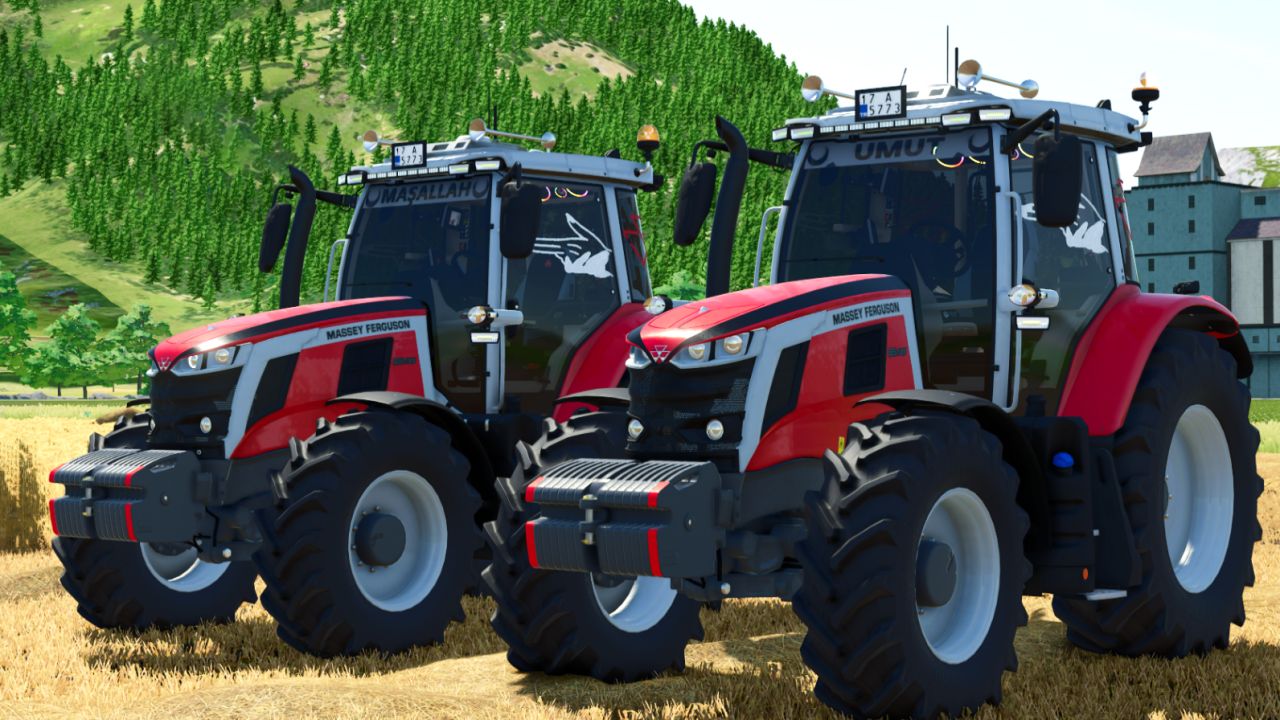
Massey Ferguson 6S Edit V1.1.0.1
Massey Ferguson 6S Edit V1.1.0.1 Category: Small Tractors Price: $137500 Power: 150 hp Max. speed: 50 kph Added rust for wear shader Free configs This mod isn’t mine, I just edited it. Owner Adub Modding ABP Team V1.1.0.1 Minor changes were made. Author: UMUT EFE MODDING, Adub Modding ABP Team Report bugs in the comments and help modders improve this mod. Always check the comments, you can find a solution. DOWNLOAD MOD

Work Width Multiplier V1.0.0.1
Work Width Multiplier lets you widen the working area of your seeders, cultivators and disc harrows, so you finish your fields faster. HOW IT WORKS The mod moves the work area of the machine outwards from its center. The 3D model stays exactly the same, only the strip of ground that is worked becomes wider. Seed consumption follows the worked area automatically. CONTROLS – J: widen the working area (+0.5x per press, up to x5) – Right Shift + J: reset to the original width A message on screen shows the current width every time you change it. AFFECTED MACHINES – Seeders and planters – Cultivators – Disc harrows The setting applies to all of these machines at once, and also to machines you buy later. NOTES – Only the working area changes, the model is not scaled. – AI helpers may keep using the original width. – The mod starts at the original width (x1), so nothing changes until you press J. To start download click the filename. To open archive files use one of these programs: WinRAR, 7-Zip, WinZip. Some mod archives may need to be extracted before the mods will work.
AutoDrive top-down flyover editor V1.0.3.3
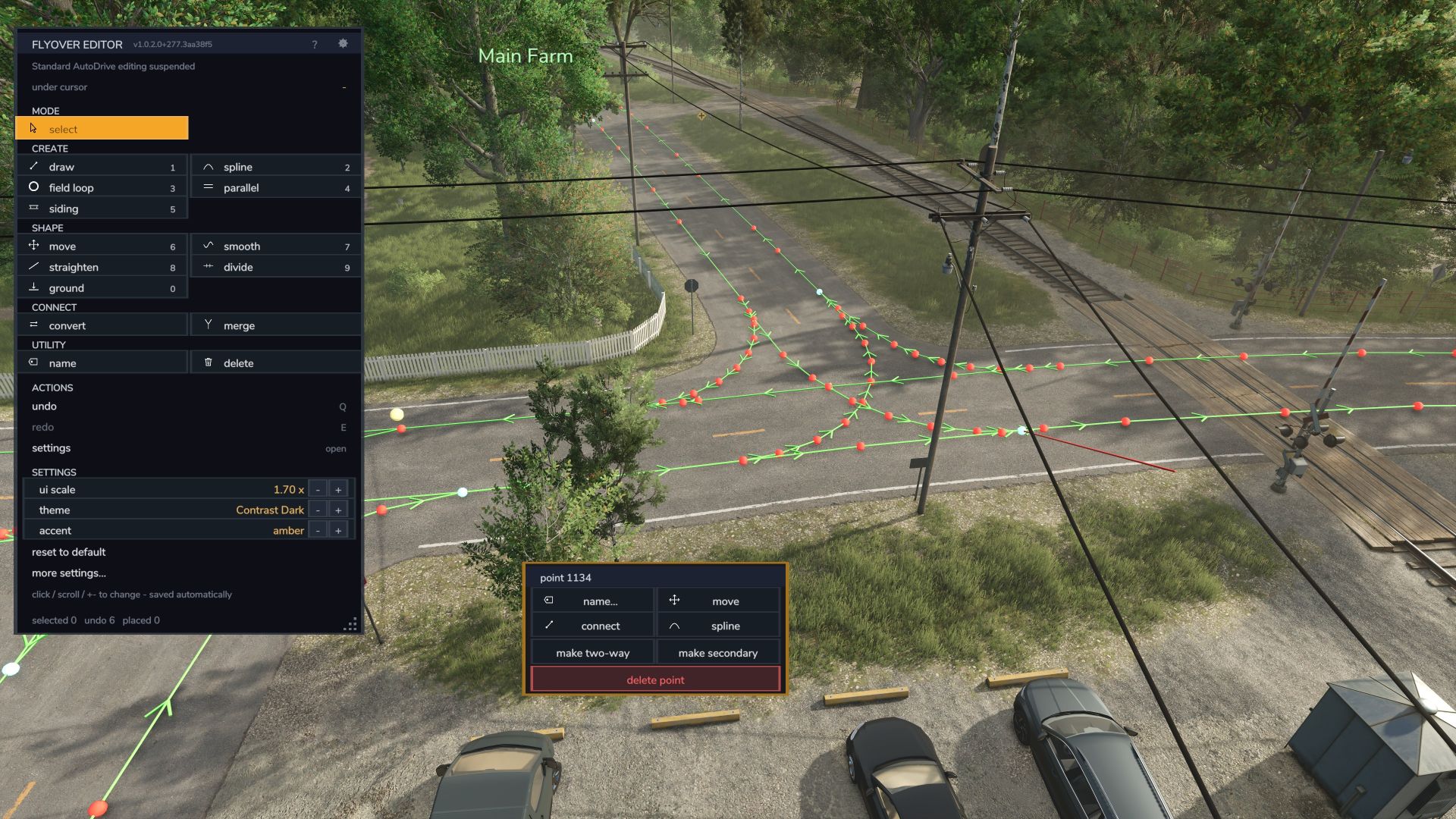
AutoDrive top-down flyover editor V1.0.3.3 Build and repair your AutoDrive route network from above – on foot or in a vehicle, without driving every metre of it. Flyover Editor is a top-down editor for AutoDrive route networks in Farming Simulator 25. Instead of recording track from a vehicle a metre at a time, you fly a free overhead camera and edit the whole network like a map: place waypoints with a click, lay roads along the map’s own roads, curve connections, add parallel lanes, straighten and smooth runs, put points back on the ground, and clean up the tangle every long-running save collects – all from a clear, clickable panel. It runs as a companion mod beside stock AutoDrive. It does not change AutoDrive’s files or your savegame’s config. It attaches to AutoDrive while the game runs, and refuses to load (and tells you why) if AutoDrive is not installed. Everything goes through AutoDrive’s own network functions, so a route laid in the editor is the same as one recorded from a vehicle. Required mods: Autodrive Author: HuskerMcDoogle Report bugs in the comments and help modders improve this mod. Always check the comments, you can find a solution. DOWNLOAD MOD
Factory Direct Delivery V1.2
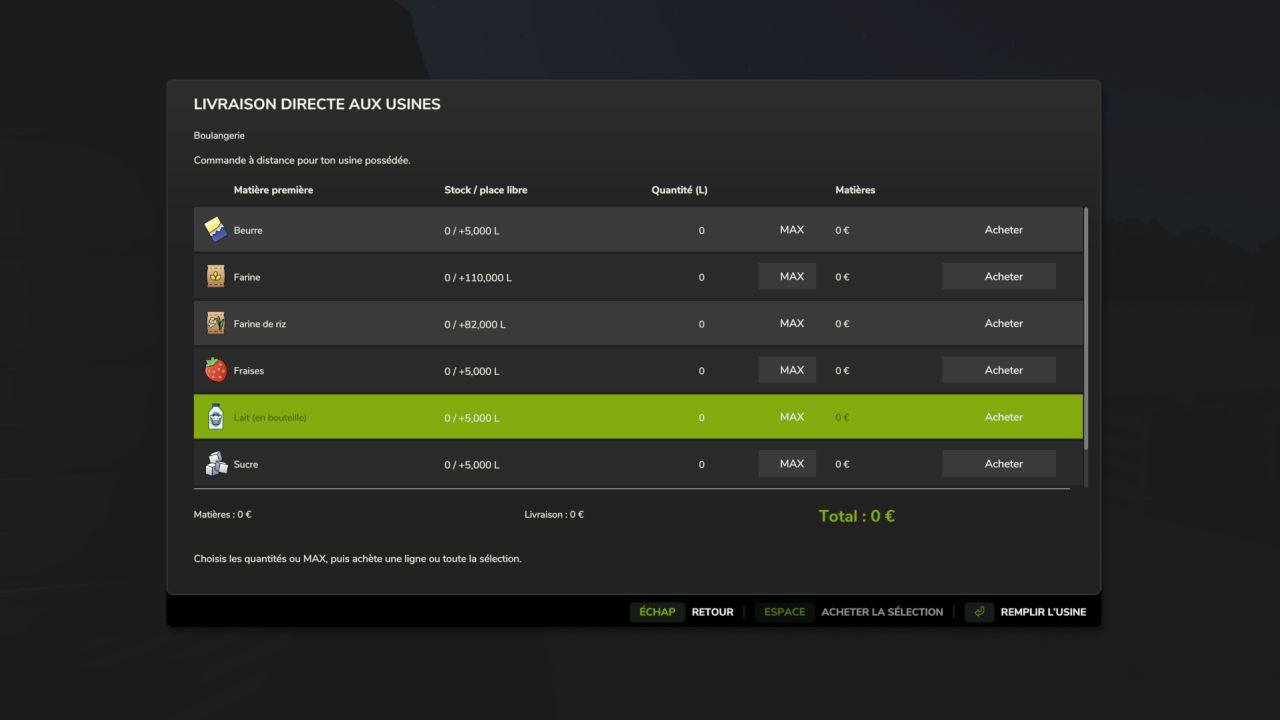
Factory Direct Delivery V1.2 Factory Delivery lets you purchase and have raw materials delivered directly to your factories from the Productions menu. Select an owned factory, then click “Buy raw materials”. The window displays all its inputs with the current stock, available space, quantity to order, MAX and Buy. Features: Remote purchasing from the Productions menu. Individual or group purchase of several materials. MAX per material and a “Fill the factory” button. Detailed quote: materials, delivery fees and total. Quantities and prices are locked when clicking Buy, even while the factory is producing. Payment and stock addition upon unloading. Arrival, unloading and departure animation with the in-game International CV Series. Support for shared storage. 27 localization files. F8 remains available on foot near the factory. Default pricing: in-game price × 1.35; delivery at 150 + 12 per 1,000 litres, with a single fixed fee per order. Settings are available in settings.xml. Compatibility: single-player and multiplayer on PC/Mac, dedicated servers supported, for owned factories using the standard production system. The truck is an animation synchronized between clients, with no collision, and does not travel on roads. A grouped order is represented by a single visual delivery. Installation: place the ZIP file without extracting it in the mods folder and activate the mod when loading the savegame. For an update, replace the old ZIP and keep only one copy. Script author and creator of the added assets: Olicatam. The truck and its textures are loaded from FS25; game assets are not redistributed. Presentation icon illustrated with AI assistance; in-game screenshots by Olicatam. NEW IN 1.2.0.0 — MULTIPLAYER Quotes are generated by the server, then require personal confirmation valid for two minutes. The server checks the owning farm and the player’s vehicle purchase permission. Stocks and payments are modified only by the server, upon unloading. Only one active order per factory, to prevent concurrent orders. Synchronization of trucks and deliveries in progress for joining players. Works on dedicated servers without graphical loading of trucks on the server side. If the available space decreases before arrival, only the quantity that can actually be delivered is charged. Install exactly the same ZIP on the server and all clients. 84 automated checks passed, including simulated network exchanges; a test in a real multiplayer session is still required. V1.2.0.0 Multiplayer and dedicated server support. Quotes and confirmations validated by the server, farm and purchase-right verification, payments and inventories processed exclusively server-side. Protection against reusing a confirmation and concurrent orders on the same factory. Synchronized trucks and deliveries visible to joining players. 27 languages retained. The same ZIP is required on the server and clients. 84 automated checks; a real multiplayer session still needs to be confirmed. Author: Olicatam Report bugs in the comments and help modders improve this mod. Always check the comments, you can find a solution. DOWNLOAD MOD

Realistic window rain and dust V Beta 3
Realistic rain on windows with dust that slowly washes away when it rains. Has manually working wipers that can be remapped to your liking. Window droplets also form when pressure washed and slowly dries afterwards. List of working base game vehicles so far as i am working on adding more to the list. Agrifac LightTraxx (Glass Fixed) – Included Antonio Carraro Mach 4 R Case IH Axial-Flow 7160 Case IH Farmall 120 C Case IH Puma 185 CVXDrive Challenger MT665 Claas Arion 530 Claas Evion 450 Claas Jaguar 990–930 (mod pack) Claas Lexion 620–670 C53 (mod pack) Claas Lexion 750–770 C56–C59 (mod pack) Deutz-Fahr 6115 C RVshift Deutz-Fahr 8280 TTV Dewulf ZK IV SE Fendt 512 Vario Fendt 700 Vario series, including 720 Fiat 160-90 Gregoire GL 8.4 IMPEX Hannibal T50 International Transtar II Iseki HJ6130 Iseki TJW 1233 JCB 435S Stage V CB Fastrac iCON 4000 (Highlands DLC) John Deere 3650 John Deere 6M 95 John Deere 6R 145 John Deere 6R 230/250 John Deere 9RX 770 John Deere 9700 / 9000 series John Deere 1270G John Deere 848L-II John Deere R4045 (mod) Komatsu 951 Krone BiG X 1180 Kubota M8-181 Landini REX 4-070 GT Lindner Lintrac 130 Lizard Pickup 2017 Mack Anthem 6×4, MP7 425 Mack Anthem 6×4, MP8 505 Mack Super-Liner 6×4 Massey Ferguson 7S 155 Massey Ferguson 9S.285 New Holland L318 Oxbo MKB-4TR Pfanzelt Felix Ponsse Bison Active Frame Rottne F20D Schaeffer 9660 T-2 Sennebogen 340 G (Glass Fixed) – Included Valtra T195 — Vermeer ZR5-1200 Volvo L120H Zetor Crystal 16045 Zetor Forterra HSX 120 Zetor Proxima HS80 This is a beta build so there may be issues with unfixed vehicles. Base game vehicles added Massey Ferguson MF 8570 Deutz-Fahr AgroStar 8.31 John Deere 8R John Deere 9R John Deere S7 John Deere 7R Case IH Magnum 340 Fendt 1038 / 1000 Vario John Deere 3650 John Deere 9RX 770 BETA 2 Added mod support for Belarus 550-82 by rantott hus modding To start download click the filename. To open archive files use one of these programs: WinRAR, 7-Zip, WinZip. Some mod archives may need to be extracted before the mods will work.
Farm Assistent FS25
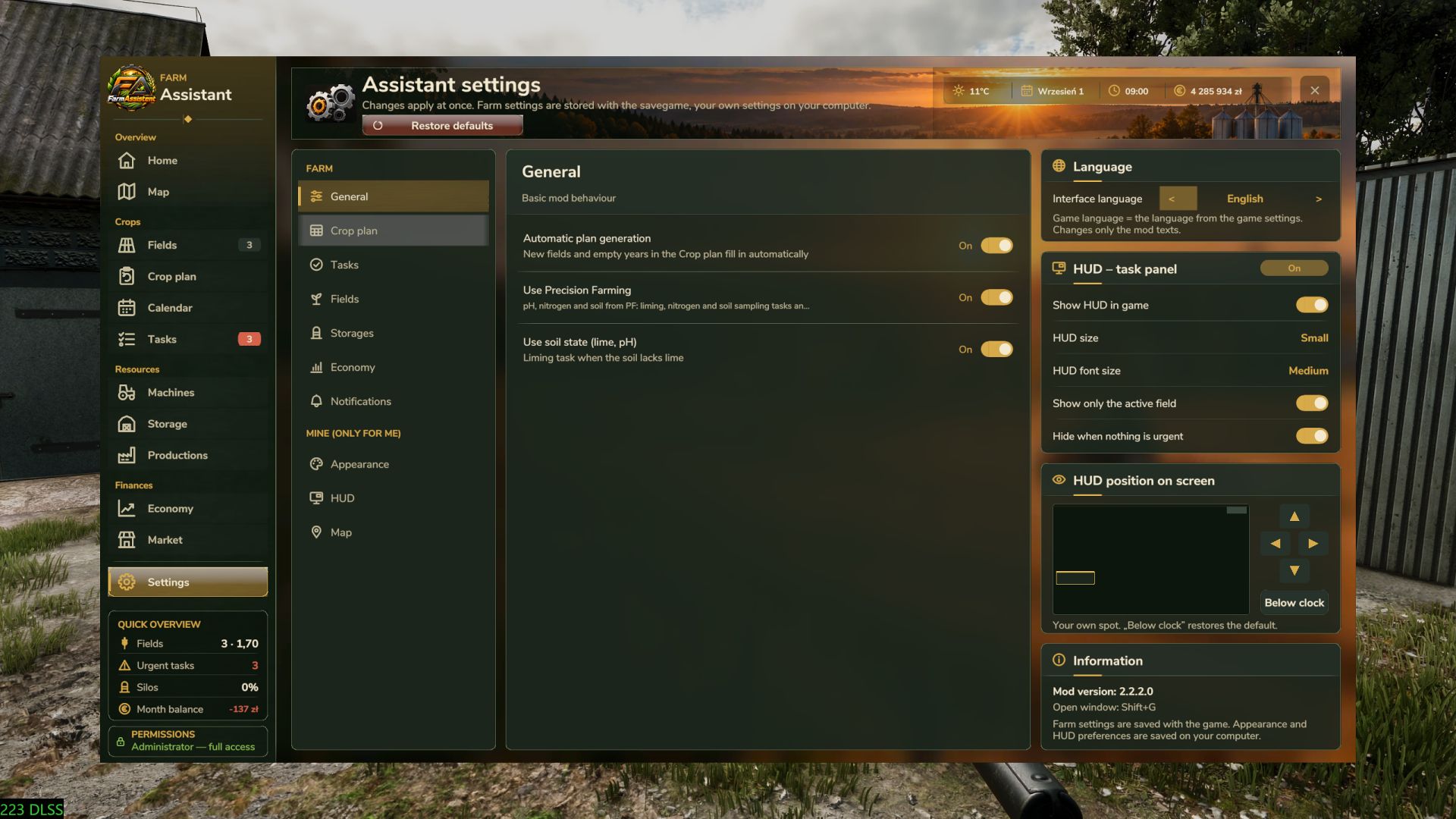
🌾 FarmAssistent – Your Complete Farm Management Assistant Take full control of your farm with FarmAssistent! FarmAssistent is an advanced farm management and planning tool for Farming Simulator 25. It combines field monitoring, intelligent work recommendations, crop rotation planning, financial information, storage management and much more into one modern, easy-to-use interface. Whether you're managing a small farm or a large agricultural operation, FarmAssistent helps you organize your work, make better decisions and stay one step ahead. 🚜 Main Features 🌱 Advanced Field Management - Monitor all your fields in one place. - Check crop types, growth stages and field conditions. - Track fertilization, weeds, stones, plowing and soil requirements. - Precision Farming integration for nitrogen and pH information. - View field status and recommended actions. 📋 Intelligent Field Work Planner - Automatically analyzes field conditions. - Recommends the next agricultural operations. - Displays urgent, planned, blocked and pending tasks. - Helps you choose suitable soil cultivation methods. - Keep track of completed and skipped operations. 🌽 Multi-Year Crop Rotation Planner - Generate crop rotation plans for multiple years. - Uses crop availability and seasonal calendars from the game. - Supports crop rotation rules and catch crops. - Helps organize sowing and harvesting schedules. - Validates generated plans against available crop information. 🗺️ Interactive Farm Map - Overview of your fields and their current conditions. - Different map layers for easier farm monitoring. - Field status information directly on the map. - See which fields are currently being worked by AI helpers. 💰 Farm Economy & Market - Monitor important financial information. - Check current selling prices. - Compare selling opportunities. - View estimated gross margins per hectare. - Review seasonal farming activity. 🏭 Storage, Production & Machinery - Monitor stored crops and available resources. - Check production facilities and required supplies. - View machinery fuel levels and condition. - Keep important farm information in one place. 📅 Agricultural Calendar & Weather - View sowing and harvesting periods. - Plan agricultural operations according to the season. - Receive warnings about upcoming precipitation and freezing temperatures. - Stay informed about important field activities. 📖 Field Journal & Seasonal Reports - Track harvesting, preparation and sowing history. - Review activities for individual fields. - View yearly summaries of harvested and sown crops. - Receive end-of-year notifications. 🎨 Modern Interface - Modern graphical interface with detailed dashboards. - Four selectable interface themes. - Field information and task indicators. - Custom icons and visual status indicators. - Configurable HUD displaying useful information during gameplay. - English and Polish language support. 🌐 Multiplayer Support FarmAssistent supports multiplayer and dedicated servers. Farm information is shared through the server. Farm settings, crop plans and task statuses are managed by the server administrator or host, while other players have read-only access. ⚙️ Important Information FarmAssistent is a management and advisory tool, not an automatic farming system. It helps you decide what to do next, but does not automatically operate machinery, purchase equipment, sell crops or perform field work. Precision Farming integration is available when the DLC is installed. How to open: Left Shift + G Game: Farming Simulator 25 Version: 2.0.3.0 Multiplayer: Supported Dedicated servers: Supported Languages: English / Polish Author: Bleh 🆕 Version 2.0.3.0 - Improved stubble mulching detection. - Corrected field status after mulching. - Improved seasonal summaries and notifications. - Added field journals and seasonal reports in the 2.0 series. - Added weather warnings and AI helper field tracking. - Improved interface performance and usability. Created by Bleh. Enjoy smarter, more organized farming with FarmAssistent! - Redesigned the map with new layers, markers and clickable field details. - Added a notification center and alerts for supplies, fuel and machine maintenance. - Improved the work planner, crop calendar and margin estimates based on your fields. - Added a language selector with support for 19 languages. - Refreshed the interface, logo and icons, and improved text readability. - Added window size and opacity sliders, plus easier HUD positioning. - Improved Precision Farming support, data safety and performance.

Server Player Count V1.1.1
Shows the current player count directly in the HUD on multiplayer servers. The display consists of a compact player count with a status indicator: Green: no Lua warning or Lua error detected Yellow: Lua warning detected Red: Lua error detected The status indicator can be reset in the game settings if a detected message has been checked and is not critical. Note: In singleplayer, the HUD display is hidden automatically if the mod was enabled there by mistake. Additional detections may be added later if log data can be evaluated more cleanly in-game. V1.1.0.0 -The HUD display has been redesigned to match the game’s style and now sits directly next to the time and weather display with the player icon. -Script errors and other error messages from the game and other mods are now detected. -Warnings are ignored by default and can be enabled by the host in the game settings. -Only the host or an administrator can reset the server status point. -Other players can no longer change the server status point. Changelog 1.0.1.0: – The HUD display now follows the visibility of the game HUD. V1.1.0.0 Improved display of player count on dedicated servers To start download click the filename. To open archive files use one of these programs: WinRAR, 7-Zip, WinZip. Some mod archives may need to be extracted before the mods will work.
Hitch Guide FS25
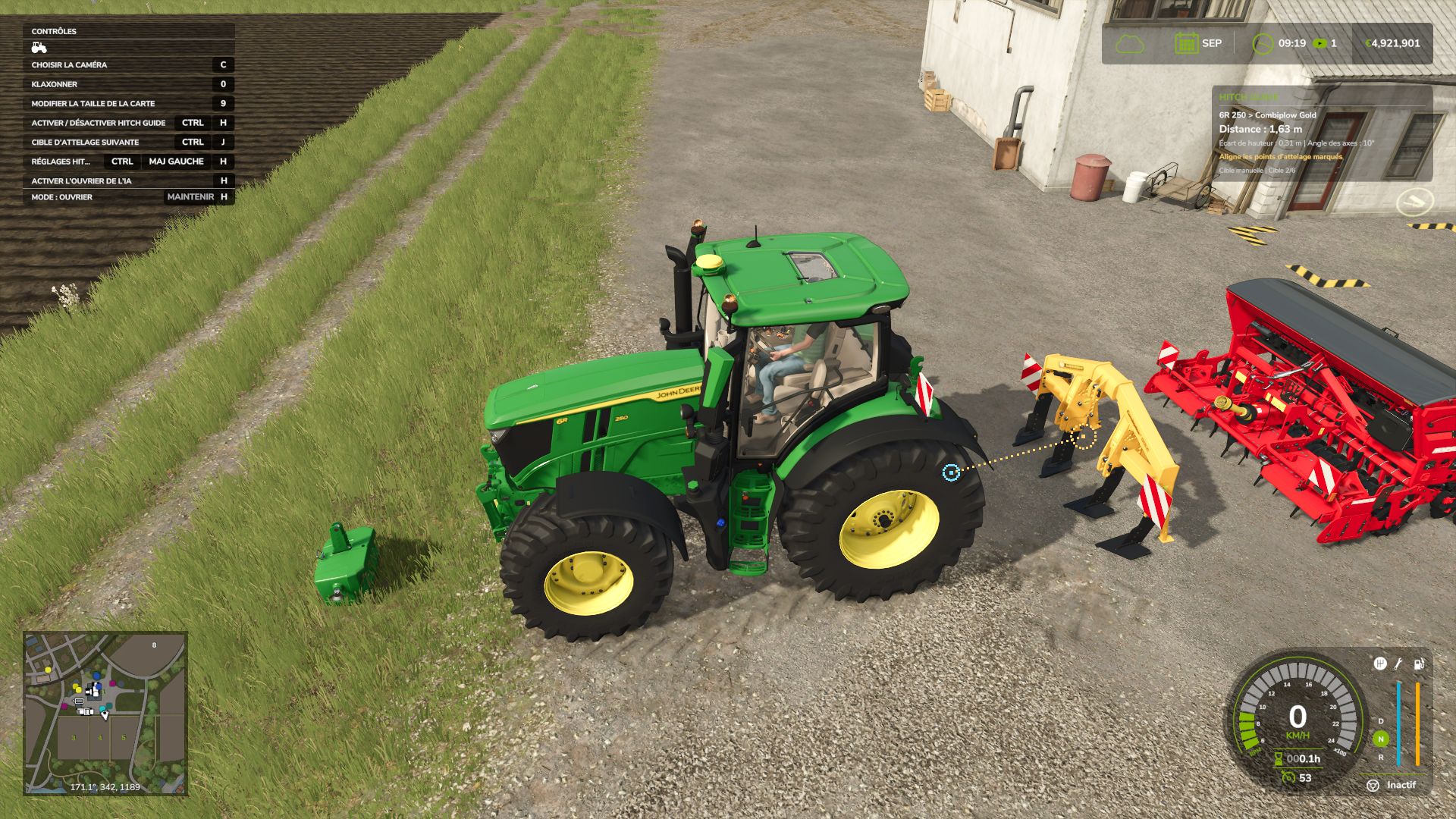
Attaching your tools becomes easier with Hitch Guide! Approach a compatible detached implement with your vehicle: circles mark the actual hitch points, and a dotted line helps you align them. A small panel displays the distance, height difference and angle between the axes. The marker turns green when FS25 offers the corresponding hitch. Features: • Detection of compatible hitches, both at the front and rear, including cutter bars. • Support for free hitch points on implements already connected to the vehicle. • Automatic or manual target selection. • Compact FS25-style panel, placed below the time and money display and adapted to the HUD resolution and scale. • Option to hide the panel while keeping the line and markers visible. • Configurable range, maximum speed, panel size and display options. • Settings saved automatically. • 27 FS25 languages and regional variants. Default controls (in vehicle): Left Ctrl + H: enable / disable guidance. Left Ctrl + J: select and lock the next target. Left Ctrl + Left Shift + H: open the settings. Keys can be changed in the game controls. By default, guidance appears within 15 m and up to 12 km/h. To display only the line and circles, set “Show panel” to No and leave markers set to Yes. The mod guides alignment; it does not drive or attach for you. Use the usual in-game action to attach. It respects hitch types and farm access rights. Special connection systems used by some mods may not be recognized. Installation: place FS25_HitchGuide.zip in the mods folder without extracting it, then activate Hitch Guide when loading your savegame. Script mod for PC / Mac; not available on consoles. Version: 1.0.2.0 Author: Olicatam
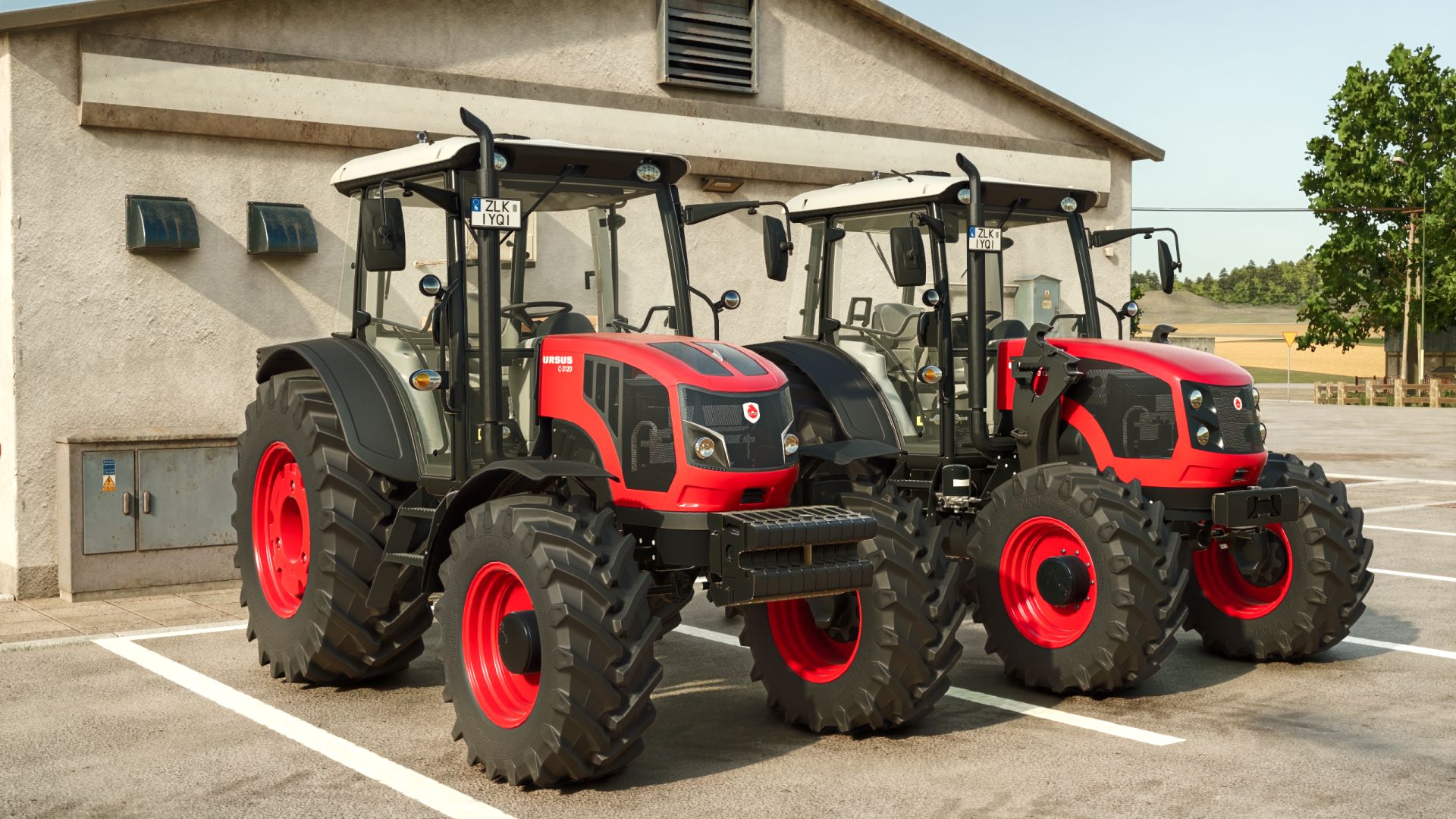
Ursus C-3120/3130 FS25
Ursus C-3120 / C-3130 Polish utility tractor Ursus C-3120 with a 4-cylinder 115 hp engine (C-3130: 125 hp) and a 16/16 powershift transmission. Price: 92,000 € Power: 115 – 125 hp Max. speed: 40 km/h Fuel tank: 180 l Features: - Engine: C-3120 (115 hp) or C-3130 (125 hp), with matching hood decals - Two engine hood versions: modern and classic, both with perforated grilles - Front weights: 250 kg block (standard) or 500 kg, with a front tow hitch in the weight - Tyres from 7 base game brands, including wide and dual wheels - 6 rim colours, including aluminium - Removable front fenders - Front loader console - Crop sensor - GPS terminal and 40 km/h speed sign - Passenger seat - Original black Ursus rear fenders with rear lights - Working doors, rear window and wipers Interactive Control support (optional, requires FS25_interactiveControl): - Open and close the doors from inside and outside, and open the rear window - Lights, front and rear work lights, beacon and hazard lights from the dashboard switches - External rear hitch (EHR) and rear PTO buttons on the rear fenders
- 15 per page
- 30 per page
- 45 per page
- 60 per page
-
See more per page
Bigger pages, fewer clicks - and no ads anywhere.
Go Pro