Farming Simulator 25 mods
76,924 results- 15 per page
- 30 per page
- 45 per page
- 60 per page
-
See more per page
Bigger pages, fewer clicks - and no ads anywhere.
Go Pro
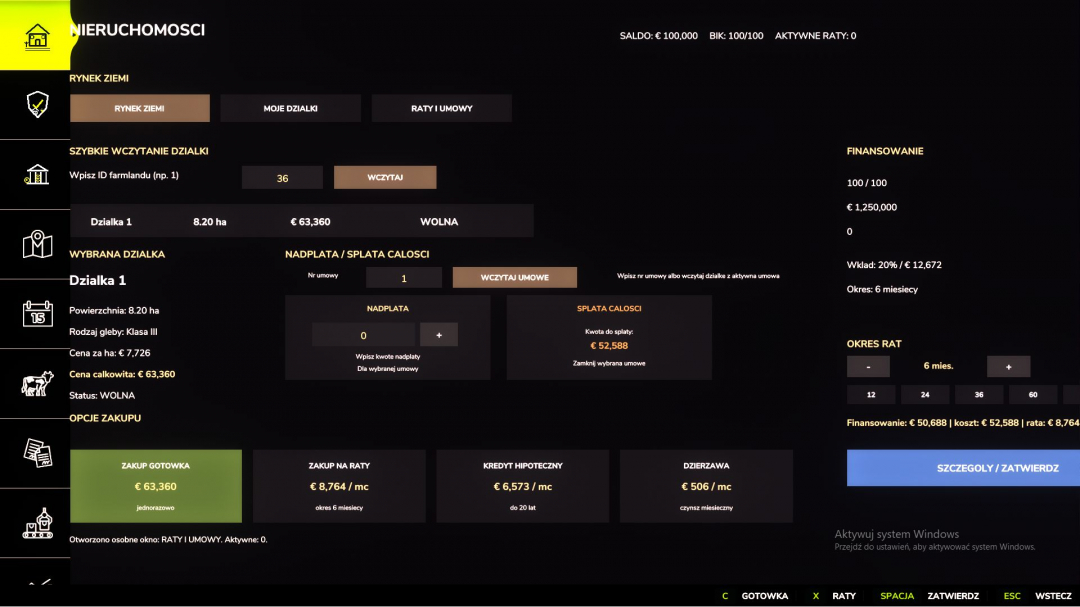
AGRO-FINANCIAL CENTER V1.0
AGRO-FINANCIAL CENTER Turn your farm into a true financial empire! AGRO-CENTRUM FINANSOWE is a comprehensive economic extension for Farming Simulator 25, introducing a realistic system of loans, leasing, real estate, and insurance. Manage your farm finances like a seasoned farmer and make decisions that can lead to great profits... or significant losses. **Mod features include:** - Bank loans and machinery leasing - Land purchases via installments and mortgages - BIK and creditworthiness system - Overpayments and early contract settlements - Debt collection and consequences of debt - Insurance for machinery, crops, buildings, and livestock - Accidental damage coverage and compensation - Expanded financial menu and new interfaces Every decision counts. Grow your farm, negotiate financing options, and monitor your installments — because the bank never sleeps. If you enjoy realistic economics and want to elevate FS25 to a new level, this mod is perfect for you.
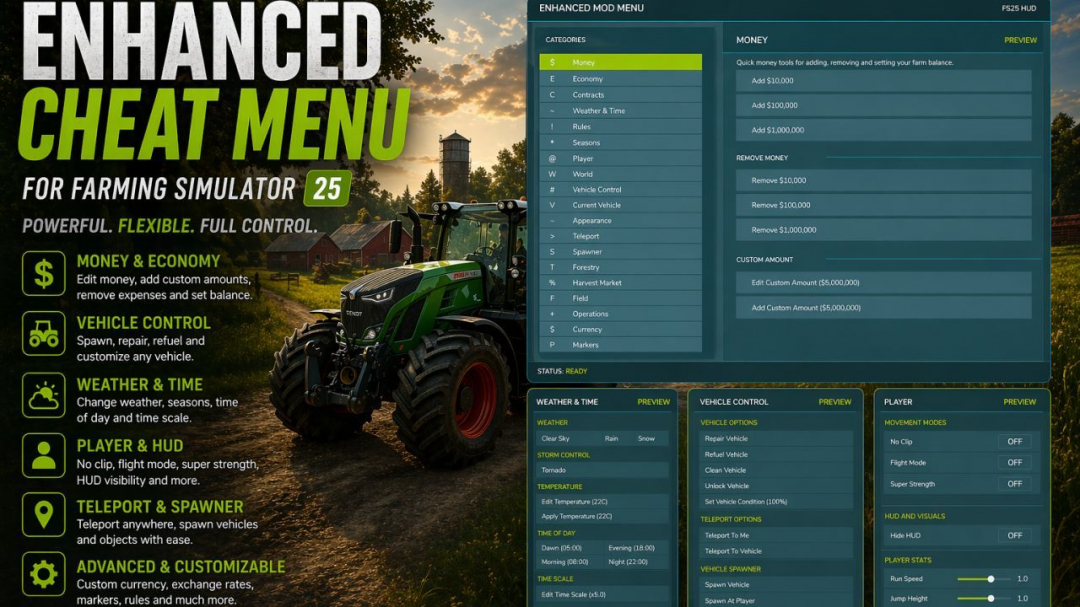
Enhanced Mod / Cheat Menu V1.7
This FS25 modification introduces a comprehensive mod and cheat menu packed with a vast array of features. Dozens of functionalities are at your fingertips. **General Menu Features:** - Full in-game Enhanced Mod Menu for Farming Simulator 25, accessible with Left Alt + M; - Favorites system for quick access to frequently used functions; - Recent actions section; - Function search with results; - Overview of active cheats; - Undo last action option; - Reset button to restore supported changes to default values. **Money And Economy:** - Preset money options: add or remove $10,000, $100,000, or $1,000,000; - Custom money editing: set, add, or remove a specific amount; - Ideal Market setting; - Dynamic Difficulty Breaker; - Refund all costs; - Free purchases and buildings; - Toggle daily costs; - Instant production payback; - Multiple currency options with selector; - Custom currency creation with editable code, name, symbol, and exchange rate. **Contracts:** - Infinite contracts; - Custom reward multipliers; - Instant completion of all contracts; - Refresh contract board. **Time, Weather, And Seasons:** - Weather control: clear, rain, snow, tornado; - Editable temperature; - Calendar date selection; - Custom clock and time settings; - Quick time presets: dawn, morning, noon, evening, night; - Time skip options: 1 day, 2 days, 7 days, 1 month, 3 months, 6 months, 1 year; - Editable time scale; - Freeze time feature; - Season switching: spring, summer, autumn, winter; - Override for field requirements and weather impact; - Always ideal conditions mode. **Player Tools:** - No Clip mode; - Flight mode; - Super strength; - Player invisible mode; - Toggle default HUD; - Editable player run speed and jump height. **World Cleanup And Markers:** - Traffic and pedestrian toggles; - Cleanup of owned pallets, bales, and loose freight; - Markers for owned pallets and bales; - Freight marker cleanup. **Vehicle Tools:** - Vehicle repair, fuel refill, full tank refill; - Vehicle washing; - Dirt and paint wear management; - Restore full vehicle appearance; - Vehicle cloning, selling, and deletion; - Prevent vehicle flips; - Teleport vehicles to map markers; - Repair attached implements; - Full tank refill for attached tools; - Lift and lower attached implements. **Vehicle Editing:** - Max speed, reverse speed, power, and mass adjustments; - Reset power; - Crop damage toggle; - Ghost mode; - Vehicle name and configuration management; - Apply selected configuration and view info. **Tool Editing:** - Target selection, work width and speed adjustments; - Power requirements; - Clone tools. **Teleportation:** - Destination filters and selection; - Teleport to chosen locations. **Spawner:** - Category-based spawning menu; - Spawn selected items; - Pile material and amount customization; - Spawn piles. **Forestry:** - Tree selection and growth stage; - Plant trees ahead of player (one or five); - Chainsaw crosshair and speed switching; - Remove nearby living trees and cut stumps; - Clear logs within range. **AI Helpers:** - Free helpers; - Complete all AI workers; - Teleport to active helper. **Traffic Control:** - Cleanup traffic around player; - Freeze traffic; - Respawn traffic. **Market And Crop Prices:** - Insider trading and forecast info; - Auto trader; - Custom harvest sales multiplier and reset; - Restore crop prices; - Crop selection and pricing adjustments; - Set crop to max or normal market price. **Field And Crop Tools:** - Perfect field setup; - Custom growth, instant grow, harvest; - Crop selection; - Plant crops; - Auto weed removal, stone disabling; - Soil cycling, instant plowing, cultivating, sowing, fertilizing, rolling. **Field Ownership And State:** - Switch and select fields; - Purchase and sell fields; - Make all fields owned; - Reset ownership; - Manage field states: lime, mulch, plow, roll; - Fertilizer levels; - Remove weeds and stones. **Custom Map Markers:** - Create and edit markers; - Place at player position; - Select, teleport, delete markers; - Delete all custom markers. **Conflicts:** - Grow now (thanks CollapsingVoid); - Other scripts interacting with the same code/functions. **V1.7.0.0 Updates:** - Vehicle, trailer, and tool capacity adjustments, including fuel, grain, and unloading speeds; - Menu text color customization; - Settings are now saved after exiting, with a slight delay upon re-entry for loading and applying settings.

English Radio Stations V1.0.0.1
Enhance the atmosphere of your Farming Simulator 25 experience with the English Radio Pack. This straightforward radio add-on provides a wide selection of English-speaking internet radio stations directly within the game, ideal for long fieldwork, road trips, harvesting, logging, or relaxing on your farm. The pack features a variety of stations spanning genres such as country, rock, pop, classic hits, talk radio, dance, and more. Simply install the file, start the game, and enjoy listening while you work. **Features** - Over 80 English-speaking internet radio stations - Easy installation - Compatible with the in-game radio system - No additional scripts needed - Adds realism and immersion - Suitable for casual farming, roleplay, multiplayer, and extended gameplay sessions **Installation** - Download and extract the file. - Copy streamingInternetRadios.xml to: Documents/My Games/FarmingSimulator2025/music - If the folder already contains a radio file, make a backup first. - Launch Farming Simulator 25. - Use the in-game radio controls to switch between stations. **Notes** - Some radio streams may occasionally stop working if the station changes its stream URL or goes offline. This is normal for internet radio streams and not caused by the mod. **V1.0.0.1** - Resolved legal registration issues.
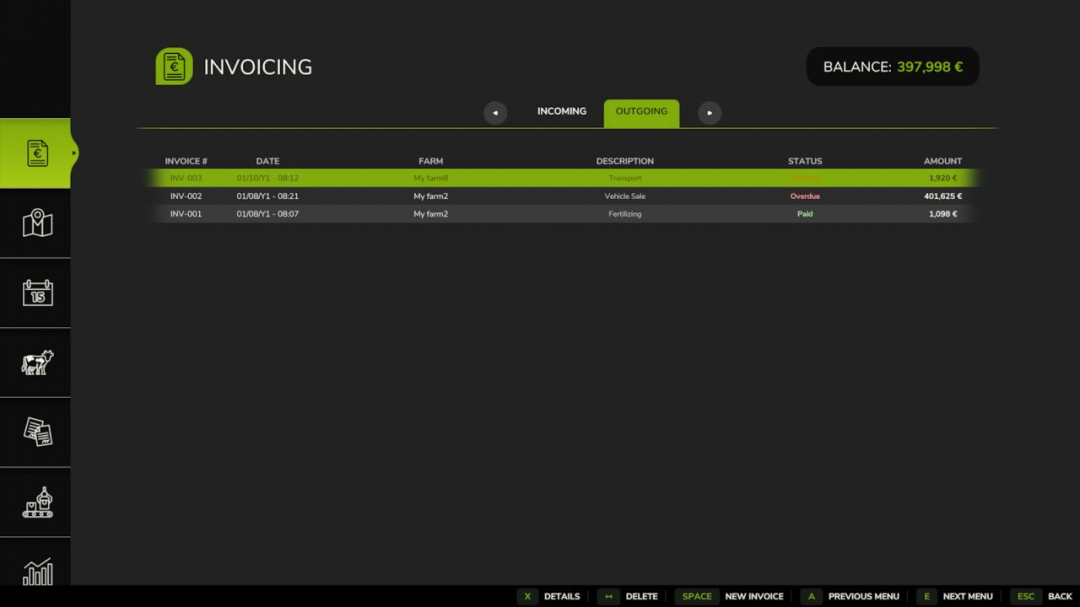
Invoices V1.1.1
Create, send, and manage invoices between farms in multiplayer. Ideal for agricultural contractor gameplay, this mod allows you to bill other farms for services such as plowing, harvesting, transport, and animal care, as well as sell vehicles and consumables directly via invoice. Base prices are aligned with the game's contract economy and automatically adjust based on your difficulty setting. Each price can be freely modified when creating an invoice. **Features:** - Full creation wizard: select recipient, work types, fields, quantities, and prices - Vehicle selection with automatic ownership transfer and resale pricing - Consumable selection (bales, pallets, bigbags…) with automatic ownership transfer and resale pricing - Product selection with automatic market prices - VAT system (4 rate groups, editable per line item, with optional simulation) - Net / VAT / Gross breakdown displayed on each invoice - Incoming and outgoing invoice tabs with status tracking - Pay or delete invoices with automatic financial integration - Separate Income and Expense entries in the Finance tab - Automatic payment reminders and late fees - Supports 25 languages - Compatible with FS25_RedTape: invoice transactions are properly categorized as taxable income and deductible expenses Important: Only consumables physically present in the world (not stored inside buildings) can be invoiced and transferred. Make sure to eject bales, pallets, or bigbags from storage buildings before creating an invoice. Access via the dedicated tab in the InGame Menu (ESC). **V1.1.1.0** - Fixed title separator display in invoice header - Fixed recipient-side icons not showing correctly in invoice dialogs - Fixed menu icon rendering


WayPoint GPS v1.0
WayPoint GPS Beta is a standalone GPS route system for Farming Simulator 25. Open the full ESC map, hold CTRL, and click anywhere to set a GPS destination. WayPoint GPS will draw a route on the minimap and map screen, providing a clear visual guide without the need for AutoDrive or Courseplay. This is a beta release, made available for public testing and feedback before a wider launch. **Features:** - Standalone GPS route system - CTRL-click to set destinations on the ESC map - Route line displayed on the minimap and map screen - AI-road-based routing with off-road and last-mile connectors - Optional steering assist - Customizable route line color - Customizable waypoint pin color - Adjustable route thickness and visibility - Bindable controls in the controls menu - Custom GPS waypoint marker **Important:** Pathing is for guidance only and may not always be perfect, especially around bridges, islands, ferry crossings, yards, and off-road targets. Steering assist is experimental and not an autopilot. Always check your route before driving and be ready to steer or brake as needed.

Random World Events V2.1.6.1
Random World Events is the complete FS25 rewrite of the original FS22 mod. It features a probabilistic event engine that triggers timed world events during gameplay, impacting your economy, vehicles, fields, and more. Each event has adjustable intensity, duration, and cooldown. A dedicated physics layer applies terrain-aware wheel grip and suspension tuning to your vehicle every frame. All settings are saved per savegame, allowing each farm to have its own configuration. — Over 43 unique events across 4 active categories — Configurable frequency (1–10), intensity (1–5), and cooldown (1–240 minutes) — Events trigger automatically based on a probability timer during gameplay — Manual triggering available via settings panel or the rweTest console command — Enable/disable toggles per category (economic, vehicle, field, special) — In-game HUD notifications and warnings when events start and end — Only one event active at a time — cooldown prevents event spam **Known Limitations** — Wildlife/animal events: toggle exists, but events are not yet implemented — Weather events: toggle exists, but events are not yet implemented — Multiplayer: supported in theory, but money and physics changes are local-only; network sync is not yet implemented — Physics values (articulationDamping and comStrength) are configurable but not yet integrated with an FS25 physics API All rights reserved. Unauthorized redistribution, modification, reuploading, or claiming this mod as your own is strictly prohibited. Enjoy a more unpredictable farming experience! **V2.1.6.1** — Several quality-of-life improvements and stability fixes, including a complete rewrite of the event HUD rendering for better reliability across maps and screen resolutions. **What’s fixed:** — Keybindings now persist correctly between sessions — HUD position is saved with the game, not just on exit — Animal events no longer fail silently when the farm ID cannot be resolved — Right-click key hint removed from HUD footer for cleaner display — Load-order crash fixed; input hooks are now correctly registered on startup — All HUD text is now fully translated, no longer showing hardcoded English **What’s new:** — HUD is now drawn directly by the mod, more stable, and compatible with all screen setups — Version number and key hints in the HUD update dynamically — Subsystem API allows other mods to hook into RWE events programmatically — Cross-mod bridge for FarmTablet integration (events visible on the tablet) — Improved debug tools for diagnosing event issues — Updated mod icon **Save migration:** Not required. Existing saves load normally.

Farm Tablet V2.3.1
FarmTablet — A compact, all-in-one farm management tablet for Farming Simulator 25. Originally inspired by a tablet mod for FS17, built from scratch for FS22 and now fully converted and rewritten for FS25. The goal is simple: useful farm info at a glance, without getting in the way of gameplay. The mod has been rebuilt with a clean, modular structure — every app lives in its own file, making it easy to expand, fix and improve over time. It’s actively developed and shaped by community feedback. **What’s in it right now:** - Dashboard — farm overview with balance, fields, vehicles and world state - Weather — current conditions, temperature, wind, cloud cover and forecast - Fields — all owned fields with crop type and growth stage - Animals — pen status with food, water and cleanliness levels - Workshop — nearby vehicle diagnostics with fuel, wear and operating hours - Bucket Tracker — load counter for wheel loaders and excavators - Digging — excavation, tracking and soil scanner - App Store — browse and manage installed apps - Settings — configure the tablet from the pause menu - Updates — changelog and version history **Mod integrations (auto-detected at runtime, safe to run without them):** - NPC Favor, Soil Fertilizer, Seasonal Crop Stress, Income Mod, Tax Mod **What’s coming next:** - Better tablet visuals and frame design - Icons instead of text labels - Sounds, color tweaks and UI polish - More apps and deeper interactions based on feedback - Multiplayer improvements The mod is in active development. Bug reports, ideas and suggestions are always welcome — this is a community project and your feedback directly shapes what gets built next. **COPYRIGHT NOTICE:** All rights reserved. Unauthorized redistribution, copying, or claiming this mod as your own is strictly prohibited. **V2.3.1.0** The tablet key now works correctly after rebinding in the FS25 controls menu. Previously, the mod only registered the keybind once at startup and never picked up changes; this is now fully fixed. **What’s new / fixed:** - Fixed: rebinding the tablet key (default T) in the FS25 controls menu now takes effect immediately, the new key works on foot, in vehicles, and after any context switch - The tablet toggle action now appears in the FS25 controls menu under its own entry (FT_TOGGLE_TABLET) and can be rebound like any other game action - Fixed: a crash on load caused by a corrupted internal file. In some cases, the tablet would fail to register its console commands silently - French translation improved with native translations from the community contributor Seb; app names and help text that were showing in English are now fully translated **Saves:** No migration needed. **Required mods:** - Income Mod - Tax Mod - NPC Favor - Realistic Soil & Fertilizer - Seasonal Crop Stress - Market Dynamics - Realistic Worker Costs - Random World Events
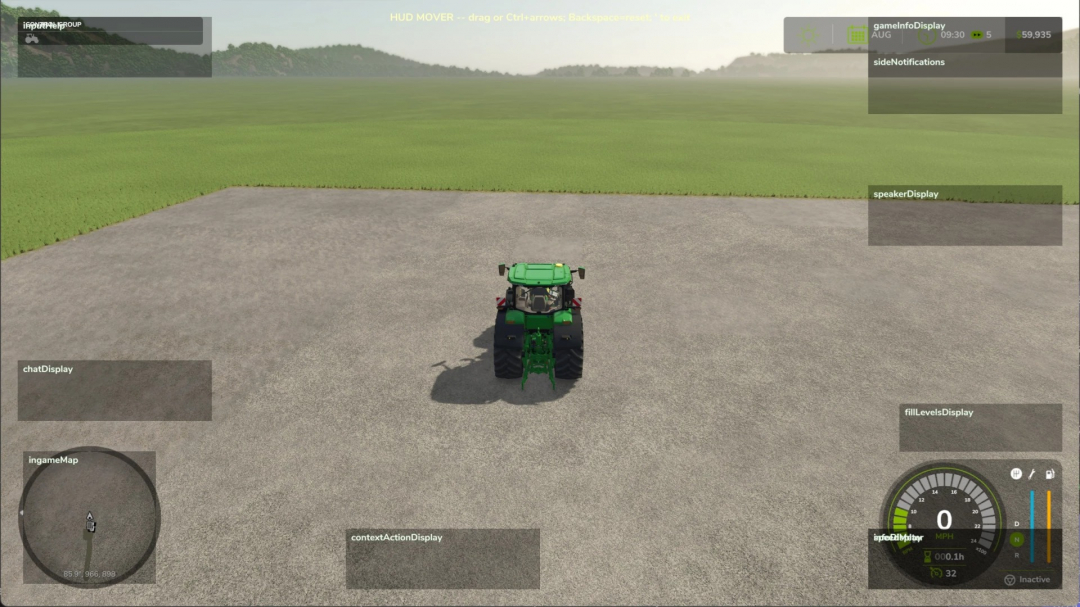
HUD Mover v1.0
HUD Mover allows you to drag base-game HUD elements anywhere on the screen — specially designed for ultrawide and triple-screen setups where the speedometer, info panel, clock, and minimap are often fixed to the physical screen corners, far from the player's line of sight. How it works Press the apostrophe (' ) to enter edit mode — works both on foot and in any vehicle. Mouselook is automatically disabled, the cursor appears, and each movable HUD element is outlined with a translucent box and label (including those currently hidden), so you can position the speedometer's placeholder while on foot, and it will appear at the new spot when you get into a tractor. - Left-click and drag any HUD element to move it. - Ctrl + arrow keys for precise nudging of the last clicked HUD element. - Backspace to reset all HUD elements to their default positions. - Press the apostrophe again to exit. Positions are saved automatically to modSettings/FS25_HudMover/positions.xml and restored on the next game launch. What you can move Any HUD element registered by the base game: speedometer, info display (gear, fuel, transmission cluster), game info panel (clock, calendar, money), input help, minimap, fill levels, side notifications, speaker display, chat, vehicle name, and context actions. The minimap and fill-level displays use dedicated handlers so they move together as a unit instead of scattering when dragged. Requirements - No mod dependencies. - PC only. Why this exists The base game pins HUD elements to fixed screen corners — fine on a single monitor, but problematic on triple-screen setups where those corners are far from your central viewing area. This mod allows you to bring everything into view where you can actually see it.
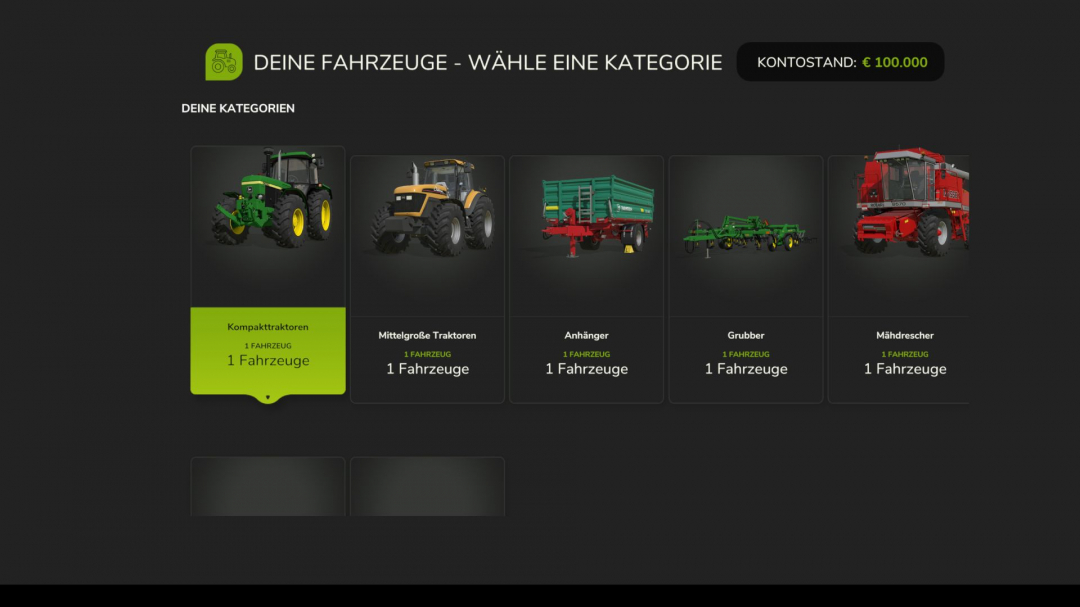
Vehicle trade-in V1.0.0.1
Are you tired of selling your old vehicles for little money and then having to buy new ones at full price? The vehicle trade-in mod introduces a realistic trade-in system to Farming Simulator 25 — just like a real dealer. Instead of selling and buying separately, you can now exchange your existing vehicles directly for new ones. The trade-in value is calculated realistically based on several factors and automatically deducted from the purchase price. **Control:** CTRL + T — Open exchange menu **How it works:** - Press Ctrl+T to open the trade-in menu - Select a category and the vehicle you want to trade in - Browse the shop and choose your new replacement vehicle - Confirm the exchange — the trade-in value will be credited automatically - The configurator opens immediately so you can choose colors, wheels, license plates, and other options - The new vehicle appears at the nearest dealer **6-stage price calculation:** - Level 1: Base value (original purchase price) - Level 2: Operating hours deduction (more hours = less value) - Level 3: Damage factor (damaged vehicles lose value) - Level 4: Pollution penalty (dirty vehicles lose up to 10%) - Level 5: Age factor (older vehicles are worth less) - Level 6: Minimum value limit (vehicles always retain a minimum value) **Features:** - Realistic trade-in value based on age, hours, damage, and contamination - Supports all standard FS25 vehicle categories (tractors, harvesters, trailers, attachments, trucks, etc.) - Full vehicle configurator after the exchange (colors, wheels, license plates) - Customizable pricing rules (value loss per hour, minimum value, damage factor, age factor, etc.) - Complete sales statistics with totals, averages, and records - Optional cleaning and repair requirement before trade-in **Important:** - Works in single player and multiplayer - Placeable objects and bundle items are automatically filtered out Ideal for anyone seeking more realistic vehicle management on their farm. **V1.0.0.1:** - More spacing between vehicle cards in the trade-in shop - Added train/rail system filter for own vehicles and shop vehicles - Built-in money check in the configurator to prevent account overdraft - Added message “You don’t have enough money” with clearer feedback - Vehicle images loaded more reliably for standard, DLC, and mod vehicles - Visually adjusted the price tag in the vehicle display - Fixed display issues in price calculation - Successful trade-ins are protected against double debits and negative account balances.

Tool Work Lines V1.0
Tool Work Lines adds visual guide lines to help you see exactly where your tools and implements will work before you start the job. Hold the show-lines key and the mod displays left/right work-width indicators on the ground, plus a dotted center guide line. This helps with lining up passes more accurately when mowing, cultivating, plowing, seeding, spraying, using bale equipment, and working with other tools. Multiplayer - Not tested Features - Shows tool work-width guide lines while holding the key - Supports many field tools, including: - mowers - cultivators - plows - seeders - sprayers - windrowers - bale wrappers / bale pickup equipment - trailers and fallback vehicle outlines where possible - Separate line sets for multiple attached tools, such as front mower + rear mower combinations - Dotted center guide line for easier alignment - Predictive curved guide lines while turning - Color selection menu for guide lines - Saves your selected line color Controls - Hold Left Alt — Show tool work lines - Left Alt + Z — Open line color menu Controls can also be changed in the game’s control settings. Planned Upgrades - Future updates may include: - Improved support for more modded tools - Better detection for tools that do not use standard work-area nodes - More accurate bale pickup and wrapper guide zones - Additional line styles and visibility options - Optional longer/shorter prediction distance - More advanced turning prediction - Possible per-tool color options - Further cleanup for unusual tool combinations Beta Notice - This is a beta release. The main work-line system is working well, but some tools may still use fallback detection if they do not provide standard work-area data. Please report any tools that show incorrect width, position, or direction so support can be improved in future updates. Changelog - v0.1.0.21 Beta - Added work-width guide lines for tools and implements - Added dotted center guide line - Added support for front/rear tool combinations - Added improved bale pickup and wrapper detection - Added curved prediction while turning - Added Alt + Z color dialog - Added selectable line colors - Removed right-side notification spam - Added movement/camera lock while the color menu is open - Prepared beta release package
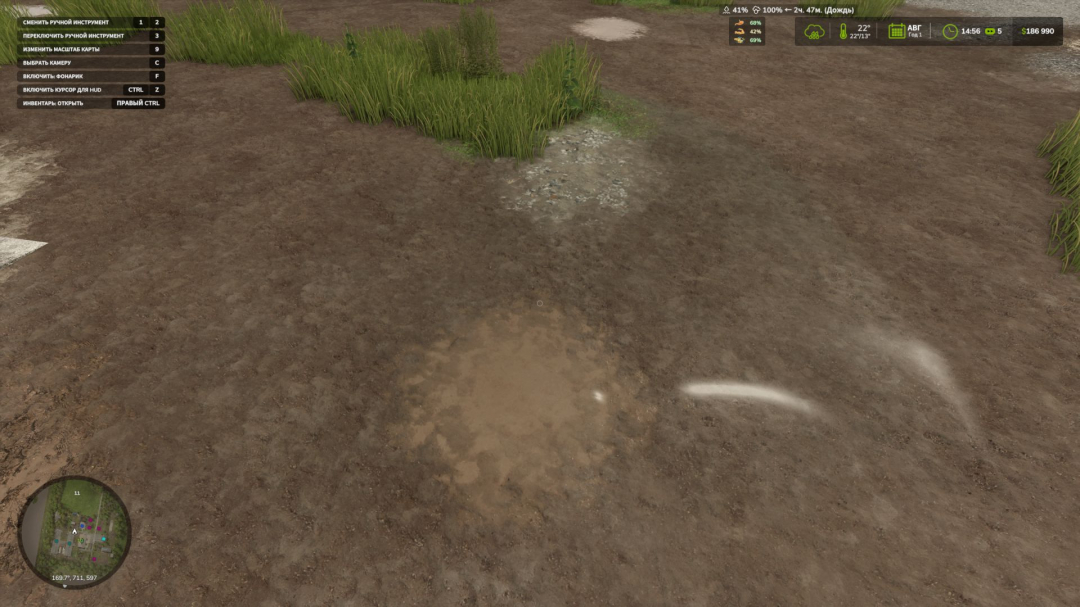
Dynamic Puddles BETA 2 v1.0
A mod that adds dynamic puddles to the map when it rains. The mod analyzes the terrain's relief, identifies low-lying areas and suitable spots, and gradually creates water puddles. (Not recommended for very uneven maps, as it may produce awkward puddles that stick out or hang in the air.) Puddles appear during rain, grow wetter in rainy weather, and gradually disappear as they dry up. What does the mod do? - Automatically creates puddles on the map. - Puddles only appear when it rains. - After the rain stops, puddles slowly diminish and vanish. - The mod searches for low-lying areas where water can collect. (Not recommended for very uneven maps, as it may result in unnatural puddles that protrude or float.) - Checks terrain slope, water bodies, and land elevation. For debugging, use the console command: gsPuddleDebug 1 This toggles the display of debugging information related to puddles. PS. The mod is in Beta to gather user feedback. BETA 2 - Added mod settings: - Enable or disable puddle appearance in fields - Set maximum number of puddles - Define minimum distance between puddles
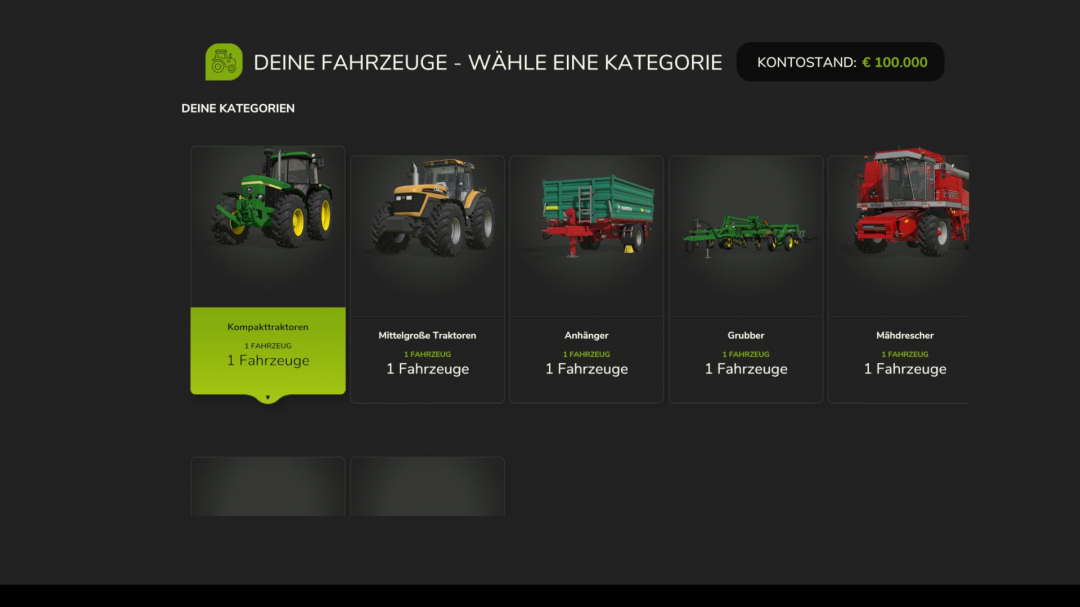
Vehicle trade-in V1.0.0.3
Are you tired of selling your old vehicles for little money and then having to buy new ones at full price? The vehicle trade-in mod introduces a realistic trade-in system to Farming Simulator 25 — just like a real dealer. Instead of selling and buying separately, you can now exchange your existing vehicles directly for new ones. The trade-in value is calculated realistically based on several factors and automatically deducted from the purchase price. **Control:** CTRL + T — Open exchange menu **How it works:** - Press Ctrl+T to open the trade-in menu - Select a category and the vehicle you want to trade in - Browse the shop and choose your new replacement vehicle - Confirm the exchange — the trade-in value will be credited automatically - The configurator opens immediately so you can select colors, wheels, license plates, and other options - The new vehicle appears at the nearest dealer **6-stage price calculation:** - Level 1: Base value (original purchase price) - Level 2: Operating hours deduction (more hours = less value) - Level 3: Damage factor (damaged vehicles lose value) - Level 4: Pollution penalty (dirty vehicles lose up to 10%) - Level 5: Age factor (older vehicles are worth less) - Level 6: Minimum value limit (vehicles always retain a minimum value) **Features:** - Realistic trade-in value based on age, hours, damage, and contamination - Supports all standard FS25 vehicle categories (tractors, harvesters, trailers, attachments, trucks, etc.) - Full vehicle configurator after the exchange (colors, wheels, license plates) - Customizable pricing rules (value loss per hour, minimum value, damage factor, age factor, etc.) - Complete sales statistics with totals, averages, and records - Optional cleaning and repair requirements before trade-in **Important:** - Works in single player and multiplayer - Placeable objects and bundle items are automatically filtered out Ideal for anyone seeking more realistic vehicle management on their farm. **V1.0.0.3** - Added 23 languages: de, en, fr, it, es, ea, pl, nl, ru, br, pt, cs, cz, hu, ro, da, fi, no, jp, kr, ct, fc, tr. - All UI text and dialogs are now fully translatable. - Vehicle category names automatically use translations from the base game.
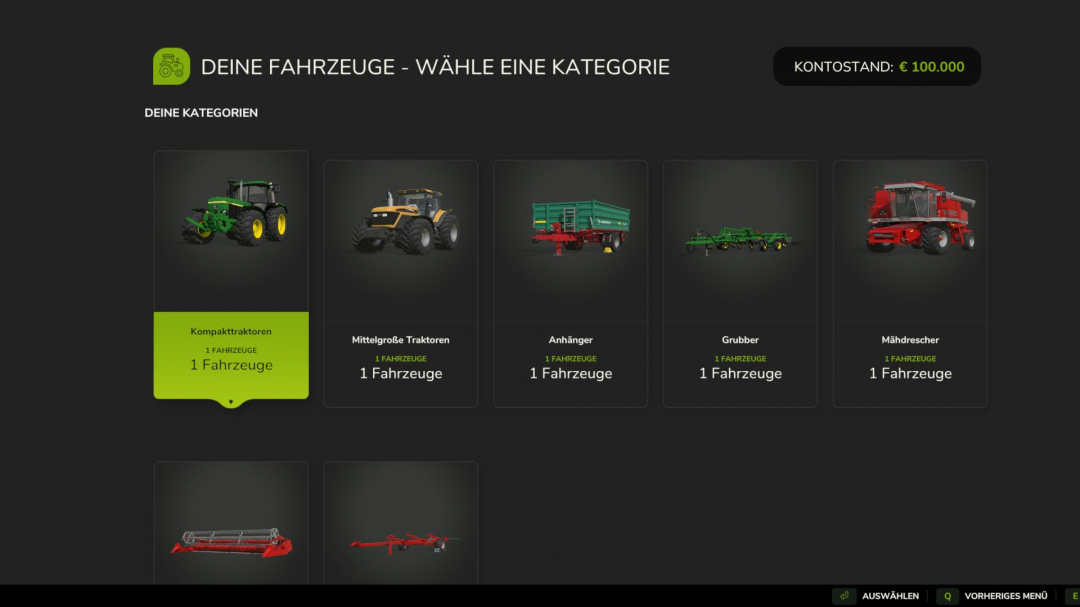
Vehicle trade-in V1.1.0.1
Are you tired of selling your old vehicles for little money and then having to buy new ones at full price? The vehicle trade-in mod introduces a realistic trade-in system to Farming Simulator 25 — just like in a real dealership. Instead of selling and buying separately, you can now exchange your existing vehicles directly for new ones. The trade-in value is calculated realistically based on several factors and automatically deducted from the purchase price. **Control:** - CTRL + T opens only the statistics menu - The menu can now be found in the LS 25 shop **How it works:** - Press Ctrl+T to open the trade-in menu - Select a category and the vehicle you want to trade in - Browse the shop and choose your new replacement vehicle - Confirm the exchange — the trade-in value is automatically credited - The configurator opens immediately so you can customize colors, wheels, license plates, and other options - The new vehicle appears at the nearest dealer **6-stage price calculation:** - Level 1: Base value (original purchase price) - Level 2: Operating hours deduction (more hours = less value) - Level 3: Damage factor (damaged vehicles lose value) - Level 4: Pollution penalty (dirty vehicles lose up to 10%) - Level 5: Age factor (older vehicles are worth less) - Level 6: Minimum value limit (vehicles always retain a minimum value) **Features:** - Trade-in financing for configured vehicle purchases - Realistic trade-in value based on age, hours, damage, and contamination - Supports all standard FS25 vehicle categories (tractors, harvesters, trailers, attachments, trucks, etc.) - Full vehicle configurator after exchange (colors, wheels, license plates) - Customizable pricing rules (value loss per hour, minimum value, damage factor, age factor, etc.) - Complete sales statistics with totals, averages, and records - Optional cleaning and repair requirements before exchange **Important:** - Compatible with single player and multiplayer modes - Placeable objects and bundle items are automatically filtered out Ideal for anyone seeking more realistic vehicle management on their farm. **V1.1.0.1:** - Fixed missing language entries for car repair and cleaning - All external language files regenerated from the central modDesc translations - Special characters and XML-safe entities cleaned for all 27 languages - Added financing information to the statistics menu.

Realistic Soil & Fertilizer V2.2
Realistic Soil & Fertilizer Mod for Farming Simulator 25 adds meaningful depth to farming without overwhelming complexity. Each field has its own soil health — nitrogen, phosphorus, potassium, organic matter, and pH — which change based on your crops, applications, and weather. Neglect your soil and your yields will decline. Manage it well for more efficient farming. **SOIL NUTRIENTS** Each field independently tracks five values: - Nitrogen (N) — heavily depleted by most crops, especially corn and canola - Phosphorus (P) — depletes more slowly, crucial for root crops - Potassium (K) — lost in large amounts during high-yield harvests, especially potatoes and sugarbeets - Organic Matter (OM) — enhances long-term fertility; manure, compost, and chopped straw increase it - pH — influences nutrient absorption; lime and gypsum adjust pH Different crops extract varying amounts of each nutrient. Fallow fields recover slowly. Legumes (soybeans, peas, beans) provide a nitrogen boost in spring. Growing the same crop repeatedly increases nutrient extraction. **FERTILIZER TYPES** Supports all major fertilizer types used in the base game and popular mods: *Synthetic:* - Liquid Fertilizer — balanced N/P/K, quick uptake - Solid Fertilizer — higher phosphorus, standard cost - Digestate — biogas byproduct, rich in nitrogen and potassium - UAN28 / UAN32 — liquid nitrogen solutions - Anhydrous Ammonia — high-concentration nitrogen source - AMS / Urea — dry and liquid nitrogen options - Starter Fertilizer — high-phosphorus pop-up fertilizer - MAP / DAP — phosphorus-heavy dry and liquid fertilizers - Potash — pure potassium source *Organic:* - Manure — slow-release, boosts organic matter - Slurry — liquid organic rich in potassium - Compost — excellent organic matter enhancer - Biosolids — versatile organic option - Chicken Manure — concentrated nutrients, increases organic matter - Pelletized Manure — processed for easier application **pH Management:** - Lime — raises pH significantly - Liquid Lime — gentler than dry lime - Gypsum — slightly lowers pH, improves organic matter **Crop Protection:** - Insecticide — reduces pest pressure - Fungicide — reduces disease pressure Each fertilizer type has realistic nutrient profiles and application rates in metric or imperial units. **SPRAYER RATE CONTROL** Precisely control fertilizer application per pass: - Rate Up / Rate Down keys allow real-time adjustments - 20 stepped rate multipliers from 0.10x to 2.00x in 0.10 increments - Over-application risks: exceeding 1.25x may cause pH and nitrogen burns; at 1.50x burns are guaranteed - Auto-Rate mode adjusts application based on soil depletion - Rate settings persist per vehicle **YIELD PENALTY** Low nutrient levels reduce yields. Fields need N, P, and K at or above optimal thresholds for full output. Falling below increases penalties, capped depending on crop demands. **PEST, WEED & DISEASE PRESSURE** Fields track weed, pest, and disease pressure independently. Cultivation reduces weed and pest pressure; plowing reduces pests and diseases more aggressively. Insecticide and fungicide applications directly lower respective pressures. **HUD** A real-time soil panel displays current nutrient levels: - 6 preset positions (top right, top left, bottom right, bottom left, center right, custom) - Custom position is draggable - 4 color themes: Green, Blue, Amber, Mono - 3 font sizes - 5 transparency levels - Compact mode for smaller screens - Toggle HUD with a keybinding - Settings are per-player and do not affect multiplayer A detailed Soil Report can be accessed via keybinding. **SOIL MAP OVERLAY** Color-coded overlay accessible when the map is open, with 9 data layers: Nitrogen, Phosphorus, Potassium, pH, Organic Matter, Urgency Score, Weed Pressure, Pest Pressure, Disease Pressure. Fields are colored based on status. **PDA SCREEN** Dedicated in-game PDA page with two tabs: - Farm Overview — full field list with nutrient levels and status, plus farm-wide averages - Treatment Plan — lists fields needing attention with details **SETTINGS** Access via Shift+O. In multiplayer, gameplay settings are admin-controlled; HUD settings are per-player. Toggle systems include: - Fertility system - Nutrient cycles - Fertilizer costs - Seasonal effects - Rain effects - Plowing bonus - Auto-Rate Control - Notifications **Difficulty levels:** - Simple — less depletion, lower costs, more forgiving - Realistic — standard rates (default) - Hardcore — rapid depletion, higher costs, no neglect allowed **Units:** Switch between metric (kg/ha) and imperial (lb/ac). **PRECISION FARMING COMPATIBILITY** If the official DLC is active, this mod enters read-only mode, observing PF soil data without conflicts. **MULTIPLAYER** Fully supported. Server controls gameplay settings; each player manages their HUD. Soil data syncs across clients; new players receive full sync. **CONSOLE COMMANDS** Type 'soilfertility' in the developer console for commands: - soilfertility — show all commands - SoilEnable / SoilDisable — toggle mod - SoilSetDifficulty 1/2/3 — set difficulty - SoilFieldInfo — show soil data for a specific field - SoilShowSettings — display current settings - SoilResetSettings — reset to defaults - SoilSaveData — save data - SoilDebug — toggle debug logs **COMPATIBILITY** Works with all maps, vehicles, sprayers, crop rotation mods. No known conflicts. Compatible with existing saves. **INSTALLATION** Extract the zip into your mods folder. Configure via Shift+O. No further steps needed. **COPYRIGHT NOTICE:** All rights reserved. Redistribution, copying, modification, or claiming as your own is prohibited. **V2.2.0.0** Includes full Precision Farming integration, improved soil map overlay, bug fixes for nutrient loss reporting, and more accurate data visualization. **What’s new / fixed:** - PF integration and shared field data - Correct info display for layers - Dimmed tiles for unsampled areas - Correct pH variation display - Proper nutrient depletion for large fields - Organic matter and harvest nutrient values fixed - Crop protection effects improved - Compatibility with older saves ensured
- 15 per page
- 30 per page
- 45 per page
- 60 per page
-
See more per page
Bigger pages, fewer clicks - and no ads anywhere.
Go Pro