Farming Simulator 25 mods
76,924 results- 15 per page
- 30 per page
- 45 per page
- 60 per page
-
See more per page
Bigger pages, fewer clicks - and no ads anywhere.
Go Pro
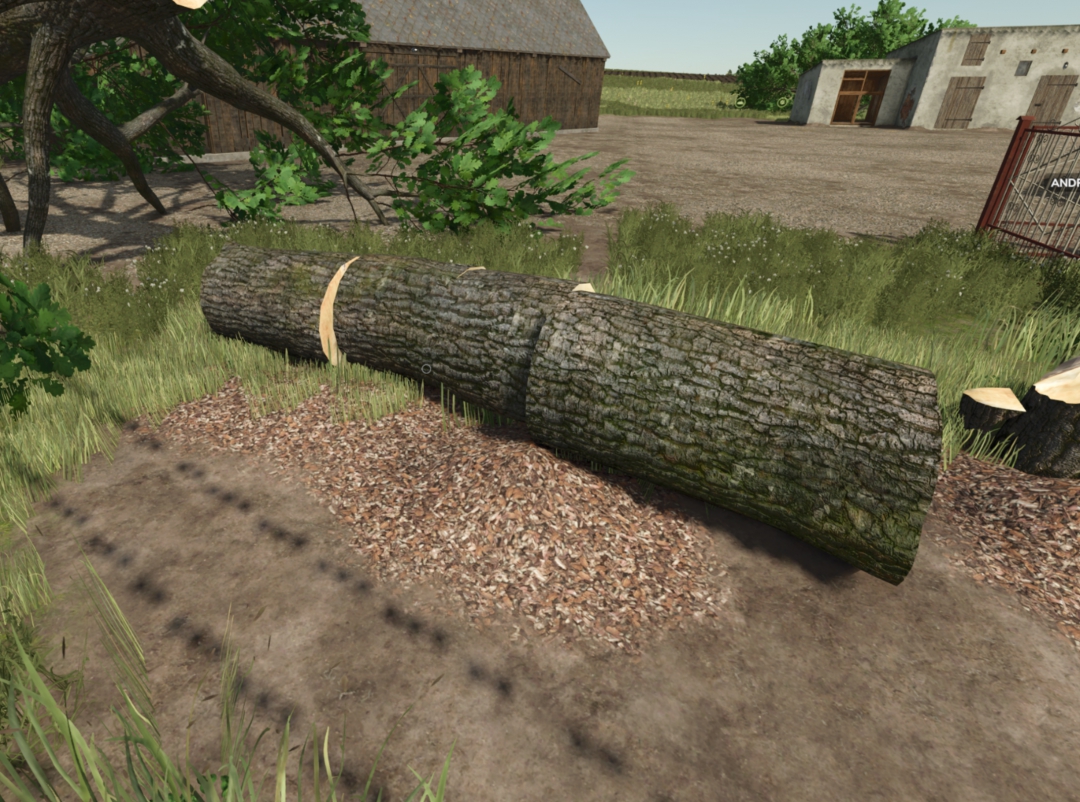
sawdust only
This mod adds realistic sawdust (fine wood shavings) when cutting trees with a chainsaw. The sawdust appears dynamically as you cut and adapts to the process, making logging feel more natural and atmospheric. Multiplayer support P.S. At the moment, there are no similar mods for Farming Simulator 25, so I created this mod for myself and decided to share it with the community.
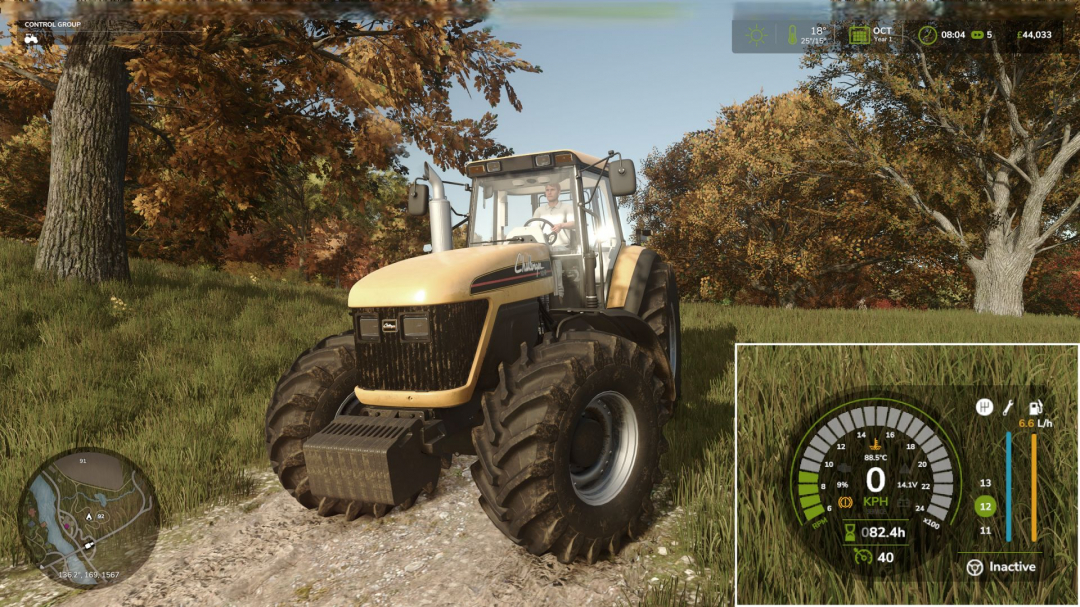
Advanced Damage System BETA 3 v1.0
Attention: BETA Version Please note: this mod is currently in BETA. Always back up your savegames before using it. **Important**: It is strongly recommended to read the Mod Guide. Without understanding the core mechanics, ADS can easily become frustrating, as improper maintenance and rough operation will lead to frequent breakdowns. **Advanced Damage System (ADS)** The Advanced Damage System is a complete overhaul of the standard vehicle damage and maintenance mechanics in Farming Simulator 25. A machine's reliability now depends directly on how carefully and efficiently you operate it. The harder you push your equipment and the less attention you pay to maintenance, the more often it will fail. ???? There are no more instant “one-click” repairs. Maintenance now takes time, resources, and planning. You will need to monitor wear, service your vehicles on time, and manage your fleet properly so that a breakdown does not interrupt important fieldwork. **Quick Guide** If you do not want to read the full guide but still want to play with ADS without constant breakdowns and unnecessary frustration, just follow these three rules: **1. Always follow the service interval.** By default, the recommended interval is about 5 operating hours on average. You can check it: – in the workshop, – in the vehicle info panel when looking at the machine, – in the ADS fleet management menu opened with the P key. Once the interval is reached, perform the Maintenance procedure in the workshop. **2. Inspect and prepare your machines every day.** Perform a daily inspection by holding the R key near the vehicle, and do basic pre-shift maintenance. Clean the machine with the Air Blower and lubricate machines that require it with the Grease Gun. These simple routine actions greatly reduce the risk of avoidable failures. **3. Do not abuse your equipment.** Avoid overloading, overheating, using implements that are too heavy or demanding for the machine, excessive wheel slip in mud, hard work on a cold engine, and high-speed driving over rough terrain. A simple rule applies here: if something would be harmful to the machine in real life, it is harmful in ADS too. **Key Features** - Complete Replacement of the Vanilla Damage System - Vehicles are divided into separate critical systems: engine, transmission, hydraulics, cooling, fuel, working systems, electrical, and chassis. Each system has its own wear factors based on operating conditions. For example, excessive wheel slip increases transmission wear, while rough high-speed driving damages the chassis. - Regular Maintenance Becomes Essential - Scheduled servicing is no longer optional. It is the main way to prevent accelerated wear and avoid expensive repairs or overhauls. - Dynamic Breakdowns - The mod includes dozens of breakdowns tied to specific systems. Each failure has its own gameplay effects and can develop into more serious problems if ignored. - Reworked Workshop Logic - The workshop menu now includes inspection, repair, maintenance, and overhaul. Every procedure takes real in-game time, so repair planning becomes part of normal vehicle management. - Realistic Thermal Simulation - Engines need proper warm-up and can overheat under heavy load, especially in hot weather or when cooling airflow is restricted. Ignoring temperature can have serious consequences. - Battery and Alternator Simulation - Batteries can discharge, alternators can fail, and starting the engine can become difficult. If necessary, you can use one vehicle to jump-start another. - Vehicle-Specific Characteristics - Machines differ by brand and age in Reliability and Maintainability. More reliable vehicles wear more slowly and break down less often, while more maintainable vehicles are cheaper and faster to repair. - Pre-Shift Inspection and Maintenance - Before heading to the field, vehicles should be inspected and prepared for work. This includes checking the machine, cleaning radiators and air intakes, and lubricating equipment that requires it. **BETA 3** Changelog 0.9.2.0: – Significant rebalancing of system wear factors. – Enabling the “Quick Inspection” setting while an inspection is in progress now completes it instantly. – Enabling the “Park Vehicle” option during service procedures now applies immediately to vehicles currently being serviced. – Warnings for cold or overheated engine/transmission now appear as a single notification instead of staying on screen. – Added dashboard alerts for vehicles experiencing critical loads. – Redesigned dashboard indicators with added sound effects upon activation. – Added an option to disable all warning messages (cold engine, overheating, breakdowns). – Fixed engine and CVT temperature synchronization when the engine is under load. – Battery capacity setting changes now apply correctly and no longer cause mass discharge across all batteries. – Maintenance Log: Fixed the counter for repaired breakdowns in the maintenance log. – Fixed an issue where queuing service procedures (e.g., “Do X after Y”) caused unintended vehicle repainting and unexpected charges. – Fixed an issue where AutoDrive AI ignored critical breakdowns and continued driving. – Minor UI improvements. **Required mods:** Vehicle Years

Cold Start – Realistic Engine Behaviour V1.0.0.2
Cold Start – Realistic Engine Behaviour Adds realistic cold start mechanics and dynamic engine temperatures to Farming Simulator 25. Vehicles now start at the current ambient temperature, warm up during use, and retain heat after shutdown. Cold engines perform differently from fully warmed machines, adding more depth and realism to everyday gameplay without becoming frustrating. Features - Ambient temperature-based starts - Dynamic engine warm-up system - Heat retention after shutdown - Reduced performance while cold - Stall risk if pushed too hard when cold - Weather-sensitive behaviour - Multiplayer compatible How does it work? - Cold engines need time to reach operating temperature before delivering full performance. - Machines that have recently been used stay warmer after shutdown, making later restarts easier and more realistic. - Cold mornings feel harsher, while warmer weather makes starting and running machinery easier. Compatibility - Works with motorized vehicles. - Designed for both singleplayer and multiplayer. This mod is a WIP and will be updated as we go along. It has passed the initial testing phase. V1.0.0.2 - This update brings some finishing touches to the way the mod behaves. - Engine temperature will never drop below the ambient temperature of the map. - Engines will now warm up no matter how far away you are from the vehicle. Start it and go do something else whilst it warms up! ???? - Cruise control bug fixed. Mod now does not affect cruise control at all. - Electric vehicles now excluded.
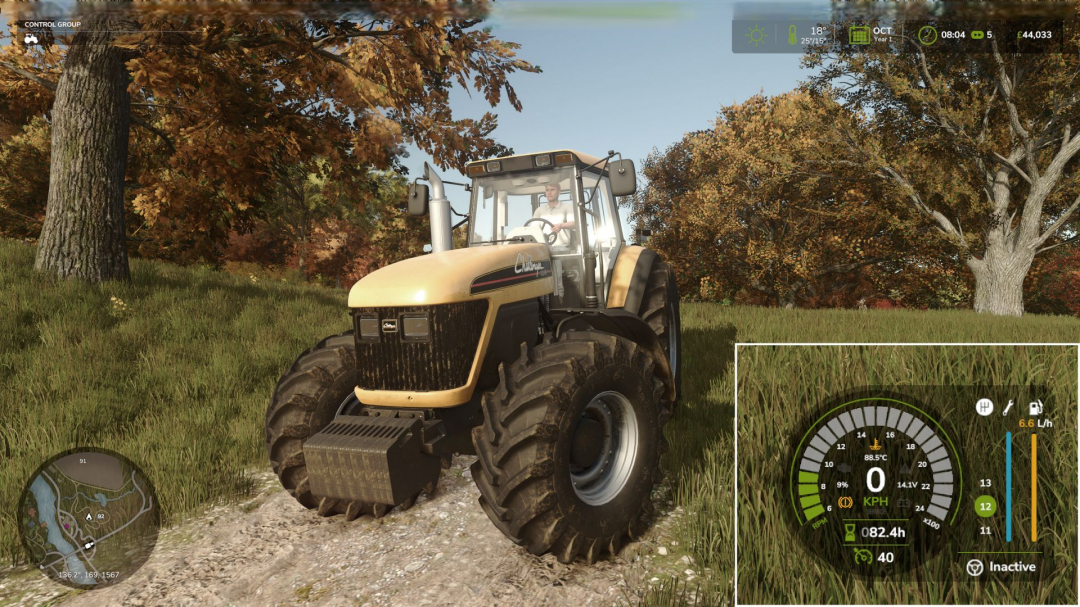
Advanced Damage System v0.9.2.1
Attention: BETA Version Please note: this mod is currently in BETA. Always back up your savegames before using it. **Advanced Damage System (ADS)** The Advanced Damage System is a complete overhaul of the standard vehicle damage and maintenance mechanics in Farming Simulator 25. A machine’s reliability now depends directly on how carefully and efficiently you operate it. The harder you push your equipment and the less attention you pay to maintenance, the more often it will fail. There are no more instant “one-click” repairs. Maintenance now takes time, resources, and planning. You will need to monitor wear, service your vehicles on time, and manage your fleet properly so that a breakdown does not interrupt important fieldwork. **Quick Guide** If you do not want to read the full guide but still want to play with ADS without constant breakdowns and unnecessary frustration, just follow these three rules: 1. Always follow the service interval. By default, the recommended interval is about 5 operating hours on average. You can check it: – in the workshop, – in the vehicle info panel when looking at the machine, – in the ADS fleet management menu opened with the P key. Once the interval is reached, perform the Maintenance procedure in the workshop. 2. Inspect and prepare your machines every day. Perform a daily inspection by holding the R key near the vehicle, and do basic pre-shift maintenance. Clean the machine with the Air Blower and lubricate machines that require it with the Grease Gun. These simple routine actions greatly reduce the risk of avoidable failures. 3. Do not abuse your equipment. Avoid overloading, overheating, using implements that are too heavy or demanding for the machine, excessive wheel slip in mud, hard work on a cold engine, and high-speed driving over rough terrain. A simple rule applies: if something would be harmful to the machine in real life, it is harmful in ADS too. **Key Features** **Complete Replacement of the Vanilla Damage System** Vehicles are divided into separate critical systems: engine, transmission, hydraulics, cooling, fuel, working systems, electrical, and chassis. Each system has its own wear factors based on operating conditions. For example, excessive wheel slip increases transmission wear, while rough high-speed driving damages the chassis. **Regular Maintenance Becomes Essential** Scheduled servicing is no longer optional. It is the main way to prevent accelerated wear and avoid expensive repairs or overhauls. **Dynamic Breakdowns** The mod includes dozens of breakdowns tied to specific systems. Each failure has its own gameplay effects and can develop into more serious problems if ignored. **Reworked Workshop Logic** The workshop menu now includes inspection, repair, maintenance, and overhaul. Every procedure takes real in-game time, so repair planning becomes part of normal vehicle management. **Realistic Thermal Simulation** Engines need proper warm-up and can overheat under heavy load, especially in hot weather or when cooling airflow is restricted. Ignoring temperature can have serious consequences. **Battery and Alternator Simulation** Batteries can discharge, alternators can fail, and starting the engine can become difficult. If necessary, you can use one vehicle to jump-start another. **Vehicle-Specific Characteristics** Machines differ by brand and age in Reliability and Maintainability. More reliable vehicles wear more slowly and break down less often, while more maintainable vehicles are cheaper and faster to repair. **Pre-Shift Inspection and Maintenance** Before heading to the field, vehicles should be inspected and prepared for work. This includes checking the machine, cleaning radiators and air intakes, and lubricating equipment that requires it. **BETA 4** Changelog 0.9.2.1: – Added new tabs for vehicles currently undergoing service to easily track completion times. A dedicated tab for non-ADS equipment has also been added, creating a centralized hub for your entire fleet. – Added compatibility with Ingame Time Operating Hours mod. Service intervals now scale dynamically based on the current time scale (time acceleration). – Resolved an issue where the script would enter an infinite loop if no valid damage types were available to be added to the system. – Fixed a bug where certain modded vehicles failed to warm up while idling. – Fixed an issue causing excessive hydraulic system stress on harvesters due to incorrect PTO (Power Take-Off) angle detection. – Relocated the overdue service indicator to ensure compatibility with the Enhanced Vehicle mod (fixing the overlap with the EV odometer). – Mobile and owned workshops now operate 24/7 (ignoring standard operating hours) – Added Brazilian Portuguese translation by gustavojpa20 – Added Korean translation by ppananaa **Required mods:** Vehicle Years
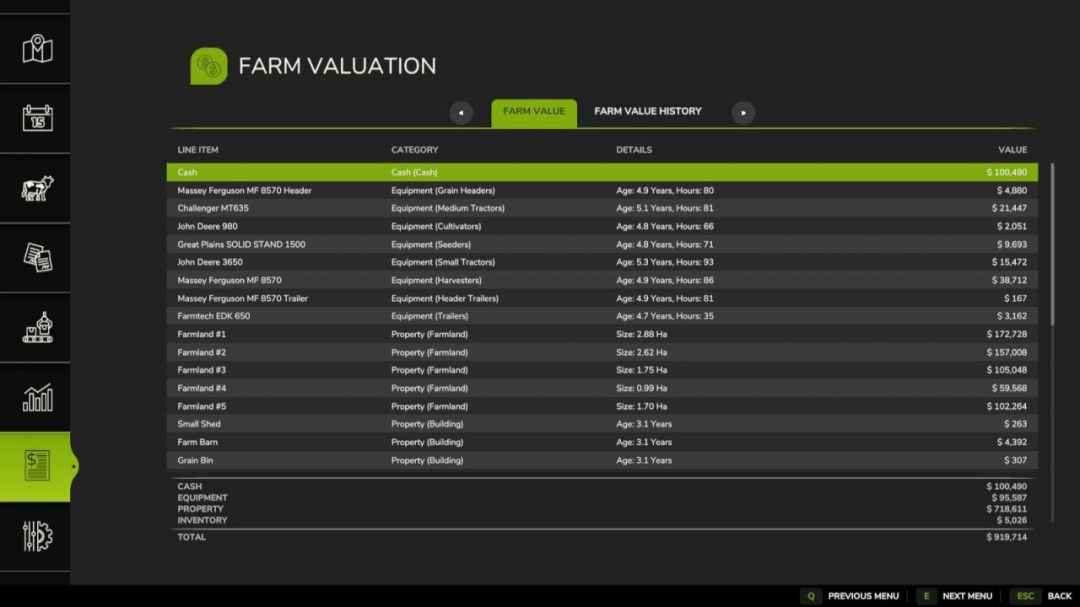
Net Worth Tracker V1.1.0.1
Adds a menu screen with a tab to summarize your farm's total value in a balance sheet and a history tab to review the history of your farm's value. Farm Value: This section provides a summary of the current day's farm value. Each line item in the balance sheet includes a name, category, additional details, and a value, and can be sorted by name, category, or value. The line items are grouped into four subtotals: – Cash: cash and loans – Equipment – Property: land and buildings – Inventory: fill and livestockFarm Value History: This section shows the history of farm values recorded at the end of each day. Each entry notes the day and the farm's value at day's end, and can be sorted by date.Dev Console Commands: – `nwtBuildHistory` – rebuilds fake value history from the previous day – `nwtToggleDebug` – toggles debug mode for the mod – `nwtGetFarmValue` – calculates the current farm value – `nwtFarmValueToCSV` – exports the current farm value to CSV. Optional parameter: absolute file path to save the file. Default location: `/nwt_farm_value.csv` – `nwtFarmValueHistoryToCSV` – exports the farm value history to CSV. Optional parameter: absolute file path. Default location: `/nwt_farm_value_history.csv`V1.1.0.1 Adds Polish translation Removes GIANTS `Object` superclass from instantiated data objects to reduce object clutter, resulting in improved server performance.
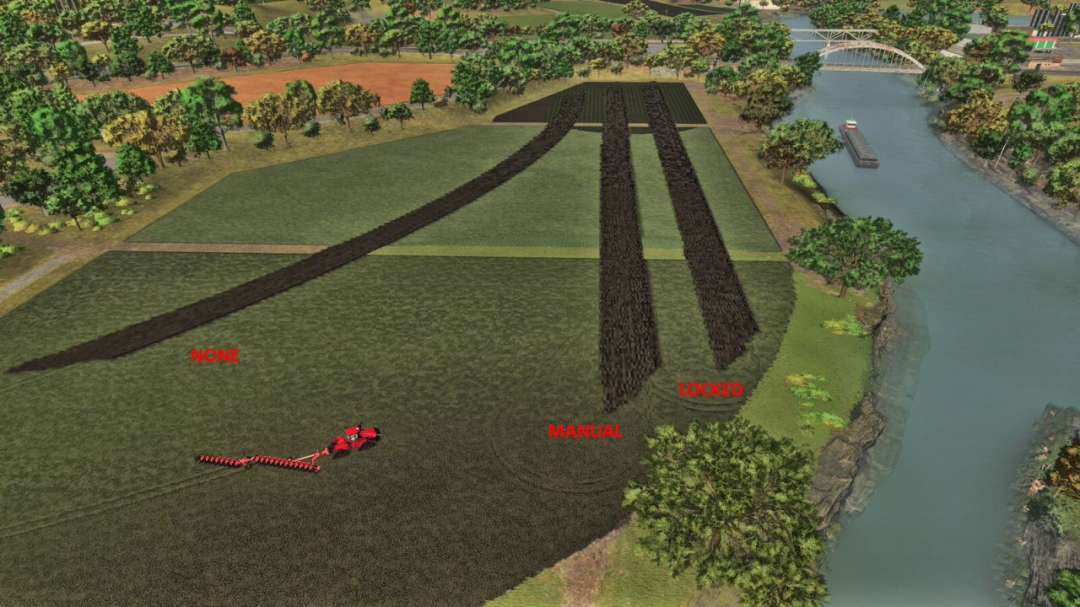
Steering Lock V1.0
Locks a vehicle to a compass heading with gentle persistent correction. Works with any steerable vehicle. All keys are unbound by default. Assign them in the in-game Controls menu under "Steering Lock". **Actions / Keybinds:** – Activate / Deactivate: Toggle the steering lock on or off – Cycle Heading Preset: Cycle through 0 / 90 / 180 / 270 degrees – Clear Heading: Clear the preselected heading, and disable the HUD overlay. – Get Current Heading: Capture the vehicle's current compass heading – Fine Adjust Heading +0.1 deg: Nudge the target heading clockwise (hold to select faster) – Fine Adjust Heading -0.1 deg: Nudge the target heading counter-clockwise (hold to select faster) – Reposition HUD: Move the HUD display to a different location **Usage:** First, set a heading using the preset cycle or by capturing the current heading. Fine-tune the heading with +/- adjustments if needed. Activate to lock to that heading. The heading is remembered when deactivated so you can resume without re-setting it. Works better at lower speeds, as there is less impact at high speeds to avoid overcompensating and wobbling. **Reverse lock functionality:** The lock stays active while reversing too! – the steering correction automatically inverts so the vehicle maintains the same heading backward along the same line. Useful for tight silage compacting, tool work, row tasks, backing straight into unloaders and trailers, or parking spots without losing your heading. If you want to back up freely to maneuver, just deactivate first – your heading stays remembered and one press of Activate re-engages the lock, same with going forward! **HUD Reposition:** Press the Reposition HUD key to enter reposition mode. The mouse cursor appears automatically, with the reposition box. Move the mouse to place the HUD, then LEFT-CLICK to save.
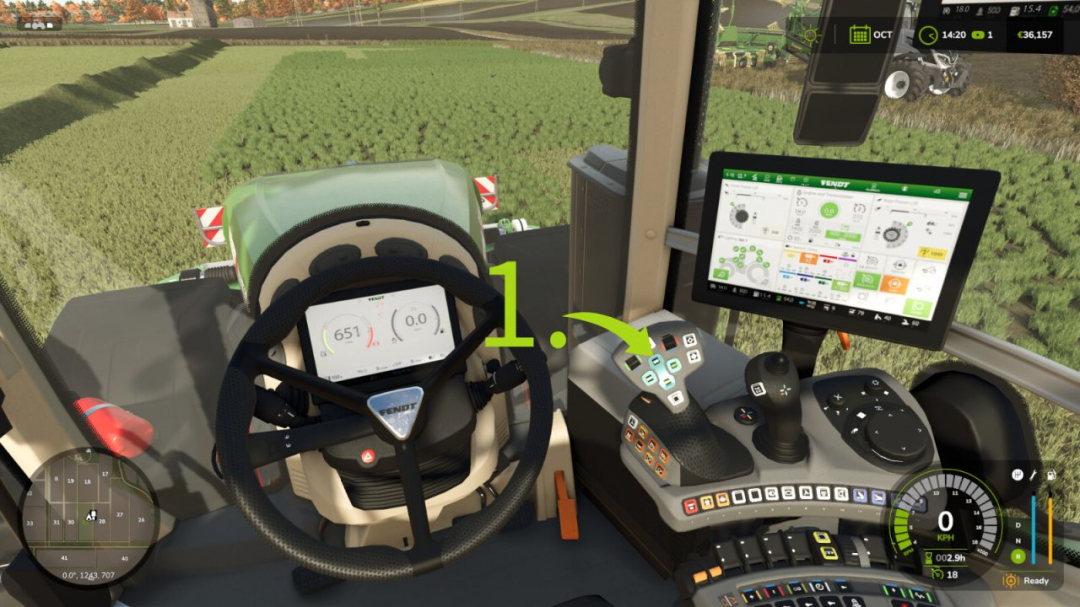
Teach-IN Extension V1.0
Teach-IN Extension adds customizable sequences for recurring operating and workflow routines to Farming Simulator 25. **Features:** - Four configurable Teach-In sequences - Trigger types: Immediate, Manual, Time, and Distance - Actions for cruise control C1/C2, GPS, front/rear linkage, and front/rear PTO - User-friendly menu for creating, editing, moving, and deleting slots - Profiles can be saved and loaded - Ideal for repetitive field operations and fixed work routines - Supports multiplayer **Default key bindings:** - Open/close menu: Left Ctrl + Left Alt + T - Start sequence 1: Left Ctrl + Left Alt + Up Arrow - Start sequence 2: Left Ctrl + Left Alt + Down Arrow - Start sequence 3: Left Ctrl + Left Alt + Right Arrow - Start sequence 4: Left Ctrl + Left Alt + Left Arrow - Stop active sequence: Left Ctrl + Left Alt + Numpad 0 - Preselect cruise control C1: Left Ctrl + Left Alt + 1 - Preselect cruise control C2: Left Ctrl + Left Alt + 2 Ideal for precise, repeatable field routines and convenient control of fixed work processes.

Realistic Soil & Fertilizer V1.9.9
Realistic Soil & Fertilizer Mod for Farming Simulator 25 Adds meaningful depth to farming without overwhelming complexity. Every field has its own soil health — nitrogen, phosphorus, potassium, organic matter, and pH — that changes based on what you grow, what you apply, and what the weather does. Ignore your soil and yields will suffer. Manage it well and your farm runs more efficiently. **SOIL NUTRIENTS** Each field independently tracks five values: – Nitrogen (N) — depletes heavily from most crops, especially corn and canola – Phosphorus (P) — depletes more slowly, matters most for root crops – Potassium (K) — lost in large quantities with high-yield harvests; especially heavy for potatoes and sugarbeets – Organic Matter (OM) — improves long-term fertility; manure and compost build it up; chopped straw also contributes – pH — affects how well nutrients are absorbed; lime and gypsum adjust it Crops extract different amounts of each nutrient. Fallow fields slowly recover on their own. Legumes (soybeans, peas, beans) provide a spring nitrogen bonus. Growing the same crop consecutively increases nutrient extraction. **FERTILIZER TYPES** The mod supports all major fertilizer types used in the base game and common mods: **Synthetic:** – Liquid Fertilizer — balanced N/P/K, quick uptake – Solid Fertilizer — higher phosphorus, standard cost – Digestate — biogas byproduct, strong nitrogen and potassium – UAN28 / UAN32 — liquid nitrogen solutions – Anhydrous Ammonia — highest-concentration nitrogen source – AMS / Urea — dry and liquid nitrogen options – Starter Fertilizer — high-phosphorus pop-up fertilizer – MAP / DAP — phosphorus-heavy dry and liquid options – Potash — pure potassium source **Organic:** – Manure — slow-release, builds organic matter – Slurry — liquid organic, high in potassium – Compost — excellent organic matter boost – Biosolids — good all-around organic option – Chicken Manure — concentrated nutrients, builds organic matter – Pelletized Manure — processed for easier application **pH Management:** – Lime — raises pH significantly – Liquid Lime — slightly gentler than dry lime – Gypsum — lowers pH slightly, improves organic matter **Crop Protection:** – Insecticide — reduces pest pressure – Fungicide — reduces disease pressure Each type has realistic nutrient profiles with appropriate application rates in metric or imperial units. **SPRAYER RATE CONTROL** Control exactly how much fertilizer you apply per pass: – Rate Up / Rate Down keybindings let you adjust on the fly while in the cab – 20 stepped rate multipliers from 0.10x to 2.00x in 0.10 increments – Over-application risk: exceeding 1.25x risks pH and nitrogen burn; at 1.50x burn is guaranteed – Auto-Rate mode automatically sets the application rate based on how depleted the field is — heavy deficits get more, healthy soil gets less – Rate persists per vehicle so you don’t lose your setting when you get out **YIELD PENALTY** Low nutrient levels reduce yield. Fields need N, P, and K at or above the optimal threshold for full output. The further below that threshold, the larger the penalty — up to a hard cap depending on how demanding the crop is. **PEST, WEED & DISEASE PRESSURE** Fields track weed, pest, and disease pressure independently. Cultivation reduces weed and pest pressure. Plowing reduces pest and disease pressure more aggressively. Insecticide and fungicide applications reduce the respective pressures directly. **HUD** A real-time soil panel shows the current field’s nutrient levels at a glance: – 6 position presets (top right, top left, bottom right, bottom left, center right, or custom) – Custom position is draggable — put it exactly where you want it – 4 color themes: Green, Blue, Amber, Mono – 3 font sizes – 5 transparency levels – Compact mode for smaller displays – Toggle the HUD on/off with a keybinding – All HUD settings are per-player and don’t affect other players in multiplayer A full Soil Report is also available via keybinding, showing a detailed breakdown for the current field. **SOIL MAP OVERLAY** A color-coded map overlay is accessible while the in-game map is open. Switch between 9 data layers: Nitrogen, Phosphorus, Potassium, pH, Organic Matter, Urgency Score, Weed Pressure, Pest Pressure, and Disease Pressure. Each field cell is colored green/yellow/red based on its current status. **PDA SCREEN** A dedicated page in the in-game PDA with two tabs: – Farm Overview — full field list showing N/P/K/pH/OM and status for every tracked field, plus farm-wide averages – Treatment Plan — lists fields that need attention with a breakdown of what they need and why **SETTINGS** Open the settings panel with Shift+O. In multiplayer, gameplay settings are admin-controlled. HUD/display settings are always per-player. **Toggleable systems:** – Fertility system (enable/disable the whole mod) – Nutrient cycles – Fertilizer costs – Seasonal effects (nitrogen behavior changes by season) – Rain effects (rain causes nutrient leaching) – Plowing bonus (plowing improves soil health) – Auto-Rate Control – Notifications (low nutrient warnings) **Difficulty levels:** – Simple — reduced depletion, lower costs, more forgiving – Realistic — balanced, standard rates (default) – Hardcore — rapid depletion, higher costs, no room for neglect Units: Switch between metric (kg/ha) and imperial (lb/ac) per player. **PRECISION FARMING COMPATIBILITY** If the official Precision Farming DLC is active, this mod automatically enters read-only mode. It does not interfere with PF soil data — it just observes. No conflicts. **MULTIPLAYER** Fully supported. The server controls gameplay settings. Each player controls their own HUD preferences. Field soil data is synced to all clients. New players joining mid-session receive a full state sync automatically. **CONSOLE COMMANDS** Type soilfertility in the developer console (tilde key) to see all commands. Key ones: - soilfertility — show all available commands - SoilEnable / SoilDisable — toggle the mod - SoilSetDifficulty 1/2/3 — set difficulty - SoilFieldInfo — show soil data for a specific field - SoilShowSettings — display current settings - SoilResetSettings — reset everything to defaults - SoilSaveData — force save soil data to disk - SoilDebug — toggle debug logging **COMPATIBILITY** – Works with all maps – Works with all vehicles and sprayers – Compatible with crop rotation mods – No known conflicts with other mods – Save game compatible — existing saves load normally **INSTALLATION** Extract the zip into your mods folder. Open the settings panel with Shift+O to configure. No additional steps required. **V1.9.9.0** – Mod Icon has been updated/changed – Settings panel its ADMIN page has been improved. Output will be shown in a popup, instead of just the console
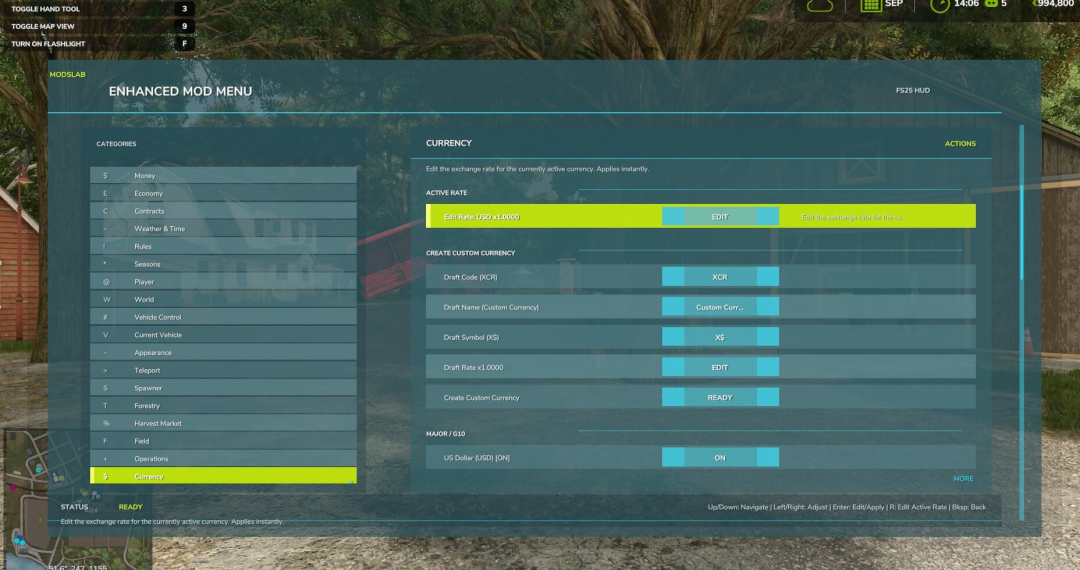
Enhanced Mod / Cheat Menu V1.1
Version 1.1.0.0: The menu has been completely redesigned and now functions as a full-featured HUD in the FS25 style. This FS25 modification introduces a mod and cheat menu with a wide range of features, offering dozens of options: - Adjust your balance (increase/decrease money) - Switch currencies with automatic conversion (over 50 options) and manual exchange rate editing - Place markers on the map and teleport to them - Spawn menu for vehicles, tools, bales, pallets, and more - Configuration menu to modify various vehicle components - Weather, seasons, and temperature controls - Modify vehicle parameters (power, top speed, weight, and other stats) - Player movement adjustments (run speed and jump height) - Perfect field conditions - Instant planting, cultivating, and fertilizing - Enable or disable traffic and pedestrians - Super strength mode (lift objects manually) - Toggle HUD on or off - Tree spawning - Increased chainsaw speed - Optimal market conditions - Increase crop value (sell at maximum prices) - Fly mode and No-Clip mode And many other features. To open the menu, press Alt + M.
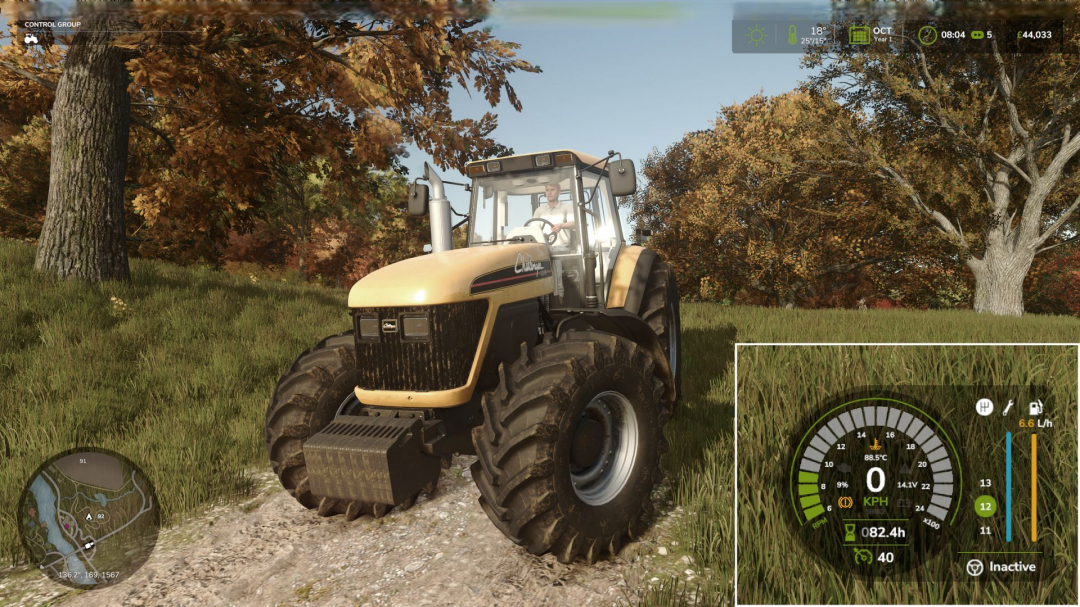
Advanced Damage System v0.9.2.2
Attention: BETA Version Please note: this mod is currently in BETA. Always back up your savegames before using it. Advanced Damage System (ADS) The Advanced Damage System is a complete overhaul of the standard vehicle damage and maintenance mechanics in Farming Simulator 25. A machine’s reliability now depends directly on how carefully and efficiently you operate it. The harder you push your equipment and the less attention you pay to maintenance, the more often it will fail. There are no more instant “one-click” repairs. Maintenance now takes time, resources, and planning. You will need to monitor wear, service your vehicles on time, and manage your fleet properly so that a breakdown does not interrupt important fieldwork. Quick Guide If you do not want to read the full guide but still want to play with ADS without constant breakdowns and unnecessary frustration, just follow these three rules: 1. Always follow the service interval. By default, the recommended interval is about 5 operating hours on average. You can check it: – in the workshop, – in the vehicle info panel when looking at the machine, – in the ADS fleet management menu opened with the P key. Once the interval is reached, perform the Maintenance procedure in the workshop. 2. Inspect and prepare your machines every day. Perform a daily inspection by holding the R key near the vehicle, and do basic pre-shift maintenance. Clean the machine with the Air Blower and lubricate machines that require it with the Grease Gun. These simple routine actions greatly reduce the risk of avoidable failures. 3. Do not abuse your equipment. Avoid overloading, overheating, using implements that are too heavy or too demanding for the machine, excessive wheel slip in mud, hard work on a cold engine, and high-speed driving over rough terrain. A simple rule applies here: if something would be harmful to the machine in real life, it is harmful in ADS too. Key Features - Complete Replacement of the Vanilla Damage System Vehicles are divided into separate critical systems: engine, transmission, hydraulics, cooling, fuel, working systems, electrical, and chassis. Each system has its own wear factors based on operating conditions. For example, excessive wheel slip increases transmission wear, while rough high-speed driving damages the chassis. - Regular Maintenance Becomes Essential Scheduled servicing is no longer optional. It is the main way to prevent accelerated wear and avoid expensive repairs or overhauls. - Dynamic Breakdowns The mod includes dozens of breakdowns tied to specific systems. Each failure has its own gameplay effects and can develop into more serious problems if ignored. - Reworked Workshop Logic The workshop menu now includes inspection, repair, maintenance, and overhaul. Every procedure takes real in-game time, so repair planning becomes part of normal vehicle management. - Realistic Thermal Simulation Engines need proper warm-up and can overheat under heavy load, especially in hot weather or when cooling airflow is restricted. Ignoring temperature can have serious consequences. - Battery and Alternator Simulation Batteries can discharge, alternators can fail, and starting the engine can become difficult. If necessary, you can use one vehicle to jump-start another. - Vehicle-Specific Characteristics Machines differ by brand and age in Reliability and Maintainability. More reliable vehicles wear more slowly and break down less often, while more maintainable vehicles are cheaper and faster to repair. - Pre-Shift Inspection and Maintenance Before heading to the field, vehicles should be inspected and prepared for work. This includes checking the machine, cleaning radiators and air intakes, and lubricating equipment that requires it. BETA 5 Changelog 0.9.2.2: – Added optional tutorial tips that help explain the mod mechanics and warn the player when something is being done incorrectly. Singleplayer only – Added Hungarian and Portuguese translations Required mods: Vehicle Years

Slow Steering V2.1
What does the mod do? In vanilla Farming Simulator 25, vehicles steer just as aggressively at 80 km/h as when maneuvering. This is unrealistic and feels sluggish on a keyboard or gamepad. Slow Steering links the steering angle, steering speed, and return-to-center response to the vehicle speed—at higher speeds, the steering becomes smoother and more precise, helping you maintain control in tight turns. Features include: - Realism layers with speed-sensitive reduction of steering parameters along an adjustable curve - Counter-steering damping for smoother exits from curves - Input dead zone to filter micro-wobbles - Exponential input curve for smoother middle response, ideal for keyboard - Servo effort simulation, increasing steering time with speed to mimic lack of power steering - Brake force scaling for added realism Polished in-game UI with four tabs (General, Steering, Realism, HUD), live curve diagram, preset modes, and intuitive controls. HUD display options include four positions, optional colored bar, speed indicator, and configurable opacity.

Realistic Soil & Fertilizer V2.0.2
Realistic Soil & Fertilizer Mod for Farming Simulator 25 adds meaningful depth to farming without overwhelming complexity. Each field has its own soil health — nitrogen, phosphorus, potassium, organic matter, and pH — that change based on what you grow, what you apply, and the weather. Neglect your soil and yields will suffer. Manage it well and your farm runs more efficiently. **SOIL NUTRIENTS** Each field independently tracks five values: - Nitrogen (N) — depletes heavily from most crops, especially corn and canola - Phosphorus (P) — depletes more slowly, important for root crops - Potassium (K) — lost in large quantities with high-yield harvests; especially heavy for potatoes and sugarbeets - Organic Matter (OM) — improves long-term fertility; manure and compost build it up; chopped straw also contributes - pH — affects nutrient absorption; lime and gypsum adjust it Crops extract different amounts of each nutrient. Fallow fields recover slowly on their own. Legumes (soybeans, peas, beans) provide a spring nitrogen bonus. Growing the same crop consecutively increases nutrient extraction. **FERTILIZER TYPES** The mod supports all major fertilizer types used in the base game and common mods: *Synthetic:* - Liquid Fertilizer — balanced N/P/K, quick uptake - Solid Fertilizer — higher phosphorus, standard cost - Digestate — biogas byproduct, strong nitrogen and potassium - UAN28 / UAN32 — liquid nitrogen solutions - Anhydrous Ammonia — highest-concentration nitrogen source - AMS / Urea — dry and liquid nitrogen options - Starter Fertilizer — high-phosphorus pop-up fertilizer - MAP / DAP — phosphorus-heavy dry and liquid options - Potash — pure potassium source *Organic:* - Manure — slow-release, builds organic matter - Slurry — liquid organic, high in potassium - Compost — excellent organic matter boost - Biosolids — versatile organic option - Chicken Manure — concentrated nutrients, builds organic matter - Pelletized Manure — processed for easier application *PH Management:* - Lime — raises pH significantly - Liquid Lime — gentler than dry lime - Gypsum — slightly lowers pH, improves organic matter *Crop Protection:* - Insecticide — reduces pest pressure - Fungicide — reduces disease pressure Each fertilizer type has realistic nutrient profiles with appropriate application rates in metric or imperial units. **SPRAYER RATE CONTROL** Control exactly how much fertilizer you apply per pass: - Rate Up / Rate Down keys allow on-the-fly adjustments in the cab - 20 stepped rate multipliers from 0.10x to 2.00x in 0.10 increments - Over-application risk: exceeding 1.25x risks pH and nitrogen burn; at 1.50x burn is guaranteed - Auto-Rate mode automatically adjusts application based on field depletion — more for heavy deficits, less for healthy soil - Rate setting persists per vehicle, so you don’t lose your adjustments when you exit **YIELD PENALTY** Low nutrient levels reduce yield. Fields need N, P, and K at or above optimal thresholds for full output. The further below, the larger the penalty — up to a maximum depending on crop demands. **PEST, WEED & DISEASE PRESSURE** Fields track weed, pest, and disease pressure independently. Cultivation reduces weed and pest pressure. Plowing reduces pest and disease pressure more aggressively. Insecticide and fungicide applications directly reduce respective pressures. **HUD** A real-time soil panel shows current nutrient levels at a glance: - 6 preset positions (top right, top left, bottom right, bottom left, center right, or custom) - Custom position is draggable - 4 color themes: Green, Blue, Amber, Mono - 3 font sizes - 5 transparency levels - Compact mode for smaller screens - Toggle HUD on/off with a keybinding - Settings are per-player and do not affect others in multiplayer A full Soil Report is available via keybinding, showing detailed data for the current field. **SOIL MAP OVERLAY** While the map is open, switch between 9 data layers: Nitrogen, Phosphorus, Potassium, pH, Organic Matter, Urgency Score, Weed Pressure, Pest Pressure, and Disease Pressure. Fields are color-coded based on their status. **PDA SCREEN** A dedicated in-game PDA page with two tabs: - Farm Overview — lists all fields with N/P/K/pH/OM and status, plus farm-wide averages - Treatment Plan — highlights fields needing attention with detailed requirements **SETTINGS** Open with Shift+O. In multiplayer, settings are admin-controlled. HUD and display settings are per-player. Toggle systems include: - Fertility system (enable/disable mod) - Nutrient cycles - Fertilizer costs - Seasonal effects - Rain effects - Plowing bonus - Auto-Rate Control - Notifications for low nutrients **Difficulty levels:** - Simple — less depletion, lower costs, more forgiving - Realistic — standard rates (default) - Hardcore — rapid depletion, higher costs, no neglect allowed **Units:** Switch between metric (kg/ha) and imperial (lb/ac) per player. **PRECISION FARMING COMPATIBILITY** If the official DLC is active, this mod enters read-only mode, observing PF soil data without conflicts. **MULTIPLAYER** Fully supported. Server controls gameplay settings; each player manages their HUD preferences. Soil data syncs across clients; new players receive full sync automatically. **CONSOLE COMMANDS** Type 'soilfertility' in the developer console for commands. Key commands include: - soilfertility — show all commands - SoilEnable / SoilDisable — toggle mod - SoilSetDifficulty 1/2/3 — set difficulty - SoilFieldInfo — show soil data for a specific field - SoilShowSettings — display current settings - SoilResetSettings — reset to defaults - SoilSaveData — save soil data - SoilDebug — toggle debug logs **COMPATIBILITY** - Works with all maps and vehicles - Compatible with crop rotation mods - No known conflicts - Save game compatible **INSTALLATION** Extract the zip into your mods folder. Configure via Shift+O. No additional steps needed. **V2.0.2.0** Fixed bugs and improved simulation features. No save migration required. **What’s fixed:** - Custom fertilizers draining tanks faster than intended due to math errors — fixed - Hotkeys firing multiple times when Courseplay is active — fixed **What’s new:** - Soil compaction tracked per 10x10 m cell, only where driven - Subsoiler treatment works cell-by-cell - Translations updated by community contributors **Saves:** No migration needed; existing data carries over. Previous compaction values reset on first load.
Market Dynamics V1.1.4
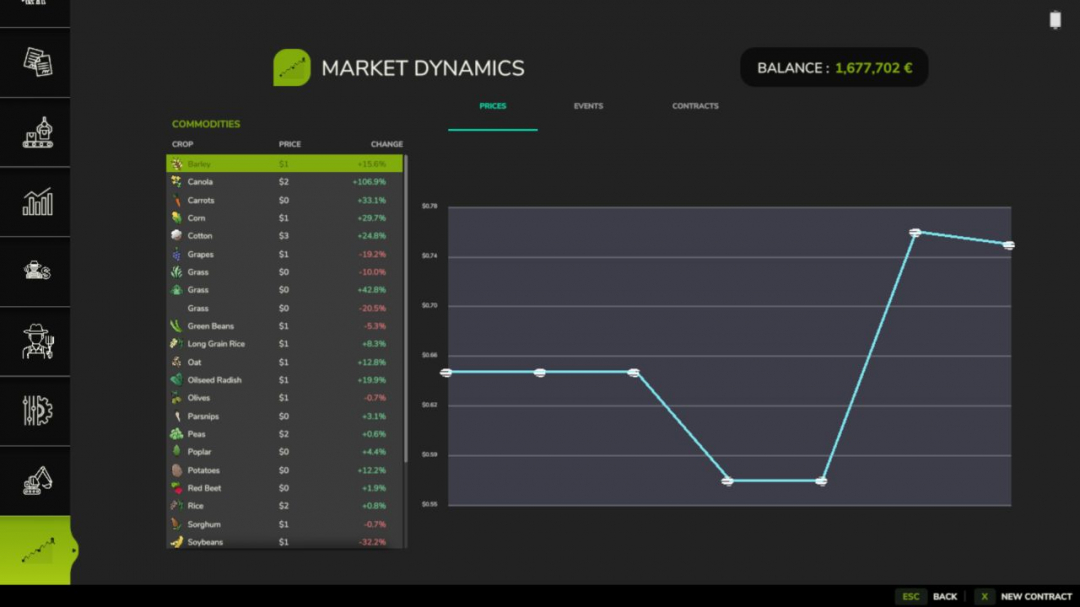
Futures Missions mod can be found here -> https://github.com/Mmtrx/FS25_FuturesMission Real-world inspired dynamic crop pricing for Farming Simulator 25. Prices fluctuate daily and intraday based on world events, supply, demand, and seasonal drift. This is the first public release covering all core systems. **What’s included:** Dynamic pricing engine — every tracked crop has a live price built from a base price, a volatility factor, and an event modifier stack. Prices drift intraday every in-game minute and shift daily with mean-reversion toward the base. They clamp between 50% and 200% of base so things stay volatile but never absurd. Seven world events — Regional Drought, Bumper Harvest, Trade Disruption, Geopolitical Crisis, Biofuel Initiative, Livestock Feed Boom, and Root Crop Blight. Each fires probabilistically with per-type cooldowns and randomised intensity so markets feel alive without becoming noise. Futures contracts — lock in a sell price today for delivery up to 120 in-game days from now. Fulfill on time for the full locked-price payout; miss the deadline and you take a 15% penalty on the unfulfilled portion. If you have FS25_UsedPlus installed your credit score scales that penalty between 10% and 20%. Market screen (F10) — a full InGameMenu page with three tabs: live prices with % change and a session trend chart, active world events with intensity and time remaining, and your contract history. Press N or click New Contract to open the contract dialog from anywhere on the screen. Mod integrations — FS25_BetterContracts: completing a harvest contract applies a short-lived supply-spike to that crop. FS25_UsedPlus: contract outcomes feed your credit score and your score scales the default penalty. Both integrations activate automatically on detection. Translations — all 25 Farming Simulator 25 languages included. Settings — enable/disable dynamic prices, enable/disable events, event frequency, volatility scale, and debug logging, all accessible in-game under ESC > Settings > Market Dynamics. **Known limitations** Multiplayer is singleplayer only in this release. Price state, events, and contracts are not synced across clients. Dedicated server hosting works but only the server player sees live MDM prices. Multiplayer sync is planned for a future release. Save data is stored in savegame/modSettings/FS25_MarketDynamics.xml. Removing the mod mid-save is safe — the file is simply ignored on next load. **V1.1.4.0** FS25_FuturesMission has been updated. The Market Dynamics tab was overwriting the SERVER SETTINGS tab when playing on a multiplayer server. MDM’s tab now always inserts after all existing game tabs (including the MP-only SERVER SETTINGS tab), and recovers automatically if anything shifts tab positions. **Required mods:** Better Contracts

Czech Language Pack V1.3
A translation package for many mods and maps. When a mod translated here is activated, the translation is automatically loaded and applied. You can create your own versions for PL, FR, IT. This script adds or overrides translations for activated mods from the translations folder. – "mapdir"/translations/ Alternatively, you can specify a separate folder: – "mapdir"/modTranslations/ Files must follow the pattern "modname"_"lang".xml. Czech translations for the mods: - FS25_AdditionalFilltypes – v1.1.1.0 - FS25_additionalGameSettings – v1.0.0.5 - FS25_Alma_Missouri – v1.1.0.1 - FS25_AnimalFoodCalculator – v1.0.0.0 - FS25_AnimalPackage_vanillaEdition – v1.0.0.0 - FS25_BR163_Brazil – v1.0.0.2 - FS25_Claas_Axion_900 – v1.0.0.1 - FS25_ClaasJaguar800 – v1.0.0.0 - FS25_ClaasLexion500 – v1.0.3.0 - FS25_ClaasPack – v1.1.0.0 - FS25_CMV – v1.0.0.0 - FS25_Configure_Maintenance – v1.0.0.0 - FS25_ContractBoost – v1.1.0.0 - FS25_CultivatorSettings – v2.0.1.0 - FS25_CustomLogos – v1.2.0.1 - FS25_DefModPack – v1.2.1.1 - FS25_EasyDevControls – v1.2.0.0 - FS25_EnhancedAnimalSystem – v1.1.0.1 - FS25_EnhancedLoanSystem – v1.0.0.0 - FS25_FarmlandOverview – v1.0.2.0 - FS25_Fastrac_4000_ICON – v1.2.0.2 - FS25_Fastrac_8000_ICON – v1.1.0.3 - FS25_Fendt700Vario_Gen6 – v1.3.0.0 - FS25_Fendt700VarioSeries – v1.3.0.0 - FS25_Fendt900Vario_S4 – v1.3.0.0 - FS25_FendtVario_900Gen7 – v1.1.0.2 - FS25_FendtWeightsPack – v1.1.0.0 - FS25_FLC253 – v1.0.0.1 - FS25_FlieglTimberRunnerAutoload – v1.0.0.0 - FS25_Geistal – v1.0.0.0 - FS25_Greenhouse_Wood – v1.0.0.2 - FS25_Hinterkaifeck – v5.0.0.5 - FS25_InfoDisplayExtension – v1.2.2.0 - FS25_infusionproductionpack – v1.1.0.0 - FS25_Jungheinrich_EFG_S50_PRO – v1.0.0.1 - FS25_Lunow_crossplay – v1.0.0.0 - FS25_MAN_19_322 – v1.0.0.1 - FS25_Meat_Production – v1.1.0.0 - FS25_ObjectStorageExtension – v1.0.1.0 - FS25_pinnacle6x4Pack – v1.1.0.0 - FS25_PlaceableOverview – v1.0.1.0 - FS25_ProductionControl – v1.0.0.2 - FS25_ProductionPointLeasing – v1.0.0.0 - FS25_RealisticAnimalLosses – v1.0.0.0 - FS25_RefreshContracts – v1.0.0.0 - FS25_RepairPickup – v1.2.0.0 - FS25_rootCropStorage – v1.0.0.0 - FS25_roundBalerExtension – v1.2.1.0 - FS25_stopFullCombine – v1.1.0.0 - FS25_ToolInclinationHelper – v1.0.0.6 - FS25_TreeSaplingPalletPack – v1.0.0.1 - FS25_TSStockCheck – v1.0.0.2 - FS25_useYourTyres – v1.0.0.3 - FS25_VIPOrderManager – v1.2.1.0 - FS25_VolvoFH16Tipper – v1.0.0.1 - FS25_enhancedMixerWagons – v1.0.0.0 - FS25_GarageMenu – v1.0.0.3 - FS25_CropRotation – v1.0.0.0 Map and mods based on Pichonniere Valley map: - FS25_The_Pichonniere_Valley – v1.1.0.1 - FS25_The_Pichonniere_Buildings_Pack – v1.1.0.0 - FS25_Straw_Shed_Old – v1.0.0.1 - FS25_Ivoy_Straw_Hangar – v1.0.0.0 - FS25_Ivoy_Piggery – v1.0.0.0 - FS25_Ivoy_Farm_Garage – v1.0.0.0 - FS25_Ivoy_Cereal – v1.0.0.1 Map and mods based on Kingdom Of Wallachia map: - FS25_bigGarage – v1.0.0.1 - FS25_CowBarnEuropeanModernPack – v1.0.0.0 - FS25_FoodMixerSilo – v1.1.0.0 - FS25_LongShed – v1.0.0.0 - FS25_OldCornDryer – v1.0.0.1 Map and mods based on CIZKOV map: - FS25_ArtisanalChipsFactory – v1.0.0.0 - FS25_BigWhiteCowBarn – v1.1.1.0 V1.3.0.0 update: - FS25_CropRotation – v1.0.1.0 Added translations: - FS25_HofBergmann – v1.4.0.0 Removed translation: - FS25_MudSystemPhysics – this translation has already been included by the mod author.
Investment System V1.1
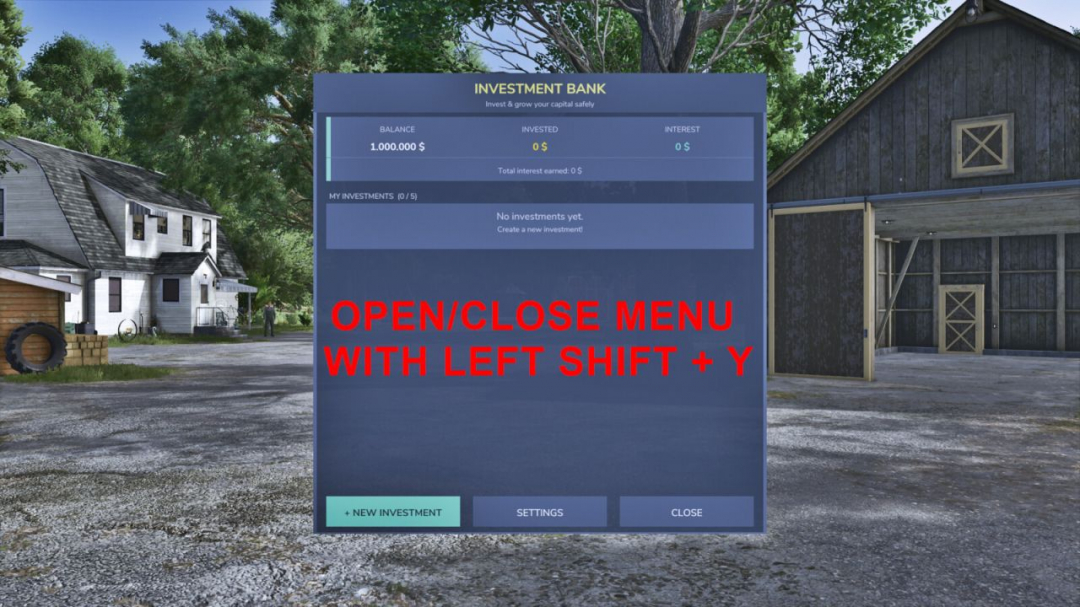
Manage your farm finances like a pro with a full investment system built right into Farming Simulator 25. **FEATURES:** - Deposit money into fixed-term investments (1 to 5 years) - Selectable interest rates: from 0.5% to 5% per annum (in 0.5% increments) - Simple interest: monthly payouts directly to your account - Compound interest: interest is reinvested and paid out at the end of the term - Random rate mode: the bank rolls a random rate when you deposit (configurable) - Up to 5 simultaneous investments per farm - Investments expire automatically and pay out without any fee - Early withdrawal possible at any time for a 5% fee - Live yield preview before confirming a deposit - Remaining term displayed per investment (years & months) - Settings page to switch between fixed and random interest rate mode Open/close the bank with “Left Shift + Y” Minimum deposit: 1,000 | Maximum deposit: 50,000,000 **V1.1.0.0** The key combination for opening/closing the menu has been set to “Left Shift + Y” Fixed an issue where the key combination change was not being applied The amount of money can now be entered via the keyboard Added 2 new buttons to add and subtract 1k and -1k For random interest rates, the interest rate is now displayed before investing Interest rates are rolled once a month Selectable interest rates from 0.5% to 5% (Random interest rates can go up to 10%) German translation updated (ä, ö, and ü instead of ae, oe, and ue)
- 15 per page
- 30 per page
- 45 per page
- 60 per page
-
See more per page
Bigger pages, fewer clicks - and no ads anywhere.
Go Pro