Farming Simulator 22 mods
50,366 results- 15 per page
- 30 per page
- 45 per page
- 60 per page
-
See more per page
Bigger pages, fewer clicks - and no ads anywhere.
Go Pro
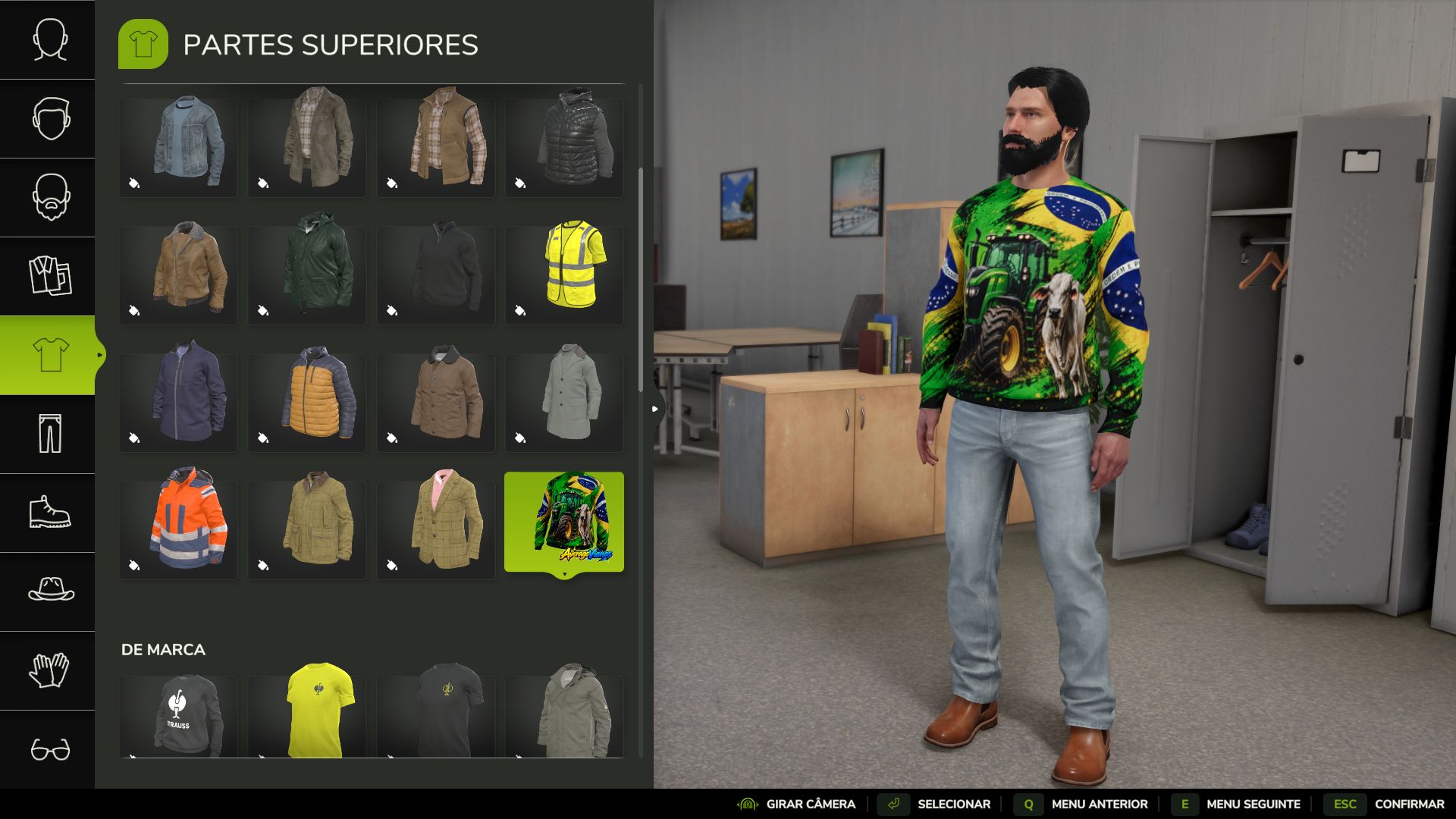
Agro Brasil UV Shirt FS25
UV Agro Brazil Shirt – AverageVianas Long-sleeved shirt featuring a tractor, Nelore cattle and the Brazilian flag, for those who want to bring the countryside and Brazilian pride into the game. Please help me out by supporting my YouTube channel: youtube.com/@vianasgameplay Features Version for male and female characters Fixed design (the color does not change in the wardrobe) Multiplayer compatible Requirement You must install the Wardrobe Clothing Addon (FS25_WardrobeClothingAddon_BMP) by BMProd. Without it, the shirt will not appear. After loading the save, if you do not see the item, switch tabs in the wardrobe or wait about 30 seconds before starting. Credits Base model: U_BMP. Textures and artwork: AverageVianas.
Automatic Profit Tax FS25
This simple mod will automatically tax your profits at the beginning of each month or quarter, depending on your settings. It only deducts taxes for profits from crops, products and property income. You will not be taxed for selling vehicles, equipment, buildings or land. You will also not be taxed if you make a loss. You can choose between the following tax percentages under General Settings: 5%, 10%, 15%, 20%, 25%, 30% and 50%. You can also select Monthly or Quarterly payments. Quarterly payments occur at the beginning of January, April, July and October, covering the previous quarter. This mod is for people who want more realism or a more challenging economy. I made it for personal use but decided to share it with the community in case someone else might appreciate it. Please let me know if you encounter any issues. Have fun!
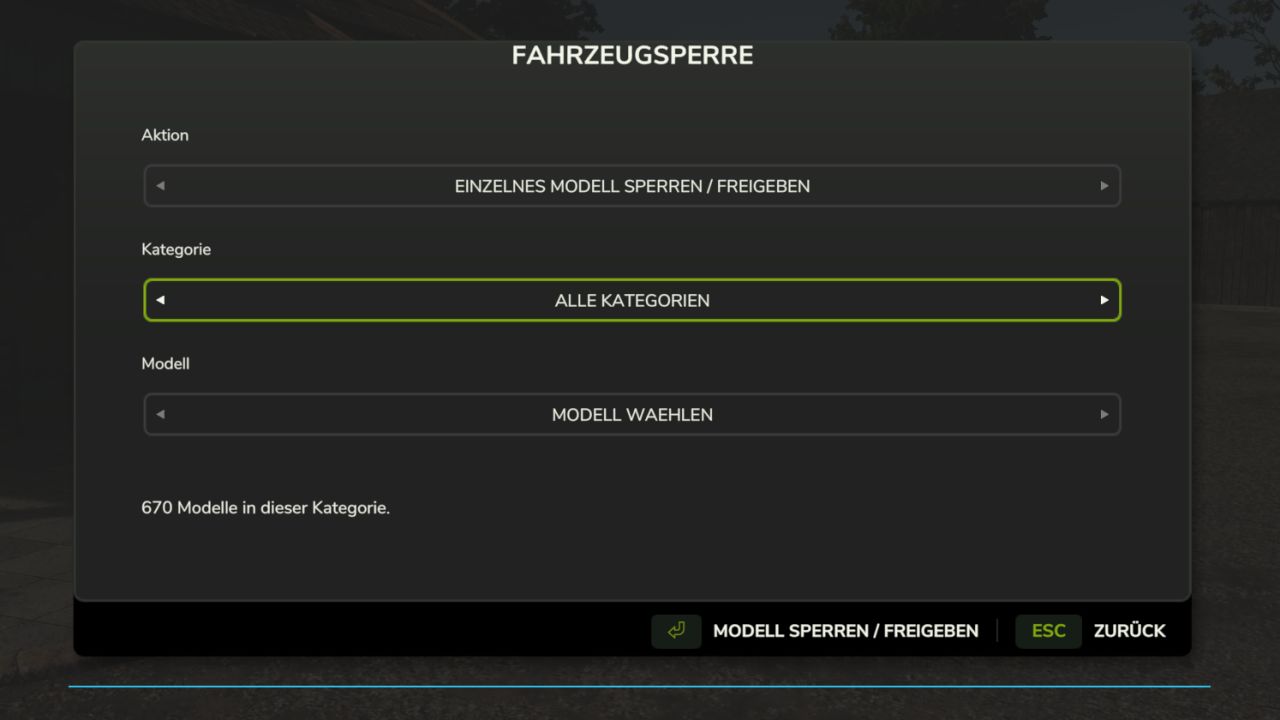
Vehicle Lock FS25
LS25 Vehicle Lock Decide for yourself which vehicle models are available in your game. With the Vehicle Lock, you can block tractors, trucks, harvesters and other machines individually or by category for purchase and rental. Perfect for nostalgia and Ostalgie maps Features: - Lock and unlock models directly in the vehicle view of the shop. - Clear selection menu with action, category and associated models. - Lock and unlock entire categories or all vehicle models at once. - Locked models remain visible in the shop. - Contracts with locked models in the designated loan vehicle package are hidden. - Objects and tools are excluded from the lock. - The lock list is saved separately for each savegame. - Supports loaded vehicles from the base game, DLCs and mods. Controls: Open the selection menu with Ctrl + Alt + B or use the "Lock / unlock model" button in the vehicle view of the shop. Vehicles already owned remain usable. Accepted contracts remain available. A lock applies to all configurations of the respective model. Platform: PC Game mode: Single-player Version: 0.11.0.0 Beta Test version, no multiplayer support.
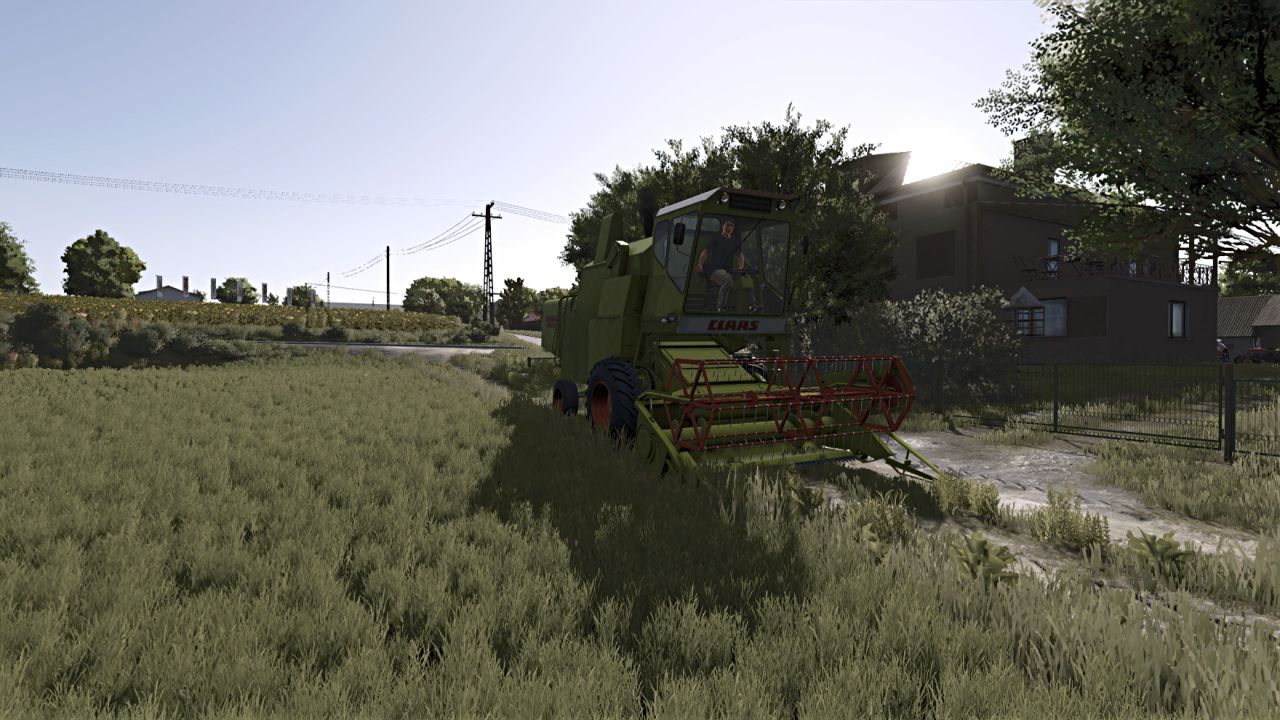
Claas Mercator Series Sound (Prefab) FS25
Advanced realistic sound of Claas Mercator combine series
Farm Assistent FS25
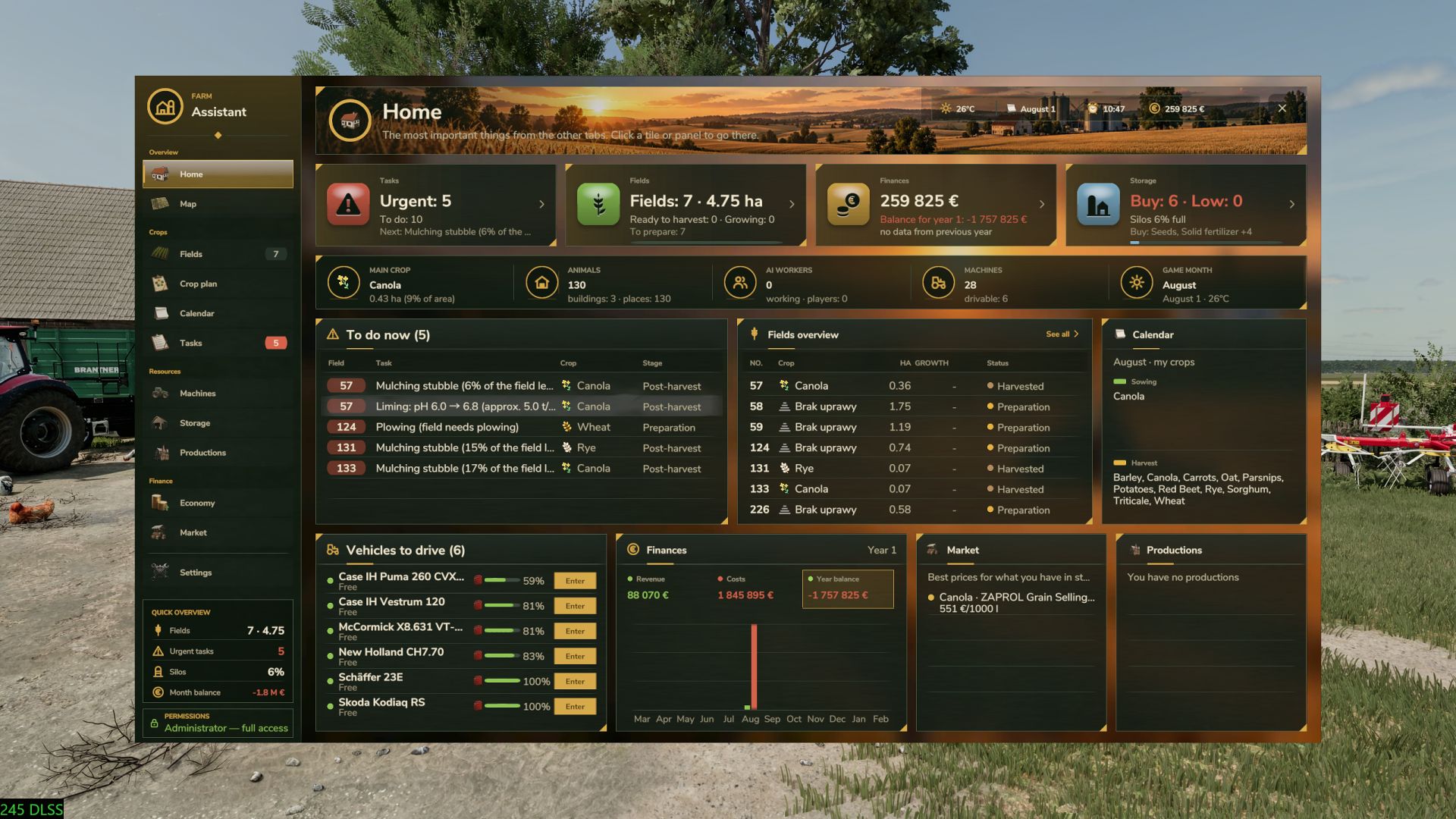
🌾 FarmAssistent – Your Complete Farm Management Assistant Take full control of your farm with FarmAssistent! FarmAssistent is an advanced farm management and planning tool for Farming Simulator 25. It combines field monitoring, intelligent work recommendations, crop rotation planning, financial information, storage management and much more into one modern, easy-to-use interface. Whether you're managing a small farm or a large agricultural operation, FarmAssistent helps you organize your work, make better decisions and stay one step ahead. 🚜 Main Features 🌱 Advanced Field Management - Monitor all your fields in one place. - Check crop types, growth stages and field conditions. - Track fertilization, weeds, stones, plowing and soil requirements. - Precision Farming integration for nitrogen and pH information. - View field status and recommended actions. 📋 Intelligent Field Work Planner - Automatically analyzes field conditions. - Recommends the next agricultural operations. - Displays urgent, planned, blocked and pending tasks. - Helps you choose suitable soil cultivation methods. - Keep track of completed and skipped operations. 🌽 Multi-Year Crop Rotation Planner - Generate crop rotation plans for multiple years. - Uses crop availability and seasonal calendars from the game. - Supports crop rotation rules and catch crops. - Helps organize sowing and harvesting schedules. - Validates generated plans against available crop information. 🗺️ Interactive Farm Map - Overview of your fields and their current conditions. - Different map layers for easier farm monitoring. - Field status information directly on the map. - See which fields are currently being worked by AI helpers. 💰 Farm Economy & Market - Monitor important financial information. - Check current selling prices. - Compare selling opportunities. - View estimated gross margins per hectare. - Review seasonal farming activity. 🏭 Storage, Production & Machinery - Monitor stored crops and available resources. - Check production facilities and required supplies. - View machinery fuel levels and condition. - Keep important farm information in one place. 📅 Agricultural Calendar & Weather - View sowing and harvesting periods. - Plan agricultural operations according to the season. - Receive warnings about upcoming precipitation and freezing temperatures. - Stay informed about important field activities. 📖 Field Journal & Seasonal Reports - Track harvesting, preparation and sowing history. - Review activities for individual fields. - View yearly summaries of harvested and sown crops. - Receive end-of-year notifications. 🎨 Modern Interface - Modern graphical interface with detailed dashboards. - Four selectable interface themes. - Field information and task indicators. - Custom icons and visual status indicators. - Configurable HUD displaying useful information during gameplay. - English and Polish language support. 🌐 Multiplayer Support FarmAssistent supports multiplayer and dedicated servers. Farm information is shared through the server. Farm settings, crop plans and task statuses are managed by the server administrator or host, while other players have read-only access. ⚙️ Important Information FarmAssistent is a management and advisory tool, not an automatic farming system. It helps you decide what to do next, but does not automatically operate machinery, purchase equipment, sell crops or perform field work. Precision Farming integration is available when the DLC is installed. How to open: Left Shift + G Game: Farming Simulator 25 Version: 2.0.3.0 Multiplayer: Supported Dedicated servers: Supported Languages: English / Polish Author: Bleh 🆕 Version 2.0.3.0 - Improved stubble mulching detection. - Corrected field status after mulching. - Improved seasonal summaries and notifications. - Added field journals and seasonal reports in the 2.0 series. - Added weather warnings and AI helper field tracking. - Improved interface performance and usability. Created by Bleh. Enjoy smarter, more organized farming with FarmAssistent!
Menu organizer FS25
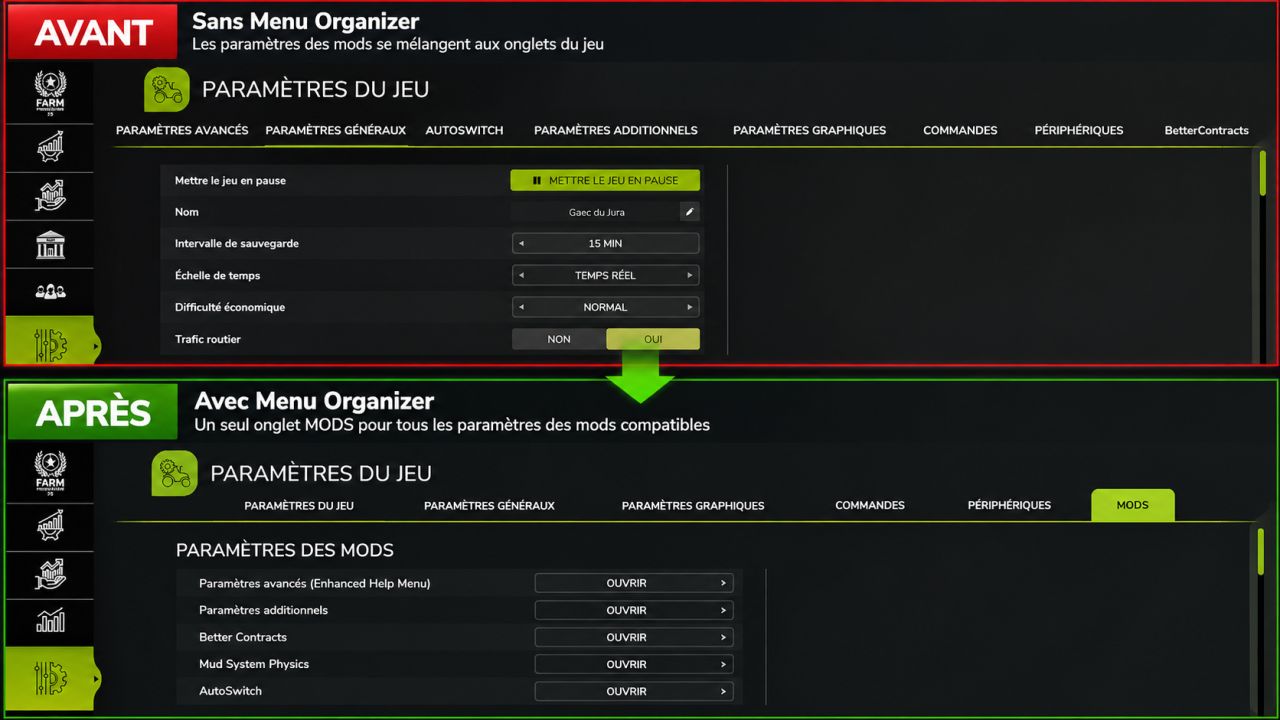
Cleaner menus, a better-organized game! With several mods installed, the Farming Simulator 25 settings menu can quickly become cluttered. Menu Organizer provides a simple and effective solution. The mod automatically groups the settings pages of compatible mods into a single MODS tab, while keeping the game's original tabs. Features Automatic grouping of settings for compatible mods. A single MODS tab to easily find their settings. Preservation of each mod's individual features and settings. Mouse- and keyboard-compatible navigation. Discreet interface, integrated into the Farming Simulator 25 style. No configuration required. Installation: simply enable Menu Organizer in your game. Note: mods using a completely independent interface are not affected. Menu Organizer: fewer tabs, more clarity!
No Grass Drop FS22
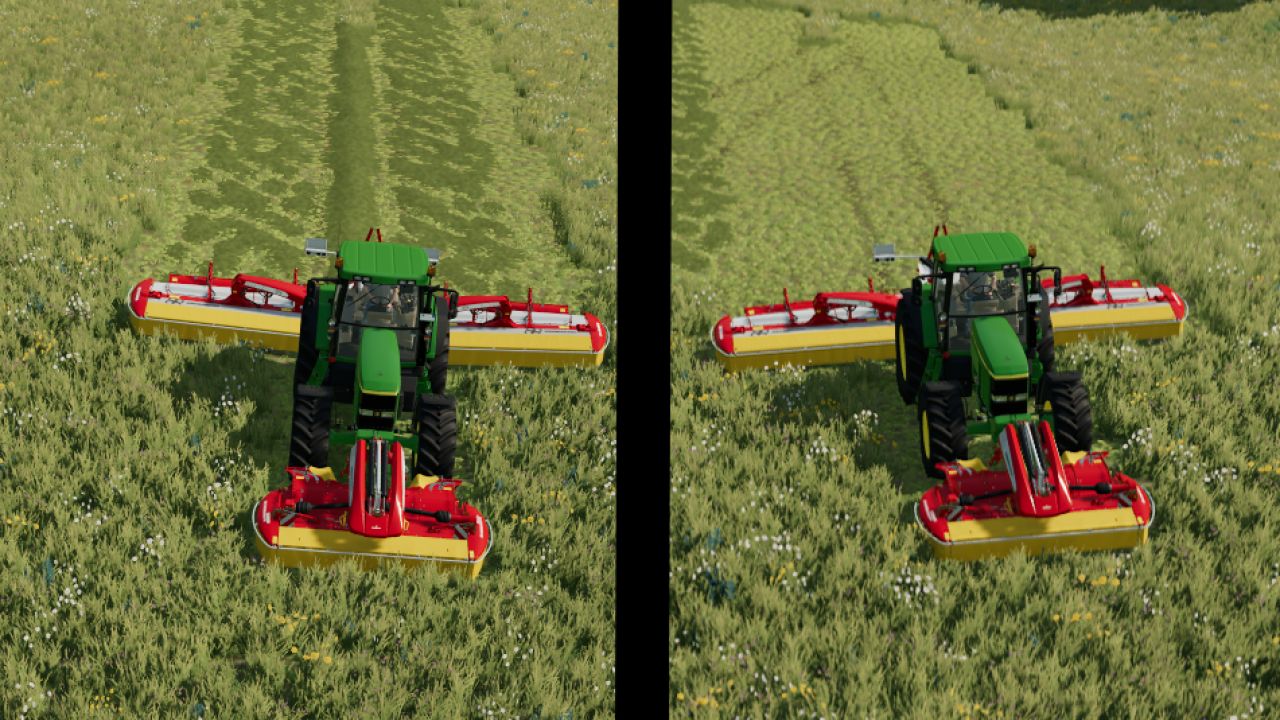
Script that allows you to disable grass discharge from mowers F9 KEY Very good game


Inventory Backpack FS25
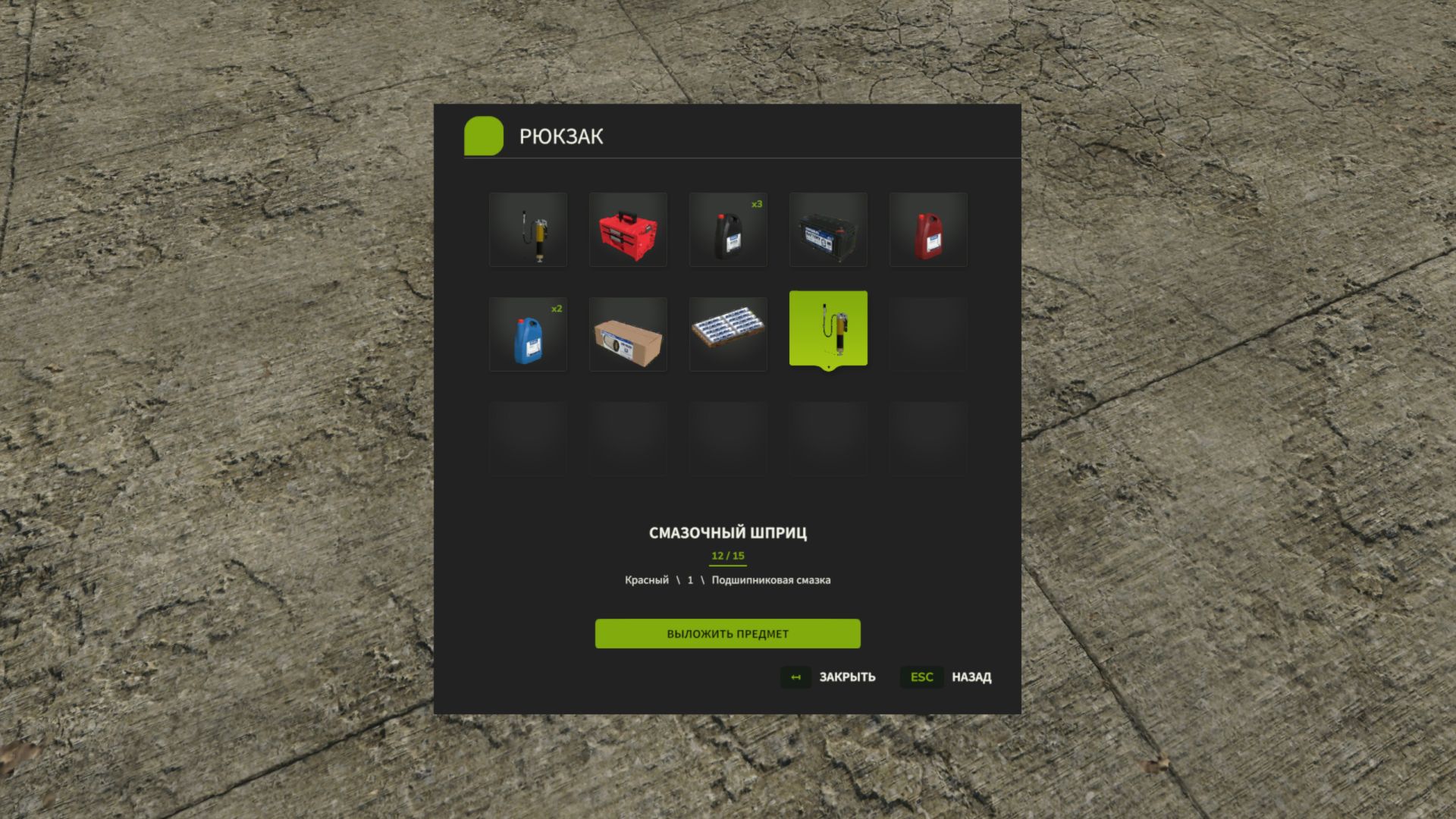
🎒 Inventory BackPack — Keep all your essentials with you! Tired of carrying items one by one? Constantly having to head back for things you’ve forgotten? Using an entire vehicle just to transport a few small objects? Now, in Farming Simulator 25, you have your very own backpack! Inventory BackPack adds a personal inventory system with 15 slots to the game, allowing you to collect, store, carry, and retrieve compatible items whenever you need them. Working in the fields? Servicing your machinery? Transporting small tools and accessories? Or simply want to keep your gear close at hand? You no longer need to return to the farm every single time! ✨ What’s new in version 1.0.0.1? 🌍 New languages added! The interface now automatically switches between Russian, English, and German based on your game’s language settings. 🎮 Revamped control system! Key bindings for 'I' and 'Y' have been adjusted to minimize conflicts with vehicle controls. 🚜 Vehicle controls take priority while you’re inside a machine; backpack functions are restored once you step out. 🔧 Additional tweaks to ensure smooth control functionality in multiplayer. The updated control system is currently undergoing testing on dedicated servers. 🎒 Key Features 📦 15 inventory slots — carry multiple items at once. 👨🌾 Personal backpack — each player has their own unique inventory. 🌐 Multiplayer support — designed for both single-player and co-op gameplay, including dedicated servers. 💾 Persistent storage — each player’s inventory is saved individually within every save game. 🖼️ Intuitive interface — displays item icons, names, and configurations. 🔢 Item stacking — identical items are grouped together, with the quantity clearly shown. 🖱️ User-friendly controls — select items using your mouse or keyboard. 🔧 Support for other mods — allows you to store compatible carryable objects from third-party modifications. 🚫 No cheats — you won’t be able to stuff a tractor, truck, or large piece of equipment into your backpack! 🚜 One backpack — many uses! Heading out to work far from the farm? Take everything you need with you. Need to move several small items? No more running back and forth for each one individually. Using the Advanced Damage System? The backpack helps you carry compatible filters, tools, and consumables. Inventory BackPack is a completely standalone mod. It does not require the Advanced Damage System or any other additional mod to function! 🎮 Controls I — Open / close backpack (on foot). Y — Place an item into the backpack. Mouse / arrow keys — Select an item. Enter — Remove the selected item. Esc — Close the menu. 🌍 Supported Languages 🇷🇺 Russian 🇬🇧 English 🇩🇪 German The interface language is determined automatically based on your game settings. 📥 Installation Download `FS25_InventoryBackPack_for_Multiplayer.zip` from the "Assets" section below. Place the ZIP archive into your Farming Simulator 25 `mods` folder. Activate the mod in your savegame. For multiplayer, ensure the same version is installed on both the server and all players' computers. Note: Compatibility with specific third-party items may vary. Work on object physics and key bindings for dedicated servers is ongoing. 🎒 Less running around. More farming! Game: Farming Simulator 25 Version: 1.0.0.1 Author: Vovainter Platforms: PC Languages: RU / EN / DE ❤️ Support & Feedback Inventory BackPack is under active development! Found a bug? Have an idea for a new feature? Feel free to share your feedback via GitHub Issues. The mod continues to evolve! If you’ve found a bug or have suggestions for improvements, please let us know in the GitHub Issues section. Thank you for downloading and supporting Inventory BackPack! Thank you for your support! - Added localization in three languages: English, German, and Russian. - Fixed occasional keyboard control conflicts on dedicated multiplayer servers. - Improved the stability of the backpack keys (I and Y). Fixed cases where the keys stopped responding to presses in multiplayer games.
First Person Player Body FS25
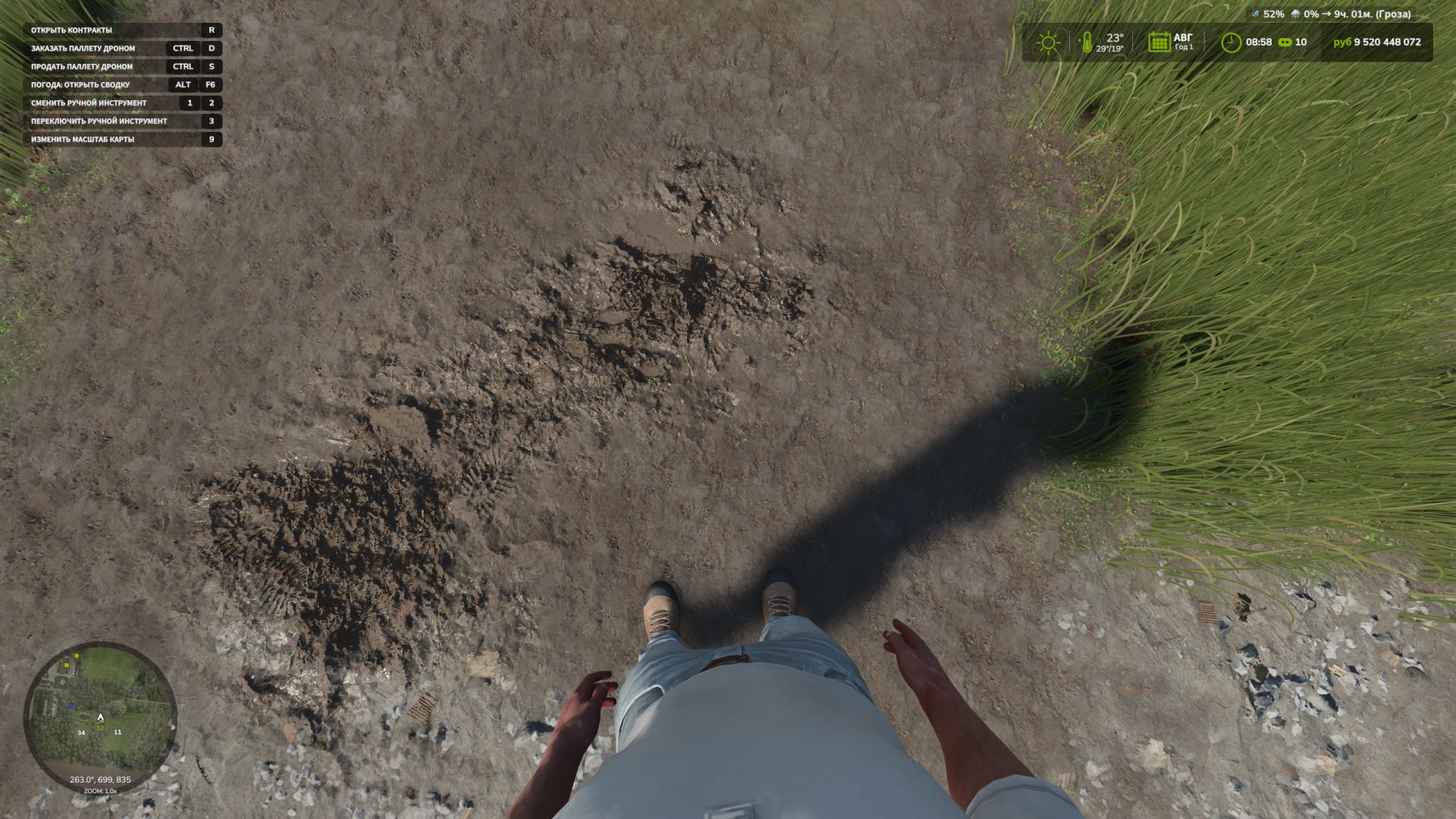
First-Person Player Body adds a “full” character display in first-person mode in Farming Simulator 25. Now, when looking down, the player can see their animated body, legs and arms, and the character’s movements are correctly displayed together with the camera. The head remains behind the camera so that it does not obstruct the view, while still contributing to the shadow. The mod also improves the first-person view inside vehicles. When using the interior camera, the standard seated driver model is displayed. The camera can follow the eye animation and movements of the seated character. The mod settings include: * On foot - Player body visibility. - Camera side-to-side movement. * In vehicles - Driver body visibility. - Camera position — standard or eye level. - Camera following the driver’s animation. To move the camera in standard mode, or the entire character in eye-level mode: Rctrl + Arrow keys RAlt + Arrow keys - Added Spanish translation (Pericops) - Fixed the hand takeover mode when one of the hands switches a lever and, upon returning, does not take over the steering wheel. (This issue should no longer occur) - Now, if the "standard" mode is selected in the vehicle, only the camera moves using RCtrl+arrow keys and RAlt+arrow keys; if "at eyes" is selected, the character’s butt bone moves. - Improved hand interception - Minor fixes - Adaptation to Beam Eye Tracker can be enabled or disabled in the settings. - New hand-over-hand steering setting, enabled in the settings. - Added new settings for the mod: -- Save FOV -- Set the steering wheel rotation angle in the cab to 150 degrees for all vehicles. (This prevents the hands from twisting.) -- By pressing RCTRL + R, you can set the steering angle for each vehicle separately. - Added new settings options. Enable or disable FOV control and enable or disable FOV reset after exiting the vehicle - Minor fixes - Added interior cabin zoom or FOV. Adjust with the mouse wheel, press the mouse wheel to reset. (Not tested with other mods that work with FOV; to avoid problems, I recommend not using them.) - Various minor fixes - Fixed an issue causing the camera to reset after applying the game mechanics using characterTargetNodeModifier to vehicles. - Added the ability to move forward and backward using LAlt + Up Arrow (forward) and Down Arrow (backward) - Fixed an error when saving - Added compatibility with the FS25_CabView mod - The default camera position setting in vehicles has been changed to "Eye level" (those who have already used the mod will keep their own settings) - You can now adjust the height of the character's fifth point while sitting in a vehicle, thereby lowering or raising the bone; the skeleton depends on where the character's buttocks are located. (The controls can be assigned in the settings; by default, RCTRL + the up and down arrow keys on the keyboard) - Translations have been moved to separate files - French, German, Polish and Czech translations have been added
Dubya Cattle Co. Cab HUD FS25
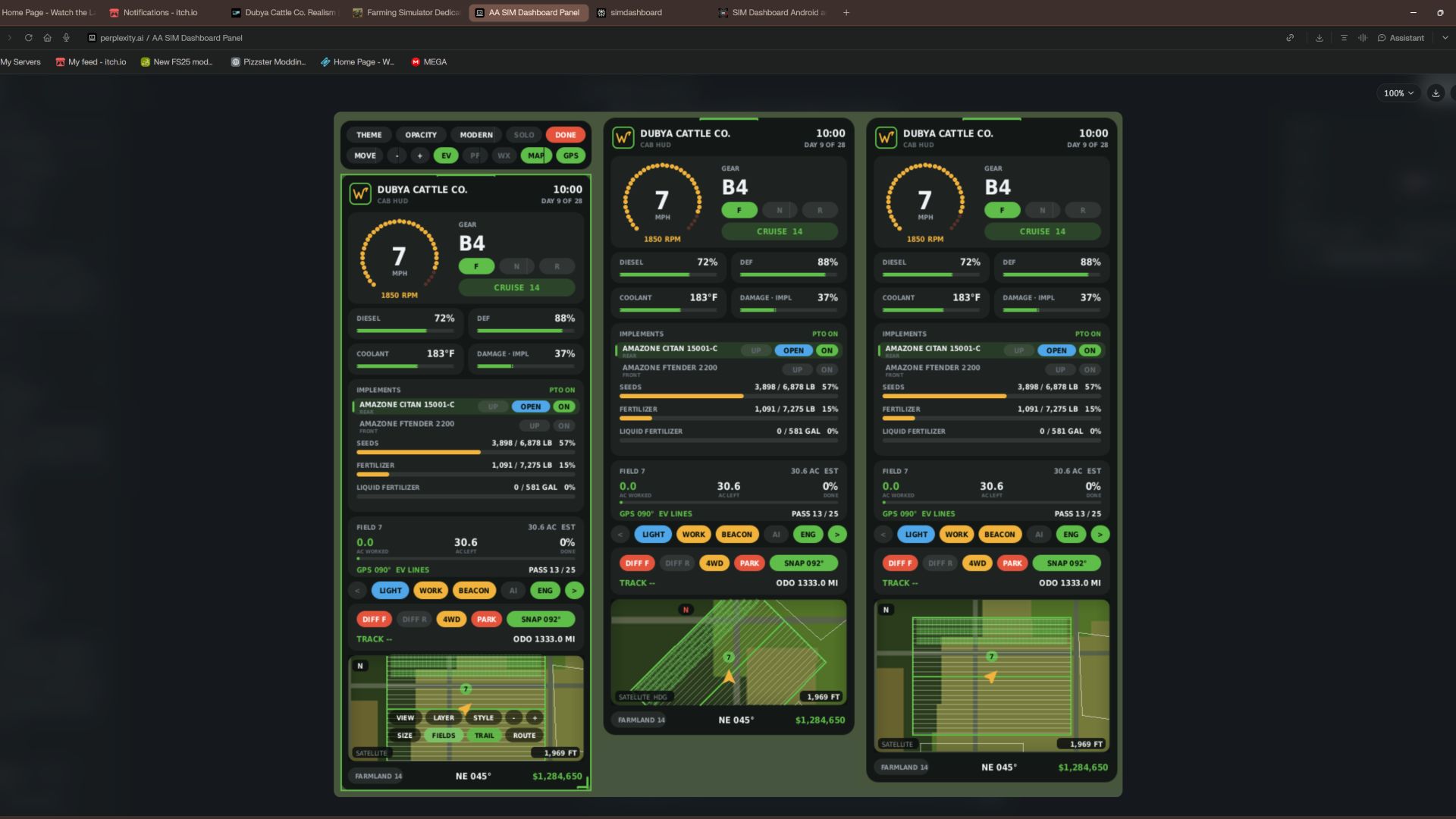
Dubya Cattle Co. Cab HUD for Farming Simulator 25 A full in-cab dashboard panel that puts everything you need while driving in one clean, movable, resizable window. Speed, engine, fuel, implements, Precision Farming data, a live mini map with field layers, and a 5-day weather forecast, all without opening a single menu. The panel shows whenever you're in a vehicle and hides when you get out. It's client-side, so it works in single player and on multiplayer and dedicated servers, and each player sets it up their own way. What the panel shows Header Dubya Cattle Co. logo In-game day of the month and the time of day Driving and engine Speed (MPH) and engine RPM, with bar gauges Direction (Forward / Neutral / Reverse), current gear, and cruise control speed Diesel (or electric / methane), DEF level, coolant temperature in °F, and damage Damage works like the game's repair bar: it shows the worst damage across the tractor and everything attached, labeled "DMG IMPL" when an implement is the worst one Implements (like the game's control group HUD) Every attached implement, including ones hooked to other implements, listed with front or rear position The selected implement is highlighted Each implement shows whether it's raised or lowered, folded or open (for implements that fold), and turned on PTO on/off Acres worked and left Shows the field you're working, its size in acres, acres worked, acres left, and percent done, with a progress bar In single player or when you host, it counts the exact area your implements process, so overlap isn't counted twice On a dedicated server it estimates from working width and distance, marked EST Each field and implement set gets its own counter, so a new job on the same field starts at zero Fill tanks Every tank across the tractor and implements, up to 4: for example seed and fertilizer on a seeder, or a front tank Each tank shows its fill type, amount, capacity, and percentage with its own bar; empty tanks are named after what they hold Bars turn amber at 20% and red at 10% Lights and status Indicators for turn signals, headlights, work lights, beacon, AI helper, and engine on/off Enhanced Vehicle support (optional) If you run the Enhanced Vehicle mod, an extra section shows: Front and rear diff locks, 2WD / 4WD / FWD mode, and park brake Steering snap angle, track number, work width, and headland distance Odometer and trip meter Precision Farming support (optional) If Precision Farming is installed, the panel shows: The soil type under your tractor Sprayers and spreaders: pH or nitrogen, current and target value, application rate, and auto / manual mode (amber means you're still under target) Seeders: seed rate, auto / manual mode, and tramline width Combines: yield in t/ha and the percentage of yield potential Mini map Three views (Right Ctrl + Y): 2D north up, 2D heading up (the map turns with you and a red N shows where north is), and a live 3D chase view from above and behind the tractor North-up map of your farm, using your map's own overview image, with an arrow showing your heading 4 zoom levels: 300 m, 600 m, 1.2 km, 2.4 km across Field layers, using the same colors as the game's map menu, with a legend: Field Work: plowed, cultivated, stubble tillage, seedbed Crops: growing, ready to harvest, harvested, withered Fertilized: fertilizer levels (replaced by PF Nitrogen when Precision Farming is installed) Needs Work: needs lime, plowing, or rolling Weeds: weeds and stones Precision Farming: soil types, pH, nitrogen, yield, and seed rate Layers refresh every 15 seconds, so fresh work shows up as you go 5 map styles: Standard, Satellite, Topo (with grid), Dark, and Night Weather forecast Today plus the next 4 days Weather icon for each day (the worst weather expected during working hours) High and low temperatures in your game's °F or °C setting Rain, storm, hail, and snow days highlighted in amber Footer Farmland number, compass heading in degrees, and your farm's money Customization Modern layout (default): rounded cards, an arc-style RPM gauge around the speed readout, slim pill gauges and pill-shaped buttons. The original Classic layout is one key press away. Move the panel to preset screen positions, or drag it anywhere with the mouse Resize it with hotkeys, or drag the bottom-right corner 10 color themes plus a custom theme you can set in the settings file Adjustable background opacity Turn each section on or off: Enhanced Vehicle, Precision Farming, map, forecast Solo mode hides the game's own HUD and keeps only this panel, for a clean cinematic cab view. Enhanced Vehicle's guide lines and track numbers stay visible. The game HUD comes back when you get out of the vehicle. All settings save automatically to modSettings/FS25_DubyaHUD.xml Controls Every key uses Right Ctrl, and all of them can be changed in Options → Controls under "Dubya HUD". Keys Action Right Ctrl + H Show / hide the panel Right Ctrl + J Move to next screen position Right Ctrl + K Smaller Right Ctrl + L Bigger Right Ctrl + C Next color theme Right Ctrl + B Background opacity Right Ctrl + O Solo mode (hide game HUD) Right Ctrl + E Show / hide Enhanced Vehicle info Right Ctrl + P Show / hide Precision Farming info Right Ctrl + F Show / hide weather forecast Right Ctrl + M Show / hide mini map Right Ctrl + N Map zoom Right Ctrl + G Map layer Right Ctrl + V Map style Right Ctrl + U Panel layout (modern / classic) Right Ctrl + Y Map view (2D north up / 2D heading up / 3D) Mouse: when the cursor is showing, drag the panel's header to move it and its bottom-right corner to resize it. Installation Put FS25_DubyaHUD.zip in your mods folder (Documents\My Games\FarmingSimulator2025\mods). Don't unzip it, and keep the file name exactly as is. Enable the mod when you load or create your save. For a dedicated server, upload the same zip to the server's mods folder and enable it there. Get in any vehicle. The panel appears automatically. Compatibility Works on its own. Enhanced Vehicle and Precision Farming are optional; their sections only appear when those mods are active. Other mods' HUDs, such as AutoDrive or Courseplay, aren't hidden by solo mode. If something isn't working, check log.txt for lines starting with "DubyaHUD". v2.5.0.0 Fixed Acres worked / left reading too high, especially in a combine (one headland lap could show half the field done) Now measured on a 2.5 m grid using each work area's real position: only ground actually passed over counts, and each spot counts once Overlaps, headland turns and driving back over cut ground no longer add acres Combine straw/chopper areas and ridge markers are left out, so the header isn't counted twice Same accuracy in single player, hosting and on a dedicated server (no more EST estimate) Saved progress uses the new grid; totals saved by older versions start fresh once v2.4.0.0 Added Needle speedometer (modern layout): switch with Right Ctrl + I or by clicking the gauge Dial scaled to the vehicle's top speed, rounded up to the next 10 mph Speed ring lights up as you go faster, red near top speed Cruise speed marker and a digital readout under the needle Choice is saved; the digital gauge with the RPM ring is still the default Changed Implement states now read LOWERED / RAISED and FOLDED / UNFOLDED (pills, classic list and hitch buttons) More space between implement names and their state pills v2.3.0.0 Added Month name in the header next to the day (for example OCTOBER DAY 9 OF 28), using the game's own month names Clickable at all times: the HUD is clickable whenever you're in a vehicle, with no key to press first The camera only holds still while the mouse is over the HUD The toolbar shows when the mouse is over the HUD; map buttons show when it's over the map Right Ctrl + X or DONE pauses clicking until you next get in a vehicle ALWAYS button on the toolbar turns it off (back to Right Ctrl + X only) Removed 3D map view, which could crash the game when you switched to it; a saved 3D setting falls back to 2D v2.2.0.0 Added - Auto map layer: when you're on a field, the map switches to the layer for the job - Plow, cultivator, disc, subsoiler, roller, mulcher, stone picker or seeder: Field Work - Fertilizer, liquid fertilizer, slurry, manure or digestate: PF Nitrogen (Fertilized without Precision Farming) - Lime: PF pH (Needs Work without Precision Farming) - Herbicide or weeder: Weeds - Combine: PF Yield (Crops without Precision Farming); mower or baler: Crops - Sprayers and spreaders are read by what's in the tank, what was last in it, or what a front tank is feeding them - A layer you pick yourself stays until the job changes or you enter another field - AUTO map button in interact mode turns auto layer on or off Removed - Coverage trail (drawing, saving and its map button); older saved trail data is ignored --- v2.1.0.0 Added - GPS route uses the game's own GPS (Steering Assist), so GPS lines work without Enhanced Vehicle - Driving onto a field switches the vehicle to Steering Assist; the game detects the field from the ground, builds its course and shows its lines in the world - Your normal AI mode comes back about 8 seconds after leaving the field, or when you get out or switch vehicles - HUD map shows the game's lines with the current line highlighted; the field card shows LINE x / y - GPS modes on the GPS toolbar button: AUTO, GAME, EV, OFF - Saved field work: worked acres are saved per savegame (and per server in multiplayer), every 30 seconds, on game save and on quit - Finished fields worked again on a later day start over automatically for the next season - RESET button on the field card in interact mode (click twice to confirm) --- v2.0.0.0 Added - Interact mode (Right Ctrl + X): mouse cursor, camera stops following the mouse, clickable HUD - Lights, work lights, beacon, turn signals and engine - Select an implement; raise/lower, fold/unfold and turn it on from its pills - Enhanced Vehicle diff locks, 4WD, park brake, snap, and odometer/trip - Map buttons for view, layer, style, zoom, size, field outlines and route; mouse wheel zooms the map - Toolbar for theme, opacity, layout, solo mode, move, size, and showing EV, PF, forecast, map and GPS - Drag the header to move, drag the corner to resize - Leave with Right Ctrl + X, DONE, or by getting out of the vehicle - Automatic GPS route when you enter a field: follows the field's longest straight edge, first pass half a work width inside it - Turns on Enhanced Vehicle's track lines when it's installed; the HUD map follows changes made in Enhanced Vehicle - Field card shows the route heading and pass number - Right Ctrl + R recalculates the route - Map upgrades - Field outlines and field numbers, with the field you're in highlighted - Three map sizes (Right Ctrl + T) - Heading-up view puts your arrow lower so you see more ahead - Outlines are only drawn for fields in view Changed - All earlier keybinds kept --- v1.9.0.0 Changed - Imperial units everywhere, whatever the game's unit setting - Liquids in gallons; grain in bushels (USDA standard bushel weights); everything else in pounds - Speed and cruise in mph; coolant and forecast in °F - Work width, headland, tramlines and map scale in feet; odometer and trip in miles - Precision Farming rates in lb/ac or gal/ac; seed rate in lb/ac or seeds/ac; nitrogen in lb/ac - Combine yield in bu/ac for grain, lb/ac for other crops
FarmSimBot – your FS25 Discord bot FS25
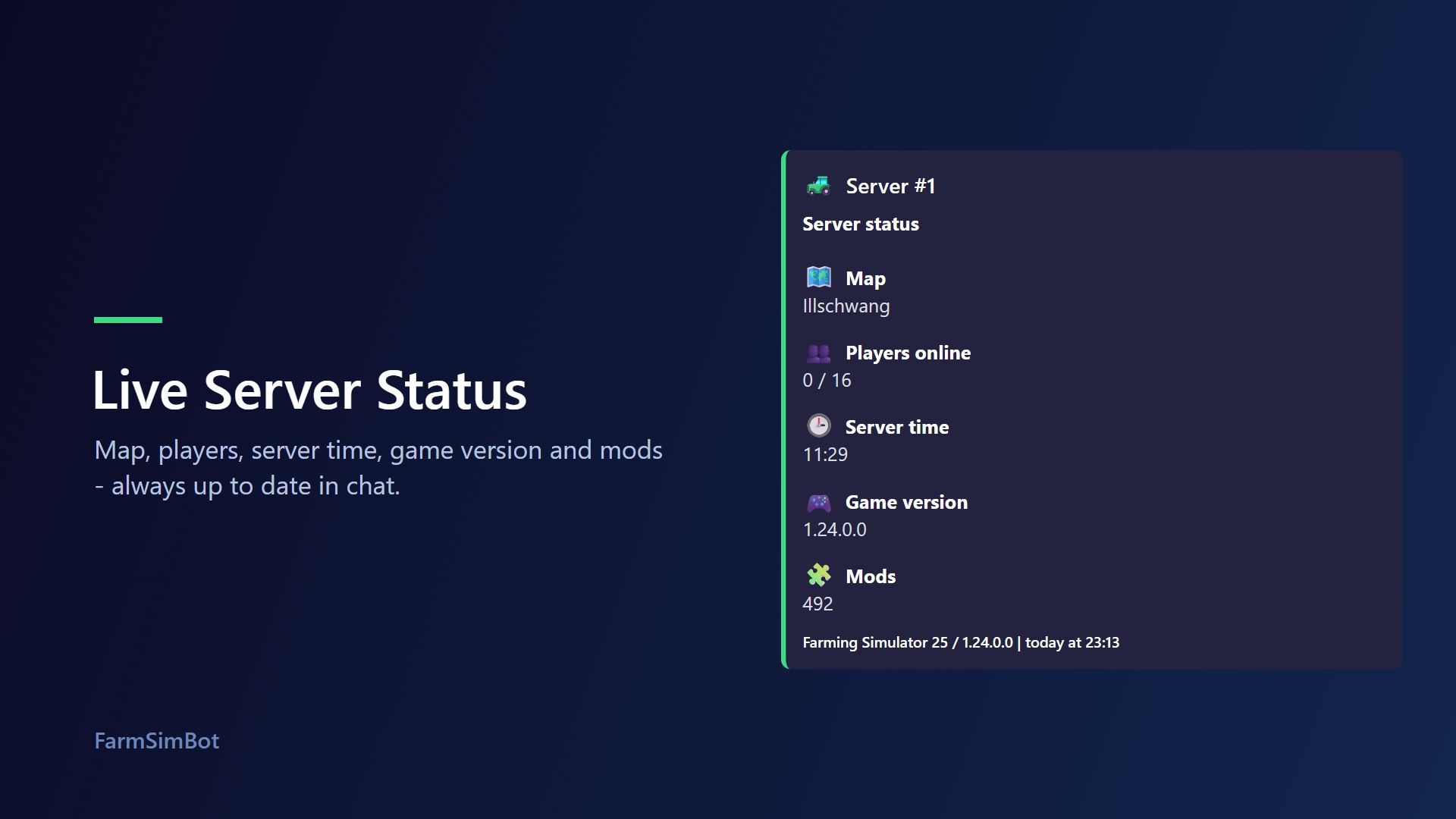
FarmSimBot – your FS25 Discord bot FarmSimBot shows the status of your Farming Simulator 25 server right in Discord and connects your community with the SimuTools mod database. Everything is set up conveniently in the web panel. Features Please note that some FarmSimBot features are paid. - Live server status: A message that updates automatically, with players, map, server time, game version and mods. It also notifies you when someone joins or leaves the server. - Mod watch: Notifications about new, removed and updated mods on your server, optionally with a download button. - Mod comparison: /modcheck compares the mods on your server with the database and shows outdated versions. /modsearch searches mods by name or author. - ModUpdater: New mods from the SimuTools database are posted with image, rating and link in a channel of your choice. - World management: Notifications about month changes and fields that are ready to harvest. - Live map: A map in Discord with players, vehicles, pallets and bales. - Application system: An "Apply" button for your Discord. Applicants answer your questions by private message (text, buttons, age check, speed test). Then your team votes, decides directly, or applicants are accepted automatically. The bot assigns the role, runs trial periods and shows statistics in the panel. (New, Community tier) - Multiple LS25 servers per Discord server and a custom design for the status message. - Your own bot name and bot image on your server. - Community features: Level system with role rewards, birthdays and small games such as quiz, hangman and word scramble. Set up in three steps - Invite the bot to your Discord server. - Log in to the panel with Discord and select your server. - Enter the statistics feed of your LS25 server and choose the channel for the status message. Added an image version of Server Stats using an image editor - Added a test system (tests all of the bot's features for a certain period of time) - Improved and expanded the ticket system - Miscellaneous bug fixes and improvements New Functions and More - - Ticket System, Serverlist, LogHelper, etc.. - New Functions and More (see on Dashboard) Application System Added (Adds an application system to your Discord) - Yes/No dialogs - Text boxes - Speed test - and more Users click the button in a channel and receive a private message; after answering the questions, the user is either accepted based on the settings, or a vote is initiated to decide whether they should be accepted
FS Icon Studio FS25
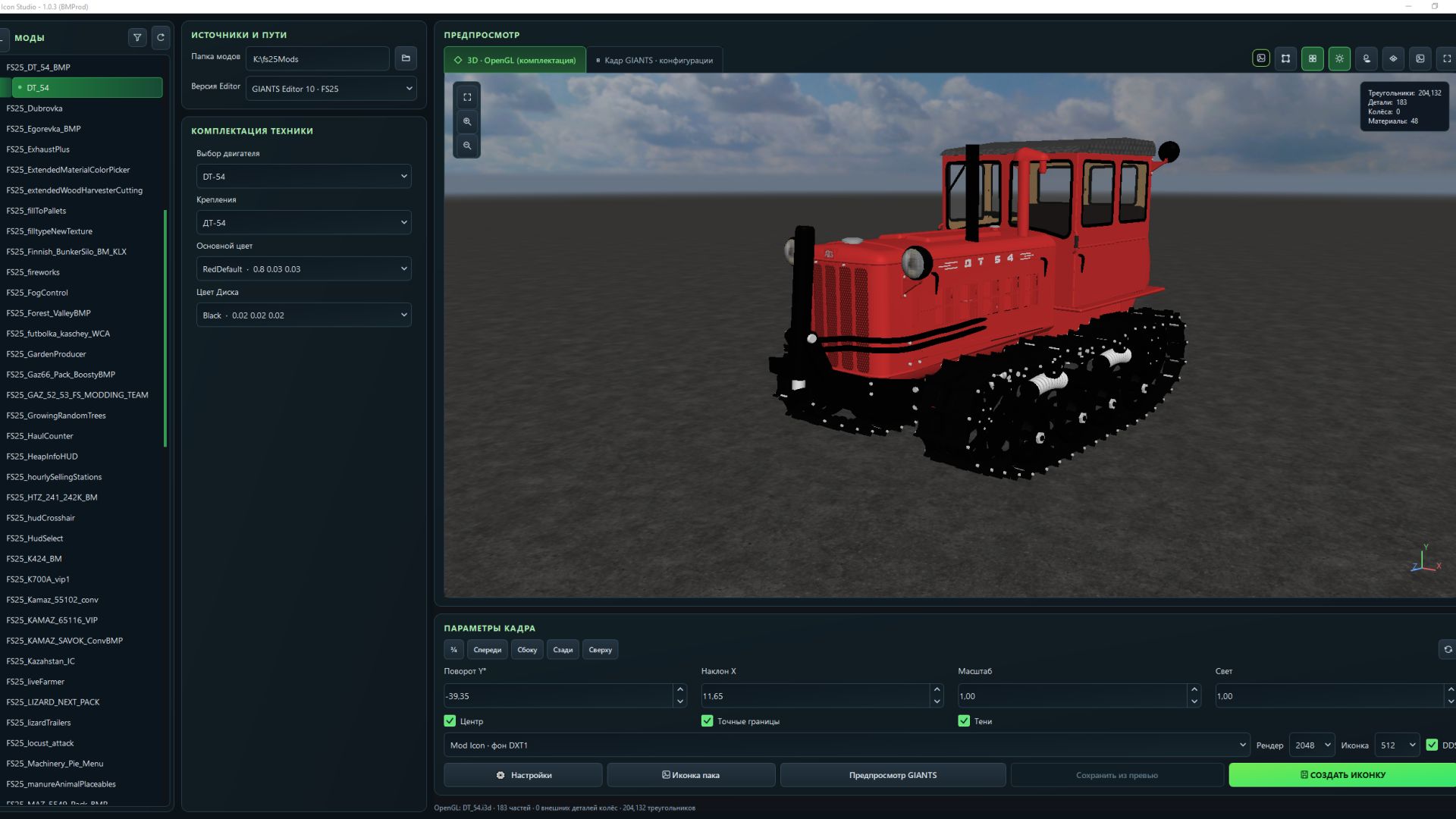
FS Icon Studio — a Windows utility that combines vehicle selection, equipment configuration, 3D preview and ready-to-use icon creation in one window. It helps prepare images for the in-game store and a mod cover: choose the required wheels and color, set the camera angle, check the result and save it as PNG or DDS. Features - FS22 and FS25 in one application. Separate path settings for the games and GIANTS Editor 9 and 10, with switching between versions. - Convenient mod list. Unpacked mods are displayed as a tree with store items. If a mod has no storeItems list, the program suggests the discovered I3D models. - Interactive 3D preview. Adjust the camera angle and check supported configurations without launching GIANTS Editor after every change. - Equipment selection. Colors, wheels, variants and part visibility from the mod XML. For foldable vehicles, you can choose the folded or unfolded position. - Frame settings. Rotation, tilt, scale, lighting, shadows and automatic model centering. (By rotating the 3D model in space.) - Rendering through GIANTS Editor. A separate tab displays the frame created with GIANTS tools, using materials and configurations loaded from the game. - Two icon types. Store Icon with a transparent background and Mod Icon with a built-in ModHub background. - PNG and DDS export. Store Icon uses DDS DXT5 with transparency, while Mod Icon uses DXT1. Render resolution is up to 2048 × 2048; the finished icon size ranges from 128 × 128 to 1024 × 1024. - Save directly to the mod. The program uses the icon names and paths from the XML. When replacing files, it can automatically create backups. - Save the finished preview. A successful GIANTS frame can be exported without launching the editor again. - Settings memory. Paths, selected configurations, frame parameters and export settings are saved between launches. The interface is available in Russian and English. How does FS Icon Studio differ from GIANTS Icon Generator? The official GIANTS Icon Generator is intended for creating mod icons using GIANTS tools. FS Icon Studio uses the same approach for the final render and adds its own workspace for preparing the image. The main difference is two preview stages in one window. First, you select the equipment configuration and camera angle in the interactive OpenGL preview. Then you launch a GIANTS frame to check the materials and final appearance before saving. The Editor is launched on your command. Configuration selection and frame adjustment are also available in the official generator. (Though by entering values.) The studio’s advantage lies in its workflow: the equipment configuration is displayed next to the model, mods and items are available in a tree, FS22 and FS25 are combined in one interface, and the finished frame can be saved without rendering again. Additional convenience comes from reading paths from the XML, backups and saving settings between sessions. The program works with unpacked mods. For the final render, the corresponding installed game and GIANTS Editor are required: version 9 for FS22 or 10 for FS25. The OpenGL preview is intended for preparing the composition; complex shaders and scripted vehicle features should be checked in the “GIANTS Frame” tab. - Added graphics settings for the OpenGL preview render. - Fixed an issue where some paint configurations were missing. - Expanded the materials displayed in the OpenGL 3D preview. - Added a window on first launch with brief information. If you want to read the full information, click More details. - Full instructions have also been added to the settings. - Fixed issues where there was no choice of color configuration. - The OpenGL preview now supports dynamicallyLoadedParts. - Fixed an issue where the icon DDS file was not saved when replacing it. - Camera rotation data from the XML for the icon is no longer applied. - Fixed some issues for FS22 mode (editor 9.0.6). - Fixed missing icons in icon pack mode. - Added buttons to the camera positioning settings for viewing from different angles. - Added a button to enable smooth model rotation in the 3D preview. - Optimized the 3D preview code (it is now even smoother and more enjoyable). - Configurations in Vehicle Equipment now load translations when available. - Fixed issues with white hoses in the 3D preview. - Added an option to enable or disable the floor plane. - Added the Dark Concrete Floor texture by default. - Added the option to select the floor color or assign it a texture. - Added an option to enable or disable the floor grid. - Improved the settings window interface. - Added a sky to the background by default (you can configure everything). - When user names contained Cyrillic characters, an option was added to specify the temporary folder. - The interface has been reworked (its styles). - Added a new "Pack Icon" mode. - Unloading effects are no longer displayed in the 3D preview. - Fixed display issues with additionalWheel in the 3D preview. - Added the ability to pan the preview camera using the middle mouse button (MMB). - Added the ability to enable a mode displaying an approximate icon view in the 3D preview. - Added the ability to enable a grid in Giants preview mode. - Various minor fixes. - Added language selection to the settings - Added a Save button in the preview. (In this case, there is no need to wait for giantEditor to load a second time) - Added a checkbox to the settings to choose whether to save icon backups
- 15 per page
- 30 per page
- 45 per page
- 60 per page
-
See more per page
Bigger pages, fewer clicks - and no ads anywhere.
Go Pro