Farming Simulator 22 mods
50,366 results- 15 per page
- 30 per page
- 45 per page
- 60 per page
-
See more per page
Bigger pages, fewer clicks - and no ads anywhere.
Go Pro

FS25 AgroCalc BisonSM
FS25 AgroCalc BisonSM BigBags containing AgroCalc Bison SM magnesium sulphate lime (acts like lime) Category: BigBags Price: 105 $ Capacity: 500 L

FS25 Winch Unlimited Trees
FS25 Winch Unlimited Trees This script removes the limit on how many trees can be attached to one winch rope. It works globally for all winches that use the default winch function (base game, DLCs and mods). No vehicle needs to be changed or bought again. Notes: – The maximum pulling weight of each winch is unchanged and still applies to the total weight of all attached trees. – Winches with their own custom winch script are not affected. Hotkeys: none

USEFUL-THINGS-FS25 Livestock Trailer Extension
USEFUL-THINGS-FS25 Livestock Trailer Extension Upgrade your animal transport vehicles with a smart HUD fill bar and animal sounds! Features: – FILL BAR: Show the animal icon, breed name, and trailer capacity directly on your screen. – ANIMAL VOCALIZATIONS: The livestock inside the transport vehicle can now make vocalizations during transportation. – SOUND CONTROL: Change your audio setup anytime inside the game settings menu. You can adjust the animal sound volume or turn the sounds completely off. – MULTIPLAYER SYNC: The livestock sound settings can only be managed and toggled by the game Admin. Filltype Icon & Naming Logic: – SINGLE TYPE / SINGLE BREED: Displays the specific icon and breed name (e.g., loading one or multiple cows of the same breed shows that breed name and the cow icon. Same logic applies to all individual types like water buffalo, sheep, goats, pigs, horses, and chickens). – MIXED BREEDS: Loading different breeds of the same animal type displays a general text name (e.g., mixing Holstein and Angus cows displays “Cows” with the cow icon). – MIXED CATEGORIES: Loading any cow breed together with water buffalo changes the text name to “Cow & Water Buffalo”. Loading any sheep breed together with goats changes it to “Sheep & Goat”. – Majority Count Rule: The fill bar automatically chooses its icon based on numbers. If you load more cows than buffalo, the HUD displays the cow icon. If you load more buffalo than cows, it displays the buffalo icon (same rule applies to sheep and goats). – Equal Count Rule: If you load an exactly equal amount of both categories (e.g., 1 cow + 1 water buffalo, or 5 sheep + 5 goats), the HUD automatically displays the animal icon that was loaded first into the trailer, or the trailer first slot.

FS25 Meadow Trails v1.0.1.0
FS25 Meadow Trails v1.0.1.0 Repeated vehicle traffic wears visible wheel paths through wild grass, planted grass fields, and decorative ground foliage. Wild grass and decorative foliage outside fields use Grass Wear Passes. Repeated traffic can develop dirt tracks; hard surfaces such as asphalt and concrete are excluded. Base Game mode leaves field destruction to FS25. Meadow Trails mode uses Crop Destruction Passes for field crops, including planted grass, on owned and unowned land. Both pass settings range from 1 to 5; default: 4. Grass fields retain their field ground type. Settings in ESC > Game Settings: – Grass Wear Passes – Crop Destruction: Base Game / Meadow Trails – Crop Destruction Passes – Trail Recovery Time – Tire Tread Marks: On / Off Trail recovery defaults to 3 in-game months without traffic. Options: Off, 1 Day, 1 Month, 2 Months, or 3 Months. Only originally removed vegetation returns in saved patches. Changed field ground or a different crop cancels recovery. Meadow Trails crop damage recovers over 3 months. Tire Tread Marks strengthens native tread marks on worn grass paths and grass fields using each wheel’s existing texture. Enable tire tracks in graphics settings; the game controls their lifetime. Wear and recovery history are saved. Ctrl+Shift+M opens the Protected Areas editor (rebindable). Draw and name boundaries from above, move or remove points, rename/delete areas, undo, and Save & Close. Up to 64 areas with 128 points each are saved per game. Protected boundaries stop Meadow Trails wear, dirt painting, crop damage, enhanced tread marks and mod recovery writes. Existing damage is not erased. Base Game crop destruction mode still follows FS25 settings; normal game tire tracks and farming tools remain active. Changelog 1.0.1.0 – Added wear on planted grass fields and selectable Base Game / Meadow Trails crop destruction modes. – Changed grass wear and crop destruction settings to independent 1–5 pass controls, both defaulting to 4. – Added staged trail recovery with a 3-month default and improved recovery of damaged vegetation. – Added optional enhanced tire tread marks and improved compatibility with All Decorative Foliage and All Ground Textures. – Added a top-down protected-area editor with named boundaries, point editing, Undo, saved areas and middle-mouse camera rotation.

FS25 Manual Hydraulic Control v1.2.0.0
FS25 Manual Hydraulic Control v1.2.0.0 Manual Hydraulic Control allows you to raise and lower the hydraulic lifts manually, just like in real life, and to hold them at any height. This is useful, for example, when a shed entrance is too low: the implement can be lowered slightly so that you can drive through. The mod also enables a more active style of play: for example, a plow can be fully lowered and will then plow. The base-game “V” key for raising and lowering remains available, so both control styles can be combined. Stepless, manual height adjustment of the hydraulics via keypress (hold to move, release to stop). Control always applies to the hydraulics selected with the “G” key (front or rear). The working state (e.g. for plowing or cultivating) is set automatically as soon as the implement touches the ground, and released again when it is lifted. The original automatic raise/lower function remains fully usable. Controls are only active while the engine is running. While lifting manually, the engine speed is raised slightly because the hydraulics need power, just like on a real tractor. The same applies to front loaders and other hydraulic tools, where the engine speed follows the speed of the movement. The hydraulics behave like a real pump: lifting is slower at idle, heavy implements rise more slowly and demand more engine speed. Lowering by gravity is slightly quicker than lifting. Additionally, the automatic lift when attaching an implement is disabled, so the implement stays at its current height. This function can be toggled on or off via a key at any time. The setting applies from the next attaching operation onwards. Default controls (customizable in the menu): – STRG RIGHT + – = Raise – STRG RIGHT + . = Lower – STRG RIGHT + , = Toggle automatic lift on attach on/off Changelog Version 1.2.0.0 – New: The engine speed is raised while lifting manually, depending on movement speed and implement weight. – New: The engine speed boost also applies to front loaders and other hydraulic tools. – New: Lifting speed depends on engine speed and implement weight; lowering is slightly quicker than lifting. – New: The working state is set and released based on the implement’s ground contact instead of fixed lift heights. Version 1.0.0.0 – Initial release

FS25 Traffic Density Control v1.0.2.0
FS25 Traffic Density Control v1.0.2.0 Traffic Density Control adds a dedicated section to the game settings where the AI traffic density can be adjusted. The number of active AI vehicles can be set directly in-game. Values from 15 to 150 vehicles are possible. For map creators, traffic splines can optionally use the user attribute trafficDensity or density. Example values are 0 for blocked traffic, 0.1 for very low traffic, 0.25 for low traffic, 0.5 for medium traffic and 1 for normal traffic. Splines without this user attribute keep their normal map behavior. A manual reload function is also available for singleplayer. It can reload the AI traffic once if needed, for example when vehicles are stuck or traffic behaves unusually. In multiplayer, only the host or an admin can change the number of AI vehicles. For the change to take effect, the server must be saved and restarted once after adjusting the vehicle count. Important note: A higher number of AI vehicles can, depending on the map, system performance and gameplay situation, cause performance issues, traffic jams or unusual AI traffic behavior. Therefore, increase the value carefully and test the setting individually on each map. Changelog 1.0.0.5 – Custom AI traffic on mod maps is now supported. – New mapper function “trafficDensity” to control traffic density on individual traffic splines. – Installation instructions added as a text file. Changelog 1.0.1.0 – Fixed pathfinding for custom trafficSystem vehicles on mod maps. Changelog 1.0.2.0 – Collision detection for railroad crossings and traffic lights has been corrected


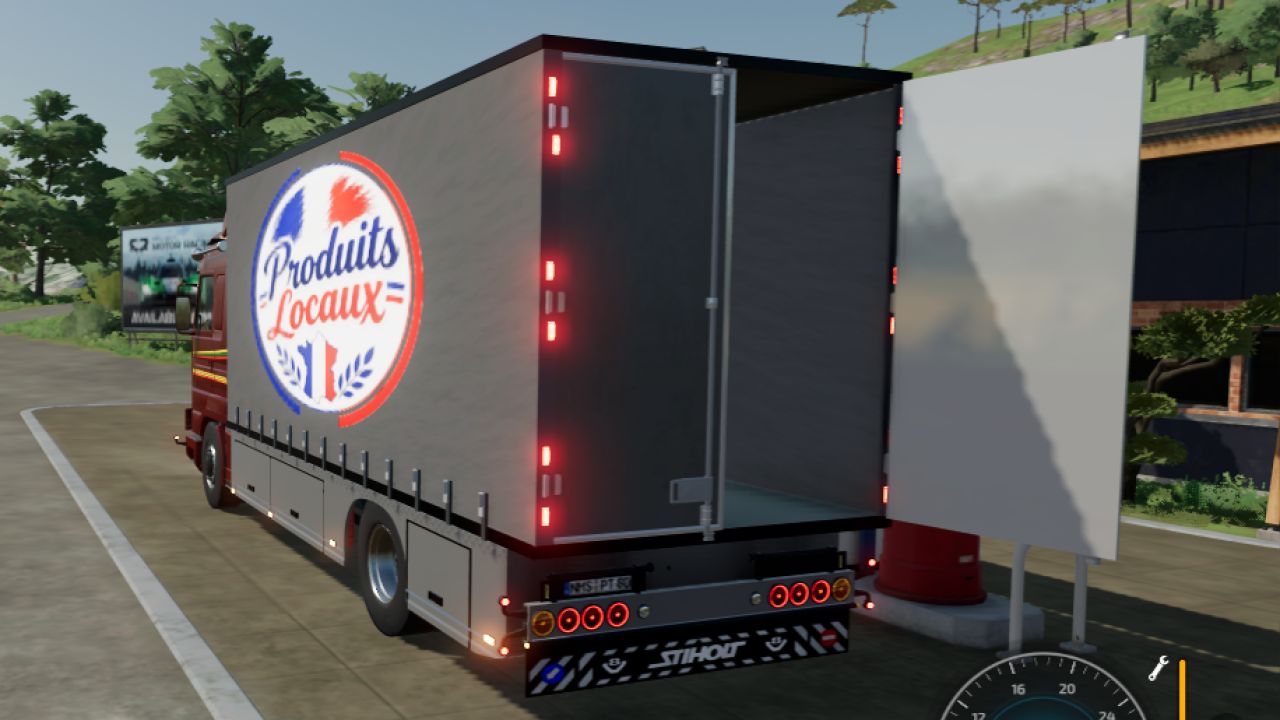
Scania 143 with tarpaulin FS22
I offer you this Scania 143 tarpaulin truck; there are probably a few errors, so please report them to me so I can improve it. Have fun ;) price: 110,000 euros max. speed: 94 km/h power: 500 hp

FS22 Fendt Favorit 600 LSA SH V1.2
FS22 Fendt Favorit 600 LSA SH V1.2 Added: – side marker lights – air horns – more horsepower – wider tires UPDATE V1.2 Added: – strobe lights – decals – interior objects

FS25 Rain Vision Dynamic beta 2
FS25 Rain Vision Dynamic beta 2 This mod adds a touch of realism to your gameplay. It is now possible for rain to interact with vehicle windows with this mod. I hope you like it. I will soon try to add other effects such as snow and fogging. The main feature I have not managed to implement so far is the interaction between the windshield wipers and the water on the windshield, but I will keep trying. I hope you like it, and please report any compatibility issues in the comments. BETA 2 The orientation of the rain texture on the glass has been changed; some vehicles had the drops running vertically down the windshield.

FS25 Realistic Physics beta 2
FS25 Realistic Physics beta 2 Realistic Physics (BETA) IMPORTANT: DELETE THE PREVIOUS MOD FROM YOUR MODS FOLDER! This is the new, rewritten version of the Realistic Physics mod, and it has the same name as the old one. If the old one stays in, the two clash and your vehicles will behave strangely. Only one of them can be in the game, never both! The mod is still in beta, so some bugs may turn up. I got tired of tractors that feel like they’re glued to the ground, so I made this mod to fix that. It’s still in development and this is a beta, so expect some rough edges and changes between versions. What it does Suspension tuning: every vehicle category and type gets its own suspension settings, so a big tractor, a small tractor, a trailer and a car all feel different instead of sharing one generic setup. It works on mod vehicles too. Wheel spin hopping: if you spin the wheels, the machine bounces. Hard ground and roads make it bounce the most, and soft field soil barely does. How much it hops also depends on how hard the wheels are spinning, how heavy the vehicle is loaded, and how much weight you’re pulling. It fades out as you pick up speed, so it won’t shake you around at normal driving speed. Good to know It’s a beta, so some vehicles may not feel right yet. I’m tuning things all the time. If you find something odd, tell me which vehicle it was and what you were doing, and I’ll look into it. Author: Márk Rónai © Márk Rónai. All rights reserved. Please don’t re-upload, edit or redistribute this mod without my permission. BETA 2 Fixed: – The weak bounce of spinning wheels. – Trailer suspension. – Vehicles being prone to tipping over. New: Tractors with swing-arm suspension, such as John Deere or Fendt, level themselves automatically.

FS22 Sipma RN 610 / N-064 Antek
FS22 Sipma RN 610 / N-064 Antek Hey everyone! I’m releasing the Sipma RN 610 / N-064 Antek fertilizer/lime spreaders for Farming Simulator 2022, converted from the Farming Simulator 2025 version. These spreaders feature some very interesting additions that help make the gameplay feel much more realistic. I’ve included several cool details, such as: a removable cover (tarp), detachable spreading discs, an adjustable shutter/gate, two types of spreading discs, worn-out decals, and much more—including interactive controls (IC) and other fine touches. If you have any ideas for further improvements, feel free to reach out via private message or leave a comment (depending on the platform). -FS22 Mod Author: ZlotowkaScammer -FS25 Mod Authors: Vnsfdg2, patologia__, qwertyPL -Mod File Size: 14.4 MB -Multiplayer: Yes -Language: PL/EN/DE -Texturing: ~90% complete -Bugs: There shouldn’t be any, but it’s always possible I missed something—if you happen to find any issues, please let me know in the comments. Mod Includes: -Vnsfdg2 model -7-8 configuration variants -3 color configurations -Spreading: Lime/Fertilizer -Animations/Sounds: Yes (FS22) Interactive Control: -Covering/uncovering the tarp -Attaching/detaching the PTO shaft -Inserting/removing internal grilles -Opening hopper slides -Removing spreading discs -Removing rear guards -Access steps -Cleaning brush Configuration Options: “Sipma RN610 Antek” model -Additional extensions: Yes/No -Reflectors: None/Rear/Side/Both -PTO shaft guard: Yes/No -Mounting brackets: Yes/No -Decal type: Old/New -Spreading disc type: New/Old -Covering tarp: Yes/No “Sipma N-064 Antek” -Additional extensions: Yes/No -Reflectors: None/Rear/Side/Both -PTO shaft guard: Yes/No -Mounting brackets: Yes/No -Decal type: Old/New -Decal variant: I/II -Spreading disc type: New/Old -Covering tarp: Yes/No Color Configurations: -Main body color -Component color -Tarp color Full Description: -Sipma RN610 Antek –> Capacity: 610–1210 L, Weight: 230 kg, Working Width: 18 m, Working Speed: 16 km/h, Compatibility: Lime/Fertilizer. – Sipma N-064 Antek –> Capacity: 610–1210 L, Weight: 240 kg, Working Width: 18 m, Working Speed: 16 km/h, Compatibility: Lime/Fertilizer. Have a great time playing :)!
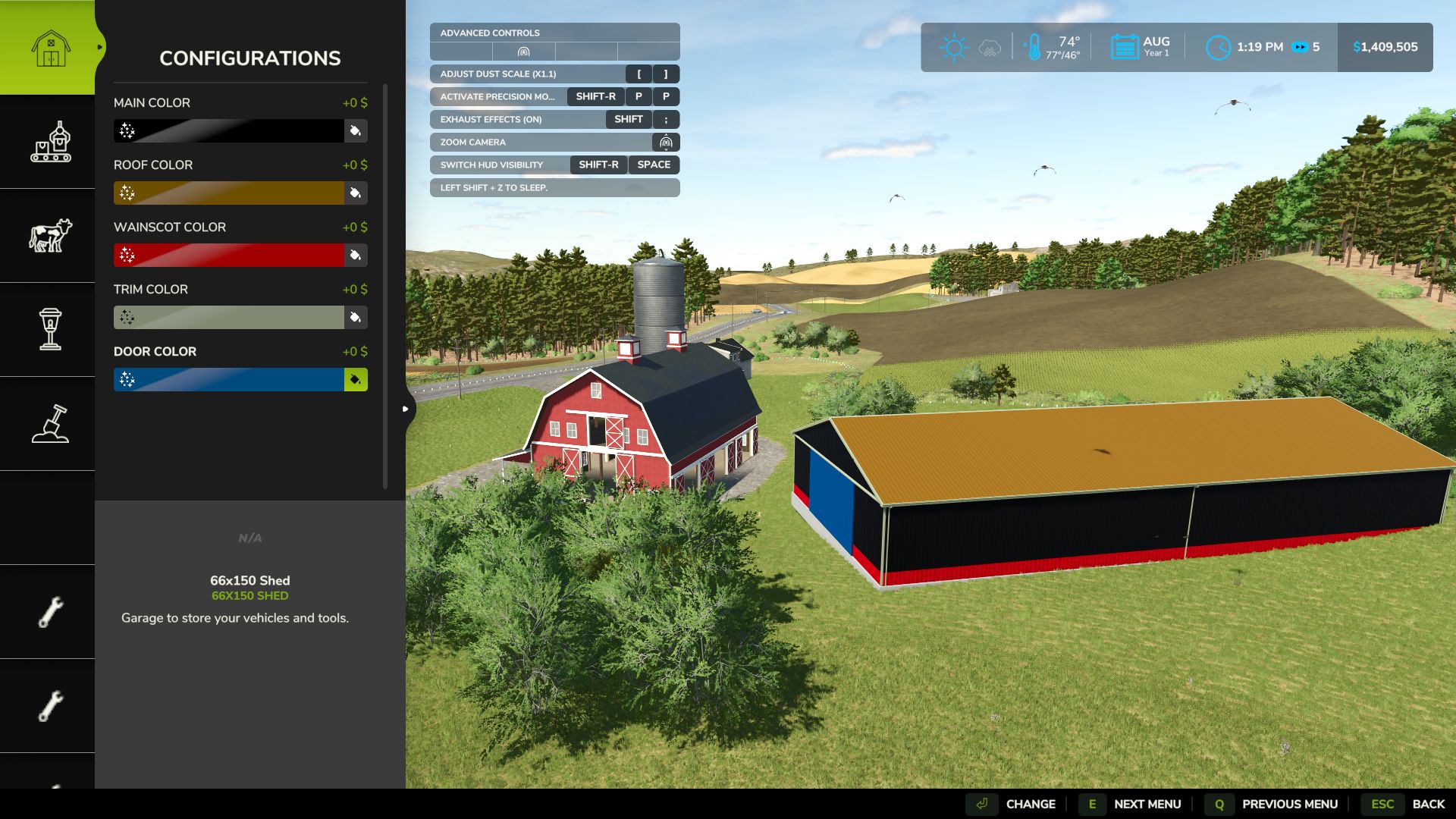
Placeable Color Picker Fix FS25
Following the Farming Simulator 25 v1.25.0.0 update, some players experienced issues accessing the Custom Color Picker when customizing placeable buildings. Placeable Color Picker Fix restores access to the existing custom color selection menu, allowing players to customize supported buildings without encountering the known color-picker error. Features Restores Custom Color Picker functionality on affected placeables Uses the original in-game color selection interface Preserves existing custom colors Does not modify original game files Supports single-player and multiplayer Tested with FS25 v1.25.0.0 Compatibility Platform: PC only Game: Farming Simulator 25 Multiplayer: Supported Compatibility Notice: Do not use Enhanced Color Selection (FS25_EnhancedColorSelection). Extended Material Color Picker has been tested alongside this fix and worked successfully.
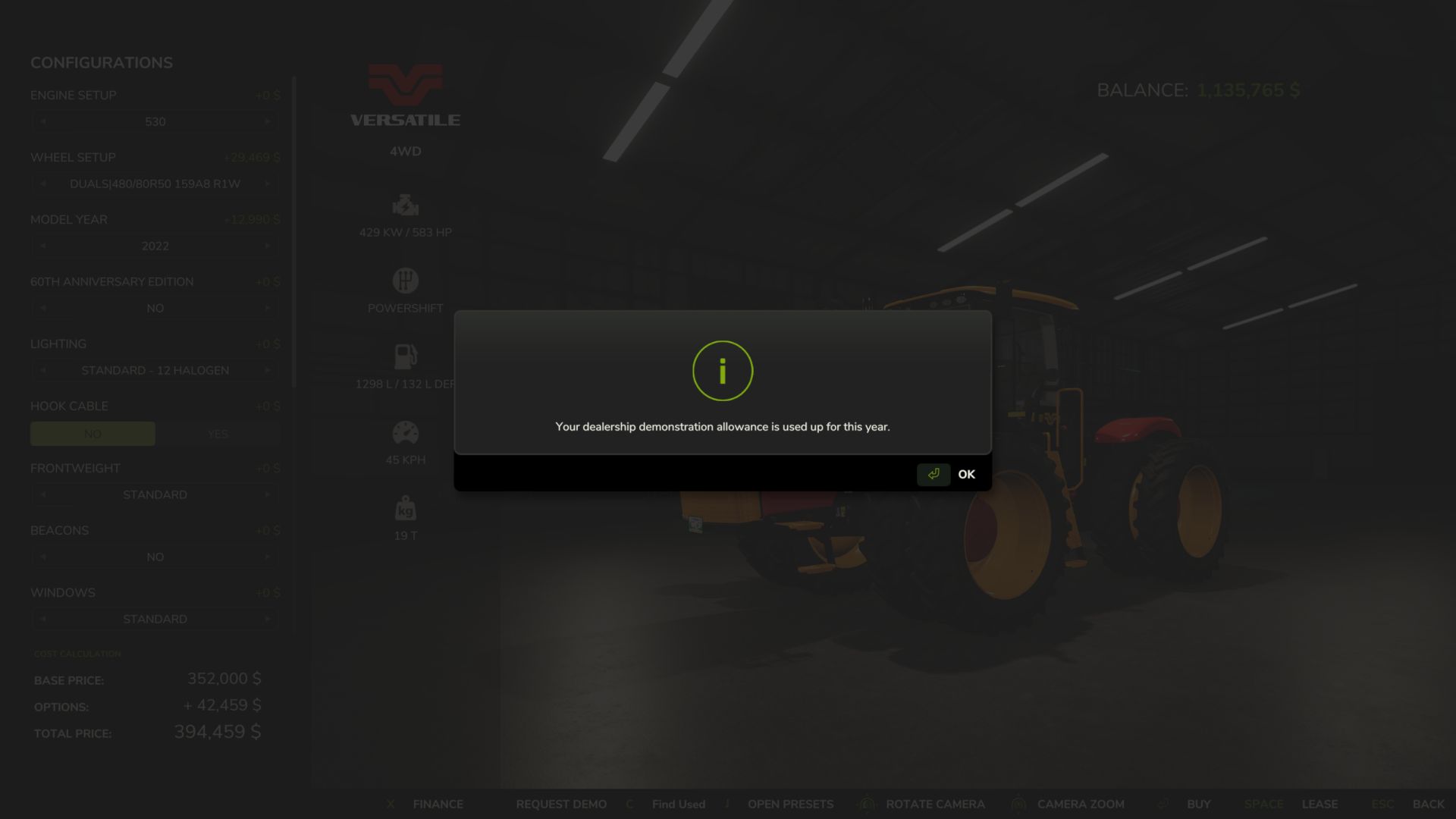
Equipment Demo FS25
Try before you buy. Want to see how a tractor handles your implements or how a combine performs on your farm before spending the money? Equipment Demo lets you request free dealership demonstrations directly from the shop. Choose your configuration, request a demo, and put the equipment to work. Features Two free demos per in-game year, with up to two active at once. Try equipment together, such as a combine and header. Each item uses one demo allowance. Two in-game days or ten operating hours per demo, whichever comes first. No demo or leasing fee. Normal fuel, DEF and repair costs still apply. Simple shop controls: Request Demo changes to Return Demo on that equipment’s shop page. Buy the machine you tested, keeping its configuration, hours, wear, dirt and contents. Save and continue later. Demo progress and yearly usage persist across reloads. Demo equipment cannot be sold. Changes in 0.1.12.0: - Demo usage now tracks the machine's native FS25 operating-hours meter instead of maintaining a separate operating-hours clock. - Existing saves are migrated without resetting their current demo limits. - Improved handling of operating-hour data after saving/reloading. - Demo machines now use the actual current FS25 vehicle value when you choose to purchase them, including the game's normal depreciation factors. Custom price rounding and price caps have been removed. - Enforced the intended limit of 2 equipment demos per year. - Demo duration remains 2 in-game days OR 10 operating hours, whichever comes first. - Existing return safety systems and protections against selling demo equipment remain in place. - This remains a single-player public test build. - 126 automated behavioural/compatibility checks and 5 separate GIANTS SDK source replays are passing.
- 15 per page
- 30 per page
- 45 per page
- 60 per page
-
See more per page
Bigger pages, fewer clicks - and no ads anywhere.
Go Pro