Farming Simulator 22 mods
50,366 results- 15 per page
- 30 per page
- 45 per page
- 60 per page
-
See more per page
Bigger pages, fewer clicks - and no ads anywhere.
Go Pro

FS22 Lighting by bartosz22
FS22 Lighting by bartosz22 Hello, I’m releasing my lighting mod for FS22. All you need to do is replace the files, and that’s it. Happy gaming!


FS25 Tractor Terrain Dynamics beta 9
FS25 Tractor Terrain Dynamics beta 9 TTD — Tractor Terrain Dynamics Equipment physics, not a dirt mod. No settings required — everything works automatically. What is it? TTD changes equipment behavior depending on the weather, soil type, moisture, tire wear and tire pressure. The ground is not a target, it is a condition. The tractor is the main character. A wet field means less grip. Plowed soil means more resistance. Asphalt means everything is easy. Just like in real life. What you get: – Weather affects your work: rain — the field becomes softer, dry weather — everything is stable – Soil-type physics: 17 types, from asphalt to plowed fields. – Equipment feels different: tracks, dual tires, wide tires — everything matters. – The transmission works realistically: it holds gears under load – The HUD displays moisture, grip and resistance – Multiplayer: synchronization is handled in the code Important to understand: TTD does not add wheel slip “on demand.” Wheel slip is the result of conditions: a wet field, tire wear (if UYT is installed), a sudden start or excessive speed. If the tractor is new, the tires are new and the weather is dry, you will not notice a difference. TTD simply makes the physics fair and predictable. What TTD does NOT do: – No visual dirt – It does not only slow you down – No random penalties Compatibility: – UseYourTyres — tire wear affects road grip. – More Realistic — for maximum hardcore enjoyment Everything that happens is the result of your decisions, the weather and the ground. The mod archive includes a complete guide describing the physics and containing the author’s contact details. BETA 9 v1.0.3.8 IMPORTANT The previous version had a bug: surface states would get stuck, causing vehicles to behave strangely — both on fields and on natural surfaces (grass, dirt, etc.). This has been fixed in v1.0.3.8. FIXES – The mod works on dedicated servers again. – Server and clients now correctly share surface and vehicle state data. – Switching between field / natural / road / object no longer gets stuck. – After leaving grass or dirt onto a field, the sliding gradually returns to normal over a couple of seconds — no more sudden stuck slip. – Vehicles without a driver, without active work and without active surface interaction are no longer processed every frame — less load. – The calibrator now shows only the pages that actually affect physics in the selected mode. No more twisting sliders that do nothing. – The calibrator now properly affects tractor slip when working with a trailer or a seeder. – Trailers and seeders now pass their resistance on to the tractor. – Tractor slip is calculated when it pulls a trailer or an implement. If the tractor drives on its own — slip is minimal, since it isn’t pulling anything. NEW – Wheels now leave tracks and break up natural surfaces (grass, dirt, sand, gravel). – Breaking only works if deformation is enabled in the settings. – Broken roads are repaired manually — using the normal in-game terraforming tools for in-game money. Nothing repairs itself. – Deformation on/off is in the game settings menu, right where difficulty and surface mode are. – Mod settings (difficulty, surface mode, deformation) can only be changed by the host or master user. Regular players can see them but cannot change them. – New mode: “Roads only”. On fields, TTD physics is completely turned off — the game behaves like vanilla, no slip, no sinking. But on grass, dirt, sand and gravel TTD keeps working and keeps breaking them up. On fields the HUD shows values from TTD’s own settings — for information only, they do not affect field physics. This mode is handy if you play with another field physics mod, or simply don’t want to slip on fields. – The calibrator also supports “Roads only” mode — grass/dirt settings are available, and if deformation is on, deformation settings too. – If TTD is your main physics mod, you can use any mode. “Field” and “Field + roads” should not be used together with other physics mods. If you play with another field physics mod, switch TTD to “Roads only”. – There are more setting combinations now — everyone can find what suits them. Examples: • Don’t want to slip on fields → “Roads only”, deformation off. Fields behave like vanilla, grass and dirt are untouched too. • Want slip on grass, but don’t want to touch fields or roads → “Roads only”, deformation off. TTD stays out of fields, slip and resistance work on grass, roads stay intact. • Full hardcore: fields, grass and broken roads → “Field + roads”, deformation on. Everything works, grass and dirt get broken up by wheels. • Playing with another field physics mod, but want grass and surface breaking from TTD → “Roads only”, deformation on. TTD doesn’t interfere with the other mod on fields, grass and roads are handled by TTD. – IMPORTANT ABOUT TIRES: tire physics always works, regardless of difficulty and mode. Narrow tires slip more — they already grip the ground worse. Duals, twins and tracks grip better. This is by design from the start: tire type directly affects how the vehicle behaves. ABOUT THE CALIBRATOR AND SLIP The slip slider in the calibrator is not an “on/off for wheel spin”. It does not directly make the tractor slip or not slip. Slip depends on how much the tractor is pulling (trailer, seeder, plow), on the ground, on moisture and on the tires. The slider only adjusts how strongly all of that is applied through resistance and grip. If the tractor drives on its own — it barely slips, no matter where the slider is. If it pulls a heavy trailer through wet mud — it will slip, and the slider will make it stronger or weaker. V1.0.3.7 * Added built-in calibrator for fine-tuning the behaviour of each tractor directly in-game * TTD Calibrator Description (RU/EN/DE/FR/IT/PL): https://drive.google.com/drive/folders/1sLNXcLPwPgm9MTGft8uRE2Zen2v-SK-Q?usp=drive_link * Tracked vehicles now leave ruts just like wheeled ones * Completely reworked the wheel sinking system – behaviour is now noticeably smoother and more predictable * Fixed an issue where moisture on grass and other natural surfaces was displayed incorrectly * Tracked vehicles now behave differently from wheeled ones – tracks sink less, slip less and recover more easily * Front wheels of tractors now sink slightly less than the rear ones – just like on real machines * Fixed a bug where engine settings could fail to apply to some vehicles * Each vehicle now stores its own settings separately and does not affect others * Removed unnecessary calculations that could cause frame drops when many vehicles were present on the map * Improved overall performance – the game now runs more steadily * Cleaned up some old and unused parts left over from previous versions * Updated default difficulty values – they are now more balanced * HUD now hides together with the in-game interface – the separate toggle button has been removed * HUD values now match the actual physics * Minor fixes in the interface and settings menu BETA 7 TTD v3.6 BETA – Natural Surface Support This is a BETA version for testing. If you just want to play, download the stable version from ModHub or KingMods – select version 3.5. What’s new in this beta: TTD now works on natural surfaces outside fields (grass, gravel, dirt roads, forest ground) Reduced grip and increased rolling resistance on these surfaces Wet conditions affect traction Asphalt and concrete remain unchanged What we need from testers: Test on different surfaces: grass, gravel, dirt roads, forest paths Test in dry and wet weather Test with and without UseYourTyres (UYT) Test with loaded trailers or heavy equipment Please leave feedback in the comments: Which surface were you on? Was it dry or wet? Was the slip too strong, too weak, or just right? Did you have UYT installed? Known issue: With UYT and heavily worn tires (50%+), slip may be excessive. We need your feedback on this. Your feedback will help us improve the mod. Thanks for testing! V1.0.3.5 Fixed: Difficulty now saves correctly (was broken in 1.0.3.4 – my fault, I missed it during testing) HUD position now stays within screen bounds at any UI scale Removed UYT dependency — all mods (UYT, Tire Pressure, More Realistic, Moisture System, etc.) are now optional Big thanks to all players who helped test TTD, and special thanks to: – Sinterra – FirenzeIT – Italian translation – Tontzu – ticho Thank you so much for your help! V1.0.3.4 What’s new: -Difficulty picker (Easy/Medium/Hard) right in the game settings menu -Difficulty sticks to your save and syncs in multiplayer – no more random resets -Public API for other mods (getSharedData, registerIntegration) -Wheels dig in properly under load with speed-aware sinking Improvements: -HUD actually scales now – looks the same on 1080p, 2K, 4K, whatever -TTD keys show up in the Controls menu so you can rebind them Bug fixes: -HUD position saves and restores correctly -Wheel radius recovery on multiplayer servers -hitchLiftFactor syncs when clients connect -Physics cleanup when resetting/deleting vehicles Other: Manual — HTML, 3 languages EN/DE/RU https://drive.google.com/file/d/1wxbQOC8sOlJvhRgshQd2EFaD00tbQ9LL/view?usp=drive_link FS25_useYourTyres listed as dependency Updated screenshots with HUD icon guide V1.0.3.2 Moisture: Global moisture is map-wide, saved separately Wetting/drying rates vary by ground type Plowed soil dries slowly, asphalt dries fast Two-point hitch: Drawbar raises/lowers in sync with wheel sink Potholes: Generated when driving onto a field Depth depends on terrain (low spots = deeper) Grow faster on wet ground Optimization: Idle vehicles no longer calculated 50+ vehicles = 50 FPS Saving: Global moisture saved separately from vehicles Old saves are compatible Compatibility: Removed Variable Tire Pressure – was conflicting with TTD Removed duplicate configs V1.0.3.1 TTD v3.1 – What’s New Realistic differential. Your tractor now pulls to one side when one wheel is on soft ground and the other on hard ground. Just like real life – the machine doesn’t just spin dumbly, it behaves differently depending on what’s under each wheel. Smarter implement hydraulics. Some implements (Horsch, Maestro) used to lift the tractor when the wheels sank in. Now the hydraulics work in float mode – the implement stays on the ground and the tractor doesn’t get jacked up. Smooth field/road switching. No more jittery physics at the edge of a field. The tractor knows clearly whether it’s on a field or on the road. Trailers and implements don’t lose connection. No more crashes when deleting a tractor, and physics updates instantly when you attach or detach. Performance boost. The mod is lighter now – less CPU load, fewer checks every frame. Your FPS won’t suffer. AI tractors now feel the ground too. Bots sink into plowed soil and slip just like you do. Fair physics for everyone. V1.0.3.0 Multiplayer support enabled — mod now fully works on dedicated servers Fixed moisture behavior when game time is paused Fixed tyre wear synchronization between server and clients Fixed ground type detection reliability Fixed manual — all pages now display correctly HUD: new icon order — moisture, sink, grip, resistance, tyre wear HUD: sink (wheel sinking) now displayed instead of season HUD: grey tyre icon “NA UYT” when UYT mod is not active Physics: ground resistance now depends on wheel sinkage, not directly on moisture Physics: wheel slip now depends on sinkage, tyre type and tyre wear Physics: reduced ground resistance for stubble, cultivated stubble, post-harvest and other post-harvest field types Physics: maximum wheel sinkage increased to 25% (was 20%) AI: wheel sinking now works when AI is driving Improved overall network performance

FS25 Open My Door (IC) v1.1.0.0
FS25 Open My Door (IC) v1.1.0.0 Automatically opens and closes driver doors via Interactive Control when approaching, entering, starting the engine and leaving the vehicle. Multiplayer-compatible. Hello everyone, Tired of having to operate the driver’s door manually every time? Open My Door automates the opening and closing of your vehicle doors via Interactive Control – whether you are entering, exiting or simply walking past. Features Automatic opening & closing: When you walk towards the driver’s door, it opens automatically. When you move away again, it closes by itself. Adjustable closing behavior: When entering (default): The door closes immediately upon entry. When starting the engine: The door remains open after entering and only closes once the engine is running. Automatic exit behavior: The door opens immediately when leaving (E) and closes as soon as you move away. Full compatibility: Multiplayer-compatible (status synchronization via the IC API) and compatible with Cab Cinematic (FS25_CabCinematic). Requirements Farming Simulator 25 Mod: Interactive Control (VertexDezign) Vehicles with IC support for the driver’s door Installation Copy the archive file (FS25_openMyDoor.zip) to your mods folder: Documents\My Games\FarmingSimulator2025\mods\ Activate both mods (Interactive Control & Open My Door) in the savegame before starting the game. In-game settings Under ESC -> Game Settings -> Open My Door (OMD), you can adjust the behavior: Automatic approach detection: On / Off Trigger distance: 1.5 m to 3.5 m (closes automatically at distance + 1.0 m hysteresis) Closing mode: When entering / When starting the engine Feedback and error messages are welcome here in the thread! This is my first mod, so please be a little lenient! ;) V1.1.0.0 – Bugfix (Error: C stack overflow): Fixed recursive source() calls in OpenMyDoor.lua during g_specializationManager:addSpecialization(…) when the mod starts. – Bugfix (ON/OFF slider in the settings menu): Clones of BinaryOptionElement now correctly initialize onGuiSetupFinished() as well as the internal references textElement and sliderElement, so the switch no longer incorrectly displays ON when set to OFF. – New feature (Open door when engine stops): Added a new option to the settings menu (openOnMotorStop) that automatically opens the driver’s door when the engine is switched off to allow the player to exit (and closes it again if the engine is restarted without exiting).
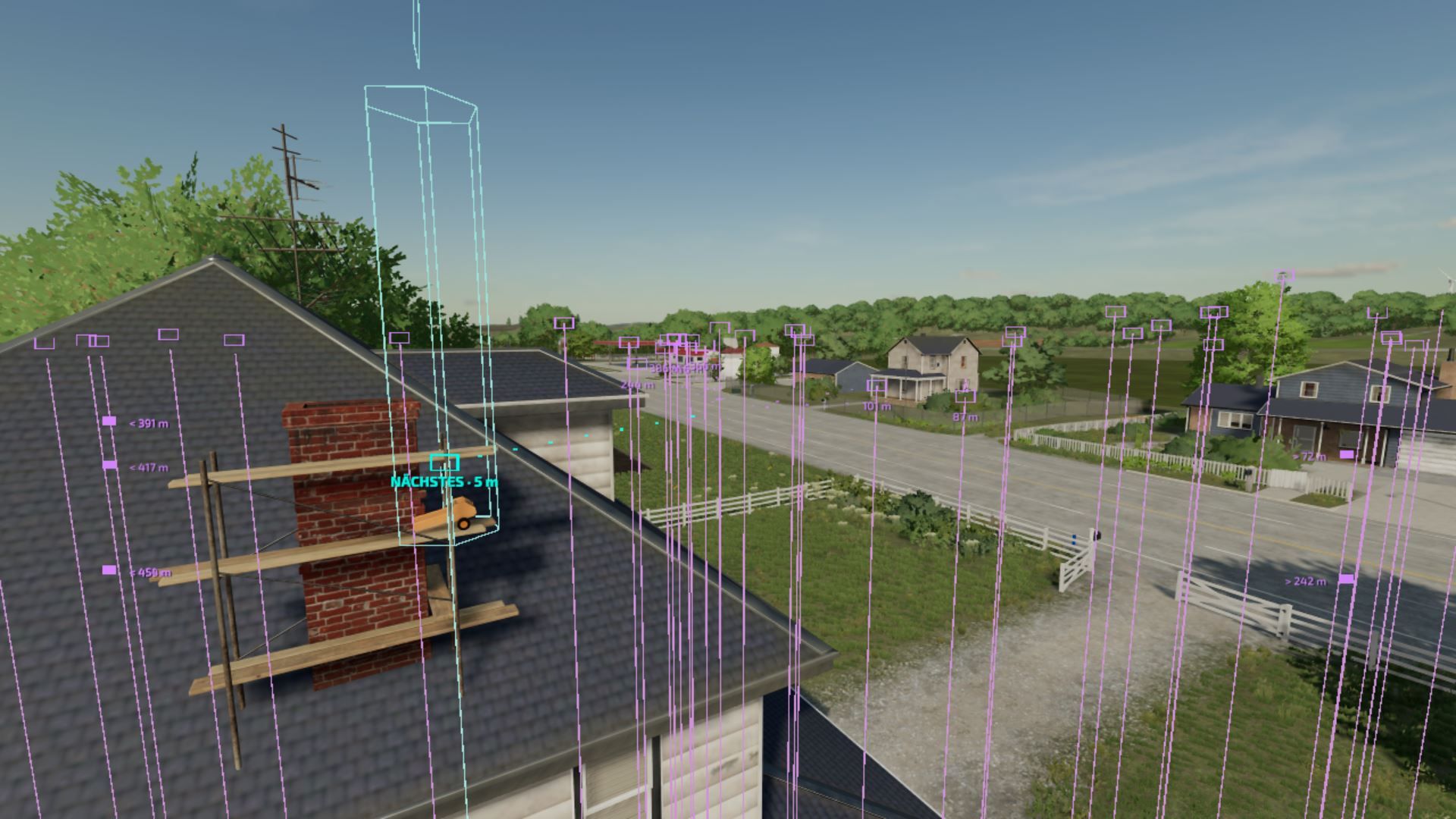
Collectible ESP/Wallhack FS22
LS22 ESP/Wallhack Mod Mod showcase: The idea came from hack menus in well-known shooter games. I adopted this principle and applied it to the collectibles in Farming Simulator 2022. As you can clearly see, the turquoise line indicates the closest collectible and disappears as soon as the object is no longer there (this still works after restarting the game if you do not manage to collect them all). Elmcreek: 100/100 collectibles [it must be winter or December to collect one] Haut-Beyleron: 20 collectibles Erlengrat: 12 collectibles YAAAAY, the mod works for ALL 3!

FS25 Hydraulic Suspension System v2.0.0.0
FS25 Hydraulic Suspension System v2.0.0.0 Ever noticed that the tractor front axle in the game feels like a steel beam? Hit a rock and the whole tractor jumps, the wheel barely moves. This mod gives tractors the hydraulic front suspension they have in real life. Suspension that really works The wheel moves up and down over bumps and rocks, and you can see the links, cylinders and shaft moving. The tractor is much more stable and comfortable. Automatic leveling Just like real tractors: add front weights or a heavy implement and the front returns to the right height by itself in a few seconds. Every brand with its own system John Deere ILS and TLS, Fendt, Claas PROACTIV, Terraglide (Case IH / New Holland / Steyr), MF Quadlink, Valtra, Deutz-Fahr and McCormick. Each one behaves differently, some softer, some firmer. Driving modes – AUTO – levels by itself – WORK – firmer when working in the field or when the front starts bouncing – LOCKED – stiff axle for front loader work or heavy transport – MANUAL – raise and lower the front yourself (only on JD ILS and Fendt, like in real life) Keys Ctrl+Alt+U – change mode Ctrl+Alt+↑ / ↓ – raise / lower the front (manual mode) (can be changed in control options) ℹ Only works on tractors that have this system in real life: medium and large tractors from the listed brands. Small tractors and crawlers stay as they are. BETA VERSION The mod is still being tested, especially in multiplayer. lot of work needs to be done, but so far is playable and tweaks and fixes will be released from users feedback and suggestions, If you find a problem, please send me your log.txt file. In multiplayer, I need the log from both the host and the player who joined. V2.0.0.0 – Suspension window (Left Alt + U): system, mode, height, front-loader stabiliser and live state (axle load, weight on the front, cylinders, spring, damping, warnings) with a side view of the axle. Settings and panel moved from the game’s menu into the window. – Trucks (new): rear air suspension with levelling (ECAS), up to 3 axles. Same ride height empty or loaded, manual height for loading docks and coupling, back to ride height by itself above 30 km/h. 8×4 tippers and bigger keep their leaf springs. Can be switched off. – Levelling only on tractors that have it in real life (brand, weight and minimum power, default 120 hp). Small / simple tractors get a swinging pendulum front axle without suspension instead of the game’s soft suspension. Tracked tractors are left alone. – Wheel loaders and telehandlers: Ride Control (boom suspension with accumulator) above 6 km/h, rigid below for precise work; Ctrl + U switches AUTO / OFF. – Front loader on tractors: the load really floats with the movement of the arm tip; on / off in the window. – Firmer damping on the road above 30 km/h; JCB Fastrac rear self-levelling suspension; hydraulic valve sound. – Rigid front axles (e.g. John Deere 7030) move and tilt as one piece. – No more shaking on independent suspension (JD 8R ILS) and no more little hops when switching tractors. – Panel: warnings “end stop” and “front too light – add ballast”, name of the tractor’s system; can be switched off; hides while the window is open and when Zasty HUD is active. – Cars, combines and other vehicles are left alone (shop category is checked). – Keys: Ctrl + U mode, Ctrl + Alt + Up / Down manual height (hold), Alt + U window. Removed: Ctrl + Alt + L and Ctrl + Shift + U (now in the window). – Fix: the default keys were not assigned on a new installation. KEYS (default) – Left Ctrl + U: Suspension mode (Ride Control on wheel loaders) – Left Alt + U: Suspension window – Left Ctrl + Left Alt + Up / Down arrow: Manual height (hold) These are the default keys. If one of them is already used by the game or by another mod, go to Options > Controls and set the key you prefer, to avoid conflicts. V1.1.0.0 Big update: every machine now behaves almost like the real one. Tractor classes: automatic levelling only on tractors that have it in real life. Small and simple tractors get a pendulum front axle without suspension. Wheel loaders and telehandlers: Ride Control (boom suspension). The load floats over bumps above 6 km/h, and the arm is rigid below that. Ctrl+Alt+U switches AUTO / OFF or keybind your self Front loader damping: reacts to the tip of the arm and ignores smooth hills. It has its own switch, Ctrl+Alt+L. Road damping: firmer above 30 km/h. JCB Fastrac: self-levelling rear axle. HUD: warnings for end stop and for a front that is too light (add ballast), and the name of the tractor’s system. Sound: hydraulic valve sound when levelling. Smoother: no shaking on the JD 8R ILS and no hops when switching tractors. Settings: new options in the controls menu, all in 25 languages. Tracked tractors are left alone. V1.0.0.1 Fixes -ride control a bit smoother – Rigid front axle of the model (both front wheels hanging from the same axle, e.g. John Deere 7030 Series): the whole axle now moves up/down and tilts with the wheels; before, the axle stood still while the hubs moved on their own (reported by Cris669). – Performance / bouncing on rough ground (e.g. ploughed field): the front wheels were rebuilt by the physics almost every frame. Now they are only rebuilt when the axle moves 2 mm or more, at most every 100 ms. – HUD textures compressed – no more “raw format” warnings in the log (reported by Patrik Vendelberger). – Faster game start: the settings menu section is now built only the first time you open Settings (it froze the start by ~4 s). – Log: the front loader line no longer lists rear implements by mistake. Behaviour – Only the tractor driven by a player has the hydraulic suspension. Parked tractors and AI helpers keep the game’s original suspension; when you leave the tractor or hire a helper it goes back to the original. Thanks to Cris669 and Patrik Vendelberger for the reports! V1.0.0.0 New – In-game settings menu: Esc -> Settings -> General -> “Hydraulic Suspension System”. Brands, minimum weight, WORK mode draft, hold height when stopped, wheel camber, HUD, cab suspension, loader stabiliser, diagnostics. Saved in modSettings (kept when the mod is updated). – New icon HUD (default; “Text” brings back the old line): the tractor seen from the side with the front cylinder. – Cylinder colour = mode: green AUTO, orange WORK, blue MANUAL, red with padlock LOCKED. – The front wheel moves down/up with the cylinder height; the bar on the side shows the height (centre mark = levelled). – Values: height (levelled / +x.x cm), front axle load, spring and damping of the current mode (% of the game’s original), so you can see what changes between AUTO, WORK, MANUAL and LOCKED. – Shop picture of the tractor next to the icon (can be switched off). Three sizes. – Move the HUD (icon or text) with the mouse: Ctrl+Shift+U, drag, right click / Esc / Enter to finish. The camera stays still while moving. – Cab suspension (inside view): the bumps of the chassis arrive damped inside the cab, like on a suspended cab; slow slopes are still followed. Firmer with the suspension LOCKED. Can be switched off in the menu. – Front loader arm damping (like the MX Shock Eliminator / LDS / ride control): with a front loader attached, above 6 km/h the arm really floats: the load swings on a simulated nitrogen accumulator (~0.8 Hz with an empty tool, up to ~1.4 Hz with a heavy load, damped by the orifice) driven by the tractor’s bumps, and the game moves the arm, cylinders and tool with it. Below 6 km/h the arm is back exactly where you put it (precise work). Shown on the HUD; can be switched off in the menu. – All texts translated into the 25 game languages. Known – Pendulum angle, ILS articulation travel, cab suspension and loader arm values are estimates (no published figures). All can be tuned per system in modSettings/FS25_HydraulicSuspensionSystem.xml. – The cab model itself does not move (the game has no separate cab part or i cant find it); the effect is on the inside view. BETA 2 New – Systems simulated per brand and model, with real data where it is published: John Deere ILS (8R, independent) and TLS Plus, Fendt 1000 Vario (independent wheels), Fendt 700 Vario (120 mm, level control, manual height), Fendt 300 Vario (80 mm), other Fendt, Claas PROACTIV (85 mm), CNH Terraglide (Case IH / New Holland / Steyr), MF Quadlink (90 mm), Valtra AIRES air suspension, Deutz-Fahr with anti-dive, McCormick IFS (independent), Kubota M7, JCB Fastrac. – Real rules where known: Terraglide and TLS only level above 1.5 km/h; Terraglide can only be locked below 12 km/h and re-engages by itself above it. – Rigid (pendulum) front axles really swing: one wheel over a rock tilts the whole axle. – Independent suspension (JD ILS, Fendt 1000, McCormick IFS): each wheel moves on its own, with camber change on the arms. – Firmer damping for a moment under hard braking or acceleration, to hold the front (stronger on Deutz-Fahr anti-dive and Claas). – Manual height (Ctrl+Alt+Up / Down) only on systems that have it in real life. – Mode and manual height saved with the savegame. – Settings and per-system profiles in modSettings/FS25_HydraulicSuspensionSystem.xml: created on first start, kept when the mod is updated; you can add profiles for mod tractors. – With Soil & Draft Physics: WORK mode only when the implement is really pulling (real draft force, default 15 kN). – Works together with 4×4 Traction System. – Compatible with MoreRealistic: on the front wheels it controls, the hydraulic suspension owns the spring/damper (MoreRealistic’s load-based spring stays on the other wheels, no more fighting/bouncing at the front); WORK mode uses MoreRealistic’s real draft force. – Translations for all 25 game languages. Fixes – No more “Path not registered” errors in the log when loading/saving the mode and manual height. Known – Multiplayer still being tested. Pendulum angle and ILS articulation travel are estimates (no published figures found).

FS22 Fendt 900 Vario SCR ! !EDIT! !
FS22 Fendt 900 Vario SCR ! !EDIT! ! Features: – strobe lights – marker lights – decals – new sounds – interior accessories – new tires

FS25 Zasty HUD
FS25 Zasty HUD -This mod was made as a ecossystem, to work with my mods, so use it with caution with any other mods, compatibility out my ecossystem not tested – Premium tractor HUD in two styles (horizontal bar or round tachometer) that replaces the original speedometer. – Speed, rpm, gear, fuel, DEF, engine temperature, hour meter, field and crop, minimap with heading. – Attached implement: state, fill level in tonnes or litres, working width and worked hectares. – Top bar with weather, date, game time, time speed, real clock and money. – Shows live data of the Zasty Chalk mods (4×4 Traction System, Hydraulic Suspension System, Real Powertrain, HRM2: warning lamps, coolant, oil pressure) and hides their own panels. – Settings window with the mouse (Left Alt + H): style, size, position, top bar, units, minimap and which modules to show. – Hides the original speedometer, minimap and fill level bar, and the “engine starting” message (each one optional). – Works on its own with any tractor. English, German, Portuguese. KEYS (default) – Left Alt + H: Zasty HUD settings window These are the default keys. If one of them is already used by the game or by another mod, go to Options > Controls and set the key you prefer, to avoid conflicts.
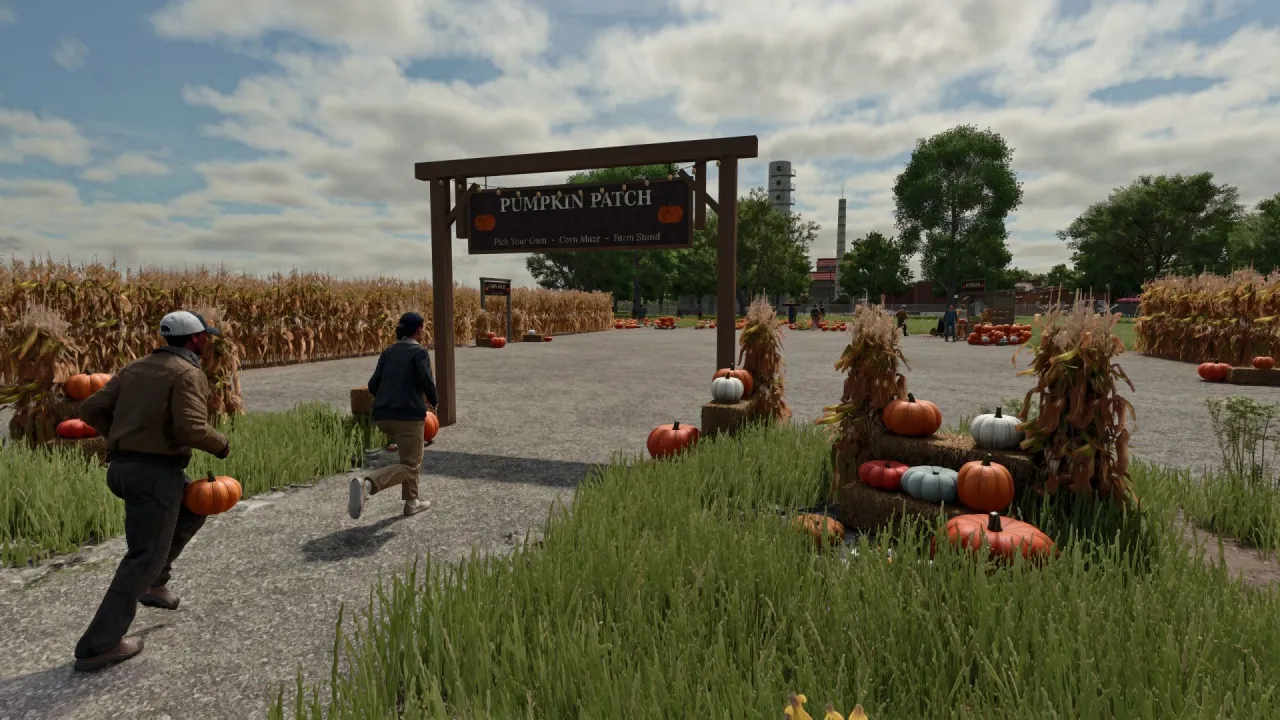
FS25 Interactive Pumpkin Patch
FS25 Interactive Pumpkin Patch Bring the feeling of fall to your farm with a working pumpkin patch, a farm stand, corn mazes and visitors. https://discord.gg/ashmere Features: A 12 × 12 m pumpkin field with about 110 pumpkins across 8 varieties. Pick them by hand, carry up to 4, and picked spots regrow over a few days. A farm stand where you can sell pumpkins or carve them into jack-o’-lanterns that glow at night. The stand earns 20 per hour from visitors. Small and large corn mazes with solid walls, a timer and 4 hidden stamp posts. Find them all and beat your best time. A scarecrow that sways in the wind, watches you and waves when you come close. Its face glows at night. An entry sign with string lights, plus a corn shock, straw bale display and pumpkin pile. Visitors stroll through the patch, visit the stand and explore the maze. Some take a pumpkin home. Picks, lanterns and maze times are saved and shared in multiplayer. Available in 10 languages. How to install: Download the .zip. Don’t unzip it. Put it in Documents / My Games / FarmingSimulator2025 / mods. Turn the mod on when you load or start a save. Find everything under Ashmere in the shop and in build mode. Found a bug? Report it in the Discord bug channel. https://discord.gg/ashmere

FS25 Precision brush
FS25 Precision brush PRECISION BRUSH Smaller brush sizes for the landscaping tools SHORT SUMMARY Adds extra, smaller brush sizes to the Paint, Sculpt and Foliage tools of Farming Simulator 25, for much finer landscaping. DESCRIPTION Ever wished the landscaping brush could go smaller? Precision Brush adds two extra brush sizes below the old minimum to the construction menu’s landscaping tools, so you can paint ground textures, shape terrain and place plants with far more control. WHAT YOU GET – Paint (ground painting): two new smaller steps, 0.125 and 0.25 (the original smallest was 0.5) – Sculpt (terrain shaping): two new smaller steps, 0.5 and 1 (the original smallest was 2) – Foliage (plants): two new smaller steps, 0.125 and 0.25 (the original smallest was 0.5) – Works with the normal brush size controls, nothing else in the game changes HOW TO USE Open the construction menu, choose Paint, Sculpt or Foliage and keep lowering the brush size. The new steps come right after the old minimum. INSTALLATION Copy FS25_PrecisionBrush.zip (do not unzip it) into your mods folder: Documents\My Games\FarmingSimulator2025\mods Then enable the mod for your savegame. CREDITS Created by Rónai Márk

FS25 AutoSwitch v1.0.3.0
FS25 AutoSwitch v1.0.3.0 AutoSwitch automates tire pressure and differential locks and makes traction realistic. It makes Variable Tire Pressure, Enhanced Vehicle, MoreRealistic, Mud System Physics, Tractor Terrain Dynamics and AutoDrive work together without modifying or disabling any of these mods. Objective: make the game more realistic and efficient. Features: – Tire pressure: with AutoDrive / Courseplay, deflate in the field and inflate on the road; manual driving in Automatic or Manual mode. – Differentials (Enhanced Vehicle): rear locks at 15 % slip, front at 30 % (adjustable), 2WD only on asphalt and concrete, 4WD elsewhere. – Plowing: in AUTO mode, a lowered plow locks the rear differential, it unlocks when the plow is raised. – AUTO / MANUAL mode (Right Ctrl + Up arrow): in MANUAL you handle diff locks and 2WD / 4WD, an engaged lock is never released and the tractor slides in turns; back to AUTO with AutoDrive / Courseplay. – Real drivetrain of each machine: combines, forage harvesters and 2WD machines with their own HUD icon, only the driven axle locks. – Steering: 90 % in 4WD; locks released with the wheels turned and refused with a “Straighten the wheels” alert. – Grip (MoreRealistic): wet-ground loss with 5 levels, capped VTP field bonus, diff-lock bonus; built-in tire wear taken into account (worn tires grip less in the field, a bit more on dry road). – Dual wheels: real width used by Mud System Physics. Mounted only with the rear (BKT 650/65R42) and front (BKT 540/65R30) dual-wheel racks, tire by tire (15 in-game minutes per tire). – AutoDrive speed by terrain (field, track, road), in 2 km/h steps. – Display: speed range, top view of the tractor and slip of each wheel next to the speedometer, blocks movable with the mouse. – Mud: MSP → TTD bridge (no double resistance), wet paths drivable; tire tracks kept with the savegame, muddy tires stay dirty. – Weather (Right Ctrl + M): current weather, next 24 hours and following days; mini weather widget next to the clock; visible wind (trees, crops, grass). – Register (Right Ctrl + R): AutoDrive Addon weighings, farm sales and totals per month and per product. – Finances: bank overdraft with interest, co-ops paid at the end of the month. – Opening hours: shop open 8 am to 7 pm, selling points 6 am to 10 pm (adjustable). – Traffic: game cars no longer overtake tractors. – Sleep for several hours or several days. – Mod conflicts arbitrated by AutoSwitch (ModMixer no longer needed). – Protected sowing, grass trampled by the wheels, implements stay still when stopped. Racks: place the racks, park the tractor in the rectangle (green = well placed), on foot on the yellow marker press Right Ctrl + I. Unmount with empty racks. Single-player only. Settings: AUTOSWITCH tab in the Settings (required mods listed at the bottom: OK in green, X in red). Required mods: Variable Tire Pressure, Enhanced Vehicle, AutoDrive, Courseplay, MoreRealistic + XML Databank, Mud System Physics 1.3.6, Tractor Terrain Dynamics 1.0.3.7 (only one TTD), DynamicDrive Pro, Realistic Harvesting, Moisture System. Tire wear is built in: no tire mod needed. New in V1.0.3.0: built-in tire wear (all vehicles, trailers and tracks, % per wheel on the HUD, new tires at the workshop), Courseplay jobs resume on load, total hectares in the Fields window, new forage harvester icons. Discord: https://discord.gg/yrFBwCgtA7 License CC BY-NC-SA 4.0. V1.0.3.0 – Built-in tire wear (no tire mod needed anymore), wheel by wheel, for all vehicles, trailers and tracks: grip, radius, worn tread visible, rubber tracks smooth when fully worn – HUD: wear in % per wheel, tires of attached tools and trailers shown below the tractor; new tires at the workshop; TTD reads this wear – Courseplay jobs resume when the savegame loads, from the waypoint where they stopped – Total hectares in the Fields window; mini weather no longer overlaps the clock bar – New forage harvester HUD icons (4×4 and 4×2) V1.0.1.2 Rear differential locked during plowing (AUTO mode), AUTOSWITCH tab in the Settings, opening hours (store, sales points), twin wheels can only be mounted via pallets, visible weather and wind, weighing and sales log, bank overdraft and cooperatives paid at the end of the month, cars no longer overtake tractors. Optional tire wear (Use Your Tyres recommended): Real Physics – Tire Wear is no longer required. V1.0.0.6 New in V1.0.0.58: TTD beta recognized under its original name, AUTO / MANUAL mode, real drivetrain and combine / forage harvester icons, Real Physics – Tire Wear, trampled grass, report of mods not enabled, no more FPS drop with racks. V1.0.0.5 Wheel slip: each wheel is compared to its own ground speed; turning no longer counts as wheel slip (display and automatic differential locking); in 4×2, no more displayed slip on the free front wheels Display: top-down view of the tractor near the speedometer (axles locked in red, 4×4 in green), with the slip of each wheel, one slip indicator per locked axle Display: the tractor and the speed range are two separate blocks, each movable with the mouse (position saved) Transmission: 4×2 only on hard surfaces (asphalt, concrete), 4×4 on paths, grass and sand as in the field Sleep: two sliders, “Time in hours” (+0 to +23 h) and “Time in days” (+0 to +7); with days, wake up at 8 a.m. on the last day (+ the selected hours) Sleep: the player being stuck upon waking after several days has been fixed (the “Market News” window from Dynamic Market was invisible); it now appears upon waking Lights: headlights, lights and beacons of other vehicles are visible 5 times farther away and twice as bright (adjustable in the menu, x1 = base game) New shop icons for rear and front tire pallets BETA 2 – Separate rear / front differential locks (15% / 30% slip, adjustable), fixed bonus of +4% rear / +3% front. – 90% steering in 4WD; locks disabled when the wheels are turned, requests rejected with a warning. – Wet-ground traction across 5 levels; VTP field bonus capped (+15%, +20% with dual wheels). – AutoDrive speed according to the terrain, in 2 km/h increments. – Implements remain stable when stationary; mud also slows down trailers and implements. – Integrated conflict resolution between mods (ModMixer no longer required).

FS25 Soil Deformation Save
FS25 Soil Deformation Save Wheel ruts, tyre tread marks and plow furrows no longer vanish when you save and reload: they stay on your fields until the soil is worked again. Normally every save and reload wipes your wheel ruts, tyre tread marks and plow furrows. Soil Deformation Save keeps them: the marks stay on your fields exactly where you left them. WHAT IT DOES – Remembers the marks of every wheel on the ground: tractors, implements (disc harrows, rollers, …), trailers, harvesters – base game and modded vehicles alike. – Saves how far the wheels sank in as real terrain deformation and rebuilds it into the soil when you load. – The tyre tread marks and the furrows dug by the plow are saved and restored too. – No time limit: the marks stay until the soil is worked again. HOW MARKS DISAPPEAR (like in reality) – Plow, cultivator, disc harrow, subsoiler, packer, roller, ridge former and seed drills level the ground where they work. – A plow buries the furrows of earlier passes. – Direct drills do not work the soil, so they do not level the ruts (they only remove old furrows). INSTALLATION AND USE – Copy the zip file, without unpacking it, into the game’s mods folder and activate it in your savegame. – No settings, no menus, no on-screen messages – it works in the background. – You can add it to an existing savegame, but it does not know marks made before it was installed: it records from the moment you enable it. – When you load, the marks start to rebuild a few seconds after the map starts, gradually, beginning with the ones closest to the camera. – The data is stored in the file soilDeformationSave.xml in your savegame folder. GOOD TO KNOW – Marks are recorded on farmland only, not on roads. Furrows are not restored where crops have been sown since. – Restored dents can be subtler and shallower than the game’s own fresh ruts – especially on maps with a coarse terrain grid (e.g. 1 m). – Works in single player and on the server / host. Players who join a multiplayer game as clients do not see the restored marks. For multiplayer the mod must be used as a zip file. – With an extreme number of marks, the oldest ones are smoothed out first (memory limit). Created by Rónai Márk

FS25 Mud on the road v2.7.0.0
FS25 Mud on the road v2.7.0.0 MUD ON THE ROAD – Tyres only drop mud when there is real mud on them – the mud the game shows on your tyres after field work. Clean or washed tyres leave nothing. – On roads, yards and tracks muddy tyres leave tyre-print smears and throw off clods. Faster driving flings clods further across the road. – The tyres shed their mud as they go, so the tyres clean up as the trail fades over a few hundred metres. – Smears bend with the wheels through corners. – Mud builds up: driving over old mud freshens and thickens it, and new layers go on top. – Works for every vehicle and trailer with wheels, including AI helpers. CLEANING UP – Rain washes mud off the road: heavy rain clears it in about 5 in-game hours, light rain in around half a day. – In dry weather mud dries and turns pale, and is gone after about three in-game days. – Sweepers clean it up: any sweeper brush that is turned on removes the mud it passes over. – Scrape it up with a bucket: put a loader, telehandler or wheel loader bucket down with its lip on the road and push forward. The mud goes into the bucket (as manure in the base game, or as mud/dirt/soil if another mod adds that fill type). MUD ON ROAD SIGN – A small A-frame “Mud on road” warning sign in the UK road-sign style. – Shop: Decorations. Price: 25. GOOD TO KNOW – Mud is saved with your savegame. – Multiplayer: the mud is purely visual and worked out on each PC, so it adds no network traffic. – Settings: modSettings/FS25_MudOnRoad.xml is created on first start. Change how long mud lasts, how far it is carried, how many clods are thrown, the maximum amount of mud on the map and more. -Multiplayer now supported Console commands (press ~): – mudOnRoadLoadTyres – covers your tyres in mud (for testing, single player or host) – mudOnRoadClear – cleans every road – mudOnRoadInfo – shows how much mud is lying around – mudOnRoadToggle – turns mud dropping on or off – mudOnRoadBucketInfo – shows why your bucket is or isn’t scraping mud V2.7.0.0 Multiplayer: mud is now synced from the server, so every player sees the same mud on the roads. Players who join a server later now see all the mud that is already on the roads. Sweeping, bucket scraping, rain washing and drying out are now the same for every player. New: on wet worked fields, mud flicks up off the tyres. New: parts near the wheels get muddier during wet field work. Settings file updated. Old settings files are replaced with the new defaults. V2.3.2.0 Tyre marks – Tyre marks are now one continuous trail instead of patchy prints. – Prints have torn, overlapping ends, so the trail looks natural rather than blocky. – Darker, more realistic mud colour. – Smears stay on smooth roads, yards and flat painted tracks. Grass verges, gateways, gravel and uneven ground get lumps of mud only, so smears no longer look like planks on rough ground. When mud appears – Mud only comes off vehicles that have just left a worked field (ploughed, cultivated, sown etc.). Grass fields don’t count, and muddy vehicles driving out of the yard no longer leave mud. – The trail stops 600 m after the field, or sooner once the tyres are clean. Lumps – Around twice as many lumps are thrown off the tyres, and more crumbs sit in the tyre prints. Settings – New options: maxTrailDistance (trail length after the field), smearsOnTerrain (smears on all ground), hardGroundSmears (smears on hard painted ground) and flatTolerance (how flat painted ground must be for smears). – The settings file is reset to the new defaults on first start.

FS25 Realistic window rain and dust beta 2
FS25 Realistic window rain and dust beta 2 Realistic rain on windows with dust that slowly washes away when it rains. Has manually working wipers that can be remapped to your liking. Window droplets also form when pressure washed and slowly dries afterwards. List of working base game vehicles so far as i am working on adding more to the list. Agrifac LightTraxx (Glass Fixed) – Included Antonio Carraro Mach 4 R Case IH Axial-Flow 7160 Case IH Farmall 120 C Case IH Puma 185 CVXDrive Challenger MT665 Claas Arion 530 Claas Evion 450 Claas Jaguar 990–930 (mod pack) Claas Lexion 620–670 C53 (mod pack) Claas Lexion 750–770 C56–C59 (mod pack) Deutz-Fahr 6115 C RVshift Deutz-Fahr 8280 TTV Dewulf ZK IV SE Fendt 512 Vario Fendt 700 Vario series, including 720 Fiat 160-90 Gregoire GL 8.4 IMPEX Hannibal T50 International Transtar II Iseki HJ6130 Iseki TJW 1233 JCB 435S Stage V CB Fastrac iCON 4000 (Highlands DLC) John Deere 3650 John Deere 6M 95 John Deere 6R 145 John Deere 6R 230/250 John Deere 9RX 770 John Deere 9700 / 9000 series John Deere 1270G John Deere 848L-II John Deere R4045 (mod) Komatsu 951 Krone BiG X 1180 Kubota M8-181 Landini REX 4-070 GT Lindner Lintrac 130 Lizard Pickup 2017 Mack Anthem 6×4, MP7 425 Mack Anthem 6×4, MP8 505 Mack Super-Liner 6×4 Massey Ferguson 7S 155 Massey Ferguson 9S.285 New Holland L318 Oxbo MKB-4TR Pfanzelt Felix Ponsse Bison Active Frame Rottne F20D Schaeffer 9660 T-2 Sennebogen 340 G (Glass Fixed) – Included Valtra T195 — Vermeer ZR5-1200 Volvo L120H Zetor Crystal 16045 Zetor Forterra HSX 120 Zetor Proxima HS80 This is a beta build so there may be issues with unfixed vehicles. BETA 2 Added mod support for Belarus 550-82 by rantott hus modding

FS22 Green Mowing
FS22 Green Mowing Hey, I’m releasing a mod that allows you to mow green crops using a mower. It’s a conversion from FS19; everything works properly. Feel free to download it!
- 15 per page
- 30 per page
- 45 per page
- 60 per page
-
See more per page
Bigger pages, fewer clicks - and no ads anywhere.
Go Pro