Farming Simulator 22 mods

47,980 results
224 / 3,199
Jeulin M1V версия 1.0.0.0 для Farming Simulator 2025
other
Fortschritt HTS 8kub версия 1.0.0.0 для Farming Simulator 2025
trailers
John Deere 7030 AgroEra версия 1.0.0.0 для Farming Simulator 2025
tractors
Claas Rollant 350 RotoCut версия 1.0.0.0 для Farming Simulator 2025
packs
Ferrari 288 GTO 1985 версия 1.0.0.0 для Farming Simulator 2025
cars
Agro-Lift Type-G версия 1.0.0.0 для Farming Simulator 2025
implements
GTW210 версия 1.0.0.0 для Farming Simulator 2025
trailers
New Holland TX 30, 32, 33, 34, 36 Series версия 1.0.0.0 для Farming Simulator 2025
harvesters
Volvo S60/V60 2019 версия BETA для Farming Simulator 2025
cars
Universal Forage Headers версия 1.0.0.0 для Farming Simulator 2025
other
Crop-Dependent Rolling V2.0.0.0
other

Crop-Dependent Rolling V2.0.0.0

Crop-Dependent Rolling V2.0.0.0 Crop-Dependent Rolling gives you control over which crops need a rolling pass after sowing. Every supported crop on the currently loaded map is detected automatically and shown clearly in an in-game menu. For each crop you can choose individually between “Rolling required” and “No rolling”. By default, the mod adopts the values given by the game or the map. This means additional crops on modded maps are supported as well. The settings apply immediately and area-precisely: areas already sown keep their state, while areas sown afterwards use the current setting. In real farming, whether to roll a field does not depend on the crop alone. Soil type, moisture, seedbed condition, sowing method and weather all play a role. This mod’s settings apply to the game’s rolling mechanic and can be adjusted as you see fit – background on this is in the Information view of the menu. V2.0.0.0 – Major rework: – Version 1 used a fixed list of crops that needed no rolling (maize, sunflowers, cotton, sorghum, poplar, oilseed radish). That fixed list has been fully replaced with individual configuration. – Every seedable crop on the map is detected automatically, including modded crops – Configurable directly in an in-game menu instead of the Lua script – Defaults to the values given by the game/map – Settings are saved per savegame – Multiplayer: server is authoritative, only admins can change settings – NOTE: your previous manual edits to the script no longer apply

Improved Soybean Textures With Destructible Stubble (Prefab) V1.1.0.0
other

Improved Soybean Textures With Destructible Stubble (Prefab) V1.1.0.0

Improved Soybean Textures With Destructible Stubble (Prefab) V1.1.0.0 This prefab contains a complete set of new soybean textures I have made to look and function as realistic as possible. The colors, foliage shapes, and ground layers are very realistic and detailed, and look like what you would find in a real soybean field. What’s new besides updated textures? – The soybeans are now in 30 inch spaced rows, and the plant spacing in the rows looks realistic. – The growth calendar has been completely remade to allow double cropping of soybeans behind any of the winter crops such as winter wheat, canola, or barley. Soybeans planted in April will be hravest ready by September, and for May and June, October. This timing is based off of the growth periods of northern Alabama with its long, hot summers. – The stubble is also destructible by tires. – Sizes and widths for each growth period has been adjusted, and some more stages have been added. – New harvested distance textures featuring the striping often seen in harvested soybean fields. This prefab also includes custom cutter effects that match the foliage. See readMe for instructions on how to install those. Also feel free to use these textures and xml in any map you may be making. I would however really appreciate a small mention in the description, if you don’t mind. (trying to build up some name recognition for future projects) I hope you enjoy using these textures to make your game more realistic! V1.1.0.0 – Added custom cutterEffects to match the new foliage.

Everything Constructable V1.0.0.1
other

Everything Constructable V1.0.0.1

Everything Constructable V1.0.0.1 Buildings no longer appear instantly. Instead, placing a building creates a realistic multi-phase construction project with fenced sites, monthly progress, and resource delivery. You can disable and enable this process at will. For construction projects, you can deliver material yourself to reduce the cost. Projects will take a number of months, depending on the cost. You can pause a project if you want to wait and supply materials. You must always pay for labour, but can configure the portion of the total cost for labour vs materials. Fully supports multiplayer. Excludes base game simple pastures and those in FS25_FencelessPastures. V1.0.0.1 – Fix a bug where you couldn’t place a building site if you didn’t have the full project cost.

Dashboard Live V2.1.0.0
other

Dashboard Live V2.1.0.0

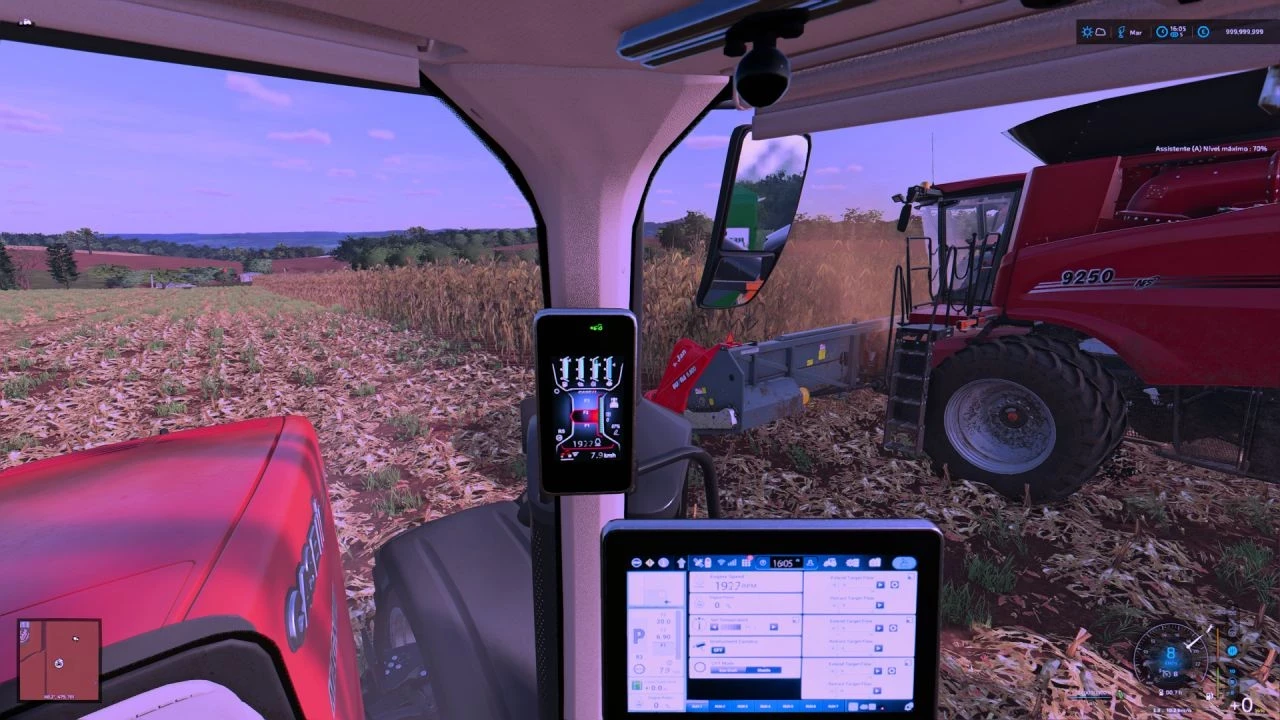
Dashboard Live V2.1.0.0 Dashboard Live (DBL for short) allows you to display all kinds of information in your board computers and/or dashboards in all kinds of tractors, regardless of brand. A zoom function is included to make it easier to view displays: – Left Shift key – Space bar: Short zoom – Both shift keys – space bar: Permanent zoom on/off If supported in the vehicle, the right Alt key and left/right/up/down arrow can be used to scroll through displays. In the MultiPlayer game, DBL synchronizes the engine temperature, fuel and air consumption from the server to the clients. What can be displayed? Basic game: – Status of the front and rear linkage – Status of attached devices and trailers – Filling levels – Compass heading – PTOs – Display of the currently active implement – Status of the folding/unfolding process – Tipping status – Tipping side – Course display (N/E/S/W, N/NE/E/SE/S/SW/SW/W/NE or degrees) – Field number – Weight of the loaded filling quantity – Real-time clock – Radio: On/Off, station and volume – Radio volume adjustable via buttons Minimap: – Display of the surrounding map in the dashboard Thresher: – Filling indicator – Status of straw chopper/swath delivery – Cutting height – Position of the transfer tube – Overloading process active Bale press / Bale wrapper: – Bale size – Bale counter Front loader: – Tool position Further functions: – Dark mode – Acoustic signals Supported mods (optional): VehicleControlAddon: – Status of the differential locks – Status of the all-wheel drive – Hold speed – GPS status – Slip of the drive wheels Enhanced Vehicle: – Status of the differential locks – Status of the all-wheel drive Headland Management: – Status – Field/pre-turn mode CombineXP: – Tonnes per hour – Engine load – Yield – High moisture warning CVTaddon: – Speed steps – Acceleration ramps – Braking ramps – Various warning states Important: Vehicles must be prepared for DashboardLive in advance in order to be able to use the functions and displays. An installation guide and documentation are included, and video tutorials are also available. V2.1.0.0 – ISOBUS: Trailer and implements can bring their own terminals or screens for DashboardLive integration. – Fixes for fonts GENERIC and GENERIC_BOLD – Syntax checks for dashboard entries – Conditions now support comparing strings – Conditions are now supported by valueType=”dbl.cc” – Integration of realGPS – Items can be active on multiple pages – HeadingText expanded – Added a fix for the œnil condition in AISteering’s server synchronization – Engine temperature will be saved – Engine will heat up and cool down without being entered – Compatibility with realismAddonGearBox (parking brake) – Added a button to release all engaged parking brakes – Added support for animations – Added the ability to temporarily store dashboard values and combine them with other dashboard values

Dashboard Live Vanilla Vehicles V1.1.0.0
other

Dashboard Live Vanilla Vehicles V1.1.0.0

Dashboard Live Vanilla Vehicles V1.1.0.0 Dashboard Live Vanilla Vehicles (short: DBL_VV) is an extension to Dashboard Live and integrates it into the following vehicles of the base game. Vehicle list: CaseIH A8800 MR Magnum T4B Puma Quadtrac 715 Claas Arion 5 Series Evion 450 Jaguar 990TT Lexion 6900 Lexion 8000 Series Xerion 12 Series Deutz-Fahr Series 6 Series 7 Series 8 Fendt Katana MT 1100 Series 5275 C-SL Vario 200 Vario 300 Vario 500 Vario 700 Vario 900 Vario 1000 John Deere Series 6R Series 7R Series 8R Series 8RT Series 8RX Series 9R Series 9RX Series S7 Krone Big M 450 Big X 1180 Massey Ferguson Beta 7360 AL4 Series 7S Series 9S New Holland Series T7 Series T8 Oxbo AT 5105 BP 2140E EPD 540E MKB 4TR Valtra S Series T Series Volvo FH16 FH Electric L120H L120H Electric L180H VNX 300 V1.1.0.0 – realGPS support and integration: Use of realGPS as a mini-map. – MB DLC Work Cameras for All Vehicles support and integration: – realGPS and cameras for vehicles including Oxbo, Claas, Deutz, MF, Valtra, Volvo, Skoda, and many more. – JD displays expanded: – isoBUS and RTK pages now also include a camera for implements – 6M added – New G5 Apillar display for the 9Rx, among others – Cameras are integrated into the pages of the G4 and G5 terminals and can be switched between. – New functions: output per hectare/hour, fuel consumption in liters/hectare, and actual on-board voltage (12 V/24 V) implemented – Display errors and parameters for various displays corrected – isoBus screen for Brantner DD 24073/2 XXL – isoBus screen for Lemken Juwel6 and Titan18 – Fendt Variotronic can be used separately. – All previously hard-coded displays are now also included separately as compounds – Page layouts revised – Missing radio backgrounds fixed via Patch 1.16 – Faulty startup screens fixed via Patch 1.19 – Flickering fixed after Patch 1.20 – CEBIS missing nodes in the log fixed

224 / 3,199

We use essential cookies to keep you signed in and remember your theme. With your consent we also use functional storage (to remember preferences like downloaded mods, kept on your device) and ad cookies that help keep ModNest free. Pro members never see ads. Privacy & cookies.