Farming Simulator 25 mods
74,386 results- 15 per page
- 30 per page
- 45 per page
- 60 per page
-
See more per page
Bigger pages, fewer clicks - and no ads anywhere.
Go Pro
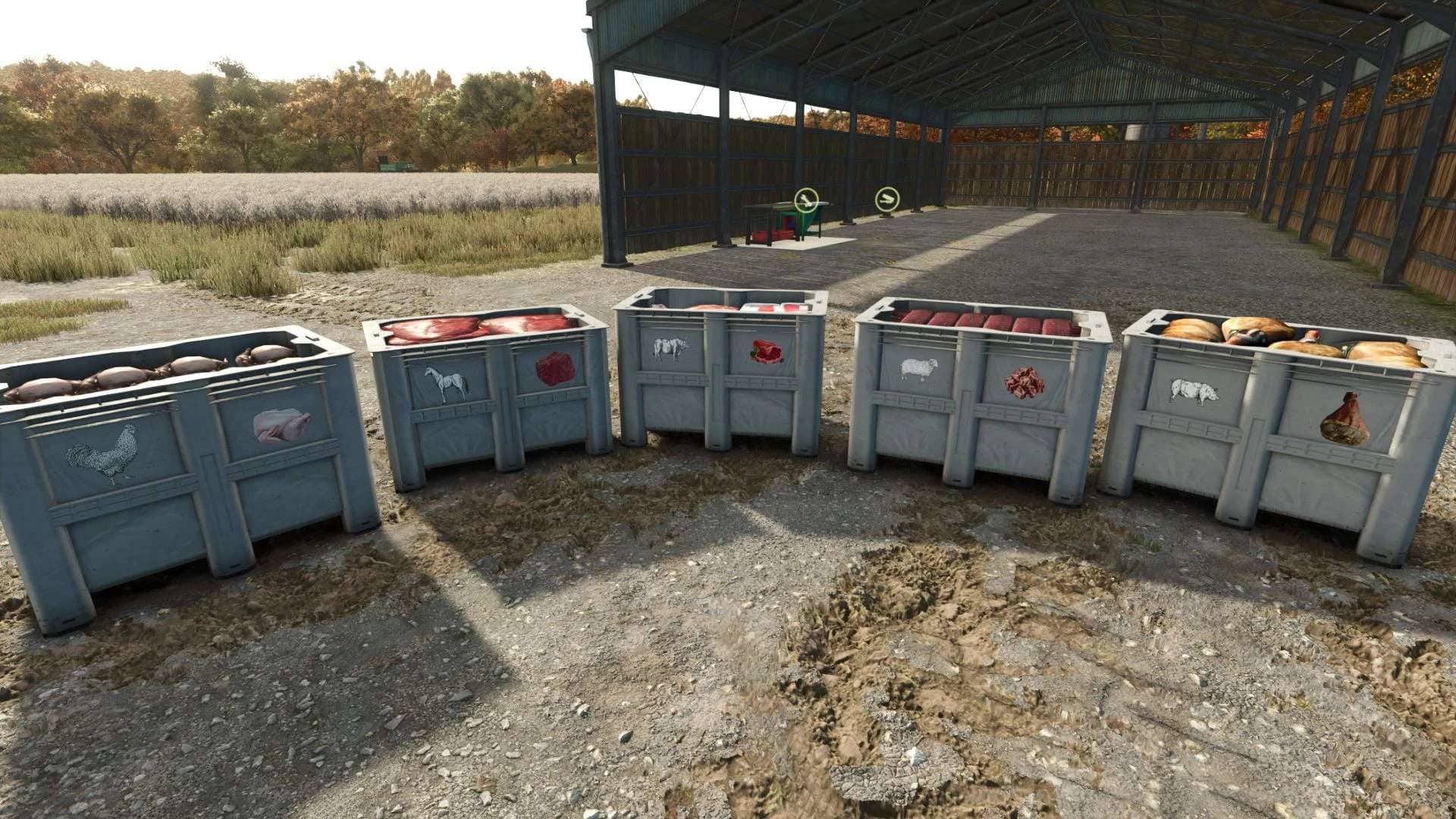
RLRM – Butcher Table Mods Bridge v1.0
This mod adds compatibility between Realistic Livestock RM and Butcher Table. Instead of every animal producing the same amount of meat, the butcher yield is now calculated using: – Live Weight – Meat Quality (Genetics) Features: – Weight-based butcher yield – Meat Quality affects production Supports: – Cattle – Pigs – Sheep / Goats – Chickens – Horses (Experimental) Plug & Play – Multiplayer compatible Reference Weights: – Cattle: 1000 kg – Pigs: 200 kg – Sheep/Goats: 60 kg – Horses: 550 kg – Chickens: 4 kg Meat Quality Multipliers: – 0-9 = 0.70x – 10-19 = 0.80x – 20-29 = 0.90x – 30-39 = 0.95x – 40-59 = 1.00x – 60-69 = 1.10x – 70-79 = 1.15x – 80-89 = 1.20x – 90-99 = 1.30x Requirements: – Realistic Livestock RM – Butcher Table Experimental: Horse support is currently experimental and may not perfectly match the intended live-weight calculation.
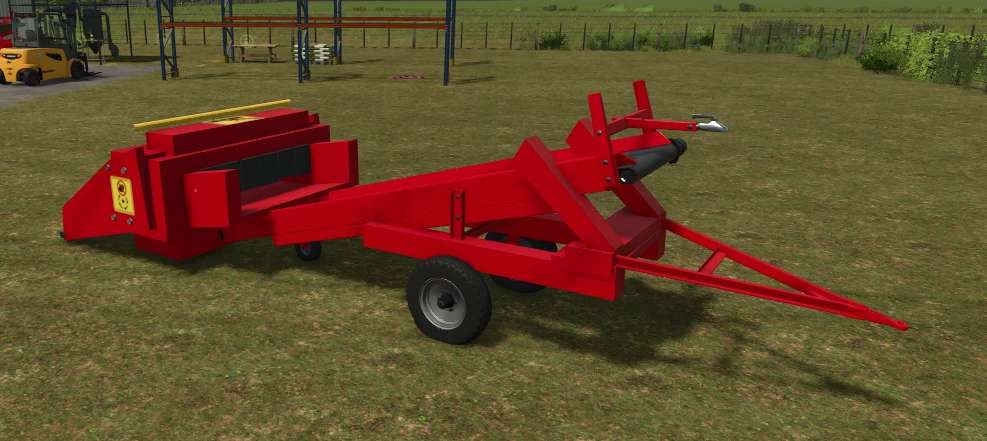
Bale Conveyor v1.0
Converts bales directly into loose material using an integrated roller-fed hopper and conveyor belt. Place a compatible bale in the intake tray and the machine will process it automatically, allowing the material to be transferred to other conveyors, trailers, storage facilities or production points. A practical solution for automating bale handling without relying on ground-based bulk filling. Features: – Supports compatible bale materials. – Roller-fed intake hopper. – Continuous conveyor discharge. – Works with other conveyors and production systems. – Configurable frame color. – Transportable design. – PC/Mac only due to custom scripts.
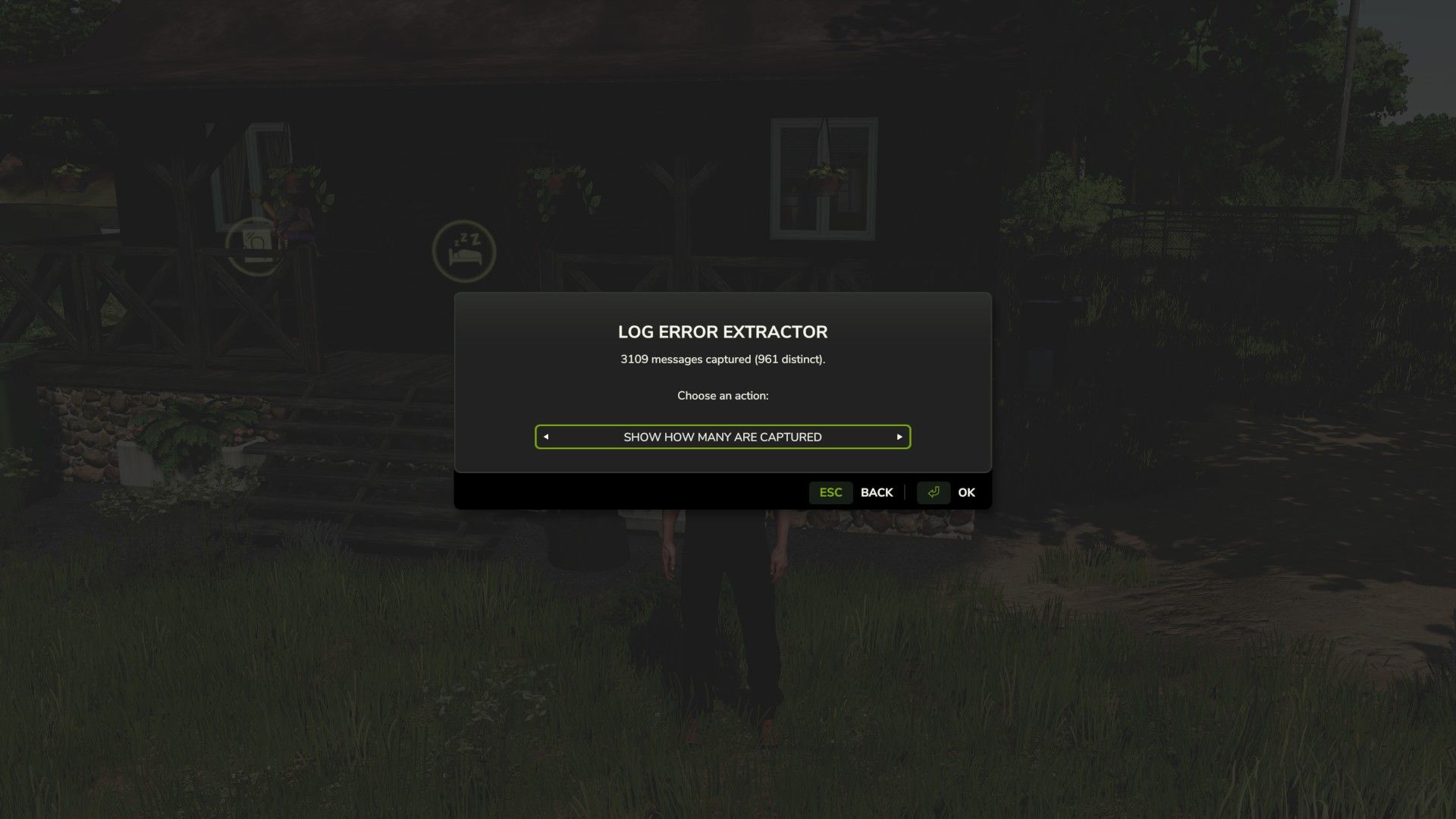
Log Error Extractor v1.2
Stop scrolling through thousands of lines of log file trying to work out which mod broke your game. Log Error Extractor captures every error and warning your game produces and writes them to a clean, readable report — errors and warnings only, nothing else. It then ranks every mod in your folder by how many distinct problems it’s causing, so the culprit is sitting at the top of the list instead of buried somewhere in a 6,000-line log. What it does – Writes a report containing only errors and warnings, saved as log_errors.txt next to your normal log – Ranks your mods worst to best by distinct error count, with flags on the serious offenders – Collapses repeated messages — one mod throwing the same warning 500 times shows once with a count, not 500 lines – Breaks the report down mod by mod so you can see exactly what each one is throwing – Console commands are there for anyone who prefers them: dumpLogErrors, topLogErrors, countLogErrors, clearLogErrors – Getting started Bind a key under Options → Controls → Log Error Extractor, load your save, and press it. The menu opens anywhere — on foot, in a vehicle, doesn’t matter. Cycle the options with the arrows and hit OK. – Save Report To File — writes the full report to log_errors.txt in your Farming Simulator 2025 folder. – Show Worst Mods — puts your top offenders straight on screen, no file needed. – Show Count — tells you how many errors and warnings have been captured so far. – Clear — wipes everything collected up to now so your next report starts clean. – That last one is the most useful when you’re hunting a specific conflict. Clear the buffer, recreate whatever broke, then save the report — and it’ll contain nothing but what happened in between. Important — do not rename the mod. The folder is called FS25_AAA_LogErrorExtractor on purpose. Farming Simulator loads mods alphabetically, and the AAA forces this one to load first so it can capture errors from everything that loads after it. Rename it and it drops down the list, and anything loading before it goes uncaptured. Requirements and limitations – PC only. This is a script mod, and script mods are not supported on PlayStation or Xbox. – Singleplayer only for now. Multiplayer is untested rather than known-broken — it’s declared unsupported so it won’t load in an MP save. If you’d like to help, flip in the modDesc, test it, and let me know what happens. – It cannot capture errors that occur before it loads, so base game startup and engine-level messages won’t appear. Check the game’s own log.txt for those. Reporting problems The mod writes a small health check file, log_status.txt, every time you load a save. If something isn’t working, open it — and please attach it if you’re reporting an issue. V1.2.0.0 Unneeded files removed from the zip. I know I said not to rename the zip in both my posting and the video showing how to use. But a caveat I had not thought about was brought up in the comments. The FS25_ prefix is a GIANTS ModHub submission rule, not something the game engine requires. The game only cares that the name is letters, digits and underscores, and doesn’t start with a digit. Renaming the zip to AAA_LogErrorExtractor.zip works fine. So go ahead and Right click the mod, choose rename and then delete the FS25_ prefix if you are finding you have mods not being found. Check your console or basegame log and see a texture warning showed up in `log.txt` — a raw-format PNG that should have been a DDS and The Log Error Extractor didn’t capture it. The report came back clean. That looked like a bug in the extractor. It isn’t. It’s a boundary of how the mod works, and it’s worth writing down. How the extractor actually works It can’t read `log.txt`. That was settled early on: the Lua sandbox only allows `io.open` in write mode, and the game holds the log file open exclusively anyway. Nothing in a script mod can open it and scrape it. So instead of reading the log, the extractor sits in front of the functions that *write* to it. At load time it wraps `printError`, `printWarning`, the whole `Logging` family, and a filtered `print`, buffers everything they’re handed, and dumps that buffer on command. That works well. On a 1,200-mod load order it captured 3,182 messages. Why this one slipped through The hooks aren’t failing. If this warning had passed through any of those functions, it would have been sitting in the dump with the other three thousand. It wasn’t. So it never went through Lua at all. Texture loading happens in the engine’s C++ layer, which writes to `log.txt` directly. There’s no Lua function in the path, so there’s nothing to wrap. Combine that with not being able to read the log back, and the message is genuinely unreachable. Not “hard to catch” unreachable by this design. What else is in that category – anything the engine handles itself rather than routing through script: – texture format and loading problems – i3d loading failures – shader compilation messages Anything a mod’s Lua code reports is still caught normally, which is the large majority of what actually matters when you’re chasing a broken mod. The practical takeaway “0 errors” from the extractor means “0 errors that Lua reported.” It does not mean the log is clean. That distinction belongs in the README, because a tester who reads it the wrong way will report a mod as healthy when it isn’t. Possible future work Covering this class would need a completely different mechanism scanning the mods folder for raw format textures directly, rather than waiting for the engine to complain. That sidesteps the log entirely. It depends on directory listing being available in the sandbox, which hasn’t been verified. Worth a look, but it’s a new feature rather than a fix.
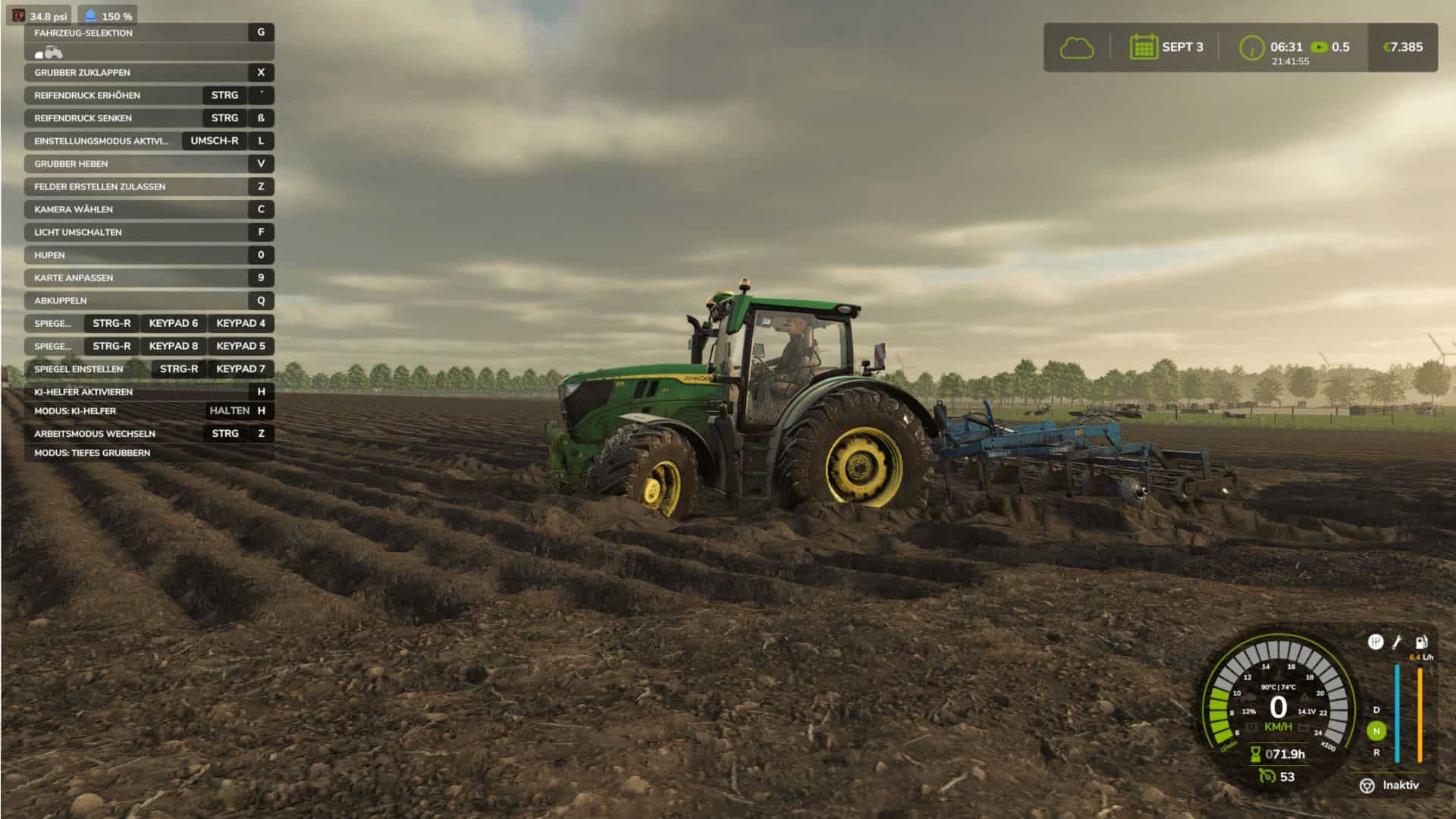
Visual Mud Tracks v1.3.7.2
Description: Visual Mud Tracks expands Farming Simulator 25 with a comprehensive simulation of lanes, soil moisture, tire behavior, compaction, fruit destruction, root damage and bogging. This means that vehicles react much more realistically to dry, moist and water-saturated soils. The mod is designed for single player and multiplayer and can work with the **Realistic Water & Soil Management System**. Soil moisture, load capacity and waterlogging not only influence the display, but also tire contamination, sinking, slippage, driving resistance and plant damage. Physical lanes and terrain grooves Tires can permanently lower the terrain and create real grooves in the terrain heightmap. The depth and width of the tracks are calculated individually for each wheel. To be taken into account: – Vehicle weight – actual wheel load – Tire width and tire radius – Tire pressure – Soil moisture – Soil saturation – Carrying capacity – Speed – Wheel slip – Cornering – Number of previous crossings – Trailers, levels and attachments Left and right bike lanes remain separate. The center of the vehicle is not lowered unnecessarily. The grooves have a narrow, steep cross section so that the edge areas do not sink over a large area. Existing tracks can be deepened by further difficult crossings. A maximum depth protects the terrain from extreme deformation. The groove is created directly at the actual wheel contact. There is no delayed post-processing behind the vehicle. Steered, mirror mounted and differently aligned wheels are taken into account. Restoration through tillage Physical lanes can be removed again through appropriate tillage. The following are supported, among others: – Plows – Cultivator – Disc harrows – Subsoiler – Mulcher – Reels – Seeders – Direct seeding machines – Planters The terrain is only reset within the actual work area being worked on. Pending trace calculations and saved visual traces are also removed there. Safe Terrain Journal – The mod uses separate savegame files: – `visualMudTracksTerrainBackup.xml` – `visualMudTracksActiveRuts.xml` – `visualMudTracksState.xml` The original terrain height of a cell is saved during the first intervention and is not later overwritten by further passes. Active grooves and recovery information are managed separately. This allows tracks to be reset in a more controlled manner. Interrupted restores can be resumed the next time you start the game. Important note for updates: Before switching from an older version, existing lanes with the old version still installed should be removed using tillage equipment and the score saved. Grooves that have already been permanently written into the terrain height map may otherwise remain. Visible and physical sinking Tires visibly and physically sink on soft and wet surfaces. The sinking is implemented via the effective wheel physics radius. This means that the tires, suspension and ground contact react together. The sinking occurs progressively and not suddenly. On solid ground, the wheel lifts itself out of the ground in a controlled manner. The sinking depth depends on: – Soil moisture – Saturation – Carrying capacity – Wheel load – Tire width – Tire pressure – Speed – Slip – existing track depth Wide tires distribute the load better. Narrow, heavily loaded tires cut deeper. Tire pressure system The tire pressure can be changed while driving. The value is saved for each wheel and synchronized in multiplayer. Low tire pressure: – increases the contact area – Improves grip on soft ground – reduces cutting – can make it easier to get out of soft tracks High tire pressure: – reduces the contact area – increases cutting – increases the risk of getting stuck on wet ground – may be cheaper on solid ground A compact HUD shows the current pressure in bar and evaluates it in color. Soil moisture HUD and RWSM connection The Soil Moisture HUD shows the current RWSM topsoil value in percent. The display uses the same soil moisture value as the RWSM field info. Values above 100 percent can represent severe waterlogging or waterlogging. RWSM soil moisture affects: – Sludge content – Tire contamination – Particle effects – Carrying capacity – Sinking depth – Tire grip – Wheel slip – Groove depth – Danger of getting stuck – Fruit and root damage Increased soil moisture caused by irrigation can also change the soil physics. Tire dirt and mudThe amount of mud is stored individually for each tire. A tire remains dirty after leaving the field and cleans itself depending on the surface. – Asphalt cleans quickly – Gravel cleans slower – Clean dirt roads only slightly – high speed throws more mud out of the tread – Rain also washes off the tires – a light film of dirt may remain The particle effects distinguish between dry earth and wet mud. Included are: – fine dry soil particles – medium dry soil particles – fine wet splashes – medium mud particles – rare heavy mud lumps The amount of particles depends on wheel rotation, slip, tire width, radius, moisture, sink factor and load capacity. Particles are only generated when there is suitable ground contact. Progressive stuck physics On heavily waterlogged and less stable ground, a vehicle can progressively become stuck. Continuous slippage causes driven wheels to dig in further. At the same time, the transferable grip decreases and the driving resistance increases. To be taken into account: – Soil moisture and saturation – Carrying capacity – Wheel load – Tire pressure – Slip – Speed – Engine utilization – Engine speed – Tensile load – Working resistance – Duration of exposure Plows, cultivators, disc harrows, subsoilers, seed drills, power harrows and rollers produce different pulling resistances. Working width and working depth influence the power requirement. In extreme conditions, propulsion can be almost completely lost. Lifting or uncoupling an implement immediately reduces the additional load. Controlled reversing can reduce the digging condition and free the vehicle along its own lane. Soil compaction – Vehicles compact the top and bottom soil depending on wheel load, soil moisture, slip and number of passes. Included are: – Topsoil compaction – Subsoil compaction – Stronger compaction in wet soil – Multiple experiences – Additional load due to cornering and slipping – Plow sole for frequent plowing – Different effects of plow, cultivator and subsoiler – Targeted reconsolidation by rolling – slow biological recovery Compaction and soil structure can be viewed in the field info. Fruit destruction Plants in the immediate tire area may be damaged or completely removed. The native LS25 fruit destruction is used for this. The damage depends on: – Wheel load – Tire width – Soil moisture – Slip – Cornering – Growth stage – Root health – Soil structure – Number of crossings Young plants react more sensitively. Repeated crossings significantly increase the damage. Normal tires remove plants after several trips over the same spot at the latest. Detected maintenance tires reduce the damage, but do not prevent it completely if the vehicle is driven frequently. Root Health Each contaminated soil cell can receive its own root health value. Root damage occurs due to: – high wheel load – wet ground – strong slip – Cornering – Multiple crossings – unfavorable growth stages – compacted soil If root health declines, the risk of visible plant damage increases. – below 70 percent: increased sensitivity – below 40 percent: further crossings lead to destruction more quickly – less than 20 percent: very high risk of failure Root health is saved and can slowly recover biologically. Field info and settings menu The mod expands the field information to include numerous land values, including: – Soil compaction – Underbody status – Root health – Soil structure – Sink factor – Carrying capacity – Fruit and root damage The settings menu contains detailed descriptions of all options. High and low values, interactions, performance consequences and save game effects are explained. The menu texts are available in twelve languages: – German, English, French, Spanish, Italian, Dutch, Polish, Portuguese, Russian, Czech, Hungarian and Turkish. Multiplayer and performance The crucial physics calculations run on the server side. Tire pressure, contamination and important soil conditions are synchronized. To optimize performance, the mod uses: – limited groove points – adjustable storage intervals – Event and bulk caches – sleeping floor cells – Reduced refresh rates for removed or inactive areas – delayed safe initialization of the particle systems – Clean release of particle effects when deleting vehicles Tire contamination / GIANTS-Washable – Tire contamination fully adapted to the original GIANTS washable system. – VMT leaves the original LS25 tire dirt as a basis and no longer writes its own dirt/wetness values on dry fields or grass. – Additional VMT mud is only activated when the ground is actually wet or soft. – Mud color tuned darker; Build-up and breakdown occur more slowly and naturally. – When exiting real mud conditions, the original GIANTS dirt/wetness/color condition will be restored and will not be overwritten further thereafter. – VMT-Radschlamm remains savegame and multiplayer capable. Driving physics / sinking / suspension – Stuck driven wheels can create a physical terrain groove directly at the wheel contact even without forward movement. – If there is a lot of slip when stationary, a short, elongated tire pocket is created in the direction of rolling instead of just a transverse line. – Temporary wheel radius sinking and permanent heightmap groove are offset against each other so that the same effect is not shown twice. – Transitions to real terrain deformation remain continuous so that vehicles do not jump up or sink additionally when a groove occurs. – Wet/soft floors affect wheel suspension via the native GIANTS interface setSuspensionMultipliers. – The original vehicle/axle suspension remains the technical basis; VMT does not replace XML spring values. – On heavily saturated ground, the suspension is softer, but the damping is deliberately kept higher. Low tire pressure increases compliance slightly. – Dry fields, roads and frozen ground continue to use the original GIANTS suspension. – Existing RWSM/VMT soil data will be reused; no additional full field or DensityMap queries for the suspension. Permanent terrain grooves – Permanent heightmap grooves are written directly on the actual wheel contact. – The previous delayed groove queue has been removed because batched subsequent terrain writes could cause larger sections of terrain to sink behind the vehicle. – Distance-based sampling is retained; there are still no heightmap writes in each frame. – Wheel contact may only leave grooves at the same depth or lower them further, never raise them. – Existing grooves no longer jump up when you drive over them again. – Before each write, the actual terrain height is taken into account; the effective groove depth is monotonic. – Tillage remains the normal path, which is allowed to consciously raise a saved groove again. Unchangeable original height – For each persistent groove, the original height is permanently locked when first detected. – originalHeight may not be replaced by later wheel contacts, loading, verification or migration. – When loading, the current heightmap depth is only observed and not adopted as the new logical groove depth. – This prevents saved grooves from being gradually committed deeper and deeper upon reboot or mod update. – VMT only stores the logical depth actually applied by VMT. – In legacy migrations, if several old entries meet the same new cell, the original height that was adopted first is retained. – Cultivator/plow always returns to this unchangeable original height. Savegame persistence/update security – Groove persistence extended to Format 7 / Restore Scheme 3. – Older save game formats 3, 4, 5 and 6 remain readable and are migrated in an update-safe manner. – Exact world position X/Z of each groove is stored in addition to grid indices. – The original height, applied depth and absolute target height are saved. – Old grooves are found again via their physical world position and not just via possibly differently quantized heightmap keys. – Primary and backup files use a monotonic save sequence; When loading, the newer valid generation wins. – Persistence files are reopened after writing and validated for format, restore scheme, sequence and groove count. – The dirty state is only reset after successful validation. – Temporary terrain write errors no longer discard loaded grooves; they remain until they are successfully processed. – The final save game callback is registered centrally via the VMTSaveCoordinator. Loaded grooves / double deformation – When loading, VMT first checks the heightmap already saved by GIANTS. – If the physical groove already exists, it will not be written into the terrain again. – This means that grooves are not applied deeper again after a restart or mod update. – If a groove actually needs to be added, this is done exclusively via the Lower-Only-Terrain-Writer. – A mod update cannot raise existing terrain.Tillage/Restoration – Cultivators and plows reset persistent grooves to the saved original height. – A groove entry is not deleted until the recovery is written successfully or the original height is already physically present. – In the event of temporary terrain write errors, the groove remains saved and can be reprocessed later. – After successful tillage, the groove will be removed from the persistent chunk record and will not appear again after restart. – Old or newly quantized groove cells at work area edges are reliably detected. – Terrain that is already higher than the original historical height due to landscaping or map updates will never be lowered to the old value again. Performance in old save games – A 16 m spatial index has been added for persistent grooves. – Cultivators and plows only check grooves in the immediate vicinity of their current work area. – Expensive wide heightmap/grid passes over large areas have been removed. – Legacy baselines are only reconstructed when necessary for the actual cell being edited; no full card scan. – Lazy load verification of old grooves heavily budgeted so that saves with many thousands of grooves do not produce large FPS spikes. – Chunk-based storage and local queries remain the foundation for large savegames. Stability / Entity Security – Added protection against GIANTS entities that have already been deleted. – Vehicle nodes are checked with entityExists before world position, speed and direction queries. – Invalid vehicles no longer enter the VMT physics cache; Wheel position queries only fall back to valid nodes. – Stuck, mud, groove, tire pressure and traction logic remains stable even when deleting or selling vehicles. User Interface/Localization – Fixed VMT menu header L10N error; “Visual Mud Tracks” appears without a missing translation key. – HUD, tire pressure, soil moisture and multiplayer displays are retained. Compatibility – RWSM connection for moisture, saturation, load capacity and compaction is retained. – Tire pressure, slip, sink physics, wet suspension, mud particles, compaction, multiplayer and savegame persistence continue to work together. – GIANTS-native tire contamination and vehicle physics remain the basis; VMT only supplements the wet/soft ground effects. – Existing saves with grooves from older VMT versions remain loadable and can be migrated without restarting the career. Current status: Visual Mud Tracks 1.37.1.15 Required: – Realistic Water & Soil Management (RWSM)
Transport Company v1.3
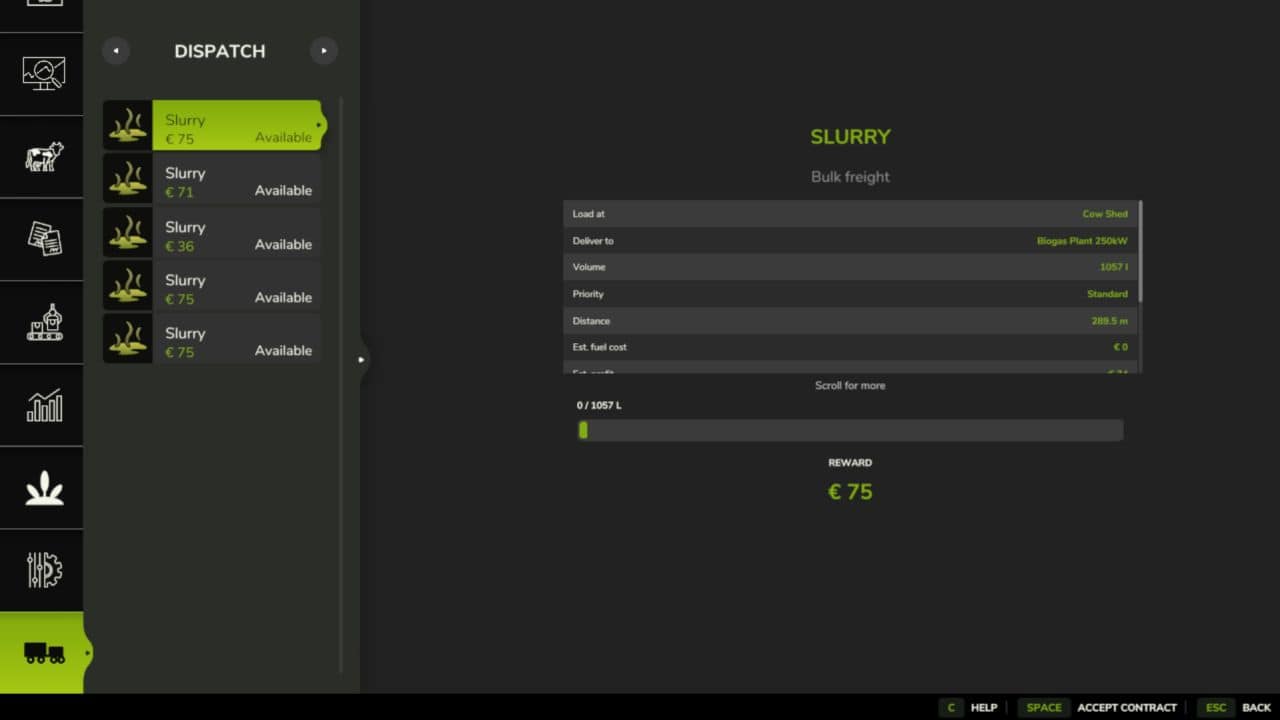
Your map is already full of silos, dairies and mills moving goods between them. None of it pays you a penny. Buy a headquarters and it does. Freight jobs are generated from the stations that already exist on your map, priced against the live economy. Haul them yourself, or put a driver in the cab and let the base game AI run the route while your fleet quietly books the miles, the diesel and the profit truck by truck. Contract Board – Jobs are generated from real stations on your map, using the live economy price of the goods to set the reward. Two Ways To Run A Job 1: Haul it yourself -> Load at the pickup, tip at the destination. Progress moves as you tip. 2: Hire a driver -> Hands the route to the base game AI as a Load & Deliver job. Per-Truck Books – The base game only keeps farm-wide statistics. This tracks every truck separately. Company Ledger – Revenue, driver wages, fuel, distance and job count for the company as a whole, followed by a history of every finished and expired contract, newest first. – Company figures are tracked separately from the fleet on purpose; a load you tip yourself cannot be pinned to a specific truck, because the station reports liters and a position, never the vehicle that delivered them. Dispatch Office – Four tabs in the in-game menu, built from stock FS25 menu widgets so it looks and behaves like the rest of the game. New: Reset Board button – New button in the PDA to clear stuck or stale contract boards – Blocked hired drivers are automatically unstuck when the board resets New: Driver recovery – Blocked drivers now attempt up to 5 reverse maneuvers with a longer backup distance before giving up Bug fixes – Fixed deliveries paying out twice under certain timing conditions – Fixed the in-game day counter and service unit tracking – Fixed headquarters state not archiving properly when selling or rebuilding
AutoDrive Pro v1.0
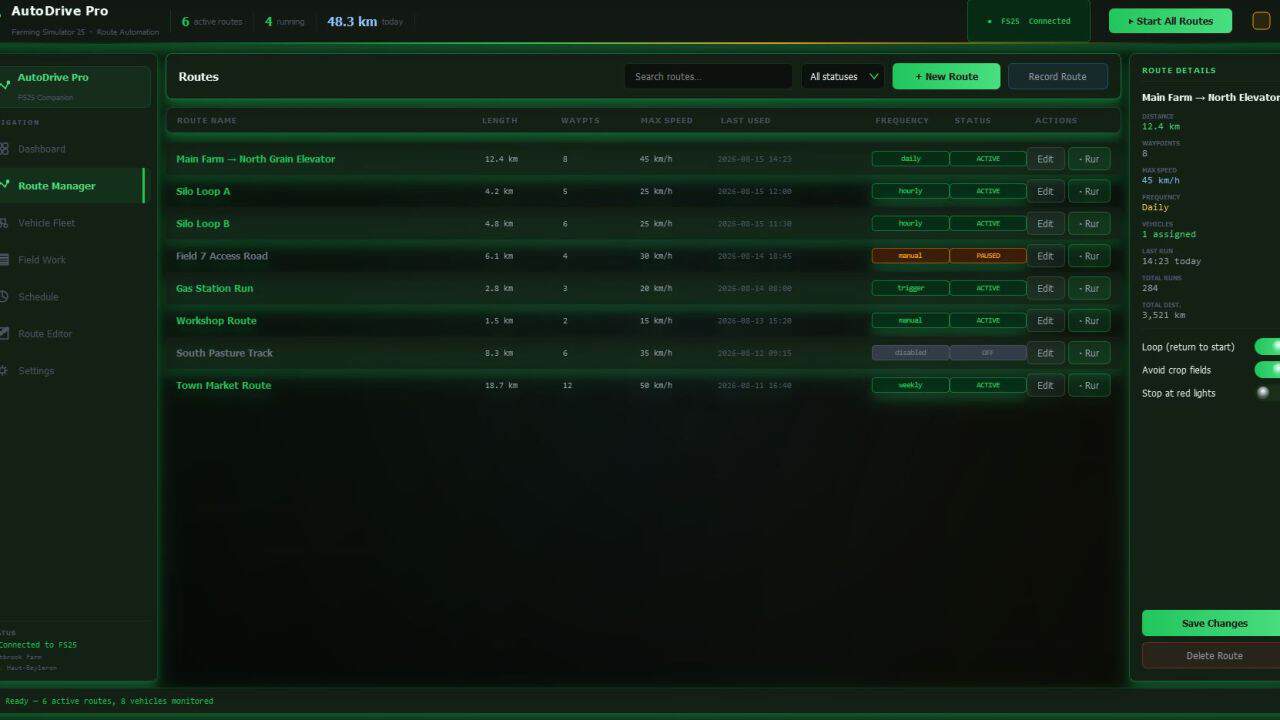
AutoDrive Pro is a companion app for Farming Simulator 25 that puts your entire vehicle fleet on autopilot. Record a route once — every tractor, harvester, and transport vehicle drives it automatically from that point on. Core features: – Route Manager — record routes in-game by driving normally, edit waypoints, set per-segment speed limits, and link routes into a smart navigation network – Visual Route Editor — draw and edit routes directly on your farm map without loading the game. Load ready-made presets for Haut-Beyleron, Elmcreek, Felsbrunn, Erlengrat, and Riverbend Springs — or import community routes via .json – Vehicle Fleet — monitor every machine in real time: fuel level, current task, live status. Automatic refuel trips, multi-vehicle sync, route assignment in two clicks – Field Work — auto-generate optimized driving patterns (parallel rows, spiral, diagonal), track harvest progress, auto-assign vehicles when a field is ready – Automation Schedule — run routes on a fixed time (daily / weekly) or by trigger: grain tank full → auto-unload, fuel low → gas station, end of day → all vehicles return to parking – Live Dashboard — real-time overview of all vehicles, active routes, fuel levels, and today’s deliveries on a single screen
Visual Mud Tracks v1.3.7.3
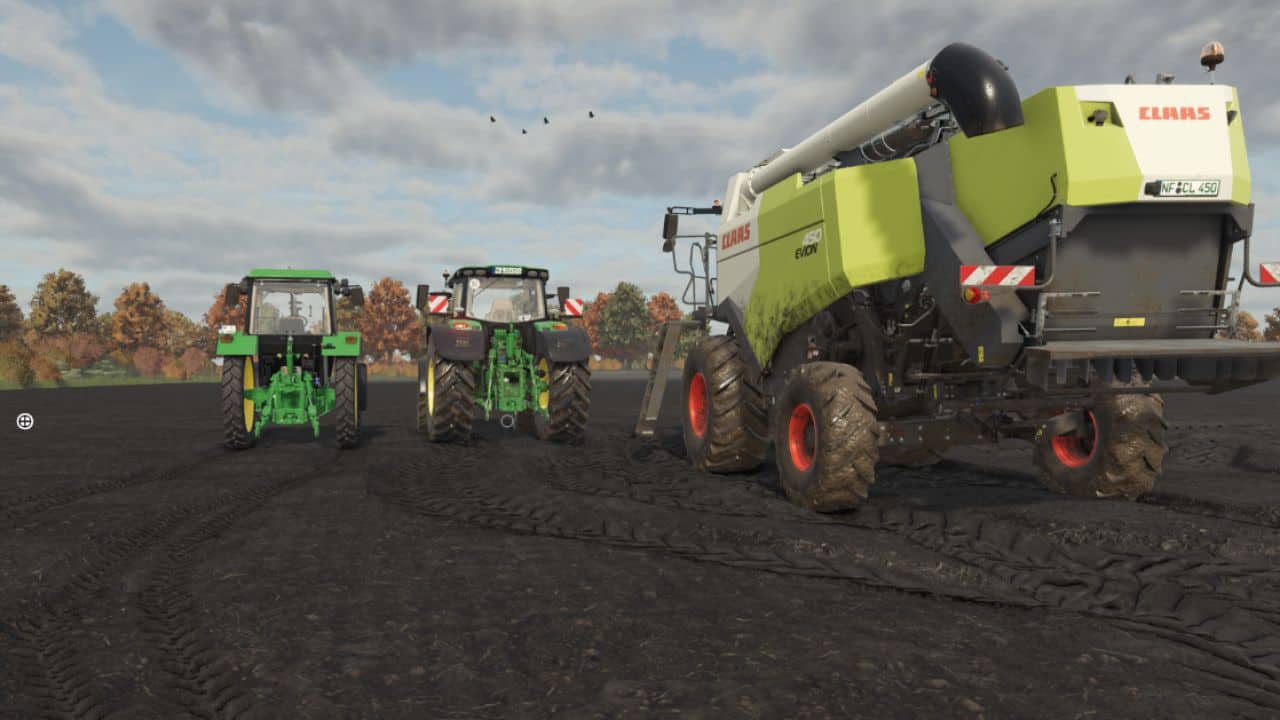
Description: Visual Mud Tracks expands Farming Simulator 25 with a comprehensive simulation of lanes, soil moisture, tire behavior, compaction, fruit destruction, root damage and bogging. This means that vehicles react much more realistically to dry, moist and water-saturated soils. The mod is designed for single player and multiplayer and can work with the **Realistic Water & Soil Management System**. Soil moisture, load capacity and waterlogging not only influence the display, but also tire contamination, sinking, slippage, driving resistance and plant damage. Physical lanes and terrain grooves Tires can permanently lower the terrain and create real grooves in the terrain heightmap. The depth and width of the tracks are calculated individually for each wheel. To be taken into account: – Vehicle weight – actual wheel load – Tire width and tire radius – Tire pressure – Soil moisture – Soil saturation – Carrying capacity – Speed – Wheel slip – Cornering – Number of previous crossings – Trailers, levels and attachments Left and right bike lanes remain separate. The center of the vehicle is not lowered unnecessarily. The grooves have a narrow, steep cross section so that the edge areas do not sink over a large area. Existing tracks can be deepened by further difficult crossings. A maximum depth protects the terrain from extreme deformation. The groove is created directly at the actual wheel contact. There is no delayed post-processing behind the vehicle. Steered, mirror mounted and differently aligned wheels are taken into account. Restoration through tillage Physical lanes can be removed again through appropriate tillage. The following are supported, among others: – Plows – Cultivator – Disc harrows – Subsoiler – Mulcher – Reels – Seeders – Direct seeding machines – Planters The terrain is only reset within the actual work area being worked on. Pending trace calculations and saved visual traces are also removed there. Safe Terrain Journal – The mod uses separate savegame files: – `visualMudTracksTerrainBackup.xml` – `visualMudTracksActiveRuts.xml` – `visualMudTracksState.xml` The original terrain height of a cell is saved during the first intervention and is not later overwritten by further passes. Active grooves and recovery information are managed separately. This allows tracks to be reset in a more controlled manner. Interrupted restores can be resumed the next time you start the game. Important note for updates: Before switching from an older version, existing lanes with the old version still installed should be removed using tillage equipment and the score saved. Grooves that have already been permanently written into the terrain height map may otherwise remain. Visible and physical sinking Tires visibly and physically sink on soft and wet surfaces. The sinking is implemented via the effective wheel physics radius. This means that the tires, suspension and ground contact react together. The sinking occurs progressively and not suddenly. On solid ground, the wheel lifts itself out of the ground in a controlled manner. The sinking depth depends on: – Soil moisture – Saturation – Carrying capacity – Wheel load – Tire width – Tire pressure – Speed – Slip – existing track depth Wide tires distribute the load better. Narrow, heavily loaded tires cut deeper. Tire pressure system The tire pressure can be changed while driving. The value is saved for each wheel and synchronized in multiplayer. Low tire pressure: – increases the contact area – Improves grip on soft ground – reduces cutting – can make it easier to get out of soft tracks High tire pressure: – reduces the contact area – increases cutting – increases the risk of getting stuck on wet ground – may be cheaper on solid ground A compact HUD shows the current pressure in bar and evaluates it in color. Soil moisture HUD and RWSM connection The Soil Moisture HUD shows the current RWSM topsoil value in percent. The display uses the same soil moisture value as the RWSM field info. Values above 100 percent can represent severe waterlogging or waterlogging. RWSM soil moisture affects: – Sludge content – Tire contamination – Particle effects – Carrying capacity – Sinking depth – Tire grip – Wheel slip – Groove depth – Danger of getting stuck – Fruit and root damage Increased soil moisture caused by irrigation can also change the soil physics. Tire dirt and mudThe amount of mud is stored individually for each tire. A tire remains dirty after leaving the field and cleans itself depending on the surface. – Asphalt cleans quickly – Gravel cleans slower – Clean dirt roads only slightly – high speed throws more mud out of the tread – Rain also washes off the tires – a light film of dirt may remain The particle effects distinguish between dry earth and wet mud. Included are: – fine dry soil particles – medium dry soil particles – fine wet splashes – medium mud particles – rare heavy mud lumps The amount of particles depends on wheel rotation, slip, tire width, radius, moisture, sink factor and load capacity. Particles are only generated when there is suitable ground contact. Progressive stuck physics On heavily waterlogged and less stable ground, a vehicle can progressively become stuck. Continuous slippage causes driven wheels to dig in further. At the same time, the transferable grip decreases and the driving resistance increases. To be taken into account: – Soil moisture and saturation – Carrying capacity – Wheel load – Tire pressure – Slip – Speed – Engine utilization – Engine speed – Tensile load – Working resistance – Duration of exposure Plows, cultivators, disc harrows, subsoilers, seed drills, power harrows and rollers produce different pulling resistances. Working width and working depth influence the power requirement. In extreme conditions, propulsion can be almost completely lost. Lifting or uncoupling an implement immediately reduces the additional load. Controlled reversing can reduce the digging condition and free the vehicle along its own lane. Soil compaction – Vehicles compact the top and bottom soil depending on wheel load, soil moisture, slip and number of passes. Included are: – Topsoil compaction – Subsoil compaction – Stronger compaction in wet soil – Multiple experiences – Additional load due to cornering and slipping – Plow sole for frequent plowing – Different effects of plow, cultivator and subsoiler – Targeted reconsolidation by rolling – slow biological recovery Compaction and soil structure can be viewed in the field info. Fruit destruction Plants in the immediate tire area may be damaged or completely removed. The native LS25 fruit destruction is used for this. The damage depends on: – Wheel load – Tire width – Soil moisture – Slip – Cornering – Growth stage – Root health – Soil structure – Number of crossings Young plants react more sensitively. Repeated crossings significantly increase the damage. Normal tires remove plants after several trips over the same spot at the latest. Detected maintenance tires reduce the damage, but do not prevent it completely if the vehicle is driven frequently. Root Health Each contaminated soil cell can receive its own root health value. Root damage occurs due to: – high wheel load – wet ground – strong slip – Cornering – Multiple crossings – unfavorable growth stages – compacted soil If root health declines, the risk of visible plant damage increases. – below 70 percent: increased sensitivity – below 40 percent: further crossings lead to destruction more quickly – less than 20 percent: very high risk of failure Root health is saved and can slowly recover biologically. Field info and settings menu The mod expands the field information to include numerous land values, including: – Soil compaction – Underbody status – Root health – Soil structure – Sink factor – Carrying capacity – Fruit and root damage The settings menu contains detailed descriptions of all options. High and low values, interactions, performance consequences and save game effects are explained. The menu texts are available in twelve languages: – German, English, French, Spanish, Italian, Dutch, Polish, Portuguese, Russian, Czech, Hungarian and Turkish. Multiplayer and performance The crucial physics calculations run on the server side. Tire pressure, contamination and important soil conditions are synchronized. To optimize performance, the mod uses: – limited groove points – adjustable storage intervals – Event and bulk caches – sleeping floor cells – Reduced refresh rates for removed or inactive areas – delayed safe initialization of the particle systems – Clean release of particle effects when deleting vehicles V1.3.7.3 – Fixed bug when it was raining that you couldn’t drive faster than 20 on the road. Required: – Realistic Water & Soil Management (RWSM)
Textures meadow deco foliage v1.0
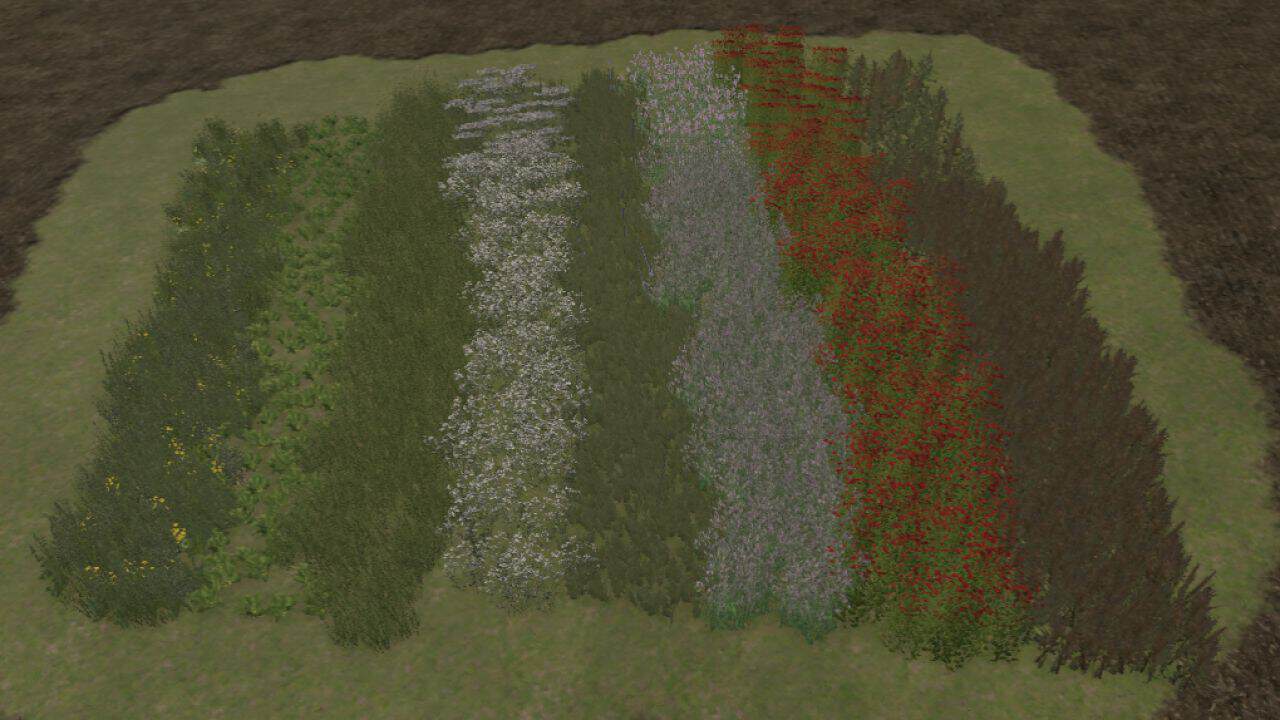
Hello, I am giving you meadow and deco cardboard, instructions on how to upload it are in the file.

Est San Ignacio V1.0
Est San Ignacio takes place in the rural areas that surround my town called Ayacucho, a ranch with lots around it and some more in front. There are points of sale and purchase of supplies and factories already established, pine forests to cut down, 15 lots to work on, 2 forest areas for logging and 1 plot for sheds and others.
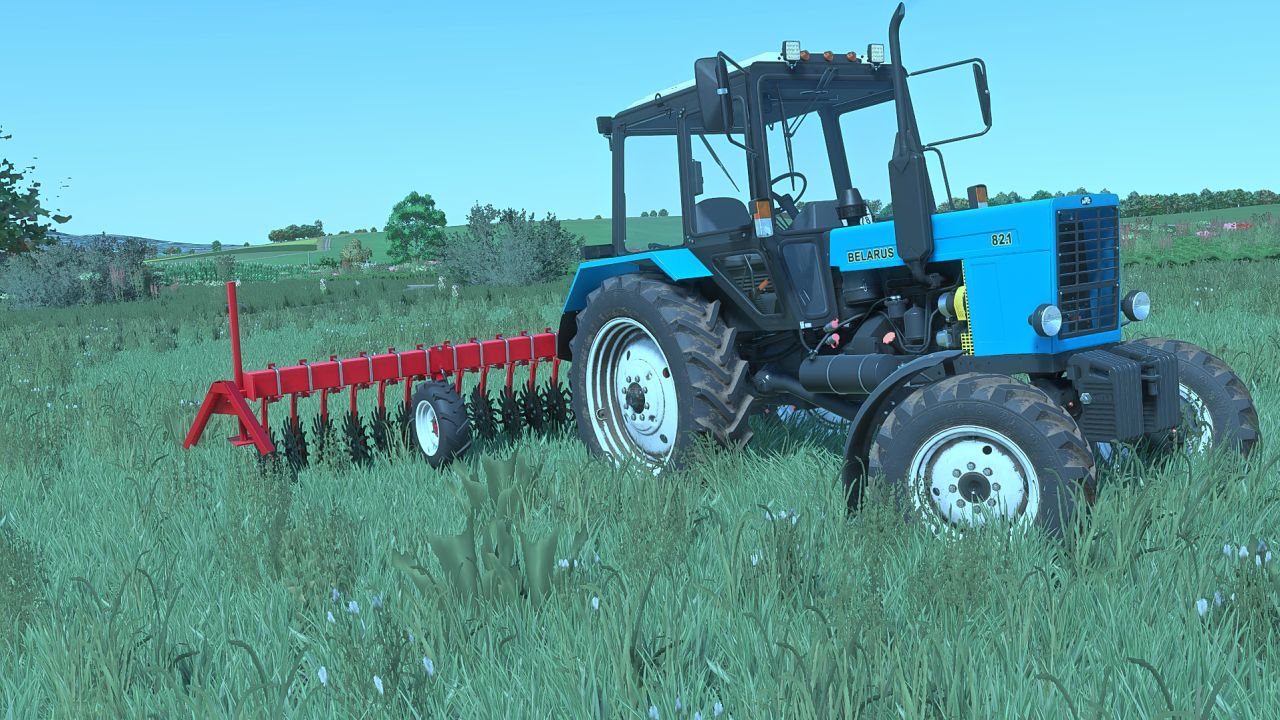
DEMETRA RBN-6 V1.0.0.0
DEMETRA RBN-6 V1.0.0.0 Price: $8300 Working width: 6 m Required power: 85 hp Configurations Rim color Interrow

Rolland Rollspeed 8851 V1.0
Reconversion of Univers Simu’s Rolland Rollspeed 8851 tipper for FS22 –Price: €67,620 –Capacity: from 35 m³ to 51 m³ –Configurations: without sideboard, grain sideboard, silage sideboard Tire configurations: -Trelleborg -Michelin -BKT -Nokia Thank you and good luck to you! Stimi 3.0 Univers Simu Modding

Harvester Unloader Sync V1.2.4.1
Harvester Unloader Sync synchronizes the speed of the departure tractor with a combine or forage harvester when overloading. The mod is based on real assistance systems from agriculture. If the sync system is retrofitted on both vehicles, the tractor can automatically adopt the speed of the harvester and correct the longitudinal distance while driving. The steering remains entirely with the player. Features * Realistic speed synchronization * automatic distance correction * Support for combine harvesters and forage harvesters * Sync retrofit in the vehicle shop * both vehicles require the system * No display and no scan without suitable equipment * HUD only on a compatible harvester nearby * no automatic steering * Performance-optimized vehicle detection * Support for existing languages

Textures meadow deco foliage (Prefab) V1.0
Hello, I am giving you meadow and deco cardboard, instructions on how to upload it are in the file. To start download click the filename. To open archive files use one of these programs: WinRAR, 7-Zip, WinZip. Some mod archives may need to be extracted before the mods will work.

AutoDrive Courtland, MN 4X V1.0
AutoDrive Courtland, MN 4X Requires: Autodrive Courtland, MN 4X

Courtland, MN 4X V1.1
Here is Version 1 of Courtland, MN 4X. Unfortunately I just don’t have time to do more to this map at the moment due to illness, but I do anticipate a Version 2 to wrapped things up, I’ll let people report more issues before that point. Thank you for all the patience. CORNMEAL, WET DISTILLER, AND CRACKED CORN IS STILL IN WIP. Requires: American Fence and Gates Precision Farming Configurator Row Crop System
- 15 per page
- 30 per page
- 45 per page
- 60 per page
-
See more per page
Bigger pages, fewer clicks - and no ads anywhere.
Go Pro