Farming Simulator 25 mods
77,954 results- 15 per page
- 30 per page
- 45 per page
- 60 per page
-
See more per page
Bigger pages, fewer clicks - and no ads anywhere.
Go Pro
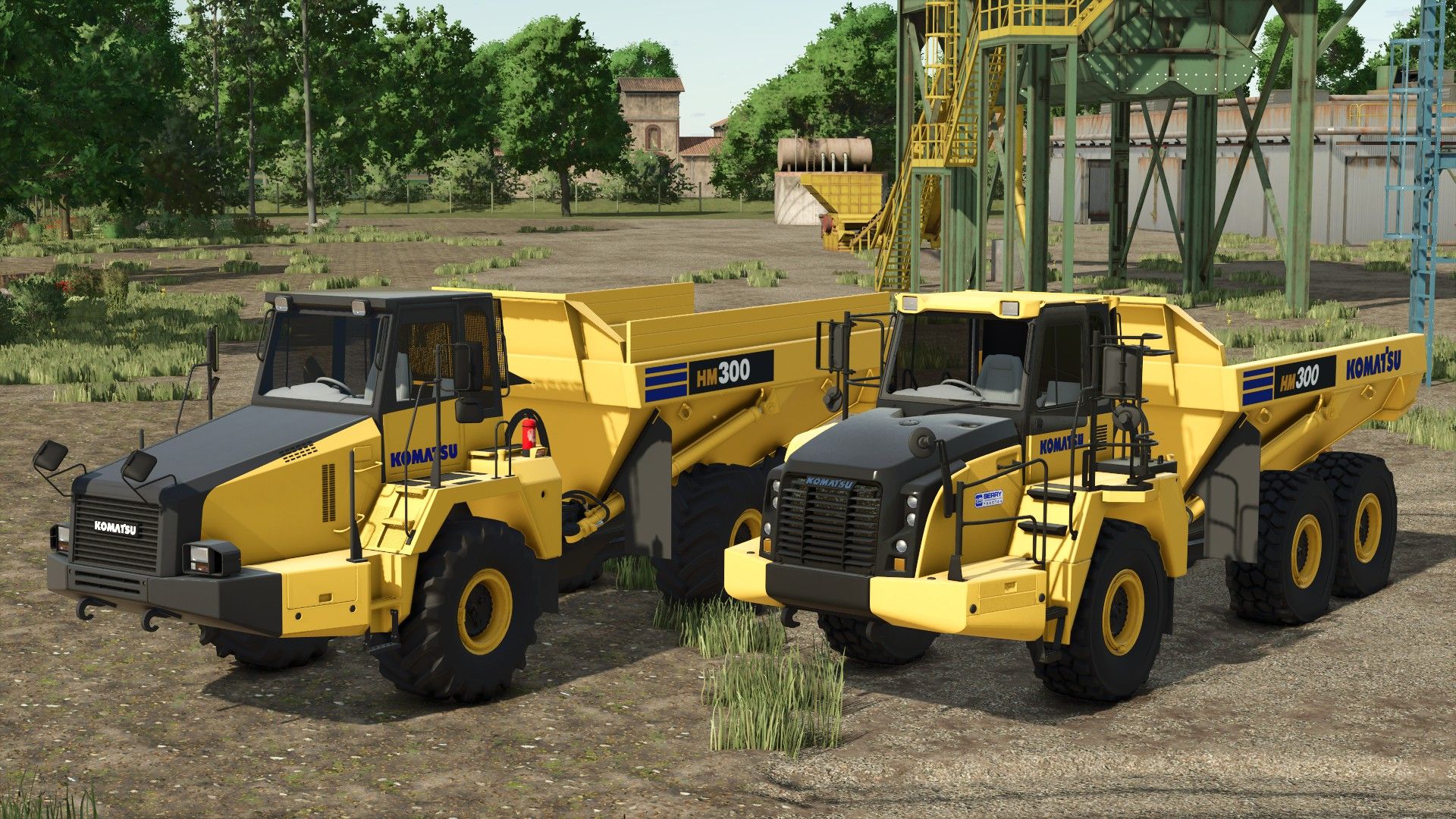
Komatsu HM300 Edit V2.0
Komatsu HM300 Edit V2.0 Version 2.0 Safari Edit: Performance: Real Power: 332HP → 480HP (+45%) – SAA6D120E-7 engine tuned for real work Top Speed: 58.6 km/h → 75 km/h (+28%) – Get between sites faster Reverse Speed: 22 km/h → 30 km/h (+36%) – Maneuver quicker Torque: 11.102 → 15.5 (+40%) – Climbs hills with full load Brakes: 45 → 60 (+33%) – Stops safely with 50 tons Economy & Usability: Fuel Tank: 795L → 1200L (+51%) – Work longer without refueling DEF Tank: 159L → 200L (+26%) Fuel Consumption: 124 → 110 (-11% more economical) Engine Start: 2500ms → 1500ms – Faster start Capacity: Regular Body: 35,000L → 50,000L (+43%) Cheater Boards: 45,000L → 65,000L (+44%) Author: SafariMods85, Canada FS, EB Modding, Pappy Report bugs in the comments and help modders improve this mod. Always check the comments, you can find a solution. DOWNLOAD MOD

Lush Map Editor V1.0
This is my dream map editor! All my ideas and wishes for map editing put into action in my own editor, and shared with you. 🙂 Roads with junctions and roundabouts, fields and farmlands management, creating creeks and painting ground textures and foliage simultaneously. Traffic splines? Not a problem! Automatically created when you create the road! It’s never been easier to create maps. To start download click the filename. To open archive files use one of these programs: WinRAR, 7-Zip, WinZip. Some mod archives may need to be extracted before the mods will work.

Massey Ferguson 5455 RED DRAGON V1.0
I made a Massey Ferguson 5445 model tractor with tire lettering based on Ragnar’s old 54D. Stealing parts is strictly forbidden. This is the version with tire lettering; editing it is also forbidden. If it is edited, that mod will be removed. To start download click the filename. To open archive files use one of these programs: WinRAR, 7-Zip, WinZip. Some mod archives may need to be extracted before the mods will work.
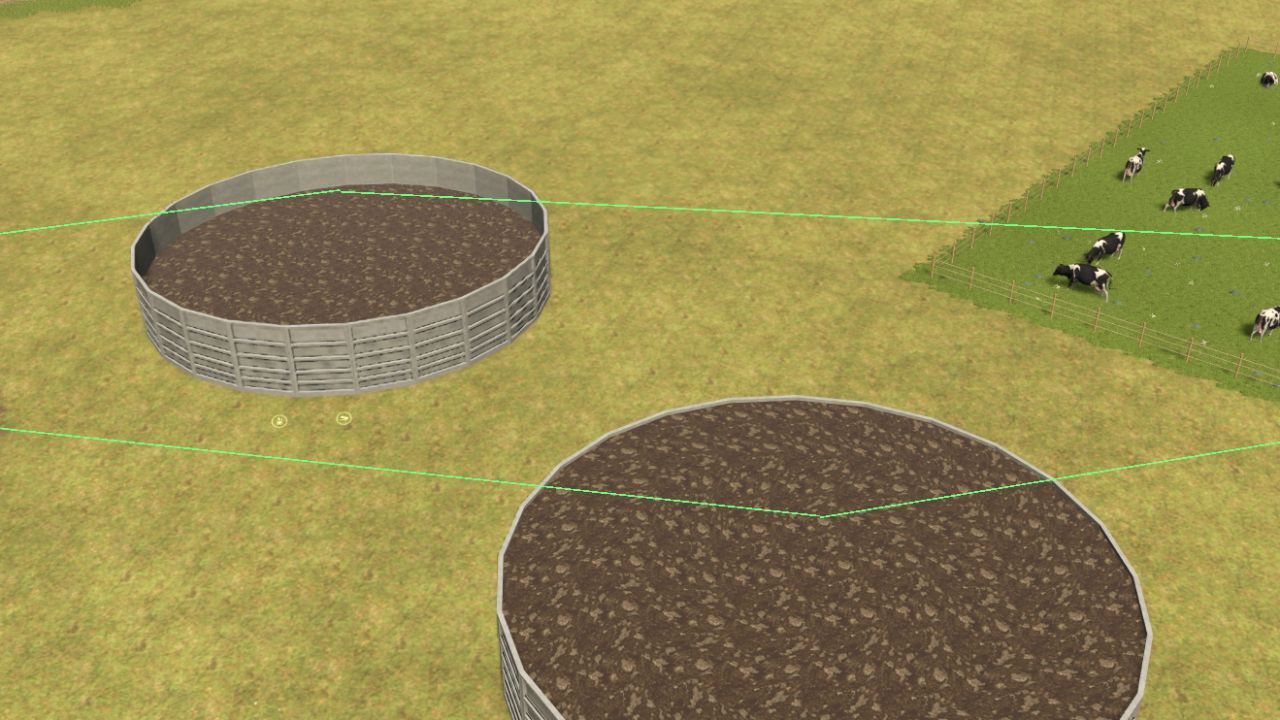
Intelligente Güllelagerung V1.0.0.0
Intelligente Güllelagerung V1.0.0.0 Übernimm die volle Kontrolle über deine Gülle-, Gärrest- und Mistlagerung im Landwirtschafts-Simulator 25! Smart Slurry Storage stellt ein intelligentes Verbindungs- und Speichermanagementsystem vor, mit dem Sie Tierställe, Güllebehälter, Misthaufen und Biogasanlagen (BGA) miteinander verbinden können. Erstellen Sie Ihre eigenen Lagernetzwerke, steuern Sie die Befüllungsprioritäten und automatisieren Sie den Materialtransfer zwischen verbundenen Standorten. HAUPTMERKMALE Intelligentes Güllemanagement: Verbinden Sie Tierställe mit einem oder mehreren Güllebehältern. Unterstützung der Gärrestnutzung: Gärreste können auch in herkömmlichen Güllebehältern gelagert werden, ohne dass sie in flüssigen Dung umgewandelt werden müssen. Getrennte Lagerung: Flüssigmist und Gärreste dürfen nicht im selben nicht leeren Tank vermischt werden. Mistmanagement: Verbinden Sie Mist produzierende Ställe mit Misthaufen und Lagereinrichtungen. BGA-Integration: Flüssigmist und Gülle werden zu Biogasanlagen transportiert und der Gärrestausstoß wird mit den Lagertanks verbunden. Benutzerdefinierte Füllpriorität: Wählen Sie aus, welcher angeschlossene Speicher zuerst gefüllt wird, und ändern Sie die Priorität jederzeit. Visuelles Verbindungssystem: Verbindungen lassen sich einfach über den speziellen Slurry-Modus verwalten. Speicherinformationen: Vernetzte Gebäude, Ziele und Füllprioritäten werden in der bestehenden Informationsanzeige des Spiels angezeigt. Automatisches Speichern: Verbindungen und Füllprioritäten werden mit Ihrem Spielstand gespeichert. Multiplayer-Unterstützung: Ausgelegt für Einzelspieler, Mehrspieler und dedizierte Server. Mehrsprachige Unterstützung: Beinhaltet Übersetzungen für mehrere Sprachen. SCHLAMMMODUS Öffnen Sie den Baumodus und drücken Sie K, um den Schlammmodus zu aktivieren. Wählen Sie einen Tierstall, eine Güllegrube, einen Misthaufen oder eine Biogasanlage aus, um deren Anschlüsse zu verwalten. Klicken Sie auf einen anderen kompatiblen Speicherort, um eine Verbindung herzustellen oder zu trennen. Die angeschlossenen Speichereinrichtungen zeigen ihre Füllpriorität (1, 2, 3 usw.) an, wenn eine Quelle ausgewählt wird. Klicken Sie auf eine bestehende Verbindung, um: Priorität der Abfüllung ändern Verbindung entfernen Stornieren Sie können auch neue Gebäude platzieren, während der Schlammmodus aktiv ist. VERBINDUNGSFARBEN Grün: Verbindungen für flüssigen Dung Blau: Verbindungen zum Gärrest Lila: Verbindungen zu Gülle Rot hervorgehoben: Aktuell ausgewähltes Gebäude SPEICHERINFORMATIONEN Gehen Sie zum Informationsauslöser eines Lagerhauses, um Informationen zur aktuellen Kapazität sowie weitere Details anzuzeigen: Verbundene Quellen Verbundene Ziele Prioritäten für die Besetzung Es ist kein zusätzliches HUD erforderlich. KOMPATIBILITÄT Entwickelt für den Landwirtschafts-Simulator 25 auf PC/Mac. Unterstützt Einzelspieler-, Mehrspieler- und dedizierte Server. Version: 1.0.0.0 – Erstveröffentlichung Tags: HAUPTMERKMALEKlicken SieSpeicherinformationen Vernetzte GebVerbinden Sie Tierst

Aguilar Chisel V1.0
Features: – Price: 8.000€ – Required power: 110cvx – Working width: 3M – Working speed: 13km/h Have fun everyone, and thank you for respecting my work. To start download click the filename. To open archive files use one of these programs: WinRAR, 7-Zip, WinZip. Some mod archives may need to be extracted before the mods will work.

Reisch RT 160 V1.0
Converted from FS19, have fun playing Price: €22,500 Capacity: 18000 l Features: Ridemax FL693 M Configurations: Attacherjoint, Extension, Bale trailer, Animal transporter Enes EKER Agrartechnik Nordeifel To start download click the filename. To open archive files use one of these programs: WinRAR, 7-Zip, WinZip. Some mod archives may need to be extracted before the mods will work.

Tümosan 8110 Series V1.0
Hello, today I wanted to share with you the Tümosan 8110 mod to which I added a few things. Have fun playing -105 hp -44 km/h -beacon lights -horn -modifications alperensss Turkish Force Mods To start download click the filename. To open archive files use one of these programs: WinRAR, 7-Zip, WinZip. Some mod archives may need to be extracted before the mods will work.

Grass Tracks V1.0
This mod attempts to simulate grass destruction in a realistic way. The grass is not destroyed aggressively, but multiple passes in a short time will reduce the grass to the cutRolled stage by stage. The crawlers reduce it directly to the sown stage, a narrow strip at first and then wider for the second pass. This mod destroys grass and weeds, and they will grow back at a rate depending on the season. This mod also destroys forest foliage… grass will grow in their place. Dual wheels and narrow wheels (row-crop wheels) cause the same damage for now. To start download click the filename. To open archive files use one of these programs: WinRAR, 7-Zip, WinZip. Some mod archives may need to be extracted before the mods will work.

Belarus 892.2 Agrotrade V1.0
Belarus MTZ 892.2 Agrotrade Here is the MTZ 892.2 Bátor Agrotrade Benii edition for Farming Simulator! This model arrives with even more unique details and configuration options to perfectly fit your virtual farm’s profile. Key Features & Specs: Base Price: €12,000 Power: 70 kW / 95 HP Transmission: Manual Fuel Tank Capacity: 156 liters Max Speed: 52 km/h (up to 55 km/h according to specs) Weight: 4.6 tonnes Configurations & Settings:Engine Setup: MTZ 892.2 factory option Dashboard: Traditional combined gauges Attachers: Hitch/linkage option Additional customization options (starting from +€1,200). Download this special edition as well, and put a reliable Agrotrade machine to work for your everyday field tasks! Enjoy the game! ricsi0001 BearFarm Pavel Vakulov Erlan10 RusAgroTeh Sergey Danilenkov TYOMATY Vladimir69 Sevill To start download click the filename. To open archive files use one of these programs: WinRAR, 7-Zip, WinZip. Some mod archives may need to be extracted before the mods will work.

Ford 8030 V1.0
optional rice tires and dryland tires optional front coupler optional standard and chrome exhaust optional canopy optional wheel color optional front and rear weights To start download click the filename. To open archive files use one of these programs: WinRAR, 7-Zip, WinZip. Some mod archives may need to be extracted before the mods will work.

Tool Doctor V1.0.1
Tool Doctor helps you understand why a machine is not working. It inspects the vehicle you are driving and its attached implements, then indicates common problems and the actions to take in a native FS25 interface. NOTIFICATIONS WHILE WORKING A small orange in-game notification appears in the top right after an attempt to work in a field is blocked, or when a problem occurs during operation. Examples: “No seeds”, “Product tank empty”, “Implement still folded” or “Implement still raised”. The messages include the machine’s name and protection against overly frequent reminders. In multiplayer, only the affected player receives the alert. DIAGNOSTICS • Engine stopped and the game’s start-up warning. • Implement folded, raised, switched off or activation refused. • Native machine warning when available: supply, power, configuration, etc. • Missing seeds or product, taking compatible connected tanks into account. • Missing header, combine harvester hopper full and bale ejection in progress. • Consumables depleted and maintenance advice in case of significant wear. MENU AND CONTROLS Left Ctrl + Left Shift + D in a vehicle to open Tool Doctor. Shortcut can be changed in the game’s control settings. Scrollable list, automatic refresh and Refresh button. When equally important, the selected implement appears first. 27 language variants. No dependency on another mod. MULTIPLAYER Compatible with solo play, hosted games and dedicated servers on PC/Mac. Install and activate exactly the same ZIP on the server and for all players. The diagnostic uses the states synchronized by FS25 and does not modify money, stocks or permissions. Tool Doctor checks the known states of machines. Not all field, crop or third-party script restrictions are covered. Wear is maintenance advice and does not by itself mean that the machine is blocked. To start download click the filename. To open archive files use one of these programs: WinRAR, 7-Zip, WinZip. Some mod archives may need to be extracted before the mods will work.


FS2011 HUD Style (Addon for Zasty HUD) V1.0
Play FS25 with the HUD of Farming Simulator 2011! This addon for Zasty HUD (by Zasty Chalk) adds a third style, “FS 2011”, next to “Bar” and “Round” in the Zasty HUD settings window. While it is active, the FS 2011 HUD fully replaces the FS25 HUD, so nothing overlaps. Bars (bottom right) – The classic FS 2011 bar stack: speed, fuel consumption (l/h), AdBlue and fuel – Speed bar: the red fill shows the engine rpm, gear and gear group on the left, set cruise control speed on the right; the speed icon turns green while cruise control is on – Fuel consumption in litres per hour (0 when the engine is off) – Blue AdBlue / DEF bar when the vehicle has a DEF tank (base game and AdBlue mods) – Vehicle schema above the bars: tractor with front and rear implements. Switched on (B) = green, selected (G) = brighter, lowered = tilted towards the ground Clock (top right) – FS 2011 clock with weather symbol – Real (computer) time and time scale below it – Your balance under the clock, on foot and in vehicles PDA (bottom left) – Replaces the FS25 minimap. The game’s minimap key (9) switches the PDA screens (Left Alt + I works too), one more press hides it, every change gives the PDA beep – Map: north up, heading marker, coordinates, field numbers (your fields in green) and the game’s icons for the shop, selling points, productions and animals – Weather Forecast: today and the next three days on FS 2011 day cards (symbol, max and min temperature) – Prices: best price for each crop – Statistics: silo storage and animals – Players: multiplayer only – Vehicles: tractor with all implements and trailers, state and fill levels – Engine: rpm, load, temperature, gear, direction, speed, operating hours, fuel, AdBlue, consumption, damage, wear, total mass – Tyres: with the Variable Tire Pressure mod (front axle, rear axle, trailer, road/field, inflating/deflating) – Farm: date, time scale, balance, field, crop, vehicles, farmlands, play time – PDA size in the Zasty HUD window (row “PDA size”, 40-100 %), changes live F1 help – One glossy FS 2011 box: key on the left, action on the right; grows with the number of actions – In build mode, the shop and menus it moves to the right side More – The whole FS25 HUD it replaces is hidden: speedometer, minimap, fill levels, vehicle schema, time/money box (notifications and warnings stay) – Variable Tire Pressure: its window is hidden, the pressures are on the PDA (its control panel Ctrl+Alt+U still works) – Languages: EN, DE, PL, FR, ES, IT, PT/BR, CZ, RU, NL, HU, TR. The addon also translates Zasty HUD itself into these languages and fixes its language detection in FS25 (Zasty HUD’s files stay unchanged) – Speed, volume and money follow your game settings (km/h / mph, litres / gallons, currency) – Bars and clock follow the “Size” setting of the Zasty HUD window HOW TO USE 1. Put FS25_ZastyHUD_FS2011.zip into your mods folder next to FS25_ZastyHUD.zip 2. Activate both mods in your savegame 3. Press Left Alt + H and choose Style: FS 2011 4. Press 9 (or Left Alt + I) to switch the PDA screens NOTES – Zasty HUD’s own files are not changed. Remove this addon and Zasty HUD works as before (a saved “FS 2011” style falls back to “Round”). With Bar or Round the minimap key works as usual. – Client side only, single player and multiplayer. Where the game gives no consumption figure (e.g. multiplayer clients) it is measured from the falling fuel level. – The forecast is read from the game when available; otherwise the Weather Forecast screen shows today only. – Other mods that change the game HUD may overlap. Please report problems with your log.txt. – Zasty HUD: Zasty Chalk – FS 2011 style addon: Siemanek – Original HUD design: GIANTS Software (Farming Simulator 2011), redrawn for this addon To start download click the filename. To open archive files use one of these programs: WinRAR, 7-Zip, WinZip. Some mod archives may need to be extracted before the mods will work.
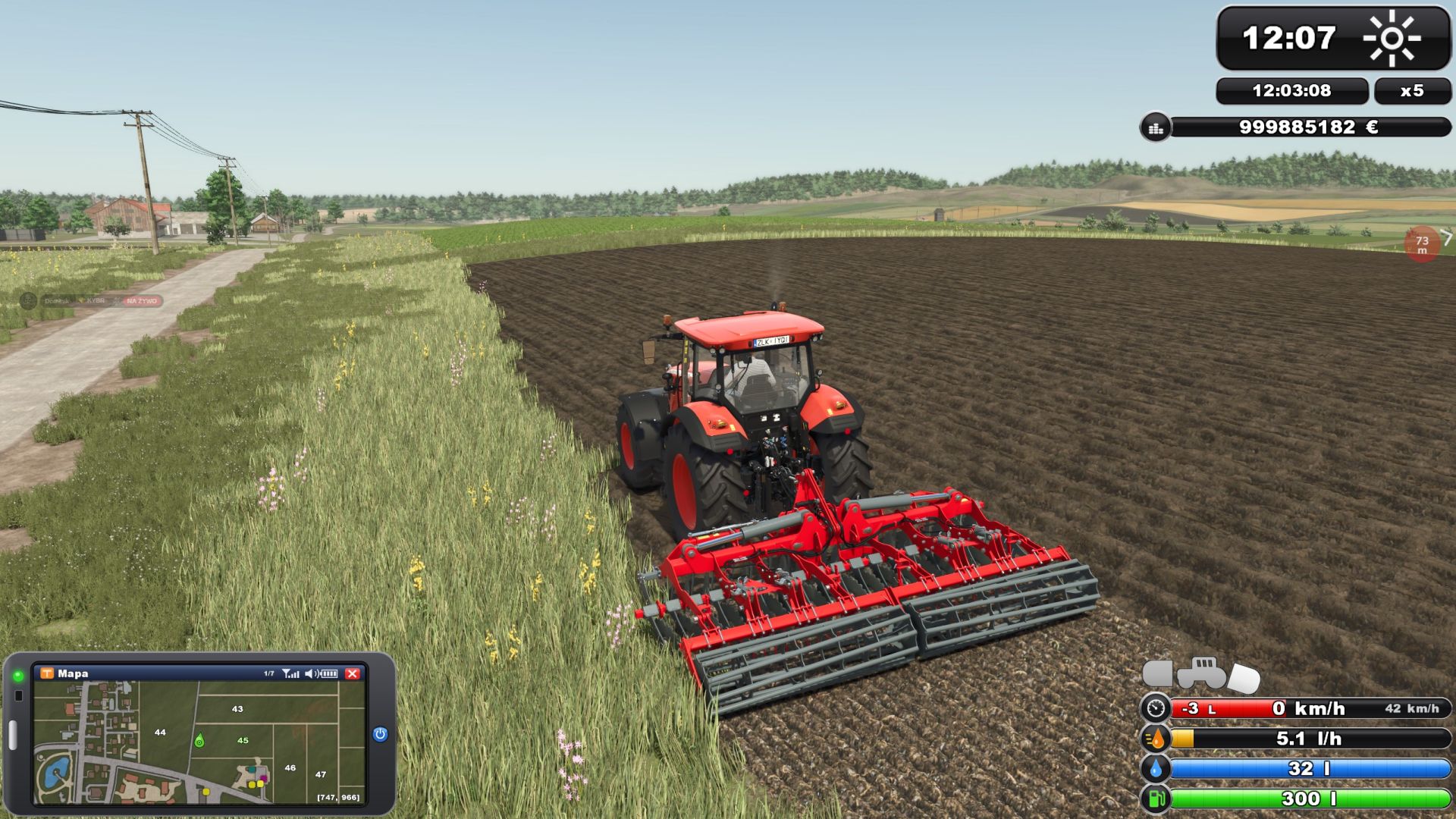
FS2011 HUD-Stil (Add-on für Zasty HUD) V1.0.0.0
FS2011 HUD-Stil (Add-on für Zasty HUD) V1.0.0.0 Zasty HUD FS 2011 Style (Addon) Spiele FS25 mit dem HUD von Farming Simulator 2011! Dieses Add-on für Zasty HUD (von Zasty Chalk) fügt im Einstellungsfenster von Zasty HUD neben „Balken“ und „Rund“ einen dritten Stil hinzu: „FS 2011“. Solange es aktiv ist, ersetzt das FS 2011 HUD das FS25 HUD vollständig, sodass keine Überlappungen entstehen. MERKMALE Balken (unten rechts) Die klassische FS 2011-Balkenanzeige: Geschwindigkeit, Kraftstoffverbrauch (l/h), AdBlue und Kraftstoffstand Geschwindigkeitsanzeige: Die rote Füllung zeigt links die Motordrehzahl, den Gang und die Ganggruppe an, rechts die eingestellte Geschwindigkeit für den Tempomat; das Geschwindigkeitssymbol wird grün, wenn der Tempomat aktiviert ist. Kraftstoffverbrauch in Litern pro Stunde (0 bei ausgeschaltetem Motor) Blaue AdBlue-/DEF-Anzeige, wenn das Fahrzeug über einen DEF-Tank verfügt (Basisspiel und AdBlue-Mods). Fahrzeugschema über den Balken: Traktor mit Front- und Heckanbaugeräten. Eingeschaltet (B) = grün, ausgewählt (G) = heller, abgesenkt = zum Boden geneigt. Uhr (oben rechts) FS 2011 Uhr mit Wettersymbol Echtzeit (Computerzeit) und darunter liegende Zeitskala Ihr Gleichgewicht unter Zeitdruck, zu Fuß und in Fahrzeugen PDA (unten links) Ersetzt die FS25-Minikarte. Mit der Minikartentaste (9) im Spiel werden die PDA-Bildschirme umgeschaltet (alternativ Alt + I). Ein weiterer Tastendruck blendet sie aus; bei jedem Wechsel ertönt ein Signalton vom PDA. Karte: Norden oben, Richtungsmarkierung, Koordinaten, Feldnummern (Ihre Felder grün) und die Spielsymbole für Shop, Verkaufsstellen, Produktionen und Tiere Wettervorhersage: heute und die nächsten drei Tage auf FS 2011 Tageskarten (Symbol, Höchst- und Tiefsttemperatur) Preise: Bestpreis für jede Ernte Statistik: Silolagerung und Tiere Spieler: Nur Mehrspieler Fahrzeuge: Traktor mit allen Anbaugeräten und Anhängern, staatlicher und Füllstandsanzeiger Motor: Drehzahl, Last, Temperatur, Gang, Drehrichtung, Geschwindigkeit, Betriebsstunden, Kraftstoff, AdBlue, Verbrauch, Schäden, Verschleiß, Gesamtmasse Reifen: mit der Modifikation für variablen Reifendruck (Vorderachse, Hinterachse, Anhänger, Straße/Feld, Aufpumpen/Ablassen der Luft) Bauernhof: Datum, Zeitmaßstab, Gleichgewicht, Feld, Ernte, Fahrzeuge, Ackerland, Spielzeit Die PDA-Größe im Zasty-HUD-Fenster (Zeile „PDA-Größe“, 40–100 %) ändert sich live. F1-Hilfe Eine glänzende FS 2011-Box: Schlüssel links, Aktion rechts; wächst mit der Anzahl der Aktionen Im Baumodus werden der Shop und die Menüs auf die rechte Seite verschoben. Mehr Das gesamte FS25-HUD, das es ersetzt, wird ausgeblendet: Geschwindigkeitsmesser, Minikarte, Füllstandsanzeige, Fahrzeugschema, Zeit-/Geldanzeige (Benachrichtigungen und Warnungen bleiben erhalten). Variable Reifendruckanzeige: Das Fenster ist ausgeblendet, die Druckwerte werden auf dem PDA angezeigt (die Tastenkombination Strg+Alt+U funktioniert weiterhin). Sprachen: EN, DE, PL, FR, ES, IT, PT/BR, CZ, RU, NL, HU, TR. Das Add-on übersetzt außerdem Zasty HUD selbst in diese Sprachen und behebt die Spracherkennung in FS25 (die Dateien von Zasty HUD bleiben unverändert). Geschwindigkeit, Volumen und Geld richten sich nach Ihren Spieleinstellungen (km/h / mph, Liter / Gallonen, Währung). Balken und Uhr richten sich nach der Einstellung „Größe“ des Zasty-HUD-Fensters. ANFORDERUNGEN Zasty HUD (FS25_ZastyHUD), installiert und aktiv ANWENDUNG 1. Legen Sie die Datei FS25_ZastyHUD_FS2011.zip in Ihren Mods-Ordner neben die Datei FS25_ZastyHUD.zip. 2. Aktiviere beide Mods in deinem Spielstand. 3. Drücken Sie Alt + H und wählen Sie „Stil: FS 2011“. 4. Drücken Sie 9 (oder Alt links + I), um zwischen den PDA-Bildschirmen zu wechseln. ANMERKUNGEN Die Dateien von Zasty HUD selbst bleiben unverändert. Nach dem Entfernen dieses Add-ons funktioniert Zasty HUD wie zuvor (ein gespeicherter „FS 2011“-Stil wird auf „Rund“ zurückgesetzt). Sowohl bei Balken- als auch bei Rund-Designs funktioniert die Minimap-Taste wie gewohnt. Nur clientseitig, Einzelspieler und Mehrspieler. Wenn das Spiel keinen Verbrauchswert angibt (z. B. bei Mehrspieler-Clients), wird dieser anhand des sinkenden Treibstoffstands gemessen. Die Vorhersage wird, sofern verfügbar, aus dem Spiel vorgelesen; andernfalls zeigt der Wetterbildschirm nur den heutigen Tag an. Andere Mods, die das HUD des Spiels verändern, können Überschneidungen verursachen. Bitte melden Sie Probleme mit Ihrer log.txt-Datei. Zasty HUD: Zasty Chalk FS 2011-Style-Addon: Siemanek Originales HUD-Design: GIANTS Software (Farming Simulator 2011), für dieses Add-on neu gezeichnet Erforderliche Mods: Zasty HUD Tags: Erforderliche ModsFSHUDPDA
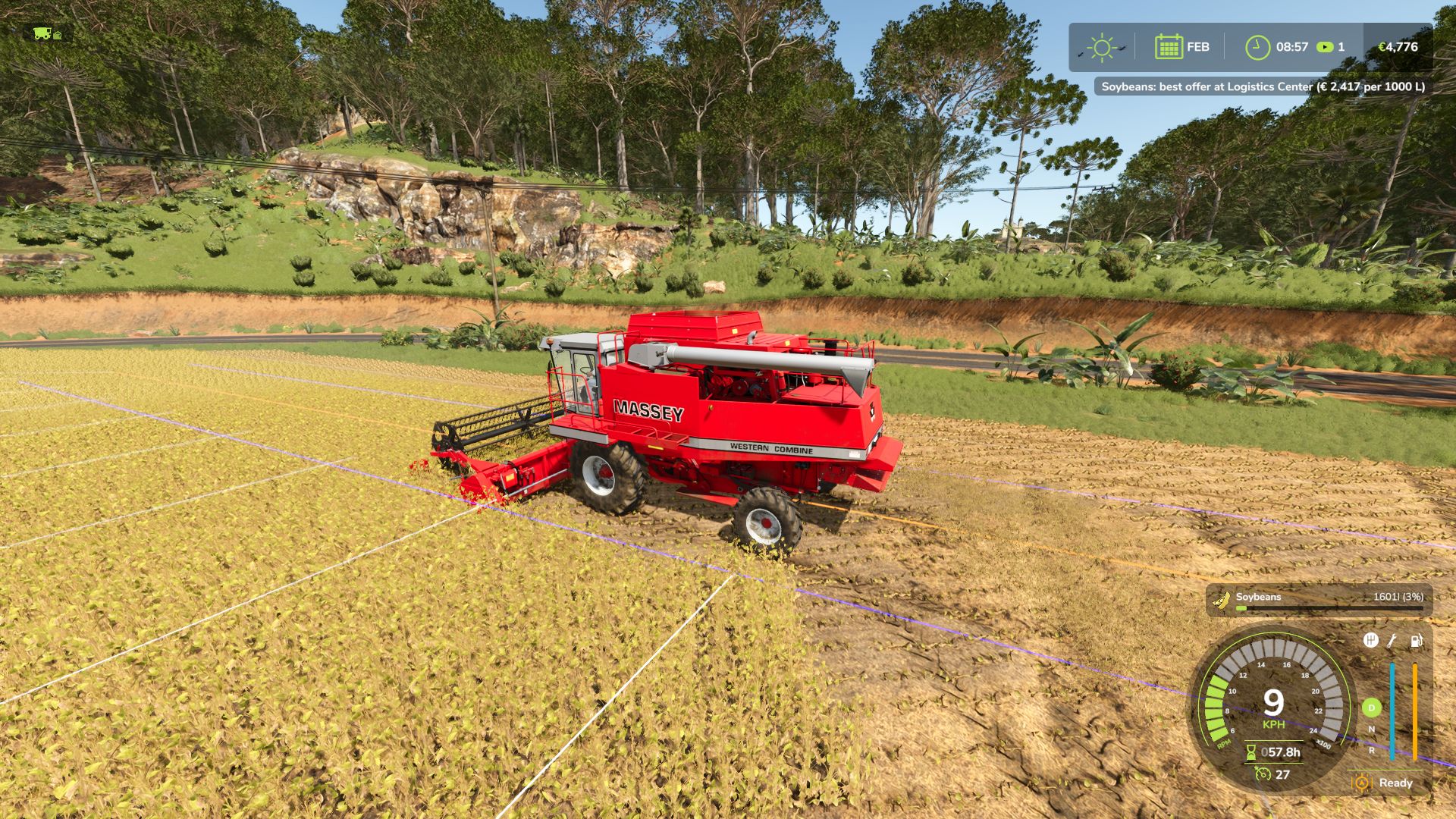
Direktverkauf von Feldfrüchten V1.0.0.0
Direktverkauf von Feldfrüchten V1.0.0.0 Mit Direct Harvest Sale verkaufen Sie Ihre Ernte direkt während der Ernte, ohne dass Sie sie abladen oder zu einem Verkaufsort fahren müssen. SO FUNKTIONIERT ES Aktivieren Sie den Direktverkauf, und Ihre gesamte Ernte wird sofort zum besten Marktpreis verkauft. Das Geld fließt direkt auf Ihr Betriebskonto, und der Tank füllt sich nie, sodass Sie ohne Unterbrechung ernten können. BEDIENELEMENTE – U: Direktvertrieb ein- oder ausschalten Eine Meldung auf dem Bildschirm bestätigt den aktuellen Status und den Preismultiplikator. BESTER PREIS Während der Ernte prüft die Mod alle Verkaufsstellen auf der Karte, die deine Ernte annehmen, und verkauft sie immer zum besten Preis. Der Preis an jeder Verkaufsstelle spiegelt bereits die Nachfrage wider; die Verkaufsstelle mit dem höchsten Preis ist also diejenige, die deine Ernte am dringendsten benötigt. Eine Meldung auf dem Bildschirm zeigt dir an, welche Verkaufsstelle das beste Angebot hat und wie viel sie pro 1000 Liter zahlt. ANMERKUNGEN – Kompatibel mit Mähdreschern und Wurzelgemüseerntern. Es werden ausschließlich geerntete Feldfrüchte verkauft, sonst nichts. – Während des Direktverkaufs werden die Ernteprodukte niemals im Tank gelagert. – Funktioniert für alle Ihre eigenen Erntemaschinen, einschließlich derjenigen, die von KI-Helfern gesteuert werden. Nur Einzelspieler. Sprachen: Englisch, Deutsch, Französisch. Tags: ANMERKUNGENBEDIENELEMENTEDer PreisEine Meldung
- 15 per page
- 30 per page
- 45 per page
- 60 per page
-
See more per page
Bigger pages, fewer clicks - and no ads anywhere.
Go Pro