Farming Simulator 25 mods
76,924 results- 15 per page
- 30 per page
- 45 per page
- 60 per page
-
See more per page
Bigger pages, fewer clicks - and no ads anywhere.
Go Pro

Farm Tablet V2.5.1
FarmTablet: a complete farm management tablet for Farming Simulator 25. Open it with one key and your whole farm is right there. A phone-style tablet with a lock screen, a home screen full of glossy app icons, a dock for your favourites, and as many pages of apps as you need. Tap an app, check what you need, tap home, and get back in the cab. No pausing, no menus stacked four deep, no alt-tabbing to a spreadsheet. Originally inspired by a tablet mod for FS17, built from scratch for FS22, and now fully rewritten from the ground up for FS25. The goal is still simple: useful farm info at a glance, without getting in the way. Every app lives in its own file, so the mod is easy to expand, fix, and improve, and it is actively shaped by community feedback. **What is in it right now** - Dashboard: farm overview with balance, income, fields, vehicles, time and weather, with widgets you can arrange - Weather: current conditions, temperature, wind, cloud cover and a five-day forecast - Field Manager: every owned field with crop type and growth state - Animals: pen status with food, water and cleanliness levels - Workshop: nearby vehicle diagnostics with fuel, wear and hours, plus one-click repair - Digging: live position, terrain height and dig depth - Bucket Tracker: load counter for wheel loaders and excavators - Storage: silo inventory and the best sell price per crop - Time Controls: set the time scale and skip to a time of day - Hotspot Manager: view and clear map pins - Notes: a simple farm todo list - Farm Admin: money, time and vehicle controls (host only) - Field Jobs: log your field work sessions - Contracts: active contracts with completion, reward and time left - Fleet Manager: every owned vehicle sorted by fuel - Production Buildings: your production chains, inputs and outputs - Farm Stats: a full farm statistics snapshot - App Store: browse every installed app, grouped by category - Settings: configure the whole tablet from inside the tablet - Updates: changelog and version history **Mod integrations** NPC Favor, Soil Fertilizer, Field Sentry, Seasonal Crop Stress, Income Mod, Tax Mod, Market Dynamics, Worker Costs, Personnel (Pro-Staff), Random World Events, UsedPlus, and Invoices (with RoleplayPhone). Load any of these mods and its app appears in the tablet on its own. No setup, no load order to worry about. **Made yours** Move, resize and recolour the tablet, set your own home screen image, choose which app opens first, and arrange the Dashboard exactly how you like. Everything saves with your game. **Other details** - Full multiplayer support; every player gets their own tablet and the actions that change the game are admin-gated - Dedicated server safe; the tablet is client-side and skips the server with no overhead - Reads your game data only; it never changes your save - Ships in 26 languages and follows your game language The mod is in active development. Bug reports, ideas and suggestions are always welcome. This is a community project, and your feedback directly shapes what gets built next. **V2.5.1.0** **What’s new** - Favourites page: tap the star (in the app bar or on the home screen) to see just your starred apps. The star glows gold when it is open, and EDIT lets you pick which apps to keep. Saved per savegame. - Clearer app bar: a little house for Home and a real left arrow for Back. Back steps up one level (it leaves a sub-page first) before going home. - Customise app icon labels in Settings: show or hide them, and change the size and colour. **Fixed** - Status bar (signal, battery, power), dock and home indicator now render on the home and lock screens. - App icon textures are now mipmapped DDS, clearing most of the texture warnings in log.txt. - Worker Costs roster scrolls past the first 5 staff. **Required mods:** Income Mod Tax Mod NPC Favor Realistic Soil & Fertilizer Seasonal Crop Stress Market Dynamics Realistic Worker Costs Random World Events
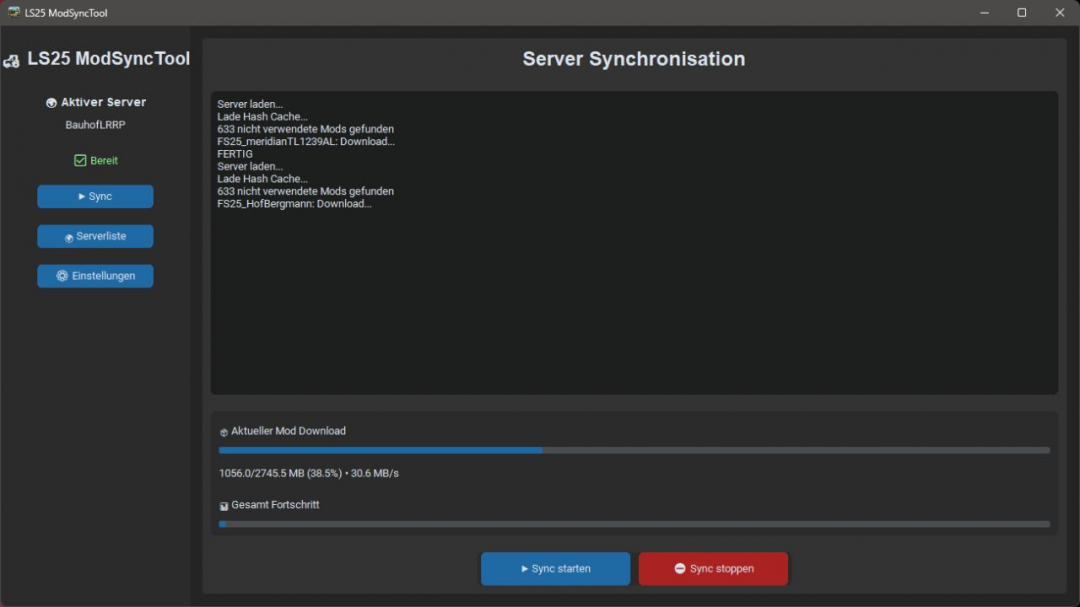
Mod Sync Tool With Server List V1.1
LS25 ModSyncTool The LS25 ModSyncTool simplifies joining multiplayer servers with extensive mod packages. Whether it's dozens or even hundreds of mods, they can be quickly synchronized—especially on community, roleplay, construction yard, or contractor servers. Manually comparing your mods with the server's list can be time-consuming and prone to errors. FeaturesAutomatic comparison of your mods with the server's mod listDetection of missing modsIdentification of outdated or different mod versionsQuick overview of synchronization statusSupport for individual server mod listsUser-friendly setup without complications LS25 ServerCentral Integration The ModSyncTool works seamlessly with LS25 ServerCentral.Through ServerCentral, communities can manage their servers including:Server descriptionDiscord linkMap informationMod listsPublish Players can retrieve server info and automatically verify their mod collection using the ModSyncTool. Project GoalThe LS25 ServerCentral and ModSyncTool were developed to better connect the German-speaking Farming Simulator 25 multiplayer community and to make it significantly easier to join community servers. Less time managing mods — more time on the farm. NoteThis tool does not modify game or savegame files. It is solely used for analyzing and comparing mod inventories. V1.1.0.0Improved download speedEnhanced advertising features
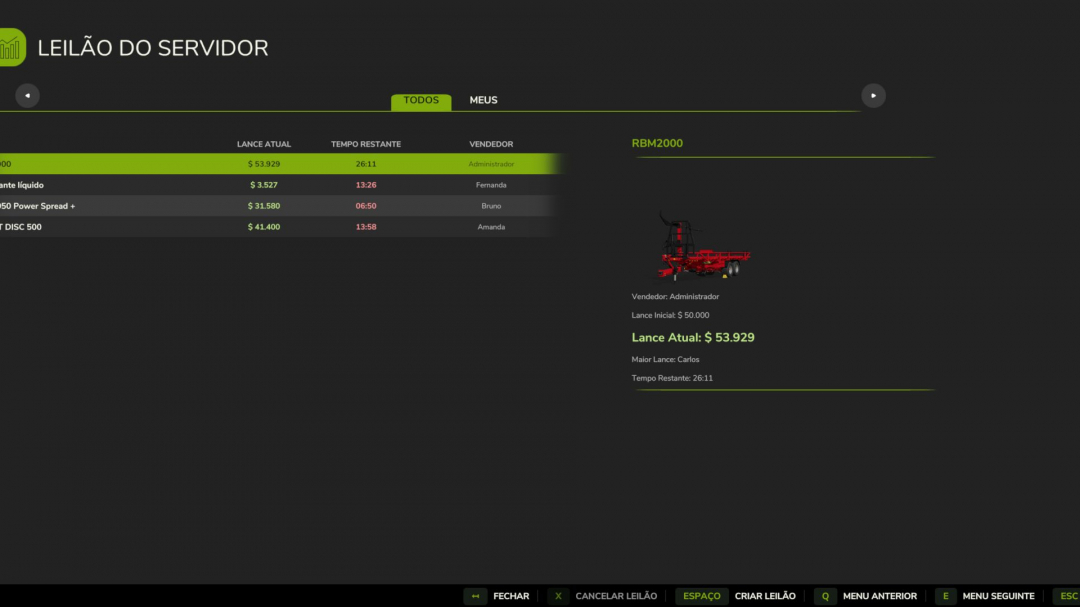
Server Auction BETA v1.0
Server Auction House — User Guide Server Auction House introduces a real-time auction marketplace to Farming Simulator 25. You can list your tractors, harvesters, and tools for sale or place bids on equipment offered by other players and virtual bots. **Controls and Shortcuts** Open the Auction Panel: Press the K key (standard keyboard) anytime during gameplay. Navigate the Interface: Use your mouse to select active auctions from the list on the left, view details on the right, or click the buttons in the bottom menu. **How to Play (Gameplay)** 1. Create an Auction (Sell) Open the auction panel by pressing K. Click the Create Auction button in the bottom menu. Select your farm vehicle or tool from the list. Set the Starting Price (Minimum Bid) and Duration (how long the auction will run). Confirm to list the item; it will immediately leave your farm and be available for bidding. **WARNING** Security Rule: Once an auction receives its first bid—whether from a player or a virtual bot—it cannot be canceled by the seller. This ensures a fair bidding process. 2. Bid (Buy) Choose an item from the active auction list to see detailed information on the right, including the seller, current bid, remaining time, and a photo of the equipment. The bid input field will automatically suggest the next minimum bid amount. Click Bid to place your offer. If the auction ends and you are the highest bidder, the item is yours! **Server Settings (Enable/Disable Bots)** The mod adds a control section within the game’s general settings menu (In-Game Settings). Enable/Disable Bots: Server administrators can turn AI bidding and auctions on or off. On: Bots generate auctions for random used items and bid against players. Off: Auctions are conducted solely between real players. **Important Note (Spawn Warning)** **Delivery of Won Items:** Currently, when you win an auction, the purchased vehicle or equipment appears directly at your character’s location. This is a temporary limitation; future updates will ensure items are delivered to the official store’s designated zones or specified locations.
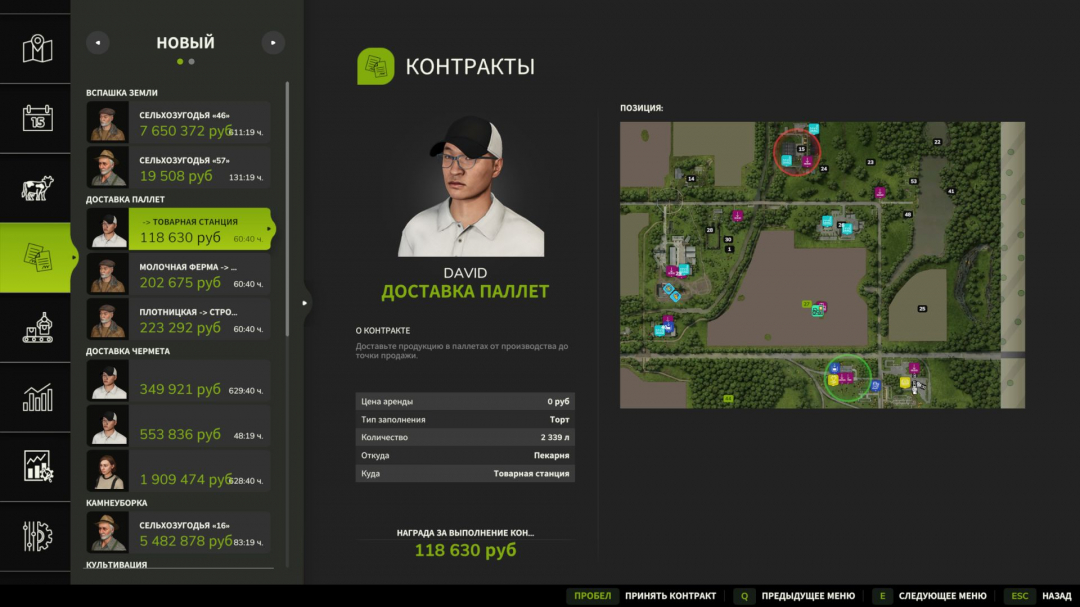
Pallet delivery contracts V1.0.1
Pallet Delivery Contracts is a mod that introduces a new type of contract for delivering palletized products in Farming Simulator 25. Tasks for transporting goods from production facilities to points of sale can now automatically appear on the map. You will need to load pallets with finished products, deliver them to the specified location, and earn monetary rewards upon successful completion. **Mod features:** - New contract type for pallet delivery. - Automatic generation of tasks between production facilities and retail outlets. - Various order sizes: - Small contracts - Medium contracts - Large contracts - Rewards depend on the volume of transported products. - Contracts have a time limit. - Supports most of the game's production chains. - Automatic creation of necessary pallets to complete tasks. - Display of loading and unloading points on the map. **How does it work?** 1. Open the contracts menu. 2. Find the Pallet Delivery task. 3. Accept the contract. 4. Pick up pallets at the specified production facility. 5. Deliver products to the designated point of sale. 6. Receive a reward after successful delivery. Add more logistics to your farm and earn money by transporting finished products between factories and retail outlets! **V1.0.1.0** - Penalties introduced for selling contract products outside the specified location. - Fixed issues with saving and loading valid contracts.
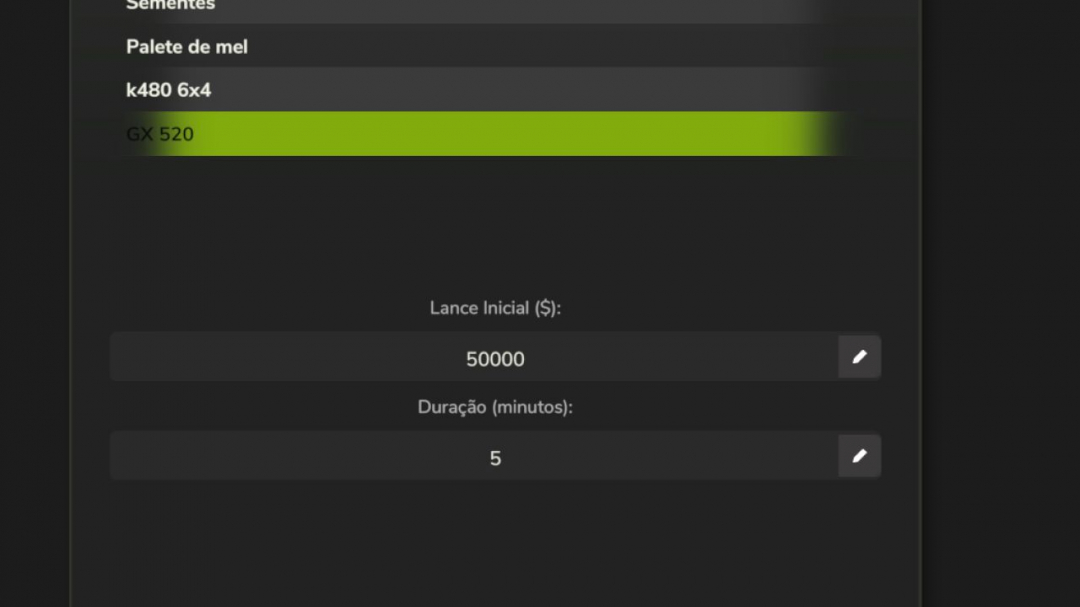
Server Auction V1.0
Server Auction House — User Guide Server Auction House introduces a real-time auction marketplace to Farming Simulator 25. You can list your tractors, harvesters, and tools for sale or place bids on equipment offered by other players and virtual bots. Controls and Shortcuts Open the Auction Panel: Press the K key (standard keyboard) anytime during gameplay. Navigate the Interface: Use your mouse to select active auctions from the list on the left, view details on the right, or click the buttons in the bottom menu. How to Play (Gameplay) 1. Create an Auction (Sell) - Open the auction panel by pressing K. - Click the Create Auction button in the bottom menu. - Select your farm vehicle or tool from the list. - Set the Starting Price (Minimum Bid) and Duration (how long the auction will run). - Confirm to list the item; it will be removed from your farm immediately and available for bidding. WARNING Security Rule: Once an auction receives its first bid—whether from a player or a virtual bot—it cannot be canceled by the seller. This ensures a fair bidding environment. 2. Bid (Buy) - Choose an item from the active auction list to see detailed information on the right, including the seller, current bid, remaining time, and a photo of the equipment. - The next minimum bid amount will be displayed automatically in the text field. - Click Bid to place your offer. - If the auction ends and you are the highest bidder, the item is yours! Server Settings (Enable/Disable Bots) This mod adds a control section within the game’s general settings menu (In-Game Settings). You can enable or disable bids and auctions created by AI. - On: Bots generate auctions for random used items and bid against players. - Off: Auctions are conducted solely between real players. Important Note (Spawn Warning) IMPORTANT Delivery of Won Items: Currently, when you win an auction, the purchased vehicle or equipment appears directly at your character’s location. This is a temporary limitation, and future updates will allow items to appear in the official store’s delivery zone or designated areas. V1.0.0.0 Added: - New Translations: - Full support for French (`translations/lang_fr.xml`), including UI labels, error messages, global announcements, and French bot names (e.g., Pierre, Jean, Camille, Chloé). - Full support for Spanish (`translations/lang_es.xml`), including UI labels, error messages, global announcements, and Spanish bot names (e.g., Alejandro, Carlos, Sofía, Elena).
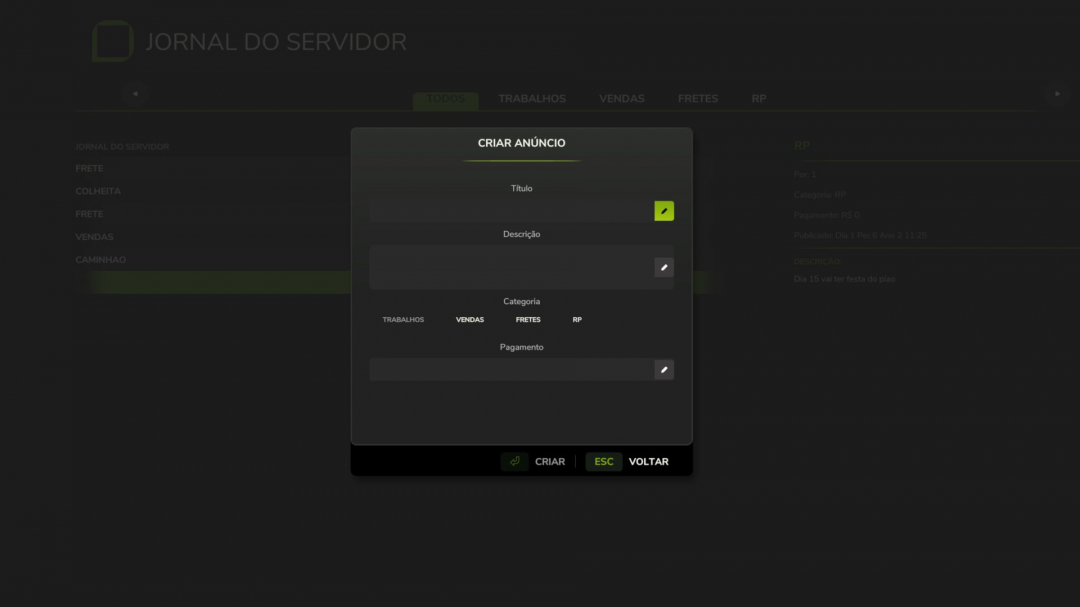
Server Journal V1.0
Server Journal is a multiplayer bulletin board mod for Farming Simulator 25 that allows players to create and view real-time announcements on the server. The data is server-authoritative and saved within the savegame, ensuring all players see the same information even after reconnecting. **Features** - Real-time post creation and listing with multiplayer synchronization - Category filters: Jobs, Sales, Freight, and RP - Savegame persistence via XML - Native GIANTS Engine UI with a custom pause menu icon - Configurable keybind (default J) in Options > Controls - Internationalization support: EN, PT, BR **V1.0.0.0** - Added new available languages (multilingual support) - English - Portuguese (Brazil) - French - Spanish
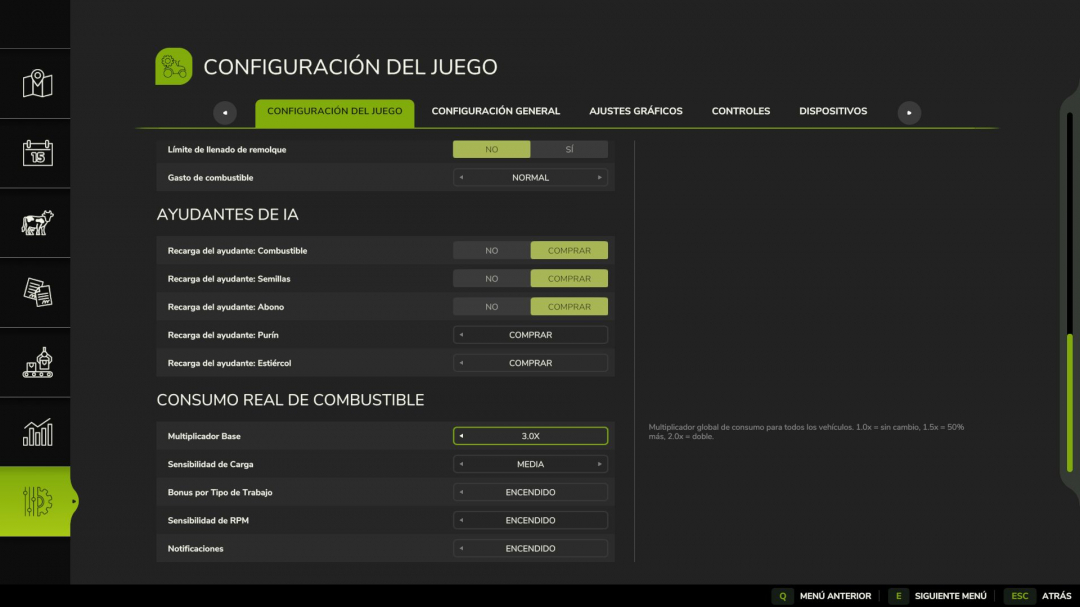
Real Fuel Consumption V1.0
Real Fuel Consumption makes your farm's fuel usage more realistic and challenging. Unlike other mods that simply multiply consumption by a fixed factor, this mod uses a dynamic system that reads each vehicle's actual state in real-time. **How it works:** - Base Multiplier configurable from 1.0x to 3.0x (default 1.5x) - Load Bonus — the engine consumes more when under real stress: climbing hills, pulling heavy implements, towing loads - Work Type Bonus — each task has different fuel consumption, just like in real life: - Plowing / Cultivating: +40% - Harvesting: +35% - Baling: +25% - Mowing / Tedding: +20% - Spraying / Fertilizing: +15% - Sowing: +10% - RPM Sensitivity — higher engine RPM results in increased fuel consumption **Features:** - All options configurable from the Game Settings menu (ESC), no commands or special keys needed - Compatible with all vehicles and mods - Multiplayer ready - Saves your settings per savegame Tip: For balanced realism, use a multiplier of 1.5x. For a more hardcore challenge, increase to 2.5x or 3.0x with Load Sensitivity set to High. Made with passion for realistic farming simulation.

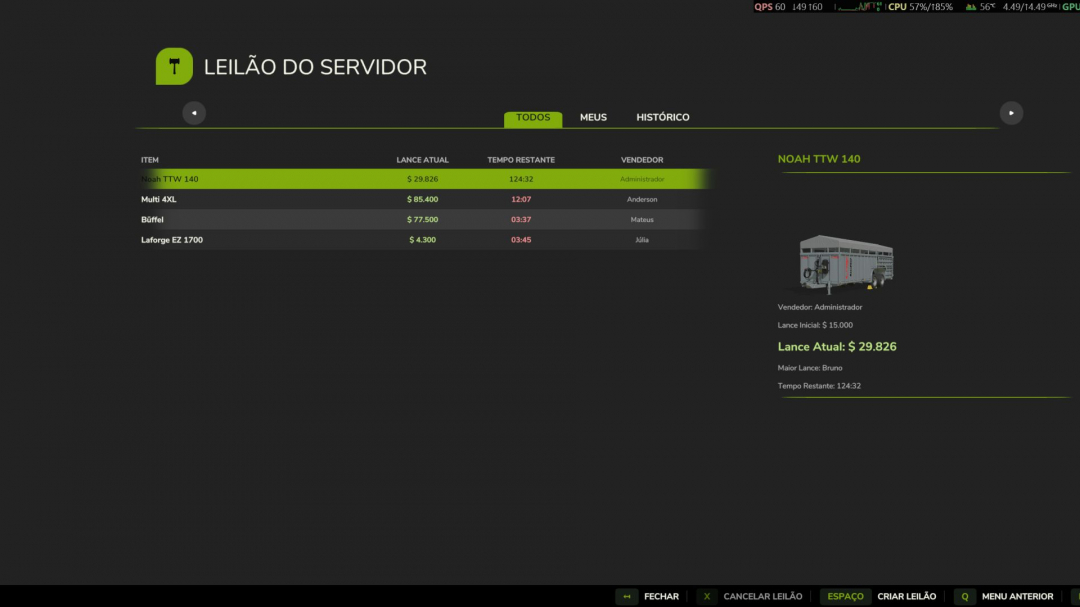
Server Auction V1.3.3
Server Auction House — User Guide Server Auction House brings a real-time auction market to Farming Simulator 25. You can put your own tractors, harvesters, and tools up for sale or bid on equipment advertised by other server players and virtual bots. Controls and Shortcuts Open the Auction Panel: Press the K key (standard keyboard) at any time during the game. Navigate the Interface: Use the mouse to select active auctions in the list on the left, view details on the right, or use the buttons in the bottom menu. How to Play (Gameplay) 1. Create an Auction (Sell) Open the auction panel by pressing K. Click the Create Auction button (in the bottom menu). Select your farm vehicle/tool from the list. Choose the Starting Price (Minimum Bid) and Duration (time that the auction will be active). Confirm. The item will leave your farm immediately and will be listed for bidding. WARNING Security Rule: After an auction receives the first bid (whether from a player or a virtual bot), it can no longer be canceled by the seller. This ensures a fair market for those bidding. 2. Bid (Buy) Select an item from the active auction list to see its detailed information in the right pane (seller, current bid, time remaining, and a photo of the equipment). The text field will automatically display the next minimum bid amount. Click Bid to register your offer. If time runs out and you are the highest bidder, the item is yours! Server Settings (Enable/Disable Bots) The mod adds a special control section within the game’s general settings menu (In-Game Settings). Enable/Disable Bots: Server administrators can turn on or off bids and auctions created by Artificial Intelligence. On: Bots create auctions of random used items and compete by bidding on players’ items. Off: The auction will operate exclusively between real players on the server. Important Note (Spawn Warning) IMPORTANT Delivery of Won Items: Currently, when you win an auction, the purchased vehicle or equipment appears (spawns) directly in the position where your character is standing. This is a temporary limitation and this behavior will be corrected in future updates so that items appear in the official store’s delivery zone or designated locations. [1.3.3.0] – 2026-06-28 Added – BRAIN Bot Profile: – Added the **BRAIN** bot bidding profile (assigned to bot “Anderson”). – Implemented a stable 5% chance of the bot playing “pranks” on specific auctions (bidding up to 150% of store value, high bid frequency, large bid increments). – Implemented smart behavior for other 95% of auctions (limiting bids to 70%-85% of store value to buy cheap, bidding minimum increments). [1.3.2.0] – 2026-06-28 Fixed – Header Icon Customization: – Pointed the page title header icon (`headerIcon`) to the custom `icon_AuctionTab.png` instead of the base game finances image slice. – Also synchronized this change to **Server Journal**’s page title header, pointing it to custom `icon_JournalTab.png`. [1.3.1.0] – 2026-06-28 Added – Menu Tab Custom Icon: – Created a custom tab icon `icon_AuctionTab.png` showing a minimalist white gavel silhouette with transparent background. – Registered the custom icon for the in-game menu tab, disabling the base game finances icon override. – Done the same for **Server Journal** using a custom `icon_JournalTab.png` icon. [1.3.0.0] – 2026-06-28 Added – History Tab: – Added the **History Tab** to the Auction House UI. – Implemented persistent saving and loading of ended auctions in `server_auctions.xml`. – Implemented a rolling limit of **30 ended auctions** in history to prevent savegame XML bloat. – Configured History cells to show “Sold” or “No Bids” in place of remaining time. – Configured History detail view to display “Status: Ended” and hide the bidding input panel. – Added Spanish and French translations for the new history tab labels. [1.2.3.0] – 2026-06-24 Added – New Translations: – Added full support for **French** (`translations/lang_fr.xml`) translation, including UI labels, error messages, global announcements, and French bot names (e.g., Pierre, Jean, Camille, Chloé). – Added full support for **Spanish** (`translations/lang_es.xml`) translation, including UI labels, error messages, global announcements, and Spanish bot names (e.g., Alejandro, Carlos, Sofía, Elena). – **Mod Description Translations:** – Added French and Spanish localized description blocks in the modDesc.xml. – Registered `fr` and `es` under the `supportedLanguages` attribute in modDesc.xml.
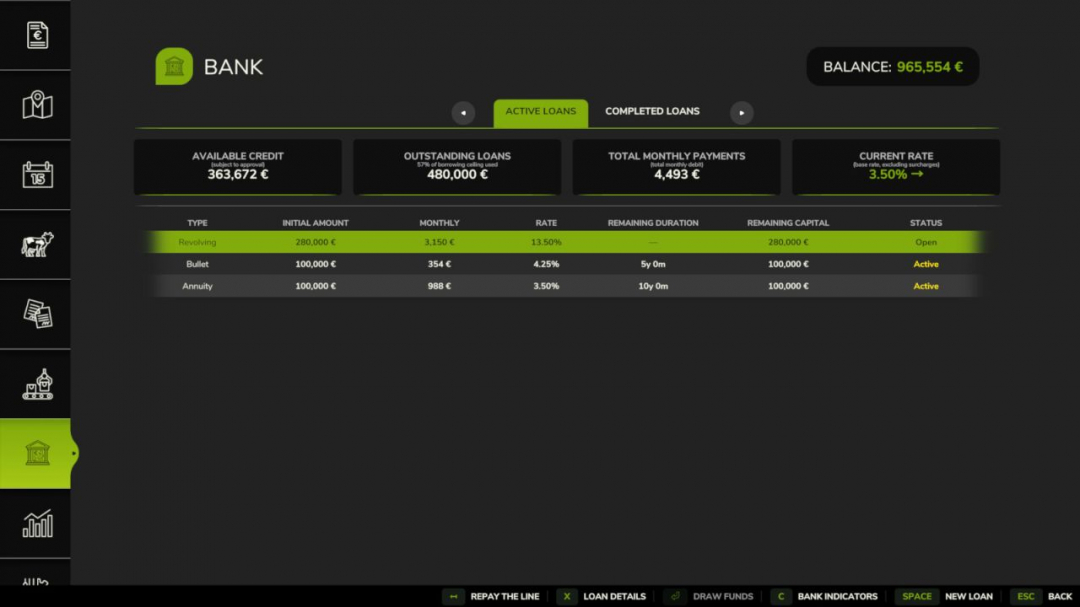
Bank And Credit V1.0.1
Bank & Credit introduces a fractional-reserve bank system to Farming Simulator 25. Borrow money, manage your debts, and expand your credit capacity through farming activities. The bank operates as a standalone virtual entity with its own equity, funded by the interest it earns. Credit is granted based on an evaluation of your income and assets, not automatically. **Features:** - Three loan types: Annuity (fixed monthly payments), Bullet (interest-only, full principal at maturity), Revolving (flexible draw and repayment, no fixed term) - Revolving loans: 1% annual commitment fee on undrawn amounts; optional closure when balance reaches zero - Credit scoring using DSCR (12-month income history with decay weighting) and LTV (asset liquidation value with category-specific haircuts) - Five risk levels: LOW / MODERATE / HIGH / CRITICAL / REFUSED, with transparent rate breakdowns and clear refusal reasons - Risk surcharges added to the base rate: LOW +0%, MODERATE +0.75%, HIGH +2%, CRITICAL +5% - Critical applications are automatically capped at 50% of the requested amount; the bank still lends but at a reduced size - Asset haircuts by category: farmland 70%, livestock 60%, buildings 55%, inventory 50%, tools 50%, tractors 40%, cash 30% - Borrower limit: liquidated asset value plus 24-month income projection minus existing debt - Concentration cap: a single farm cannot exceed 25% of the bank’s total lending capacity - Loan detail view: full amortization schedule for Annuity and Bullet loans, or draw and repayment panel for Revolving loans - Bank health dashboard: displays equity, leverage ratio, outstanding portfolio, internal loss reserve, and coverage ratio - Annual financial report per farm - Base rate with mean reversion, updated quarterly (1% – 12%, configurable) - Spread types: Annuity +0%, Bullet +0.75%, Revolving +5% - Early repayment options for Annuity and Bullet loans: full or partial, with configurable penalties (0% – 5%) - Settings (in Game Settings): starting capital (€100k – €5M), leverage ratio (5x – 20x), base rate, dynamic rate, early repayment penalty - Separate entries for Interest and Principal in the Finance tab - Solo and multiplayer modes: in multiplayer, bank equity and portfolio are shared server-side across all farms - Compatible with FS25_Invoices: invoice income counts towards DSCR history - Compatible with FS25_RedTape: subsidy and grant income count towards DSCR history **Important:** This mod replaces the vanilla loan system. Any existing vanilla loan balances are automatically cleared at game start. **Updates in V1.0.1.0:** - Fixed multiplayer synchronization of paid loans and annual reports - Corrected Bank tab display in the menu - Fixed input fields for repayment and draw amounts to prevent letter entries - Added full translation support for all 27 supported languages
Rent Your Field V1.0.0.1
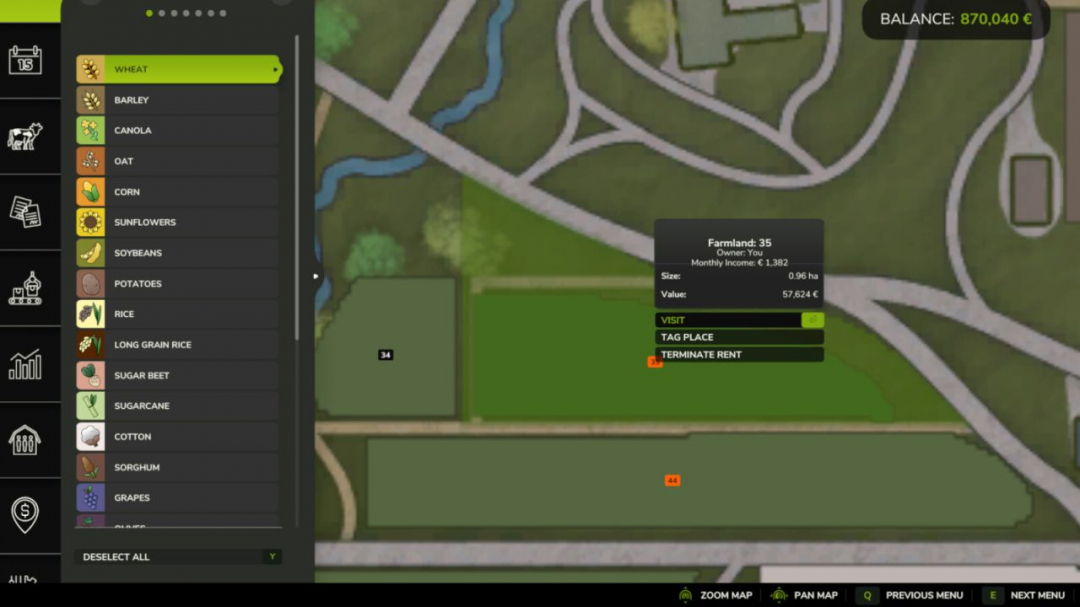
Rent out your unused fields to neighbors and earn passive income! This mod allows you to lease your farmland to neighbors and receive monthly payments based on the field value and game difficulty. **Features:** - Rent out your owned fields to neighbors - Monthly passive income (2.0% of field value) - Difficulty-based earnings multiplier - Configurable minimum lease duration (default: 12 months) - Early termination with penalty (50% of remaining months’ income) - Automatic monthly payments - Multiplayer support **How to use:** 1. Select a field you own 2. Press the rent button 3. The field will be leased to the AI 4. First payment received the month after renting out the field 5. Subsequent monthly payments are automatic 6. You can terminate at any time, but a penalty applies if terminated before the minimum duration expires (no penalty if terminated before the first payment) **Settings:** - Minimum lease duration: 3-24 months (configurable) - Monthly income: 2.0% of field value - Difficulty multiplier: Easy (1.2x), Normal (1.0x), Hard (0.8x) - Rent fields with placeables: Yes/No (default: No) - Auto termination probability: 0-100% (default: 20%) **V1.0.0.1** Fixed a bug that prevented the Precision Farming mod from correctly updating field yield
Dynamic Market V1.0.1
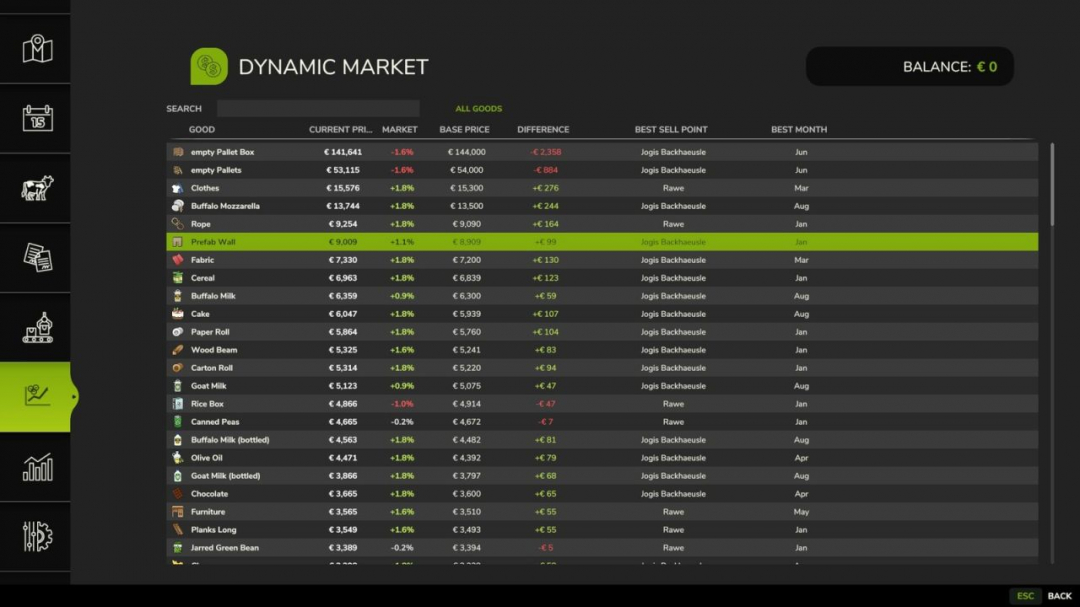
Enhances the Farming Simulator selling price system by adding an extra dynamic monthly market layer. The core game pricing and seasonal logic remain unchanged and serve as the foundation in standard mode. Additionally, an independent market adjustment applies monthly price variations based on product groups and the overall market conditions. Optionally, a yearly average mode can be activated, disabling the seasonal price curve and replacing it with a stable annual mean value. This average is calculated using the usual Giants pricing logic, including difficulty settings and selling station influence, providing a consistent reference throughout the year and helping players choose the optimal selling month without relying solely on seasonal peaks. Each product category—such as grains, oilseeds, vegetables, forage crops, wood, animal products, and processed goods—follows its own price curve, preventing uniform price changes and creating a more realistic market behavior across different goods. A dedicated market screen displays the base game price, the dynamically adjusted selling price or yearly average depending on the mode, the percentage difference, the selling location, and the best selling month based on the base game. Search and storage filters enable quick navigation through available products. All market calculations are performed server-side in multiplayer to ensure consistent pricing across all clients. Features: - Additional dynamic monthly market layer on top of base game pricing - Optional yearly average mode replacing Giants seasonal curve - Yearly average based on Giants pricing logic, difficulty, and selling station - Independent price curves for each product group - Comparison between base game price and adjusted market price - Percentage deviation display - In-game market overview page with search and storage filters - Automatic detection of sellable products from maps and mods - Manual product group assignment for custom or misdetected items - Server-authoritative pricing for multiplayer savegames V1.0.1.0 - UI adjustments for improved readability - Revised French translations
Bank Balance Earns Interest V1.2
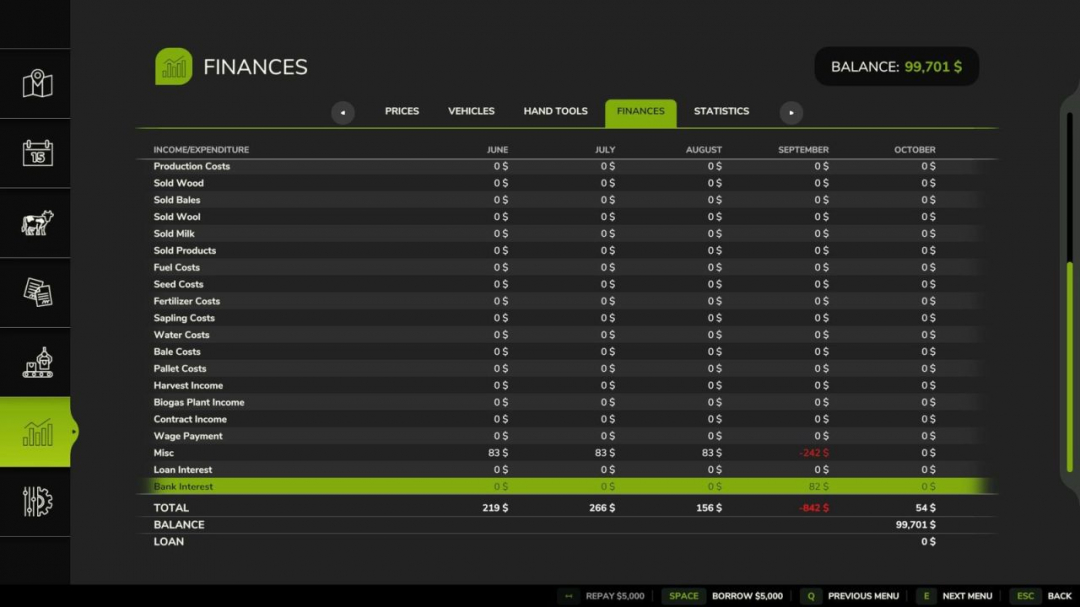
Adds interest calculations so that a farm's bank balance earns interest at the beginning of each month. The interest is displayed as a "Bank Interest" subtotal on the finances screen. The default rate is 1% APY. Two developer console commands have been added to manage the interest rate: `biSetInterestRate` – allows you to change the interest rate. Example: `biSetInterestRate 0.01` sets the rate to the default. `biGetInterestRate` – displays the current interest rate in the console. V1.2.0.0 Adds a "Bank Interest" money category.

Czech Language Pack V2.0
Translation package for many mods and maps. When a mod translated here is activated, the translation is automatically loaded and applied. It is possible to create your own version for PL, FR, IT, ... This script will add or override translations for activated mods from the translations folder. – "mapdir"/translations/ Alternatively, you can define a separate folder: – "mapdir"/modTranslations/ Files must follow the pattern "modname"_"lang".xml Czech translations for the mods: FS25_AdditionalFilltypes – v1.1.1.0 FS25_additionalGameSettings – v1.0.0.5 FS25_Alma_Missouri – v1.1.0.1 FS25_AnimalFoodCalculator – v1.0.0.0 FS25_AnimalPackage_vanillaEdition – v1.0.0.0 FS25_BR163_Brazil – v1.0.0.2 FS25_Claas_Axion_900 – v1.0.0.1 FS25_ClaasJaguar800 – v1.0.0.0 FS25_ClaasLexion500 – v1.0.3.0 FS25_ClaasPack – v1.1.0.0 FS25_CMV – v1.0.0.0 FS25_Configure_Maintenance – v1.0.0.0 FS25_ContractBoost – v1.1.0.0 FS25_CultivatorSettings – v2.0.1.0 FS25_CustomLogos – v1.2.0.1 FS25_DefModPack – v1.2.1.1 FS25_EasyDevControls – v1.2.0.0 FS25_EnhancedAnimalSystem – v1.1.0.1 FS25_EnhancedLoanSystem – v1.0.0.0 FS25_FarmlandOverview – v1.0.2.0 FS25_Fastrac_4000_ICON – v1.2.0.2 FS25_Fastrac_8000_ICON – v1.1.0.3 FS25_Fendt700Vario_Gen6 – v1.3.0.0 FS25_Fendt700VarioSeries – v1.3.0.0 FS25_Fendt900Vario_S4 – v1.3.0.0 FS25_FendtVario_900Gen7 – v1.1.0.2 FS25_FendtWeightsPack – v1.1.0.0 FS25_FLC253 – v1.0.0.1 FS25_FlieglTimberRunnerAutoload – v1.0.0.0 FS25_Geistal – v1.0.0.0 FS25_Greenhouse_Wood – v1.0.0.2 FS25_Hinterkaifeck – v5.0.0.5 FS25_InfoDisplayExtension – v1.2.2.0 FS25_infusionproductionpack – v1.1.0.0 FS25_Jungheinrich_EFG_S50_PRO – v1.0.0.1 FS25_Lunow_crossplay – v1.0.0.0 FS25_MAN_19_322 – v1.0.0.1 FS25_Meat_Production – v1.1.0.0 FS25_ObjectStorageExtension – v1.0.1.0 FS25_pinnacle6x4Pack – v1.1.0.0 FS25_PlaceableOverview – v1.0.1.0 FS25_ProductionControl – v1.0.0.2 FS25_ProductionPointLeasing – v1.0.0.0 FS25_RealisticAnimalLosses – v1.0.0.0 FS25_RefreshContracts – v1.0.0.0 FS25_RepairPickup – v1.2.0.0 FS25_rootCropStorage – v1.0.0.0 FS25_roundBalerExtension – v1.2.1.0 FS25_stopFullCombine – v1.1.0.0 FS25_ToolInclinationHelper – v1.0.0.6 FS25_TreeSaplingPalletPack – v1.0.0.1 FS25_TSStockCheck – v1.0.0.2 FS25_useYourTyres – v1.0.0.3 FS25_VIPOrderManager – v1.2.1.0 FS25_VolvoFH16Tipper – v1.0.0.1 FS25_enhancedMixerWagons – v1.0.0.0 FS25_GarageMenu – v1.0.0.3 FS25_CropRotation – v1.0.0.0 Map and mods depending on Pichonniere Valley map: FS25_The_Pichonniere_Valley – v1.1.0.1 FS25_The_Pichonniere_Buildings_Pack – v1.1.0.0 FS25_Straw_Shed_Old – v1.0.0.1 FS25_Ivoy_Straw_Hangar – v1.0.0.0 FS25_Ivoy_Piggery – v1.0.0.0 FS25_Ivoy_Farm_Garage – v1.0.0.0 FS25_Ivoy_Cereal – v1.0.0.1 Map and mods depending on Kingdom Of Wallachia map: FS25_bigGarage – v1.0.0.1 FS25_CowBarnEuropeanModernPack – v1.0.0.0 FS25_FoodMixerSilo – v1.1.0.0 FS25_LongShed – v1.0.0.0 FS25_OldCornDryer – v1.0.0.1 Map and mods depending on CIZKOV map: FS25_ArtisanalChipsFactory – v1.0.0.0 FS25_BigWhiteCowBarn – v1.1.1.0 V2.0.0.0 Added translation: FS25_KommunalServices – v1.1.0.0 FS25_scrapSpawner – v1.0.0.0 FS25_lsfmHoseSystem – v1.0.0.1 Free for all, enjoy.
Ala-Talkkari Winter Equipment v1.0.0.0
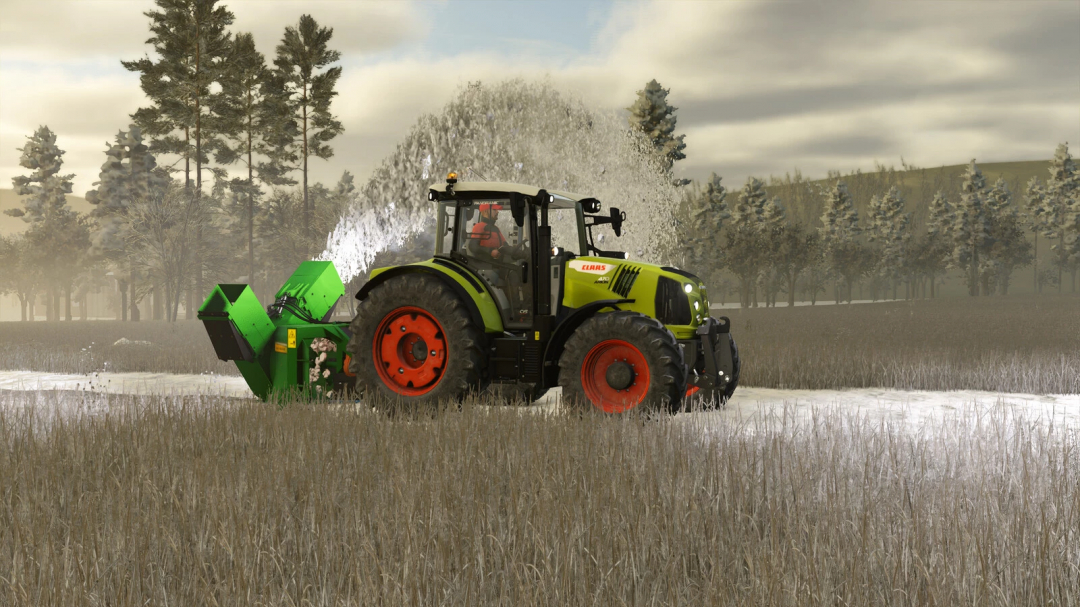
The U-Plow 4800 is an efficient and versatile universal plow, suitable for a variety of plowing tasks. Its excellent snow control and removal capabilities are enhanced by turning end wings. Designed specifically for large areas such as shopping center parking lots or factory yards, it is also effective for road clearing. The plow can be tilted 20 degrees in both directions, and the wings can be turned 90 degrees independently in either direction. Price: $16,800 Max width: 4.8 m Attacher configurations: 3-point, front loader, wheel loader, telehandler The Ala-Talkkari AT-251 V 2G is a new V-shaped snow blower designed for tractors in the 90-150 hp power range, equipped with a gear reducer. Its rotor has a diameter of 1 meter, ensuring efficient operation even in the thickest snow. The default working width of 2.5 meters can be increased to 2.75 meters with additional wings. Snow can be unloaded on either the left or right side by opening the flaps. However, when both flaps are opened, snow will only be unloaded on the right side. Category: Winter equipment Price: $9,500 Working width: 2.50 - 2.75 m Needed power: 90 hp
- 15 per page
- 30 per page
- 45 per page
- 60 per page
-
See more per page
Bigger pages, fewer clicks - and no ads anywhere.
Go Pro