Farming Simulator 25 mods
76,924 results- 15 per page
- 30 per page
- 45 per page
- 60 per page
-
See more per page
Bigger pages, fewer clicks - and no ads anywhere.
Go Pro

Realistic Worker Costs V1.0.9.4
Realistic Worker Costs Mod for Farming Simulator 25 Adds authentic ongoing wage expenses for hired workers, enhancing farm management with more strategic depth. **MAIN FEATURES:** - Configurable wage system: choose between hourly or per-hectare payments - Three wage tiers: Low ($15/h), Medium ($25/h), High ($40/h) - Skill-based wages: workers with higher skills earn more - Full integration with in-game settings - Console commands for comprehensive control - Multiplayer support - Available in 10 languages - Compatible with saved games **HOW IT WORKS:** Workers now incur costs while active! The mod automatically calculates wages based on: 1. Time worked (hourly mode) or hectares worked (per hectare mode) 2. Worker skill level (multiplier from 80% to 120%) 3. Selected wage level or custom rate **SETTINGS OPTIONS:** - Enable/Disable: toggle the mod - Cost Mode: hourly or per hectare - Wage Level: low, medium, or high - Custom Rate: set your own wage - Notifications: enable/disable payment alerts - Debug Mode: additional logging **CONSOLE COMMANDS:** Type 'workerCosts' in console for a full list, including: - WorkerCostsEnable/Disable - WorkerCostsSetWageLevel 1|2|3 - WorkerCostsSetCostMode 1|2 - WorkerCostsSetCustomRate - WorkerCostsTestPayment - WorkerCostsShowSettings - WorkerCostsResetSettings **INSTALLATION:** 1. Extract to your FS25 mods folder 2. Enable in the mod menu 3. Configure settings in-game or via console **COMPATIBILITY:** - Compatible with FS25 (all versions) - Supports multiplayer - Compatible with most other mods - Safe to add or remove from existing saves This mod introduces a new financial layer to your farm, requiring you to consider labor costs alongside equipment expenses for better profitability planning. It adds realism and challenge, perfect for players seeking a deeper economic experience. Note: All rights reserved. Do not redistribute or claim as your own. **V1.0.9.4** - Fixed text wrapping issues; set explicit textMaxNumLines where needed - Estimated costs now display in per-hectare mode using WorkerSystem:getEstimatedIntervalCost() - Worker list on dashboard now shows 'Helper (Vehicle Name)' - Updated localization: payment interval now 30 minutes since fix #38, replacing the previous 5-minute interval; refreshed all outdated strings and removed redundant help text.
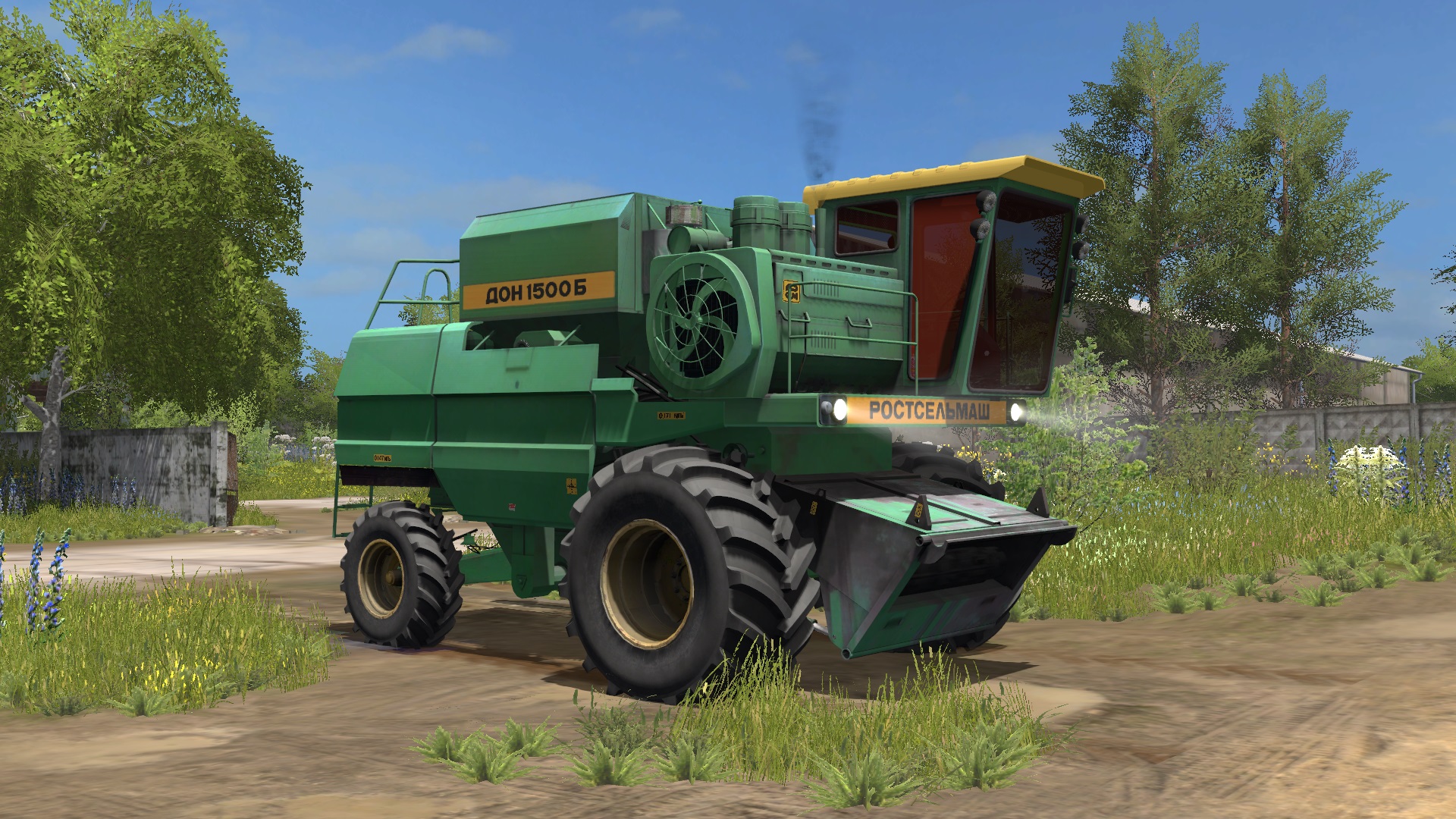
МОД ДОН-1500Б V2.1 ДЛЯ FARMING SIMULATOR 2017
- Мощность: 173 кВт / 235 л.с.; - Скорость: 25 км/ч; - Объем топливного бака: 310 л.; - Стоимость: 55 000 €; - Стоимость обслуживания в день: 5 €; - Объем бункера: 6 000 л.; - Конфигурация колес; - Конфигурация копнителя / измельчителя; - Открывается дверь, крышка мотора, крышка радиатора; - Анимированные приборы; - Рабочая светотехника; - Рабочие зеркала; - Оставляет следы; - Пачкается и моется; - В комплекте 2 жатки. АВТОР МОДА: Данил Косиков,Anton_Zasim71 RU АВТОР МОДА: Данил Косиков,Anton_Zasim71 RU

Farm Tablet V2.3.2.3
FarmTablet — A compact, all-in-one farm management tablet for Farming Simulator 25. Originally inspired by a tablet mod for FS17, built from scratch for FS22 and now fully converted and rewritten for FS25. The goal is simple: useful farm info at a glance, without getting in the way of gameplay. The mod has been rebuilt with a clean, modular structure — every app lives in its own file, making it easy to expand, fix and improve over time. It’s actively developed and shaped by community feedback. **What’s in it right now:** - Dashboard — farm overview with balance, fields, vehicles and world state - Weather — current conditions, temperature, wind, cloud cover and forecast - Fields — all owned fields with crop type and growth stage - Animals — pen status with food, water and cleanliness levels - Workshop — nearby vehicle diagnostics with fuel, wear and operating hours - Bucket Tracker — load counter for wheel loaders and excavators - Digging — excavation tracking and soil scanner - App Store — browse and manage installed apps - Settings — configure the tablet from the pause menu - Updates — changelog and version history **Mod integrations (auto-detected at runtime, safe to run without them):** - NPC Favor, Soil Fertilizer, Seasonal Crop Stress, Income Mod, Tax Mod **What’s coming next:** - Better tablet visuals and frame design - Icons instead of text labels - Sounds, color tweaks and UI polish - More apps and deeper interactions based on feedback - Multiplayer improvements The mod is in active development. Bug reports, ideas and suggestions are always welcome — this is a community project and your feedback directly shapes what gets built next. **COPYRIGHT NOTICE:** All rights reserved. Unauthorized redistribution, copying, or claiming this mod as your own is strictly prohibited. **V2.3.2.3** - Paging arrows and toggles (Notes field/template pickers and the rest) now respond instantly. Previously, content only refreshed on a 4-second timer, so a click could take up to 4 seconds to show. - The Production app no longer displays ‘stalled’ while a production is running. It now counts the productions you have switched on instead of reading an empty field. - The Soil app now shows N/P/K in ppm, aligning with the Soil Fertilizer HUD instead of raw internal values. - The ‘DESEL’ button, which looked like a misspelled ‘diesel’ next to the fuel bar, is now labeled ‘UNPIN’ in the Workshop and Income apps. (The 0% fuel reading was fixed in 2.3.2.2.) **Required mods:** - Income Mod - Tax Mod - NPC Favor - Realistic Soil & Fertilizer - Seasonal Crop Stress - Market Dynamics - Realistic Worker Costs - Random World Events

Czech Language Pack V1.9
Translation package for numerous mods and maps. When a mod translated here is activated, the translation loads automatically and is applied. You can create your own versions for PL, FR, IT, and others. This script adds or overrides translations for active mods from the translations folder. – "mapdir"/translations/ Alternatively, you can specify a separate folder: – "mapdir"/modTranslations/ Files must follow the pattern "modname"_"lang".xml Czech translations for the mods: FS25_AdditionalFilltypes – v1.1.1.0 FS25_additionalGameSettings – v1.0.0.5 FS25_Alma_Missouri – v1.1.0.1 FS25_AnimalFoodCalculator – v1.0.0.0 FS25_AnimalPackage_vanillaEdition – v1.0.0.0 FS25_BR163_Brazil – v1.0.0.2 FS25_Claas_Axion_900 – v1.0.0.1 FS25_ClaasJaguar800 – v1.0.0.0 FS25_ClaasLexion500 – v1.0.3.0 FS25_ClaasPack – v1.1.0.0 FS25_CMV – v1.0.0.0 FS25_Configure_Maintenance – v1.0.0.0 FS25_ContractBoost – v1.1.0.0 FS25_CultivatorSettings – v2.0.1.0 FS25_CustomLogos – v1.2.0.1 FS25_DefModPack – v1.2.1.1 FS25_EasyDevControls – v1.2.0.0 FS25_EnhancedAnimalSystem – v1.1.0.1 FS25_EnhancedLoanSystem – v1.0.0.0 FS25_FarmlandOverview – v1.0.2.0 FS25_Fastrac_4000_ICON – v1.2.0.2 FS25_Fastrac_8000_ICON – v1.1.0.3 FS25_Fendt700Vario_Gen6 – v1.3.0.0 FS25_Fendt700VarioSeries – v1.3.0.0 FS25_Fendt900Vario_S4 – v1.3.0.0 FS25_FendtVario_900Gen7 – v1.1.0.2 FS25_FendtWeightsPack – v1.1.0.0 FS25_FLC253 – v1.0.0.1 FS25_FlieglTimberRunnerAutoload – v1.0.0.0 FS25_Geistal – v1.0.0.0 FS25_Greenhouse_Wood – v1.0.0.2 FS25_Hinterkaifeck – v5.0.0.5 FS25_InfoDisplayExtension – v1.2.2.0 FS25_infusionproductionpack – v1.1.0.0 FS25_Jungheinrich_EFG_S50_PRO – v1.0.0.1 FS25_Lunow_crossplay – v1.0.0.0 FS25_MAN_19_322 – v1.0.0.1 FS25_Meat_Production – v1.1.0.0 FS25_ObjectStorageExtension – v1.0.1.0 FS25_pinnacle6x4Pack – v1.1.0.0 FS25_PlaceableOverview – v1.0.1.0 FS25_ProductionControl – v1.0.0.2 FS25_ProductionPointLeasing – v1.0.0.0 FS25_RealisticAnimalLosses – v1.0.0.0 FS25_RefreshContracts – v1.0.0.0 FS25_RepairPickup – v1.2.0.0 FS25_rootCropStorage – v1.0.0.0 FS25_roundBalerExtension – v1.2.1.0 FS25_stopFullCombine – v1.1.0.0 FS25_ToolInclinationHelper – v1.0.0.6 FS25_TreeSaplingPalletPack – v1.0.0.1 FS25_TSStockCheck – v1.0.0.2 FS25_useYourTyres – v1.0.0.3 FS25_VIPOrderManager – v1.2.1.0 FS25_VolvoFH16Tipper – v1.0.0.1 FS25_enhancedMixerWagons – v1.0.0.0 FS25_GarageMenu – v1.0.0.3 FS25_CropRotation – v1.0.0.0 Map and mods depending on Pichonniere Valley map: FS25_The_Pichonniere_Valley – v1.1.0.1 FS25_The_Pichonniere_Buildings_Pack – v1.1.0.0 FS25_Straw_Shed_Old – v1.0.0.1 FS25_Ivoy_Straw_Hangar – v1.0.0.0 FS25_Ivoy_Piggery – v1.0.0.0 FS25_Ivoy_Farm_Garage – v1.0.0.0 FS25_Ivoy_Cereal – v1.0.0.1 Map and mods depending on Kingdom Of Wallachia map: FS25_bigGarage – v1.0.0.1 FS25_CowBarnEuropeanModernPack – v1.0.0.0 FS25_FoodMixerSilo – v1.1.0.0 FS25_LongShed – v1.0.0.0 FS25_OldCornDryer – v1.0.0.1 Map and mods depending on CIZKOV map: FS25_ArtisanalChipsFactory – v1.0.0.0 FS25_BigWhiteCowBarn – v1.1.1.0 V1.9.0.0 Update translation: FS25_lsfmAnimalTransportPack – v1.0.0.1
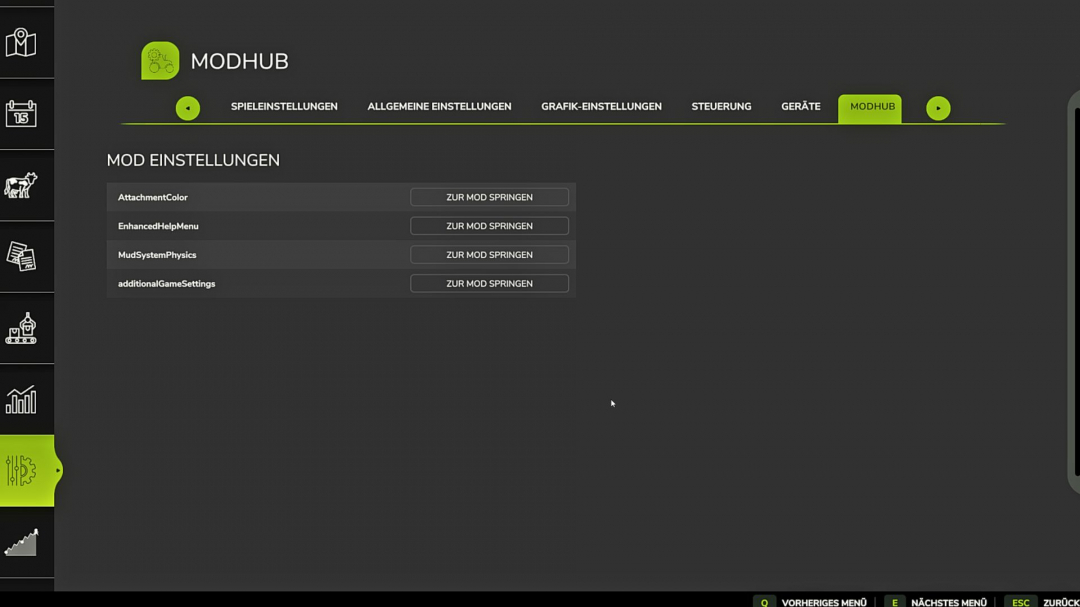
Mod Settings Hub V2.0
ModSettingsHub (MODHUB) is a utility mod for Farming Simulator 25 that optimizes and declutters the pause menu's user interface. Many complex modifications add their own configuration pages to the game. With a large number of active mods, this quickly leads to an overcrowded and visually broken tab bar in the in-game menu. The ModSettingsHub solves this problem by automatically intercepting the menu pages of registered third-party mods and grouping them into a central, alphabetically sorted list. Access is cleanly provided via a single, newly added tab called "MODHUB". **Main Features & Functionalities:** - Centralized Management: Eliminates the chaos in the top tab bar by bundling all mod settings into one fixed, easy-to-find location. - Seamless UI Integration: The layout visually blends perfectly into the native design of the GIANTS Engine (FS25). The spacing of the menu tabs adapts dynamically to prevent display errors such as overlapping navigation elements. - Advanced Memory Feature: The script precisely remembers which mod settings page (e.g., AttachmentColor) the player was viewing when closing the menu. Upon reopening, exactly this page is restored without any visual flickering. - Integrated Anti-Phantom-Click Protection: A built-in security routine blocks incorrect mouse inputs during the menu’s loading phase, ensuring no options are unintentionally altered. **Multiplayer & Server Compatibility:** The hub runs fully synchronized in multiplayer mode and perfectly supports dedicated server environments. **Full Localization:** Fully automatic support for English and German, based on the user’s in-game language settings. **V2.0.0.0** - Every mod setting should be moved to mod hub even without its own tab in the settings - Many bug fixes

Hirschfeld Ravage Einstreuer V1.0.0.1
The Elmer bedding spreader is now available in a customized Hof Hirschfeld edition for Farming Simulator 25. The machine has been visually redesigned, adorned with matching logos, and thus integrates perfectly into the Hof Hirschfeld fleet. The automatic bale pickup function is particularly practical. This eliminates the need for an additional front loader, significantly simplifying the workflow in the barn. Simply grab the bale, pick it up, and spread the bedding – barn work just became a little more enjoyable. Features: Elmer bedding spreader for Farming Simulator 25 Customized Hof Hirschfeld design Hirschfeld logos on the machine Automatic bale pickup No front loader required Ideal for straw and barn work A practical helper for everyday farm life A cleaner barn, less maneuvering, and a machine that looks like it’s always been part of the farm – that’s exactly how we like it.

Modification Directory Switcher V1.0
This handy tool simplifies organizing and switching between your mods.Create subfolders within the directory: "Documents/My Games/FarmingSimulator2025/mods" Here, you can save different profiles for maps, savegames, or playstyles. The tool automatically updates the mod folder path in "gameSettings.xml" to switch profiles seamlessly.Important: - Runs in PowerShell, no installation required. - Works solely with folder paths; no files are modified. - The mod path is changed securely to activate only the desired mods.Security: This script is a simple path management tool and contains no malware.Quick Start: 1. Unzip the archive. 2. Ensure your mod folder is located at "Documents\My Games\FarmingSimulator2025\mods". 3. Launch "run.bat". 4. Follow the menu prompts to switch profiles or reset to default.Note: Farming Simulator 2025 must be closed before using the tool, so changes take effect.
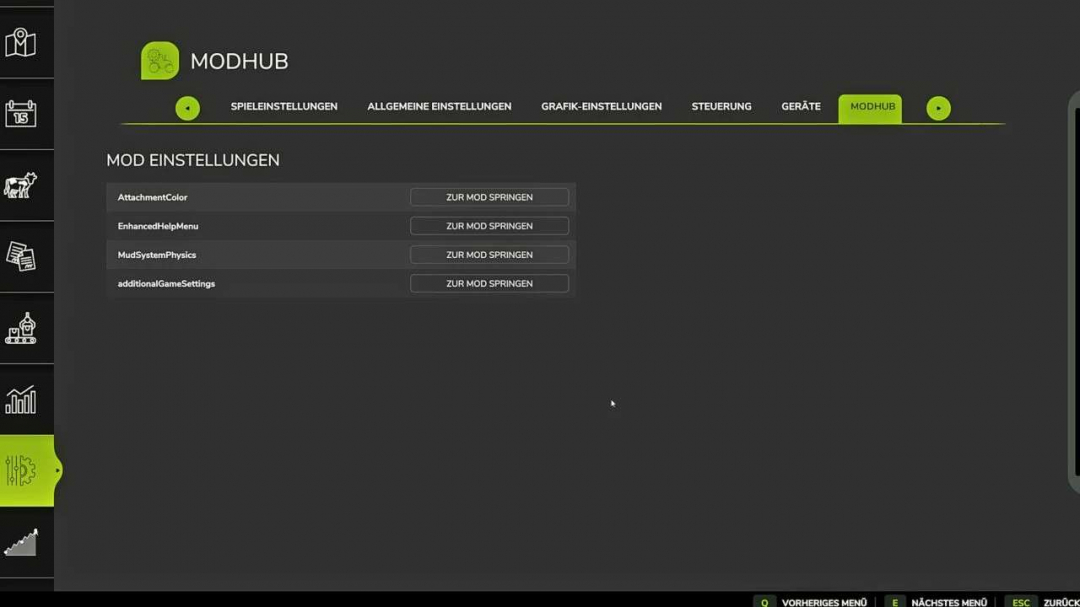
ModSettingsHub v2.0
ModSettingsHub (MODHUB) is a utility mod for Farming Simulator 25 that streamlines and organizes the pause menu's user interface. Many complex mods add their own configuration pages, which can clutter the in-game tab bar, especially with numerous active mods. ModSettingsHub addresses this by automatically intercepting third-party mod menu pages and consolidating them into a single, alphabetically sorted list. Access is simple and clean through a dedicated tab called "MODHUB". **Key features and functionalities:** - Centralized management: Keeps the tab bar tidy by grouping all mod settings in one fixed location. - Seamless UI integration: The layout blends naturally with the game's native design, with dynamic spacing to prevent display issues like overlapping tabs. - Improved memory function: Remembers the last accessed mod settings page, restoring it upon reopening without flickering. - Click protection (anti-phantom click): Blocks erroneous mouse inputs during menu loading to prevent accidental changes. - Multiplayer & server support: Fully synchronized in multiplayer mode and compatible with dedicated servers. - Full localization: Supports German and English voice acting automatically, based on the game’s language settings.
Modded Courseplay v8.3.0.1
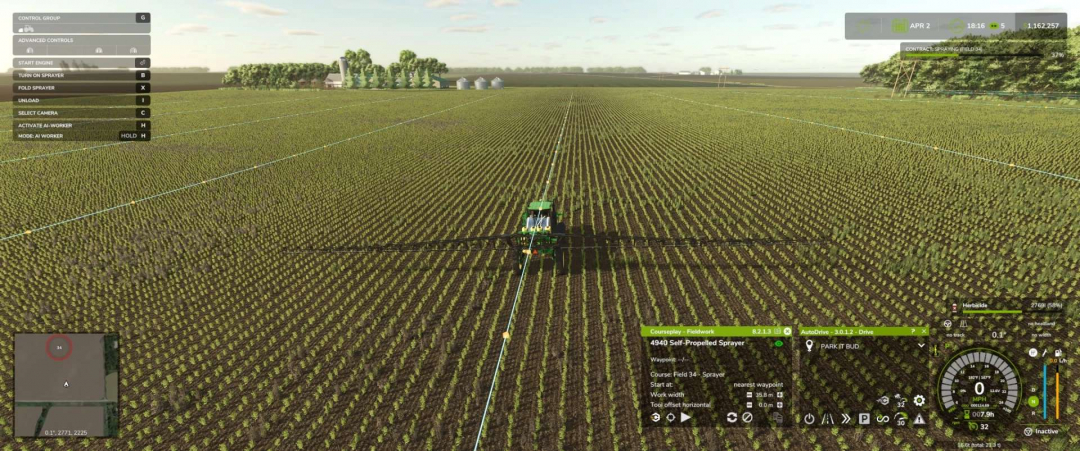
Unofficial Courseplay FS25 Custom Build Changelog Current custom build: 8.3.0.1 **VERSION / CORE CLEANUP** – Fixed a fieldwork turn-state logic issue that could affect turn handling. – Bumped custom version through the project, ending at 8.3.0.1. – Cleaned up older/incorrect references from the base mod. – Removed/avoided duplicate Lua registration issues. – Fixed vehicle configuration XML issues, including bad offset naming and duplicate entries. – Updated visible FS22-style text/references where they were showing incorrectly in the FS25 build. **MAJOR HUD OVERHAUL** – Reworked the Courseplay mini HUD into a cleaner style layout. – Kept the Courseplay green/black color theme. – Added a cleaner title bar: – Courseplay – Fieldwork – Courseplay – Unload Combine – Courseplay – Silo Work – Moved version number to the top-right of the HUD. – Removed visible CP: prefixes from HUD text where possible. – Enlarged and cleaned the vehicle name row. – Added/realigned the eye/course visibility icon. – Cleaned divider lines and spacing. – Improved font sizes and alignment. – Fixed long vehicle names so they trim cleaner instead of overflowing. – Rebuilt the bottom action row so buttons stay in a consistent order: 1. Courseplay/settings, Field target / crosshair 2. Play, Record or next/unload-now, Pause / reverse / recycle, Clear 3. Clear copied course cache, Copy generated course – Made buttons larger and easier to click. – Fixed overlapping/non-clickable button issues. – Moved all main action buttons to the bottom. – Kept copy-generated-course button available. – Added/cleaned the copied-course cache clear button. – Changed the unload-combine “next” icon scaled/positioned cleaner. – Prevented hidden buttons from remaining clickable underneath visible buttons. – Fixed HUD movement so it cannot be dragged while locked. – Fixed a bug where dragging the HUD moved the background but left buttons/text behind horizontally. – HUD position now moves as one unit. – HUD position/state is saved better. – Added HUD open/closed persistence. – If the HUD was open when saving, it should reopen after loading. – If it was closed when saving, it should stay closed. – Saved HUD position is retained. **FIELDWORK HUD TEXT CLEANUP** – Cleaned fieldwork HUD labels and values: – Waypoint: 1530/3050 – Start at: last waypoint – Start at: nearest waypoint – Start at: first waypoint – Work width – Tool offset horizontal – Added the missing space after Waypoint:. – Fixed course display states: – Course: temporary – Course: (none) – Course: Field 8 – Spreader – Current intended behavior: – If a course has a field, show: – Course: Field 8 – Spreader – If multiple fields are detected, show: – Course: Fields 8, 9 – Spreader – If no field is detected, fall back to the course/tool name: – Course: Spreader – If no course is loaded: – Course: (none) – If a temporary/generated course exists but is not saved: – Course: temporary – Added redundancy protection so it should not show: – Course: Field 8 – Field 8 – Spreader **SAVED-COURSE FOLDER / PATH DISPLAY** – Added folder/path-aware course display. – Tried mapping folders like: – combine/field 8 – sprayer/field 8 – planter/field 8 – Later changed the preferred display to field-first format: – Course: Field 8 – Spreader instead of: – Course: Spread – Spreader **AUTO-GENERATED COURSE NAMES** – Added generated-course auto-name logic and bumped to 8.2.1.0 for that feature. – New auto-name style examples: – Field 8 – Spreader – Field 8 – Harvester – Fields 8, 9 – Mower **Design choices:** – No crop name included. – No fill type included. – Keeps the course reusable across crops/products. – Uses field number first. – Uses implement/tool type second. – Falls back to generic course/tool name if no field is detected. **COURSE GENERATOR / JOB MENU CHANGES** – Made Create Job bottom actions visible immediately on the map page. – Start Job / Generate Course should appear without needing to switch tabs first. – Cleaned labels in the job menu. – Removed visible CP: prefixes from some action text. – Improved bottom-action syncing across pages. **ACTIVE WORKERS MENU INSIDE COURSEPLAY** – Fixed selected worker index mismatch. – Fixed vehicle name mismatch. – Added better active worker descriptions. – Improved selected-row behavior. – Long worker names/descriptions trim cleaner. – Added detailed worker task text such as: – Planting – Seeding – Spraying – Spreading – Harvesting – Mowing – Baling – Unloading Combine – Bunker Silo Work – Loading Silo – Collecting Bales **BASE GAME ACTIVE WORKERS MENU INJECTION** – Added shared worker detail text so the base game Active Workers list can show clearer CP job descriptions instead of generic text like: – FIELD WORK – WORKING THE… – Expected examples: – Spreading Lime – Spraying Herbicide – Planting – Seeding – Harvesting – Unloading Combine – Collecting Bales **WARNING TEXT CHANGES** – Changed the center-screen unloader warning. – Old style: – CP: Unloader too far away from the field. – New style: – Unloader too far away! Move closer to target field or set a new target! – Also: – Removed the CP: prefix from the center warning. – Left this warning as a center-screen warning, not a persistent top-right game info message. **INFO TEXT / NOTIFICATION SETTINGS** – Added and refined an info-text display setting. – Current choices: – Deactivated – Courseplay HUD box (constant) – Warning popups only – Game info area (persistent) – Meaning: – Deactivated: no extra CP info box. – Courseplay HUD box (constant): CP info box stays visible. – Warning popups only: CP info box only appears temporarily for warnings. – Game info area (persistent): uses the game’s notification/info area. – Prevented duplicate stacked copies of the same message. – Keeps one active message alive while the problem still exists. – Clears it when the problem is fixed. – Rate-limited repeated updates. – Added context where possible: – 9RX 770 needs to be refilled with seed – 4940 Self-Propelled Sprayer needs to be refilled – 9RX 830 needs to be refueled – Limited persistent messages to actual stoppage/problem states. – Did not make normal status messages persistent. **NOTIFICATION SOUND SETTING** – Added setting: – Game info notification sound – Purpose: – Plays a sound once when a new warning starts. – Does not spam repeatedly while the same issue remains active. **AUTODRIVE REFILL / MODE FIXES** – Fixed the issue where AutoDrive refill/reload caused the Courseplay HUD to get stuck in the wrong mode. – Specifically: – Fieldwork jobs should stay on the Fieldwork HUD. – Sprayers/spreaders/planters should not remain in Silo Work after emptied/refill. – HUD now prefers the actual running CP job instead of a stale selected HUD mode. – After AutoDrive refill, restart should resume fieldwork instead of forcing the wrong page. – Restart after refill was adjusted toward last waypoint behavior instead of restarting from the beginning. **SILO WORK SEPARATION** – Kept actual Silo Work for bunker/silo jobs. – Fieldwork refill/reload should no longer be treated as Silo Work. – Lime spreading, spraying, planting, etc. should remain Fieldwork. **DEFAULT SPEED CHANGES** – Changed default speeds: – Turn speed default: 10 km/h – Reverse speed default: 10 km/h – That is about: 6.2 mph – Existing vehicles may keep saved values, but new/default settings use the new value. **TEXT / CAPITALIZATION POLISH** – Waypoint: kept uppercase. – Added spacing after Waypoint:. – Start at: kept uppercase. – Start values kept lowercase: – last waypoint – nearest waypoint – first waypoint – Course state labels cleaned. – HUD and menu text made more consistent overall. I want to thank the Courseplay dev team for a wonderful mod! Please donate to them!
Build Menu: Husbandry Storage Info V1.0
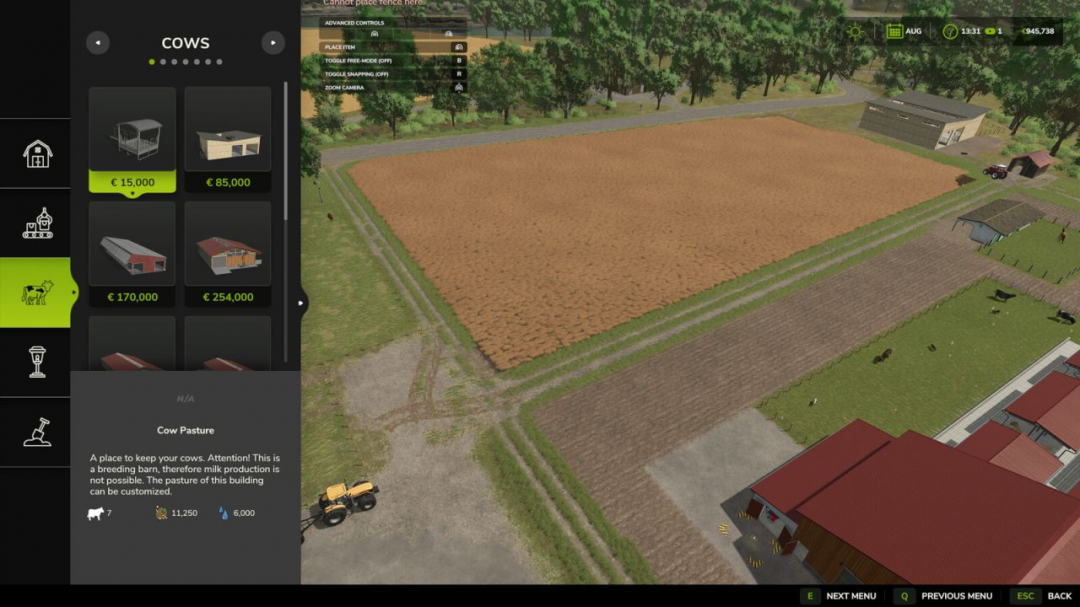
Check an animal husbandry’s storage capacities BEFORE placing it. In the construction menu (and the shop), each barn displays, next to the animal count, the storage capacity for its feed trough, slurry (liquid manure), manure, milk, straw, and water—each with its respective icon. Planning tip: if a barn produces slurry or manure but has NO internal storage, the value reads "external" and the entire label turns orange—indicating you need to place a separate slurry pit or manure heap nearby. If the animal type does not produce a certain resource, that line is simply omitted (e.g., pastures, chicken coops). Pure display add-on: it only reads stored data and does not affect gameplay, savegames, or multiplayer. The redundant feed-type icon strip is hidden for husbandries to save space.
Save Unit Profiles V1.2.0.2
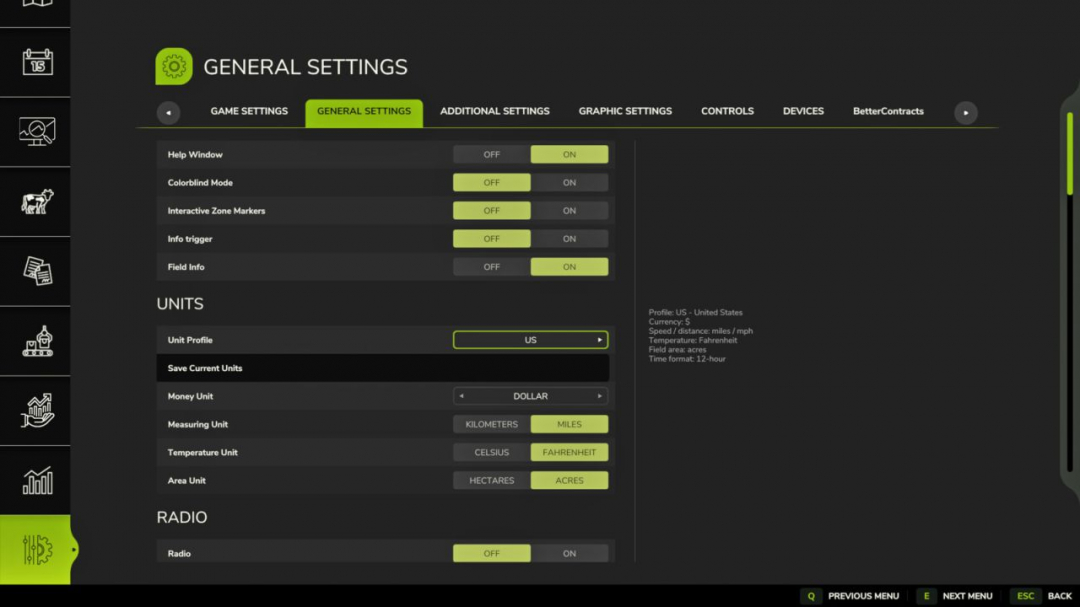
Save Unit Profiles allows each savegame to have its own currency and unit settings. The mod introduces a native Unit Profile selector in the Farming Simulator 25 Settings menu under: General Settings > Units. Selecting a profile instantly applies it to the current savegame and updates the in-game units when the Settings UI is closed. This eliminates the need for manual XML editing and makes switching between maps from different regions seamless. For example, a North American savegame can use dollars, miles, Fahrenheit, and acres, while a UK savegame can use pounds, miles, Celsius, and acres, and a European savegame can use euros, kilometers, Celsius, and hectares. Features: - Per-savegame currency and unit profiles. - Native Unit Profile selector in General Settings > Units. - Immediate application of profile changes to the current savegame. - Built-in regional profiles for various map locations and play styles. - Integrated currency support within Save Unit Profiles. - Save Current Units option to create custom profiles from current settings. - Compatibility with existing XML mappings for advanced manual configuration. Configuration: To use normally, open General Settings > Units and select your desired Unit Profile. The mod also stores its configuration in: modSettings/FS25_SaveUnitProfiles/saveUnitProfiles.xml. Advanced users can manually edit this file, but it's no longer necessary for standard profile setup. Hotkeys: No hotkeys are required. Console commands: - suStatus – Show current status and settings. - suReload – Reload the XML configuration. - suApply – Apply the profile to the current savegame. - suApply UK / suApply US / suApply EU – Manually apply specific profiles. - suProfile UK / suProfile US / suProfile EU / suProfile CA – Assign and apply profiles to the current savegame. - suSaveCurrent – Save current unit settings to the loaded savegame. - suDebug on / suDebug off – Enable or disable debug logging. Changelog: Version 1.2.0.2: - Added optional handling for external time-format settings. - Prevented unsupported use24HourTime calls when the provider isn't available. - Added localization keys for UI text. Version 1.2.0.1: - Improved live application of settings when changing profiles. - Correct application of profile changes after leaving Settings. - Reduced duplicate success notifications. - Error/warning notifications remain if profile application fails. Version 1.2.0.0: - Native Unit Profile selector added to General Settings > Units. - Automatic apply-on-selection behavior implemented. - Regional currency/profile support integrated within Save Unit Profiles. - Additional predefined regional profiles added. - Save Current Units option for custom profiles. - XML editing no longer required for normal profiles. - Support for existing XML mappings and console commands retained. Version 1.1.0.0: - Added SAVE UNITS button in in-game Settings. - Support for saving current units directly to the loaded savegame. - suSaveCurrent console command added. - Manual XML mappings and custom profiles still supported. Version 1.0.0.0: - Initial release. - Per-savegame unit and currency profiles introduced. - Default US, UK, and EU profiles included. - Console commands for status, reload, manual apply, and debug logging available.
AGRO-FINANCIAL CENTER V3.0
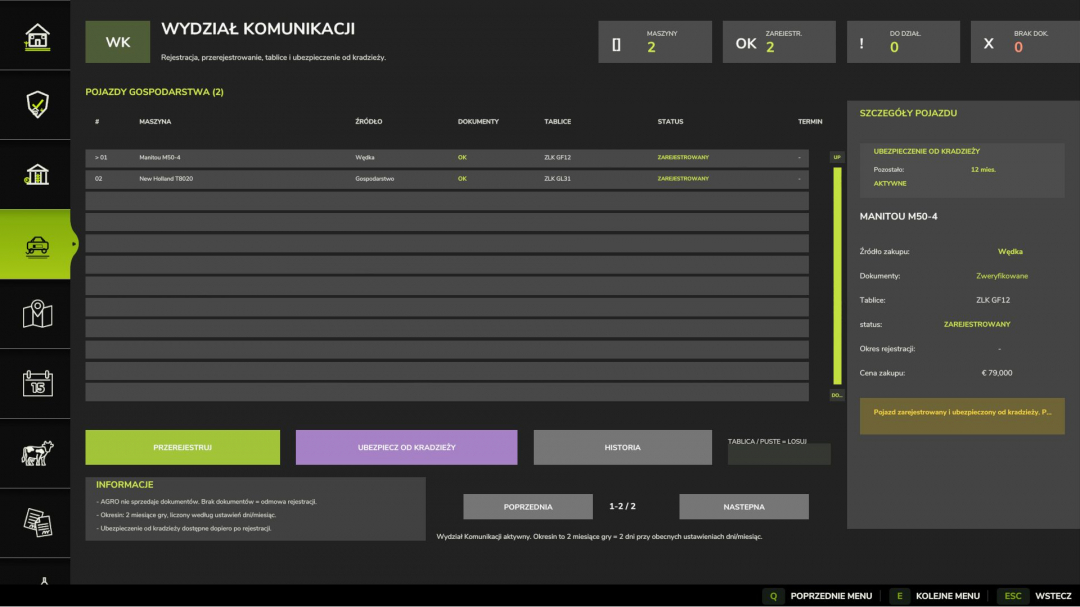
AGRO-CENTRUM FINANSOWE – UPDATE v3.0 AGRO-CENTRUM FINANSOWE is a comprehensive economic extension for Farming Simulator 25, introducing more realistic management of money, machinery, financing, and farm formalities. Version 3.0 focuses on refining the Communication Department, the machinery insurance system, operational stability, and preparing the mod for public release. This update provides a clearer and more realistic machinery operation system, including documents, registration, legal status, and theft insurance. Insurance is voluntary, lasts for a set period, and displays the remaining months of coverage. **Key changes in UPDATE v3.0:** - Added visible theft insurance information next to machinery. - Insurance status now shows: active or no policy. - A counter indicates the remaining months until insurance expiry. - Machinery insurance functions as a separate element within the Transport Department system. - Improved machinery information panel. - Removed unnecessary empty graphics from the insurance section. - Enhanced interface appearance and readability. - Fixed font warnings caused by characters and texts in the game log. - Improved icon and texture formats. - Reduced log warnings related to DDS textures. - Upgraded button GUI profiles. - Fixed double registration issues with console commands. - Increased loading stability of AGRO systems. - The mod’s name has been updated to: AGRO-CENTRUM FINANSOWE – UPDATE v3.0. - The package has been cleaned and prepared for release. **The mod offers features such as:** - Credit system - Leasing options - Purchase financing - Machinery purchase with additional formalities - Communication Department - Machinery documents and registration - Legal status management - Theft insurance - Policy duration information - Debt collection system - Bailiffs and auctions - A more realistic approach to farm finances Thanks to these features, AGRO-CENTRUM FINANSOWE enables more detailed farm management. Every financial decision becomes more significant, and machinery management now involves paperwork, registration, insurance, and cost control. Version 3.0 marks a step toward a more realistic and complete economic system for Farming Simulator 25. The mod will continue to be developed, with future updates planned to add new functions, corrections, and improvements to financial and administrative systems. If you encounter issues, errors, or have ideas for development, please leave a comment—every opinion helps improve the project. **V3.0.0.0** - Added machinery theft insurance system. - Displayed active insurance information on machinery. - Included a counter for remaining months of insurance. - Added insurance status indicator: active / no policy. - Integrated the insurance system with the Communication Department. - Improved machinery information panel. - Removed empty graphics from the insurance section. - Enhanced readability of the insurance interface. - Fixed unsupported or incorrect special characters in GUI. - Fixed font warnings in the game log. - Improved icon and texture formats. - Reduced texture warnings in logs. - Upgraded button GUI profiles. - Fixed double registration of console commands. - Improved stability of AGRO-CENTRUM FINANSOWE systems. - Updated mod version name to: AGRO-CENTRUM FINANSOWE – UPDATE v3.0. - Prepared the mod package for public release. - Enhanced document, registration, and insurance management systems. - Improved cooperation with the Fishing Machines mod. - Machines purchased via the Maszyny z W?dki system now better integrate with documents, registration, legal status, and insurance. - Together, AGRO-CENTRUM FINANSOWE and Maszyny z W?dki create a more realistic machinery market, including purchase, documentation, status, registration, insurance, and risks of used machines. This update mainly improves stability, cleans logs, refines communication, and develops the machine theft insurance system. The mod works very well with the Fishing Machines mod, creating a more extensive and realistic machinery market. Both mods complement each other perfectly, although they are not dependent on each other for operation.

Farm Tablet V2.4.1
FarmTablet is a compact, all-in-one farm management tablet designed for Farming Simulator 25. Originally inspired by a tablet mod for FS17, it was built from scratch for FS22 and has now been fully converted and rewritten for FS25. Its goal is simple: provide useful farm information at a glance without interfering with gameplay. The mod has been rebuilt with a clean, modular structure—each app resides in its own file, making it easy to expand, fix, and improve over time. It is actively developed and shaped by community feedback. **Current features:** - Dashboard — farm overview including balance, fields, vehicles, and world status - Weather — current conditions, temperature, wind, cloud cover, and forecast - Fields — all owned fields with crop type and growth stage - Animals — pen status with food, water, and cleanliness levels - Workshop — nearby vehicle diagnostics including fuel, wear, and operating hours - Bucket Tracker — load counter for wheel loaders and excavators - Digging — excavation tracking and soil scanner - App Store — browse and manage installed apps - Settings — configure the tablet from the pause menu - Updates — changelog and version history **Mod integrations** (auto-detected at runtime, safe to run without them): - NPC Favor, Soil Fertilizer, Seasonal Crop Stress, Income Mod, Tax Mod **Upcoming features:** - Improved tablet visuals and frame design - Icons instead of text labels - Sounds, color tweaks, and UI polish - More apps and deeper interactions based on feedback - Multiplayer improvements The mod is actively developed. Bug reports, ideas, and suggestions are always welcome—this is a community project, and your feedback directly influences future development. **COPYRIGHT NOTICE:** All rights reserved. Unauthorized redistribution, copying, or claiming this mod as your own is strictly prohibited. Original author: TisonK **V2.4.1.0** A two-part update focused on integration. **[FieldSentry app]** A new app that displays Soil & Fertilizer’s FieldSentry directly on the tablet. It shows whether the soil simulation is active, asleep (your choice), under an NPC contract, or decorative for each owned field. It allows toggling a field to Sleep or marking it as Meadow without console commands. In multiplayer, it’s admin-gated and validated by the host; non-admins have read-only access. It appears automatically when a compatible Soil & Fertilizer build is installed. **[Tablet Focus State API]** The tablet now publishes its on-screen state via g_currentMission.farmTablet, indicating whether it is visible and which app is active. Other mods can subscribe to this event. For example, Worker Costs uses it to hide its Pro-Staff panel when the tablet is open, preventing overlay conflicts. This is the native FS25 way to handle what was previously a browser-tab concept. Pair this with the matching Soil & Fertilizer and Worker Costs updates. Remember to back up your save and report any issues on the tracker. **Required mods:** - Income Mod - Tax Mod - NPC Favor - Realistic Soil & Fertilizer - Seasonal Crop Stress - Market Dynamics - Realistic Worker Costs - Random World Events

Realistic Worker Costs V2.2
Realistic Worker Costs Mod for Farming Simulator 25 Adds realistic ongoing wage costs for hired workers, making farm management more challenging and strategic.MAIN FEATURES: – Configurable wage system: Choose hourly or per-hectare payment – Three wage levels: Low ($15/h), Medium ($25/h), High ($40/h) – Skill-based pricing: Workers with higher skills earn higher wages – Full in-game settings integration – Console commands for complete control – Multiplayer compatible – 10 language support – Save game compatibleHOW IT WORKS:Workers now cost money while they’re active! The mod automatically calculates and deducts wages based on:1. Time worked (hourly mode) OR hectares worked (per hectare mode)2. Worker skill level (80%-120% multiplier)3. Your chosen wage level or custom rateSETTINGS OPTIONS:– Enable/Disable: Toggle the mod on/off– Cost Mode: Hourly or Per Hectare– Wage Level: Low, Medium, or High base rates– Custom Rate: Set your own wage rate– Notifications: Toggle payment alerts– Debug Mode: Extra loggingCONSOLE COMMANDS:Type ‘workerCosts’ in console for full list, including:– WorkerCostsEnable/Disable– WorkerCostsSetWageLevel 1|2|3– WorkerCostsSetCostMode 1|2– WorkerCostsSetCustomRate – WorkerCostsTestPayment– WorkerCostsShowSettings– WorkerCostsResetSettingsINSTALLATION:1. Extract to your FS25 mods folder2. Enable in mod menu3. Configure settings in-game or via consoleCOMPATIBILITY:– Works with FS25 (all versions)– Multiplayer supported– Compatible with most other mods– Safe to add/remove from existing savesThis mod adds a new layer of financial management to your farming operation. Now you need to consider not just equipment costs, but also labor expenses when planning your farm’s profitability. Makes the game more realistic and challenging!Perfect for players who want more economic depth and realism in their farming experience.Note: All rights reserved. Do not redistribute or claim as your own work.V2.2.0.0BIG UPDATEPLEASE READ THE CHANGELOG ENTIRELYThe Pro-Staff update is here!! Your helpers are now a real team you build up over time instead of a pile of interchangeable workers. Back up your save first, just to be safe.[ Hiring Hall ]– Daily hiring limit of 5 a day, resets each morning and sticks across save/reload. The panel shows how many you have used.– Trusted employees pin to the top with a star. Saves, and shows for everyone in multiplayer.– Earn your Masters through experience on the job. They are no longer offered for hire; Experienced workers start appearing once your crew has put in hours.– Timed rotation – the hall now refreshes once per day instead of refilling on demand, and the pool survives a save/reload so it is not a free re-roll.[ Worker Dossier ]The Pro-Staff panel (ALT H) is now a master-detail dossier: click a worker for their skill and fatigue gauges, lifetime hours and jobs, a recent job history, and their base to effective wage. Hire, fire with severance, assign to a vehicle, and mark trusted, all from one place.[ Under the hood ]– Multiplayer – roster, lifecycle and job history sync to clients from the host.– Job continuity – a worker re-binds to their vehicle when a job resumes after a reload, instead of a duplicate being hired.– Farm Tablet – the panel steps aside when the tablet is open, so two overlays never fight.– UI fixes – dashboard wording matches the wage tab (Payment Strategy / Compensation Tier), the duplicate Effective Rate header is gone, and the tier unit now follows the chosen strategy[ Notes ]Old saves load fine. Console: type workerCosts. Open the panel with ALT H. Big thanks to Arissani for the ideas behind this one. Shout if anything looks off.

Farm Tablet V2.5
FarmTablet — A compact, all-in-one farm management tablet for Farming Simulator 25. Originally inspired by a tablet mod for FS17, built from scratch for FS22 and now fully converted and rewritten for FS25. The goal is simple: useful farm info at a glance, without getting in the way of gameplay. The mod has been rebuilt with a clean, modular structure — every app lives in its own file, making it easy to expand, fix and improve over time. It’s actively developed and shaped by community feedback. **What’s in it right now:** - Dashboard — farm overview with balance, fields, vehicles and world state - Weather — current conditions, temperature, wind, cloud cover and forecast - Fields — all owned fields with crop type and growth stage - Animals — pen status with food, water and cleanliness levels - Workshop — nearby vehicle diagnostics with fuel, wear and operating hours - Bucket Tracker — load counter for wheel loaders and excavators - Digging — excavation tracking and soil scanner - App Store — browse and manage installed apps - Settings — configure the tablet from the pause menu - Updates — changelog and version history Mod integrations (auto-detected at runtime, safe to run without them): - NPC Favor, Soil Fertilizer, Seasonal Crop Stress, Income Mod, Tax Mod **What’s coming next:** - Better tablet visuals and frame design - Icons instead of text labels - Sounds, color tweaks and UI polish - More apps and deeper interactions based on feedback - Multiplayer improvements The mod is in active development. Bug reports, ideas and suggestions are always welcome — this is a community project and your feedback directly shapes what gets built next. **V2.5.0.0** BIG UPDATE!! The Farm Tablet is now a real tablet. **New:** - Lock screen with slide to unlock, opening to a home springboard (a paged grid of app icons plus a dock) - Real glossy icons for every app and integration - Tap an app to launch it full screen with a zoom animation; every icon presses in when touched - Status bar with a live clock, battery and signal; tap the power icon to lock - Apps open full screen with a Home and Back bar - Rounded 3D tablet frame, screen gloss and a wallpaper - Custom home background: drop a PNG into the FTBackground folder in your savegame and pick it in Settings **Notes:** - Press T to open the tablet, then slide to unlock. **Required mods:** - Income Mod - Tax Mod - NPC Favor - Realistic Soil & Fertilizer - Seasonal Crop Stress - Market Dynamics - Realistic Worker Costs - Random World Events
- 15 per page
- 30 per page
- 45 per page
- 60 per page
-
See more per page
Bigger pages, fewer clicks - and no ads anywhere.
Go Pro