Farming Simulator 25 mods
76,924 results- 15 per page
- 30 per page
- 45 per page
- 60 per page
-
See more per page
Bigger pages, fewer clicks - and no ads anywhere.
Go Pro

FS25 Global Wheel Destruction beta
FS25 Global Wheel Destruction beta Destroys foliage everywhere. On neighbour fields and also outside of fields. — IMPORTANT: as this enables foilage destruction on neighbours fields, it can impact harvest missions. If the foliage that gets harvested has a tireTrack state the game might not recognize thus state as “harvested” which leads to you not being able to finish said mission. –> You have to edit the foliage.xml! There is a trick which makes the game recognize tireTracks as “harvested” as well. You have to add “transition” lines in the fruit.xml. Specifically one that goes the likes of ” Here, for instance, my modified barley fruitType-block:

FS25 Push Bales
FS25 Push Bales With this mod, you can easily roll your bale slightly to the left or right and (after assigning a key) tip it over. Do you sometimes have the problem that you only want to roll your bale a small distance? Then this mod is exactly what you need. It allows you to move your bale left or right—or forward and backward—depending on the direction, with a mouse click. And here’s how it works: -Look at the bale -In the context menu, two new options should appear: “Move Bale (1)” & “Move Bale (2)” (default keys: left mouse button & right mouse button) -By pressing the respective button, the bale will—hopefully—move -By assigning a key, you can also tip it over Multiplayer is NOT supported yet!! But it will be added in the first update.

FS25 Savegame Mover v1.1.0.0
FS25 Savegame Mover v1.1.0.0 What it does FS25 has no built-in way to move a farm between maps. This tool reads your existing savegame, lets you point at a fresh save on the new map, and rewrites the new save with your farm — placed exactly where you click on the PDA-style overview. This is not Dummy proof, some common sense is needed. This is a EXE file, on first launch you will get a windows prompt from windows defender, as this is read and writing to folders, Click on More Info and run anyway Migrates: All vehicles & equipment owned by your farm (farmId=1) Snapped to the ground via the target map’s heightmap Rotated to face one direction (N / E / S / W) Arranged in a configurable grid (default 10m × 10m) Attached implements automatically detached so each unit lands individually Bales, pallets and other items sitting in the world (items.xml) Bales & pallets in auto-storage sheds () Animal herds (cows, sheep, pigs, chickens, horses, etc.) merged into target pens you pick Pen-internal storage — food (hay/grass/silage/TMR/grain/forage), bedding (straw), water, and produced outputs (slurry / manure / milk) Loose grain / diesel / fertiliser / seeds / lime stored in silos — both and shapes Farm money and loans Same-map version upgrade mode When the source and target savegames reference the same mapId (e.g. you were running v1.0 of a map mod, the author released v1.1 with savegame-breaking changes, and you’ve started a fresh save on v1.1), the wizard detects this and flips its defaults to preserve everything the new map version can still handle: An orange “Same-map version upgrade detected” banner appears on the Target page. Vehicle positions are preserved — every vehicle, hitched implement, and multi-component rig keeps its exact source coordinates. The drop-zone / heading / spacing controls on the Assign page are hidden. Player-placed placeables are copied wholesale — your built silos, sheds, pens, and the animals / grain / bales / pallets inside them are deep-copied into the target save. No re-purchasing on the new map version. Silo / pen / storage dropdowns auto-pre-select the matching uniqueId on the target (when present), since same-map preplaced placeables retain their IDs across versions. Map-bound mod files default ON on the Mod files page (Courseplay courses, AutoDrive routes, precisionFarming nutrient maps, mapObjectsHider state, etc.) since the underlying terrain hasn’t changed. Doesn’t migrate: Bunker silo silage — the visible mound is runtime physics state that XML can’t recreate. Optionally cashed out: a toggle on the Assign page averages the source save’s silage prices from economy.xml and adds the proceeds to the target farm’s money instead of losing it. Placeables you’ve bought (sheds, silos, animal pens) — re-purchase on the new map. You can then migrate animals / grain / bales INTO them via the wizard. Quick start Grab the latest FS25SavegameMover.exe from Releases on my Github. No Python install required. Start a fresh save on your target map in FS25 first. We use it to discover where the silos, animal pens and other points-of-interest sit on the new map. Double-click FS25SavegameMover.exe. The wizard opens maximised (10–15 s on first launch — PyInstaller unpacking). Walk through the 6 wizard pages (see below). Migrate. The tool writes a new savegame folder — your originals are never touched. Copy the new folder into an empty savegameN slot under Documents\My Games\FarmingSimulator2025\ to load it in-game. Please Read the GitHub full before use. if you have Issues please log on GitHub or on my Discord i will not see them here. Discord https://discord.gg/xJ6Z4MsM4B Github https://github.com/ConGan98/fs25-savegame-mover V1.1.0.0 What’s new Career statistics migration Source’s block (workedHectares, playTime, traveledDistance, fuelUsage, baleCount, missionCount, revenue, expenses, …) is now copied into the target’s farms.xml. Per-save animal-id counters (cowId, pigId, etc.) are deliberately left alone. Toggle on the Assign page; defaults on. Mod-specific savegame file migration New Mod files wizard page (between Review and Run) auto-detects mod-specific XMLs in the source save and offers a per-file checklist: Safe mod data (pre-checked): RedTape.xml, rm_RlAnimalSystem.xml (Realistic Livestock genetics), rm_RlSettings.xml, FS25_UnloadBalesEarly.xml, easyDevControls.xml. Map-bound (unchecked by default on cross-map): Courseplay.xml, AutoDrive*, precisionFarming.xml, mapObjectsHider.xml, treePlant.xml, treeMarker.xml, cropRotationPlanner.xml, npc.xml. Binary terrain caches (.grle / .gdm / densityMap_*) never offered — would break on a new map. Same-map version upgrade mode When source and target reference the same mapId (e.g. you’ve upgraded a map mod to a new version), the wizard flips defaults to preserve everything: Orange “Same-map version upgrade detected” banner on the Target page. Vehicle positions preserved exactly, hitched implements stay hitched. Player-placed placeables (your built silos, sheds, pens) copied wholesale with all their content. Silo / pen / storage dropdowns auto-pre-select matching uniqueIds. Map-bound mod files (Courseplay, AutoDrive, precisionFarming, …) default ON. Mod dependency list auto-merge Source’s entries in careerSavegame.xml are merged into the new save (deduped by modName) so FS25 prompts the user to activate missing mods on first load — instead of silently dropping any objects that depend on them. Minor fixes Silo dropdown now picks up combined husbandry+silo placeables (animal pens with built-in grain storage). Husbandry food / meadow / production-factor migration handles all three FS25 storage element shapes. Identity-mapping skip in silo / animal / object-storage merges prevents content doubling when same-map mode copies placeables wholesale.
FS25 Object Storage Extension v1.0.2.0
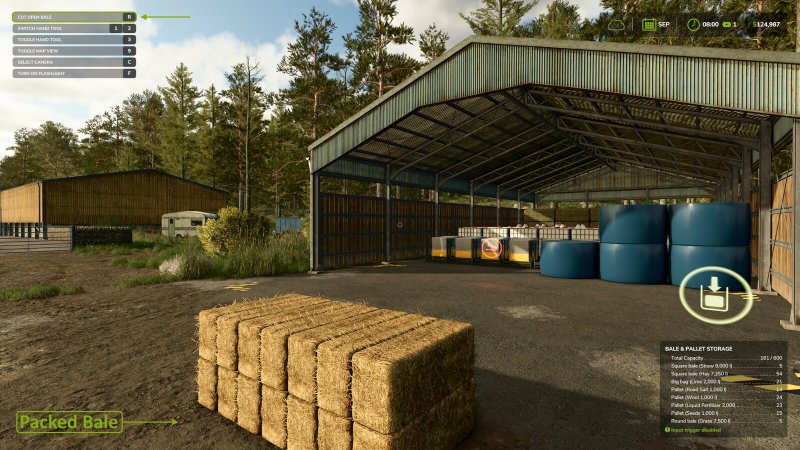
FS25 Object Storage Extension v1.0.2.0 An extension for the base game ‘Object Storage’ system that brings back some of the features found in the original ‘Object Storage’ mod (FS17 – FS22). Along with improving some existing features it is also now possible for users to adjust building configurations so you can play your way. # Global Menu: A new tab is now included as part of the In-Game Menu allowing easy viewing and spawning of all stored objects. It is possible to adjust some menu options from the ‘General Settings’ screen. # Configuration – Input Trigger: It is now possible to disable each buildings input trigger, helping you avoid unwanted delivery of objects. # Configuration – Capacity: Do you have a building that stores too many objects for your realistic gameplay or would you love just a little more space? Now you can easily adjust the capacity of your storage buildings to a number you are happy with. # Configuration – Object Types: Wishing you could limit a building to bales or pallets only? This is no longer a problem, simply select the object type you wish to store. # Improvement – Packed Bales: Object storage buildings now fully support packed bales, allowing them to be cut open once removed from storage. # Improvement – Fermenting Bales: Fermenting bales are now correctly grouped in the menu, dialog and info pop-up once fermenting is complete without requiring a game restart. # Improvement – Multiplayer Bale Colours: Bale colours are now synced in multiplayer games instead of the default white. To reduce unnecessary network bandwidth bales of the same fill type and size will use the colour of the first bale added to storage similar to a single-player game. # NOTE: There are more updates planned to include extra modding options, these will be released as they are completed. Changelog 1.0.2.0: – Added fix for base game bug affecting mods that add a new page to the “In Game Menu”, preventing the tab list from rebuilding correctly when joining or leaving a farm in multiplayer. – Fixed incorrect texts being displayed or overlaid if no storage was available as part of a filter. Changelog 1.0.1.0: – Fixed input trigger not working on selected mods where the input triggers scale is not set to (1 1 1). – Fixed random issue where the menu would not open to the ‘Object Storage’ page when using a buildings trigger, if used directly after entering the game.

FS25 Player Workers v1.0.0.1
FS25 Player Workers v1.0.0.1 Description: Player Workers makes hired workers use the same visible character style as the local player when a base game helper, AutoDrive driver, or Courseplay driver takes control of a vehicle. This is intended as a visual authenticity tool for videos, screenshots, roleplay scenes, and farm story content. Workers appear with the player’s selected character style, which keeps recorded farm scenes more consistent. The mod does not add custom clothing, replace base game character files, alter wages, change routes, change vehicle functions, or adjust gameplay balance. AutoDrive and Courseplay support is handled automatically when those mods are installed. Hotkeys: None required. Changelog: 1.0.0.1: – Fixed AutoDrive driver detection and style application after AutoDrive takes control of a vehicle. – Fixed Courseplay driver detection and style application after Courseplay starts a worker. – Improved compatibility checks for automation mods that do not always create a standard helper first.

FS25 Adjustable Fill Level
FS25 Adjustable Fill Level Adds a store configuration option that allows fillable vehicles and tools to be purchased with adjusted fill capacity. This mod multiplies the base capacity value by the following values: 0.5, 0.75, 1, 1.5, 2, 3, 5, and 10. No keybinds. No HUD clutter. Capacity is selected in the shop.

FS25 AGROWICHER – Realistic ReShade Preset for FS25
FS25 AGROWICHER – Realistic ReShade Preset for FS25 Paste the Agrowicher preset into the Farming Simulator 25 game folder, _ x64 _ Install ReShade. There are tutorials on YouTube. Select the Agrowicher preset according to the tutorial. P.S. Jankus has it on his channel. game.xml is my graphic settings for brightness and sharpness. You can copy it, but you don’t have to. Paste it into my documents, my game, farming simulator 25, and replace the files (make a backup if my settings are too strong for your computer). Download the lighting from black because that’s what I play on, and the preset was made on that lighting. Paste it into farming simulator 25, data, maps, whichever folder you go to. GO TO mapAS, mapUE, mapUS. REPLACE THE FILES!! NOTE: For the lighting to work properly, only the pre-installed ones must be present. The rest must remain original (e.g., if you installed it to mapAS, it must be original in the US/EU). If you’re already playing on a pre-installed lighting system, it’s best to uninstall and reinstall the game. My game will remain intact. I’m writing this because I’ve discovered that having two or three pre-installed lighting systems conflicts with the game. When you look up (the sky), it’s extremely bright, and when you look down (the ground), it’s extremely dark, making it impossible to play properly. Happy gaming! YouTube – AGROWICHER

FS25 Tire Pneumatics System v1.3.0.0
FS25 Tire Pneumatics System v1.3.0.0 Tire Pneumatics System General description Realistic simulation mod for agricultural tires. This mod brings an additional dimension of realism to your operation by simulating progressive wear, punctures and daily tire management. Detailed features 3D progressive wear The rubber on your tires visually wears out over the kilometers traveled. Grip gradually decreases on loose terrain when tires are worn, affecting driving on fields and meadows. Realistic punctures A tire that punctures gradually deflates with a 3D visual sag. The vehicle leans towards the side of the flat tire. The speed is automatically limited to 10 km/h. An alert message indicates the exact position of the flat tire (Front Left, Rear Right, etc.). Compatible with all vehicles Tractors, harvesters, telescopics, but also tippers, trailers, plows, spreaders and all attached tools. Tools can puncture without wear conditions — a penetrating object does not wait until the tire is worn! Frequency depending on load The more loaded your trailer or tipper is, the greater the risk of a puncture. At full load, the risk is multiplied by 2.5. Empty, the risk is normal. Repair dialog When a tire is flat, a dialog offers 3 options: Install an inner tube (35% of the price of a new tire, but the tire is slightly weakened) Replace the entire tire (price depending on tire size) Leave it flat for now (you can continue driving at 10 km/h) Wear preservation Wear is saved and preserved even after reconfiguration in the workshop (changing tires, adding twinning, rotating lights, etc.). Your tires at 40% wear remain at 40% after your visit to the workshop. In-game information The state of wear and active punctures are displayed in the game’s native information box (bottom right of the screen). Settings in Esc → Game Settings (Tyres section at the bottom) Wear Rate: Low / Normal / High Frequency of vehicle punctures: Rare / Normal / Frequent Frequency of tool and trailer punctures: Rare / Normal / Frequent Important notes compatible with all vanilla FS25 vehicles Flat tires are not triggered when an AI worker is driving the vehicle Not multiplayer compatible Credits 3D wear shader: UseYourTyres by 50keda Architecture inspiration: FS25_Puncture by Sablerock FS25 version 1.19.0.0 and higher. Now multiplayer compatible. Assets shader: UseYourTyres by 50keda. Architecture inspired by FS25_Puncture by Sablerock.” V1.3.0.0 Wear retained between sessions Wear retained after modification in the workshop Full English translation Multiplayer support V1.2.0.0 Tire wear is now preserved after reconfiguration in the workshop (changing tires, rotating lights, pairing, etc.)

FS25 Animal Waste Control
FS25 Animal Waste Control Animal Waste Control allows you to modify the amount of manure and slurry produced by your animals. The mod adds a configurable multiplier directly in the game’s general settings, allowing you to easily adjust production to match your gameplay style. For example, if your animals normally produce 200 liters of manure per hour and the multiplier is set to 2, production will increase to 400 liters per hour. By default, the production multiplier is set to 2. Important: – Animals must have access to straw in order to produce manure. – Slurry does not require straw to be produced. This mod is fully compatible with multiplayer and dedicated servers.
FS25 Silage Fermenting Settings
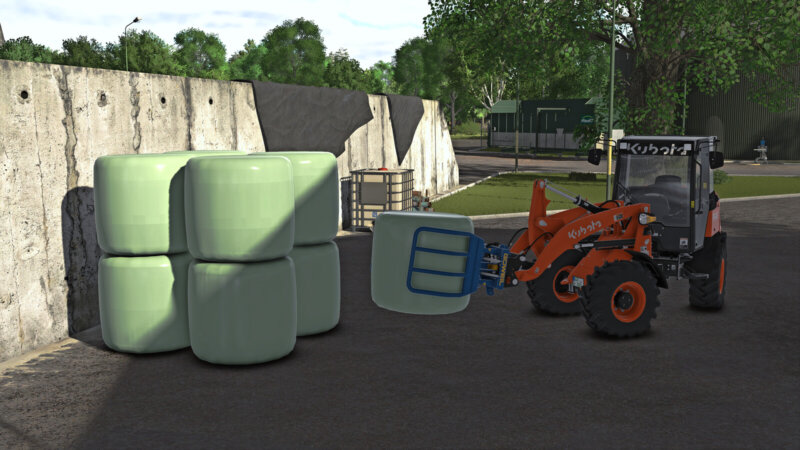
FS25 Silage Fermenting Settings With the Silage Fermenting Settings mod, you can adjust the fermentation time for silage bales and mobile silos directly in-game. This mod was created because, in FS25, silage bales and mobile silos can take significantly different amounts of time to ferment depending on the game settings. By default, bales are heavily influenced by the economic difficulty setting, while mobile silos are tied to the number of days per month set in the game. This mod allows both systems to be brought onto a consistent, shared monthly basis. The fermentation duration is specified in in-game months and automatically adjusts to the set number of days per month. Bales and mobile silos can be set independently of each other. Available values: 0.25 / 0.50 / 0.75 / 1.00 / 1.25 / 1.50 / 1.75 / 2.00 months For silage bales, the economic difficulty is ignored so that the set fermentation duration remains identical across Easy, Normal, and Hard difficulty levels. Bales already in fermentation retain their current progress percentage when the setting is changed. Mobile silos that have already been closed also retain their current fermentation progress and continue running with the newly set duration. The settings are saved per game save and restored when loading. In multiplayer, the settings can only be changed by the admin. Translated with DeepL.com (free version)

FS25 Sprayers Apply Lime
FS25 Sprayers Apply Lime Sprayers Apply Lime is a lightweight mod that adds LIME as a valid fill type to all standard and modded liquid sprayers. Features: – Universal Compatibility: Works seamlessly with base game sprayers and the vast majority of ModHub sprayers. – Clean & Efficient: Contains no extra 3D models or textures, running entirely in the background. Make lime application universal without ever having to edit individual vehicle XML files!

FS25 Farmer Working Assistant
FS25 Farmer Working Assistant No more empty roads – it’s time to bring your world to life! Why should you be the only one working? With this mod, your neighbors are busy too! AI farmers spawn at the shop, drive independently to their fields, and carry out their work – from sowing to harvesting. Afterwards, they head back, just like in real farming life. Suddenly, there’s action everywhere: tractors on the roads, work on the fields, and a world that finally feels alive. You’re no longer alone – the competition never sleeps! Features: – Active AI farmers with their own vehicles – Trips from the shop to fields and back – Visible field work – More traffic & a livelier map – Noticeably more realistic gameplay – A helper spawns every 5 to 30 real(!) minutes. – If a helper remains motionless for an extended period, they will be removed. – To spawn vehicles, the shop must still have sufficient free slots. All active helpers can be removed with “Shift” + “Alt” + “L”. PS: It is recommended to disable traffic, but it’s not required!

FS25 F1 Filter Menu
FS25 F1 Filter Menu Tired of hotkey clutter? F1 Filter Menu allows you to dynamically hide unwanted mod hotkeys from the F1 help menu.
FS25 Attach Implements Manually v1.0.0.4
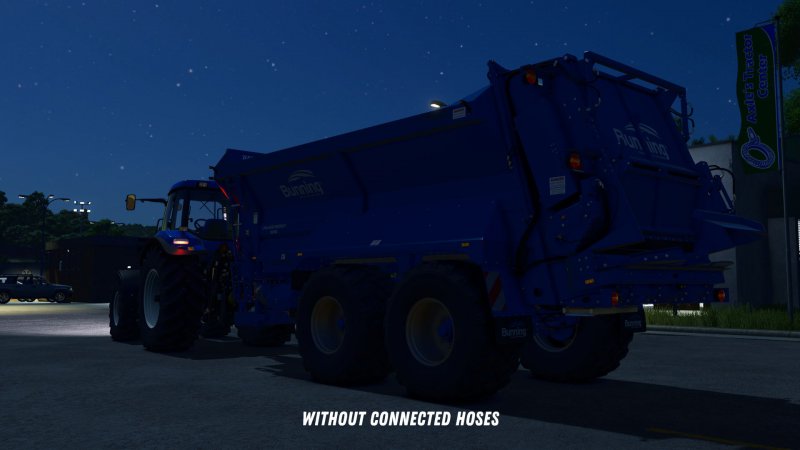
FS25 Attach Implements Manually v1.0.0.4 This mod allows you to manually attach implements to your tractor. In the general settings, you can choose whether attachments should be connected automatically or manually. If you opt for manual attachment, a message will appear when approaching an implement: “Exit vehicle to attach.” Once you’ve exited the vehicle and walked to the hitch, you can attach the implement by pressing Q. After that, you can manually connect the hydraulic hoses, air lines, and electric cables by pressing Y. The PTO shaft can be connected separately using the Z key. An exception applies to trailers and implements with a drawbar hitch and Semitrailer attacher: These will automatically attach as soon as you align the drawbar precisely with the implement’s hitch. Additionally, when purchasing front loaders, you can choose between different coupler types: – Manual: The front loader implement must be attached manually, as well as the hydraulic hoses. – Auto Locking: The front loader will automatically lock when approaching (if enabled in settings) or by pressing Q from the cab, but the hydraulic hoses must be connected manually. – Quick Coupler: The front loader will automatically lock when approaching (if enabled in settings) or by pressing Q from the cab, and the hydraulic hoses are also connected automatically. If manual attachment is enabled in the settings, you’ll need to manually connect the hoses after the implement is hitched. If it is disabled, all connections will be made automatically once the implement is attached. All key bindings can be customized freely in the settings. The default key for the “Attach” action uses the standard game assignment. The SDK folder within the mod contains a guide on how to adapt mod vehicles for the mod. This is not strictly necessary but offers extended functions for coupling configurations and trigger adjustments. Changelog 1.0.0.1: – Fixed issues with hook lift vehicles and BigBags. Changelog 1.0.0.2: – Fixed issues with skid steer loaders. – Fixed issues caused if vehicle height, length or width is not set. – Added distinction between different hose types. Hydraulic, air, and electric connections are now handled separately. – Forage harvester headers can now be attached from the forage harvester like with combine harvesters. – For modders: The possible coupler types for front loaders can be configured in the respective XML of the vehicle. Additionally, a default coupler type can be set and the selection of other coupler types in the shop can be disabled. Changelog 1.0.0.3: – Added setting and corresponding function for automatic attachment of front loaders. When enabled, front loaders will automatically attach as soon as the front loader is close enough to the front loader console of the vehicle. – Fixed ineffective setting for automatic attachment of front loader implements. – Improved overall performance impact of the mod. – For modders: In the modDesc.xml, it is now possible to specify the path to a configuration file. In this file, AttacherJoints can be marked as front loader AttacherJoints, so that corresponding configs and functions for these AttacherJoints can be used. Documentation of the functions can be found in the sdk folder. Changelog 1.0.0.4: – Fixes for patch 1.19

FS25 Icon Tooltips With Name/Description
FS25 Icon Tooltips With Name/Description Are you tired of hovering over mysterious little icons in the shop menu, desperately wondering whether that icon means “wheat” or “potatos”? Those dark days are OVER! Introducing Icon Tooltips — the mod that finally tells you what you’re looking at! Simply move your mouse over any attribute icon and — like magic — a sleek tooltip appears with the EXACT name of the attribute. No more guessing. No more squinting. No more accidentally leasing a tractor you thought was a bargain because you misread the power icon. Works everywhere that matters: – Shop & configurator – Construction & placeable edit screen – In-game statistics vehicle list – Calendar weather forecast Covers everything: engine power, working width, capacity, fill types, tires, fuel, electric battery, transmission, bale sizes, seeds, slots, winch specs, animal groups, vehicle condition, weather icons and more. Download now — your farming career will never be the same! (Results may vary. Does not actually make tractors cheaper.)
- 15 per page
- 30 per page
- 45 per page
- 60 per page
-
See more per page
Bigger pages, fewer clicks - and no ads anywhere.
Go Pro