Farming Simulator 22 mods
50,369 results- 15 per page
- 30 per page
- 45 per page
- 60 per page
-
See more per page
Bigger pages, fewer clicks - and no ads anywhere.
Go Pro


Ford 3000/3600 V1.0
-47HP/52HP -Tire Options -Fender Options -Canopy/Cab/No Cab Options -Exhaust Options -Toolbox Options -Weight Options Credits: SemyH 5/5 - (3 votes) Download mod File File size FS22_Ford_3000 16 MB
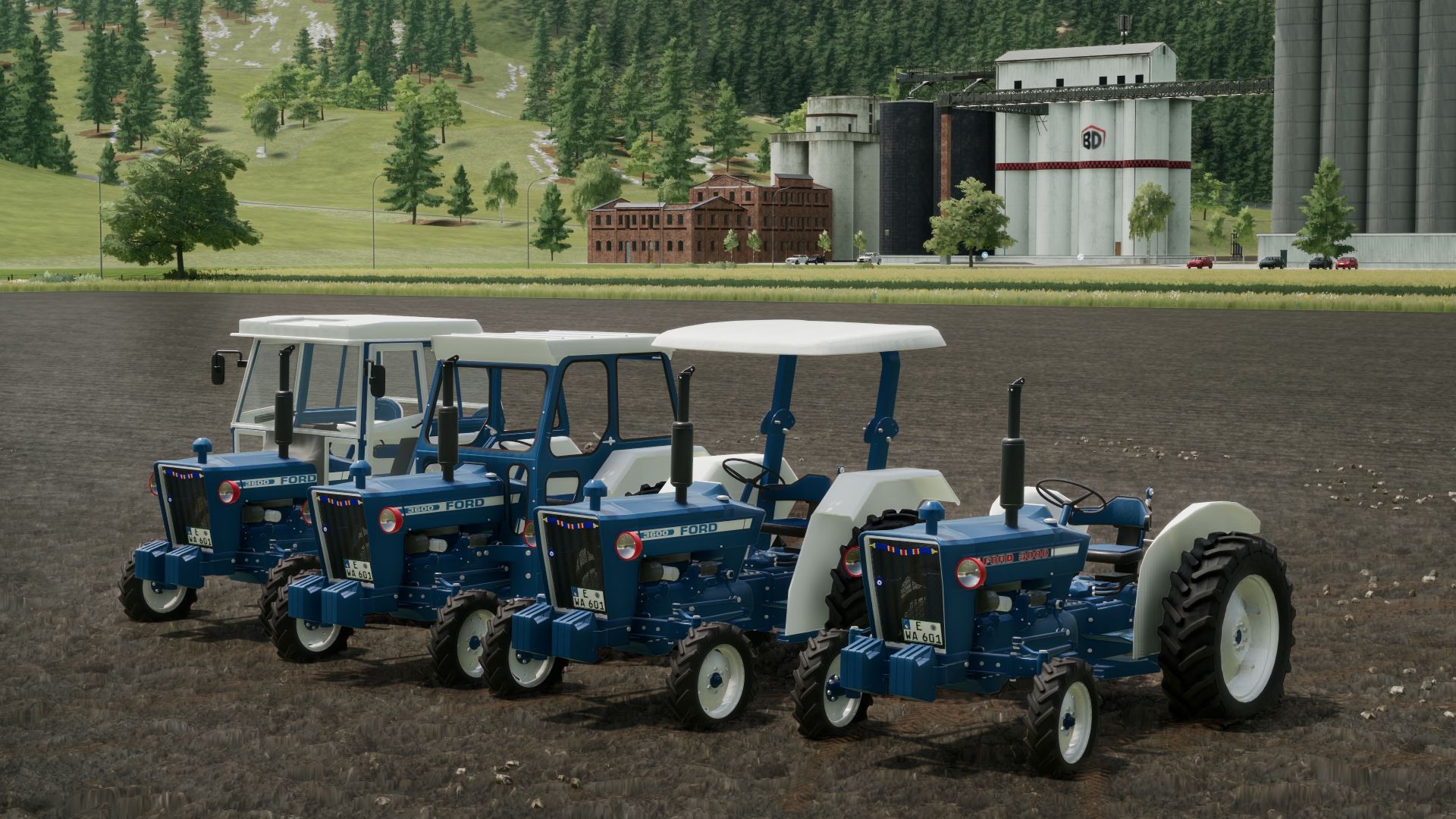
Ford 3000/3600 FS22
-Ford 3000/3600 -47HP/52HP -Tire Options -Fender Options -Canopy/Cab/No Cab Options -Exhaust Options -Toolbox Options -Weight Options The 55RagnarMod Team Wishes You Happy Gaming

FS25 Livestock Flies
FS25 Livestock Flies Bring a little more life to your livestock areas with Livestock Flies. Small clouds of flies randomly appear around some animals and follow them as they move, accompanied by subtle 3D buzzing. Not every animal is affected, keeping the effect natural and varied. Flies can appear around cows, pigs, sheep, goats and other compatible livestock, while chickens are excluded. The effect is purely visual and audio-based and has no impact on animal health, productivity or welfare. Features: – Animated fly clouds around livestock – Randomly affected animals – Flies follow moving animals – Subtle 3D buzzing – Smooth distance-based fade in and out – Compatible with standard husbandries and many modded barns – No gameplay impact Scripted mod: PC/Mac only.

FS25 Store Deliveries v1.0.7.0
FS25 Store Deliveries v1.0.7.0 Get the store to deliver your purchases for a fee. – Location is set based on the player’s position. – A delivery charge of 2.5% per item cost is applied to your purchases when using delivery. – All deliveries are confirmed by a special sound at the time of purchase. – Also acts as the reset location for vehicles in most cases. * – *if your delivery spot is full or blocked, the item will end up at the old store location, if it is a vehicle you can clear the delivery spot and reset the vehicle from the map. Controls: – Hold “Left Shift” + “Left Alt” to view the marker on the ground which represents the location. – Hold “Left Shift” + “Left Alt” and press “S” to set the location. (A sound will play and the marker will flash once.) – Hold “Left Shift” + “Left Alt” and press “X” to reset the location back to default (the store). ChangeLog v1.0.0.1 – Fixed Multiplayer Support. ChangeLog v1.0.1.0 – Added a check to make sure the intial loading of the mod isn’t bypassed due to other mods. ChangeLog v1.0.7.0 – The Set location is now the very left of the delivery area. Spot marker changed/updated to reflect the positioning. – Ability to click on the map Icon restored. – Controls input corrected to only when not in a vehicle. – Other bug fixes.

FS25 Manual Paint - Per-Material Vehicle Colours v1.0.0.1
FS25 Manual Paint - Per-Material Vehicle Colours v1.0.0.1 Paint EVERY paintable material on a vehicle – not just the handful of colour slots the vehicle maker exposed. Enable the “Manual Paint” option on the shop configuration screen (when buying or leasing) or in the workshop (for owned vehicles) to open the paint picker. Recolour a whole “colour in use” across every part that shares it in one click, or switch to the per-part view for full control. Choose any colour plus a glossy, metallic or matte finish. Materials that can’t sensibly be painted (glass, rubber, lights, chrome) are detected and hidden automatically. Applying paint costs a flat, adjustable fee – or turn charging off in the settings for free repaints. Your paintwork survives buying, saving, workshop changes and multiplayer. Changelog Version 1.0.0.1: – Fixed Lua errors in the log (“Unknown entity id … setMaterial”) after painting many parts and then changing or resetting the finish – Menu navigation: Gamepad/Keyboard improvements. Press RIGHT after activating the Manual Paint configuration to navigate into the Manual Paint panel and LEFT to go back to the configuration settings – Vehicles without any configuration options (for example the Claas Vario 620 header) now offer the Manual Paint option – The Manual Paint settings can now be reached with the keyboard and a gamepad – Clearer button labels in the shop: “Paint Colours” / “Back to Options” and “Advanced Colours” / “Colour Groups”
- 15 per page
- 30 per page
- 45 per page
- 60 per page
-
See more per page
Bigger pages, fewer clicks - and no ads anywhere.
Go Pro