Farming Simulator 22 mods
50,369 results- 15 per page
- 30 per page
- 45 per page
- 60 per page
-
See more per page
Bigger pages, fewer clicks - and no ads anywhere.
Go Pro
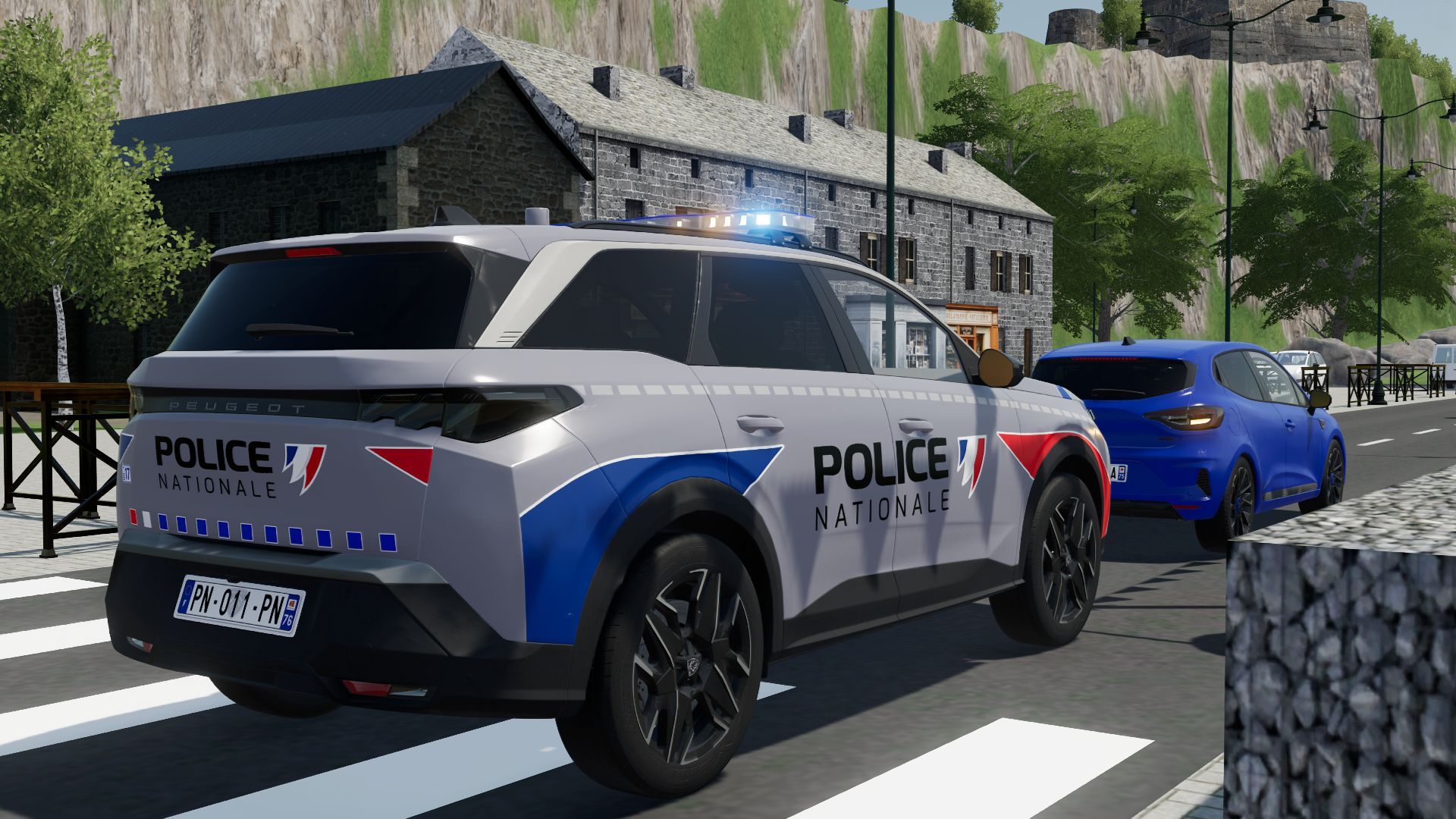
Peugeot 5008 2025 PN FS22
Peugeot 5008 2025 PN - No interior - License plate selection - Custom - UDIM - Simple IC (protect) Features: - Price: 43500 - Power: 180 3D PURCHASED BY: JESSY35 MODELER: Squir3d MODDER: MG COMMUNITY FS P.S.: No modifications or republishing; sale is authorized, under penalty of removal from the site. Have fun playing
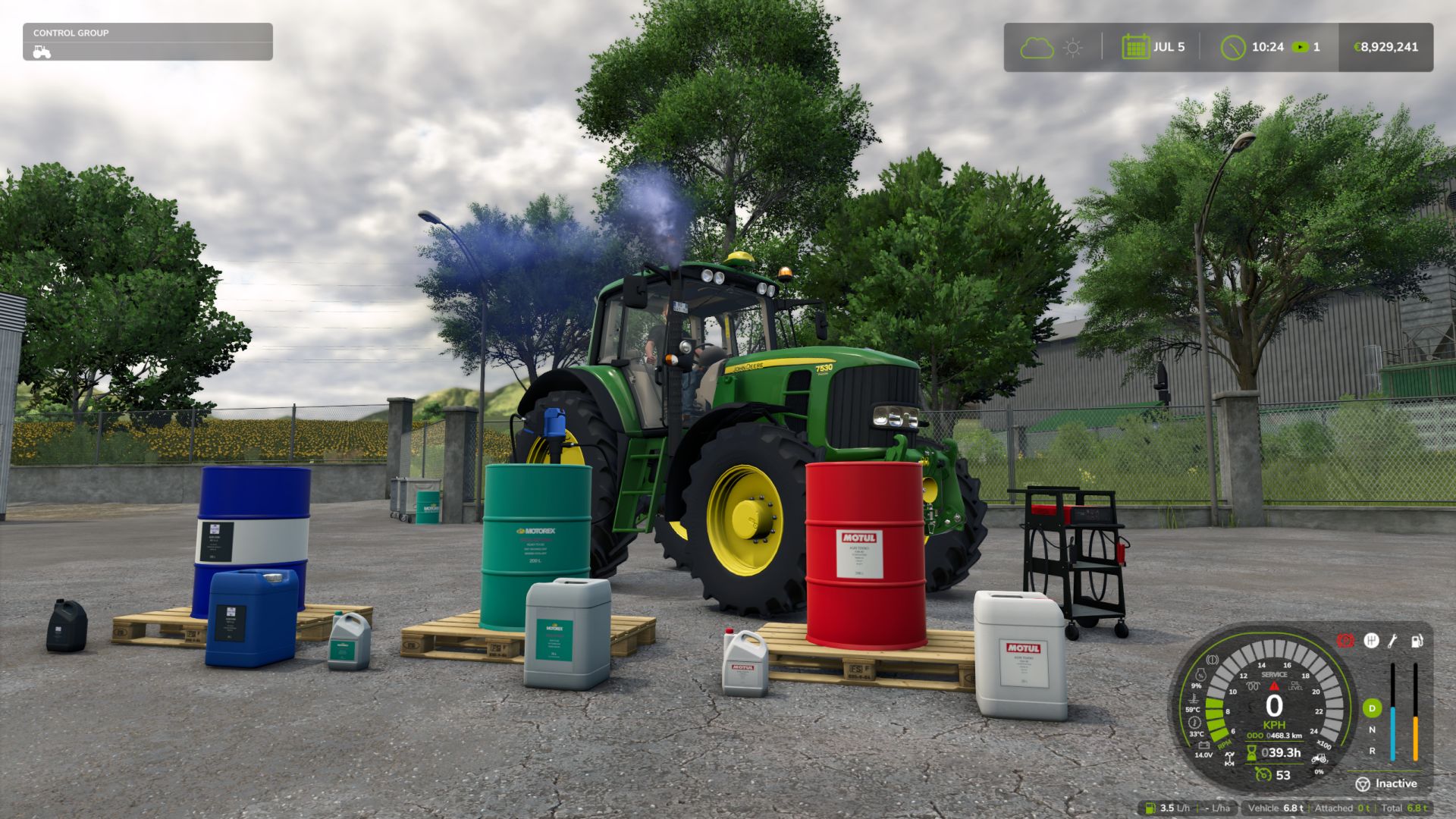
Realistic Mechanical Systems FS25
REALISTIC MECHANICAL SYSTEMS Your machines wear out. Their maintenance matters. RMS brings mechanical simulation to Farming Simulator 25. Your driving, the work performed and maintenance influence the reliability, performance and expenses of your fleet. A LIVING MECHANICAL SYSTEM • Progressive wear and breakdowns Up to eight distinct mechanical systems. Unusual noises, unstable engine speed, smoke and loss of power alert you to the condition of your machines. • Engine temperatures and behaviour Cold weather, workload, dirt buildup and mechanical condition influence warm-up, starting and exhaust smoke. • Tractor transmission 2WD, 4WD and AUTO modes, differential locks and parking brake. TAKE CARE OF YOUR EQUIPMENT • Maintenance on foot Check the levels, top up the fluids, clean with the air blow gun and use the grease gun. A heavily clogged filter must be replaced at the workshop. • Charging and jump-start assistance Use jumper cables or the Telwin Doctor Charge 155 Connect on its trolley. Recharge while you work elsewhere or choose START to assist with starting. Charging follows the game's time speed. • Fully equipped workshop Inspection, maintenance, repair, overhaul and repainting. Compare prices, durations and part quality before starting the work. EVERY MACHINE HAS ITS OWN STORY Check reports, maintenance deadlines and service history. Age, hours and mechanical condition influence vehicle value. A used machine may hide defects. Workers adapt their driving to overloading in order to protect the equipment, including when using Courseplay and AutoDrive. SINGLEPLAYER • MULTIPLAYER • DEDICATED SERVERS • 27 LANGUAGES Electric vehicles are not supported yet. DEVELOPMENT AND FEEDBACK RMS is still in the alpha phase. Your feedback helps improve its systems and their balance. Issues and suggestions: https://github.com/Squallqt/FS25_RealisticMechanicalSystems/issues Independent project derived from Advanced Damage System under the GNU GPLv3 licence. Credits retained in NOTICE.md. Do not use both mods simultaneously. Full changelog: https://github.com/Squallqt/FS25_RealisticMechanicalSystems/releases/tag/v0.12.0.0 Full changelog: https://github.com/Squallqt/FS25_RealisticMechanicalSystems/releases/tag/v0.11.0.0


FS25 Wardrobe Clothing Addon v1.4.0.0
FS25 Wardrobe Clothing Addon v1.4.0.0 What the mod adds: The core framework for character clothing mods. ATTENTION! If you cannot see the new characters and clothing items, click through the tabs and characters. The game may sometimes fail to load additional items immediately. If this happens, switch to the clothing tab, then go back to the face selection and choose a custom face. The new clothing items will appear. Alternatively, when loading the map, do not click Start immediately. Wait 30 seconds for the game to add the new items, then click Start. V1.4.0.0 various fixes for future mods. V1.3.5.0 – All clothing items have been removed from the add-on and placed in a separate pack. (It will be uploaded later) This was necessary so that people who did not want to see these clothing items would still be forced to see them. Now the mod is lighter, and everyone is free to choose a pack or clothing item from the mods they like. V1.3.4.0 – Fixed missing topLightSweater.i3d. (unnecessary registration) – Removed all unnecessary garbage from the mod that is not used by the mod. V1.3.0.0 – Added new items of clothing for Women, for March 8th! V1.2.0.0 New clothing items have been added for February 23rd. – ABIBAS tracksuit – Beret – Fixed missing fisherman’s face in characters V1.1.0.0 – Added new clothing items V1.0.0.1 – Fixed the problem of duplicating characters’ faces… A test archive was uploaded instead of a release. My apologies

FS25 Seasonal Crop Stress v1.2.6.1
FS25 Seasonal Crop Stress v1.2.6.1 FS25 Seasonal Crop Stress – Soil Moisture & Drought FS25 fields look lush even when your crops are quietly dying of thirst. This mod changes that. Real soil moisture physics: heat evaporates water, rain puts it back, sandy soil drains fast while clay holds on longer. Let moisture fall during the windows that matter most, wheat at heading or corn at pollination, and drought stress eats straight into your yield. Place a center-pivot irrigator, schedule it, and protect what you’ve grown. Features – Real Soil Moisture Physics – Soil-Type Drainage – Crop-Critical Stress Windows – Drought Yield Penalty – Field Moisture HUD & Forecast – Crop Consultant Risk Summary – Water Pump & Center-Pivot Irrigation – Multiplayer & 9 Languages Controls – Toggle Field Moisture HUD: Shift + M – Open Crop Consultant: Shift + C – Set irrigation schedule: Shift + I (or E near a pivot) – Open Settings: Shift + S – Move / resize the HUD: Shift + H Note that drought stress only bites during each crop’s critical growth window, so a Crop Consultant warning is your cue to irrigate before harvest, never after! =================================================================== GitHub Repository: https://github.com/Realistic-Farming/FS25_SeasonalCropStress =================================================================== COPYRIGHT NOTICE: All rights reserved. Unauthorized redistribution, copying, modification, or claiming this mod as your own is strictly prohibited. Original Author: TisonK =================================================================== V1.2.6.1 [ Fixed ] – Clicking a field row in the moisture HUD selects it again and fills the 5-day forecast, both in HUD edit mode and from a vehicle cab with a mouse cursor showing (reported on 1.2.6.0). Edit mode no longer fights the vehicle camera in a cab. V1.2.6.0 Added – Finite irrigation water: pumps and water sources hold real water. Scheduled irrigation plans, covers and draws from them, Irrigate Now checks what is really there, and the Agronomy difficulty dial (with Settings Hub) sets how fast irrigation drains a pump. – Pivot rain key: pivots pause in rain and resume after it (fitted pause, sensor and gate), with Auto and Manual modes applied on load. A Reinke A22 pivot is included, and the shop pivot was swapped for a water tank and pump. – Thirsty Ground: dry ground absorbs irrigation more slowly, and water a patch rejects gets one chance to run off onto the lowest neighbouring patch of the same field. – Rainstar irrigation: walk-up watering, and control and reports from the PDA and the Realistic Farming Esc page. – Moisture map: the crop moisture map draws per-pixel moisture through the game’s own map overlay, with irrigator water and seeds shown from load. – Crop Stress Field Guide and a live yield-loss readout. Field lists are grouped by GPS outline. – With Soil & Fertilizer installed, the moisture HUD flags each field’s weeds (W), pests (P), scouted disease (D) and fertilizer need (F), and drought stress uses Soil’s crop nutrient window when Soil reports it. – A moisture HUD show/hide toggle and actions in the Control Center; the HUD follows the base game’s theme, with an independent forecast pane and width resizing. Changed – Soil moisture is Crop Stress’s own. With Realistic Weather installed, Crop Stress takes only the weather (temperature and rain) from it and keeps its own moisture scale, so its Healthy and Critical thresholds no longer apply to Realistic Weather’s crop ranges. – Moisture is saved and restored truthfully: an unknown reading stays unknown instead of reading as 0, and a field’s ground recovers after a restore. – Switching Seasonal Crop Stress off now really switches it off: harvests take no drought cut, other mods stop reading its moisture, and its HUD, PDA and map show no readings. – Multiplayer: Show Moisture HUD, Crop Alerts and Alert Cooldown are each player’s own; a setting changed from the Farm Tablet reaches every player at once; a client admin’s heat wave runs on the host after a rights check. – The Crop Moisture map’s labels show text again instead of “Missing …” messages (reported on 1.2.5.96). – Translations: 1,137 garbled lines in all 26 language files are decoded, the PDA is fully translated, French Canadian reads French, the Korean Field Detail label is fixed, and the title and description read correctly in the mod manager. – Clicks on other Esc menu pages no longer open the Crop Stress screen or change the moisture map. – The pivot no longer grabs numpad 2, 4, 6 and 8, keyboard defaults are bound with live Controls hints, and the pump no longer plays a wood-chipper sound when turned on. – A HUD crash on fields with no moisture reading is fixed, and water source names and pump registration no longer stop saves from loading. – With Time Guard 1.0.0.0, the daily moisture settle runs on Crop Stress’s own day tracking. V1.2.5.0 This release adds the release gate: the mechanism that lets new systems ship locked until deliberately released. New in this version: – Release gate. Seasonal Crop Stress now carries a lock registry that keeps experimental systems off until they are deliberately released, as an explicit opt-in that is independent of the difficulty setting. – New setting: Experimental Systems. Under the mod’s settings, default off (stable only). Turn it on to use experimental systems at your own risk. – Nothing gated yet. This release wires the mechanism in. The future #89 rebuild and moisture-coupling rows are noted but not built. The F93 temperature fix stays in the stable baseline. Everything else works exactly as before. Soil moisture, crop stress, irrigation, and the F93 temperature fix are untouched. V1.2.3.1 – New: Center pivot irrigation arm now visually spins when irrigation is active. Speed is configurable via the armMinPerRev attribute in XML (default: 30 min/revolution). – New: Terrain-following support — pivot spans rise and fall as the arm rotates over uneven ground (requires updated model with span_N nodes). – New: Wheel animation — wheel rotation is physically tied to how far the arm travels. Inner towers spin slower than the tip, which is correct. – Fixed: Replaced a broken node lookup function that was silently failing, preventing the arm from animating at all. V1.2.3.0 This update fixes the long-standing issue where players on dedicated servers saw no field data in the mod’s menus, and brings a major new way to monitor your fields: the in-game Crop Moisture Monitor. What’s new / what’s fixed: • DEDICATED SERVER FIX — field moisture and stress data now syncs to all clients when they join. The Crop Moisture Monitor no longer shows a blank screen on dedi servers. • CROP MOISTURE MONITOR — a new tab in the ESC pause menu (look for the crop icon). Shows every field’s moisture level, stress %, and irrigation status at a glance. Includes a farm-wide overview with average moisture, yield loss estimate, and healthy/warning/critical counts. No more needing to open the HUD overlay — everything is in the menu. • IRRIGATION TAB — the monitor’s second tab lists all fields sorted by driest first. Click any irrigated field to jump straight to its schedule dialog. • FIELD FILTER — toggle between all fields and only your owned fields using the filter button in the monitor. • MAP OVERLAY — soil moisture is now shown as a colour-coded overlay on the in-game map (green = healthy, yellow = warning, red = critical). • RANDOM WORLD EVENTS — if you run FS25_RandomWorldEvents, heat waves and droughts now increase crop stress accumulation dynamically. • ALEX CHEN — the Agronomist NPC’s relationship level now saves and loads correctly across game restarts (requires FS25_NPCFavor). • SETTINGS PANEL — press Shift+S to open the mod settings panel without going into the ESC menu. • DANISH TRANSLATION — full Danish localisation added (thanks to community contributor West). • Various fixes to the HUD overlay, translation files, and UI layout. Save compatibility: no migration needed — your existing save loads normally. V1.2.2.0 Seasonal Crop Stress now connects with Random World Events — harsh field events make your crops more vulnerable, while good seasons give them a break. A new Crop Moisture PDA screen and several usability fixes round out this release. What’s new / fixed: – Random World Events integration: active field events now affect how fast stress builds up — bad events (crop yield penalty, harvest penalty, etc.) increase the stress rate by up to 40%; good events reduce it by up to 20% – New Crop Moisture PDA screen with per-field moisture levels and a map overlay tab showing moisture across all your fields – Irrigation PDA: clicking an irrigated row now opens its schedule directly; clicking a non-irrigated row shows a clear explanation – Fixed: FarmTablet Crop Stress app now shows moisture bars correctly (was showing “not yet available” before this update) – Alex Chen (agronomist consultant) relationship now persists across save/load sessions – Custom settings panel (Shift+S) working correctly with Soil Fertilizer – Fixed a crash caused by an invalid map overlay draw call – Fixed positioning warnings in the settings panel – Ukrainian language added – Missing translation keys filled in for all supported languages Saves: No migration needed. V1.2.1.0 – Removed the HUD -> We now have a page inside the pause menu :) – Some minor bug fixes V1.2.0.0 A lot has been added since the last release. The mod now has a proper in-game interface so you can monitor your farm’s moisture situation without relying solely on the HUD overlay. What’s new: • Crop Moisture tab added to the PDA map — each field shows a colour-coded dot: green (healthy), amber (getting dry), red (irrigate now) • New Crop PDA screen in the InGameMenu — Overview tab shows average moisture, stress level, and estimated yield loss across your whole farm; Irrigation tab lists every field sorted driest-first so you can triage at a glance and see which fields already have irrigation coverage • “Open Crop PDA” button on the map sidebar for quick access • Alex Chen (Agronomist NPC) now remembers your relationship level across save reloads — no more starting from scratch every session • Custom Settings panel added (Shift+S) — adjust stress thresholds and irrigation behaviour without leaving the game • Fixed: moisture HUD scroll, right-click, and field count display bugs • Fixed: Shift+S keybind not showing in controls menu for all languages • Ukrainian language support added • FS25_SoilFertilizer integration improvements No save migration needed — fully compatible with existing saves. V1.1.0.1 – Center pivots and drip lines were registering 0 covered fields. The field lookup used the wrong API that returns an empty list when a placeable is placed. All systems now find the correct fields. – Schedule activation was happening after the moisture simulation ran, so gains were always deferred to the next in-game hour. Fixed — gains now apply in the same hour the schedule activates. – The manual button activated the system but the schedule check on the next tick would immediately deactivate it before moisture updated. “Irrigate Now” now directly applies one hour of water to all covered fields, with immediate effect visible in the HUD. V1.0.9.1 – Improved forecast logic: season-typical daily mean temperatures replace snapshot-temp evap (eliminates midday/dawn bias); rain duration persistence heuristic added for days 1–2; day-2 signal decay blends near-term and seasonal baseline – Added ~ visual indicator on HUD forecast strip — header shows 5-Day Forecast ~, projected columns (D+1–D+4) render in desaturated blue-grey with ~47% format; “Now” column shows live data unmodified V1.0.9.0 – Added mission.cropStressManager cross-mod bridge for FarmTablet integration – Bumped version to 1.0.9.0 V1.0.8.1 – Added cz translation Thanks to @Kynuska for providing the translated version of the mod :) V1.0.8.0 – Added getLocalFarmId() and isFarmlandOwnedByFarm() to CropStressManager.lua for reliable ownership checks across singleplayer and multiplayer. – CropStressManager now re-scans for all map fields once per in-game day, ensuring newly purchased fields are correctly tracked. – The HUD and Crop Consultant dialog now correctly filter field lists to show only owned fields, with a fallback to all tracked fields to prevent blank menus. V1.0.7.0 – Center pivot now reconnects to a pump regardless of placement order — fixed the “pump not connected” bug when pivot is placed before pump V1.0.6.0 Drip irrigation lines were computing their coverage area locally on each machine, meaning clients in multiplayer could have a different coverage zone than the server — crops would dry out or be watered incorrectly for some players. This hotfix syncs the coverage data from the server to all clients. What’s fixed: – Drip line start/end points and coverage zone now correctly sync to all players when joining a multiplayer or dedicated server session – Irrigation works consistently for everyone in the game No save migration needed. V1.0.5.0 New Features: – Standard vehicle sprayers can now be used as manual irrigation. Fill them with WATER to boost field moisture. – Manual watering has been balanced with a 5x effectiveness multiplier for better gameplay. – Water applied via sprayers is fully synced with the Realistic Weather moisture system. – Added detection for Ozz’s Moisture System mod with a warning about the Shift+M keybind conflict. – Added a new ‘Sprayers & Watering’ page to the Help menu. – Updated English, German, and Dutch translations. V1.0.3.2 ## Bug Fixes – When a field was harvested and immediately replanted, accumulated drought stress from the previous crop was incorrectly applied to the new one — silently reducing yield before a single dry hour had passed. This happened because FS25 can transition a field directly from the old fruitTypeIndex to the new one without a bare-soil tick in between. – The modifier now tracks the last seen crop type per field. When a new crop is detected, stress resets to zero before accumulation begins. Bare-soil transitions also clear the tracker so every new planting starts clean. **If you have saves with affected fields, stress will reset correctly on the first hourly tick after loading this update.** ## HUD showing full moisture panel while driving (HUDOverlay) – The “Overlay disabled in vehicle” panel was implemented but never actually rendered. The vehicle detection check relied on g_localPlayer.controlledVehicle, but in FS25, g_localPlayer is nil while driving — the player pawn is despawned when entering a vehicle. The check was always returning false. – Vehicle detection now uses a 5-check chain with g_currentMission.controlledVehicle as the primary check (the same flag that powers the in-game speedometer), with input binding context and pawn-nil fallbacks behind it. The HUD will now correctly show the compact red panel whenever you are seated in a vehicle. V1.0.3.1 – Added scrollwheel and row selection to the HUD overlay V1.0.3.0 Moveable HUD, Forecast Fix & More Crops The forecast strip was overlapping itself, and right-clicking to move another mod’s HUD was accidentally dragging this one too. Both are fixed. The HUD can now be freely repositioned and resized. What’s fixed: – Forecast strip day labels and percentage bars no longer overlap each other – Right-clicking NPCFavor or SoilFertilizer HUDs no longer affects this panel – Settings now sync correctly to all players in multiplayer What’s new: – Right-click directly on the moisture panel to enter move mode, drag it anywhere on screen – Drag any corner handle to resize the panel (60%–160% scale), position is saved between sessions – Crop library expanded to 34 entries with corrected soil moisture absorption values V1.0.2.0 A couple of bugs slipped through that affected multiplayer servers and NPC Favor compatibility. This update addresses both. What’s fixed: – Settings changes on multiplayer servers now sync correctly to all connected players – If you don’t have admin/master rights on a server, the settings will now properly revert instead of appearing to change but doing nothing – Fixed a conflict that prevented the Crop Consultant NPC (Alex Chen) from registering correctly when NPC Favor is installed – Fixed cross-mod detection so NPC Favor is now reliably detected when both mods run together No save migration needed — existing saves continue to work as normal.

FS25 Tax Mod v1.2.0.0
FS25 Tax Mod v1.2.0.0 Adds realistic tax system to your farm. Features: • Daily tax deductions based on farm balance • Monthly tax returns (percentage of taxes paid) • Three tax rate levels: Low (1%), Medium (2%), High (3%) • Configurable minimum balance threshold • Tax history and statistics tracking • Professional in-game notifications • Fully configurable via console commands • Multiplayer compatible • Settings saved per savegame • Type ‘tax’ in console for commands Please be aware: You need to have developer mode enabled in order for you to open the console. This can be done in your FS game folder, then look for the “game.xml”. Change to “true” Enjoy you farming experience with my Tax Mod <3 ========================================================= https://github.com/TheCodingDad-TisonK/FS25_TaxMod ========================================================= COPYRIGHT NOTICE: All rights reserved. Unauthorized redistribution, copying, or claiming this mod as your own is strictly prohibited. Original author: TisonK ========================================================= V1.2.0.0 Fixed – The yearly tax cycle runs again. The December advisory and the March payment never fired, because the mod read a calendar field the game does not have. Tax now follows the game’s named months in either hemisphere, and the year’s bill is collected once in March. – Multiplayer (with Network Sync): players in a hosted game see the server’s tax settings and their own farm’s tax record, and get their daily and annual tax notices from it. The HUD’s annual rate shows as a whole percentage. – Converting a multiplayer save to single player keeps each farm’s tax history separate, so nothing is charged twice. – Tax settings are saved with the game reliably. – The mod’s description, settings and Esc texts read correctly in every language, Ukrainian and Polish included, and the page legend shows a plain dot between page names. – A Tax HUD show/hide toggle in the Control Center. – The emergency loan in Income Mod can read the tax you will owe, so a loan offer accounts for the annual bill. Changed – The Realistic Farming Esc menu pages are shared with the other suite mods: scrollable breed tables, the Pro Staff page and the dairy barn cards work on any host, and the side panel’s text is laid out in lines. V1.1.6.0 Same tested build as the brief 1.1.5.60 release, with a corrected version number. What’s fixed – A settings save during load could abort the game load with the full suite installed; that is fixed – Cleared the HUD toggle default key binding so it ships clean What’s new – Economy scaling now follows the shared difficulty options – HUD styling and layout improvements No save migration needed. Existing saves load as normal. V1.1.5.0 New – Irrigation operating costs now appear in your tax ledger. When you run irrigation with Seasonal Crop Stress, each day’s pump running cost is recorded as a deductible “Irrigation Operations” expense. It reflects a cost you already pay, so it adds no extra charge. – Realistic Farming ecosystem integration. Tax Mod now saves its state through the shared save system, reports to the unified on-screen display, and its settings appear in the Farm Tablet’s System Settings app. – Companion expense recording. Other Realistic Farming mods can now log deductible expenses into the tax ledger. Fixed – Multiplayer: the annual tax payment is now applied once on the host instead of once per connected player. – The tax HUD edit mode now opens with its own key binding, and the HUD no longer swallows right clicks. Localization – Added Danish, translated by a native speaker (DJWestDK). Note – Every ecosystem hook is optional. With none of the other Realistic Farming mods installed, Tax Mod works exactly as before. V1.1.3.1 – Corrected `nRows` count so the background panel fully contains all rendered rows including Recent Activity and the hint at the bottom Changelog v1.1.3.1 -> https://github.com/TheCodingDad-TisonK/FS25_TaxMod/releases/tag/v1.1.3.0 V1.1.3.0 – Taxes now work annually instead of per-transaction — more realistic farm business behaviour – Tax accumulates throughout the year; the full bill is deducted each March – In December you get an advisory notification showing your estimated tax bill, what % of your balance it is, and how much has accumulated — so you can plan your spending before year-end – HUD now shows an estimated March payment row and a countdown to your next tax event – New setting: Annual Tax Rate — choose Low (2%), Medium (5%), or High (10%) – New console command: taxAnnualRate — accepts low/medium/high or a custom value (e.g. 0.08 for 8%) – Bug fix: total taxes paid was being counted twice; now only the actual March deduction counts V1.1.2.0 – Bumped version – Fixed issue since last HUD fix V1.1.1.0 The Tax HUD previously could only be toggled via the developer console. Now you can show or hide it with a single keypress while playing. What’s New – Press T to toggle the Tax HUD on/off (rebindable in Controls settings) – HUD hint text updated to reflect the new key No save migration needed — existing saves work as-is. V1.1.0.0 This updates includes a complete rewrite of all code – Changed from 1 single file to multiple files – Settings have been rewritten to match correct FS25 behaviour – Added a HUD overlay (same as Income Mod)
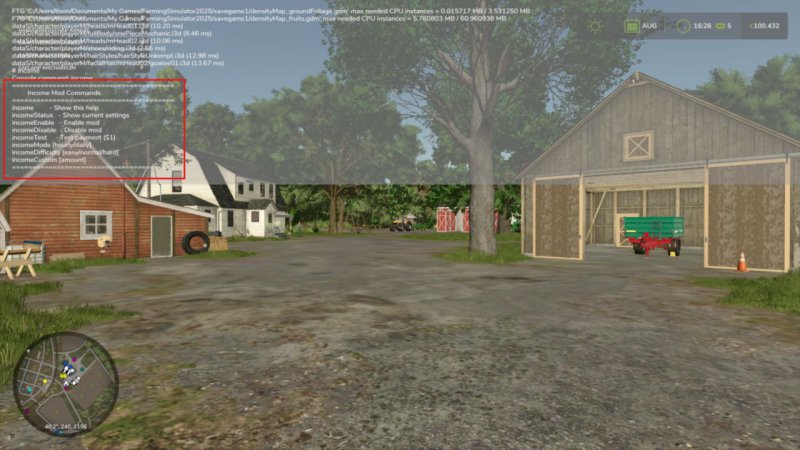
FS25 Income Mod v2.3.0.0
FS25 Income Mod v2.3.0.0 Converted from FS22_IncomeMod Income Mod provides players with a simple, balanced way to receive passive income. Automatically earn money either hourly or daily, based on your chosen difficulty or a custom amount. Perfect for players who want steady cash flow without relying solely on missions or selling goods. Features: – Easy / Normal / Hard difficulty presets – Custom income amount option – In-game notifications – Fully configurable via console commands or in the pause menu – Settings saved automatically – Works in singleplayer and multiplayer – Lightweight and stable Please be aware: You need to have developer mode enabled in order for you to open the console. This can be done in your FS game folder, then look for the “game.xml”. Change to “true” Enjoy you farming experience with my Income Mod <3 ========================================================= Github: https://github.com/TheCodingDad-TisonK/FS25_IncomeMod ========================================================= COPYRIGHT NOTICE: All rights reserved. Unauthorized redistribution, copying, or claiming this mod as your own is strictly prohibited. Original author: TisonK ========================================================= V2.3.0.0 Changed – Income schedule (multiplayer): the pay amount and pay mode now change only on the host, after a preview you confirm. Switching mode or pressing Reset pays nothing at the moment of the switch, a non-administrator is refused, and Settings Hub no longer lists or writes the pay mode or amount. – The HUD, the income report and the Esc Realistic Farming page show the host’s income schedule in multiplayer (not the joining player’s own settings), say they are waiting until it arrives, and name the current seasonal adjustment. With Experimental Systems on, they also explain the month at this rate and that the amount applies to every active farm. – Emergency loans: an amount the game does not know yet shows as Unavailable instead of 0, and the buttons only act on known amounts. Paying a loan off keeps its history, so the next loan’s rate and quote are worked out correctly, and accepting a Borrow quote checks that it still fits your current cash instead of refusing over small cash changes. – Setting the clock backwards within a day no longer pays out the “missed” hours; the next real hour pays normally. – Multiplayer: a settings change made through Settings Hub is saved only by the host. – With Master HUD installed, Income Mod no longer logs a false “HUD toggle registration failed” warning at load. – Translations: the settings labels, help pages, pay-mode options, title and description no longer show garbled characters in eleven languages, and the mod manager shows Income Mod’s own name in nine languages that had carried another mod’s name. The Esc page legend shows a plain dot between page names. V2.2.0.0 The Emergency Loan feature now tells you what’s actually happening with your finances instead of just showing a balance. What’s new: – The loan report now shows a forecast: your expected regular income, your known upcoming bills, a separate estimate of your recent day-to-day spending, and a projection of how low your cash will get. If that projection goes negative, it’s flagged as a shortage warning so you can act before you’re actually broke. – You can now repay the loan for any amount you choose, not just pay it off in full. – New Income HUD show/hide toggle added to the suite Control Center (requires SettingsHub). No save migration needed. V2.1.8.0 Quality-of-life additions for managing your income display. What’s new – Toggle the income HUD with Right Shift + I, and enter edit mode with Right Shift + J – Open your income report from the suite Control Center (with Settings Hub installed) – HUD and settings styling improvements No save migration needed. Existing saves load as normal. V2.1.7.0 This release adds the release gate: new systems ship locked until deliberately released. Nothing is taken away from the proven baseline, and experimental systems stay off unless you turn them on. New in this version: – Release gate. Experimental systems ship locked until deliberately released, as an explicit opt-in that is independent of the difficulty setting. – New setting: Experimental Systems. Under the mod’s settings, default off (stable only). Turn it on to use experimental systems at your own risk. – C3 loan elaboration locked. The emergency loan stays available as the interest-free bridge loan it has always been: grant, re-draw, forecast and repayment are untouched. What stays locked is the cost elaboration (the escalation and the Time Guard compounding). The floor escape is never removed: a broke farm can always reach the base-game loan. Everything else works exactly as before. The passive income system, the HUD, and the report dialog are untouched. V2.1.5.0 Skip income payout during sleeping. V2.1.4.0 The Income HUD position, scale, and visibility were lost every time you reloaded your save. The HUD would snap back to its default position and reappear even if you had hidden it with the I key. What’s Fixed: – HUD position and scale now save on every game save and when exiting the game – Hiding the HUD with the I key now persists across reloads No save migration needed. V2.1.3.0 Full changelog -> https://github.com/TheCodingDad-TisonK/FS25_IncomeMod/releases/tag/v2.1.3.0 V2.1.2.0 – The income panel can now be moved and resized to fit wherever you want it on screen. Right-click the panel to enter edit mode, drag it to a new position, drag a corner handle to scale it up or down, then right-click again to lock it in place. Your layout is saved between sessions. – Colors updated to match FS25’s native panel style (dark, clean, no green border) Toggle visibility still works the same way via the I key. No save migration needed. V2.1.0.0 [Hotfix v2.0.0.5 — fix multiplier option skipping states in UI] In UIHelper.createMultiOption, the cloned FS25 MultiTextOption widget could retain the template’s numTexts rather than adopting the count from setTexts. Explicitly assign opt.numTexts = #options after setTexts to guarantee the correct cycle count for all callers (payMode=2, difficulty=3, multiplier=4). Also move opt:setState() to after layout:addElement() so any FS25-internal layout-pass re-init that might wipe element state has already completed before we set the initial selection. All 50 l10n keys translated into 10 languages (en/de/fr/pl/es/it/cz/br/uk/ru). V2.0.0.4 – Fixed `MoneyType` crash (income never paid) V2.0.0.3 – Fixed mod not loading due to wrong ZIP building inside the build.sh V2.0.0.2 – HUD toggle desync fix – Added missing showHUD field to the console settings – Added explicit override that calls updateDisplay() on every open – Removed stray double blank lines V2.0.0.1 – Replaced both notification calls (payment + startup) with the correct FS25 AP V2.0.0.0 * Added **seasonal income modifiers** (Spring 0.8x, Summer 1.0x, Autumn 1.2x, Winter 0.7x) with optional toggle in the settings UI * Added **selectable income multipliers** (1x / 2x / 5x / 10x) in settings UI and via `IncomeSetMultiplier` console command * Added **per-farm multiplayer support** — each active farm now earns independently * Added **income state persistence** — `lastHour` and `lastDay` saved to `_state.xml` to prevent missed or duplicate payments after reload * Added **payment history tracking** — `IncomeHistory` console command shows last 10 payments (day, hour, amount, seasonal modifier) * Added **next payment timer** — `IncomeNext` console command displays time remaining until the next payout * Added missing **`IncomeSetDebug` console command** for toggling debug mode * Fixed critical **multiplayer duplicate payment bug** by adding a server-only guard in `giveMoney()` * Fixed duplicate startup notification (was triggering from both IncomeManager and IncomeSystem) * Fixed global namespace pollution from `getTextSafe` (moved to `UIHelper.getText()` module method) * Fixed debug print leak in `UIHelper.lua` * Fixed incorrect startup tip text (now shows: `Type ‘income’`) V1.1.0.0 – Rewrote entire code – Changed entire command list – Added new settings tab in the pause menu – Changed notification style – Optimized current code – Added support for: de, fr, pl, es, it, cz, br, uk, ru V1.0.1.0 – Fixed console error V1.0.0.5 [Critical Hotfix] – Updated settings save & load function* *In FS22 we store modSettings in user game path, in FS25 they want it to be stored in savegame folder. I was not aware of that, this is now fixed :)
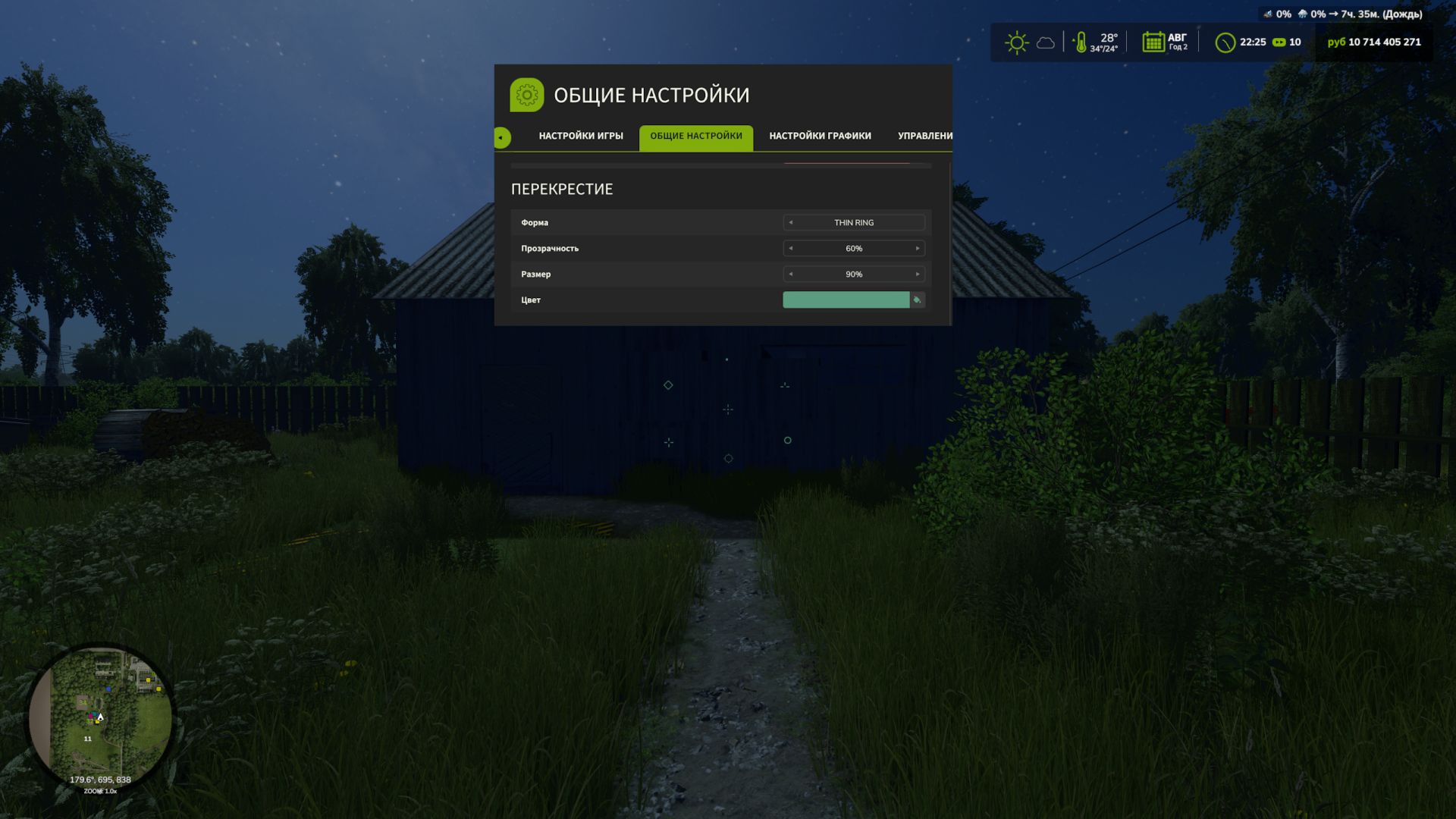
Custom HUD Crosshair FS25
Customize the crosshair in Farming Simulator 25 to suit your preferences. This mod lets you change the shape, color, transparency and size of the standard crosshair when playing on foot. Mod features: - 9 shape options: standard, dot, ring, cross, T-shaped crosshair, corner brackets, diamond, cross with a dot and thin ring. - Choose a color from the palette or customize your own shade. - Adjust visibility from 0 to 100% — the crosshair can be completely hidden. - Change the size from 50 to 300% relative to the standard size. The settings are available in the “Crosshair” section of the game settings menu. The mod also changes the standard crosshair when using a chainsaw and horse brush. Thanks: Helfer B.
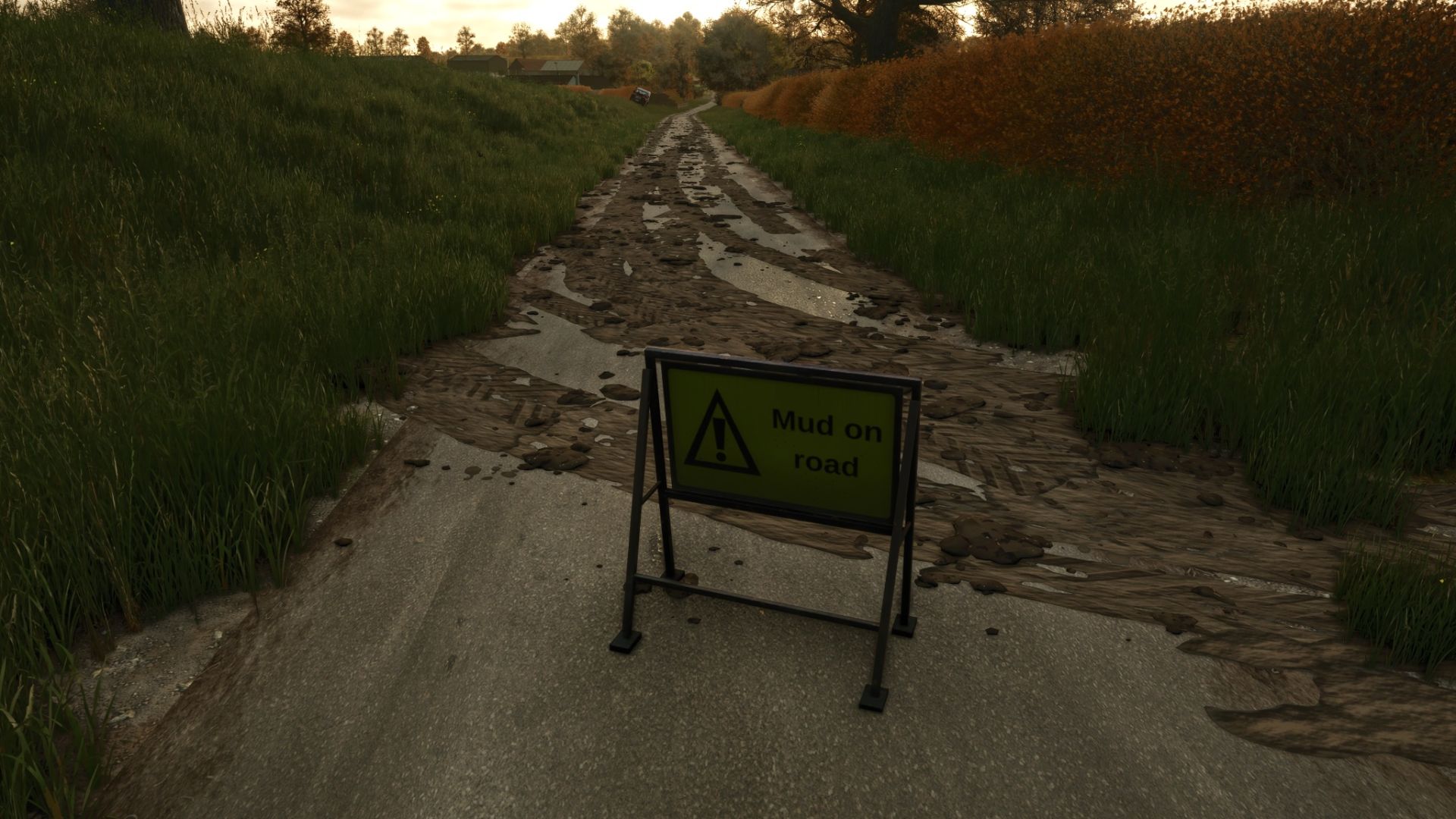
Mud on the road FS25
MUD ON THE ROAD - Tyres only drop mud when there is real mud on them - the mud the game shows on your tyres after field work. Clean or washed tyres leave nothing. - On roads, yards and tracks muddy tyres leave tyre-print smears and throw off clods. Faster driving flings clods further across the road. - The tyres shed their mud as they go, so the tyres clean up as the trail fades over a few hundred metres. - Smears bend with the wheels through corners. - Mud builds up: driving over old mud freshens and thickens it, and new layers go on top. - Works for every vehicle and trailer with wheels, including AI helpers. CLEANING UP - Rain washes mud off the road: heavy rain clears it in about 5 in-game hours, light rain in around half a day. - In dry weather mud dries and turns pale, and is gone after about three in-game days. - Sweepers clean it up: any sweeper brush that is turned on removes the mud it passes over. - Scrape it up with a bucket: put a loader, telehandler or wheel loader bucket down with its lip on the road and push forward. The mud goes into the bucket (as manure in the base game, or as mud/dirt/soil if another mod adds that fill type). MUD ON ROAD SIGN - A small A-frame "Mud on road" warning sign in the UK road-sign style. - Shop: Decorations. Price: 25. GOOD TO KNOW - Mud is saved with your savegame. - Multiplayer: the mud is purely visual and worked out on each PC, so it adds no network traffic. - Settings: modSettings/FS25_MudOnRoad.xml is created on first start. Change how long mud lasts, how far it is carried, how many clods are thrown, the maximum amount of mud on the map and more. Console commands (press ~): - mudOnRoadLoadTyres - covers your tyres in mud (for testing, single player or host) - mudOnRoadClear - cleans every road - mudOnRoadInfo - shows how much mud is lying around - mudOnRoadToggle - turns mud dropping on or off - mudOnRoadBucketInfo - shows why your bucket is or isn't scraping mud
- 15 per page
- 30 per page
- 45 per page
- 60 per page
-
See more per page
Bigger pages, fewer clicks - and no ads anywhere.
Go Pro