Microsoft Flight Simulator mods
109,103 results- 15 per page
- 30 per page
- 45 per page
- 60 per page
-
See more per page
Bigger pages, fewer clicks - and no ads anywhere.
Go Pro
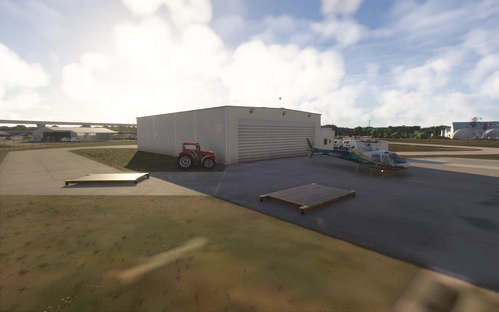
PCSO Heli Area
This add-on enhances the PCSO aviation unit area at KPIE, home to two H125 helicopters operated by the Pinellas County Sheriff's Office. It introduces new landing platforms, additional helicopter models, and populates the area with people. The modification aims to provide a more detailed and realistic representation of the PCSO facility within Microsoft Flight Simulator. Compatibility with other scenery such as VerticalSim's KPIE is illustrated in the included photos.

CSS 737-300 | Icelandair OY-MMD | MSFS 2024 | 4K Textures
This add-on introduces the Icelandair OY-MMD livery for the CSS 737-300 in Microsoft Flight Simulator 2020 and 2024. The livery features 4K textures for enhanced visual detail. Suitable for users looking to add authentic Icelandair branding to their fleet. Installation instructions are included for easy integration into the simulator.
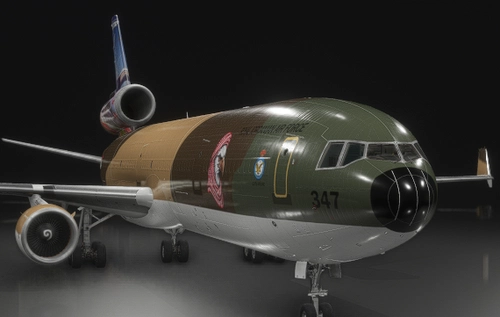
MD-11 by TFDi, Royal Jordanian Air Force
This add-on provides a custom Royal Air Jordanian livery for the MD-11 by TFDi in Microsoft Flight Simulator. The livery accurately reflects the airline's color scheme and branding. It is designed to enhance visual realism for users flying the MD-11. Installation applies only to the TFDi MD-11 aircraft.

Lorby AxisAndOhs V4
Enhance your simulator control with Lorby AxisAndOhs V4, an external application compatible with multiple flight simulation platforms including Microsoft Flight Simulator. This tool allows you to assign axis movements, control simulator events, and access internal variables with features like scripting, mouse-controlled axes, voice recognition, and virtual instruments. Explore a range of additional functionalities and downloadable resources for a customizable and immersive flight experience.
iFly 737 Max 8 Stream Deck + Autopilot Panel
The iFly 737 Max 8 Stream Deck + Autopilot Panel offers pilots an intuitive method to manage autopilot systems through a combination of physical buttons, a touchscreen, and rotary dials. This add-on provides easy access to critical functions such as auto throttle, flight director, navigation, and lighting controls, with real-time updates displayed on the Stream Deck Plus. Future updates will enhance functionality, with currently unavailable features marked as INOP. Flight Panels aims to support users with regular updates and dedicated customer service to ensure a seamless simulation experience.

Cessna Citation Longitude Stream Deck + Autopilot Panel
Enhance your aircraft control experience with the Flight Panels Autopilot Panel for the Cessna Citation Longitude on Microsoft Flight Simulator. This add-on allows you to manage autopilot systems using physical buttons, a touchscreen, and rotary dials on your Stream Deck, creating a more immersive simulation experience. Stay updated with regular product updates and benefit from free industry-leading support for a seamless installation process and personalized use. Explore a new level of realism and control in your flights with this professional and detailed stream deck integration.
AeroLens Pro - PMDG 777-300ER - Stream Deck Profile
AeroLens Pro is a customizable Stream Deck profile designed specifically for the PMDG 777-300ER in Microsoft Flight Simulator. This add-on allows users to manage cockpit, instrumentation, and showcase cameras easily, enhancing visual storytelling for pilots and creators. It features various camera controls, drone capabilities, and time of day adjustments directly from the Stream Deck. Compatible with Stream Deck XL and Mobile, this profile aims to streamline the simulation experience.
AeroLens Pro - iniBuilds A320 - Stream Deck Profile
AeroLens Pro is a comprehensive camera management solution designed specifically for the iniBuilds Airbus A320 in Microsoft Flight Simulator 2020. It offers Stream Deck profiles that allow users to easily access various cockpit views, instrumentation, and custom camera settings. Additionally, it includes drone controls and time of day manipulation features, enhancing the visual experience for pilots, creators, and streamers. This add-on is compatible with Stream Deck XL and Mobile devices.
AeroLens Pro - Headwind A339X - Stream Deck Profile
AeroLens Pro offers a comprehensive Stream Deck Profile for Microsoft Flight Simulator 2020, with easy access to various camera controls perfect for pilots, digital creators, and streamers. Specifically designed for the Headwind A330-900 Neo, this profile includes cockpit, instrumentation, showcase, custom, and quick view cameras, along with drone controls and time of day manipulation directly from your Stream Deck. Flight Panels aims to enhance the immersive experience of Flight Simulator through detailed and modern Stream Deck profiles, backed by regular updates and top-notch support services.
AeroLens Pro - Cessna 414 AW - Stream Deck Profile
Manage your cameras with ease using AeroLens Pro - Cessna 414 AW Stream Deck Profile for Microsoft Flight Simulator 2020. This ultimate Camera Management solution offers quick access to various cockpit, instrumentation, and custom cameras, along with drone controls and time manipulation features. Designed for the iniBuilds A300-600, this profile enhances your streaming and content creation experience with labeled, color-coded buttons and a range of camera controls. Stay updated with regular product updates and dedicated support from Flight Panels.
AeroLens Pro - FlyByWire A32NX - Stream Deck Profile
Enhance your Microsoft Flight Simulator experience with AeroLens Pro, a Stream Deck Profile designed for the FlyByWire A32NX. Access various cockpit, instrumentation, showcase, custom, and quick view cameras easily with individually labeled buttons. Additionally, manipulate time of day and drone controls directly from your Stream Deck for seamless content creation. Dive into the ultimate Camera Management solution for pilots, digital creators, and streamers, brought to you by Flight Panels for maximum immersion in your simulator setup.
Cessna 172 Skyhawk Stream Deck + Autopilot Panel
The Cessna 172 Skyhawk Stream Deck + Autopilot Panel is designed for the Asobo Cessna 172 Skyhawk in Microsoft Flight Simulator 2024, allowing users to manage autopilot systems through physical controls on the Stream Deck Plus. The add-on features various flight control panels that provide button controls, rotary dials, and LCD screens for real-time adjustments of altitude, heading, navigation frequencies, and lighting. It aims to enhance immersion and user experience in flight simulation setup while offering regular updates and dedicated support.
AeroLens Pro - iniBuilds A300-600 - Stream Deck Profile
AeroLens Pro is a Camera Management solution introducing Stream Deck Profiles for Microsoft Flight Simulator 2020, optimized for the iniBuilds A300-600. This ultimate tool offers a variety of camera controls, including cockpit, instrumentation, showcase, and custom views. With features like drone controls and time manipulation, enhancing your creations has never been easier. Designed with attention to detail, AeroLens Pro aims to elevate your simulation experience through intuitive functionality and regular updates.
AeroLens Pro - Fenix A320 - Stream Deck Profile
AeroLens Pro presents a comprehensive Camera Management solution for Microsoft Flight Simulator 2020 enthusiasts. This Stream Deck Profile offers easy access to various types of cameras, including cockpit, instrumentation, showcase, and custom views. With features like drone controls and time manipulation, enhance your Flight Simulator experience like never before. Designed for the Fenix A320, AeroLens Pro is compatible with Stream Deck XL and Stream Deck Mobile for iPadOS.
AeroLens Pro - BAE 146 Professional - Stream Deck Profile
Enhance your cockpit experience with AeroLens Pro - BAE 146 Professional Stream Deck Profile for Microsoft Flight Simulator 2020. Access various camera views, drone controls, and time manipulation directly from your Stream Deck. Enjoy a seamless setup with individually labeled buttons, zoom controls, and more for an immersive flying experience. Stay updated with regular product updates, dedicated support, and easy installation process through Flight Panels.
- 15 per page
- 30 per page
- 45 per page
- 60 per page
-
See more per page
Bigger pages, fewer clicks - and no ads anywhere.
Go Pro