Microsoft Flight Simulator mods
112,379 results- 15 per page
- 30 per page
- 45 per page
- 60 per page
-
See more per page
Bigger pages, fewer clicks - and no ads anywhere.
Go Pro

Asobo Cirrus SR 22 T-G6 Custom Cameras
Custom Cameras mod for the Asobo Cirrus SR 22 T-G6, featuring improved instrument and surround views for a stable pilot experience. Includes a good downward camera on the controls and eliminates the rear-left-swivel bug. Just unzip the file into your community folder to install.

Waco Regional Airport (KACT)
Enhance your flight simulation experience with this updated version of Waco Regional Airport (KACT) in Texas. This add-on includes airport services functionality, jetways, and relies on default buildings for a realistic touch. Dont forget to provide feedback for any issues you encounter. Happy flying!

Fenix Simulations A320 - Air New Zealand (Star Alliance) | ZK-OJH
Experience flying with the Air New Zealand A320-200 IAE ZK-OJH livery in Microsoft Flight Simulator with this add-on. Includes repaint textures in 4K & 8K resolution for a detailed look. Requires the Fenix Simulations A320 V2 for installation. Enjoy your flight!

inibuilds Messerschmitt Bf-108 Custom Cameras
Custom Cameras addon for the Messerschmitt Bf-108 by inibuilds. Version 2.0 brings a reorganized set of instrument views with improved quality, including a view on tablet. Previous versions fixed bugs, enhanced cockpit views, and optimized external views. Installation instructions are provided for easy setup in your Community folder.

UUDR Heliport-Reutov
Discover the UUDR Heliport-Reutov, a small privately owned airfield near Moscow, with this add-on. Includes official air charts and a detailed readme for your convenience.

Cirrus SR22T N106TG 9Thousand Livery
Cirrus SR22T N106TG 9Thousand Livery for the premium deluxe version of the new Cirrus SR22T G6 9Thousand Edition in Microsoft Flight Simulator 2020. This livery, created using Photoshop and Blender, adds a unique touch to your aircraft collection. Just extract the folder to your Community folder location for installation.

Fenix Simulations A320 - TACA Airlines (Star Alliance) N686TA
Enhance your Fenix Simulations A320 experience with this TACA Airlines (Star Alliance) N686TA livery, featuring stunning 4K & 8K textures. Simply unzip, drag, and drop the repaint files into your community folder to enjoy this detailed addition. Requires Fenix Simulations A320 V2.

Wizzair EFB Background - Fenix A320 Block 2
Customize the background of your Wizzair Electronic Flight Bag in the Fenix A320 Block 2 with this add-on. Easily change the image by following the instructions provided on the simulation website. Explore more details on how to personalize your EFB background and access the WEB MCDU on the Fenix knowledge base. Request backgrounds for other airlines in the comments section.

FENIX A320 Ergonomic Views - ErgoViews 1 V2 for IAE&CFM
Custom views for FENIX A320 - Views create to be more Ergonomic and and hepful for more precision during flights. 10 views from 0 to 9: View 0 : EFB View 1 : Wing back left View 2 : MCDU View 3 : Wing back right View 4 Wing front left View 5 : Captain view View 6 : Wing front right View 7 : Front view View 8 : Overhead Panel View 9 : First Officer view

Air New Zealand EFB Background - Fenix A320 Block 2
Customize your EFB background on the Fenix A320 Block 2 with this add-on. Easily change the image and access the WEB MCDU by following simple steps. Visit the Fenix knowledge base for more information and request backgrounds for other airlines in the comments.
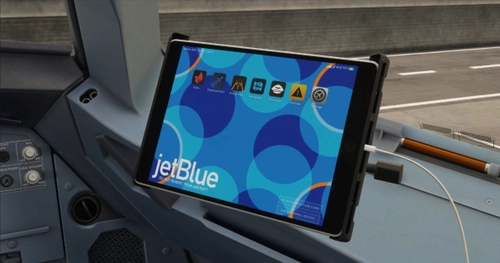
JetBlue EFB Background - Fenix A320 Block 2
Customize the background of your Electronic Flight Bag in the Fenix A320 Block 2 with this add-on. Access a step-by-step guide on changing the EFB background image and utilizing the WEB MCDU on the Fenix knowledge base. Request backgrounds for other airlines in the comments section.

LFGQ Semur en Auxois
Discover LFGQ Semur en Auxois, a civil airport located in Burgundy area featuring two runways, one paved and one grass. Special instructions include no simultaneous runway use and preferred QFU. Enjoy version 1.0 design with marked runways, 3D models, static aircraft, and additional 3D objects for enhanced realism.

Fenix A320 v2 | S7 Airlines (RA-73404) - Siberian Airlines style (CFM)
S7 Airlines livery for the Fenix A320 v2 with CFM engines in 8K resolution (RA-73404). Enhance your simulator with this Siberian Airlines style design. Installation instructions included.
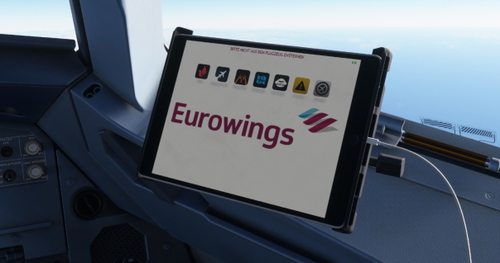
Eurowings EFB Background - Fenix A320 Block 2
Customize your Eurowings Electronic Flight Bag (EFB) background with this add-on for the Fenix A320 Block 2. Easily change the image displayed on your EFB by following simple steps on the provided website. Explore more customization options and tutorials on the Fenix knowledge base. Get ready to enhance your cockpit experience!

Lauda EFB Background - Fenix A320 Block 2
Customize your Fenix A320 Block 2 experience with Lauda EFB Background. Easily change the EFB background image and access the WEB MCDU with this convenient add-on. Visit the Fenix knowledge base for step-by-step instructions and enjoy a personalized touch to your simulator setup. Request backgrounds for other airlines to further tailor your flying experience.
- 15 per page
- 30 per page
- 45 per page
- 60 per page
-
See more per page
Bigger pages, fewer clicks - and no ads anywhere.
Go Pro