Farming Simulator 25 mods
74,674 results- 15 per page
- 30 per page
- 45 per page
- 60 per page
-
See more per page
Bigger pages, fewer clicks - and no ads anywhere.
Go Pro
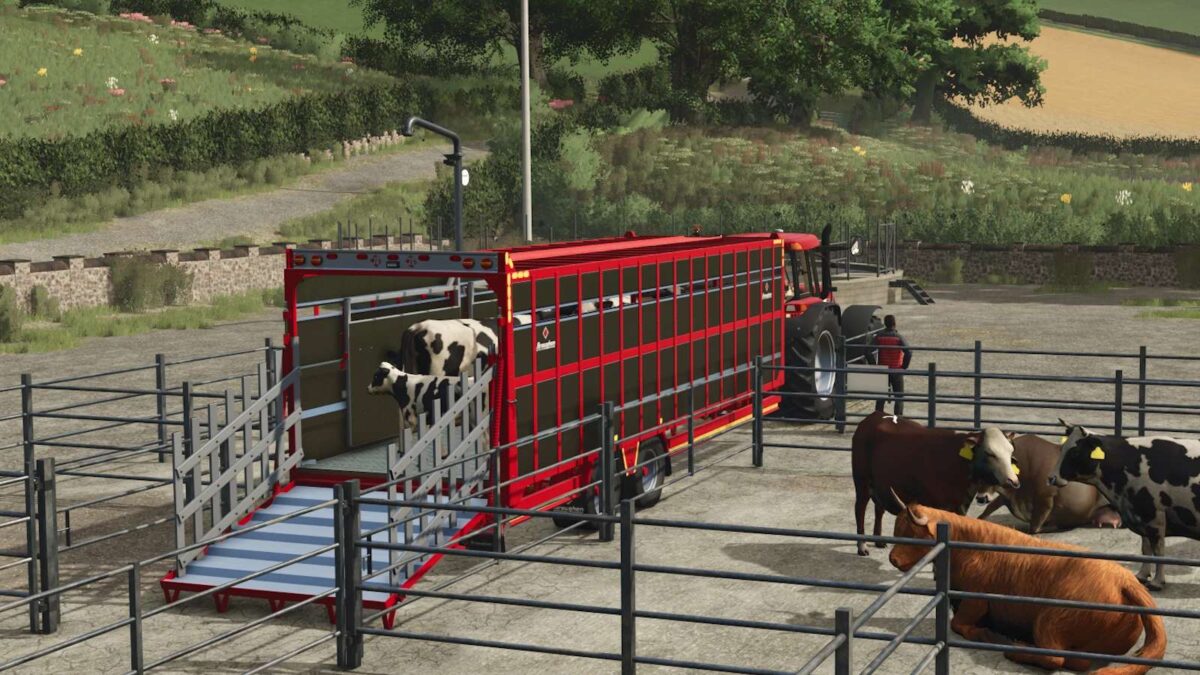
Broughan 28 Ft Animal Trailer v 1.0
Holds 10 cows, 26 pigs and 22 sheep Broughan Engineering Ltd designs, engineers and manufactures a full range of high quality, bespoke agricultural trailers, located just outside. Tullow in County Carlow Ireland and owned by brothers and founding directors Patrick and Paul Broughan. 28 ft animal trailer with aluminium sides and chequered floor and ramp. Standard Features: LED Lights Ladder Aluminium Loading Gates Interior Loading Lights Slurry Tank Dividing Gate Side Markings Crash Bar Optional Features: Air Brakes Air Suspension Steering Axles – 10 Stud Commercial Price: $28.525

Factory Profit Calculator – Mod pour Farming Simulator 25
Factory Profit Calculator – Mod pour Farming Simulator 25

American Claas Pack V1.0
These CLAAS LEXION combines have been converted into a proper U.S.-standard configuration and now feature added chaff and crop residue on the cab and rear of the combine. The residue automatically changes depending on the crop being harvested, including wheat, barley, canola, corn, and more. All added chaff and cab crop residue can be removed by washing the combine. GEFD25 / GIANTS Software – Original models, features, and functionality BigBlue9988 – U.S.-standard conversion and the added changing chaff and cab crop residue system

Avatar Switcher V1.0
Avatar Switcher is a Farming Simulator 25 script mod that lets you save the current player appearance as a reusable preset and switch between saved avatars from an in-game selector. Features Save the current wardrobe appearance as an avatar preset. Give each preset a unique ID, display name and category. Select an existing category or create a new category while saving. Contextual help explains the save fields with examples. Filter saved appearances by category. Apply or delete presets through an in-game selector. Open Avatar Switcher while on foot or inside a vehicle. Save directly from the player wardrobe through the Save to AvatarSwitcher control. Store presets outside the mod ZIP so they survive mod updates. Refresh preset data without restarting the game. Provide a public API for integration with other mods, including Helper Profiles. English, German and French localisation. Compatibility Farming Simulator 25 Version: 1.0.0.0 Script mod for PC and Mac Single-player only Multiplayer is not supported No additional mods are required Using Avatar Switcher Saving an appearance Open the Farming Simulator wardrobe and configure the player appearance. Select Save to AvatarSwitcher. Enter a unique Preset ID. This is the internal identifier used by Avatar Switcher and compatible mods; spaces are stored as underscores. Enter an optional Display Name. This is the readable name shown in the selector. If left blank, the Preset ID is used. Choose one of the existing categories shown in the list, or enter a value in New Category to create and use a new category. Use the contextual Help panel for field explanations and examples, then select Save. Applying an appearance Press the mapped Open Avatar Switcher control. Select a category. Select a saved appearance. Choose Apply. The selected appearance is written to the player settings and Avatar Switcher attempts to refresh the active player immediately. Deleting an appearance Open the selector, choose the preset and select Delete. Deleting a preset does not change the appearance currently in use. Avatar presets are stored at: Documents/My Games/FarmingSimulator2025/modSettings/FS25_AvatarSwitcher/avatarPresets.xml On first use, Avatar Switcher creates a new empty preset file directly in the modSettings folder. Saved presets remain there when the mod ZIP is updated. Before Avatar Switcher first writes an appearance to gameSettings.xml, it creates this backup when one does not already exist: Documents/My Games/FarmingSimulator2025/gameSettings.avatarSwitcherBackup.xml Known Limitations Multiplayer is intentionally disabled and unsupported. Live appearance refresh depends on the current player and wardrobe runtime state. When an immediate refresh is not possible, reopening the wardrobe or reloading the save applies the stored appearance. Player configuration paths are validated before live refresh so an unknown or unavailable model configuration is not passed to the game loader. Preset IDs must be unique.

Lizard 950LX Excavator V1.0
Download the Lizard 950LX Excavator for Farming Simulator 25. This FS25 heavy excavator features functional boom, arm and bucket controls, crawler tracks, working lights, dirt and wear support, detailed materials and forestry/construction capability.

Reveal Farms On The Map – Mod pour Farming Simulator 25
Reveal Farms On The Map – Mod pour Farming Simulator 25

Demand-oriented Application Rate – Mod pour Farming Simulator 25
Demand-oriented Application Rate – Mod pour Farming Simulator 25

Animal Planner – Mod pour Farming Simulator 25
Animal Planner – Mod pour Farming Simulator 25

Recent Construction Refund – Mod pour Farming Simulator 25
Recent Construction Refund – Mod pour Farming Simulator 25

FS25 Gregoire Besson Pack
FS25 Gregoire Besson Pack -Price: 25000-40000 $ -Working width: 2-3,5 m -Weight: 1300-2000 kg – Working speed: 12 km/h


- 15 per page
- 30 per page
- 45 per page
- 60 per page
-
See more per page
Bigger pages, fewer clicks - and no ads anywhere.
Go Pro