Farming Simulator 25 mods
74,574 results- 15 per page
- 30 per page
- 45 per page
- 60 per page
-
See more per page
Bigger pages, fewer clicks - and no ads anywhere.
Go Pro

Forest Converter v1.0
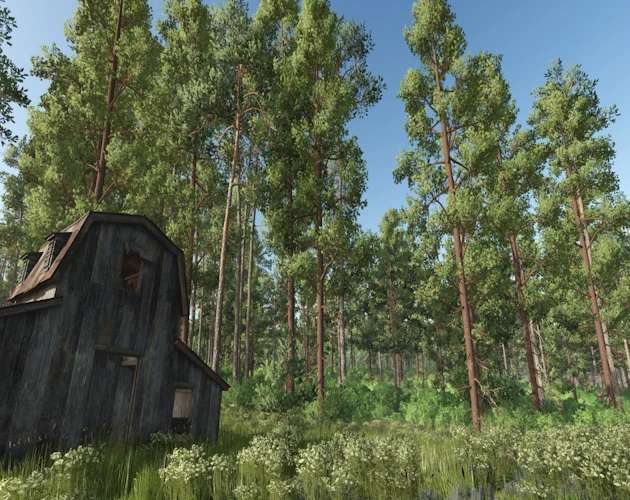
Forest Converter is a universal tree-conversion script mod for Farming Simulator 25 on PC and Mac. It replaces safely isolated standing map trees with a configurable mix of verified mature forestry trees. Unlike a small radius-based replacement tool, Forest Converter can scan: The entire map All farmlands owned by the current farm Only the farmland where the player is currently standing Every conversion starts with a protected preview. You can review the number of eligible trees, skipped-tree safety information, and normalized species mix before confirming any changes. The default mix is: 50% Silverrun Pine 50% Silverrun Ponderosa Pine Lodgepole Pine, Giant Sequoia, the bundled Pine and Spruce mature variants trees, and other compatible species remain optional at 0% until you choose to include them. Important: Back up an existing savegame before converting trees. Conversion changes the savegame-managed tree population and is not intended to be an undo tool. Main features Dedicated Settings > Forest Converter tab Works on fresh starts and existing savegames All Map Trees, Owned Farmlands, and Current Farmland scopes Configurable weighted tree-species mix Weights are normalized automatically; they do not need to total 100 Protected preview and confirmation before conversion Trees are processed gradually to reduce frame spikes Mature replacement models are created immediately Compatible map and enabled tree-pack registrations are detected automatically Only verified mature forestry targets are offered by the converter Cut trees, logs, stumps, protected objects, and unsafe tree hierarchies are skipped Automatic circuit breaker disables conversion safely when an unsupported condition or excessive failure rate is detected Thirteen bundled mature forestry trees are also individually placeable from the Construction menu Optional Forest Converter Sapling Add-On with eight pallet sizes and dynamic species selection Bundled Forest Converter trees The following 13 credited mature tree models are registered under unique Forest Converter species names: Spruce Variant 1 Spruce Variant 2 Spruce Scottish Spruce Variant 1 Scottish Spruce Variant 2 Scottish Spruce Variant 3 — repaired distant LOD Pine Variant 1 Pine Variant 2 Old Pine Scotch Pine Riverside Birch Cypress Eucalyptus They are available as optional conversion targets and under: Construction > Landscaping > Forest Converter Trees Construction placement creates a mature, registered tree without converting or changing any nearby trees. Optional Sapling Add-On FS25_ForestConverterSaplingAddon.zip is an optional companion download. It adds liftable pallets containing: 6 saplings 24 saplings 40 saplings 60 saplings 120 saplings 175 saplings 240 saplings 300 saplings The Tree Type selector is built from FS25’s active plantable-tree registry, allowing all 13 Forest Converter registrations—and other compatible active species—to appear without relying on a fixed hard-coded list. The pallet displays the selected supported species name, and the label color can be changed in the shop. Forest Converter saplings use a compatible young stage and grow into the selected mature model. Giant Sequoia remains an explicit oversized option. It should be treated as a chainsaw tree because its mature trunk is generally too large for a normal wood harvester. The Sapling Add-On has its own technical mod identity and does not replace the original Tree Sapling Pack. Both can remain installed, although this will add similar pallet products to the shop. Requirements Forest Converter Farming Simulator 25 for PC or Mac FS25_ForestConverter.zip FS25_SilverrunTrees.zip by Jos — required separately and not included Optional Sapling Add-On FS25_ForestConverterSaplingAddon.zip Forest Converter version 1.1.0.0 or newer Silverrun Trees by Jos Multiplayer is not currently supported. Installation Delete older copies of Forest Converter and the Forest Converter Sapling Add-On from your mods folder. Do not keep renamed duplicates. Place FS25_ForestConverter.zip in: Documents/My Games/FarmingSimulator2025/mods Place FS25_SilverrunTrees.zip in the same folder. If wanted, place FS25_ForestConverterSaplingAddon.zip in the same folder. Do not unzip the mod files. Enable Forest Converter and Silverrun Trees when loading the save. Enable the Sapling Add-On as well if you installed it. Fully restart the game after replacing an older version. Using Forest Converter on an existing savegame Back up the savegame. Load the save with Forest Converter and Silverrun Trees enabled. Open Settings > Forest Converter. Check the Universal Compatibility Status. Select a conversion scope. Set the desired species weights. Select Preview & Apply. Review the eligible-tree count, skipped-tree summary, and normalized mix. Confirm the conversion. Wait for processing to finish before saving the game. I recommend testing Current Farmland first. This affects eligible trees across the entire parcel where the player is standing—not merely the trees immediately around the player. Using Forest Converter on a fresh save Forest Converter can offer a protected preview after the new save finishes loading. You may confirm the current settings or decline, open Settings > Forest Converter, adjust the scope and species mix, and then select Preview & Apply. No trees are changed until a preview succeeds and you confirm it. Why some trees may not change Forest Converter intentionally does not force every visible tree through conversion. A tree may be skipped when it is: Already cut, split, or lying on the ground A stump or loose log Player-planted or managed by the savegame tree system Attached to a vehicle, placeable, mission object, or protected scene object A deliberately excluded mission tree Decorative geometry that is not registered as a usable tree by the map Part of a tree hierarchy that cannot be isolated safely Located outside the chosen farmland scope Skipping these trees is a safety feature, not necessarily an error. Some maps construct forests in unusual ways, so universal compatibility cannot be guaranteed for every decorative tree on every map. Conversion safety Forest Converter fails closed when it cannot verify that conversion is safe. Its circuit breaker can disable conversion for the current session if required managers are unavailable, tree hierarchies cannot be isolated, an unexpected exception occurs, restoration fails, or replacement failures exceed safe limits. If the circuit breaker activates after conversion has started, do not save the game. Exit and reload the backed-up save, then retain the complete log.txt for diagnosis. Species weights Weights are relative and normalized automatically. Examples: 50 Pine / 50 Ponderosa = 50% / 50% 25 Pine / 25 Ponderosa / 50 Lodgepole = 25% / 25% / 50% 30 Spruce / 30 Pine / 40 Ponderosa = 30% / 30% / 40% A species set to 0% will not be selected during conversion. Advanced console fallback The settings interface is the recommended method, but the following console commands are available for testing and troubleshooting: fcmPreview [map|owned|current] fcmConvert CONFIRM fcmCancel fcmMix fcmSetWeight fcmResetMix Compatibility and limitations PC and Mac only Single-player only Requires Silverrun Trees Designed for both new and existing savegames Map compatibility depends on how each map registers and structures its trees Player-planted trees and trees produced by an earlier conversion are protected from later map-tree scans Decorative and unsupported tree geometry may remain unchanged Giant Sequoia is oversized and is not intended for a normal wood harvester Always test on a backed-up save before converting a large area or the entire map Forest Converter 1.1.0.0 Adds 13 bundled mature tree registrations Adds all 13 trees to Construction > Landscaping > Forest Converter Trees Exposes the bundled registrations to compatible dynamic sapling pallets Uses localized names for the added species Retains protected map, owned-land, and current-farmland conversion modes Forest Converter Sapling Add-On 2.2.0.0 Generates every pallet’s species selector from the live plantable-tree registry Adds all 13 Forest Converter species Adds runtime pallet-label selection for the new species Preserves the corrected label color configuration Includes 6, 24, 40, 60, 120, 175, 240, and 300-sapling pallet options Forest Converter development Mod author, scripting, settings interface, safety systems, tree integration, custom registrations, label artwork, and release packaging: SecondChanceGaming3709 Silverrun Trees Jos Silverrun Trees remains a separate required mod. Its assets are not redistributed in Forest Converter. Bundled mature tree assets Selected mature tree models, required textures, and shape data originate from New Trees Types + New Tree Limit. Source-package credits: BMProd (BMP), LP, and Prefab Inf Modding. Redistribution and modification of the selected assets inside Forest Converter were granted by the source package creator. The original written permission record is retained by the publisher. No ownership is claimed over credited third-party assets. Sapling Add-On pallet assets Original Tree Sapling Pack pallet design, I3D model, shape data, supporting textures, store images, and original label/configuration system: Macktrucker921. Forest Converter integration, dynamic species support, expanded label artwork, and add-on packaging: SecondChanceGaming3709.
Smooth Steel Flashboard Riser Pack WIP v1.0
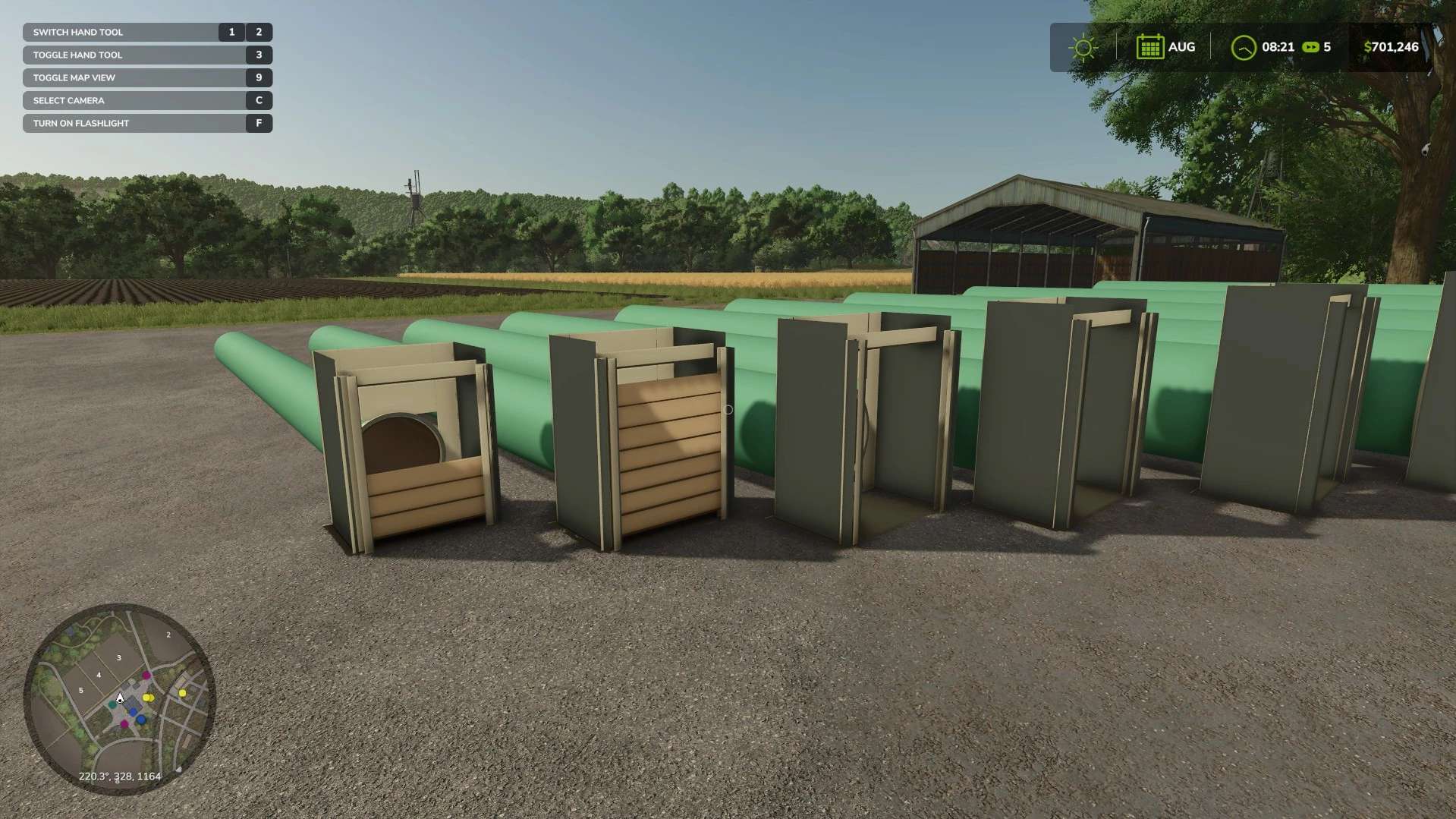
The Smooth Steel Flashboard Riser Pack adds a selection of large drainage pipes and welded flashboard riser boxes to Farming Simulator 25. These placeables are designed for drainage projects, irrigation layouts, rice fields, levees, reservoirs, and realistic farm-map construction. Each pipe measures approximately 30 feet long and features a smooth green-coated steel exterior, exposed steel edges, and a welded open-top riser box. Walk up to the riser box to cycle the wooden flashboards between three visual configurations: None Half All The flashboards are currently visual only. Functional water-level and flow-control features are planned for a future version. Included Pipe Sizes 24-inch 28-inch 32-inch 36-inch 40-inch 44-inch 48-inch 52-inch 56-inch All pipes are approximately 30 feet long. Current Features Nine individually placeable pipe sizes Smooth green-coated steel construction Welded steel flashboard riser boxes Standard wooden flashboards Walk-up interaction prompt None, Half, and All board configurations Saved board configuration Multiplayer board-state synchronization Working player and vehicle collisions Construction Mode selection Placeables can be sold and removed Individual store icons for every size Work-in-Progress Notice This is an early WIP release under active development. Features, models, materials, prices, dimensions, and installation procedures may change before the final release. Please test the mod on a backup or disposable save before adding it to an important career save. Current Limitations Flashboards do not currently affect water levels or water flow. Materials and textures are still prototype quality. Ground deformation and automatic ditch integration are not included. The current installer is designed and tested for the Microsoft Store/Xbox app PC edition of Farming Simulator 25. Steam and direct GIANTS installations have not yet been formally tested. Using the Flashboards Walk to the open side of the riser box and use the interaction prompt. Each activation cycles through: None → Half → All → None The selected board configuration is saved with the game. Removing a Pipe Open Construction Mode and select the sell/demolish tool. Select either the pipe barrel or riser box to sell and remove the complete assembly. Feedback and Bug Reports When reporting a problem, please include: Installed mod version Pipe size being tested Farming Simulator 25 game edition Whether the pipe was newly placed Description or screenshot of the problem Relevant portion of the FS25 log.txt Planned Improvements Functional water-level control Water-flow interaction Improved PBR materials and textures Improved placement behavior Steam and direct GIANTS edition installation support General model and performance optimization

Everything Silo V1.0
A silo that can hold almost Everything With a large, 1000000000 (1 Billion)L capacity and support for a wide variety of fill types, this is the one-stop for everything silo.

AGCO Sign V1.0
A simple sign with AGCO brands represented. Glows at night, has snow heaps, and has a custom grunge mask. Details: Price: 2000$ Income per hour: 35$ Daily Upkeep: 2 $/day

Hawkeye Creek IA V1.0
Welcome to Hawkeye Creek, Iowa made by Kaye Farms Modding Team. You’ll find some river bottom, flat ground and some hill ground with plenty of timber. We’ve added corn and soybean hybrids along with custom built farms. This is made to be a challenge for all of you. If you play on easy, it’ll still be a challenge selling your products. Base game corn is now called wet corn in game. you’ll get very little selling this corn. All of the hybrids will combine to “corn” and you can dry them. You want to use a mod that works with the fillType MAIZE2. Soybean hybrids will convert to soybeans when harvested. Corn Hybrids: 5088 does great on most soil types, with higher population and reacts great to nitrogen 5864 does great on most soil types, with lower population that means lower yield 5899 is the silage corn hybrid. You can plant this hybrid later in the year to help with your double crop. It’ll produce plenty of chaff. Base game corn (wet corn) is for the short season depending on when you plant it. This will help you get winter wheat in the ground on time. Soybean Hybrids: 4804 are your full season soybeans that will withstand the heat. 2203 are your short season beans to get in after wheat. Animals: If you enjoy feeding cows, I have adjusted the tmr mix to need hay, silage and mineral feed or ccm. Straw and corn stalks are just for filler. You do have an option to add grain as cracked corn. The hammer mill will be needed to produce cracked corn which also produces pig food if you put it back in the hammer mill. Map includes NH3, Starter, 28, and 32, custom lime textures, antlers ground textures and a custom soil map based on real life soil data in the area. REQUIRED MODS BESIDES ONES IN FOLDER FS25 Mega pack for hawkeye by Squatch Row Crop System v1.0.1.5 (Public / Release) | ThundRFS on Patreon Precision Farming Configurator v1.1.1.5 (Public / Release) | ThundRFS on Patreon Design Kit v1.1.0.2 [- Stable -] | ThundRFS on Patreon Also, ThundRFS has Foliage Destruction mod which is needed from his Patreon for our corn stock destruction to look right to if you are going to chop corn with the hybrids, he does so much for the game go give him some support. -Squatch Monky -LEE Farms Modding -LegacyAg -No Creek Farms -OS Farms Mapping and Modding -KennyisFatModding -CM² -LJR Modding -Schultz Modding -Antler22 If I missed anyone, I’m sorry, message me! UNZIP OR IT WILL NOT WORK Let any of the team members know if you have any issues! ENJOY!

Mega pack for hawkeye V1.0
I decided to throw these under one post. In this pack you’ll find the converted grain bins from 22 a long with a propane tank to dry corn. My silage pads are in here with a small one for ccm.


- 15 per page
- 30 per page
- 45 per page
- 60 per page
-
See more per page
Bigger pages, fewer clicks - and no ads anywhere.
Go Pro