Farming Simulator 25 mods
78,272 results- 15 per page
- 30 per page
- 45 per page
- 60 per page
-
See more per page
Bigger pages, fewer clicks - and no ads anywhere.
Go Pro
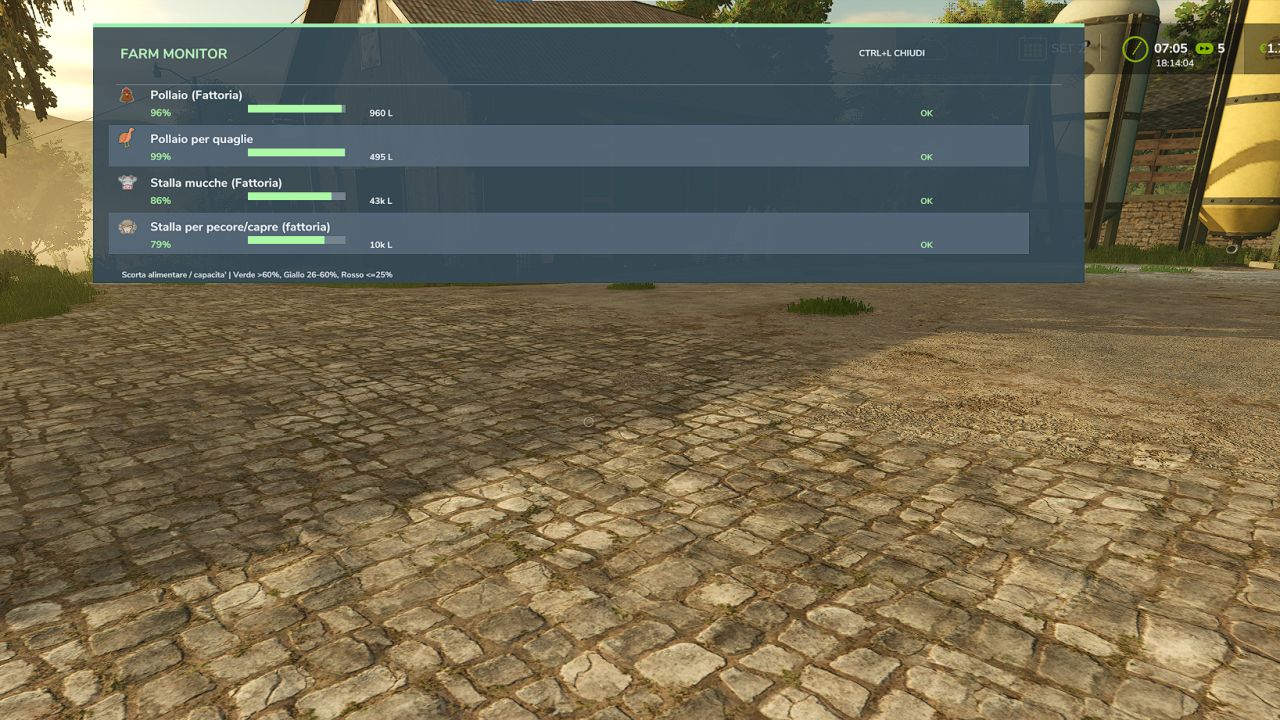
Farm Monitor FS25
Farm Monitor is a mod for Farming Simulator 25 that allows you to quickly monitor the feed level of your animal husbandries directly during gameplay, without having to constantly open the animal menu. The mod offers two display modes: - Compact mode: displays only the animal icons and feed percentage at the top center, taking up very little screen space. - Window mode: displays a more complete overview with the animal husbandry name, feed percentage, visual bar, available supply and overall status. The display can be opened and closed using the Alt+L key combination. Main features: - quick monitoring of feed levels at animal husbandries - compact and unobtrusive HUD - detailed window that can be opened when needed - dynamic colors: - green = good level - yellow = attention - red = critical - displays only animal husbandries with animals - support for multiple animal types, including dedicated icons - ideal for quickly checking whether a husbandry needs to be replenished
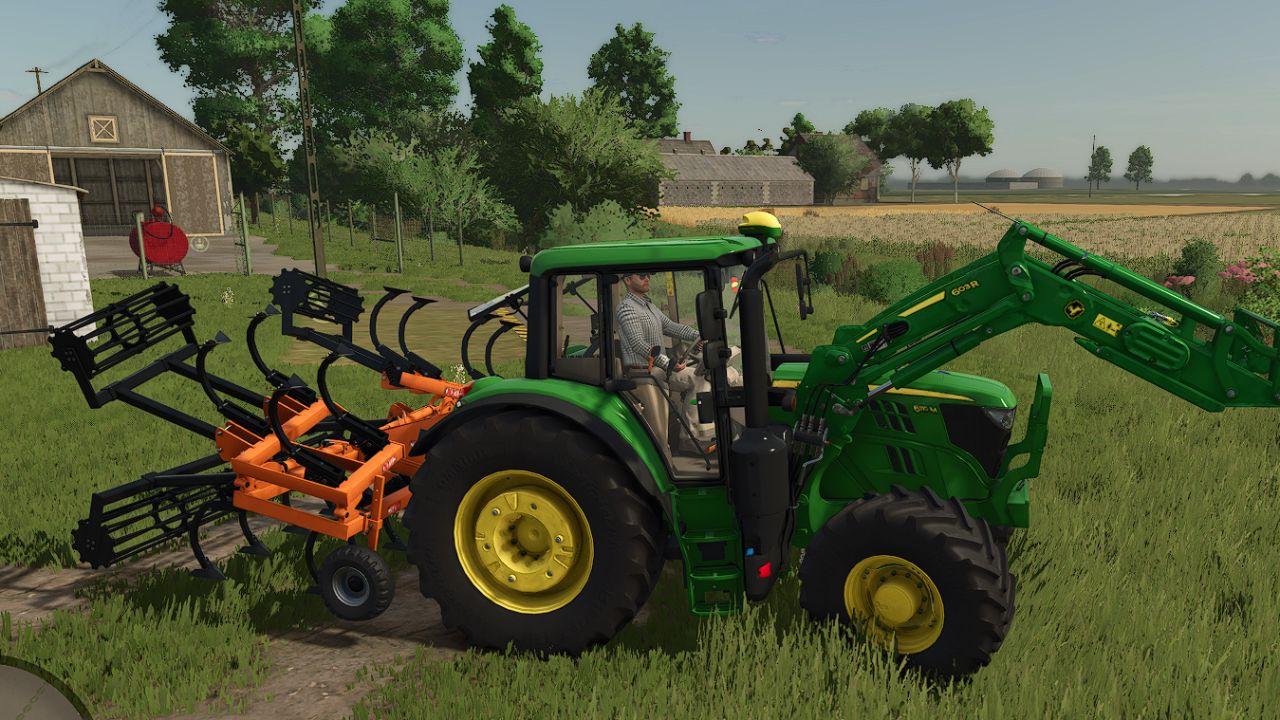
Noli P15-23 V1.0
Noli P15-23 V1.0 Noli P15: Price: 9000 $ Required power: 110 hp Working width: 3.8 m Max. working speed: 17 kph Noli P19: Price: 10000 $ Required power: 150 hp Working width: 4.8 m Max. working speed: 17 kph Noli P23: Price: 11000 $ Required power: 195 hp Working width: 5.8 m Max. working speed: 17 kph Converted FS22 Mod Author: jesusjn10, Langreomodding Report bugs in the comments and help modders improve this mod. Always check the comments, you can find a solution. DOWNLOAD MOD
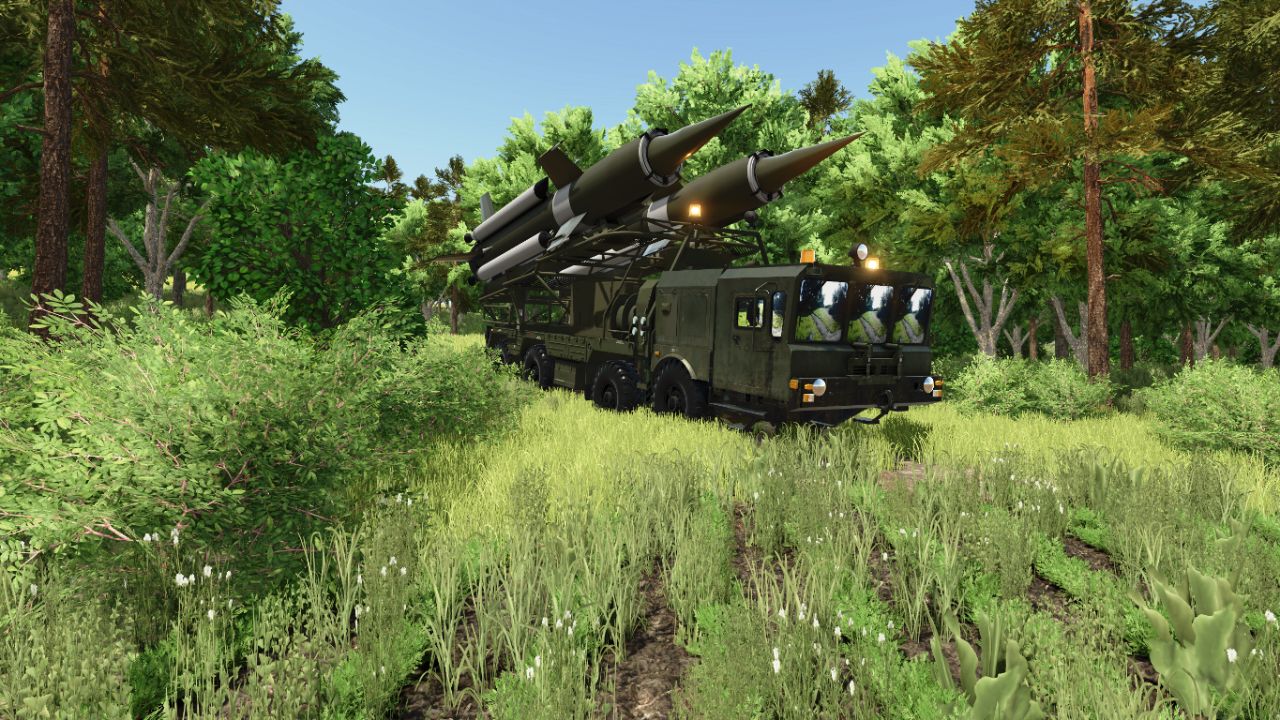
MZKT-7930 S-25 V1.0
MZKT-7930 S-25 V1.0 MZKT-7930 S-25 (8×8 Heavy Tactical Missile Launcher System): Technical and Operational Analysis Detailed Technical CharacteristicsHigh-Mobility MZKT-7930 8×8 Chassis: Built upon the multi-axle all-wheel-drive platform developed by the Minsk Wheeled Tractor Plant, engineered to transport extremely heavy payloads across rugged terrain and unpaved roads. Heavy Caliber Dual Missile Launcher: Integrates a tilting framework mounted on the rear deck that carries and elevates two large long-range missiles equipped with cruciform stabilization fins. Low-Profile Forward Cab: Features a wide, armored front cabin equipped with panoramic windshields and tactical lighting tailored for heavy route navigation and nighttime deployments. High-Torque Diesel Power & Multi-Axle Distribution: Powered by a high-torque diesel engine paired with a reinforced transmission system, guaranteeing structural stability during transport and pre-launch maneuvers. Tactical Utility and Operational DoctrineLong-Range Tactical Strike & Deterrence: Engineered to deliver heavy firepower and neutralize strategic targets, fortified installations, or critical infrastructure over extended distances. Strategic Mobility (“Shoot-and-Scoot”): Wheeled configuration allows high-speed movement across highways and field tracks, minimizing exposure to counter-battery fire. Air Defense Network Integration: Operates as a decisive component within missile batteries, coordinating seamlessly with radar systems and mobile command posts. Author: karl zu Report bugs in the comments and help modders improve this mod. Always check the comments, you can find a solution. DOWNLOAD MOD
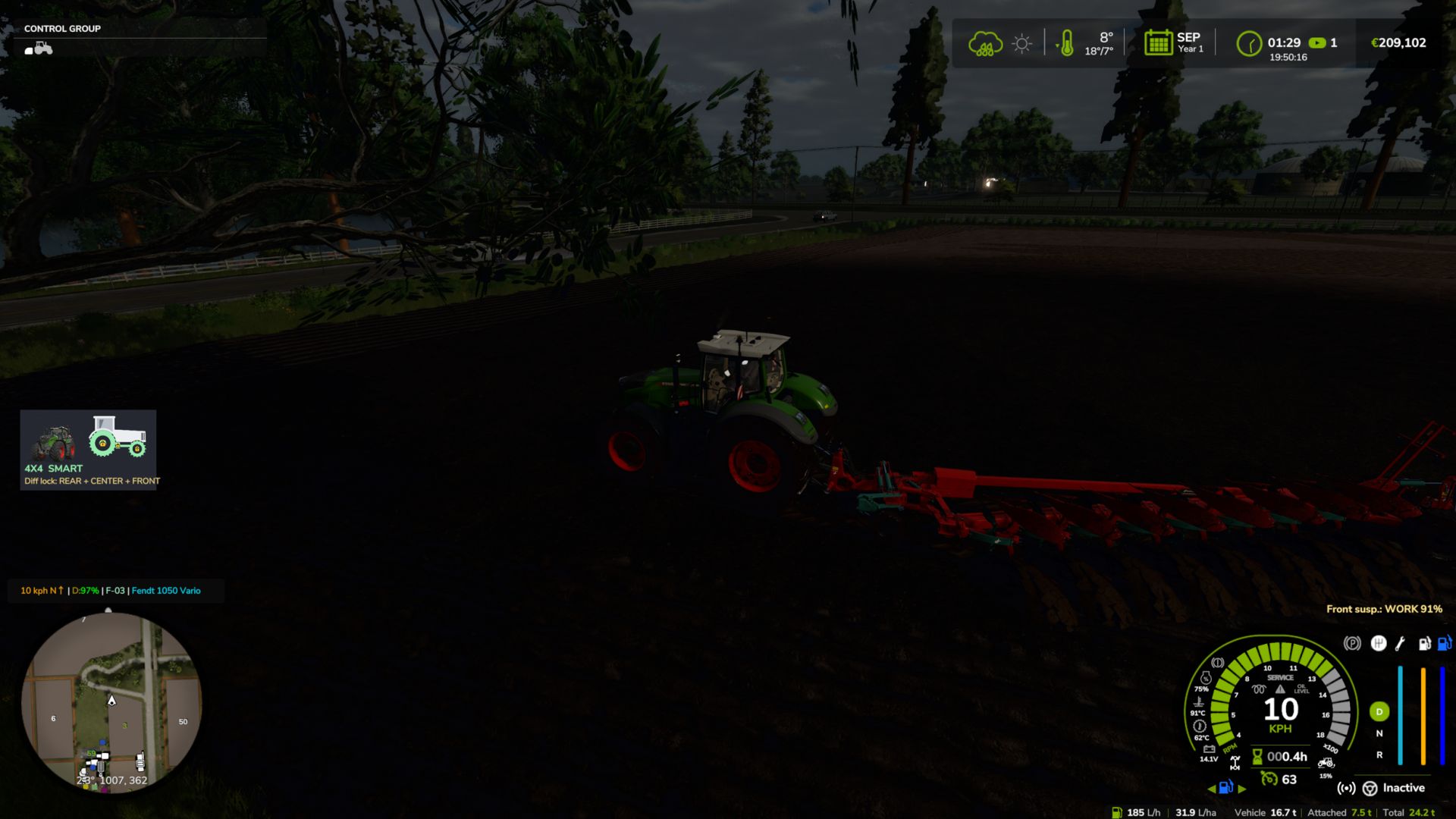
Realistisches 4×4-Traktionssystem V2.0.0.1
Realistisches 4×4-Traktionssystem V2.0.0.1 Mehrspielermodus in Entwicklung, spielbar, kann aber Fehler enthalten. Übernehmen Sie die volle Kontrolle über die Traktion Ihres Traktors – schalten Sie den Allradantrieb ein, sperren Sie das Differenzial und lassen Sie das System auf tatsächlichen Radschlupf reagieren, nicht nur auf eine zugewiesene Taste. Diese Modifikation fügt kompatiblen Fahrzeugen (Traktoren, Lastwagen, Mähdreschern, Pkw) ein vollständig zuschaltbares 4×4-Traktionssystem hinzu: Die Vorderachse kann je nach Bedarf zu- oder abgekoppelt werden, und eine Differenzialsperre kann aktiviert werden, die den Wendekreis zugunsten maximaler Traktion in Schlamm, Schnee oder bei schwerer Arbeit verringert. Merkmale Echtzeit-Schlupferkennung der Hinterräder – die Automatikmodi reagieren auf die tatsächliche Schlupfphysik der Räder, nicht nur auf die Geschwindigkeit. Vier Fahrmodi, die jedem Fahrzeug standardmäßig zugewiesen sind: Manuell – immer die Kontrolle Halbautomatisch – greift bei tatsächlichem Radschlupf ein, manuelle Steuerung ist jederzeit möglich Automatik — die gleiche Logik, angepasst an Fahrzeuge mit werkseitig eingebautem automatischem Allradantrieb (CVT/IVT-Getriebe). Intelligent – kontinuierliches, proportionales Ein- und Ausschalten nach Fendt-Art (ohne abruptes Ein-/Ausschalten). Native Reifendrucksimulation während der Fahrt – keine Abhängigkeit von anderen Mods Bildschirm-HUD mit Echtzeitstatus und anpassbarer Position im Spiel-Einstellungsmenü Keine XML-Änderungen an den Fahrzeugen erforderlich – das System integriert sich automatisch in alle kompatiblen Fahrzeuge. V2.0.0.1 Behoben: Ein wiederholter Lua-Fehler im Log („FourWDTractionSystem.lua:2518: Ungültiges Argument #3 für 'format'“) trat bei Fahrzeugen mit permanentem Allradantrieb oder ohne Allrad-Geschwindigkeitsbegrenzung auf (z. B. 6×4-Lkw, Radlader, Sattelzugmaschinen). Vielen Dank an Patrik Vendelberger für den Hinweis. Tags: Behoben EinDie VorderachseDiese ModifikationVielen Dank
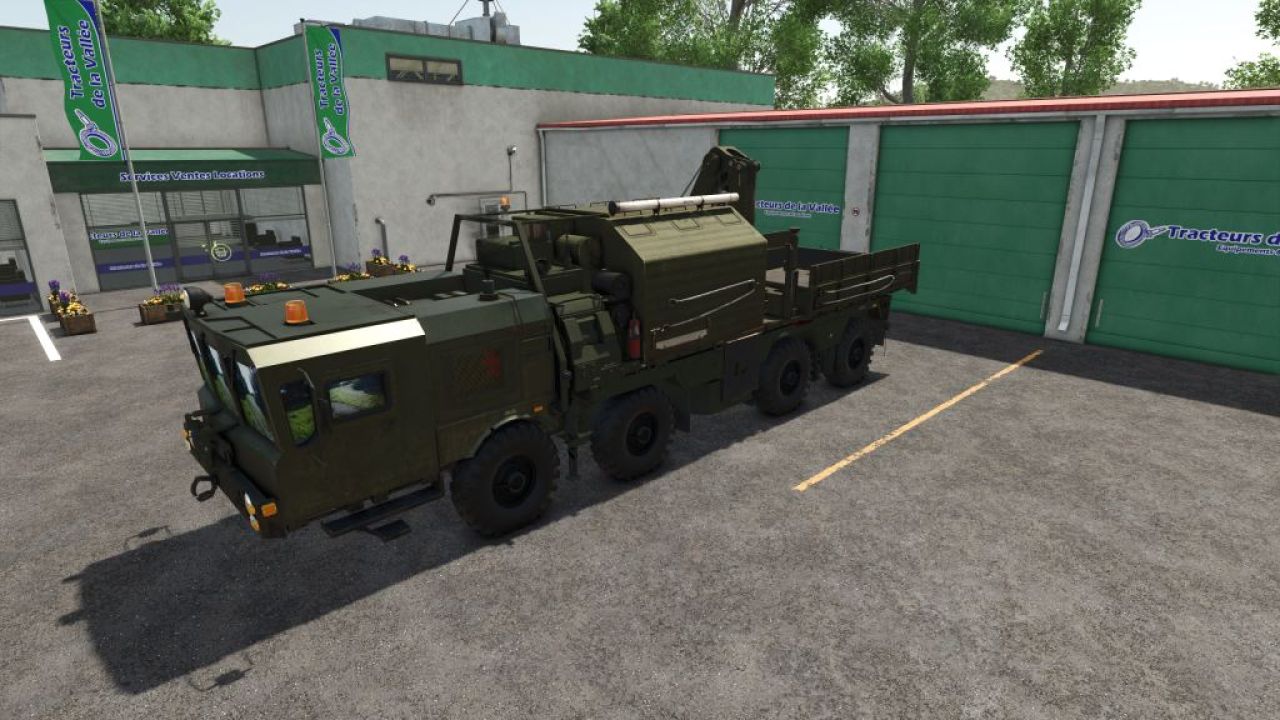
MZKT-7930 Heavy Tactical Recovery Vehicle V1.0
MZKT-7930 Heavy Tactical Recovery Vehicle V1.0 MZKT-7930 Heavy Tactical Recovery Vehicle (8×8 Rescue & ARV Platform): Technical and Operational Analysis Detailed Technical Characteristics High-Mobility MZKT-7930 8×8 Chassis: Built upon the heavy-duty all-wheel-drive multi-axle platform developed by the Minsk Wheeled Tractor Plant, engineered to transport massive payloads across extreme off-road environments. Heavy Recovery & Crane Module: Features a specialized rear superstructure equipped with a high-capacity hydraulic articulated crane and field repair equipment for recovery operations. Hydraulic Stabilization Systems: Outfitted with deployable hydraulic outrigger legs on the sides and rear to ensure a stable baseline during heavy lifting and recovery pulls. Split Forward Cabin: Features a wide, low-profile front cabin configuration with panoramic visibility, optimized to accommodate technical recovery crews and field maintenance gear. Tactical Utility and Operational Doctrine Recovery & Field Maintenance: Purpose-built to winch, extract, tow, and recover stuck, disabled, or overturned combat vehicles, launcher platforms, and heavy logistics trucks. Combat Engineering & Logistics Support: Clears blocked transit routes and assists with heavy component replacement on forward deployed units. All-Terrain Operational Access: The 8×8 drive configuration ensures full access through deep mud, snow, and rugged terrain where standard recovery trucks cannot operate. Simulation and Modding Significance Advanced Load & Crane Dynamics: Models the physical behavior of suspended loads, weight distribution during towing maneuvers, and hydraulic outrigger deployment kinematics. Complete Support Ecosystem: Serves as the essential recovery component that rounds out the heavy missile carriers, radar nodes, and supply fleets in your collection. Author: karl zu Report bugs in the comments and help modders improve this mod. Always check the comments, you can find a solution. DOWNLOAD MOD
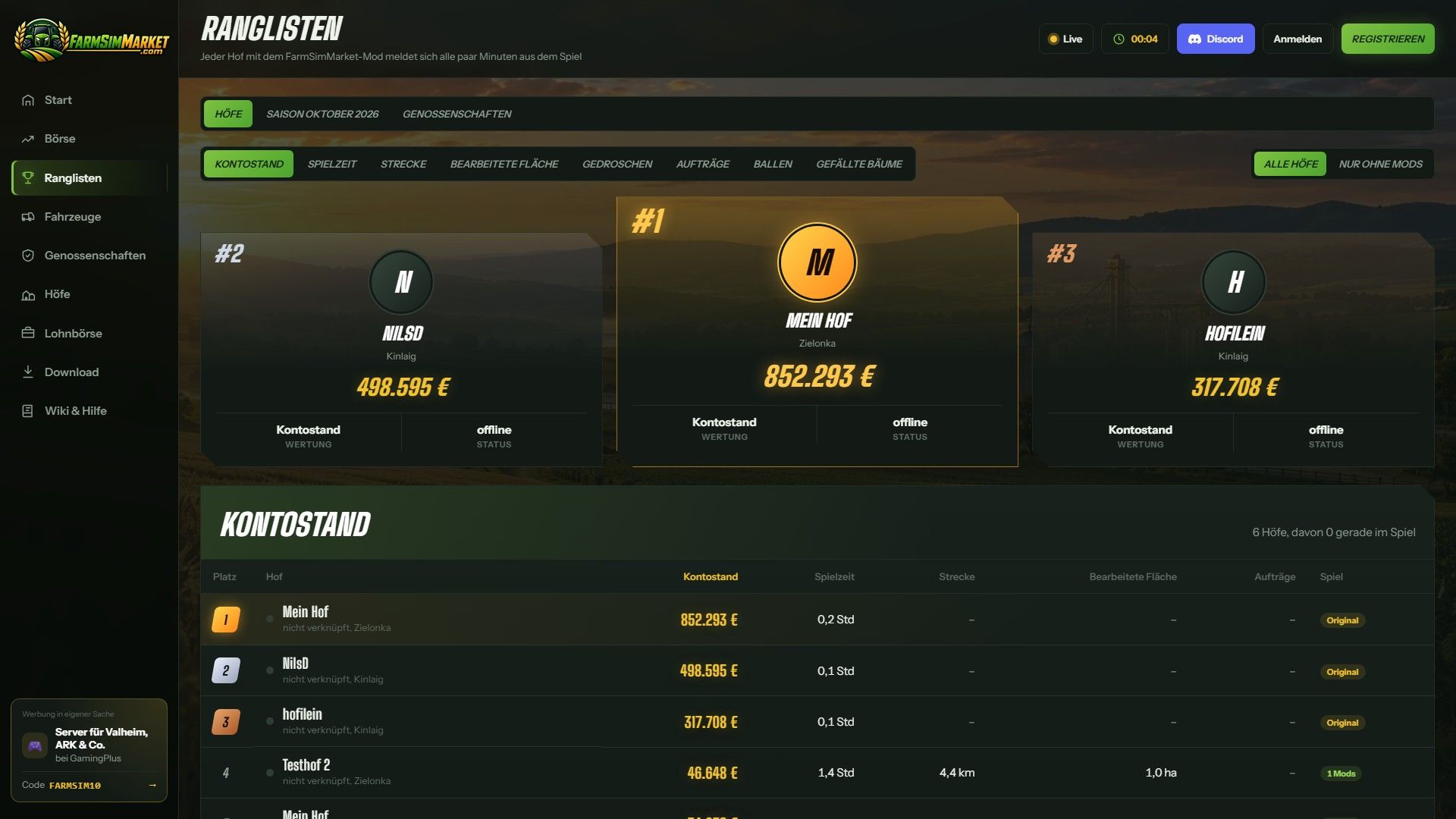
FarmSimMarket – Spielermarkt & Ranglisten BETA 7 v1.0.0.0
FarmSimMarket – Spielermarkt & Ranglisten BETA 7 v1.0.0.0 OFFENE BETA – Handle mit echten Spielern statt nur mit dem Spiel! FarmSimMarket verbindet deinen Bauernhof mit farmsimmarket.com – einem Marktplatz für alle LS25-Spieler. WAS DIE MODIFIKATION TUN KANN – Spielermarktplatz: Verkaufen oder kaufen Sie Feldfrüchte, Milch, Paletten, Ballen und Fahrzeuge von anderen Spielern – direkt im Spiel (ESC → FarmSimMarket) oder auf der Website. – Markt-Tablet (Strg+T): Preise, Ihre Angebote und Neuigkeiten am Bildschirmrand, während Sie weiterspielen – sogar im Fahrzeug. – Kein zusätzlicher Bau erforderlich: Die gekauften Waren werden in Ihre bestehenden Silos und Lagereinrichtungen eingelagert oder erscheinen als Paletten/Ballen im Abladebereich des Geschäfts. – Bestenlisten & Farmprofil: Vergleiche deine Farm mit anderen Spielern. – Vertragsmarktplatz: Auftragsarbeiten veröffentlichen oder annehmen – mit Zugriffsberechtigungen auf gemeinsam genutzten Servern. – Multiplayer- und dedizierte Server, gemietete Server (G-Portal, Nitrado …) über die Serverbrücke. SO GEHT'S LOS 1. Entpacken Sie die ZIP-Datei nicht; legen Sie sie in den Mods-Ordner und aktivieren Sie sie in Ihrem Spielstand. 2. Erstellen Sie ein Konto auf farmsimmarket.com und geben Sie den Code aus dem Spiel ein. 3. Zum Handeln starten Sie den kleinen FarmSimMarket-Helfer (farmsimmarket.com/download, Windows, keine Installation erforderlich). OFFENE BETA – BITTE LESEN FarmSimMarket befindet sich noch in einer sehr frühen Entwicklungsphase. Die meisten Funktionen sind zwar vorhanden, es kann aber gelegentlich zu Fehlern kommen oder etwas funktioniert ab und zu nicht. Erstellen Sie daher vor Ihrem ersten Handel eine Sicherungskopie Ihres Spielstands. Was noch nicht funktioniert oder kaum getestet wurde: – Nur für PC (Windows) – keine Konsolen; das Hilfsprogramm läuft nur unter Windows. – Der Handel funktioniert nur mit dem Helfer oder der Serverbrücke (ohne diese bleiben die Waren an ihrem Platz; es geht nichts verloren). – Der Mehrspielermodus und die Zugriffsberechtigungen für den Vertragsmarktplatz wurden kaum getestet. – Gemietete Server über die Serverbrücke werden noch getestet. – Die Preise bewegen sich anfangs kaum – sie entstehen durch den Handel der Spieler. Die Website ist derzeit nur auf Deutsch verfügbar. Einen Fehler gefunden? Bitte melde ihn auf Discord im Kanal #fehler-melden mit einer kurzen Beschreibung und der Datei log.txt. BETA 7 Version 0.32€ großes Update (Mod + Website) NEU – Das Lieferlager kann ausgewählt werden: Im ESC-Menü legen Sie fest, in welches Silo, welchen Schuppen, welchen Stall oder welche Produktionsstätte die gekauften Waren zuerst geliefert werden – von dort aus erfolgen auch zuerst die Verkäufe. – Zuckerrübenschnitzel können nun auf dem Markt gehandelt werden. – Genossenschaftsverträge: Eine Genossenschaft liefert oder kauft als Ganzes ein – ihre Mitglieder teilen sich die Menge, und der liefernde Betrieb erhält den entsprechenden Betrag. GEÄNDERT Das Spielgeld ist unbegrenzt: Es gibt keine Kontostandsprüfung mehr, Geld-Mods sind erlaubt und Geld zählt nicht mehr für Bestenlisten oder Erfolge. Im Gegenzug sinkt das Tageslimit mit steigendem Guthaben (höchster Kontostand der letzten 30 Tage), und Sie können innerhalb von 24 Stunden maximal ein Viertel des verfügbaren Angebots pro Ware kaufen – so kann niemand den Markt leer kaufen. Die Registrierung ist jetzt nur noch mit dem Verknüpfungscode aus dem Spiel möglich. Tags: BETAEntpacken SieErstellen SieNEU
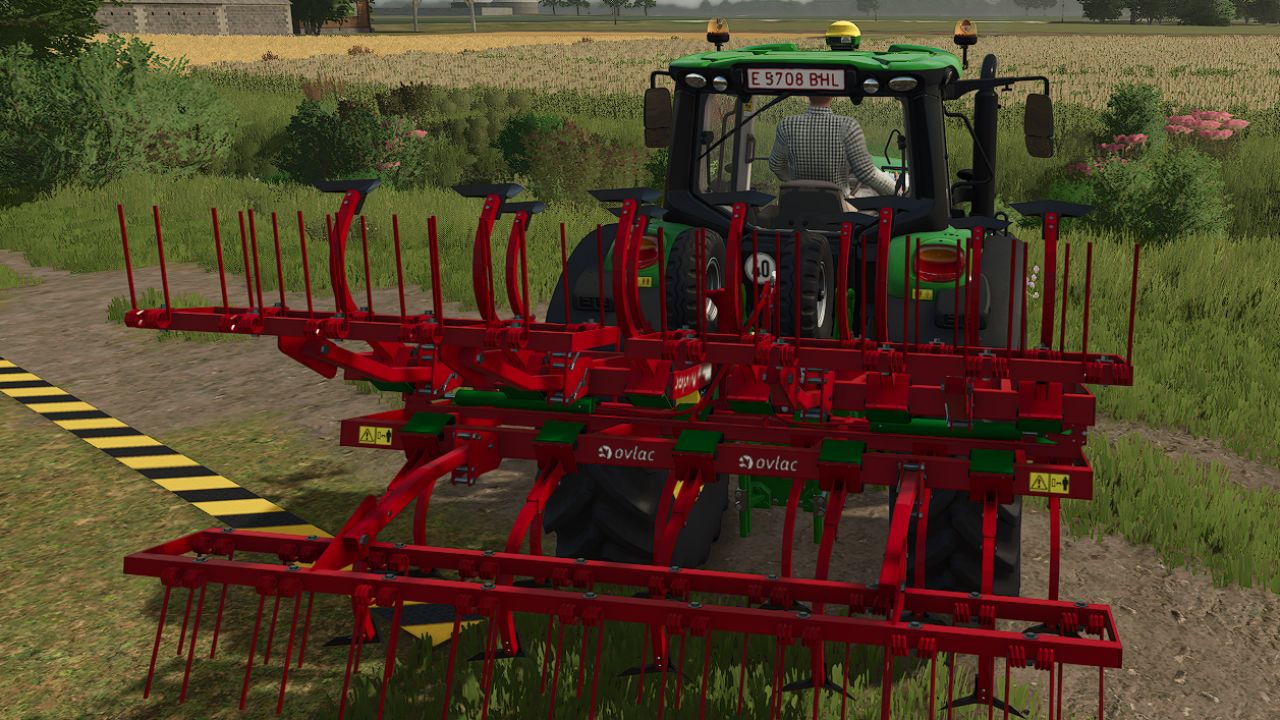
Ovlac XLander 2-17-21 V1.0
Ovlac XLander 2-17-21 V1.0 Price: 5000 € Max. working speed: 15 kph Required power: 120 and 150 hp Working width: XLander 2-17: 4.5 m XLander 2-21: 5.5 m Manufacturer Ovlac Category Cultivators Conversion FS22 Mod Author: jesusjn10, David.Mtnz (AM Modding), David.Mtnz Report bugs in the comments and help modders improve this mod. Always check the comments, you can find a solution. DOWNLOAD MOD
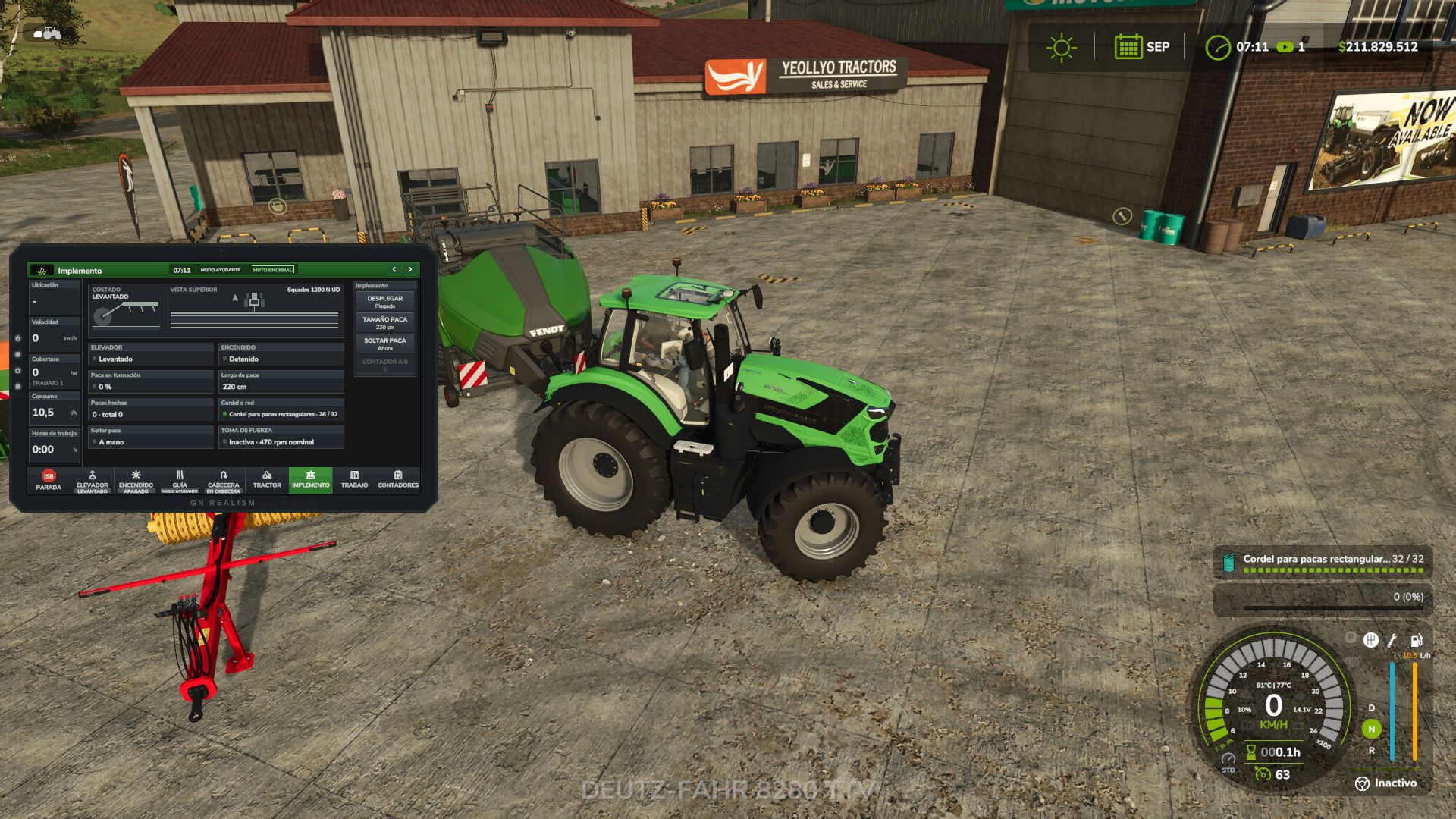
Landwirtschaftliches Terminal V1.1.0.0
Landwirtschaftliches Terminal V1.1.0.0 Rüsten Sie Ihre Maschinen mit einem echten Bordterminal aus, genau wie es beispielsweise von John Deere, CLAAS, Fendt und Trimble verwendet wird. Dieses Terminal arbeitet Hand in Hand: Es hebt Anbaugeräte am Vorgewende an, wendet automatisch, schaltet Sektionen ab, kartiert Ihre Arbeitsfläche und warnt Sie bei Problemen. Alle Funktionen basieren auf realen Spieldaten, ohne fiktive Zahlen. Wie man es bekommt Kaufen Sie es im Shop als weiteres Gerät. Wählen Sie beim Kauf oder der Anpassung eines Traktors, Mähdreschers oder einer selbstfahrenden Maschine „Landwirtschaftliches Terminal: Ja“ (10.000 $). Jährliche Lizenz: 2.000 US-Dollar pro Maschine, monatlich abgerechnet (166,67 US-Dollar) als Betriebskosten, genau wie bei echten Führungs- und Abschnittssteuerungslizenzen. Die vorhandenen Geräte werden ohne Terminal gestartet. Sie können ein Terminal beim Händler über das Konfigurationsmenü hinzufügen. Merkmale Automatische Vorgewendesteuerung: An der gelben Linie hebt das Terminal die Anbaugeräte an und schaltet sie ab, reduziert die Geschwindigkeit auf die Vorgewendeeinstellung, lenkt in Richtung der nächsten Fahrspur (U-Kurve oder Rundumwendung), senkt die Anbaugeräte wieder ab und stellt die Arbeitsgeschwindigkeit wieder her, sobald das Lenksystem die neue Spur erfasst hat. Durch Berühren des Lenkrads übernehmen Sie wieder die Kontrolle. Navigation an Landzungen: Das Leitsystem folgt den Kurven automatisch, bremst an jeder Kurve ab und stoppt den Tempomat sowie eine Warnung, wenn sich die Landzungenschleife über einem bereits bearbeiteten Bereich schließt. Spielfeldabdeckungskarte: Zeigt die Abdeckung jedes Spielfelds an, Überlappungen sind rot hervorgehoben. Enthält eine 3D-Ansicht, Ausrichtung nach oben oder Norden sowie Zoomfunktionen. Die Karten werden mit Ihrem Spielstand gespeichert. Automatische Teilbreitensteuerung: Nutzt die Abdeckungskarte mit Überlappungseinstellungen von 0 %, 50 % oder 100 % und einstellbarer Vorausschau. Zeigt die Ausbringungsmenge in l/ha oder kg/ha an. Ernte: Zeigt den Füllstand des Korntanks, den Ertrag, den Kornfluss, die Schneidwerkslast und die voraussichtliche Zeit bis zur vollständigen Befüllung des Korntanks an. Mit der Funktion „Entladen anfordern“ erhält der Traktor, der den Kornwagen zieht, eine Benachrichtigung mit einem Alarm, der den Füllstand und die Entfernung jedes Mähdreschers anzeigt, ähnlich wie bei der Maschinensynchronisierung. Traktorsysteme: Motor, Kraftstoffstand und verbleibende Reichweite, AdBlue, Traktion und Radschlupf, Differenzialsperre, automatische Zapfwelle und Hydraulik (Senk- und Hubgeschwindigkeit, maximale Hubhöhe und Ventildurchflussrate). Bedienelemente: Seitenansicht mit der aktuellen Hubposition und Draufsicht mit den Sektionen. Heben, Aktivieren, Klappen, Markierungen, Rückwärtsfahrt, Abdeckungen, Arbeitstiefe und Ballenpressensteuerung. Arbeitszähler und -historie: Zurückgelegte Fläche, Arbeitszeit, Kraftstoffverbrauch, l/ha, ha/h, Entfernung und Durchschnittsgeschwindigkeit. Warnzentrale mit ACCNOWLEDGE: Kraftstoffreserve, AdBlue- und Batteriewarnungen, voller Getreidetank, Feststellbremse, Fehlfunktionen, übermäßiger Radschlupf, niedriger Produktstand und mehr. Funktionen und Kompatibilität Funktioniert auf jeder Karte mit Basisspiel- und Mod-Maschinen, ohne dass XML-Dateien bearbeitet werden müssen. Alles kann direkt vom Terminal aus konfiguriert werden: Größe und Position jeder Maschine (innerhalb oder außerhalb der Kabine), Kartendarstellung, Touch-Bedienelemente, die nur im Stand verfügbar sind, Pieptöne und Alarme. Terminalsprache: Englisch, Spanisch, Deutsch, Français. Kompatibel mit Mehrspieler- und dedizierten Servern. Arbeitsberichte, Karten und Entladeaufträge werden mit allen Spielern geteilt. Ein Getreidewagen eines anderen Bauernhofs kann Entladeaufträge erhalten, sofern die Berechtigungen für Auftragnehmer aktiviert sind. Wenn Sie die Mods „Realistischer Kraftstoffverbrauch“, „Realistischer Dieselstart“, „Realistische Bremsen“ oder „Variable Arbeitstiefe“ verwenden, kann das Terminal deren Daten anzeigen. Diese Mods sind optional. Standard-Tastenbelegungen Alt + T (links): Terminal öffnen/schließen Linke Alt-Taste + C: Touch-Modus (Mauszeiger) Alt + P (links): Nächste Seite Alt + H (Linke Alt-Taste): Headland-Sequenz Alt + X: ISB – Stopp implementieren Tipp Das Leitsystem nutzt die im Spiel integrierte Lenkhilfe. Erstellen Sie daher zunächst Ihre Leitlinie im Feld. Stellen Sie dann AUTO HEADLAND auf „Anheben und Drehen“ ein und lassen Sie das Terminal die Vorgewendeführung übernehmen. V1.1.0.0 Änderungsprotokoll 1.1.0.0 Änderungen im Vergleich zu 1.0.0.0 (der vorherigen Version auf KingMods) Dieses Update beinhaltet auch Version 1.0.1.0, die nicht separat veröffentlicht wurde. NEU: 3D-MONITOR IN DER FAHRERHAUSKASSE Ein neuer 3D-Monitor, der über die Terminaleinstellungen (3D-Monitor-Tabelle) in der Kabine jedes Traktors oder Mähdreschers, an einem Konsolenarm oder einer Säulenhalterung installiert werden kann. Es müssen keine Fahrzeug-XML-Dateien bearbeitet werden. Der Monitor gehört zum Rechner und ist synchronisiert: Im Mehrspielermodus sieht ihn jeder Spieler. Es schaltet sich mit der Zündung ein und startet wie ein echtes System (5 Sekunden: Terminalname, „Startsystem“, Ladebalken und Startgeräusch). Es zeigt das gesamte Terminal, jede Seite, auf einem eigenen großen Bildschirm, der so gestaltet ist, dass er vom Sitzplatz aus gut lesbar ist: große, fette Schrift, große Schaltflächen und weniger Elemente pro Seite. Neue Einstellung „Monitoransicht“: Groß (eigener Bildschirm) oder Wie die 2D-Ansicht. Neue Einstellung „Monitortext“ (Normal, Groß, Extra groß) für die Wie die 2D-Ansicht. Es wird über das 2D-Terminal mit den Tasten oder im Touch-Modus (Alt + C) per Mausklick bedient. Jede Berührung erzeugt ein Geräusch. Fünf physische Tasten mit Hintergrundbeleuchtung: Bildschirm aus, Tag/Nacht, Startseite, Einstellungen und nächste Seite. Das GN REALISM-Logo wird bei eingeschalteter Zündung hinterleuchtet. Mattes Display (die Sonne blendet nicht mehr) und gedimmtes Lichtdesign. Positionierung: Die Tasten „-“ und „+“ ermöglichen die Steuerung von nah/fern, links/rechts, unten/oben, Neigen, Drehen und Rollen mit feiner oder grober Abstufung. Durch Gedrückthalten einer Taste wird die Bewegung fortgesetzt. Die Taste „IN FRONT“ positioniert das Objekt im Vordergrund. Die Größe kann bis zu doppelt so groß eingestellt werden. Die letzte Position wird modellabhängig gespeichert. Arbeitsseite: Die Karte nutzt die gesamte Höhe und zeigt dasselbe Gelände wie die 2D-Ansicht, wobei der Traktor tief im Bild nach vorne blickt. Die Karte bewegt sich in jedem Frame flüssig. Das 3D-MONITOR-Fenster warnt, wenn das Upscaling des Spiels (FSR, DLSS oder XeSS) aktiviert ist, da der Monitor dann mit einer niedrigeren Auflösung gezeichnet wird und das Bild unschärfer aussieht. Maschinen ohne Kabinenkamera zeigen die Meldung „Keine Kabinenkamera“ an und können diese nicht nachrüsten. 2D-Terminal Neuer Pfeilknopf im Rahmen: nächste Seite. Hinterleuchtetes GN REALISM-Logo auf dem Rahmen. Neue Einstellung „Im Fahrerhaus fixiert“: Bei Verwendung der Fahrerhauskamera bleibt das Terminal an einem festen Punkt im Fahrerhaus. Neue Einstellung „Sichtbar ohne Spiel-HUD“ (standardmäßig aktiviert): Das Terminal bleibt sichtbar, wenn das Spiel-HUD ausgeblendet ist. Bei geschlossenem Terminal werden Warnungen und Entladeanforderungen vom Spiel akustisch angekündigt. KI-HELFER UND HEADLAND Wenn der Spielhelfer oder eine KI-gesteuerte Aufgabe erledigt ist, steuert das Terminal nichts mehr: Vorgewende, Wenden, Teilung, Zapfwelle, Differenzialsperre, Hydraulikeinstellungen oder Wendepflug. Es überwacht und protokolliert lediglich die Arbeit. Dadurch wird das Problem behoben, dass der Helfer am Vorgewende stecken bleibt. Bei KI-gesteuertem Betrieb kehren die Hydraulikwerte zu den im Spiel vorgegebenen Werten zurück (Hebe- und Senkzeiten, maximaler Hubbereich, Animationsgeschwindigkeit) und das Terminal zeichnet seine Vorgewendelinie nicht. Die automatische Vorgewendesteuerung (Anheben, Abbremsen und Wenden) funktioniert jetzt nur noch, wenn die Lenkhilfe des Spiels aktiviert ist, wie bei realen Terminals. Das Protokoll vermerkt, wann die KI mit dem Fahren beginnt und wann sie aufhört. LEISTUNG Der FPS-Einbruch wurde durch mehrere bearbeitete Felder behoben: Die Abdeckungskarte verarbeitet nur das, was auf dem Bildschirm zu sehen ist. Aufeinanderfolgende Deckungsstreifen desselben Passes werden verbunden gezeichnet (bis zu 5 Mal weniger Teile auf der Karte). Der neue Konsolenbefehl taPerf protokolliert die Kosten des Terminals pro Frame. taMonitor testet die Monitorhelligkeit und Textgröße. MEHRSPIELER UND ABDECKUNG Der Server sendet jede Sekunde die neue Netzabdeckung an alle Spieler, und beim Verlassen eines Rechners erhält der Spieler die vom Server gespeicherte Aufzeichnung. Neue Einstellung „Gemeinsame Abdeckung“: Die Karte zeigt auch an, wo die anderen Maschinen des Betriebs die gleiche Art von Arbeit erledigt haben, und die Abschnittssteuerung wird darüber deaktiviert. GERÄUSCHE Neue Töne: Warnungen nach Schweregrad (Information, Vorsicht, Fehler), Türklingel für Entladeanforderungen und Monitorstart. SCHLÜSSEL (AUSGEWÄHLT) Nächste Seite: Linke Alt + P heißt jetzt Linke Alt + S (Alt + P öffnete die Charaktererstellung des Spiels). ISB (Geräte stoppen): Linke Alt + X ist jetzt Linke Alt + I (Alt + X setzt den Ballenzähler zurück). Falls Sie die alten Tastenbelegungen gespeichert haben, ändern Sie diese in den Einstellungen. ÜBERSETZUNGEN Alle Texte sind neu in Englisch, Spanisch, Deutsch und Französisch. Aktualisierung von Version 1.0.0.0 Ersetzen Sie die ZIP-Datei. Der Spielstand bleibt unverändert: Fortschritte, Karten und Spielverlauf bleiben erhalten. Tags: Die KartenErstellen SieLEISTUNGSie Ihre Maschinen
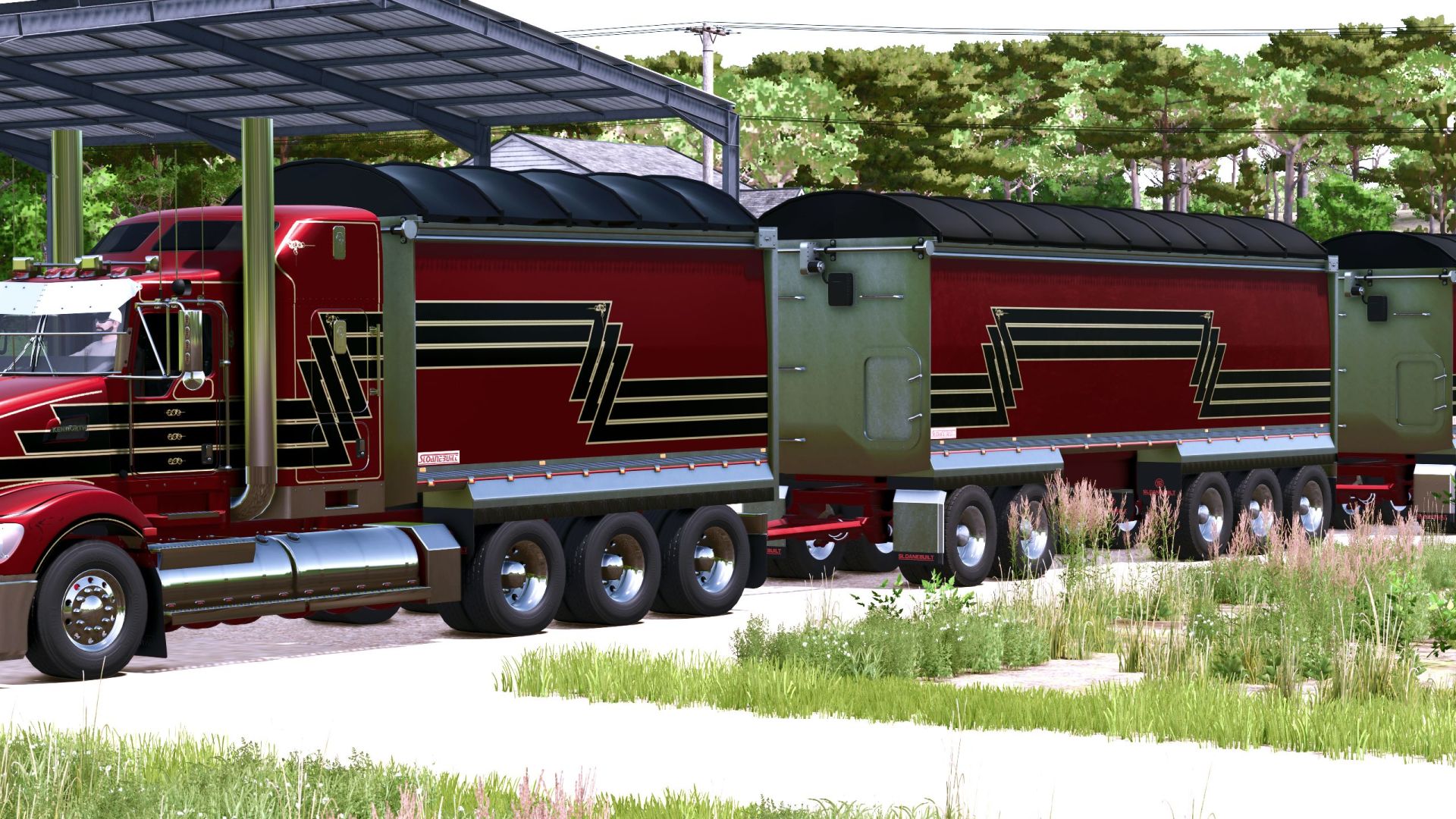
Sloanebuilt tipper bins FS25
Introducing the Sloanebuilt tipper and dog pack. AR Truck bin with fenders for stand dual axle and tri axle. Works with all of my current Kenworth truck releases, Kenworth T900, K108, and T609. I will be updating all the trucks soon with a new rear bumper that will have sloanebuilt logos to go with this pack. Paint and skin options. Standard capacity is 25,000 liters. there are also unrealistic capacities and no weight. Animated tarp, rear door and grain door. Suited for bulk materials. 4 axle dog Bin. Same animations and paint schemes as AR Truck bin. Stock Capacity is 50,000 liters with real weight. Same unrealistic capacity options as AR Truck Bin. 5 axle dog Bin. Same animations and paint schemes as AR Truck bin. Stock Capacity is 80,000 liters with real weight. Same unrealistic capacity options as AR Truck Bin. Found in Semi-trailers Category
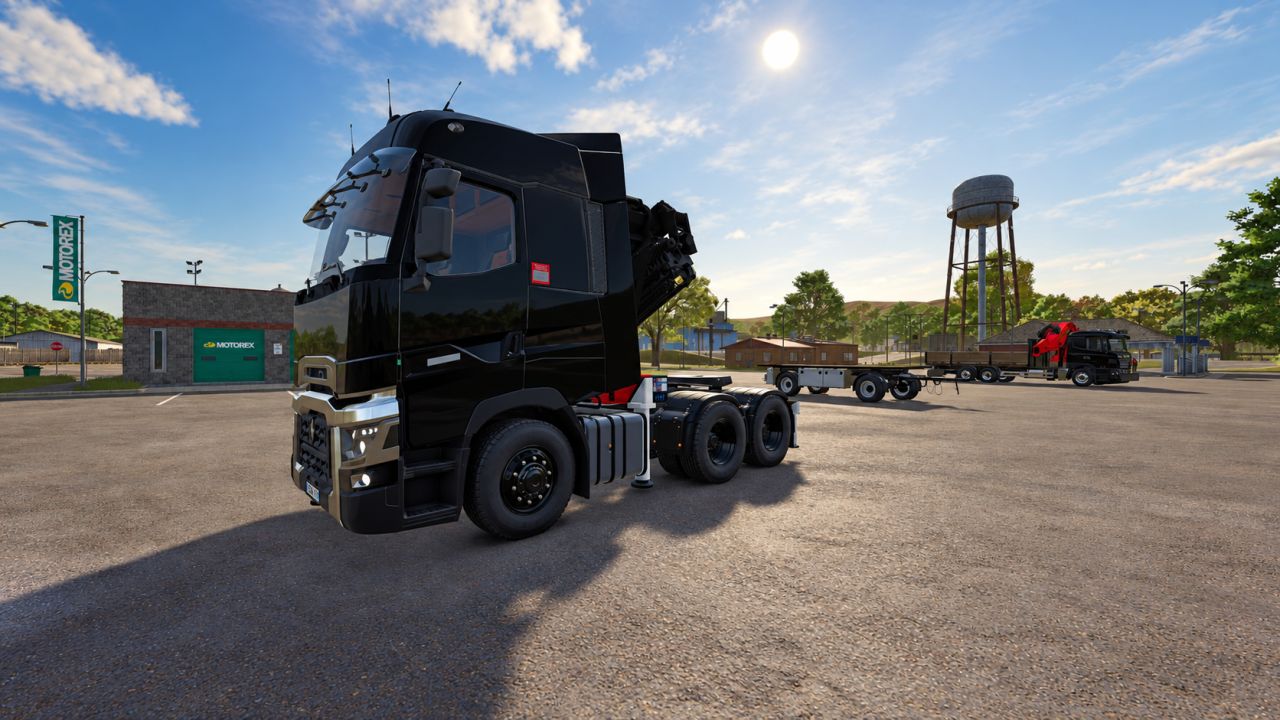
Renault T HMF 60 20 Crane + Fly jib v1.0
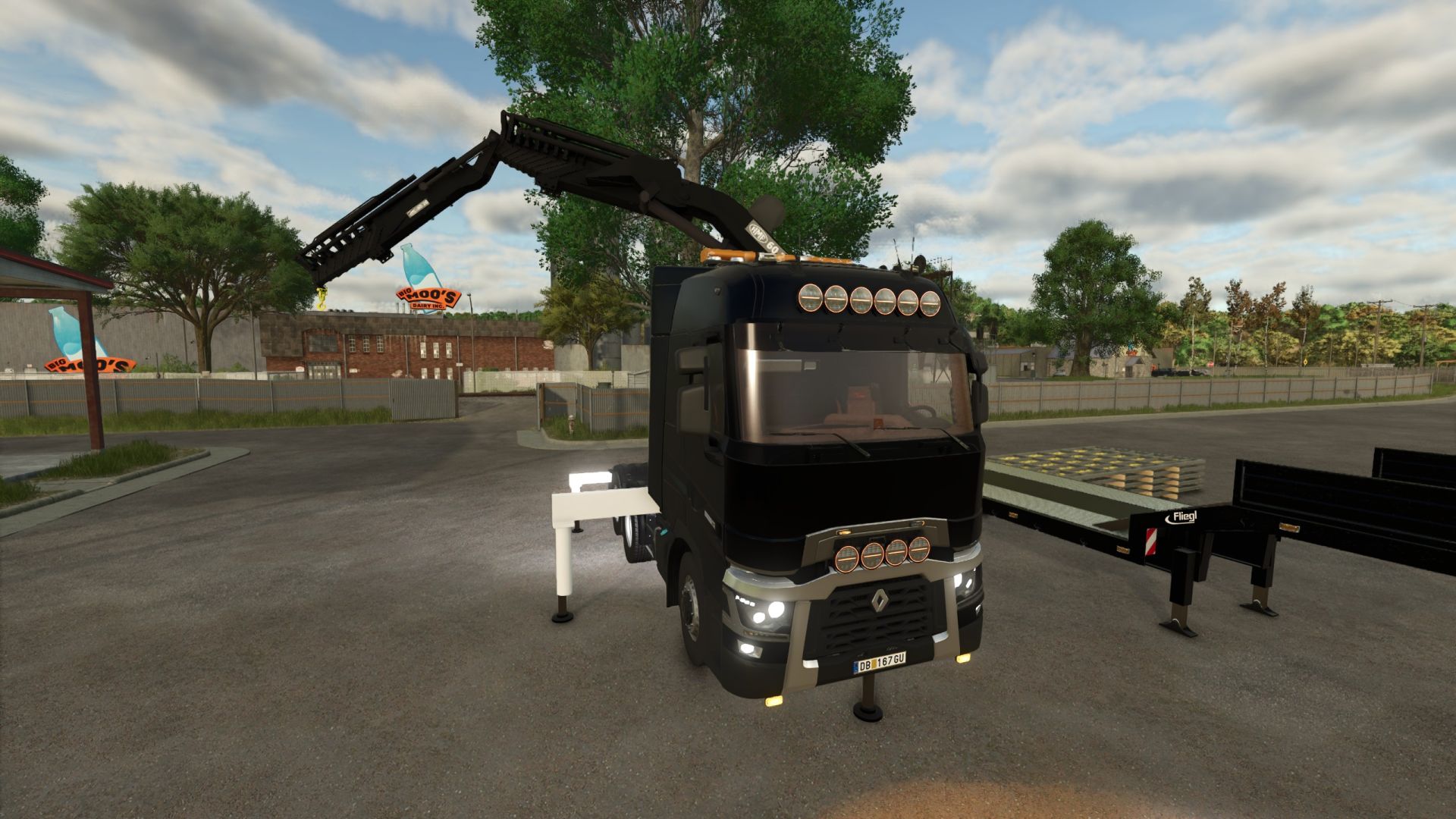
Renault T HMF 60 20 Crane + Fly jib v1.0 V1.0.0.0 Rear bumper added – The rear of the truck is now equipped with a bumper. Front and rear flashers added. Additional lights added to the bumper and on top of the cab. Additional spotlights mounted on the roof. Talmu’s added. Front support leg made functional – The support leg behind the grille is now functional and provides additional support during lifting. Crane and Fly Jib controls improved. More attachment points for the crane added – More options for attaching implements. Roof-mounted rotating beacon bar added. Introducing the Renault T equipped with an HMF 6020 crane and Fly Jib! 🏗️ A versatile mid-range crane truck, perfect for loading and unloading construction materials. Not a heavy-duty crane, but definitely not a lightweight either! Features & Recommendations HMF 6020 crane with Fly Jib Ideal for construction and transport jobs Trailer attachment recommended for better stability Loading weight onto the trailer provides additional counterweight and increases lifting stability Crane operation without a trailer is possible, but lifting capacity will be significantly reduced due to the lack of counterweight Planned for the next update: Rear bumper Functional front stabilizer leg (already hidden behind the front grille) Special thanks to DR3RS for giving permission to modify this truck! This mod is a FREE gift from DBG Community to the FS25 community. Enjoy! Author: dbcommunity, DR3RS Report bugs in the comments and help modders improve this mod. Always check the comments, you can find a solution. DOWNLOAD MOD
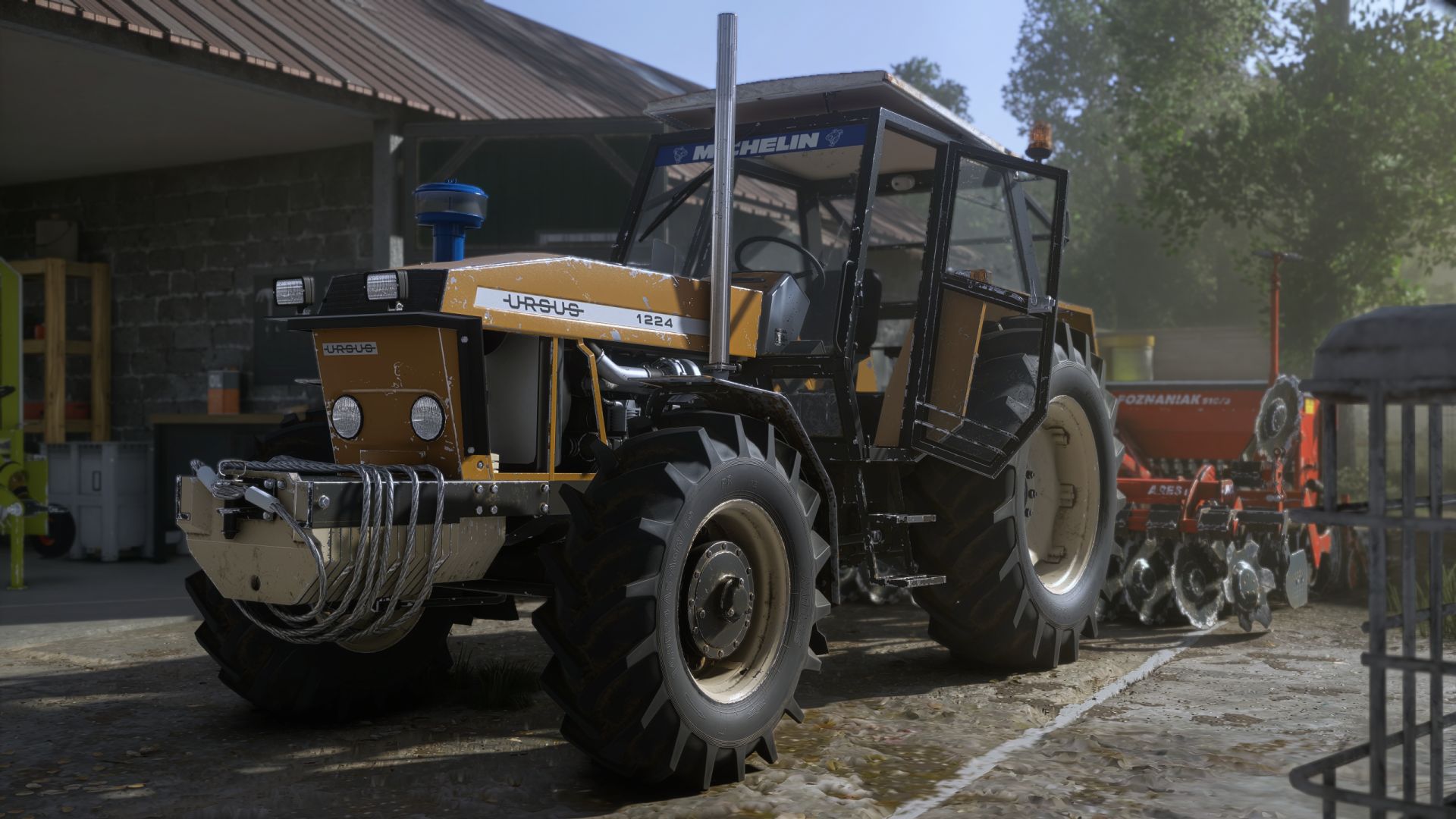
Shader VRO 2 FS25
Installation: copy the VRO_lightning folder to Documents\My Games\FarmingSimulator2025\modSettings\FS25_additionalGameSettings\lighting (‼️FOR THOSE WHO INSTALLED THE VRO 1 SHADER IS NOT NECESSARILY TO PUT AGAIN THE VRO LIGHTING ‼️) Copy the VRO_Shader_2.ini file to Farming simulator 25\x64 ✨ Features 🎥 More realistic image appearance 🌤️ Improved colors 🎨 More natural colors and contrast 🌅 Better visual depth during sunrise and sunset 🌾 Designed to preserve the natural look of the game without excessive saturation ⚙️ Compatible with DLSS 5 ⚙️ Can also be used without DLSS 5 🔧 Requires ReShade 6.8.0 🎮 Recommended Setup For the closest result to the screenshots included with this preset: ReShade: 6.8.0 DLSS 5: Cinematic (optional) Monitor in-game Brightness: 1.0 Lightning: Included file Game: Farming Simulator 25 For the best experience, I recommend using the included Lightning file together with the ReShade preset, as both were designed to work together. ‼️Please do not re-upload the material without my permission ‼️
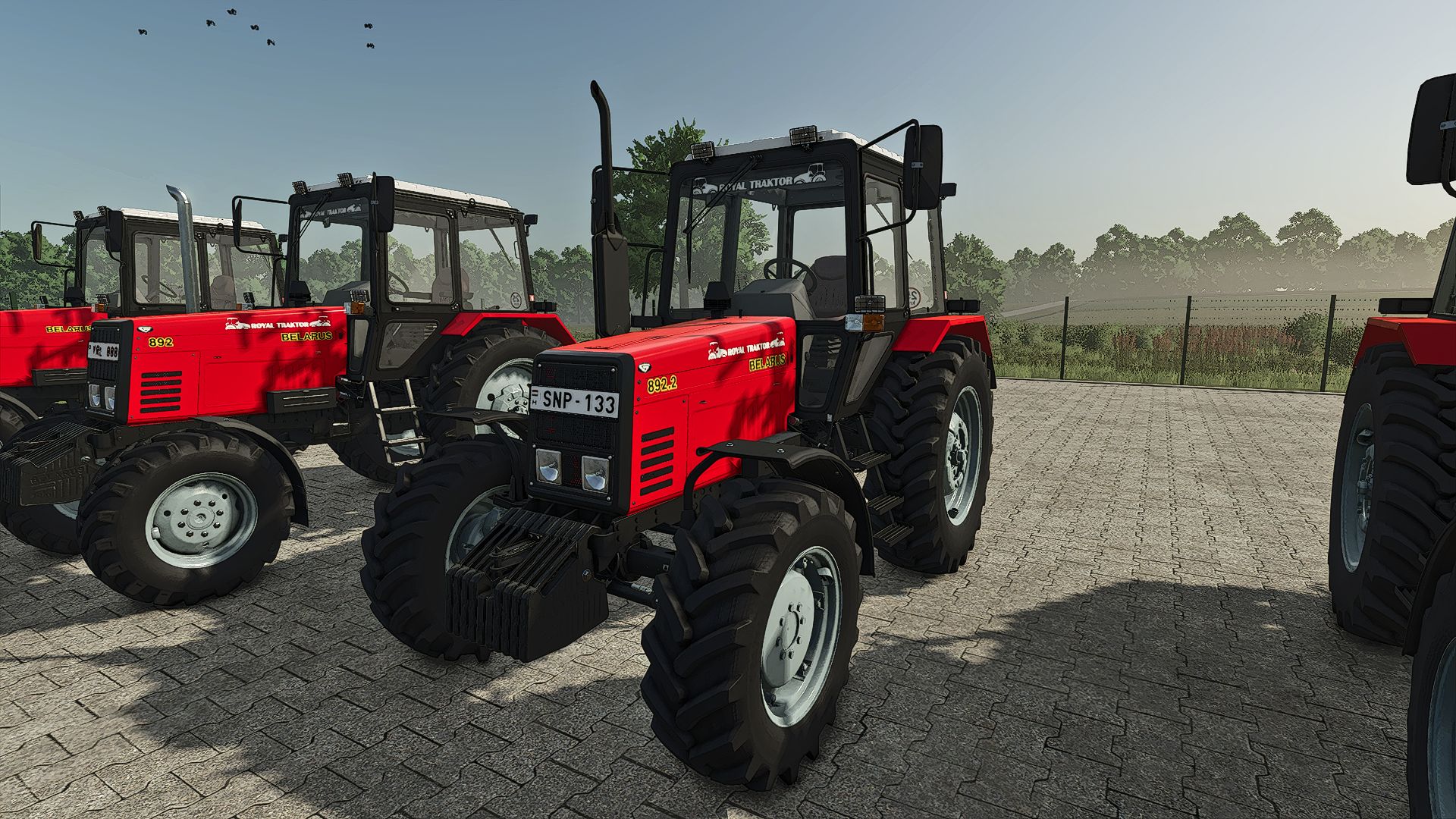
Renault T HMF 60 20 Crane + Fly jib FS25
🚛 Renault T with HMF 6020 crane and Fly Jib – New update! Meet the Renault T, equipped with an HMF 6020 loader crane and Fly Jib! A versatile crane truck for loading, unloading and placing construction materials in Farming Simulator 25. 🏗️ The Fly Jib provides extra reach and flexibility for a variety of construction and transport tasks. 🆕 What has been updated? 🔧 Rear bumper added – The rear of the truck is now equipped with a bumper. 🚨 Front and rear flashers added. 💡 Additional lights added to the bumper and on top of the cab. 🔦 Additional high-beam spotlights mounted on the roof. ✨ Talmu lights added. 🏗️ Front stabilizer leg made functional – The stabilizer leg behind the grille is now functional and provides additional support during lifting operations. 🎮 Crane and Fly Jib controls improved. 🔗 More attachment points for the crane added – More options for attaching implements. 🚧 Roof-mounted beacon bar added. ⚙️ Recommendation for lifting For extra stability, we recommend using a trailer. The load on the trailer acts as additional counterweight and increases stability during lifting operations. Working without a trailer is possible, but due to the absence of this counterweight, the usable lifting capacity is considerably lower. 🙏 Special thanks to DR3RS for permission to modify this truck! 🎁 This mod is a gift from DBG Community to the FS25 community. 💬 Feedback, suggestions and ideas are always welcome. Let us know what you think of the update! 🧡 Have fun with the mod! DBG Community 🔧 Rear bumper added – The rear of the truck is now equipped with a bumper. 🚨 Front and rear flashers added. 💡 Additional lights added to the bumper and on top of the cab. 🔦 Additional spotlights mounted on the roof. ✨ Talmu’s added. 🏗️ Front support leg made functional – The support leg behind the grille is now functional and provides additional support during lifting. 🎮 Crane and Fly Jib controls improved. 🔗 More attachment points for the crane added – More options for attaching implements. 🚧 Roof-mounted rotating beacon bar added.
Kirikouano Menü-HUD V1.7.0.0
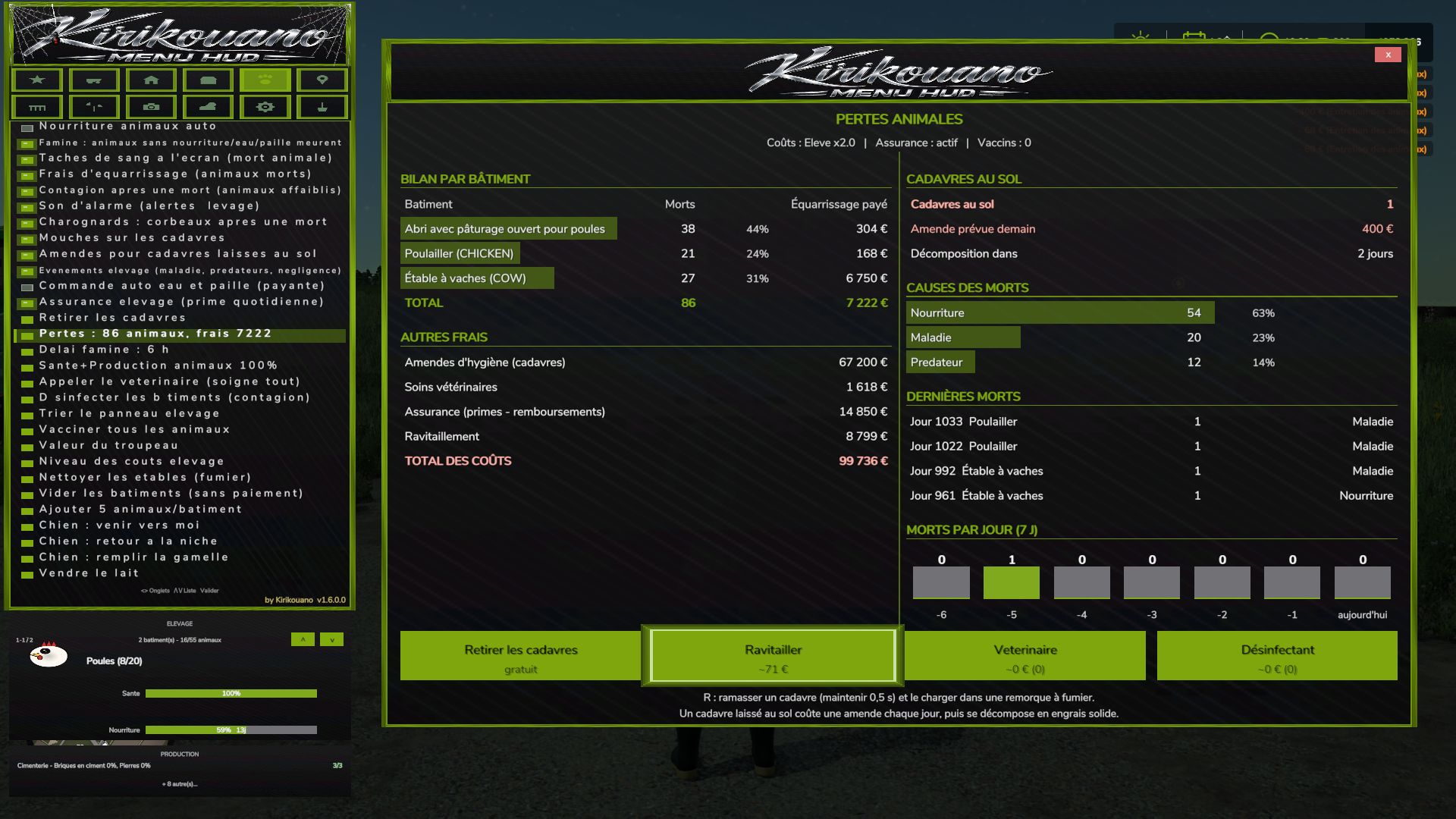
Kirikouano Menü-HUD V1.7.0.0 Kirikouano-Menü-HUD (FS25). Öffnen mit Alt + M (links). Die Menüsprache passt sich automatisch der Spielsprache an (FR, EN, DE, PL, IT). Das Menü: 12 Registerkarten 1. Cheats Spieler: Flugmodus, Supergeschwindigkeit, Superstärke, NoClip (durch Wände gehen). Ressourcen: Unbegrenztes Geld, unendliche Füllstufen, Deaktivierung von Abnutzung, kostenlose Arbeiterlöhne, Hinzufügen oder Entfernen bestimmter Beträge, Zugriff auf den Finanzbildschirm. 2. Fahrzeug Wartung: Reinigen, Reparieren, Neulackieren, Tanks leeren, Betanken (mit Auswahl der Kraftstoffart), Aufrichten eines Fahrzeugs, Befüllen des Korntanks eines Mähdreschers. Gesamte Flotte: Reparieren, reinigen, betanken. Fahren: Fahrzeuggeschwindigkeit, Haftung und Bremsen anpassen; KI-Autopilot; Krabbenlenkung; Fahrtrichtung umkehren; alle KI-Mitarbeiter stoppen. Werkzeuge: In der Nähe befindliche Anbaugeräte und Anhängepunkte auswählen; Werkzeuge an- und abmontieren, ein- und ausklappen; alle angeschlossenen Maschinen aktivieren; Arbeitsbreite anpassen; Schneckenrohre, Anhängerabdeckungen, Spanngurte und Winden steuern. Öffnungen & Animationen: Türen, Motorhauben, Luken, Lichter, Leuchtfeuer, Fahrzeugeinstiegsanimationen, automatische Türen, interaktive Punkte. Verwaltung: Zugriff auf den Fahrzeugshop, Fahrzeuge verkaufen, ein Fahrzeug klonen, Fahrzeugstatus speichern/wiederherstellen, Fahrzeugoptionen konfigurieren (Optionen auswählen, Werte festlegen, anwenden). Erschaffe ein beliebiges im Spiel verfügbares Fahrzeug. 3. Bauernhof Grundstücke: Kaufen oder verkaufen Sie beliebige Grundstücke; Verfügbarkeit der Grundstücke prüfen (auf Französisch). Fabriken: Aktive Produktionsketten verwalten, alle Produktionsmittel bereitstellen, Fertigprodukte verkaufen. Verwaltung: Automatische Tore und Schranken; alle Silos und Bienenstöcke befüllen; Verträge auflisten, abschließen oder neu erstellen; Farm-Dashboard (auch als separates Fenster verfügbar). Naturschutz: Automatische Entfernung von Bäumen und Baumstümpfen; Anpflanzung eines Baumes (mit Auswahl der Baumart); Entfernung von Wildtieren in der Nähe. 4. Gebäude Öffne den Baushop; erschaffe ein Gebäude. Präzise Positionierung: Bewegung nach oben, unten, links, rechts, vorwärts, rückwärts; 45°-Drehung; einstellbare Schrittweite; Einrasten am Boden; Zurücksetzen in die ebene Position. Freie Platzierung von Zäunen und Gebäuden; Platzierung per Maus. Zäune: Tore, automatische Verbindung, Schnappanzeige, verschiedene Ausführungen. Verwaltung: „Meine Gebäude“ (mit Bildern); Eigentumsverhältnisse korrigieren (um blockierte Verkäufe zu lösen); das aktuell bearbeitete Gebäude löschen; beschädigte Gebäude reparieren; alle Gebäude außer dem Laden löschen. 5. Nutztiere Pflege: Gesundheit und Produktivität auf 100 % stellen; Tierarzt rufen; impfen; desinfizieren; Ställe, Pferde und Mist auf dem Boden reinigen; Mist- und Güllebehälter leeren; Tierkadaver entfernen. Regeln: Tiersterben, Verhungern (mit einer Nachfrist), Fliegen, Gebühren für die Kadaverbeseitigung, Ansteckung, Alarmsignale, Bußgelder, Viehereignisse, automatische Wasser- und Strohbestellung, Viehversicherung, Tierverluste. Herde: automatische Fütterung, Herdenwert, Kostenstufen, Sortierung des Viehbestands, Hinzufügen von Tieren (anpassbare Anzahl), leere Gebäude (kostenlos). Reittiere und Tiere: Tierladen (Tiere reiten); Hund (Befehle: Komm her, zurück in den Zwinger, Futternapf füllen). 6. Teleport Teleportiere dich zu einem beliebigen Spielfeld oder einem verbundenen Spieler. Teleportiere ein Fahrzeug an deinen aktuellen Standort (mit der Option, den Fahrzeughalter auszuwählen). 7. Paletten Paletten- und Ballenladen; erzeugte Paletten entfernen; Notfalllöschung (50m Radius); alle Paletten von der Karte löschen. Verladung: Paletten in der Nähe, volle Paletten, kundenspezifisches System für jeden Anhänger, Entladung und Umpacken der Ladung. Frachtmanipulation: Bewegung nach oben, unten, links, rechts, vorwärts und rückwärts mit einstellbaren Schrittweiten. Kartenmarkierungen für Paletten und Ballen. 8. Felder Feldstatus: Kulturart, Wachstumsstadium, Unkraut, Steine, Bodenbeschaffenheit, Bodenneigung, Spritzen, Kalken, Pflügen, Walzen, Kultivieren — dann „Auf dem Feld ausbringen“. Neue Felder definieren: Feldgrenzen mithilfe einer Luftbildkamera einzeichnen. 9. Kamera Schärfentiefe, Kamerawackeln, Sichtfeld (FOV) und Mausempfindlichkeit. 10. Zeit und Wetter Zeitskala (bis zu 120x), Tageszeit, Wetter und Zeitstopp. Springe einen Tag, eine Woche, einen Monat, eine Jahreszeit oder ein Jahr vorwärts. Schneehöhe. Bestimmte Aktionen (Zeit, Wetter, Noclip/Durchdringen von Wänden) erfordern die Startoption `-cheats`. 11. System Benutzeroberfläche: Menüklänge, UI-Skalierung, Menüpositionierung, HUD ein-/ausblenden, Mini-HUD „Kirikouano“, Blockieren der Spielsteuerung bei geöffnetem Menü und Aktionssuche. Spiel: Schnell speichern, letzten Befehl wiederholen, Spielerliste, Farm-Dashboard und zum nächsten Outfit wechseln. 12. Terraforming XXL-Terraforming-Pinsel mit Multiplikator. Werkstatt: Werkzeuge zur Geländegestaltung, Bäume und Pflanzen (einzeln platzierbar, überall, mit In-Game-Sound); unterstützt runde und quadratische Formen mit anpassbarer Größe. Luftbildkamera: Navigation im Spiel, per Maus und Controller. In-Game-Werkstatt: Der Konstruktionsbildschirm des Spiels, voll funktionsfähig mit einem Controller. Offizielle Website, Hilfe und Dateiverifizierung: https://kirikouano.github.io/kirikouano-menu-hud/ V1.7.0.0 Luftbildkamera Die Navigation ist identisch mit dem Konstruktionsbildschirm des Spiels. Maus: Bewegen Sie den Cursor, indem Sie ihn zu den Bildschirmrändern hin bewegen; zum Zoomen verwenden Sie das Mausrad. Steuerung: Linker Stick zum Vorwärtsbewegen, übrige Steuerung wie im Spiel. Verwendbar mit Terraforming, Bäumen, Pflanzen, freien Feldern und Gebäudeplatzierung. Die Spielfigur bewegt sich nicht mehr, wenn das Menü geöffnet ist. Mit Escape oder B wird das aktuelle Werkzeug beendet. Pflanzen Platzieren Sie jeweils nur eine Pflanze in der Mitte einer Kachel, ohne die benachbarte Pflanze zu entfernen. Die Platzierung ist überall möglich, auch auf Beton, mithilfe des Pinsels im Spiel. Unbegrenzte Platzierungsmöglichkeiten, rund oder quadratisch, mit einstellbarer Größe wie im Spiel. Spielgeräusche beim Platzieren und Löschen. Game Workshop Neue Taste zum Öffnen des Konstruktionsbildschirms des Spiels, identisch mit dem Original, mit dem Controller. Zäune Tore. Automatische Segmentverbindung. Schnappanzeiger. Modellauswahl, mit dem echten Geschäftsnamen anstelle von „? ?“. Freie Felder Feldlinien können mit der Luftbildkamera eingezeichnet werden. Terraforming und Bäume Bürste und verstellbare Größen wie im Spiel. Tags: Freie PlatzierungMaschinenNeue FelderPflanzen
Ovlac Mini 8-2 FS25
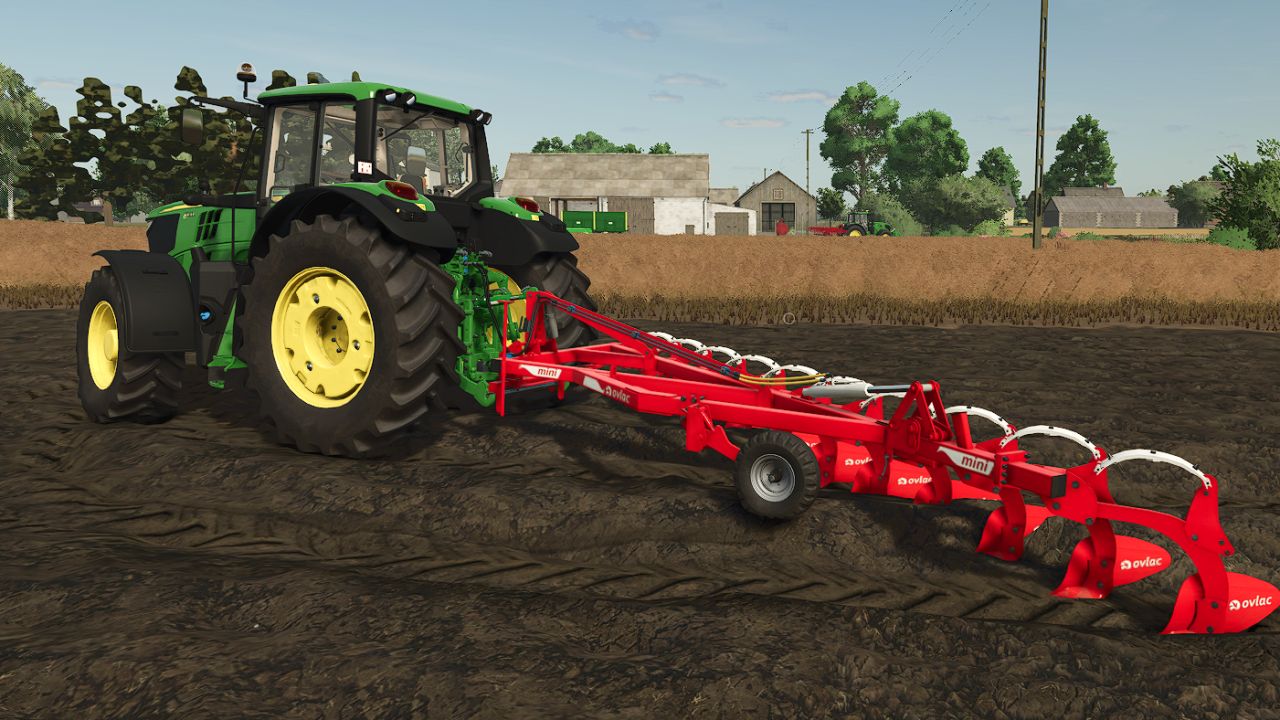
Price: 9.700 $ Required power: 150-175 hp Working width: 3.4 m Max. working speed: 12 kph Converted FS22 Mod
- 15 per page
- 30 per page
- 45 per page
- 60 per page
-
See more per page
Bigger pages, fewer clicks - and no ads anywhere.
Go Pro