Farming Simulator 25 mods
78,464 results- 15 per page
- 30 per page
- 45 per page
- 60 per page
-
See more per page
Bigger pages, fewer clicks - and no ads anywhere.
Go Pro

FS25 GE10 Script - WaterToolkit (Prefab)
FS25 GE10 Script - WaterToolkit (Prefab) WaterToolkit is a GIANTS Editor script for Farming Simulator 25 that significantly streamlines the workflow for creating and customizing water surfaces. Features: • Generate water planes from splines – both closed lake surfaces and rivers with adjustable width • Convert existing planes into complete water planes (including WaterSimulation & WaterInMirror) • Manage shader parameters via presets and apply them to any number of nodes at once • Built-in presets based on FS25 maps • Create, save, reorder and delete custom presets • Live preview with mesh triangulation directly in the viewport ____________________________________________________ Note – Height Slider Range: If the slider range for the water height is not sufficient, the limits can be adjusted directly in the script: WaterToolkit.HEIGHT_MIN_SLIDER (default: lower bound) WaterToolkit.HEIGHT_MAX_SLIDER (default: upper bound) ____________________________________________________ Installation: 1.) Navigate to the GIANTS Editor AppData path. Default: “C:\Users\\AppData\Local\GIANTS Editor 64bit 10.0.XX\scripts\” 2.) Copy the file “WaterToolkit.lua” from the prefab into the Script folder of the GIANTS Editor. 3.) The script will then be available in the GIANTS Editor via the menu bar under “Scripts”.

FS25 GE10 Script - SplineToolkit (Prefab) v2.0.1.0
FS25 GE10 Script - SplineToolkit (Prefab) v2.0.1.0 The SplineToolkit is a comprehensive GIANTS Editor script that brings a wide range of spline-related tools together in a single package. Nearly all functions include a real-time preview directly in the editor viewport. — Base Tools — The Base Tools form the foundation of the toolkit and provide essential tools for spline and terrain editing. Spline points can be projected directly onto the terrain, shifted vertically or horizontally, and the terrain height can be precisely matched to the spline. In addition, terrain textures and foliage can be painted along a spline, and Resample Spline allows the number of control points to be adjusted as needed. — Place Objects — Place Objects allows objects to be placed flexibly along a spline or distributed across a defined area. Placement can be done sequentially in the order of the SourceObjects or randomly from the available selection. A wide range of parameters such as distance, height type, rotation and offset provide precise control over the result. — Place Fence — Place Fence enables fast and structured creation of fence systems along a spline, with a clear list of base game fences including preview images. Fences can be imported directly, and animated gates can be positioned along the spline using a slider. The animation data is automatically written to the configuration file so that gates work correctly in-game via a trigger. A built-in XML viewer and the “Validate Fences” function allow full verification of all entries for errors and inconsistencies. — Export as .OBJ — The export tool allows splines to be exported as .OBJ files using two different methods, optimizing the workflow between GIANTS Editor and Blender. Additional parameters control the density and format of the exported points. — Generate Street — The road generator allows complete road meshes to be created directly inside the GIANTS Editor, including correct UVs and a selection of base game road textures. A real-time preview displays the result immediately in the viewport before the mesh is finalized. Matching traffic splines can optionally be generated automatically. ____________________________________________________ Installation: 1.) Navigate to the GIANTS Editor AppData path. Default: “C:\Users\\AppData\Local\GIANTS Editor 64bit 10.0.XX\scripts\” 2.) Copy the file “SplineToolkit.lua” and the folder “imgFence”/”imgRoads” from the prefab into the Script folder of the GIANTS Editor. 3.) The script will then be available in the GIANTS Editor via the menu bar under “Scripts”. ____________________________________________________ Hotfix Update 2.0.1: – [Base Tools] = Clear Foliage now correctly clears all foliage layers. – [Base Tools] = Set Terrain Height: Fixed spike/gap artifacts. – [Base Tools] = Set Terrain Height: Configurable pixel resolution via SplineToolkit.TERRAIN_METER_PER_PIXEL_LOAD_FROM_MAP and SplineToolkit.TERRAIN_METER_PER_PIXEL_CUSTOM. Update 2.0: – = A real-time preview has been integrated directly into the editor for nearly all tools. – = Various minor bug fixes and general code optimizations applied. – [Base Tools] = SetTerrainHeight now reads the map’s pixel grid to ensure improved height adjustment when using a non-default map configuration. – [Place Objects] = Area mode completely rebuilt; the previous width algorithm has been removed and replaced with a significantly more precise approach. – [Place Objects] = Simplified UI: Two modes (Straight / Area) via radio buttons; Sequential vs. Random placement as a dedicated selection option. – [Place Fence] = Fences can now be imported directly, including automatic transfer of all animation data into the configuration file. – [Place Fence] = Gates can be positioned along the spline via a slider and are automatically registered as AnimatedObjects, allowing them to open normally via a trigger in-game. – [Place Fence] = Added per-gate status indicator and a built-in XML viewer/editor with “Validate Fences” function for full verification of all fence and gate entries. – [Place Fence] = Fence groups are now identified via UserAttributes instead of fixed names, making the structure more robust. – [Gen. Street] = Fixed an issue where UV wrapping exceeded the maximum possible tile count. – [Gen. Street] = Road mesh generation reworked and optimized. – [Gen. Street] = Real-time preview of the generated road integrated directly into the editor. Update 1.1.1: – [Base Tools] = Added a Clear Foliage button and removed the option from the foliage layer list. – [Base Tools] = Fixed an issue with Clear Foliage where an incorrect invisible layer was applied. – [Place Object] = Added Place Type “… with Width”. Allows objects to be placed randomly within a defined width. – [Place Object] = Added Set Height Type “… + Follow Axis”. Allows connected objects to be placed almost seamlessly, even on uneven terrain. – [Gen. Street] = Added four additional textures to the list. – [Gen. Street] = Added a confirmation dialog when overwriting an existing road group. Update 1.1: – [Base Tools] = UI slightly improved and new functions “Set Foliage” and “Resample Spline” added. – [Gen. Street] = Added texture options. – [Place Fence] = ‘Spline Type’ selection removed – now automatically read from the spline. Hotfix 1.0.1: – Fix: [Place Fence] – Fences are now placed at terrain height instead of spline height. – Fix: [Place Object] – Side offset now works correctly.

FS25 DynamicDrive Pro v1.0.1.0
FS25 DynamicDrive Pro v1.0.1.0 DynamicDrive Pro brings a completely new driving experience to Landwirtschafts‑Simulator. This mod fundamentally improves vehicle physics and provides more realism, control and dynamics on every surface. Features More realistic acceleration and braking Noticeably improved grip Dynamic driving behavior on different surfaces Optimized traction for heavy machines Fine-tuned steering and cornering physics Supports singleplayer and multiplayer What makes DynamicDrive Pro special? With DynamicDrive Pro, vehicles react much more realistically to: Weight and load Speed Terrain (field, road, gravel, etc.) Slopes and inclines Heavy machines finally feel heavy, while lighter vehicles remain agile and controllable. Compatibility Works with standard and mod vehicles No additional script mod required For the best driving experience, it is recommended to choose an appropriate speed. Excessive speed can now much more realistically lead to loss of control. Enjoy driving! Changelog v1.0.1.0 Extended tire physics with noticeable differences between road, agricultural, wide and narrow tires. More realistic vehicle behaviour on slopes and side inclines. Improved braking behaviour depending on terrain, weight and slope. Enhanced traction and stability under different working conditions.

Headtracking MouseControl For IC – Mod pour Farming Simulator 25
Headtracking MouseControl For IC – Mod pour Farming Simulator 25

FS25 Manual Tipping v2.1.2.1
FS25 Manual Tipping v2.1.2.1 This mod adds manual control over trailer, semi-trailer and tipper hydraulics. In the base game, trailers can be unloaded manually, but they always lift to the maximum position. This can cause issues in low garages or confined spaces. With this mod, you can stop the lifting process at any desired position. If the trailer supports separate animations for the rear door or side panels, you can raise the trailer without unloading its contents. The material will only unload once the doors or panels are opened. The mod includes full multiplayer support — all animations are fully synchronized on the server. Default Controls – Select lift/lower direction – Left ALT – Activate hydraulics (hold to lift/lower) – Right CTRL – Open/unlock rear door or flap – O All key bindings can be changed in the game settings. If you encounter any issues, please report them by repo: github.com/letmecook401/FS25_ManualTipping Changelog 2.1.2.1 – added new hud icons for tipSide, backDoor status and isTipping status – fixed reported issues Changelog 2.0.2.1 – fixed reported issues Changelog 2.0.2.0 – fixed tipping animation issue with mixer wagons – fixed unloading issue when controlled by AI workers Changelog 2.0.0.0 – separated animation for trailer and back doors (if exists) – added ability to control back door animation – removed modification from trailers that are not compatibile – added full support for multiplayer Changelog 1.0.1.2 – fixed auger wagons error – changes binding to “lift/lower” trailer – updated modDesc version Changelog 1.0.0.2 – fixed manual tipping to silo Changelog 1.0.0.1 – fixed modDesc version
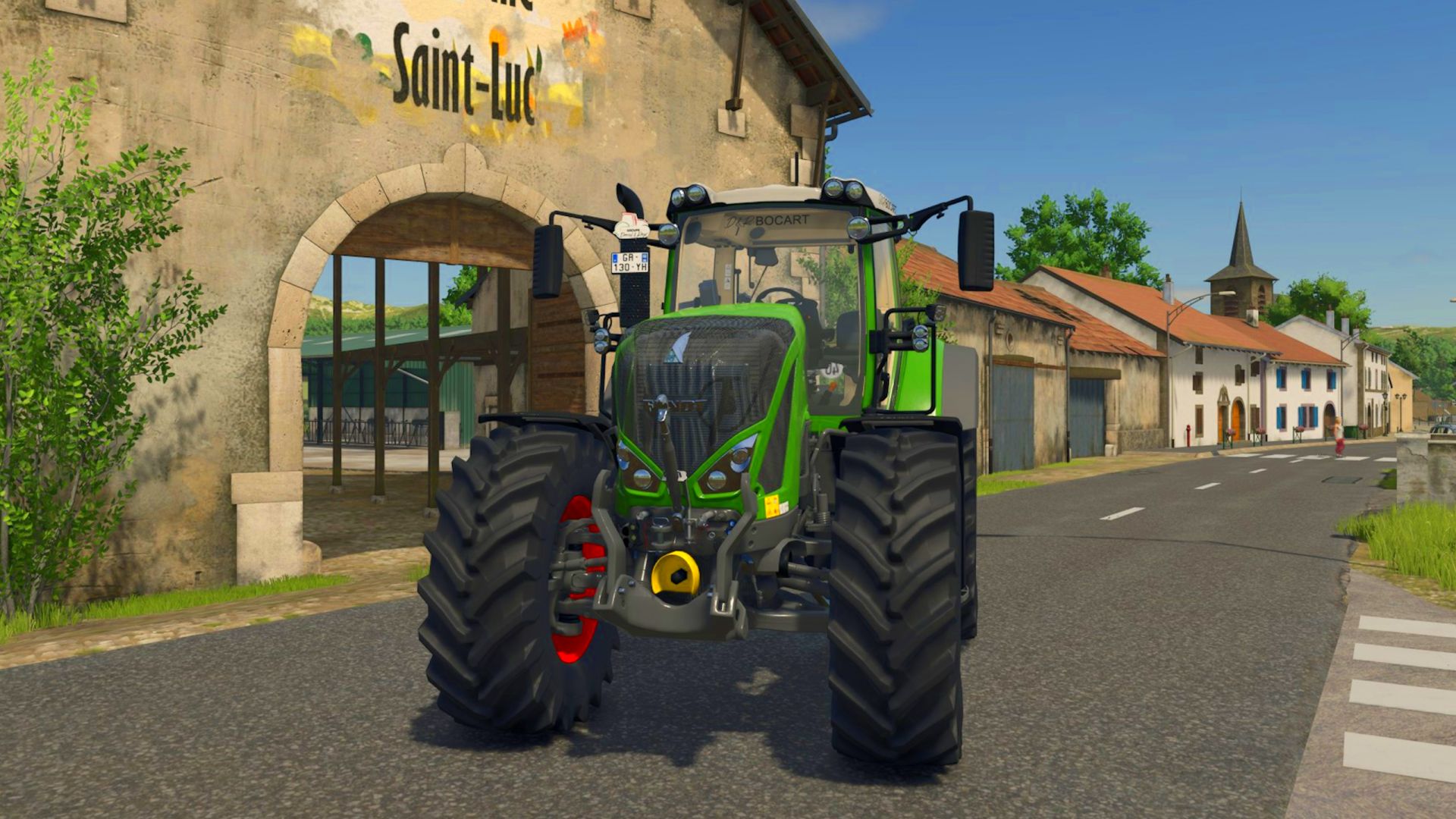
Fendt 900 Vario S4 - D&R Bocart 51 FS25
Unofficial D&R Group Fashion Groupedervaletroge.fr 🚜 Fendt 900 Vario S4 (FS25) 💰 Base price: $272,000 🔧 Power: 305 – 396 hp 🚀 Max speed: 60 km/h 📂 Category: Large tractors ⚙️ Engine configurations: 930 Vario — 305 hp 933 Vario — 335 hp 936 Vario — 366 hp 939 Vario — 396 hp 🔧 Options / customizations: Tractor color Rim color Rotating beacon / light bars Traffic signs Tires (several brands + configs) Animated doors Compatible Interactive Control - Fixed the D&R logo bug - End of the BETA phase

Crop Destruction Overhaul – Mod pour Farming Simulator 25
Crop Destruction Overhaul – Mod pour Farming Simulator 25
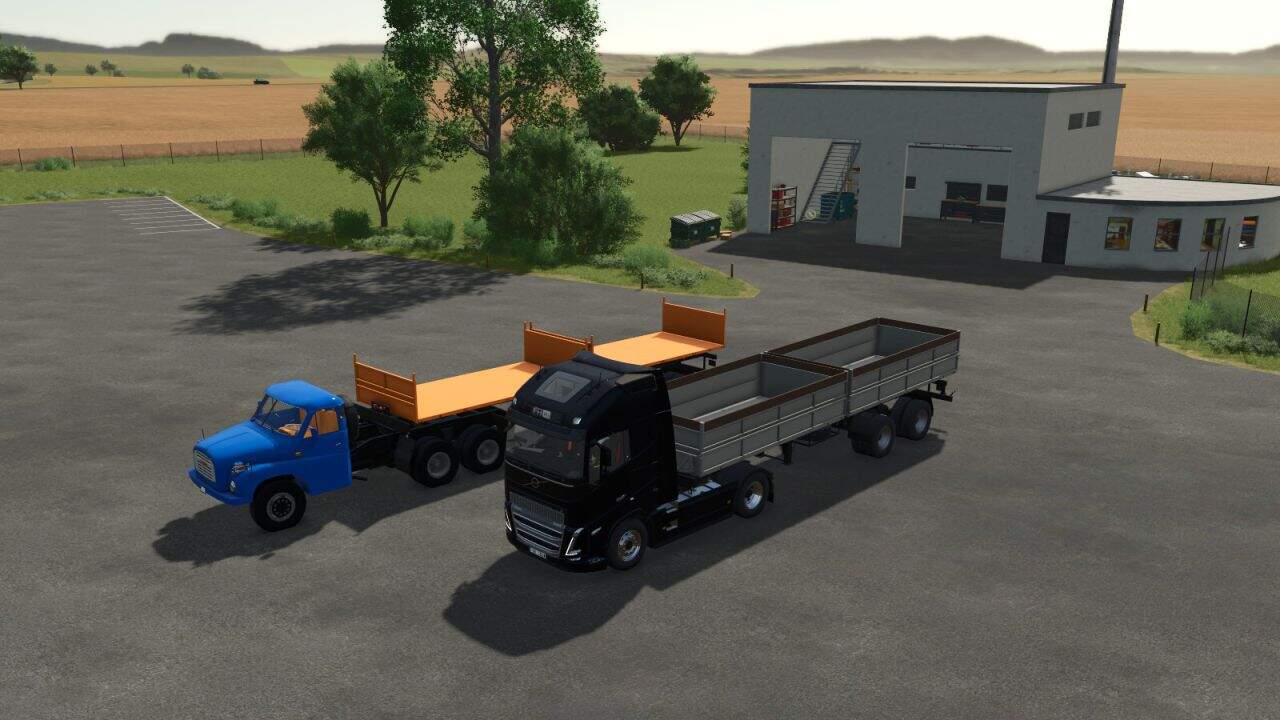
BSS NS2-29.21.20 v1.0
BSS NS2-29.21.20 v1.0 – Two-axle, double-cab tipping trailer, designed for transporting bulk material. – The semi-trailer is foldable to two sides. – Price: 33000 $ – Capacity: 21000 – 24000 liters Configuration: – Wheels – Hull – Design
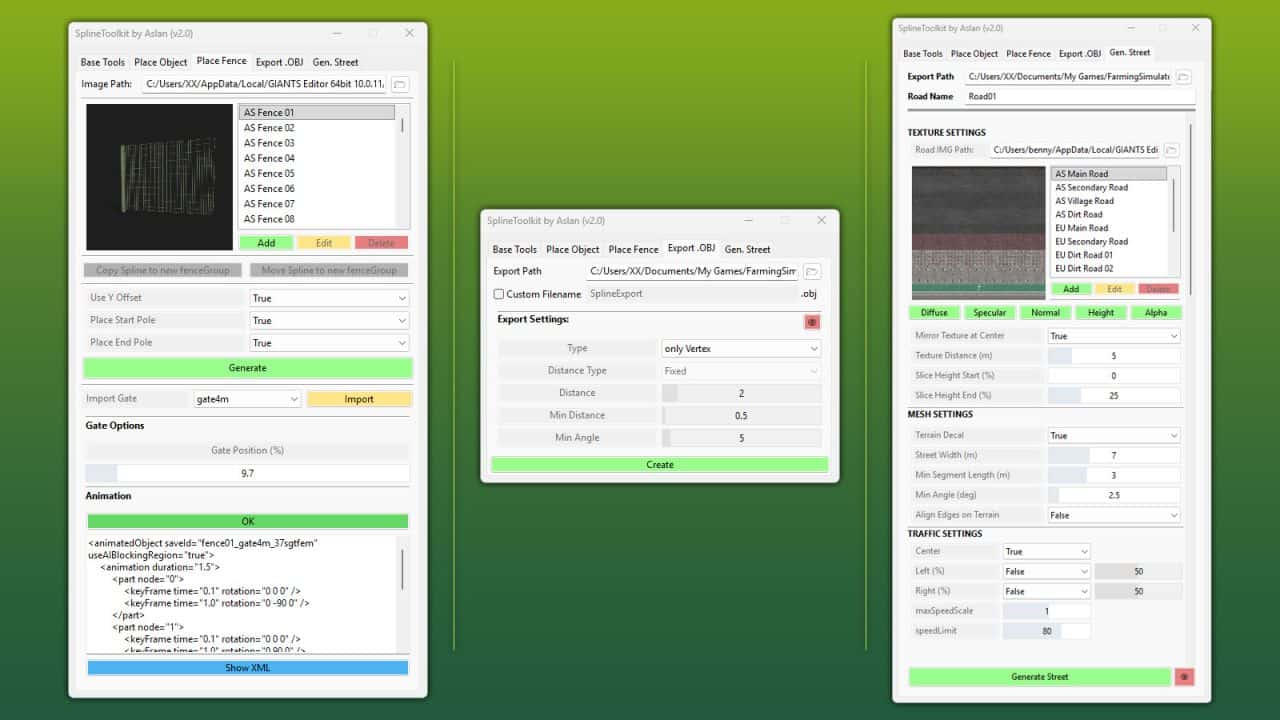
GE10 Script – SplineToolkit v2.0.1.0
The SplineToolkit is a comprehensive GIANTS Editor script that brings a wide range of spline-related tools together in a single package. Nearly all functions include a real-time preview directly in the editor viewport. Base Tools The Base Tools form the foundation of the toolkit and provide essential tools for spline and terrain editing. Spline points can be projected directly onto the terrain, shifted vertically or horizontally, and the terrain height can be precisely matched to the spline. In addition, terrain textures and foliage can be painted along a spline, and Resample Spline allows the number of control points to be adjusted as needed. Place Objects Place Objects allows objects to be placed flexibly along a spline or distributed across a defined area. Placement can be done sequentially in the order of the SourceObjects or randomly from the available selection. A wide range of parameters such as distance, height type, rotation and offset provide precise control over the result. Place Fence Place Fence enables fast and structured creation of fence systems along a spline, with a clear list of base game fences including preview images. Fences can be imported directly, and animated gates can be positioned along the spline using a slider. The animation data is automatically written to the configuration file so that gates work correctly in-game via a trigger. A built-in XML viewer and the “Validate Fences” function allow full verification of all entries for errors and inconsistencies. Export as .OBJ The export tool allows splines to be exported as .OBJ files using two different methods, optimizing the workflow between GIANTS Editor and Blender. Additional parameters control the density and format of the exported points. Generate Street The road generator allows complete road meshes to be created directly inside the GIANTS Editor, including correct UVs and a selection of base game road textures. A real-time preview displays the result immediately in the viewport before the mesh is finalized. Matching traffic splines can optionally be generated automatically. V2.0.1.0 – [Base Tools] = Clear Foliage now correctly clears all foliage layers. – [Base Tools] = Set Terrain Height: Fixed spike/gap artifacts. – [Base Tools] = Set Terrain Height: Configurable pixel resolution via SplineToolkit.TERRAIN_METER_PER_PIXEL_LOAD_FROM_MAP and SplineToolkit.TERRAIN_METER_PER_PIXEL_CUSTOM.
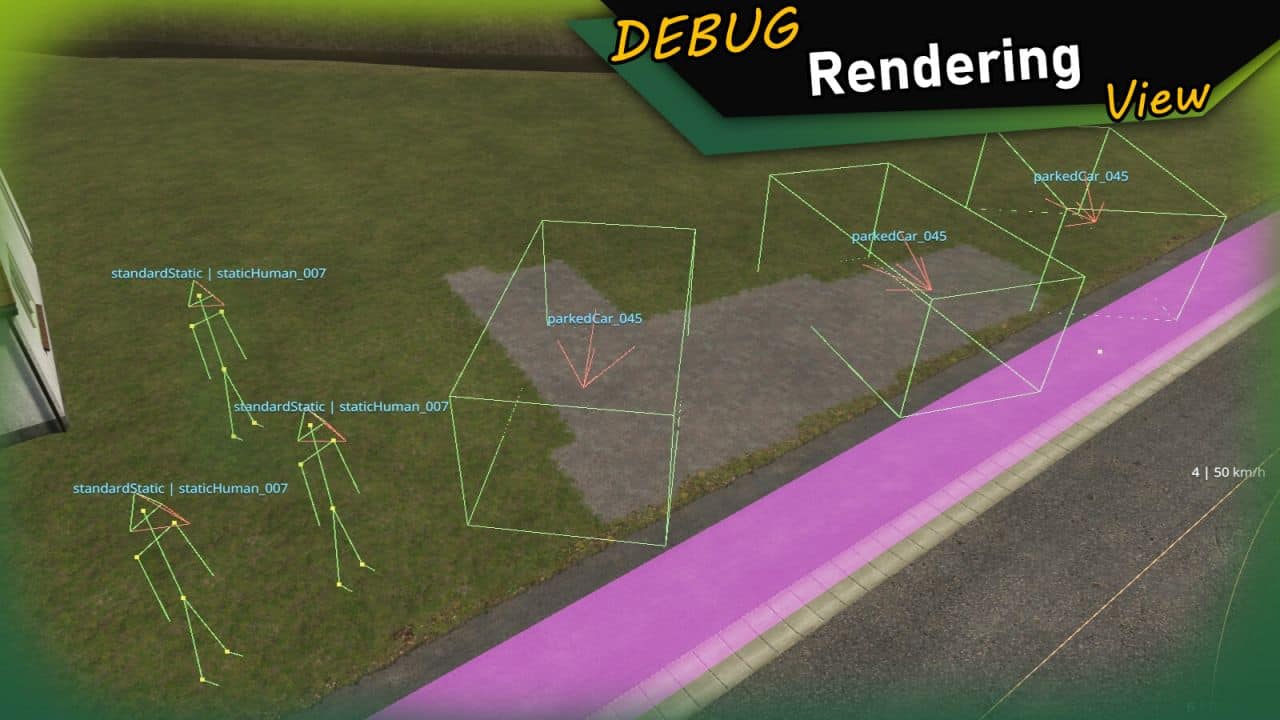
FS25GE10 Script – Traffic Manager v1.1
This comprehensive script for the GIANTS Editor 10 allows you to create, manage and debug complete traffic and pedestrian systems directly inside the editor. The Traffic Manager provides a wide range of tools for quickly setting up traffic splines, pedestrian paths and static characters, while also offering full control over all related XML data. The tool enables you to convert splines into traffic or pedestrian splines and automatically assign required attributes such as speed, density and group settings. Existing systems can be loaded, extended and fully edited, including group management, time schedules, conditions (e.g. seasons, weather) and sound configurations. A strong focus is placed on pedestrian management: Groups can be created, modified and removed. Pedestrians can be assigned to these groups individually or globally. In addition, static humans can be placed directly in the editor, organized within groups and visually debugged. The tool also supports moving entities between groups as well as automatic renaming and scene cleanup. For maximum clarity, the script includes extensive debug visualization directly in the viewport: Traffic splines, pedestrian paths, static humans, directions and bounding boxes are rendered in real time. This makes it easy to identify issues and understand system behavior without leaving the editor. This tool is designed for both beginners and advanced modders and significantly speeds up the creation of complex, lively maps. Installation: 1. Navigate to the installation directory of the GIANTS Editor (e.g. “C:Program FilesGIANTS SoftwareGIANTS_Editor_10.X.X”). 2. Copy the file “TrafficManager.lua” and the folder “imgTrafficVehicles” from the prefab into the GIANTS Editor script folder. 3. Restart the GIANTS Editor. The script will then be available via the menu bar under “Scripts”.
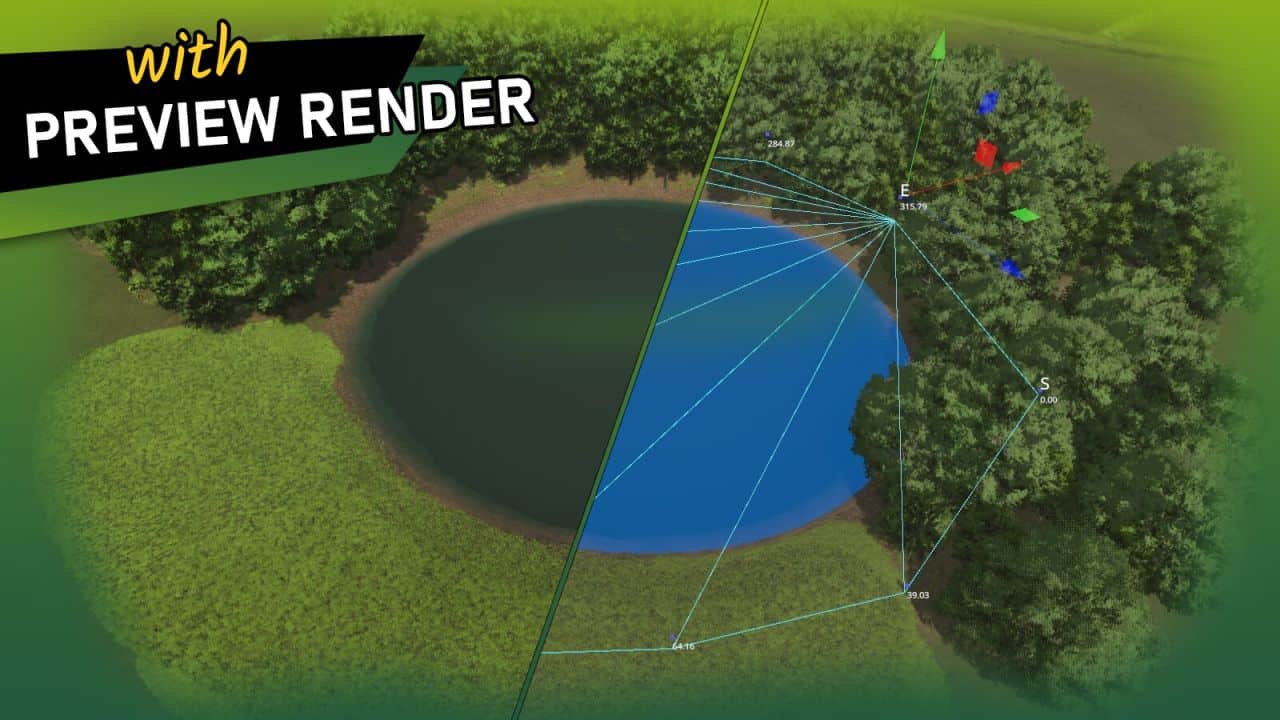
GE10 Script – WaterToolkit v1.0
WaterToolkit is a GIANTS Editor script for Farming Simulator 25 that significantly streamlines the workflow for creating and customizing water surfaces. Features: – Generate water planes from splines – both closed lake surfaces and rivers with adjustable width – Convert existing planes into complete water planes (including WaterSimulation & WaterInMirror) – Manage shader parameters via presets and apply them to any number of nodes at once – Built-in presets based on FS25 maps – Create, save, reorder and delete custom presets – Live preview with mesh triangulation directly in the viewport Note – Height Slider Range: If the slider range for the water height is not sufficient, the limits can be adjusted directly in the script: – WaterToolkit.HEIGHT_MIN_SLIDER (default: lower bound) – WaterToolkit.HEIGHT_MAX_SLIDER (default: upper bound) Installation: 1.) Navigate to the GIANTS Editor AppData path. Default: “C:UsersAppDataLocalGIANTS Editor 64bit 10.0.XXscripts” 2.) Copy the file “WaterToolkit.lua” from the prefab into the Script folder of the GIANTS Editor. 3.) The script will then be available in the GIANTS Editor via the menu bar under “Scripts”.
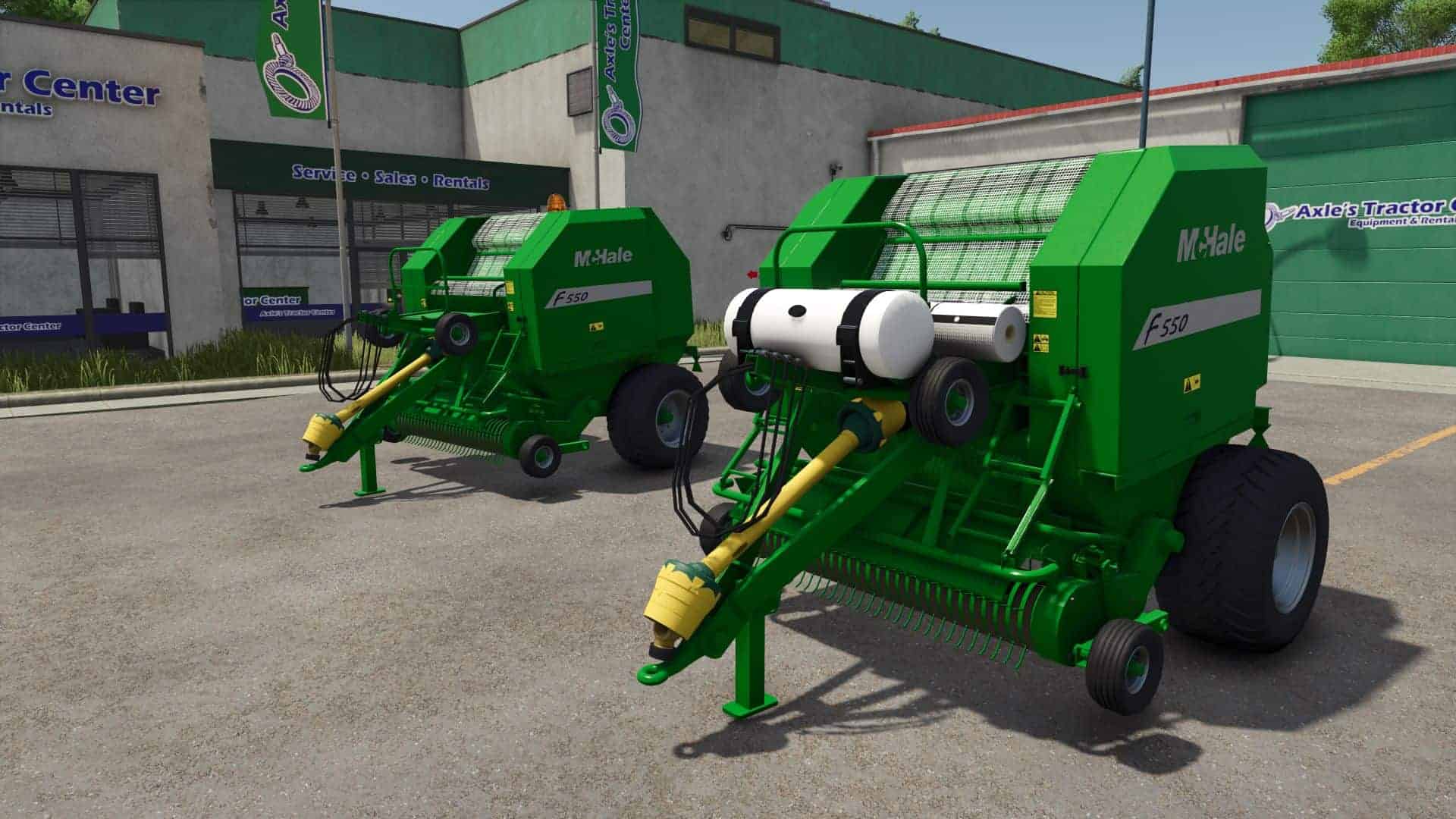
McHale F550 v1.0
McHale F550 v1.0 What’s Been Done – Completely rebuilt model from a fresh canvas – Condensed the model (previously had hundreds of transform groups) – Removed old diffuse setup and rebuilt using UDIM workflow – Reworked materials properly in Blender – Added proper mask system (previously missing) – Improved key areas like the main body and pickup Key Features / Changes – Supports 125cm and 150cm bales – (180cm not possible due to model size) – Optional beacon light – Bale wrap added (as per original release) – Optional Crop Preserve Tank – Enables silage additive – Allows 5% bonus on silage bales – Wheel hubs now match baler colour – Pickup wheels now corrected and static (no longer incorrectly mounted/moving) – Overall model improvements – Much improved dirt, wear, and wetness masks
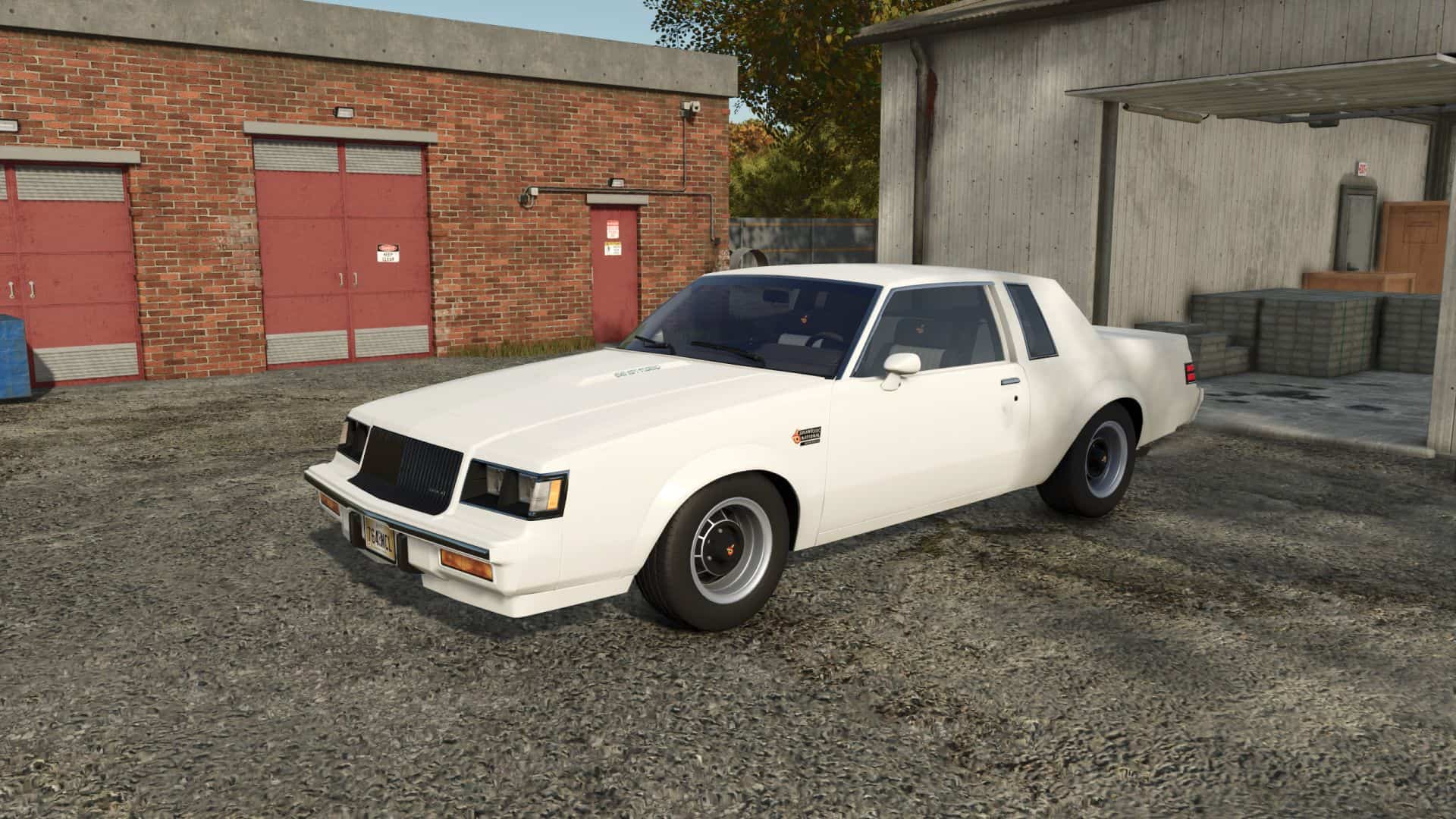
Buick Grand National 1987 v1.0
Buick Grand National 1987 v1.0 Specifications: – Price: 18295$ – Power: 245-300 hp – Speed 180 km/h – Color selection – Selectable license plates – Selectable design V1.1.0.0 – Model scaled. – Vehicle physics improved.

Litres To Tonnes Converter – Mod pour Farming Simulator 25
Litres To Tonnes Converter – Mod pour Farming Simulator 25

FS25 Hesston 7650 Field Queen V1.0.0.0
FS25 Hesston 7650 Field Queen V1.0.0.0 Hesston 7650 Field Queen – User Manual (Farming Simulator 25) This mod brings the iconic Hesston 7650 Field Queen self-propelled forage harvester to your farm, specifically designed for maize silage production. To get the best out of this machine, please follow the operating instructions below: Operating Instructions Attachment: First, attach the appropriate header to the machine. Selection: Press the ‘G’ key to switch selection to the front attachment (header). Lowering: Press the ‘V’ key to lower the header into the working position. Activation: Press the ‘B’ key to engage the harvester and start chopping. Pipe Configurations & Usage The mod features two distinct discharge pipe variations, each requiring a different harvesting strategy: Short Pipe (Fixed): This version has a fixed rotation point. It is designed to be used by hitching a trailer directly to the back of the harvester. The silage will blow straight back into the attached trailer. Long Pipe: This version is more flexible. It is designed for side-loading, allowing a truck or a tractor with a trailer to drive alongside the harvester. You can direct the pipe to blow the forage into the vehicle moving next to you. Credits:honved4 Tags: Attachment FirstField QueenLong PipeOperating Instructions
- 15 per page
- 30 per page
- 45 per page
- 60 per page
-
See more per page
Bigger pages, fewer clicks - and no ads anywhere.
Go Pro