Farming Simulator 25 mods
79,027 results- 15 per page
- 30 per page
- 45 per page
- 60 per page
-
See more per page
Bigger pages, fewer clicks - and no ads anywhere.
Go Pro

Slurry Pit Pack – Mod pour Farming Simulator 25
Slurry Pit Pack – Mod pour Farming Simulator 25

Sugar-factory – Mod pour Farming Simulator 25
Sugar-factory – Mod pour Farming Simulator 25

Land Lever Pack – Mod pour Farming Simulator 25
Land Lever Pack – Mod pour Farming Simulator 25


Shabby Sheep Barn – Mod pour Farming Simulator 25
Shabby Sheep Barn – Mod pour Farming Simulator 25

Stoneworks FS25
Category: Production Sites A pack of productions that process stone. All productions have a base game speed as well as an unrealistic speed option. Productions: Cement Factory: processes stone into cement products. Stacks products in stacks of 3 for easer loading. -Category: Production Sites -Price: $40,000/$70,000 -Monthly Upkeep: $0 -Recipies: -Cement: -Input: 1000L Stone (1000L woodchips) -Output: 180L Cement -Cycles per hour: 1/10 (2/20) -Cost per hour: $1 -Roof Plates: -Input: 1000L Stone (1000L woodchips) -Output: 125L Roof Plates -Cycles per hour: 1/10 (2/20) -Cost per hour: $5 -Cement Bricks: -Input: 1000L Stone (1000L woodchips) -Output: 125L Cement Bricks -Cycles per hour: 1\10 (2/20) -Cost per hour: $2 Stone Crusher: Crushes stone into lime -Category: Production Sites -Price: $10,00/$50,000 -Monthly Upkeep: $10 -Recipies: -Lime: -Input: 1000L Stone -Output: 750L Lime -Cycles per hour: 5/50 -Cost per hour: $0.50 -Added the abilty to remove stone from the Debris Crusher. -Added Lime to the accepted products for the Debris Crusher to make it more of a storage for your farm. -Corrected Recipies in the Fast Cement Factory. -Increased loading speed for lime.

XXL Flag Pack FS25
Flag Pack – Over 400 Flags for Farming Simulator 25 This flag pack brings a huge selection of flags to Farming Simulator 25. With over 400 different flags, the mod offers the perfect design for almost every taste. Included are: All manufacturer flags featured in Farming Simulator 25 All German federal states Selected state flags Other flags such as GIANTS and Farming Simulator The flags are perfect for decorating farms, barns, events, or maps, adding individuality and brand recognition to your farm. Category: Decorations Price: 150$ Daily Upkeep: 1$ INFO - Basegame brands only! - Over 100 more flags added - All US stats flags - All UK county flags - All Austrian state flags - Brazil and Australia flags - Black and white finish flag

Provita Supplements BONSILAGE – Mod pour Farming Simulator 25
Provita Supplements BONSILAGE – Mod pour Farming Simulator 25
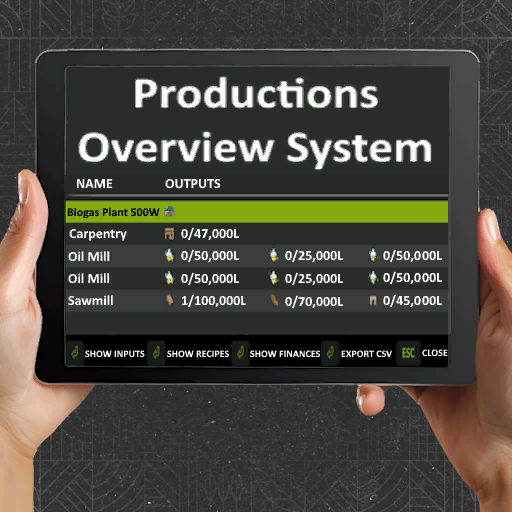
Productions Manager V1.0.0.1
A production management mod for Farming Simulator 25 that provides an overview of all your production facilities with automatic management capabilities. Key Features Production Overview: View all productions with fill levels, capacities, monthly income and processing type. Toggle Views: Switch between inputs, outputs, and recipes Financial Tracking: See monthly revenue, costs, and net profit for each production Auto-Management: Automatically activate/deactivate productions based on input availability and output capacity CSV Export: Export all production data for external analysis Multi-Language Support: Available in 12 languages Processing Type: See if the production supports Serial (S) or Parallel (P) processing. When the production supports Parallel processing, for every tick the server does, every active recipe advances. When the production only supports serial processing, for every tick the server does, only ONE recipe advances in turn. Press Right Shift + P to open the production overview. Access settings via ESC → Settings → Game Settings → NX Productions Automatic Productions: Automatically manages your production facilities: Enabled: Productions activate when inputs are available and deactivate when outputs reach 95% capacity Disabled: Manual control only (default) This setting checks run every 5 seconds and only affect productions with configured recipes. Changes are synchronized across all players in multiplayer. V1.0.0.1 New Updates: And Production name and recipe is also contained on this page Accounts for shared consumption – Multiple recipes using the same input Uses actual consumption rates – Based on cyclesPerHour Finds the bottleneck – Calculates based on which input is likely to run out first e.g. if multiple recipes use the same input Simply highlights how many cycles er month the recipe is outputting if inputs and outputs are maintained Showcases which mode the recipe is set to e.g. Storing, Selling, Distributing This shows where the product which recipe is set too distributing. (Note: Only if output mode distributing is selected) If set to Storing or selling this will display as N/A in Red Status’s may appear to be delayed, this is not the case it is the game syncing the change in status to the game. If you reload the window or alter another recipe it will update. This is out of our hands and is down to how the game processes changes. “Active” (Green) – Recipe is running AND has inputs available “Active (!)” (Orange) – Recipe is set to active BUT missing inputs (game has paused it) “Inactive” (Red) – Recipe is manually deactivated by the player Fixed: (Production rows now dynamically calculated based on number of fill types, inputs/outputs and also recipe count)

Stoneworks V1.0.0.1
A pack of productions that process stone. All productions have a base game speed as well as an unrealistic speed option. Cement Factory: processes stone into cement products. Stacks products in stacks of 3 for easer loading. -Category: Production Sites -Price: $40,000/$70,000 -Monthly Upkeep: $0 -Recipies: -Cement: -Input: 1000L Stone (1000L woodchips) -Output: 180L Cement -Cycles per hour: 1/10 (2/20) -Cost per hour: $1 -Roof Plates: -Input: 1000L Stone (1000L woodchips) -Output: 125L Roof Plates -Cycles per hour: 1/10 (2/20) -Cost per hour: $5 -Cement Bricks: -Input: 1000L Stone (1000L woodchips) -Output: 125L Cement Bricks -Cycles per hour: 1\10 (2/20) -Cost per hour: $2 Stone Crusher: Crushes stone into lime -Category: Production Sites -Price: $10,00/$50,000 -Monthly Upkeep: $10 -Recipies: -Lime: -Input: 1000L Stone -Output: 750L Lime -Cycles per hour: 5/50 -Cost per hour: $0.50

GE10 Script – Placeable Importer (Prefab*) V2.0
This GIANTS Editor script allows you to import all placeables, including fences, into your map that are defined in a selected “placeable.xml”. Unlike the official PlaceableToolkit by GIANTS, this script works purely with a visual representation during the map building phase. This means you can first place objects and fences in-game and then import them into the GIANTS Editor using this script to maintain a complete visual overview of all placed elements while continuing map development. Additionally, the script generates an in-game script that automatically removes the imported visualization placeables from the I3D when the map is loaded in-game, allowing the real placeables to load normally. For this feature to work, a “modDesc.xml” must be selected in the GE script. Installation: 1.) Locate your GIANTS Editor installation directory. By default: “C:\Program Files\GIANTS Software\GIANTS_Editor_10.X.X\” 2.) Copy the script “PlaceableImporter.lua” from the prefab into the GIANTS Editor script folder. 3.) The script will then be available in the GIANTS Editor via the menu bar under “Scripts”. INFO: – To load placeables from mods, the script creates a folder named “modPlaceholders” on first launch. All required mods must be extracted into this folder. – Object placeables can be moved/rotated in the editor and updated back to the .XML via the update button. Make sure the placeables in the .XML contain a “uniqueId”. – Fences can also be permanently integrated into the map by moving the desired fence objects outside of the “placeablePlaceholders” node. When using mod fences, texture paths may need to be adjusted. Changelog 1.1: – Fixed multiple alternative path resolution issues – placeable.xml is now loaded automatically via modDesc.xml – Custom placeable.xml path is now supported – New options added. Please refer to the info button for details


CLAAS Scorpion 7055 – Mod pour Farming Simulator 25
CLAAS Scorpion 7055 – Mod pour Farming Simulator 25
- 15 per page
- 30 per page
- 45 per page
- 60 per page
-
See more per page
Bigger pages, fewer clicks - and no ads anywhere.
Go Pro