Farming Simulator 25 mods
78,975 results- 15 per page
- 30 per page
- 45 per page
- 60 per page
-
See more per page
Bigger pages, fewer clicks - and no ads anywhere.
Go Pro

Production Revamp V1.0
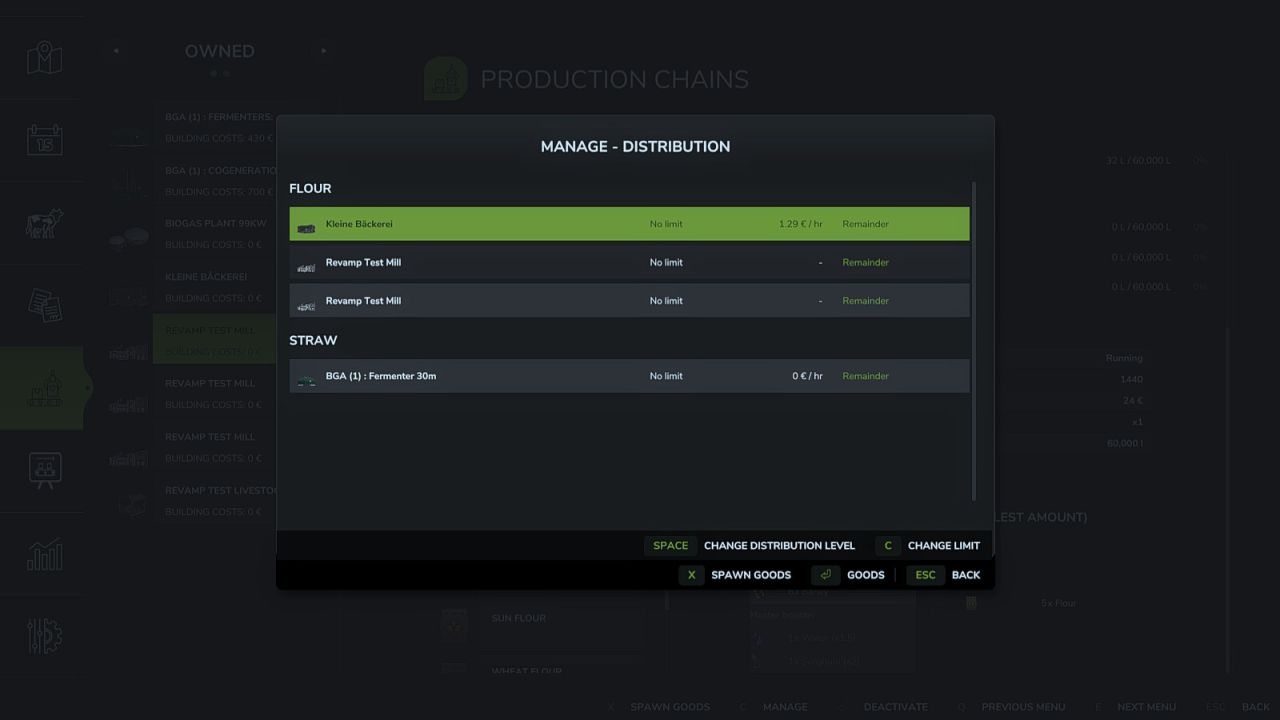
Production Revamp extends the game’s production system with a wide range of features. It is the continuation of the Production Revamp that Braeven built for Farming Simulator 22, carried on for FS25 by Achimobil with his explicit permission. Production Revamp is a pure script mod. It does not bring any buildings of its own and does not change any recipes. Some features work right away at every production, others are only available in productions a modder has adapted for them. At all productions: – Manage dialog listing all inputs and outputs with exact amounts – Output mode “Store”: products collect in the storage and can be taken out as pallets or bales in the amount you want, via the menu or directly at the building – Buy inputs directly from the dealer and sell outputs directly to him – Distribution your way: per product, choose which productions are supplied first, later or not at all, optionally with an upper limit and split evenly or by demand – Only productions that are actually processing the product right now get supplied – Delivery costs with a preview in the manage dialog and as a separate entry in the finances – Recipe view highlights missing inputs, a product that is both input and output is listed only once – Production menu shows whether a production point works in parallel or splits its capacity, and its building costs – Raised technical limits so that even very large production mod packs with well over 255 fill types load correctly – Own settings section: the admin can switch off individual areas and set prices, delivery costs and trading rights, every player can hide individual displays for themselves – Own pages in the in-game help menu – Fully multiplayer capable Only in productions adapted for it: – Mix groups: several equivalent inputs, for example rye instead of wheat – Recipes using product groups that products from other mods fit into automatically – Boosters and master boosters: optional inputs that increase the yield – Input and booster selection per production line in the manage dialog – Production depending on weather, season and time of day, plus weather-dependent storage – Live animals as input, delivered with the livestock trailer at a dedicated trigger – Take products out as logs with selectable length – Take goods out as pallets, bales or logs at silos too – Stock displays on the building as a growing stack and as a digital display, also on silos and greenhouses – Buying and selling can be locked for individual products – Production lines that run on their own For modders: – Other mods can bring their own buildings for Production Revamp and register their own products at the map’s selling points and silos, without any script – Other mods can place their buttons in the manage dialog Production Storage Control and Production Supply Trader are not needed alongside Production Revamp: their features are part of Production Revamp, and both switch themselves off as soon as Production Revamp is installed. If another mod replaces game functions that Production Revamp also builds on, a warning appears in the log. The warning is a hint, not a verdict: it does not mean the two mods do not work together, only that they might not. In that case, please check whether the affected feature still works as expected in the game. To start download click the filename. To open archive files use one of these programs: WinRAR, 7-Zip, WinZip. Some mod archives may need to be extracted before the mods will work.

Exakta U – Threepoint Scale V1.0
In Farming Simulator 22 was the mod by Hoffi. Thank you for the approval. Three-point scale for precise determination of the weight of the attachment and/or the load. Due to Tare-function every filling can be done down to the last gram. Up to 6000kg hub force The rotatable display enables the values to be read from the outside. Price: 2300,- $ Shop options: main color To start download click the filename. To open archive files use one of these programs: WinRAR, 7-Zip, WinZip. Some mod archives may need to be extracted before the mods will work.

Loan Step Modifier V1.0
Borrowing and repaying in the finances menu works in fixed steps of 5,000. Hold Shift to borrow or repay 50,000 at once, hold Ctrl for 500,000. The button labels show the current step while the key is held. You never borrow above the credit limit and never repay more than your debt or more than you can afford. To start download click the filename. To open archive files use one of these programs: WinRAR, 7-Zip, WinZip. Some mod archives may need to be extracted before the mods will work.

Instant Motor Start V1.0
Removes the engine startup delay on all vehicles. Start the engine and drive immediately. To start download click the filename. To open archive files use one of these programs: WinRAR, 7-Zip, WinZip. Some mod archives may need to be extracted before the mods will work.

Increased Fuel And Adblue Consumption Realistic V1.0
This mod increases vehicle fuel consumption to make the simulation more realistic and challenging. Applied multipliers: – Diesel (standard tractors and vehicles): x3.0 – Methane (methane-powered vehicles): x3.0 – Electric (electric vehicles, kWh consumption): x3.0 – AdBlue / DEF (diesel exhaust fluid): x4.0 – AdBlue urea: x1.0 (unchanged) Note: this mod affects the fuel consumption of ALL vehicles and is not tied to any specific manufacturer. Multiplayer compatible. To start download click the filename. To open archive files use one of these programs: WinRAR, 7-Zip, WinZip. Some mod archives may need to be extracted before the mods will work.
Produktionsüberarbeitung V1.0.0.0
Produktionsüberarbeitung V1.0.0.0 Production Revamp erweitert das Produktionssystem des Spiels um zahlreiche Funktionen. Es ist die Weiterentwicklung von Production Revamp, das Braeven für den Landwirtschafts-Simulator 22 entwickelt und das von Achimobil mit seiner ausdrücklichen Genehmigung für den FS25 fortgeführt wurde. Production Revamp ist eine reine Skript-Mod. Sie fügt keine eigenen Gebäude hinzu und ändert keine Rezepte. Einige Funktionen sind sofort in jeder Produktion verfügbar, andere nur in Produktionen, die ein Modder dafür angepasst hat. Bei allen Produktionen: Dialogfeld verwalten, das alle Ein- und Ausgänge mit genauen Beträgen auflistet Ausgabemodus „Lagerung“: Die Produkte werden im Lager gesammelt und können über das Menü oder direkt am Gebäude als Paletten oder Ballen in der gewünschten Menge entnommen werden. Kaufen Sie die Vorprodukte direkt beim Händler und verkaufen Sie die Endprodukte direkt an ihn. Verteilung nach Ihren Wünschen: Legen Sie pro Produkt fest, welche Produktionen zuerst, später oder gar nicht beliefert werden sollen, optional mit einer Obergrenze und gleichmäßiger Aufteilung oder nach Nachfrage. Nur Produktionsstätten, die das Produkt aktuell tatsächlich verarbeiten, werden beliefert. Lieferkosten mit Vorschau im Verwaltungsdialog und als separater Posten in den Finanzen Die Rezeptansicht hebt fehlende Zutaten hervor; ein Produkt, das sowohl Zutat als auch Ausgabe ist, wird nur einmal aufgeführt. Das Produktionsmenü zeigt an, ob ein Produktionspunkt parallel arbeitet oder seine Kapazität aufteilt, sowie die Baukosten. Die technischen Grenzwerte wurden erhöht, sodass selbst sehr große Mod-Pakete mit weit über 255 Fülltypen korrekt geladen werden. Eigene Einstellungen: Der Administrator kann einzelne Bereiche deaktivieren und Preise, Lieferkosten und Handelsrechte festlegen; jeder Spieler kann seine individuellen Anzeigen ausblenden. Eigene Seiten im Hilfemenü des Spiels Vollständig multiplayerfähig Nur in dafür adaptierten Produktionen: Mischgruppen: mehrere gleichwertige Inputstoffe, zum Beispiel Roggen statt Weizen Rezepte, die Produktgruppen verwenden, in die Produkte aus anderen Mods automatisch passen Booster und Master-Booster: optionale Eingaben, die die Ausbeute erhöhen. Auswahl von Input und Booster pro Produktionslinie im Verwaltungsdialog Die Produktion ist abhängig von Wetter, Jahreszeit und Tageszeit, hinzu kommt die wetterabhängige Lagerung. Lebende Tiere werden als Input mit dem Viehanhänger an einem speziellen Auslöser angeliefert. Produkte als Protokolle mit wählbarer Länge entnehmen Waren können auch als Paletten, Ballen oder Stämme aus Silos entnommen werden. Die Lagerbestände werden am Gebäude als wachsender Stapel und als digitale Anzeige, auch an Silos und Gewächshäusern dargestellt. Kauf und Verkauf können für einzelne Produkte gesperrt werden. Produktionslinien, die selbstständig laufen Für Modder: Andere Mods können ihre eigenen Gebäude für Production Revamp einbringen und ihre eigenen Produkte an den Verkaufsstellen und Silos der Karte registrieren, ohne dass ein Skript erforderlich ist. Andere Mods können ihre Schaltflächen im Verwaltungsdialog platzieren. Production Storage Control und Production Supply Trader werden zusammen mit Production Revamp nicht benötigt: Ihre Funktionen sind Teil von Production Revamp und schalten sich beide automatisch ab, sobald Production Revamp installiert ist. Wenn eine andere Mod Spielfunktionen ersetzt, auf denen Production Revamp ebenfalls aufbaut, erscheint eine Warnung im Log. Diese Warnung ist ein Hinweis, kein Beweis: Sie bedeutet nicht, dass die beiden Mods nicht zusammen funktionieren, sondern nur, dass dies möglich ist. Überprüfen Sie in diesem Fall bitte, ob die betroffene Funktion im Spiel weiterhin wie erwartet funktioniert. Tags: Andere ModsBeispiel RoggenLegen SieProduction Revamp

Sheep Goat Barn With Bale Storage V1.0
– Category: Animal Pens – Price: $48000 – Daily upkeep: $20 /day – Animal capacity: 100 animals – Food Capacity: 75,000 L – Water Capacity: 50,000 L – Bale Capacity: 350 To start download click the filename. To open archive files use one of these programs: WinRAR, 7-Zip, WinZip. Some mod archives may need to be extracted before the mods will work.

PlanET PnH Extension V1.0
PlanET Pumps N’ Hoses Expansion. With this pack you can expand your Pumps N’ Hoses DLC with more objects with the BGA from PlanET. Build larger and more diverse biogas plants in use with the PnH system. You will have 3 bunkers, 8 digesters, 2 methane flares, 4 generators, 1 separator available in this pack. Important: !!!! You need the DLC Pumps N’ Hoses !!!! PlanET digester 20m: Price: $275,000 Capacity: – Silage: 100000L – manure: 25000L – Beet pulp: 15000L – liquid manure: 25000L Maintenance: 265 $/day PlanET digester 23m: Price: $295,000 Capacity: – Silage: 115,000 l – Manure: 2,8750 l – Beet pulp: 17,250 l – Liquid manure: 2,8750 l Maintenance: 285 $/day PlanET digester 2x20m: Price: $515,000 Capacity: – Silage: 180,000 l – manure: 45,000 l – Beet pulp: 25,000 l – liquid manure: 45,000 l Maintenance: 360 $/day PlanET digester 25m: Price: $345,000 Capacity: – Silage: 150,000 l – manure: 42,000 l – Beet pulp: 22,000 l – liquid manure: 42,000 l Maintenance: $300 /day PlanET digester 26m: Price: $390,000 Capacity: – Silage: 210,000 l – manure: 50,000 l – Beet pulp: 28,000 l – liquid manure: 50,000 l Maintenance: $380 /day PlanET digester 31m: Price: $465,000 Capacity: – Silage: 250,000 l – manure: 60,000 l – Beet pulp: 33,000 l – liquid manure: 60,000 l Maintenance: $410 /day PlanET digester 32m: Price: $485,000 Capacity: – Silage: 260,000 l – manure: 70,000 l – Beet pulp: 38,000 l – liquid manure: 70,000 l Maintenance: $435 /day PlanET digester 33m: Price: $510,000 Capacity: – Silage: 270,000 l – manure: 80,000 l – Beet pulp: 43,000 l – liquid manure: 80,000 l Maintenance: $455 /day PlanET bunker 25K: Price: $75,000 Capacity: 25,000 l Maintenance: $80 /day PlanET Bunker 60K: Price: $120,000 Capacity: 60,000 l Maintenance: $105 /day PlanET Bunker 85K: Price: $165,000 Capacity: 85,000 l Maintenance: $145 /day PlanET BKHW 50: Price: $350,000 maintenance: 335 $/day PlanET BKHW 150: price: $410,000 $ maintenance: 395 $/day PlanET BKHW 350: price: $485,000 maintenance: 445 $/day PlanET BKHW 1050: Price: $555,000 Maintenance: 585 $/day PlanET Seperator 210 Price: $2,9500 Capacity: 38,000 Throughput: 12,600 l/hour Maintenance: 30 $/day PlanET methane flare small: Price: $12,800 Maintenance: 20 /day PlanET methane flare large: Price: $18,600 Maintenance: 36 /day Kastor [D-S-Agrarservice] To start download click the filename. To open archive files use one of these programs: WinRAR, 7-Zip, WinZip. Some mod archives may need to be extracted before the mods will work.

Vegetable Tipping V1.0
Allows peas, spinach, green beans, grapes and olives to be tipped directly onto the ground. Furthermore, all trailers can now load grapes. To start download click the filename. To open archive files use one of these programs: WinRAR, 7-Zip, WinZip. Some mod archives may need to be extracted before the mods will work.
Admin-Shop-Preise V1.0.0.0
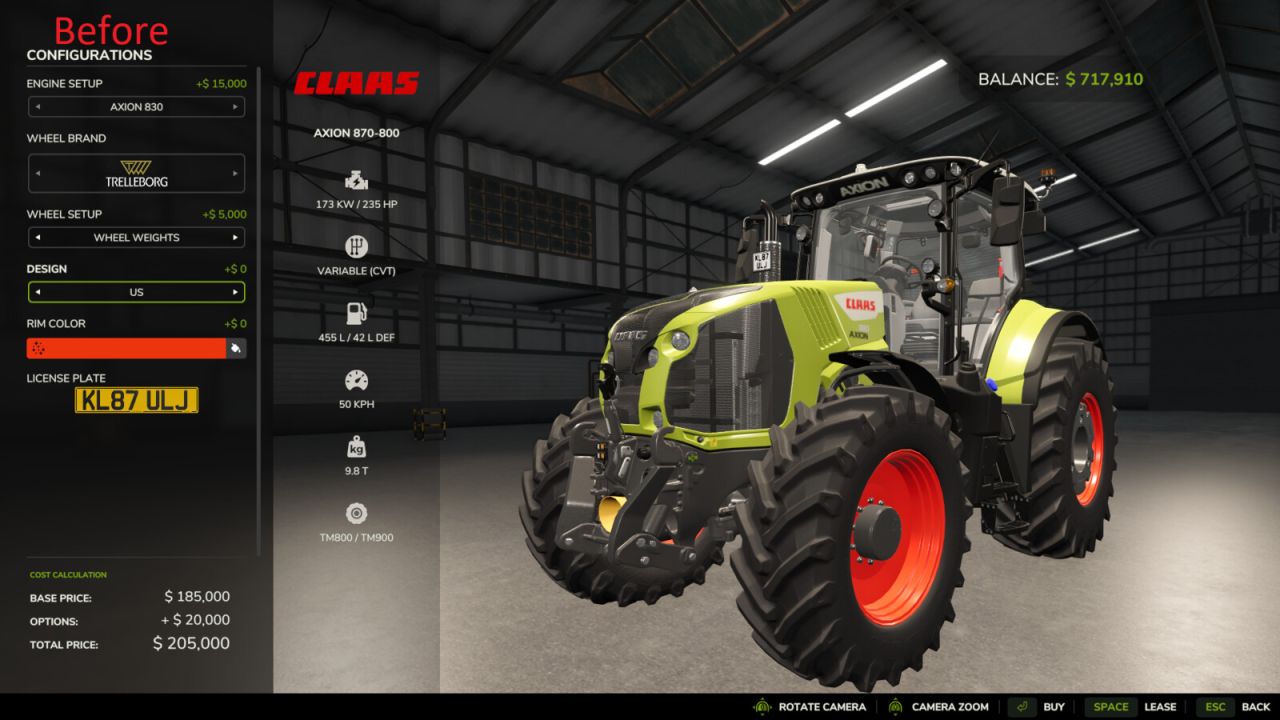
Admin-Shop-Preise V1.0.0.0 Diese Mod ermöglicht es dir, das wirtschaftliche Gleichgewicht gleich zu Beginn deiner Karriere anzupassen. Beim Start einer neuen Kampagne und der Installation vieler Drittanbieter-Mods stimmen die Ausrüstungspreise oft nicht überein. Mit dieser Mod kannst du die Kosten von Fahrzeugen und Geräten im Shop direkt während des Spiels einfach angleichen und ausbalancieren, ohne die XML-Dateien jeder installierten Mod manuell bearbeiten zu müssen. Hauptmerkmale: Erstes Wirtschaftsgleichgewicht: Ein ideales Werkzeug, um die Preise schnell an die individuellen Regeln Ihrer neuen Kampagne anzupassen. Komfortable Gerätesuche: Finden Sie die benötigten Maschinen ganz einfach über die Suchfunktion. Die originalen Shop-Symbole helfen Ihnen dabei, die Maschinen zu identifizieren. Flexible Anpassungsmöglichkeiten: Legen Sie Ihren eigenen Basispreis fest oder stellen Sie sofort den ursprünglichen Preis wieder her. Proportionale Skalierung: Die Kosten aller verfügbaren Konfigurationen werden automatisch angepasst. Wenn Sie beispielsweise den Basispreis eines Traktors halbieren, verringern sich auch die Aufpreise für zusätzliche Räder oder Motoren im Shop um 50 %. Währungsumrechnung: Geben Sie die Beträge in der in den Spieleinstellungen ausgewählten Währung ein. Kompatible Währungsumrechner werden automatisch unterstützt. Separate Spielstände: Alle Preisänderungen werden für jeden Spielstand separat gespeichert und haben keinen Einfluss auf Ihre anderen Spielstände. Mehrspieler-Unterstützung: Der Server steuert alle Preise, und nur Sitzungsadministratoren können diese ändern. Alle Teilnehmer benötigen für den Mehrspielermodus dieselbe Mod-Version. Bedienelemente: Drücken Sie zu Fuß die rechte Umschalttaste + P, um das Preisverwaltungsmenü zu öffnen. Die Hotkeys können in den Standard-Steuerungseinstellungen des Spiels geändert werden. Drücken Sie die Escape-Taste oder klicken Sie auf die Schaltfläche „Schließen“, um die Benutzeroberfläche zu verlassen. Wichtige Information: Diese Modifikation dient ausschließlich der Anpassung und dem Balancing des Gameplays. Vermeiden Sie übermäßige Preisnachlässe, damit Sie nicht das Interesse am Ausbau Ihres Bauernhofs verlieren. Die Preise für Schnittgeräte wirken sich automatisch auf deren Leasingkosten und spätere Wiederverkaufswerte aus. Der Mod erstattet kein Geld für Ausrüstung, die vor der Preisänderung gekauft wurde. Im Mehrspielermodus müssen Sie sich als Serveradministrator anmelden. Die Berechtigungen eines Farmmanagers allein reichen nicht aus. Öffnen Sie das Menü, während alle anderen Menüs geschlossen sind. Geben Sie ganze Beträge in der angezeigten Währung ein, mit oder ohne Leerzeichen. Mit der Rücktaste bearbeiten Sie den Text; nicht angewendete Eingaben werden beim Schließen verworfen. Kann keine zuverlässige Währungsumrechnung durchgeführt werden, ist die Bearbeitung gesperrt. Ändert sich der Kurs während der Bearbeitung, überprüfen Sie den angezeigten Betrag erneut, bevor Sie ihn anwenden. Spieler können unterschiedliche Anzeigewährungen verwenden; gespeicherte und Netzwerkpreise basieren auf den internen Einheiten des Spiels. Die Datei adminShopPrices.xml muss beim Aktualisieren der Mod im Speicherordner verbleiben. An anderen Ausrüstungsmod-Archiven sind keine Änderungen erforderlich. Einen bereits geöffneten Shop oder Konfigurator nach einer Preisänderung erneut öffnen. Gebäude, Verbrauchsgüter und versteckte Bundle-Artikel sind ausgeschlossen. Benutzerdefinierte Shops und andere Mods, die dieselben Preise ändern, erfordern möglicherweise Kompatibilitätstests. Die Benutzeroberfläche ist in Englisch, Deutsch und Ukrainisch verfügbar. Andere Spielsprachen verwenden Englisch. Tags: Geben SieLegen Sie IhrenMaschinenWichtige Information
MAN TGS Fliegl Ballenplattform V1.0.0.2
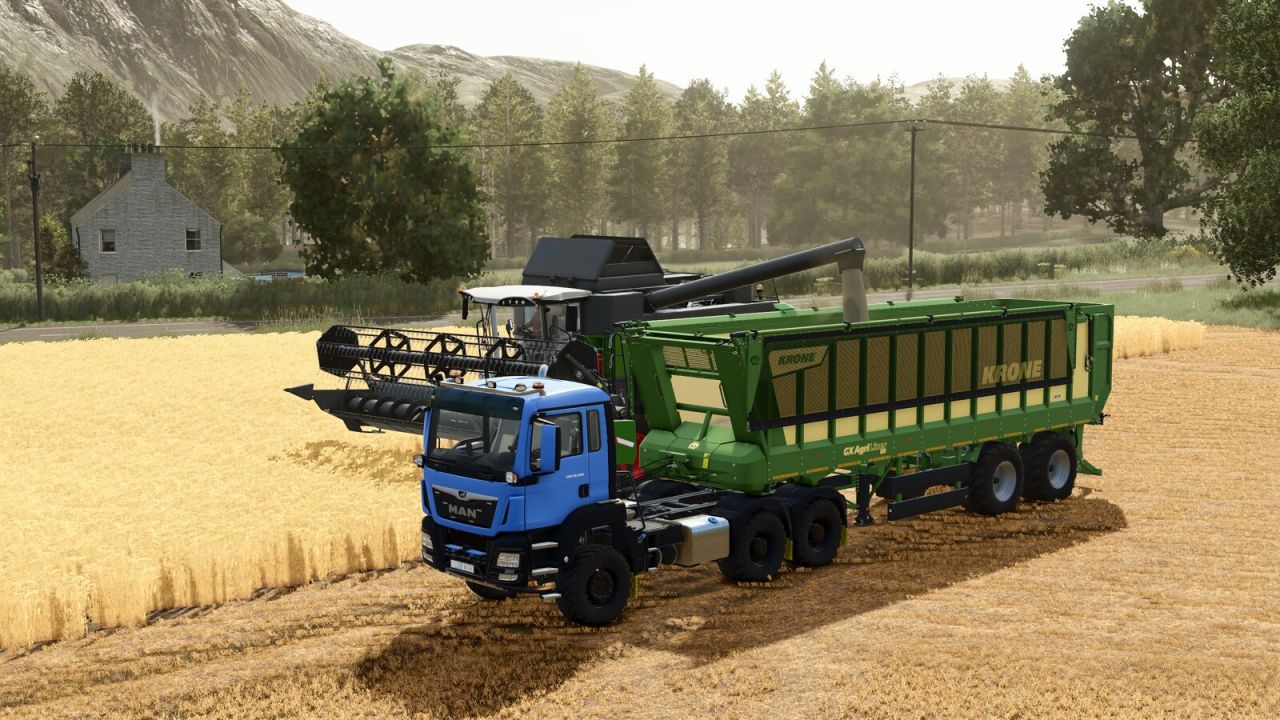
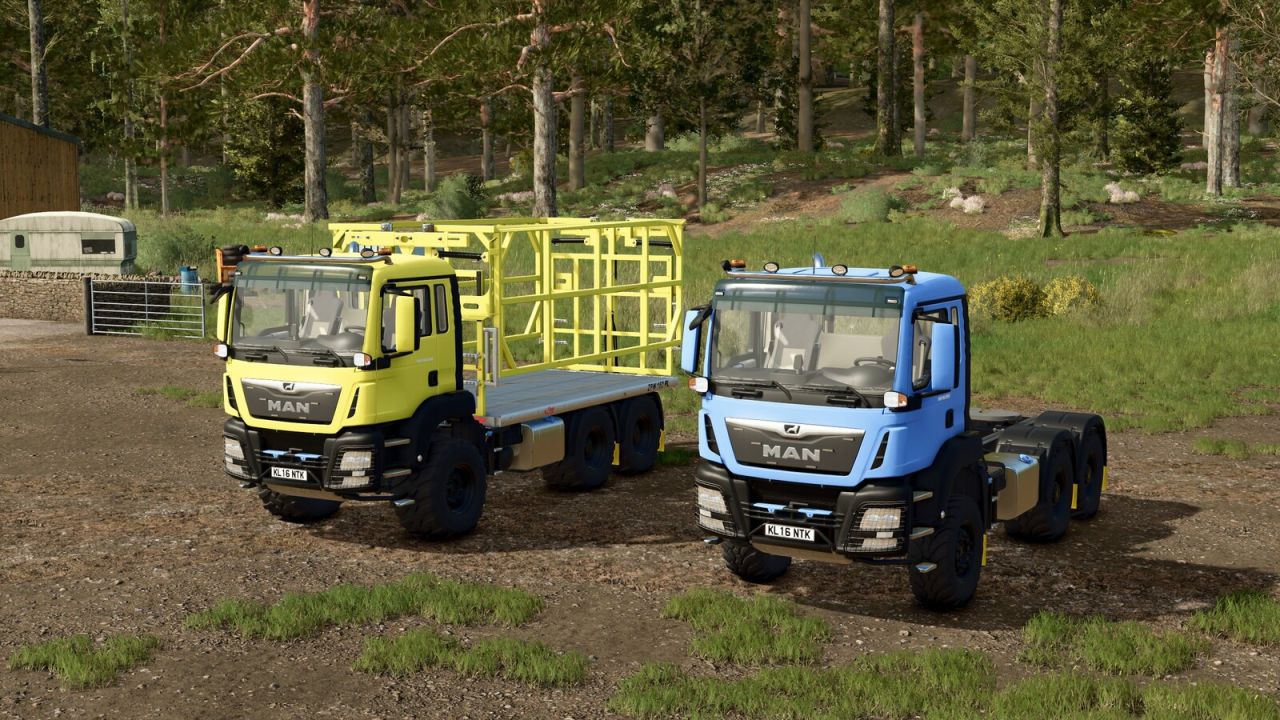
MAN TGS Fliegl Ballenplattform V1.0.0.2 MAN TGS 18 6×6 mit Fliegl ZPW160 Ballenplattform. Preis: 115.000 US-Dollar Leistung: 510 PS Höchstgeschwindigkeit: 95 km/h MAN TGS 18 6×6 Sattelauflieger. Preis: 90.000 US-Dollar Leistung: 510 PS Höchstgeschwindigkeit: 95 km/h Der MAN TGS 18 ist ein vielseitiger und leistungsstarker Lkw, der mit der renommierten Ballenplattform Fliegl ZPW160 ausgestattet ist. MERKMALE: 6×6 Allradantrieb Mehrere Radkonfigurationsoptionen (Trelleborg, Continental, BKT) Mehrere Beleuchtungskonfigurationen Anpassbare Farbschemata für LKW und Anbaugeräte Kompatibel mit den meisten Anhängeranbaugeräten Optionen zum automatischen Laden: Rundballen: 125 cm: 14 Ballen, 150 cm: 10 Ballen, 180 cm: 10 Ballen, Baumwolle: 2 Ballen Quaderballen: 180 cm: 18 Ballen, 220 cm: 12 Ballen, 240 cm: 12 Ballen, Baumwolle: 1 Ballen Ideal für die Ballenernte, den Heutransport oder allgemeine landwirtschaftliche Arbeiten! Besonderer Dank gilt Kooper 3D, die mir die Verwendung des Fliegl-Plattformmodells für den LKW ermöglicht haben. V1.0.0.2 Die Autoload-Symbole wurden angepasst. Die Preise für die einzelnen Lkw wurden angepasst. Die Farben der Felgen und Radschrauben wurden angepasst. Die Shop-Icons und das Haupt-Mod-Icon wurden ersetzt. Die LKW-Geräusche wurden angepasst. Tags: Die PreiseLKWMERKMALEPS
MAN TGS Fliegl Bale Platform V1.0.0.2
MAN TGS Fliegl Bale Platform V1.0.0.2 MAN TGS 18 6×6 with Fliegl ZPW160 bale platform. Price: $115,000 Horsepower: 510 HP Max Speed: 95 km/h MAN TGS 18 6×6 Semi-trailer. Price: $90,000 Horsepower: 510 HP Max Speed: 95 km/h The MAN TGS 18 is a versatile and powerful truck equipped with the renowned Fliegl ZPW160 bale platform. FEATURES: 6×6 All-wheel drive traction Multiple wheel configuration options (Trelleborg, Continental, BKT) Multiple lighting configurations Customizable color schemes for truck and attachments Compatible with most trailer implements Autoload Options: Round bales: 125 cm: 14 bales, 150 cm: 10 bales, 180 cm: 10 bales, cotton: 2 bales Square bales: 180 cm: 18 bales, 220 cm: 12 bales, 240 cm: 12 bales, cotton: 1 bale Perfect for bale collection, hay transport, or general farming operations! Special thanks to Kooper 3d for letting me use the Fliegl platform model for the truck V1.0.0.2 Autoload icons have been adjusted Prices for each truck have been adjusted Wheel and wheel bolt colors have been adjusted Shop icons and the main mod icon have been replaced Truck sounds have been adjusted Author: Sadneess24 Report bugs in the comments and help modders improve this mod. Always check the comments, you can find a solution. DOWNLOAD MOD
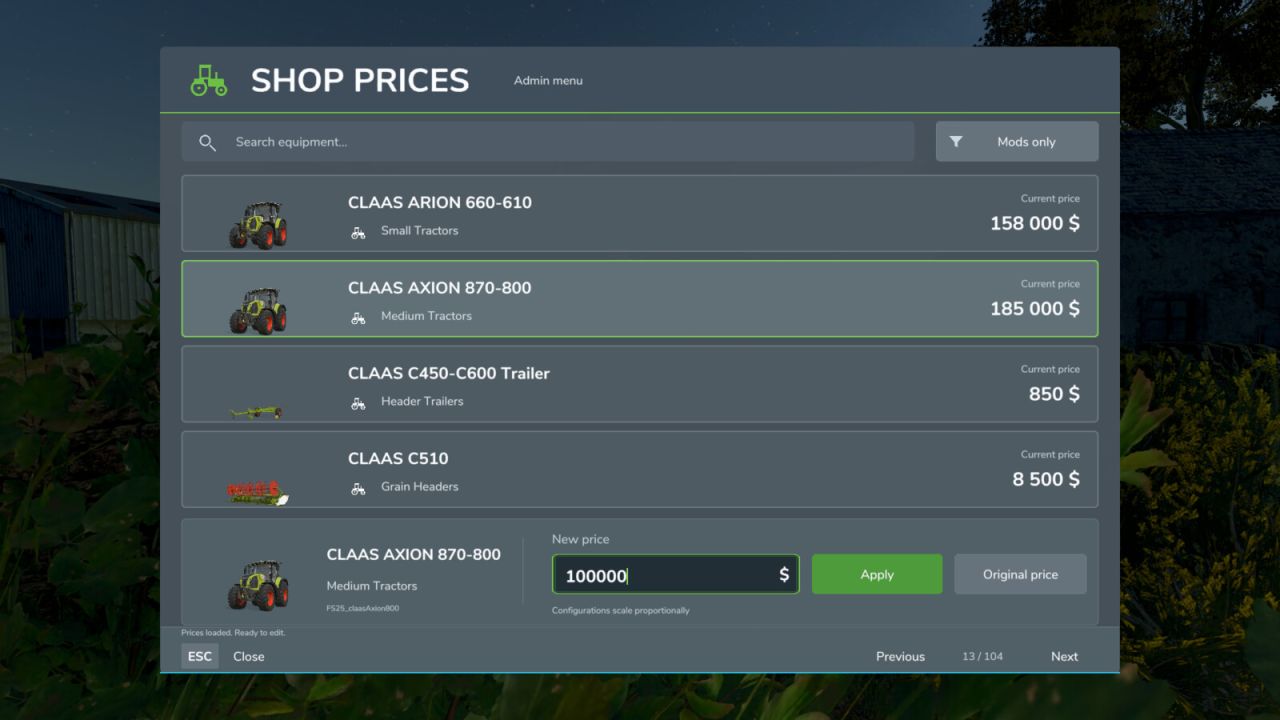
Admin Shop Prices FS25
Description: This mod was created to let you adjust the economic balance at the very beginning of your career. When starting a new campaign and adding many third-party mods, equipment prices often do not match one another. The mod lets you easily align and balance the cost of vehicles and implements in the shop directly during gameplay, without manually editing the XML files of every installed mod. Main features: - Initial economy balancing: An ideal tool for quickly adjusting prices to the individual rules of your new campaign. - Convenient equipment search: Easily find the machines you need using search, with the original shop icons to help you identify them. - Flexible adjustments: Set your own base price or instantly restore the original pricing. - Proportional scaling: Automatically adjusts the cost of all available configurations. For example, if you halve a tractor's base price, the surcharges for additional wheels or engines in the shop also decrease by 50%. - Currency adaptation: Enter amounts in the currency selected in the game settings. Compatible currency converters are supported automatically. - Separate savegames: All price changes are stored separately for each savegame and do not affect your other saves. - Multiplayer support: The server controls all prices, and only session administrators can change them. All participants must have the same mod version for multiplayer. Controls: - While on foot, press Right Shift + P to open the price management menu. - You can change the hotkeys in the game's standard control settings. - Press Escape or click the Close button to leave the interface. Important information: - The mod is designed solely to adjust and balance gameplay. Avoid excessive price reductions so that you do not lose interest in developing your farm. - Editing equipment prices automatically affects their leasing costs and subsequent resale values. - The mod does not refund money for equipment purchased before its price was changed. - In multiplayer, log in as a server administrator. Farm manager permissions alone are insufficient. - Open the menu with other menus closed. Enter whole amounts in the displayed currency, with or without grouping spaces. Backspace edits text; unapplied input is discarded on closing. - If reliable currency conversion cannot be determined, editing is blocked. If the rate changes during editing, review the displayed amount again before applying it. Players may use different display currencies; saved and network prices use the game's internal units. - Keep adminShopPrices.xml in the savegame folder when updating the mod. No changes to other equipment mod archives are required. - Reopen an already-open shop or configurator after changing a price. - Buildings, consumables and hidden bundle items are excluded. Custom shops and other mods modifying the same prices may require compatibility testing. - The interface is available in English, German and Ukrainian. Other game languages use English.
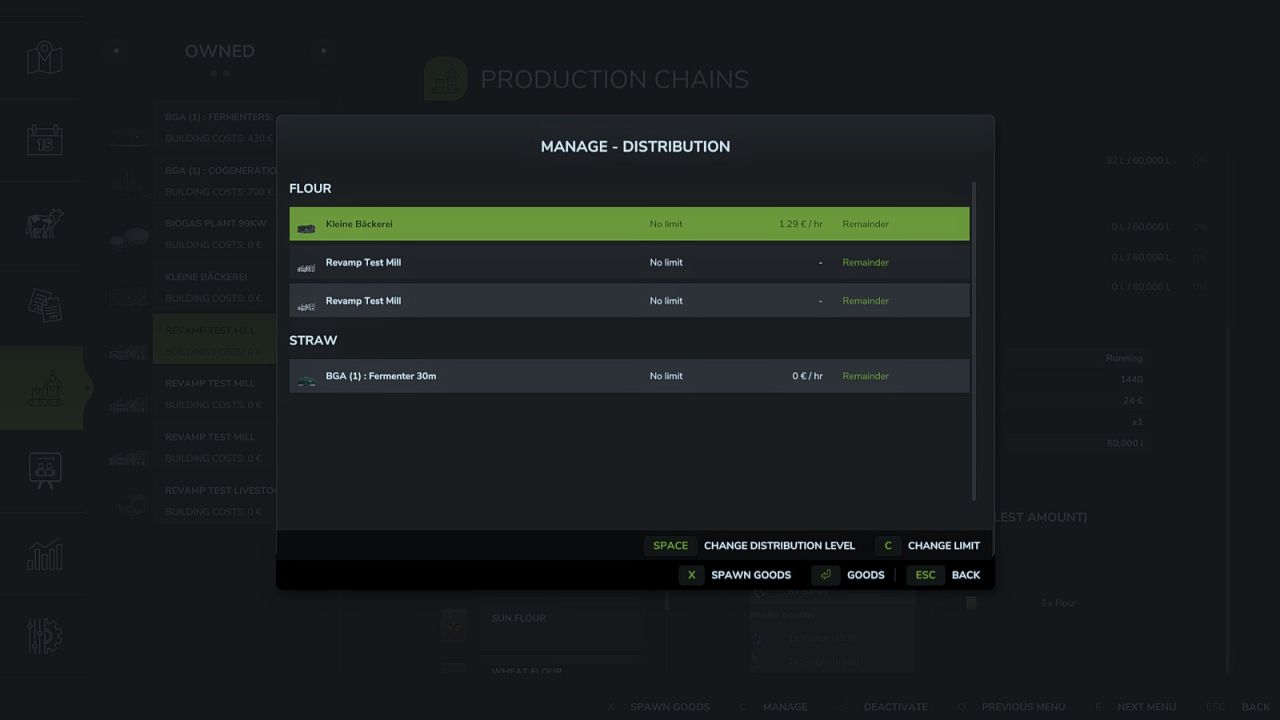
Production Revamp FS25
Production Revamp extends the game's production system with a wide range of features. It is the continuation of the Production Revamp that Braeven built for Farming Simulator 22, carried on for FS25 by Achimobil with his explicit permission. Production Revamp is a pure script mod. It does not bring any buildings of its own and does not change any recipes. Some features work right away at every production, others are only available in productions a modder has adapted for them. At all productions: - Manage dialog listing all inputs and outputs with exact amounts - Output mode "Store": products collect in the storage and can be taken out as pallets or bales in the amount you want, via the menu or directly at the building - Buy inputs directly from the dealer and sell outputs directly to him - Distribution your way: per product, choose which productions are supplied first, later or not at all, optionally with an upper limit and split evenly or by demand - Only productions that are actually processing the product right now get supplied - Delivery costs with a preview in the manage dialog and as a separate entry in the finances - Recipe view highlights missing inputs, a product that is both input and output is listed only once - Production menu shows whether a production point works in parallel or splits its capacity, and its building costs - Raised technical limits so that even very large production mod packs with well over 255 fill types load correctly - Own settings section: the admin can switch off individual areas and set prices, delivery costs and trading rights, every player can hide individual displays for themselves - Own pages in the in-game help menu - Fully multiplayer capable Only in productions adapted for it: - Mix groups: several equivalent inputs, for example rye instead of wheat - Recipes using product groups that products from other mods fit into automatically - Boosters and master boosters: optional inputs that increase the yield - Input and booster selection per production line in the manage dialog - Production depending on weather, season and time of day, plus weather-dependent storage - Live animals as input, delivered with the livestock trailer at a dedicated trigger - Take products out as logs with selectable length - Take goods out as pallets, bales or logs at silos too - Stock displays on the building as a growing stack and as a digital display, also on silos and greenhouses - Buying and selling can be locked for individual products - Production lines that run on their own For modders: - Other mods can bring their own buildings for Production Revamp and register their own products at the map's selling points and silos, without any script - Other mods can place their buttons in the manage dialog Production Storage Control and Production Supply Trader are not needed alongside Production Revamp: their features are part of Production Revamp, and both switch themselves off as soon as Production Revamp is installed. If another mod replaces game functions that Production Revamp also builds on, a warning appears in the log. The warning is a hint, not a verdict: it does not mean the two mods do not work together, only that they might not. In that case, please check whether the affected feature still works as expected in the game. Bugs and suggestions are welcome on GitHub: https://github.com/Achimobil/FS25_ProductionRevamp The documentation for modders is in the wiki: https://github.com/Achimobil/FS25_ProductionRevamp/wiki
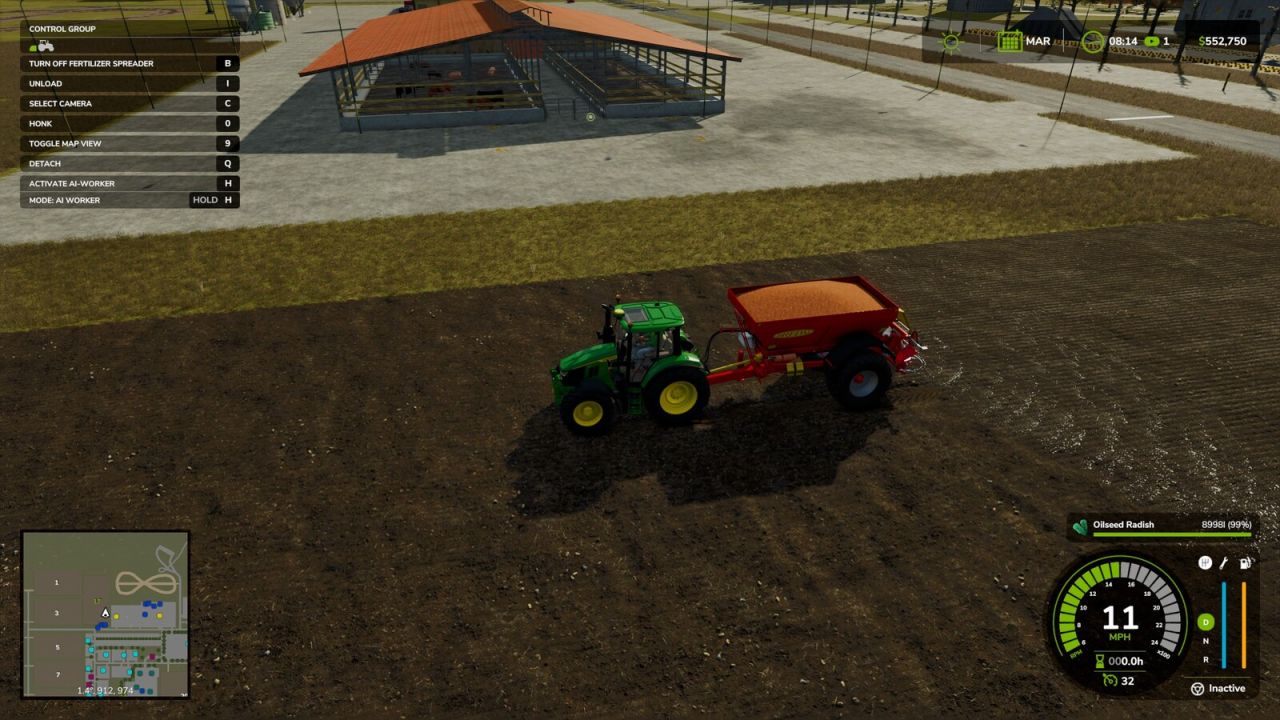
Broadcast Seeding FS25
This mod allows existing fertilizer and lime spreaders to accept seeds and sow crops, while retaining their normal fertilizer and lime spreading functions. Inspired by the real-world practice of broadcasting cover crops with a spreader.
- 15 per page
- 30 per page
- 45 per page
- 60 per page
-
See more per page
Bigger pages, fewer clicks - and no ads anywhere.
Go Pro