Farming Simulator 25 mods
78,883 results- 15 per page
- 30 per page
- 45 per page
- 60 per page
-
See more per page
Bigger pages, fewer clicks - and no ads anywhere.
Go Pro

CUMA – Shared equipment V1.0.0.3
What if you no longer needed to buy all your equipment? This mod adds CUMA cooperatives to Farming Simulator 25. Join a cooperative, pay a monthly membership fee and borrow tractors, tools and machines by the hour. A new CUMA tab appears in the shop. – Only one CUMA at a time. – Withdrawal possible after at least 1 year. – Membership fee based on the value of the fleet. – Borrowing is charged by the hour. – Rates vary depending on the season. – The number of members gradually changes. Between 2 and 4 CUMAs are generated, each with its own profile and equipment: small cooperative, arable farming, livestock farming, recent equipment, etc. Machines are selected from the in-game shop, including mods. Machines have an age, operating hours, wear, breakdowns, repairs and availability. Tools are matched to the power of the tractors. The fleet may contain tractors, seeders, plows, spreaders, haymaking equipment, balers, trailers, telehandlers, harvesters and other equipment. An area with 5 spaces can be installed from the CUMA page. Some fleet machines are displayed there. Approach them and press L to borrow them. If the area is full, a displayed machine may automatically leave to make room for the one borrowed from the menu. You can propose the purchase of a new machine by choosing: – The type of equipment – New or used – A possible trade-in – The model – Options and configurations The probability of acceptance depends on the need, compatibility, budget, number of members and expected profitability. Several in-game days are required between two proposals. Place the ZIP file in the mods folder, activate it and then open the shop. The CUMA tab appears last. Then place the delivery area from the CUMA page or via the dedicated placeable. After an update, Reset allows you to regenerate the CUMAs and their equipment. Warning: this operation deletes the existing CUMAs, their machines and their progress. Single-player only. Multiplayer is not supported. The L key cannot be remapped. Some interface warnings may appear in the log without any consequences. The mod is still being developed and will receive future updates. V1.0.0.2 – Interface changes – Fixed bugs with the mouse wheel – Increased certain limits – Fixed several bugs V1.0.0.1 A lot of improvements Creation of your own CUMA, Purchase of equipment from the CUMA directly in the shop menu Booking calendar in Multiplayer (the calendar is still in beta) To start download click the filename. To open archive files use one of these programs: WinRAR, 7-Zip, WinZip. Some mod archives may need to be extracted before the mods will work.
Hydraulisches Federungssystem V2.0.0.0
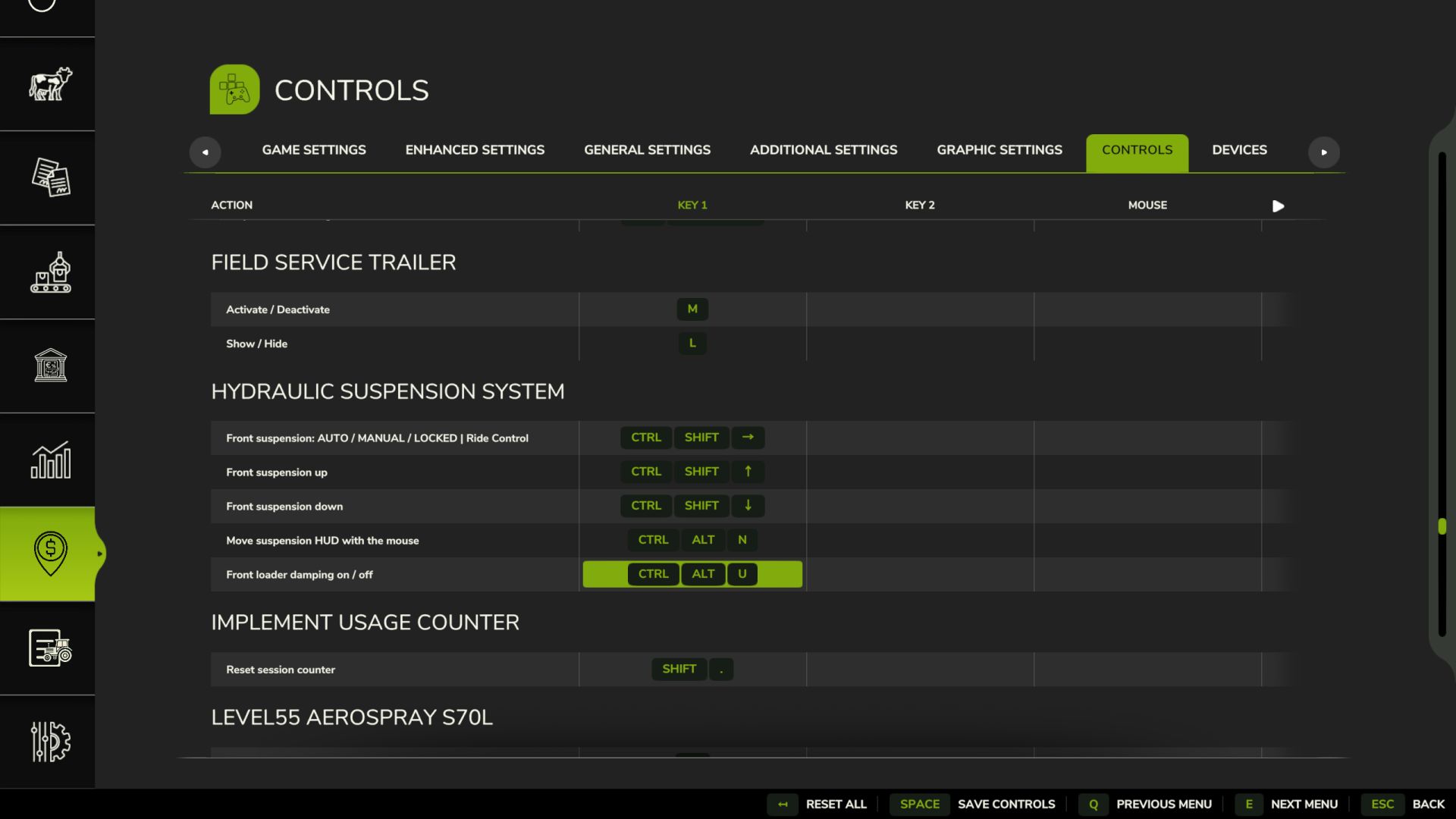
Hydraulisches Federungssystem V2.0.0.0 Ist Ihnen schon mal aufgefallen, dass sich die Vorderachse des Traktors im Spiel wie ein Stahlträger anfühlt? Fährt man über einen Stein, springt der ganze Traktor hoch, das Rad bewegt sich kaum. Diese Mod stattet Traktoren mit der hydraulischen Vorderachsfederung aus, die sie auch im echten Leben haben. Eine Federung, die wirklich funktioniert Das Rad bewegt sich über Unebenheiten und Steine auf und ab, und man kann die Bewegungen der Gelenke, Zylinder und der Welle beobachten. Der Traktor ist dadurch deutlich stabiler und komfortabler. Automatische Nivellierung Genau wie bei echten Traktoren: Bringt man Frontgewichte oder ein schweres Anbaugerät an, kehrt die Front innerhalb weniger Sekunden von selbst in die richtige Höhe zurück. Jede Marke hat ihr eigenes System John Deere ILS und TLS, Fendt, Claas PROACTIV, Terraglide (Case IH / New Holland / Steyr), MF Quadlink, Valtra, Deutz-Fahr und McCormick. Jedes System verhält sich anders, manche weicher, manche straffer. Fahrmodi – AUTO – Nivelliert sich selbst – ARBEIT – fester bei der Arbeit auf dem Feld oder wenn die Vorderseite zu federn beginnt – VERRIEGELT – Starrachse für Frontladerarbeiten oder Schwertransporte – MANUELL – Heben und Senken der Frontpartie selbst (nur bei JD ILS und Fendt, wie in der Realität) Schlüssel Strg+Alt+U – Modus ändern Strg+Alt+↑ / ↓ – Vorderseite anheben/absenken (manueller Modus) (kann in den Steuerungsoptionen geändert werden) Funktioniert nur bei Traktoren, die serienmäßig mit diesem System ausgestattet sind: mittelgroße und große Traktoren der aufgeführten Marken. Kleintraktoren und Raupenfahrzeuge bleiben unverändert. BETAVERSION Die Mod wird noch getestet, insbesondere im Mehrspielermodus. Es ist noch viel Arbeit nötig, aber sie ist bereits spielbar. Verbesserungen und Fehlerbehebungen werden basierend auf dem Feedback und den Vorschlägen der Nutzer veröffentlicht. Falls ihr ein Problem findet, sendet mir bitte eure log.txt-Datei. Im Mehrspielermodus benötige ich die Logdatei sowohl vom Host als auch vom beigetretenen Spieler. V2.0.0.0 – Fahrwerksanzeigefenster (Alt links + U): System, Modus, Höhe, Frontlader-Stabilisator und aktueller Status (Achslast, Gewicht auf der Vorderachse, Zylinder, Feder, Dämpfung, Warnungen) mit Seitenansicht der Achse. Einstellungen und Bedienfeld wurden aus dem Spielmenü in das Fenster verschoben. Lkw (neu): Luftfederung hinten mit Niveauregulierung (ECAS), bis zu 3 Achsen. Gleiche Fahrzeughöhe im Leer- und Beladungszustand, manuelle Höhenverstellung für Laderampen und Kupplungen, automatische Rückkehr zur Fahrzeughöhe ab 30 km/h. 8×4-Kipper und größere Fahrzeuge behalten ihre Blattfedern. Abschaltbar. Die Nivellierung erfolgt nur bei Traktoren, die im realen Leben über eine solche verfügen (Marke, Gewicht und Mindestleistung, standardmäßig 120 PS). Kleine/einfache Traktoren erhalten eine Pendelachse ohne Federung anstelle der im Spiel verwendeten weichen Federung. Kettentraktoren bleiben unverändert. – Radlader und Teleskoplader: Ride Control (Auslegerfederung mit Akkumulator) ab 6 km/h, starr darunter für präzises Arbeiten; Strg + U schaltet AUTO / AUS. – Frontlader an Traktoren: Die Last schwebt förmlich mit der Bewegung der Armspitze; Ein-/Ausschalten im Fenster. – Straffere Dämpfung auf der Straße ab 30 km/h; JCB Fastrac selbstnivellierende Hinterachsfederung; Geräusch des Hydraulikventils. – Starre Vorderachsen (z. B. John Deere 7030) bewegen und neigen sich als ein Bauteil. – Kein Rütteln mehr bei Einzelradaufhängung (JD 8R ILS) und keine kleinen Hüpfer mehr beim Traktorwechsel. – Bedienfeld: Warnungen „Endanschlag“ und „Vorderachse zu leicht – Ballast hinzufügen“, Name des Traktorsystems; kann abgeschaltet werden; wird ausgeblendet, wenn das Fenster geöffnet ist und Zasty HUD aktiv ist. – Autos, Mähdrescher und andere Fahrzeuge bleiben unberührt (Shop-Kategorie ist überprüft). Tastenkombinationen: Strg + U (Modus), Strg + Alt + Pfeil nach oben/unten (manuelle Höhenverstellung, gedrückt halten), Alt + U (Fenster). Entfernt: Strg + Alt + L und Strg + Umschalt + U (jetzt im Fenster). – Behoben: Bei einer Neuinstallation wurden die Standardtasten nicht zugewiesen. TASTEN (Standard) – Strg links + U: Federungsmodus (Fahrwerksregelung bei Radladern) – Linke Alt + U: Fensterheber – Linke Strg-Taste + Linke Alt-Taste + Pfeil nach oben/unten: Manuelle Höhenanpassung (gedrückt halten) Dies sind die Standardtasten. Falls eine davon bereits vom Spiel oder einer anderen Mod belegt ist, gehen Sie zu Optionen > Steuerung und wählen Sie die gewünschte Taste aus, um Konflikte zu vermeiden. Tags: Armspitze Ein- AusschaltenDas RadEine FederungHinterachsfederung Ger
Takeuchi TB350R v1.0
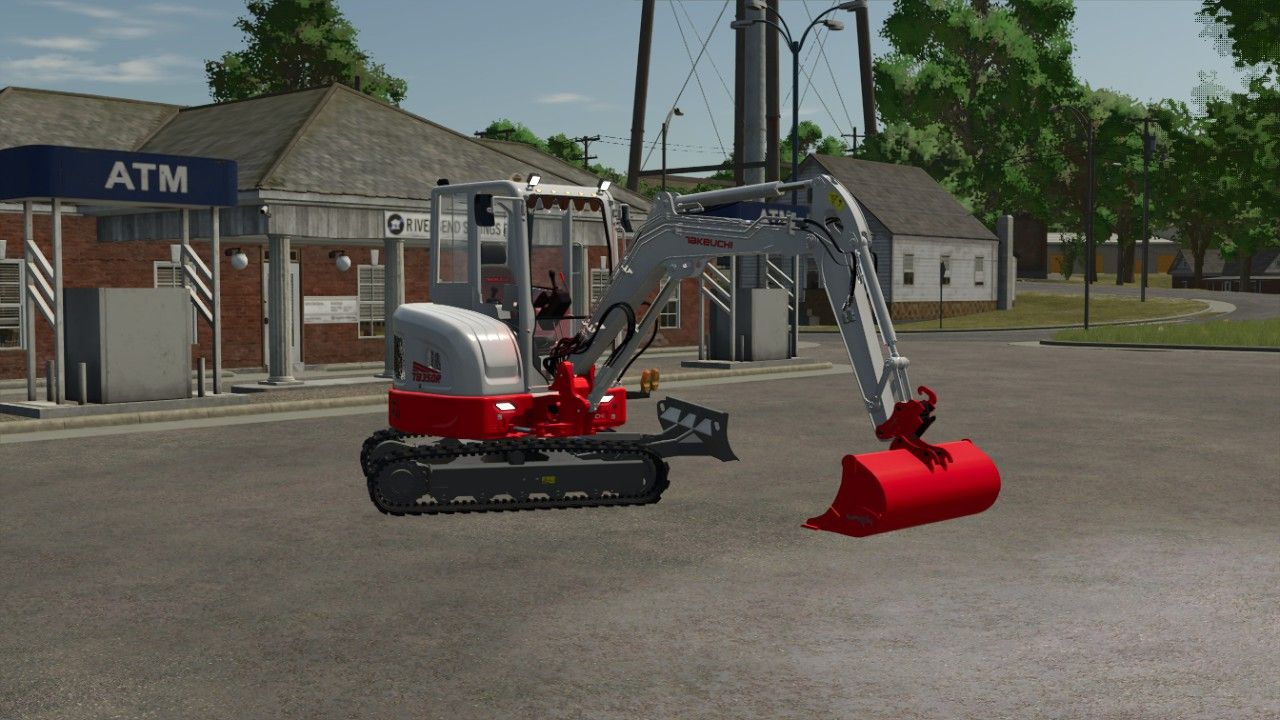
Takeuchi TB350R v1.0 Here is the Takeuchi TB350R Power: 187 Price: 260000 Max Speed: 10 Windshield sun strip Orange lights Red rear lights Author: melvintjuhhh, Terra conception Report bugs in the comments and help modders improve this mod. Always check the comments, you can find a solution. DOWNLOAD MOD
Takeuchi TB350R FS25
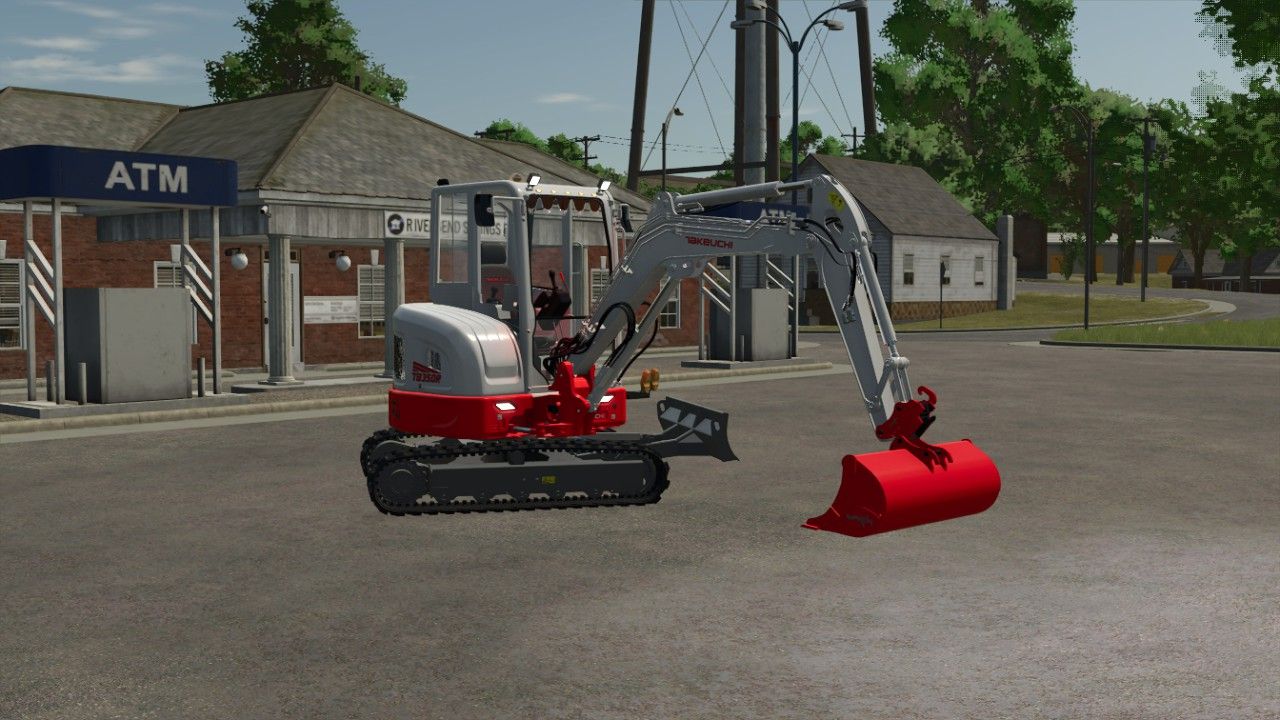
Here is the Takeuchi TB350R for the 50 people on Discord https://discord.gg/g4AbcTM9n - Windshield sun strip - Orange lights - Red rear lights Have fun with it

FS25 Switchable Sign with IC V1.0.0.1
FS25 Switchable Sign with IC V1.0.0.1 GV604 Flexi switchable Sign – prefab for FS25. Features changeable ADplate, Wide Load, Long Load and Heavy Load plates, with animated lid and locks, physical sign storage, and full Interactive Control, IC operation. Required mods: Interactive Control Credits:gaukeen Tags: FS25ICInteractive ControlWide Load
Hyper Realistic Maintenance 2 V3.1.4
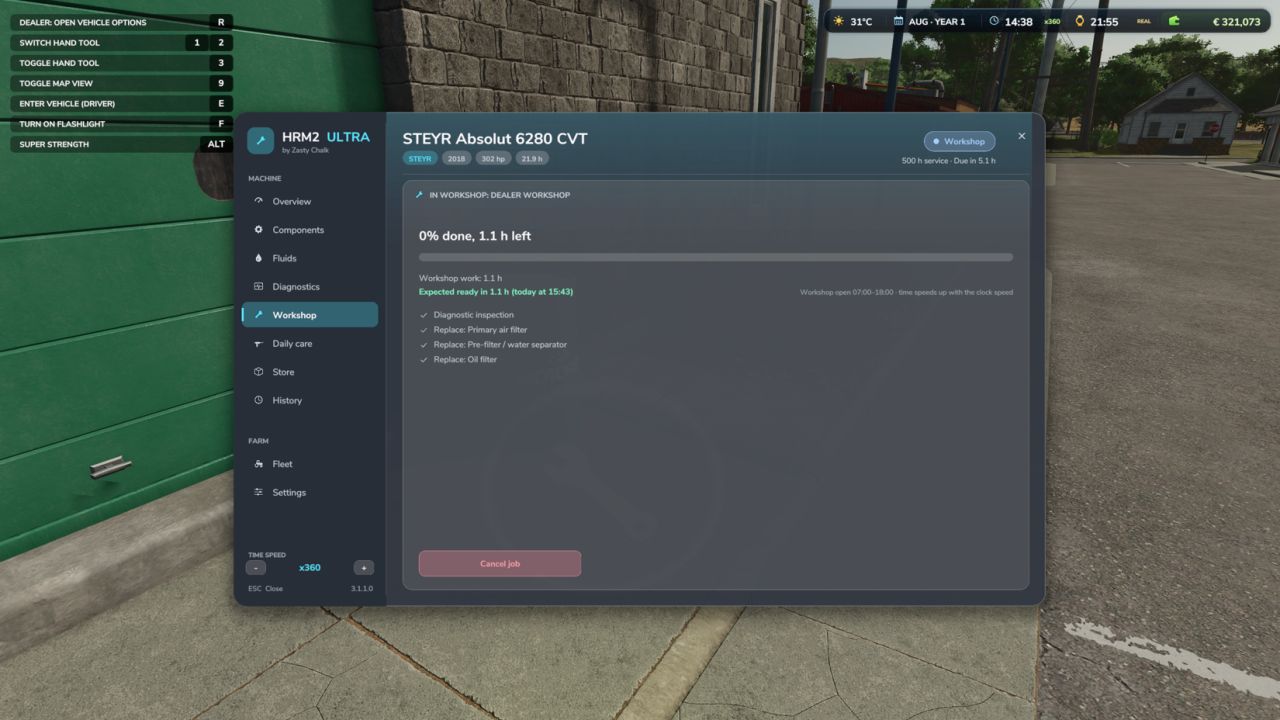
Hyper Realistic Maintenance 2 V3.1.4 Uploading to other websites without my consent is prohibited! The DEF Pack mod is recommended to simulate the new DEF systems. The DEF Mod Pack and Variable Tire Pressure mods can be used together without any compatibility issues. More translations in development Your engine wears out. Your oil gets dirty. Your turbo fails if you never maintain it. This is what “realistic maintenance” should have meant from the beginning. Hyper Realistic Maintenance 2 adds deep, continuous mechanical simulation to all motorized vehicles in your saved game — tractors, trucks, harvesters and cars — with real gameplay consequences, not just cosmetic numbers. What is simulated Engine: 5 independent components (cylinder, piston, bearings, crankshaft, valves) that influence each other — cylinder wear increases blow-by, which contaminates the oil and accelerates wear even further Thermal: coolant temperature increases with load and the engine overheats if the radiator is degraded Fluids: oil level/contamination and coolant level, both checkable and requiring maintenance Transmission: clutch, gearbox, turbo and battery/starter motor wear over time Failures: probabilistic failures that increase sharply above approximately 35% wear on the relevant component — critical overheating above 118 °C is guaranteed and does not depend on luck Behaviour by vehicle type: tractors, trucks, harvesters and cars wear at different, realistic rates Real effects, not cosmetic ones Real power loss — reduces the engine’s effectively available torque; you will feel it in the field Real no-start conditions — a flat battery or worn starter motor can actually prevent the engine from turning over, with a warning displayed on screen Harvesters suffer a real loss of threshing efficiency as the engine condition deteriorates Scheduled maintenance, just like in real life 10 maintenance items (engine oil, filters, hydraulic/transmission oil, coolant, grease, belts and much more), each with its own interval and a real cost for the farm — automatically adjusted to the vehicle’s actual power. If you neglect maintenance for too long, wear accelerates by up to +120%. Vehicle HUD with 3 pages — overview, detailed engine diagnostics and maintenance status — with an adjustable position in the game Settings menu. The game’s own repair screens (shop, farm workshop, mobile workshop) now also perform a complete HRM2 service. Compatibility: works completely standalone. If you also have the 4×4 Traction System mod, the two mods detect each other automatically, and 4WD/differential lock driving gains a real additional effect on the transmission. Significantly improved multiplayer, tested on a real dedicated server (see the changelog for details and known limitations). Maintenance progress is saved in the saved game. V3.1.4.0 HRM2 ULTRA complete rewrite: every part simulated like the real machine Every machine is built from its real parts (engine internals, injection, turbo, after-treatment EGR / DOC / DPF / SCR, cooling, electrics, transmission, hydraulics, PTO, brakes, steering, tracks, EV parts). Each one has its real service life, wears from what the machine actually does and fails in its own ways, through 4 stages. Engine oil with real chemistry (viscosity, soot, fuel dilution, glycol, TBN, wear metals) and lab oil analysis. Thermal model with thermostat, radiator fouling, boiling and ECU protection. Warm-up is quicker in game (about 1 °C every 4 s at idle) and the engine cools down on the game clock when parked (about 1 hour to lose half the heat). Battery / alternator, glow plugs and cold starts, hot shutdown damage on turbos, DPF regeneration (passive, active, parked), DEF inducement. J1939 fault codes on machines with an ECU; older machines are diagnosed by smoke, noises and gauges. Workshop: service packs (500 / 1000 / 2000 / 3000 h), inspections, repairs, overhauls, parts quality with delivery times, dealer, mobile mechanic or do it yourself, opening hours. The game’s workshop “Repair” button starts a dealer job and opens the HRM2 window on the Workshop tab. The job shows when the parts arrive, the workshop work and when the machine will be ready (today / tomorrow at hh:mm). Workshop jobs and parts delivery follow the game clock: speed up the time (also from the HRM2 window: “Time speed / +”) and they finish sooner; parked machines keep progressing. Daily care on foot: walk-around, greasing, draining the water separator, blowing out radiator and air filter, topping up fluids. The bar fills right away after the care. Workshop sounds: ratchet when you do the work, impact wrench at the dealer, oil pouring, grease gun, compressed air when blowing filters (can be switched off). Fluids included: DEF tanks (5 000 / 10 000 / 15 000 L) and pallets of 5 L engine oil 15W-40 and hydraulic oil UTTO cans (56 x 5 L). A pallet near the machine is used first when you top up or change the oil yourself; empty cans disappear. Implements and trailers too: shares, tines, discs, knives, knotters, chains, PTO shafts, gearboxes, bearings, brakes; worn tools raise the draught. Real machine hours are read on load: a 3000 h tractor is no longer like new. Hour meter on the instrument cluster and in Zasty HUD. Reads the 4×4 Traction System: driving with 4×4 or diff locks engaged wears differentials, final drives and front drive shaft. Realistic exhaust smoke, failure noises with the machine’s own sounds, brand reliability, used machines with hidden faults, farm parts store. New windows (camera locked while open) and own instrument cluster with 16 warning lamps. Singleplayer, multiplayer and dedicated servers. KEYS (default) Left Alt + M: Maintenance window (in the cab, or on foot next to a machine) Left Alt + N: Show / hide the instrument cluster These are the default keys. If one of them is already used by the game or by another mod, go to Options > Controls and set the key you prefer, to avoid conflicts. Author: zasty chalk, robster76 Report bugs in the comments and help modders improve this mod. Always check the comments, you can find a solution. DOWNLOAD MOD

Zasty HUD V1.0
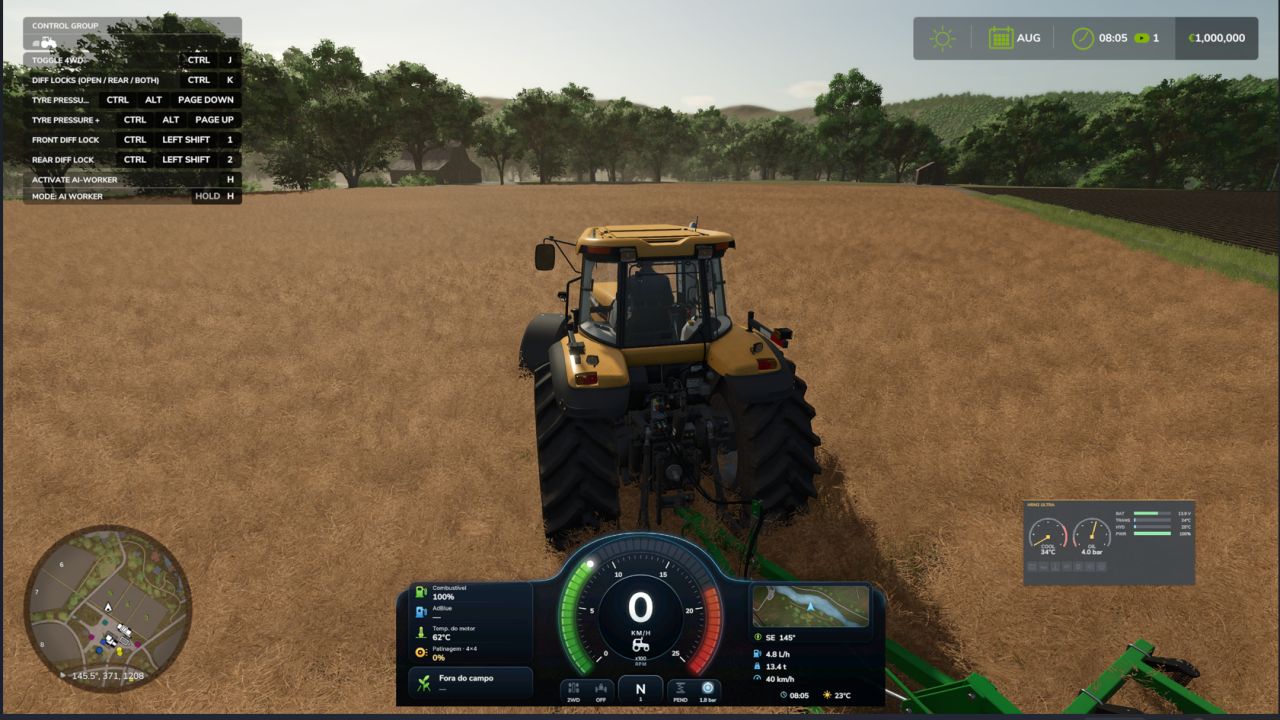
-This mod was made as a ecossystem, to work with my mods, so use it with caution with any other mods, compatibility out my ecossystem not tested – Premium tractor HUD in two styles (horizontal bar or round tachometer) that replaces the original speedometer. – Speed, rpm, gear, fuel, DEF, engine temperature, hour meter, field and crop, minimap with heading. – Attached implement: state, fill level in tonnes or litres, working width and worked hectares. – Top bar with weather, date, game time, time speed, real clock and money. – Shows live data of the Zasty Chalk mods (4×4 Traction System, Hydraulic Suspension System, Real Powertrain, HRM2: warning lamps, coolant, oil pressure) and hides their own panels. – Settings window with the mouse (Left Alt + H): style, size, position, top bar, units, minimap and which modules to show. – Hides the original speedometer, minimap and fill level bar, and the “engine starting” message (each one optional). – Works on its own with any tractor. English, German, Portuguese. KEYS (default) – Left Alt + H: Zasty HUD settings window These are the default keys. If one of them is already used by the game or by another mod, go to Options > Controls and set the key you prefer, to avoid conflicts. To start download click the filename. To open archive files use one of these programs: WinRAR, 7-Zip, WinZip. Some mod archives may need to be extracted before the mods will work.
Temperaturkontrollierte Aufbewahrungsbox V1.0.0.0
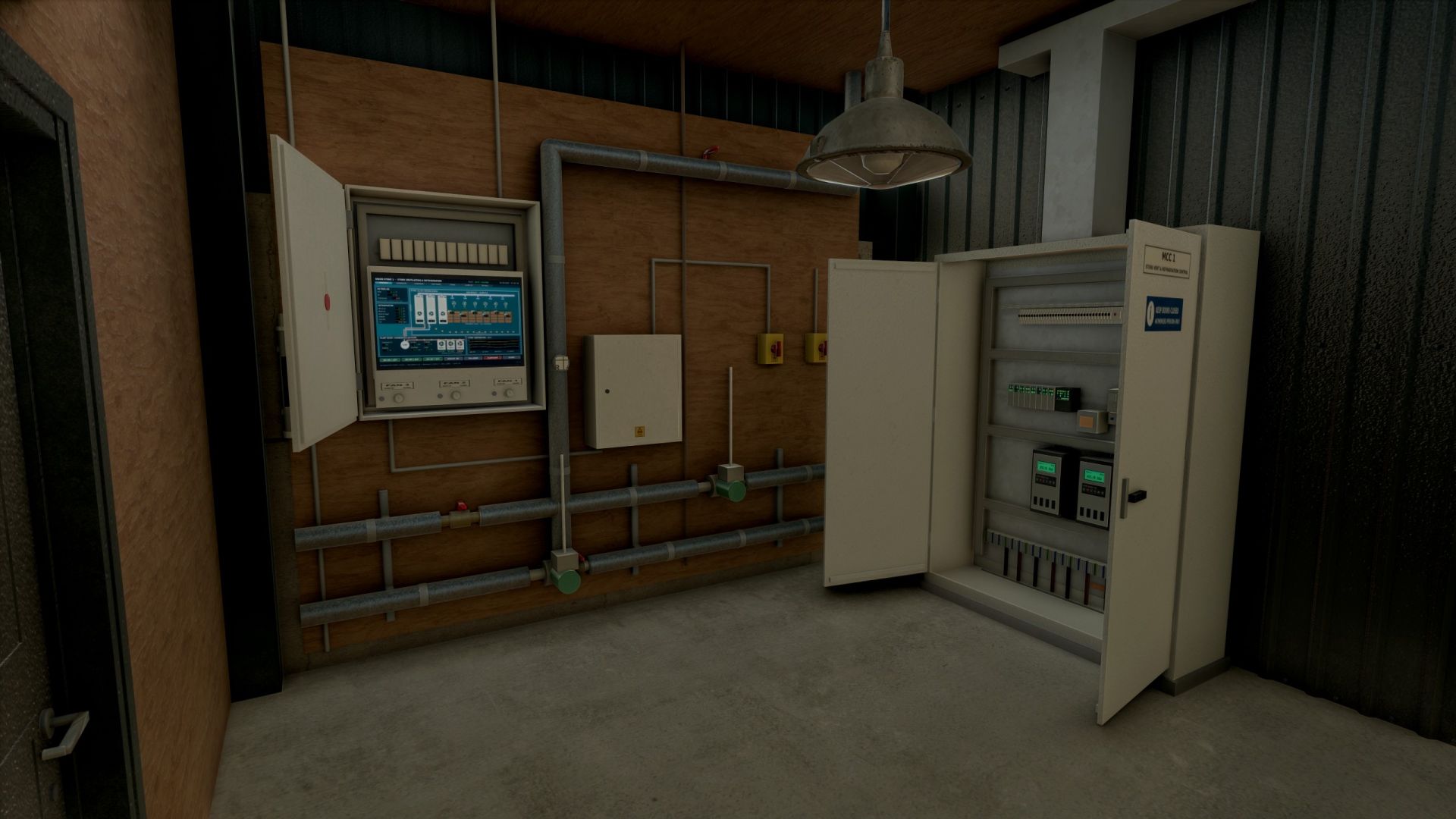
Temperaturkontrollierte Aufbewahrungsbox V1.0.0.0 Gebäude 20 x 24 m große Portalrahmenhalle mit wacholdergrüner Verkleidung, 10 m Dachüberstand, Spritzschaumdach und vorgefertigten Betonplatten im Inneren Isoliertes 6 m Sektionaltor mit Verteilerkasten und Schalter sowie Türen für Personal- und Technikraum. Hinterer Maschinenraum mit Zwischengeschoss und Treppe, drei Verdampfereinheiten in voller Höhe, isolierte Rohrleitungen, Trennschalter, Verteilerkästen und ein begehbarer MCC-Schaltschrank mit zu öffnenden Türen (Antriebe, SPS, Schütze, Leistungsschalter und Verkabelung im Inneren) Überkopf-Luftkanäle mit sechs rotierenden Umwälzventilatoren, drei Außenkondensatoren, Wetterschutzlamellen, Temperatursensoren und Verkabelung, Köderstationen für Nagetiere und viele kleine Details Lüftungssteuerung Öffnen Sie den Lüftersteuerungskasten im Technikraum und schalten Sie die Lüftergruppen 1, 2 und 3 ein oder aus. Die Lüfter drehen sich realistisch hoch und laufen wieder herunter, begleitet von Geräuschen und blinkenden Kontrollleuchten beim Starten. Großer Kontrollbildschirm mit Anzeige von Luftstrom, Verdampfern, Kondensatoren, Temperaturen der Pflanzensonden und Trendentwicklungen Die Lüfter sind beim Kauf ausgeschaltet. Objektspeicher (Shop-Option) Lagern Sie Erntekisten und Paletten: Stellen Sie diese in die abgenutzte gelbe Laderampe vor der Tür. Im Inneren sind die Kisten achtfach übereinander gestapelt, von hinten nach vorne, mit einem freien Durchgang zum Pflanzenraum. Im Entladebereich auf dem Vorfeld werden die entladenen Kisten in zwei Lagen übereinander ausgefahren. Wählen Sie im Shop „Nein“ für einen einfachen Laden ohne Lagerraum für Gegenstände (günstiger). Lichter Separate Schalter für die Ladenbeleuchtung, die Beleuchtung des Pflanzenraums und einen Außenstrahler im Garten. Preis: 185.000 Kategorie: Schuppen / Lagerraum Tags: Hinterer MaschinenraumIm InnerenLagern Sie ErntekistenSPS
Interaktives Kürbisbeet V1.0.0.0
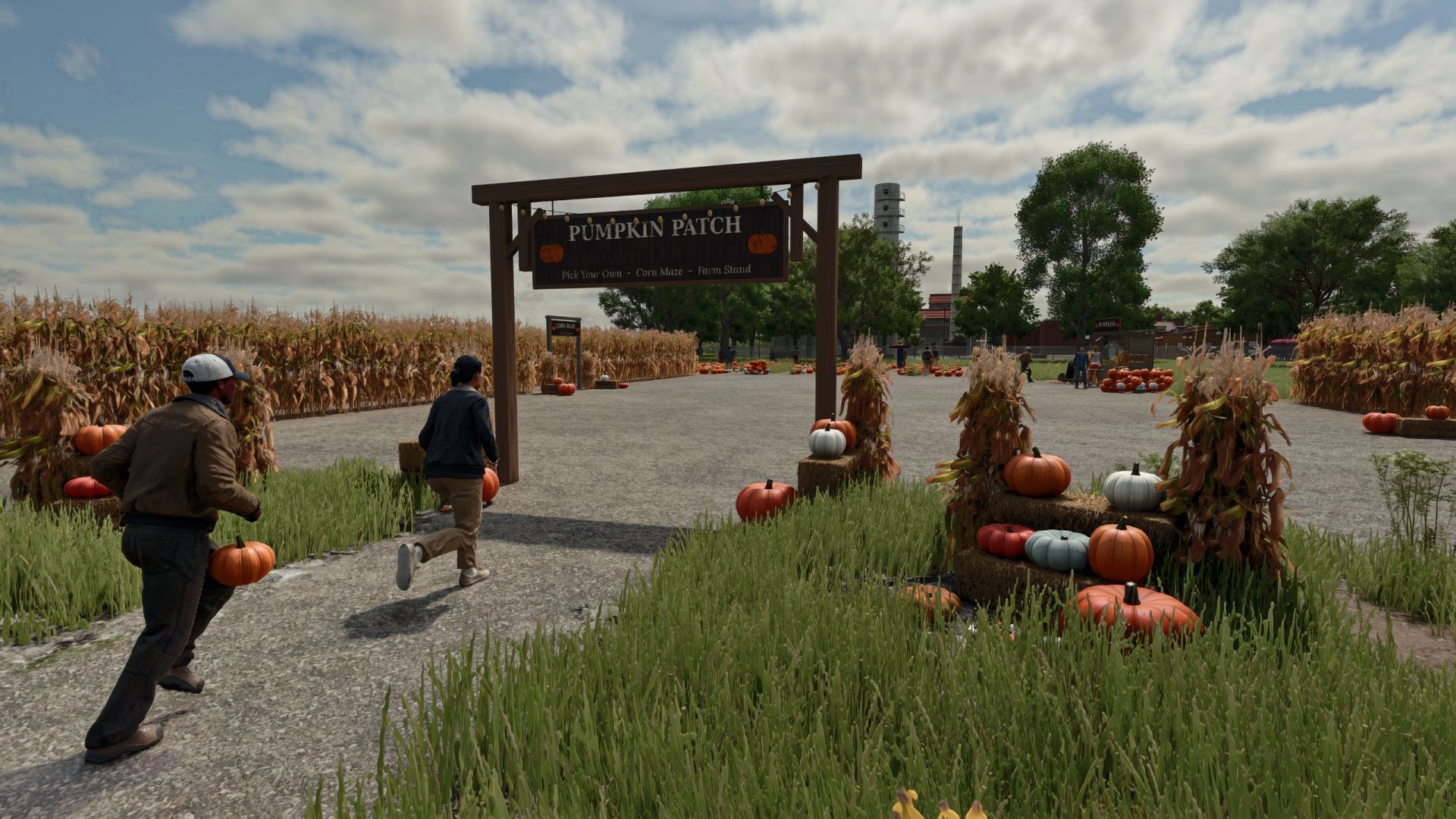
Interaktives Kürbisbeet V1.0.0.0 Bringen Sie mit einem Kürbisfeld, einem Hofladen, Maislabyrinthen und Besuchern herbstliches Flair auf Ihren Bauernhof. Merkmale: Ein 12 × 12 m großes Kürbisfeld mit etwa 110 Kürbissen in 8 verschiedenen Sorten. Sie können von Hand gepflückt werden, wobei maximal 4 Stück getragen werden dürfen. An den gepflückten Stellen wachsen die Kürbisse innerhalb weniger Tage wieder nach. Ein Verkaufsstand auf dem Bauernhof, an dem man Kürbisse verkaufen oder zu leuchtenden Halloween-Laternen schnitzen kann. Der Stand nimmt pro Stunde 20 Pfund von den Besuchern ein. Kleine und große Maislabyrinthe mit festen Wänden, einem Timer und 4 versteckten Stempelstationen. Finde sie alle und unterbiete deine Bestzeit. Eine Vogelscheuche, die im Wind schwankt, beobachtet dich und winkt, wenn du näher kommst. Ihr Gesicht leuchtet nachts. Ein Eingangsschild mit Lichterkette, dazu ein Maiskolben, eine Strohballen-Ausstellung und ein Kürbishaufen. Die Besucher schlendern über das Kürbisfeld, besuchen den Verkaufsstand und erkunden das Labyrinth. Manche nehmen einen Kürbis mit nach Hause. Spitzhacken, Laternen und Labyrinthzeiten werden im Mehrspielermodus gespeichert und geteilt. Verfügbar in 10 Sprachen. Installationsanleitung: Laden Sie die .zip-Datei herunter. Entpacken Sie sie nicht. Füge es dem Ordner Dokumente / Meine Spiele / FarmingSimulator2025 / mods hinzu. Schalte die Mod ein, wenn du einen Spielstand lädst oder startest. Alles, was du unter Ashmere findest, findest du im Shop und im Baumodus. Tags: Der StandEntpacken SieIhren BauernhofLaden Sie

Zasty HUD FS25
-This mod was made as a ecossystem, to work with my mods, so use it with caution with any other mods, compatibility out my ecossystem not tested - Premium tractor HUD in two styles (horizontal bar or round tachometer) that replaces the original speedometer. - Speed, rpm, gear, fuel, DEF, engine temperature, hour meter, field and crop, minimap with heading. - Attached implement: state, fill level in tonnes or litres, working width and worked hectares. - Top bar with weather, date, game time, time speed, real clock and money. - Shows live data of the Zasty Chalk mods (4x4 Traction System, Hydraulic Suspension System, Real Powertrain, HRM2: warning lamps, coolant, oil pressure) and hides their own panels. - Settings window with the mouse (Left Alt + H): style, size, position, top bar, units, minimap and which modules to show. - Hides the original speedometer, minimap and fill level bar, and the "engine starting" message (each one optional). - Works on its own with any tractor. English, German, Portuguese. KEYS (default) - Left Alt + H: Zasty HUD settings window These are the default keys. If one of them is already used by the game or by another mod, go to Options > Controls and set the key you prefer, to avoid conflicts.
Fire station exit traffic light FS25
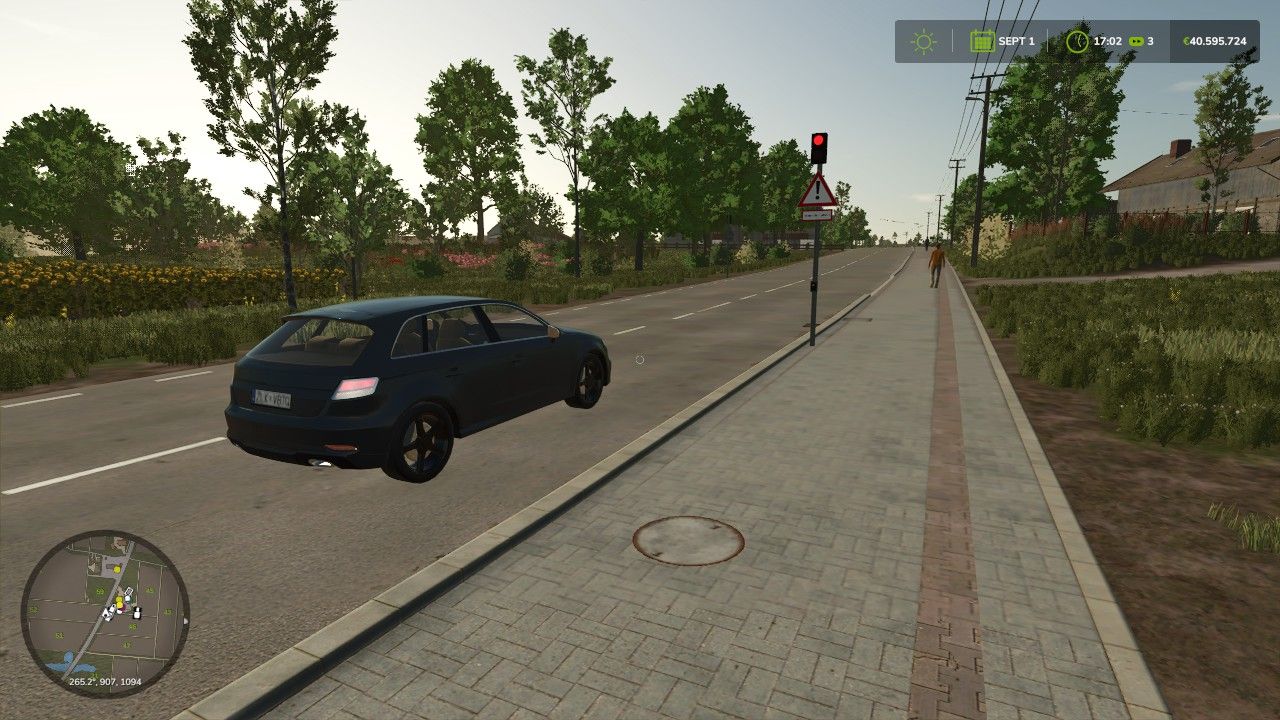
With the animated fire station exit traffic light from ScriptHub Modding, you can make your fire stations and emergency service locations in Farming Simulator 25 even more realistic. The traffic light features a manually controllable signal system with an animated signal change. When activated, the traffic light first switches to amber for 3 seconds and then to red to warn and stop traffic before a fire station exit. After being deactivated, the traffic light switches to amber again for 3 seconds before turning off completely. This makes the mod ideal for realistic firefighting operations, roleplay projects and individually designed fire station locations. Features - Animated fire station exit traffic light - Realistic signal change with time delay - Manual activation and deactivation - Amber phase lasting 3 seconds each time - Red signal to secure the fire station exit - Integrated warning sign with supplementary plate “Fire Station Exit” - Detailed traffic light pole with control element - Ideal for fire stations and emergency service locations Controls - Left mouse button: Activate traffic light - Amber for 3 seconds - Then permanently red - Right mouse button: Deactivate traffic light - Changes from red to amber for 3 seconds - Then switches off completely Mod Information - Game: Farming Simulator 25 - Mod name: Fire Station Exit Traffic Light - Manufacturer: ScriptHub Modding - In-game category: Decoration - Controls: Manually via mouse click - Special feature: Animated signal change with a 3-second amber phase ScriptHub Modding wishes you lots of fun with the mod! AI stopping area at red added Traffic clearance when the traffic light is completely switched off Automatic detection of newly installed and sold traffic lights The construction category Mod is required for display under ScriptHub Modding Practical testing of the AI function in-game is still pending

New Holland TM 7020 (Reisbauer) V1.0.0.0
New Holland TM 7020 (Reisbauer) V1.0.0.0 Marke: New Holland Modell: TM 7020 V2. Felgenfarbe: Weiß oder Schwarz. Optionen für den Reisanbau, Aufkleber, Antennen sowie verschiedene Radtypen für den Trockenfeldbau. Traktorspezifikationen Leistung: 121 kW / 165 PS Getriebe: Schaltgetriebe + Powershift-Getriebe Kraftstofftank: 218 l Höchstgeschwindigkeit: 60 km/h Gewicht: 5,4 t Gesamtpreis: 78.000 € MOD konvertiert von FS22 zu FS25 von JGGAMEPLAYAGRO. Tags: MODPS
NLM Strands FOR9T Geo Viking 800414 Short Foot (Prefab) FS25
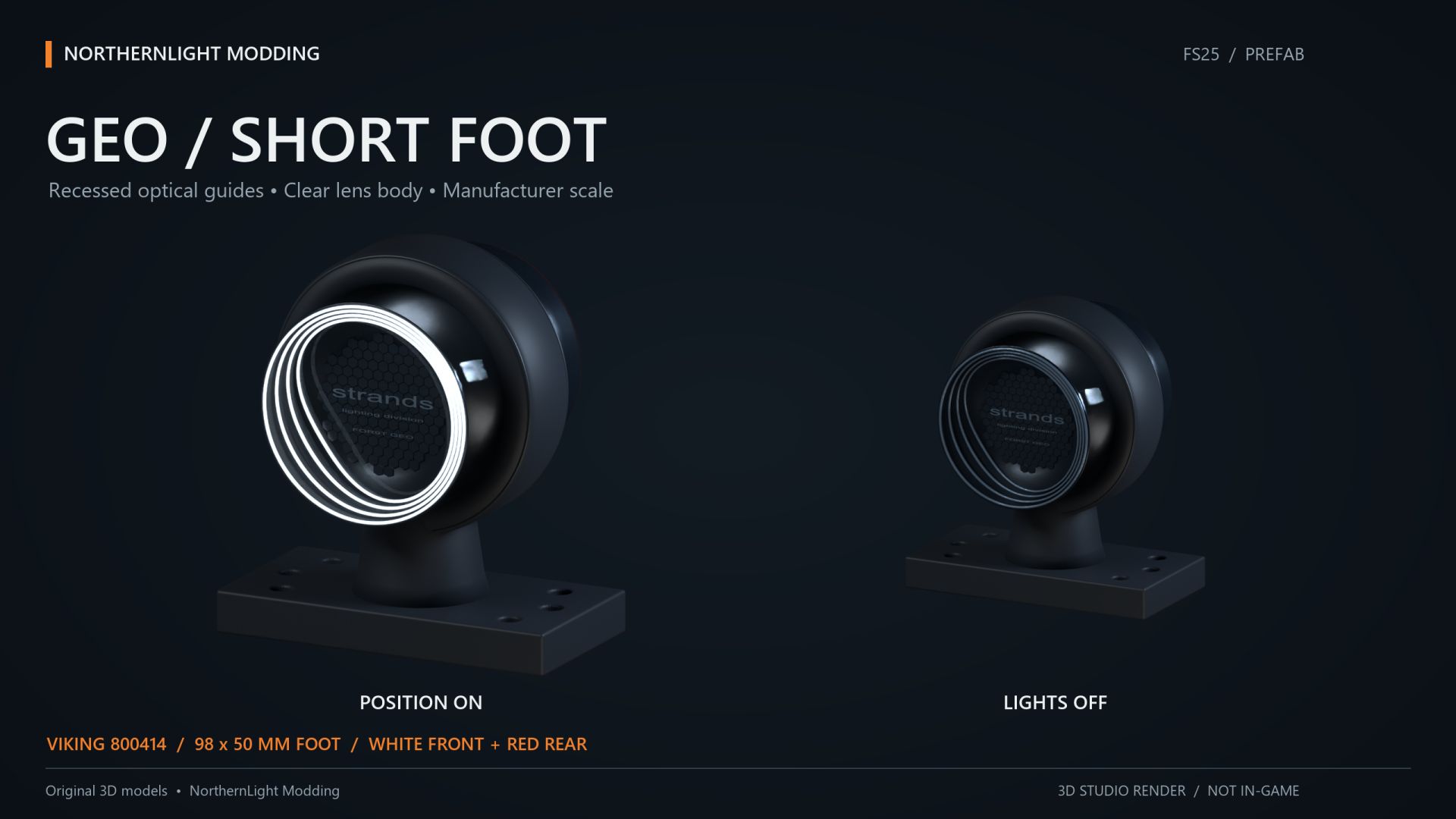
NLM Strands FOR9T Geo Viking 800414 Short Foot A short-foot marker light with white position lighting to the front and red to the rear. The compact mount suits vehicle builds that do not need a long arm. Both colours follow the vehicle position lights. Mount the complete lamp with its white side facing forward and red side facing rearward. The supplied XML connects the functions to the vehicle's normal lighting system. No additional Lua script is required. The model includes two detail levels. Dirt masks have been updated using GIANTS data. Models, matching XML and installation guides in English and Swedish are included. This is a Farming Simulator 25 prefab for vehicle modders, requiring installation and configuration using GIANTS Editor and XML. Placing the ZIP in the mods folder does not create a shop item. Author and original model: NorthernLight Modding Product reference: Strands. An independent FS25 interpretation; product names and trademarks belong to their respective owners.
NLM Strands FOR9T Geo Viking 800419 Right (Prefab) FS25
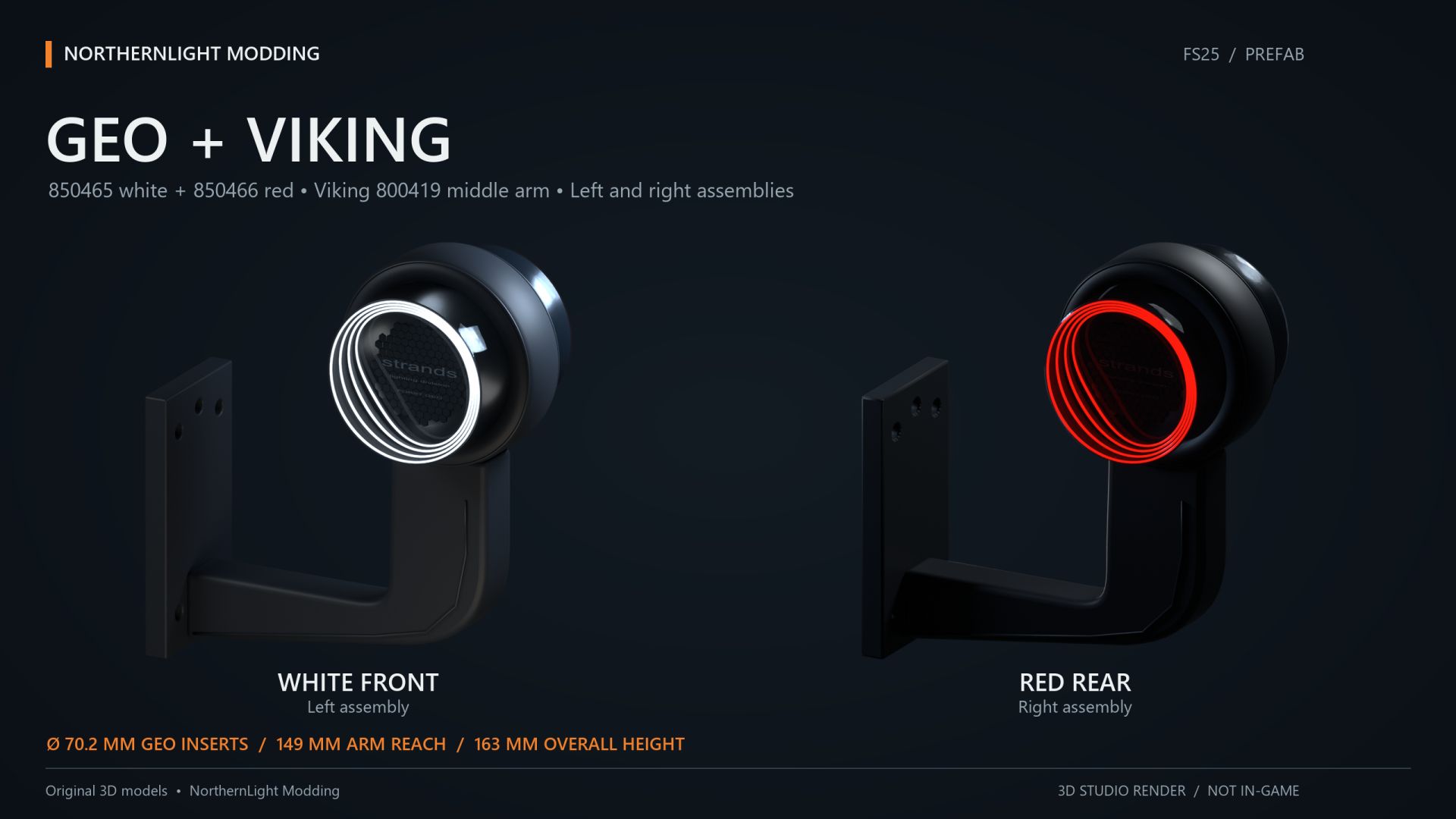
NLM Strands FOR9T Geo Viking 800419 Right A long-arm marker light for the right side, with white position lighting to the front and red to the rear. This package contains the right variant. Both colours follow the vehicle position lights. Fit the bracket to the actual vehicle mounting surface and check the orientation of both colours. The supplied XML connects the functions to the vehicle's normal lighting system. No additional Lua script is required. The model includes two detail levels. Dirt masks have been updated using GIANTS data. Models, matching XML and installation guides in English and Swedish are included. This is a Farming Simulator 25 prefab for vehicle modders, requiring installation and configuration using GIANTS Editor and XML. Placing the ZIP in the mods folder does not create a shop item. Author and original model: NorthernLight Modding Product reference: Strands. An independent FS25 interpretation; product names and trademarks belong to their respective owners.
- 15 per page
- 30 per page
- 45 per page
- 60 per page
-
See more per page
Bigger pages, fewer clicks - and no ads anywhere.
Go Pro