Farming Simulator 25 mods
78,766 results- 15 per page
- 30 per page
- 45 per page
- 60 per page
-
See more per page
Bigger pages, fewer clicks - and no ads anywhere.
Go Pro
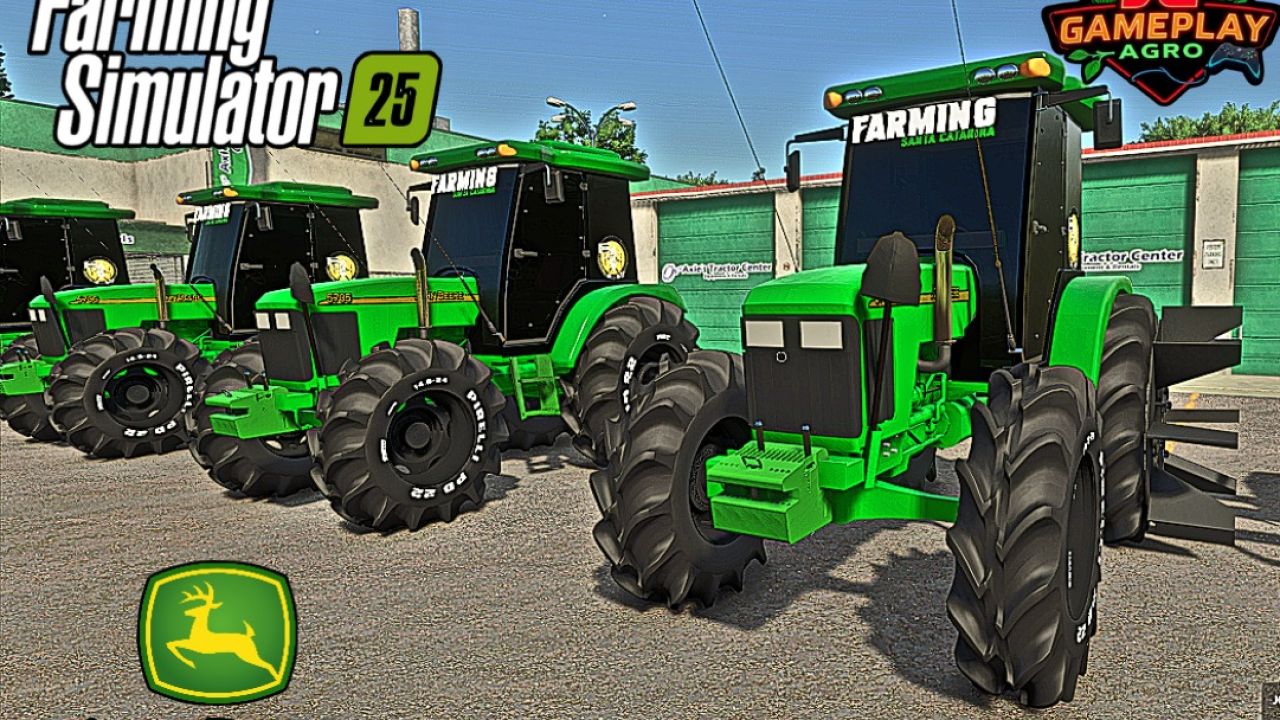
John Deere 5705 mit Kabine (Reisanbau) V1.0.0.0
John Deere 5705 mit Kabine (Reisanbau) V1.0.0.0 Marke: John Deere Modell: 5705 Cabinado Leistung: 63 kW / 85 PS Kraftstoffkapazität: 265 l Höchstgeschwindigkeit: 42 km/h Gewicht: 7,1 Tonnen PREISE Gesamtpreis: 25.000 € Mod konvertiert von FS19 zu FS25 von JGGAMEPLAYAGRO Tags: John DeerePS
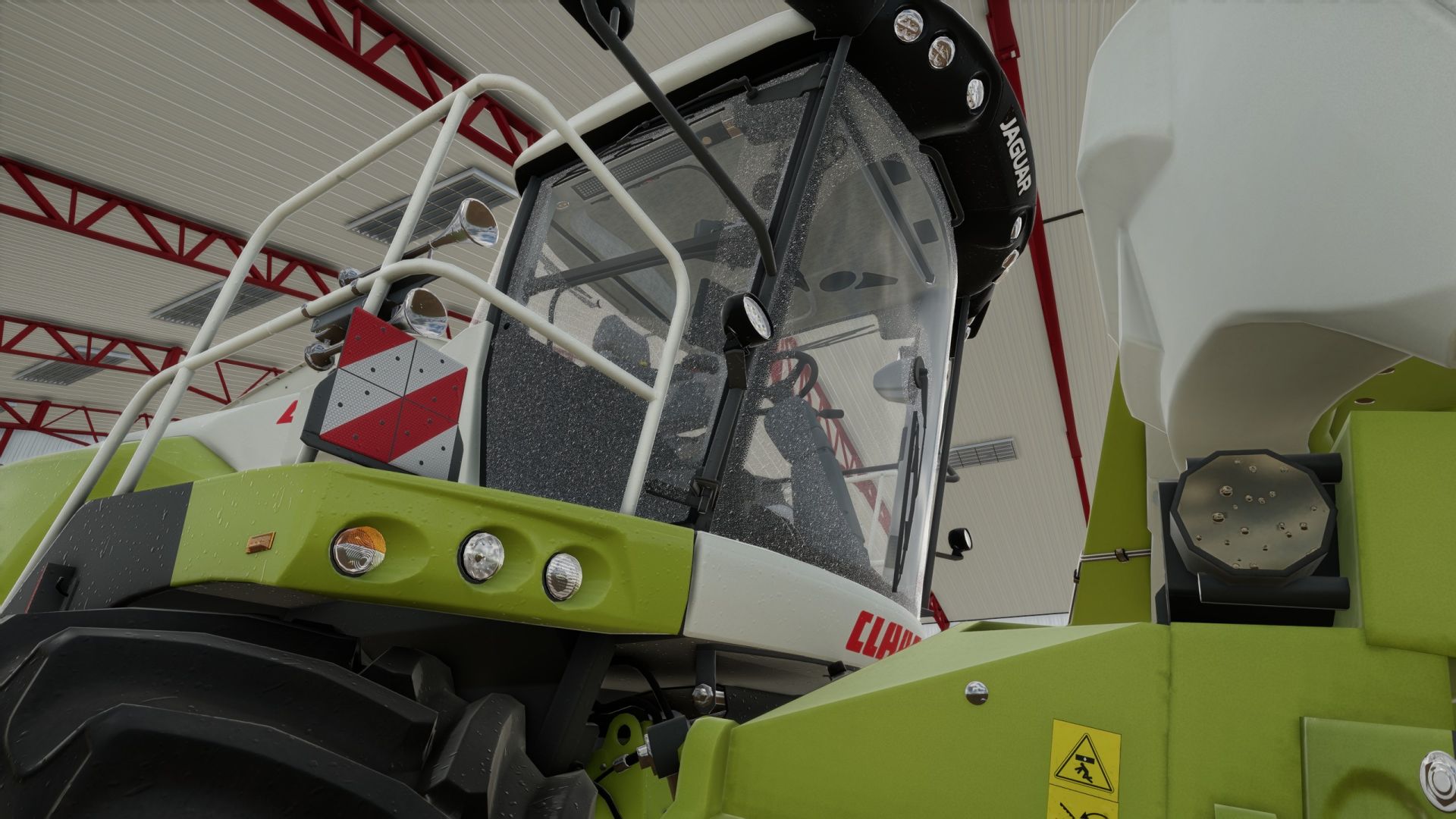
FS25 Realistic window rain and dust BETA 2 v1.0.0.0
FS25 Realistic window rain and dust BETA 2 v1.0.0.0 BETA 2 Added mod support for Belarus 550-82 by rantott hus modding Realistic rain on windows with dust that slowly washes away when it rains. Has manually working wipers that can be remapped to your liking. Window droplets also form when pressure washed and slowly dries afterwards. List of working base game vehicles so far as i am working on adding more to the list. Agrifac LightTraxx (Glass Fixed) – Included Antonio Carraro Mach 4 R Case IH Axial-Flow 7160 Case IH Farmall 120 C Case IH Puma 185 CVXDrive Challenger MT665 Claas Arion 530 Claas Evion 450 Claas Jaguar 990–930 (mod pack) Claas Lexion 620–670 C53 (mod pack) Claas Lexion 750–770 C56–C59 (mod pack) Deutz-Fahr 6115 C RVshift Deutz-Fahr 8280 TTV Dewulf ZK IV SE Fendt 512 Vario Fendt 700 Vario series, including 720 Fiat 160-90 Gregoire GL 8.4 IMPEX Hannibal T50 International Transtar II Iseki HJ6130 Iseki TJW 1233 JCB 435S Stage V CB Fastrac iCON 4000 (Highlands DLC) John Deere 3650 John Deere 6M 95 John Deere 6R 145 John Deere 6R 230/250 John Deere 9RX 770 John Deere 9700 / 9000 series John Deere 1270G John Deere 848L-II John Deere R4045 (mod) Komatsu 951 Krone BiG X 1180 Kubota M8-181 Landini REX 4-070 GT Lindner Lintrac 130 Lizard Pickup 2017 Mack Anthem 6×4, MP7 425 Mack Anthem 6×4, MP8 505 Mack Super-Liner 6×4 Massey Ferguson 7S 155 Massey Ferguson 9S.285 New Holland L318 Oxbo MKB-4TR Pfanzelt Felix Ponsse Bison Active Frame Rottne F20D Schaeffer 9660 T-2 Sennebogen 340 G (Glass Fixed) – Included Valtra T195 — Vermeer ZR5-1200 Volvo L120H Zetor Crystal 16045 Zetor Forterra HSX 120 Zetor Proxima HS80 This is a beta build so there may be issues with unfixed vehicles. Credits:Showgunn84 Tags: BETAClaas LexionJohn DeereMassey Ferguson
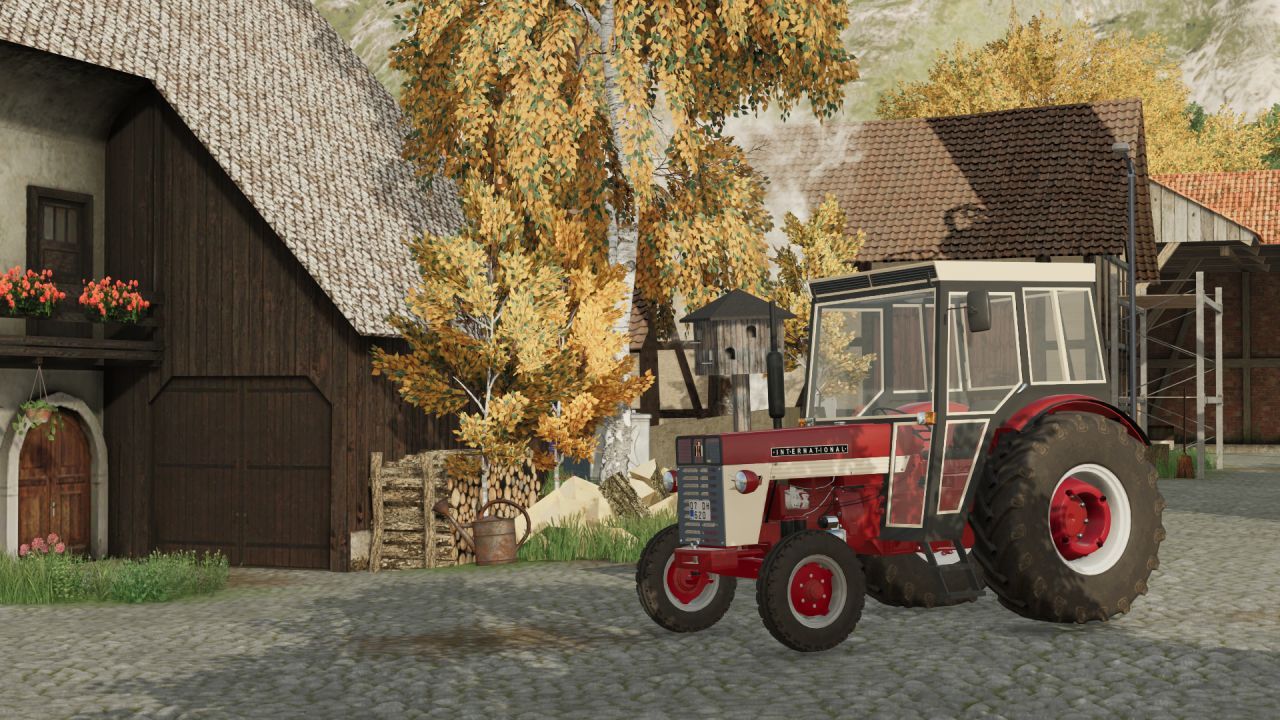
International 654S V1.0.0.0
International 654S V1.0.0.0 INTERNATIONAL 654S: Geschwindigkeit: 42 km/h Leistung: 55 PS Preis: 15.000 € Kabinenkonfiguration Dies ist eine konvertierte Mod und funktioniert einwandfrei (einschließlich Hütte, Kompatibilität mit Spielständen usw.). Ursprünglicher Besitzer: SemyH Konverter (Ersteller): Harun Mete Bolulu Tags: PS
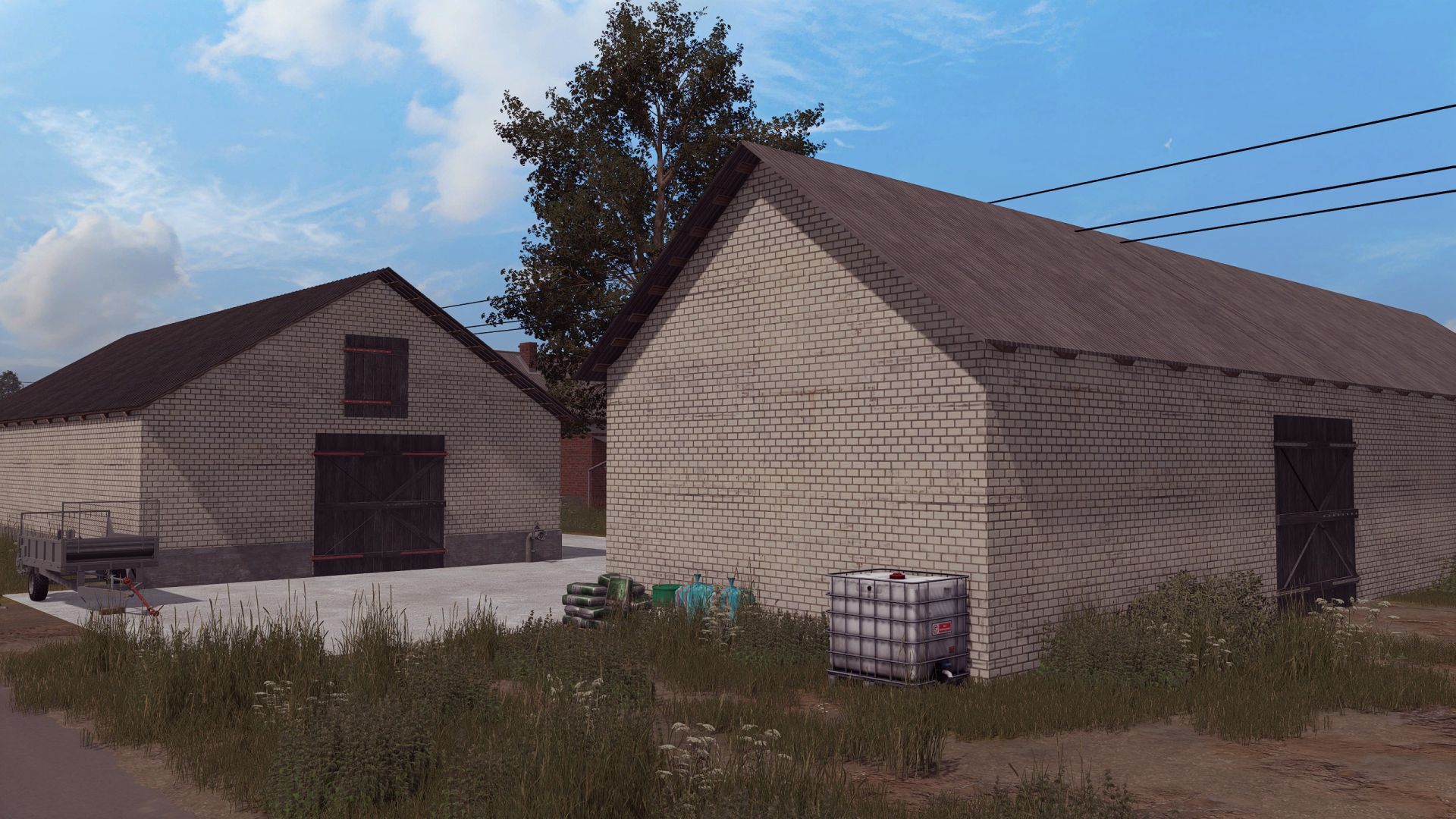
Polnische Bauernhofgebäude mit Kuhstall V1.0.0.0
Polnische Bauernhofgebäude mit Kuhstall V1.0.0.0 Kuhstall Preis 50000 Tägliche Unterhaltskosten 100 Gebäude Preis 150000 täglicher Unterhalt 100 Konvertiert von FS 19 Tags: FS
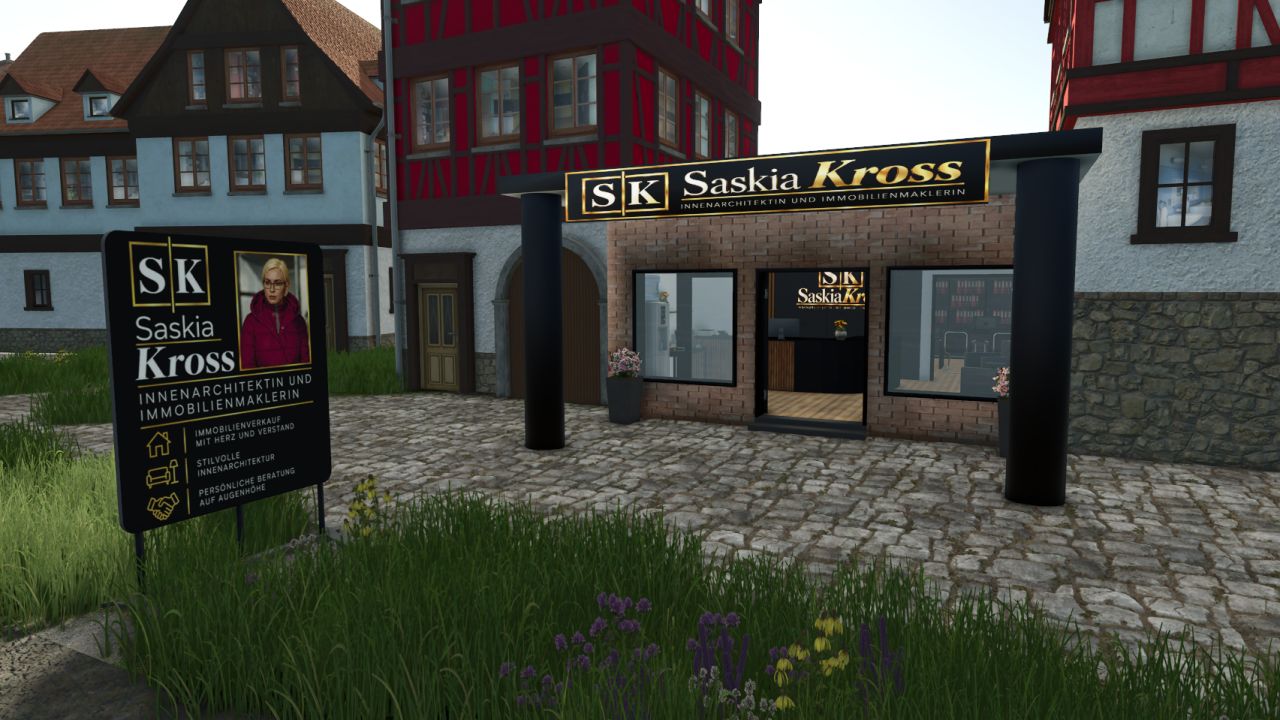
Saskia Kross Immobilienagentur V1.0.0.0
Saskia Kross Immobilienagentur V1.0.0.0 Mit dieser Modifikation erhalten Sie das Büro der Immobilienmaklerin und Innenarchitektin Saskia Kross für Ihre Karte. Das Gebäude eignet sich perfekt, um Ihre Community um ein passendes Immobilienbüro zu erweitern. Ob für die Vermittlung von Häusern, Wohnungen oder Grundstücken oder für die Gestaltung stilvoller Inneneinrichtungen – das Büro fügt sich ideal in ländliche wie städtische Umgebungen ein. Allgemeine Informationen Gebäude: Immobilienagentur Saskia Kross Kategorie: Wirtschaft Tätigkeiten: Immobilienmakler & Innenarchitekt Erforderliche zusätzliche Mod: Stanis Gebäudekategorie finden Sie hier: Stanis Gebäudekategorie Die Sitzoption kann mit der Taste „F“ ein- und ausgeschaltet werden. Kaufpreis: 85.000 € pro Gebäude Funktionen und Merkmale Sitzplatzoption Mithilfe der Taste „F“ können Sie die Sitzplatzoptionen im Gebäude einfach ein- oder ausschalten. So können Sie das Büro Ihren Bedürfnissen entsprechend anpassen. Zusätzliche Dekorationsgegenstände Unter „Dekoration“ finden Sie die passenden Objekte für Ihr Immobilienbüro und Ihre Wohnanlage: Straßenschild „Siegstraße“ Kaufpreis: 100 € Werbeschild Kaufpreis: 200 € Verkaufsschild Kaufpreis: 50 € Die Dekorationsobjekte eignen sich perfekt, um das Immobilienbüro angemessen zu gestalten, die Aufmerksamkeit auf Immobilienangebote zu lenken und Straßen und Grundstücke realistisch zu kennzeichnen. Erforderliche Mods: Stanis Gebäudekategorie Tags: Allgemeine InformationenDas GebErforderliche ModsStanis Geb
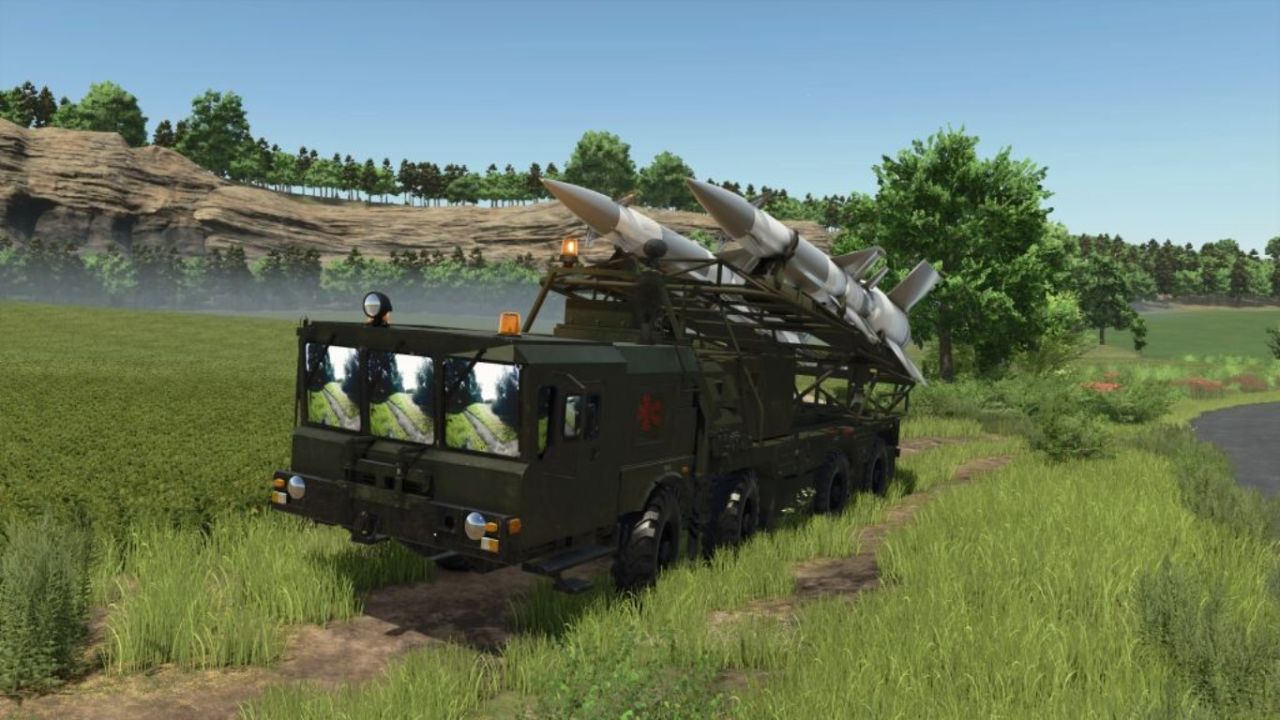
MZKT-7930 S-25 (8×8 Schweres taktisches Raketenwerfersystem) V1.0.0.0
MZKT-7930 S-25 (8×8 Schweres taktisches Raketenwerfersystem) V1.0.0.0 MZKT-7930 S-25 (8×8 Schweres taktisches Raketenwerfersystem): Technische und operative Analyse – Detaillierte technische Merkmale: Hochmobiles 8×8-Fahrgestell MZKT-7930: Basierend auf der vom Minsker Radtraktorenwerk entwickelten Mehrachs-Allradantriebsplattform, konstruiert für den Transport extrem schwerer Nutzlasten in unwegsamem Gelände und auf unbefestigten Straßen. Doppelraketenwerfer mit hohem Kaliber: Integriert ein kippbares Gestell auf dem Heckdeck, das zwei große Langstreckenraketen mit kreuzförmigen Stabilisierungsflossen trägt und in die richtige Position bringt. Flaches Fahrerhaus: Verfügt über ein breites, gepanzertes Fahrerhaus mit Panorama-Windschutzscheibe und taktischer Beleuchtung, speziell entwickelt für anspruchsvolle Strecken und Nachteinsätze. Drehmomentstarker Dieselmotor und Mehrachs-Antrieb: Angetrieben von einem drehmomentstarken Dieselmotor in Kombination mit einem verstärkten Getriebesystem, das die strukturelle Stabilität während des Transports und der Startvorbereitungen gewährleistet. Taktische Einsatzfähigkeit und operative Doktrin: Taktischer Fernangriff und Abschreckung: Entwickelt für hohe Feuerkraft und die Neutralisierung strategischer Ziele, befestigter Anlagen oder kritischer Infrastruktur über große Entfernungen. Strategische Mobilität („Schießen und Verlegen“): Die Radkonfiguration ermöglicht schnelle Bewegungen auf Autobahnen und Feldwegen und minimiert so die Gefährdung durch Gegenfeuer. Integration in das Luftverteidigungsnetzwerk: Fungiert als entscheidende Komponente innerhalb von Raketenbatterien und koordiniert sich nahtlos mit Radarsystemen und mobilen Gefechtsständen. Bedeutung für Simulation und Modding: Fortschrittliche 8×8-Plattformphysik: Modelliert das dynamische Verhalten schwerer Einzelradaufhängungen, die Traktionsverteilung auf mehrere Achsen und die Höhenverstellung der Startrampe. Strategische Feuerkraftressource: Stellt eine der größten Ressourcen in Ihrer Sammlung dar und lässt sich perfekt mit MZKT-Radareinheiten und Logistikfahrzeugen kombinieren. Tags: Analyse DetaillierteIhrer SammlungMerkmale HochmobilesRaketenwerfersystem Technische
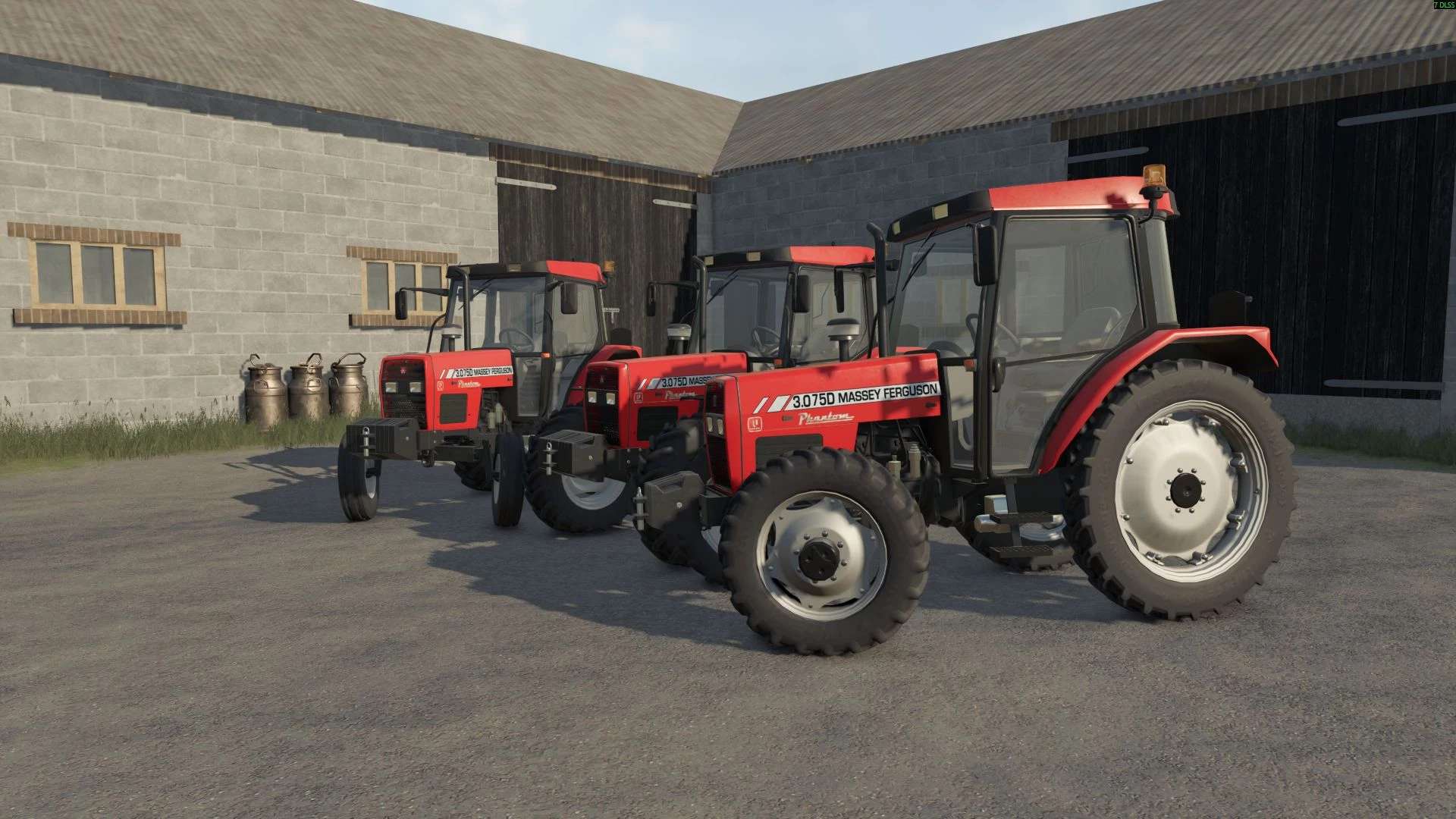
FS25 Massey Ferguson / Uzel 3000 Series v1.0.0.0
FS25 Massey Ferguson / Uzel 3000 Series v1.0.0.0 Features: Manufacturer: Massey Ferguson Models: 3075D 3085D 3095D 3105D Power: 75 to 105 hp Maximum speed: 40 km/h Base price: $21.000 Store Information: Openable door and window Agricultural wheels I would appreciate it if you could let me know your problems. Credits:Anadolu 3D KZmodding Tags: Manufacturer Massey FergusonStore Information
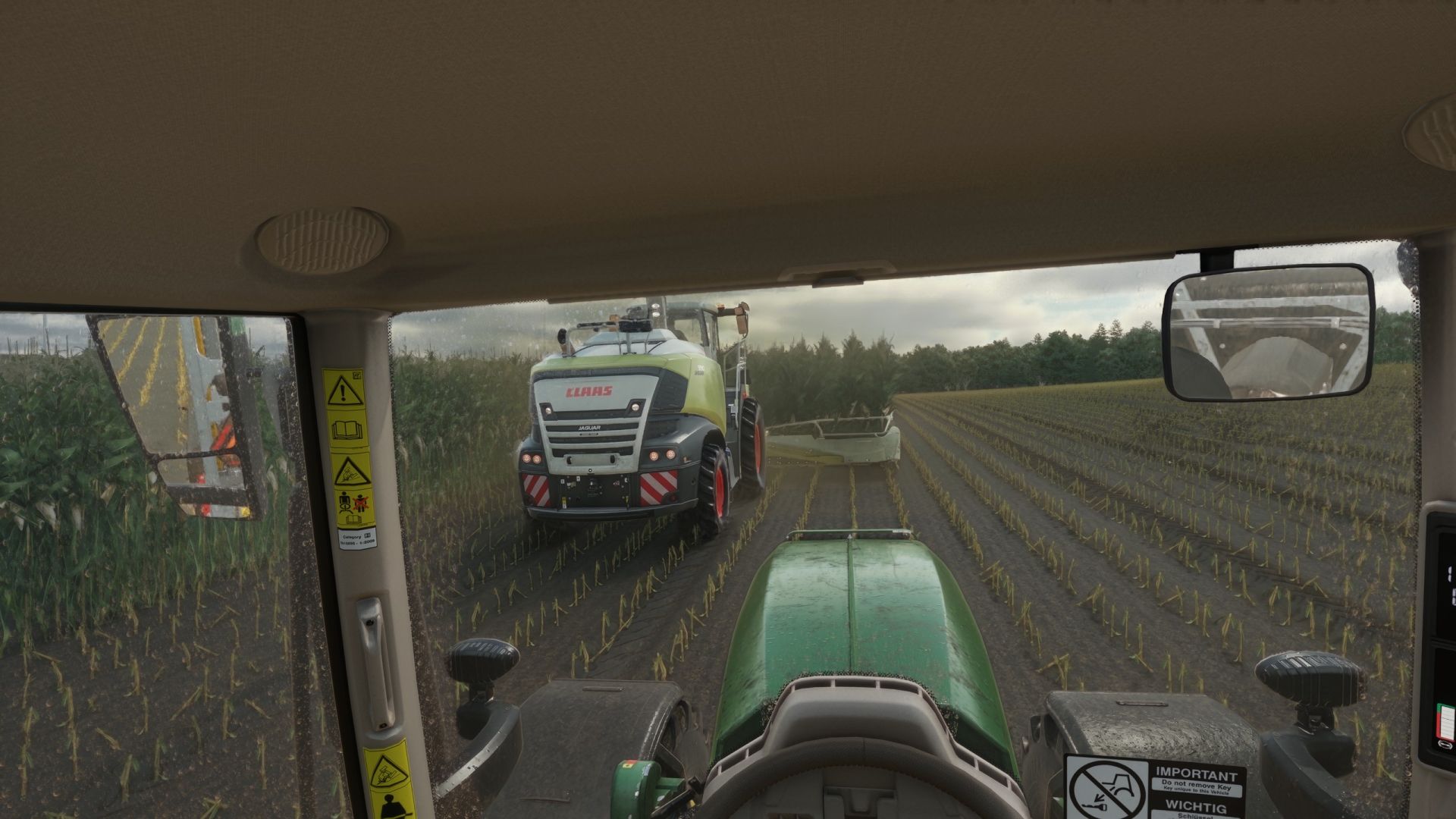
Realistischer Fensterregen und Staub BETA 2 v1.0.0.0
Realistischer Fensterregen und Staub BETA 2 v1.0.0.0 BETA 2 Mod-Unterstützung für Belarus 550-82 von rantott hus modding hinzugefügt. Realistischer Regen auf den Fenstern, der Staub wird beim Regen langsam abgewaschen. Die Scheibenwischer funktionieren manuell und lassen sich individuell programmieren. Beim Hochdruckreinigen bilden sich Wassertropfen, die anschließend langsam trocknen. Liste der aktuell funktionierenden Basisspielfahrzeuge; ich arbeite daran, die Liste zu erweitern. Agrifac LightTraxx (Glas, feststehend) – Im Lieferumfang enthalten Antonio Carraro Mach 4 R Case IH Axial-Flow 7160 Case IH Farmall 120 C Case IH Puma 185 CVXDrive Challenger MT665 Claas Arion 530 Claas Evion 450 Claas Jaguar 990–930 (Mod-Paket) Claas Lexion 620–670 C53 (Mod-Paket) Claas Lexion 750–770 C56–C59 (Mod-Paket) Deutz-Fahr 6115 C RVshift Deutz-Fahr 8280 TTV Dewulf ZK IV SE Fendt 512 Vario Fendt 700 Vario-Serie, einschließlich 720 Fiat 160-90 Gregoire GL 8.4 IMPEX Hannibal T50 International Transtar II Iseki HJ6130 Iseki TJW 1233 JCB 435S Stufe V CB Fastrac iCON 4000 (Highlands DLC) John Deere 3650 John Deere 6M 95 John Deere 6R 145 John Deere 6R 230/250 John Deere 9RX 770 John Deere 9700 / 9000 Serie John Deere 1270G John Deere 848L-II John Deere R4045 (mod) Komatsu 951 Krone BiG X 1180 Kubota M8-181 Landini REX 4-070 GT Lindner Lintrac 130 Lizard Pickup 2017 Mack Anthem 6×4, MP7 425 Mack Anthem 6×4, MP8 505 Mack Super-Liner 6×4 Massey Ferguson 7S 155 Massey Ferguson 9S.285 New Holland L318 Oxbo MKB-4TR Pfanzelt Felix Ponsse Bison Aktivrahmen Rottne F20D Schaeffer 9660 T-2 Sennebogen 340 G (Glas, feststehend) – inklusive Valtra T195 — Vermeer ZR5-1200 Volvo L120H Zetor Crystal 16045 Zetor Forterra HSX 120 Zetor Proxima HS80 Dies ist eine Beta-Version, daher können noch Fehler bei Fahrzeugen auftreten. Tags: BETAClaas LexionJohn DeereMassey Ferguson

Erkunt weight V1.0
Optional between 800 kg and 1500 kg To start download click the filename. To open archive files use one of these programs: WinRAR, 7-Zip, WinZip. Some mod archives may need to be extracted before the mods will work.
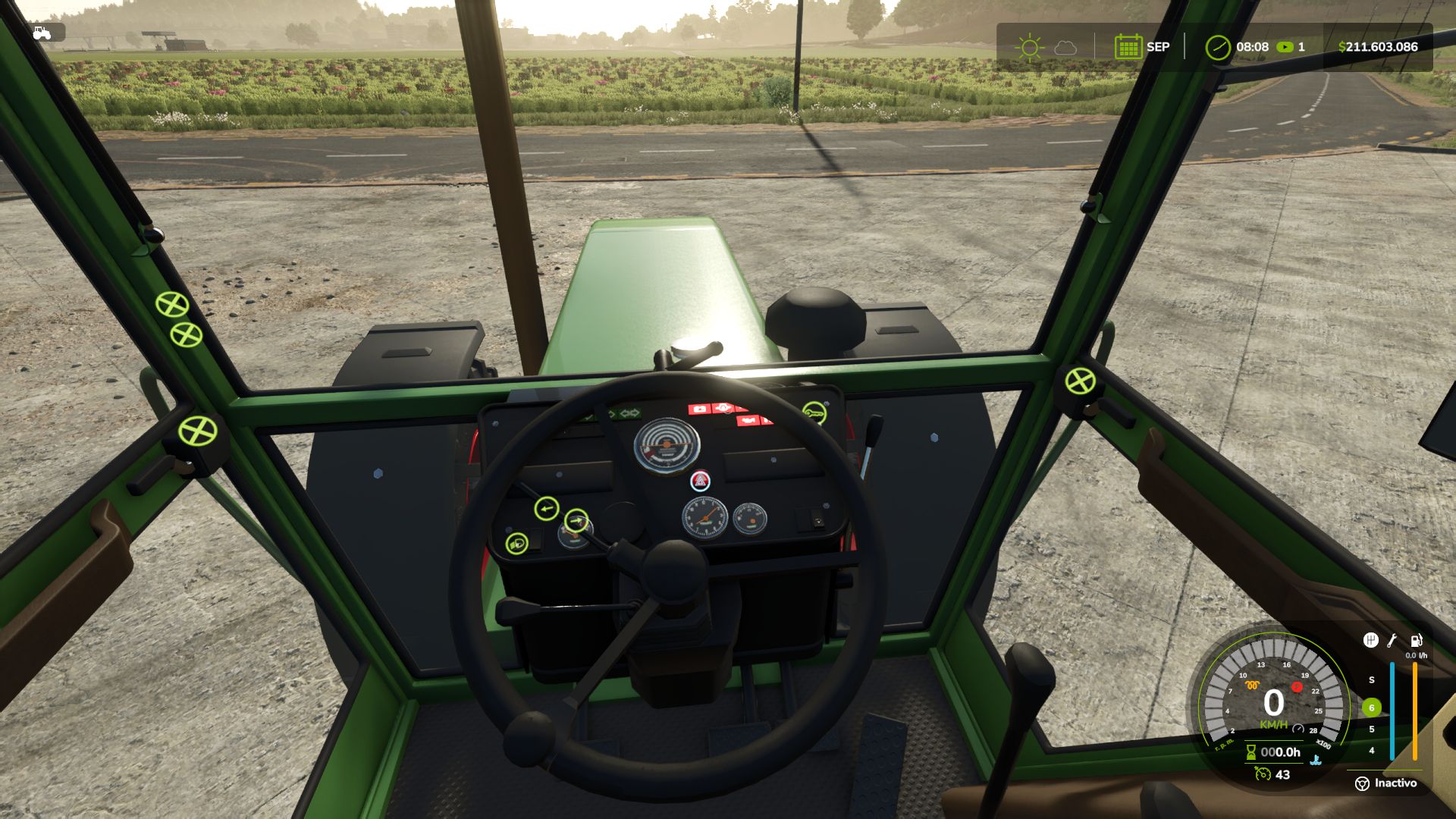
Realistischer Dieselstart V1.4.1.1
Realistischer Dieselstart V1.4.1.1 Sind Sie es leid, einen Motor mit einem einzigen Tastendruck zu starten? Realistic Diesel Start verwandelt die Zündung in eine realistische Dieselsequenz – für jedes motorisierte Fahrzeug. MEHRSTUFENSTART Kurzes Drücken des Zündschlüssels: Zündung EIN, Armaturenbrett schaltet sich ein, begleitet vom Geräusch eines echten Zündschlüssels. Die Glühkerzen werden vorgeheizt, eine kleine Kontrollleuchte neben dem Tachometer signalisiert dies. Die Heizdauer hängt von der Witterung und der Motortemperatur ab: Im tiefsten Winter dauert es eine Weile, bei warmem Motor erfolgt die Vorwärmung nahezu sofort. Halten Sie die Schaltkupplung (Alt+L) und den Zündschlüssel gedrückt, um den Motor zu starten. Starten Sie den Motor nicht, bevor die Glühkerzen glühen, da er sonst möglicherweise nicht anspringt und leicht beschädigt werden kann: Der Anlasser dreht weiter, solange Sie den Schlüssel gedrückt halten; durch weiteres Starten kann der Motor möglicherweise anspringen. Nach einem Kaltstart läuft der Motor einige Sekunden im Leerlauf, bevor er auf das Gaspedal reagiert. Das Thermometer ist im kalten Zustand blau und verblasst bei Betriebstemperatur. DRUCKLUFT (LKW) HUD-Druckanzeige. Der Kompressor baut Luft auf, während der Motor läuft. Der Druck entweicht im geparkten Zustand: Wenn Sie den Lkw stehen lassen, müssen Sie vor der Abfahrt Luft aufbauen. Bei Luftmangel greifen die Federspeicherbremsen und blockieren den Lkw: Man verliert nicht die Bremsen, man bleibt stecken. Niederdruck-Summer. Bei Realistic Brakes wird ein Anhänger mit Druckluftbremsen mit Druckluft aus dem Druckluftsystem des Lkw befüllt. INTERAKTIVE STEUERUNG Der Schlüssel am Armaturenbrett funktioniert nach der gleichen Abfolge: Ein Klick schaltet die Zündung ein, durch Gedrückthalten des Klicks wird der Motor gestartet. EINSTELLUNGEN Unter ESC > Spieleinstellungen: Kupplung zum Starten und Lichter ohne Zündung. Konsole: rdsConfig (Schaden, Luftsystem, Timings) und rdsHudPos / rdsHudSinADS / rdsHudReset zum Verschieben des HUD. KOMPATIBILITÄT Fortschrittliches Schadenssystem, realistische Bremsen, Dieselkraftstoffsystem (schlechter Kraftstoff erschwert das Starten, der Anlasserklang bleibt jedoch gleich) und interaktive Steuerung. Tastatur und Gamepad. Mehrspieler- und dedizierter Server. KI-Mitarbeiter sind nicht betroffen. Nicht kompatibel mit anderen Zündungs-/Kaltstart-Mods (Real Ignition, Cold Start System, RVB's Glühkerzenmodul): Deaktivieren Sie diese. Credits: Das Zünd-/Kontaktkonzept wurde von "Real Ignition" von Guner348 inspiriert. Mit Leidenschaft für realistische Landwirtschaftssimulation entwickelt. V1.4.1.1 MEHRSPIELER-EINSTELLUNGEN Die Mod-Einstellungen (Kupplung zum Starten, Lichter ohne Zündung und die rdsConfig-Einstellungen: Schaden, Luftsystem, Glühkerzen- und Kompressorzeiten) gehören nun zum Spielstand. Sie werden mit diesem gespeichert, vom Host (oder einem Administrator auf einem dedizierten Server) ausgewählt und gelten für alle Spieler, auch für später beitretende. Zuvor verwendete jeder PC seine eigenen Einstellungen: Wenn der Host die Option "Clutch to start" deaktivierte, wurden die anderen Spieler trotzdem zum Clutch aufgefordert. Vorhandene Spielstände werden mit den Einstellungen des Hosts gestartet. Die Joystick-Haltezeit und die Farbe der Glühkerzenbeleuchtung bleiben auf jedem PC erhalten. Kompatibel mit Spielständen der Versionen 1.4.1.0 und 1.4.0.0. Mehrspieler- und dedizierte Server werden unterstützt. Tags: Einstellungen WennMEHRSTUFENSTARTPCReal Ignition

Universal Sound Tuner V1.0
Change how your cars, trucks and tractors sound using engine sounds and horns from vehicles you already have installed. Adjust individual sounds, build and save your own tunes, change performance settings and test your setup with launch control and drag racing. Features: Engine and horn swapping. Choose sounds from base-game vehicles and installed vehicle mods. Browse a list with vehicle pictures, search by name, filter by vehicle type or save favorites. Preview sounds, step through them one at a time or pick one at random. Engine sound adjustments. Change volume, pitch, exhaust tone, cabin volume, rev range, aggression and cam lope. Keep the changes subtle or build a more noticeable setup. Turbo and supercharger sounds. Choose from small turbo, large turbo and whistle options, with adjustable volume and size. Add supercharger whine and choose between psssh, whoosh or flutter blow-off valves. Pops and bangs. Adjust lift-off pops, gear-change pops and limiter pops, with a configurable limiter point. Horn tuning. Swap horns separately from the engine sound, adjust their volume and pitch, and use the test button to hear your changes. Shop previews. Motorized vehicles get Engine Sound and Horn options in the shop. Open the Sound Tuner to start and rev the engine before buying. Your selected tune carries over to the purchased vehicle. Saved setups. Includes 7 presets and 4 slots for custom tunes. Copy a tune from one vehicle and paste it onto another. Performance tuning. Adjust power, idle RPM, rev limits, top speed and fuel use. Turbo and supercharger settings can also add boost power. Exhaust and vehicle effects. Adjust exhaust flame size, engine knock under load, reverse beeper volume and air brake volume. Choose clean, stock, black or coal-rolling smoke, with separate amount and idle smoke settings. Burnouts and launch control. Line lock holds the front brakes for burnouts, while 2-step launch control has its own RPM and pop settings. Burnouts produce smoke and leave rubber marks on the ground. Drag racing. Run an eighth mile, 1,000 feet or a quarter mile using Sportsman or Pro tree timing. Race AI on three difficulty levels or another player. Record reaction time, 60-foot time, elapsed time and trap speed, with saved time slips and best runs. Menu customization. Includes a tachometer, boost gauge, 12 themes, RGB and custom colors. Move the window around and adjust its appearance and behavior. Right-click a slider to return it to stock. Multiplayer support. Tunes are saved per vehicle and synced in multiplayer. Server owners can configure power tuning permissions, maximum power, Pro tree availability and wheel effects. Controls Left Alt + U: Open the tuner. Left Alt + Q: Open launch controls. Left Shift + Left Alt + D: Open the drag strip. Hold REV: Rev the engine while stationary. In the shop preview, you can also hold Space. Controls configurable Find everything under Ashmere in the shop and in build mode. To start download click the filename. To open archive files use one of these programs: WinRAR, 7-Zip, WinZip. Some mod archives may need to be extracted before the mods will work.
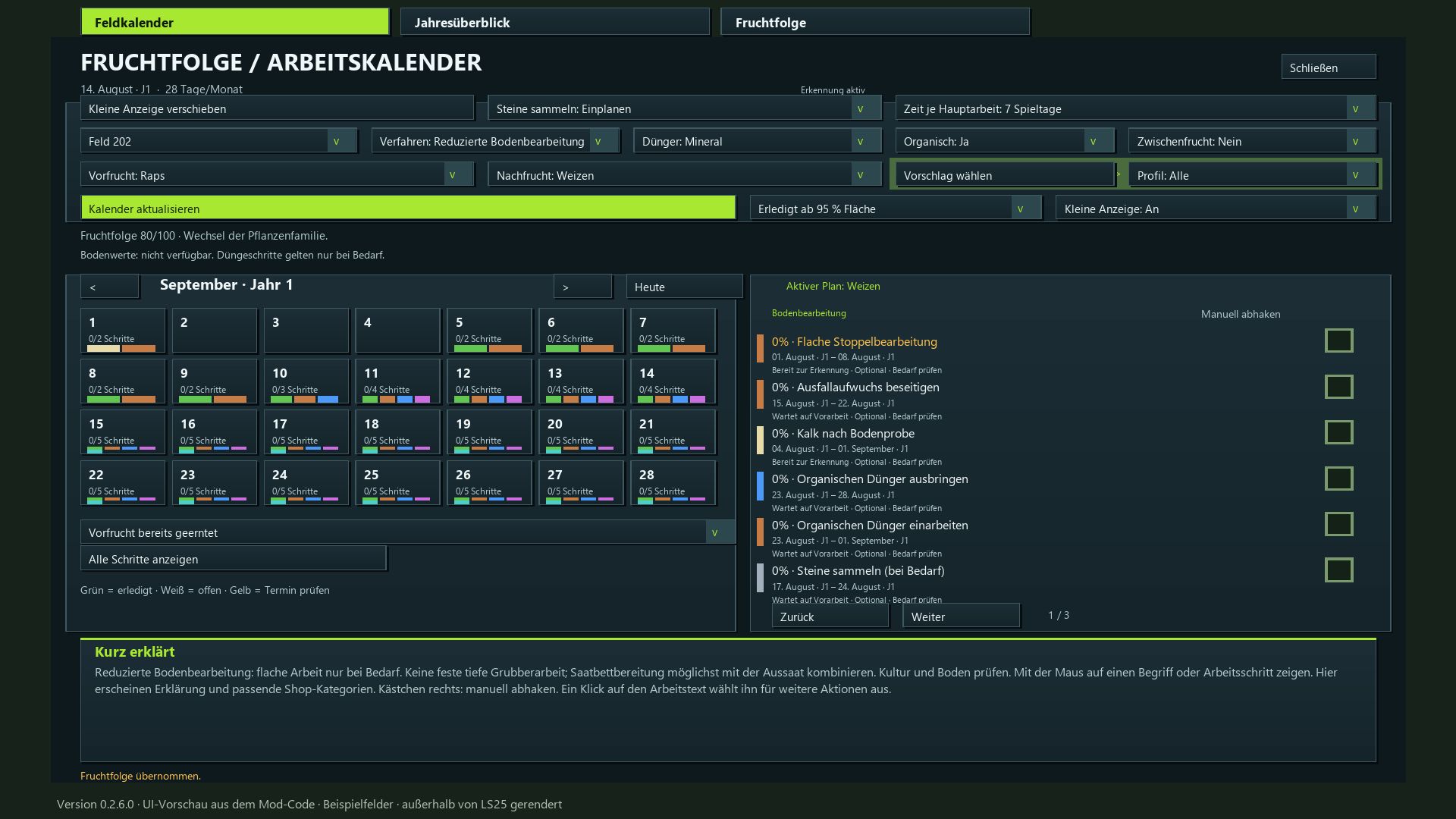
Fruchtfolgekalender BETA 3 v0.2.7.0
Fruchtfolgekalender BETA 3 v0.2.7.0 Ich habe diese Mod erstellt, um die Feldarbeitsplanung im Landwirtschafts-Simulator logischer und realistischer zu gestalten. Jeder Arbeitsschritt wird mit seinem spezifischen Zweck, der passenden Ausrüstung und einer sinnvollen Abfolge – inklusive notwendiger Wartezeiten und verschiedener Anbaumethoden – dargestellt. Daher habe ich ein Minimum von 7 Spieltagen pro Monat festgelegt, um einen spielbaren Kompromiss zu schaffen, der mehrere Arbeitstage ermöglicht. Wenn Sie mehr Zeit für die Bewirtschaftung mehrerer Felder benötigen, empfehle ich eine Dauer von 15–28 Tagen. Planen Sie die nächste Ernte und die dazugehörigen Aufgaben für jedes Ihrer Felder – von der Stoppelbearbeitung nach der Ernte bis hin zur finalen Ernte. Die Modifikation beinhaltet eine Fruchtfolgebewertung, einen Feldkalender, eine Jahresübersicht, Geräteempfehlungen und eine automatische Fortschrittsverfolgung. Fruchtfolge bewerten: Erhalten Sie bis zu 100 Punkte basierend auf Pflanzenfamilien, Anbauintervallen und der bekannten Erntehistorie jedes Feldes. Nutze kartenspezifische Nutzpflanzen: Die Mod erkennt verfügbare Nutzpflanzen, einschließlich unterstützter Winter- und Sommersorten. Halten Sie sich an den Anbaukalender: Die Aussaat- und Erntezeiträume richten sich nach Ihrem aktiven In-Game-Kalender, einschließlich aller Anpassungen, die über die Mod „Regional Crop Calendar“ vorgenommen wurden. Anbauprofile auswählen: Filtern Sie nach geeigneten Folgekulturen oder wählen Sie frei aus der gesamten Liste. Bodenbearbeitungsmethoden festlegen: Wählen Sie zwischen Mulchbodenbearbeitung, Pflügen, Direktsaat oder reduzierter Bodenbearbeitung. Berücksichtigung des regelmäßigen Pflügens: Automatische Zeitplanung basierend auf Ihren Spieleinstellungen und den erkannten Anforderungen; spezifische, manuell ausgewählte Pflugmethoden bleiben verfügbar. Planung der Feldarbeiten: Stoppelbearbeitung, Umgang mit Ausfallgetreide, Bodenbearbeitung, Steinaussortierung, Aussaat, Düngung, Pflanzenpflege und Ernte. Pflanzenschutzmaßnahmen einbeziehen: Umfasst Unkrautbekämpfung und Feldüberwachung (Hinweis: Beinhaltet kein spezielles Schädlingsbekämpfungssystem). Empfohlene Spielweise: Mindestens 7–28 Tage pro Monat; für ein entspannteres Tempo werden 15–28 Tage empfohlen. Flexible Arbeitszeiten: 3, 5, 7 oder 10 Tage, abhängig von der Monatslänge, mit angepassten Wartezeiten und Pufferzeiten. Fortschritt verfolgen: Abgeschlossene Feldarbeiten automatisch erkennen oder manuell abhaken. Optionale Schritte können als „nicht zutreffend“ gekennzeichnet werden. Visualisierung des Wachstums von Wildpflanzen: Kleine, zufällig verteilte Bestände an Nutzpflanzen und Unkräutern, wobei die Zielbedeckung von 10 % auf 40 % erhöht wird. Der Fortschritt bleibt auch bei Änderung der Monatslänge erhalten. Düngung konfigurieren: Wählen Sie zwischen kombinierter Mineraldüngung oder getrennter N/P/K-Düngung, zuzüglich Kalk und optionalem organischem Dünger. Keine obligatorischen Mengenberechnungen. Gerätesuche: Erläuterungen zu spezifischen Aufgaben und relevanten Werkstattkategorien finden Sie direkt im Kalender. Umfassende Übersichten: Sehen Sie Feldkalender, Jahresübersichten und mehrjährige Fruchtfolgen, alle zur besseren Übersicht farblich gekennzeichnet. Schätzung der Arbeitszeit: Eingabe der Feldfläche (in Hektar), der Arbeitsbreite, der Geschwindigkeit und der Effizienz für jede einzelne Aufgabe. Tägliche Aufgabenanzeige: Ein verschiebbares Fenster, das die anstehenden Aufgaben für alle Ihre geplanten Felder anzeigt. Sofortiges Speichern: Mod-Einstellungen und Planungsfortschritt werden automatisch gespeichert. Der Spielstand selbst wird über das standardmäßige Ingame-Speichersystem verwaltet. Eigener Reiter mit einer 15-Schritte-Anleitung zur Verwendung der Modifikation. Multiplayer-Unterstützung: Gemeinsame Planung mit serverseitiger Synchronisierung. Verfügbar in 18 Sprachen, mit 350 zufällig wechselnden Fakten zum Thema Landwirtschaft. Installation: Legen Sie die ZIP-Datei in Ihren Mods-Ordner und aktivieren Sie sie in Ihrem Spielstand. Diese Modifikation verändert weder Ertragsparameter noch die tatsächlichen Düngewerte. Das sichtbare Aufwachsen von Wildpflanzen platziert Nutzpflanzen und Unkraut direkt auf dem Feld. BETA 3 Update 0.2.7.0 Die Planung wurde an alle Monatslängen von 7 bis 28 Spieltagen angepasst. Arbeitszeitraum abhängig von der Monatslänge: 7–9 Monate Tage → 3 Tage; 10–14 Monate → 3 oder 5 Tage; 15–28 Monate → 3, 5, 7 oder 10 Tage. Der Vorbereitungspuffer für kurze Monate wurde angepasst. Die Wartezeit für das Wachstum der Freiwilligen bleibt unverändert und beträgt zwei Spieltage für sieben Monate. Änderungen der aktiven Monatslänge passen die Anbaupläne und Fruchtfolgeprognosen automatisch an. Begonnene und abgeschlossene Arbeiten sowie der Wachstumsfortschritt bleiben erhalten. Die Aussaat- und Erntemonate richten sich weiterhin nach dem Jagdkalender. Der Maschinenstundenaufwand pro Arbeitsgang bleibt unverändert. Handbuch, Beschreibung und Übersetzungen wurden aktualisiert. Erforderliche Mods: Realistischer Boden & Dünger Regionaler Anbaukalender Tags: Erforderliche ModsErhalten SieFeldarbeiten StoppelbearbeitungSehen Sie Feldkalender
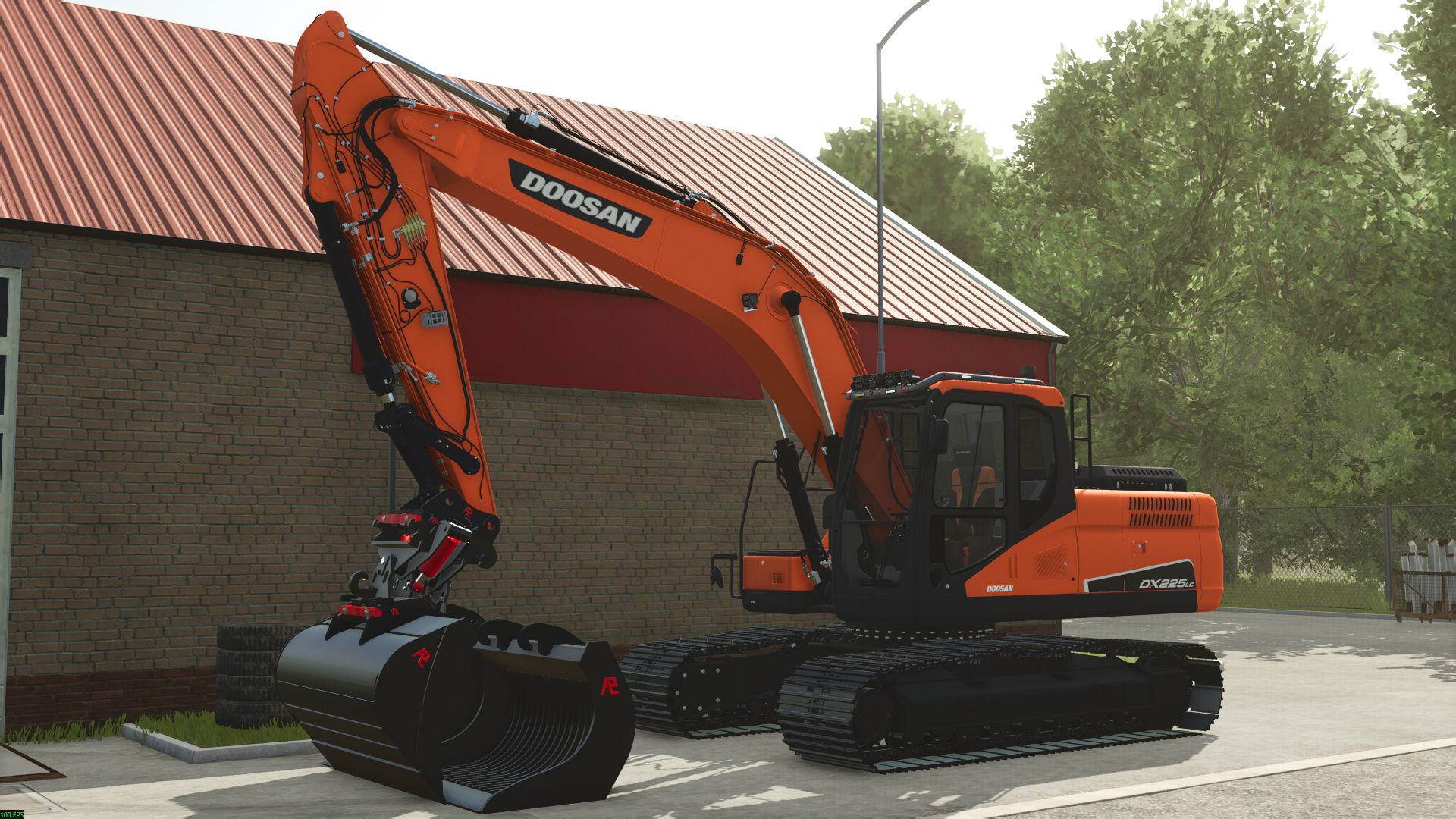
Doosan 225 LC V1.0
Doosan 225 LC V1.0 Doosan 225. There will undoubtedly be some mistakes. The Doosan 225 is equipped with 25 textures and includes a few configurations on dummies, completely fixed and suitable for the Pladdet v2. Enjoy! Required mods: PLADDET Ground set + Gripper Author: Tinus Enige Echte Report bugs in the comments and help modders improve this mod. Always check the comments, you can find a solution. DOWNLOAD MOD

Interactive Pumpkin Patch V1.0
Bring the feeling of fall to your farm with a working pumpkin patch, a farm stand, corn mazes and visitors. Features: A 12 × 12 m pumpkin field with about 110 pumpkins across 8 varieties. Pick them by hand, carry up to 4, and picked spots regrow over a few days. A farm stand where you can sell pumpkins or carve them into jack-o’-lanterns that glow at night. The stand earns 20 per hour from visitors. Small and large corn mazes with solid walls, a timer and 4 hidden stamp posts. Find them all and beat your best time. A scarecrow that sways in the wind, watches you and waves when you come close. Its face glows at night. An entry sign with string lights, plus a corn shock, straw bale display and pumpkin pile. Visitors stroll through the patch, visit the stand and explore the maze. Some take a pumpkin home. Picks, lanterns and maze times are saved and shared in multiplayer. Available in 10 languages. To start download click the filename. To open archive files use one of these programs: WinRAR, 7-Zip, WinZip. Some mod archives may need to be extracted before the mods will work.

New Holland TM 7020 (rice farmer) V1.0
Brand: New Holland Model: TM 7020 V2. Rim color: White or black. Rice farming option, decals, antennas, as well as various types of wheels for dryland farming. Tractor specifications – Power: 121 kW / 165 HP – Transmission: Manual + Powershift gearbox – Fuel tank: 218 L – Maximum speed: 60 km/h – Weight: 5.4 t Total price: €78,000 To start download click the filename. To open archive files use one of these programs: WinRAR, 7-Zip, WinZip. Some mod archives may need to be extracted before the mods will work.
- 15 per page
- 30 per page
- 45 per page
- 60 per page
-
See more per page
Bigger pages, fewer clicks - and no ads anywhere.
Go Pro