Farming Simulator 22 mods
50,486 results- 15 per page
- 30 per page
- 45 per page
- 60 per page
-
See more per page
Bigger pages, fewer clicks - and no ads anywhere.
Go Pro

Solar Skid v1.0.0.0
Small Solar Skid, two versions for now. Probably going to do up some more in the future. Placeable version can be found under the Generator tab in the Production category. Price:$7500, Daily Upkeep:$15, Income Per Hour:$125 Dynamic Version can be used for RP, can be strapped with tensions belts and bigBag attacher on D-Ring for lifting. Thanks Jonathan Buckman for the original 3D model.

Skelly bones v1.0.0.0
Skelly bones v1.0.0.0 its spooky season, why have a boring skin when youre playing your favorite game and driving your favorite SavageAF truck when you can have the bone chilling rock hard body.. of a skeleton! meet skelly goes into your warbrode and is selectable there, not all clothes work well with it, if you even want to wear clothes that is, a few different selections. just gotta play around with it

FoodPlane Fix – Visible Feed in the Barn FS25
This small fix resolves an annoying display issue on dedicated servers. When joining an active server, it can happen that existing feed in the barn isn't visually displayed in the hay rack. The animals have the feed, but the feed trough remains empty. What does the mod do? Existing feed is displayed again upon joining; it only affects the visual display in the barn; it doesn't change feed values or animal consumption. Tested on a dedicated server. Important: The mod only displays feed that is actually present in the barn. It does not add any feed.

VTMD Road Grader v1.0.0.0
VTMD Road Grader v1.0.0.0 This is a road grader capable of performing heavy grading and leveling work. From driveways to resurfacing of an area, this terrafarm enabled mod will get the job done.

French radios V1.2
Hello, I am sharing my French radio list. Only Sky does not work in farming. Feel free to share your opinions and advice. Thank you, and enjoy your game on Fs 25.Installation instructions: Path -> My Documents -> My Games -> Fs25 -> Music, paste the file and replace it.V1.2.0.0 Radios added We are now at 80 stations.

Recovery Mission V1.0.0.2
Bring recovery and roadside assistance to Farming Simulator 25! Find stranded vehicles, recover damaged tractors, and help drivers get back on the road. Take jobs through the contract menu or discover optional hidden recovery missions while exploring the map.Features include: – Recovery and roadside-repair contracts. – Random incident locations and workshop delivery destinations. – Battery, tyre, and engine-related service jobs. – Wheel-replacement missions on selected tractors: collect the spare wheel, transport it, and mount it beside the field. – Visible damage, repair sounds, and NPC drivers. – Admin settings for generation intervals, contract limits, and difficulty. – Support for 27 languages. Works with the base-game damage system, with optional integration for Realistic Mechanical Systems by Squallqt. Thanks to Squallqt for permission to include support for his mod. This mod does not include a winch. Use compatible recovery equipment and a recognized service vehicle for the relevant jobs. Base version — more updates coming! This is the initial base version of Recovery Missions. More mission types, improvements, and refinements are planned. Please report bugs! Include your mod version, map, whether you play singleplayer or multiplayer, steps to reproduce the issue, and your log.txt. Screenshots or a short video are also welcome.V1.0.0.2 Added battery replacement missions with separate worn-out and new battery models. Replacement batteries must be collected from the vehicle shop and transported to the stranded vehicle. Batteries can be carried by hand and secured with trailer straps. Added battery removal and installation stages with matching sound effects. The old battery is automatically removed after installation. Added clearer instructions and notifications for missing parts and required service equipment.Required mods: Recovery Winch Portable Service Kit
Recovery Winch V1.0.0.2
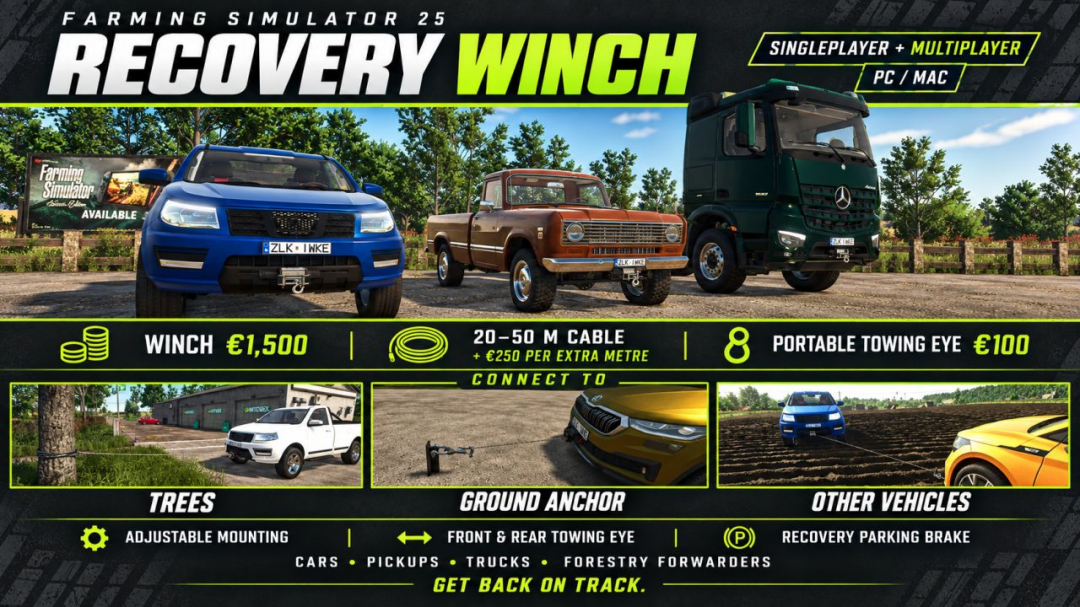
Recover a stuck vehicle, pull yourself out of trouble or winch a disabled vehicle onto a loading bed. Recovery Winch adds configurable recovery equipment to compatible Farming Simulator 25 vehicles, using the game’s native cable, hook and winch sounds.Choose equipment for the job: – Cars and pickups: the original compact bumper winch, plus low-profile, tubular bullbar and offroad bullbar designs. – Trucks: a heavy front winch with a low bullbar, a rescue cradle or a high protective guard. – Loading beds: a rear-facing winch for supported ramp-equipped trucks, trailers and hook-lift roll-off platforms. – Tractors: a separate Category 2 three-point recovery winch, available under Weights in the shop. Attach it to a compatible front or rear linkage. It weighs 220 kg and requires no PTO. – Forestry forwarders: front winch support for compatible vehicles without a factory winch.Use a standing tree, place a ground anchor or connect to an available recovery point on another vehicle. Vehicles belonging to other farms can also be recovered. Suitable free trailer and implement drawbar couplings are supported.Every purchased winch includes one reusable portable towing eye for your farm. Fit it on foot to the front or rear bumper of a car, pickup or truck, then connect the cable. The target vehicle does not need its own winch or towing-eye purchase. Previously purchased standalone eyes remain usable.The loading-bed winch includes steering and brake assistance for an unattended vehicle, with a seated helper character. The assistance never starts the engine or applies throttle: the winch provides the pulling force. Start approximately aligned behind the lowered ramps; tyre grip, vehicle width and collisions still affect loading.Adjust the mounted winch in the shop: up to 3 m forward or backward and 1 m up or down, in 5 cm steps. The separate three-point unit has a fixed mounting position. Configuration controls are shown only where applicable, including vehicles enabled through the admin setting.– Winch price: €1,500, including 20 m of cable and a portable towing eye. – Cable choices: 20, 25, 30, 35, 40, 45 or 50 m. – Cable upgrade price: €250 per additional metre. – Includes a recovery parking brake and native winding/unwinding sounds. – Singleplayer and multiplayer support, with in-game admin settings and diagnostics for dedicated servers. – Default cable pickup/release key: Y. Other available actions appear in the F1 help menu; bindings can be changed in the game settings.Compatibility depends on the vehicle’s category, couplings and loading-bed definitions. Custom vehicle scripts and moving or tilting beds may require additional support. A three-point linkage is not automatically a cable attachment point. Cable connections, ground anchors and fitted towing eyes are temporary; purchased equipment and shop configurations are saved.V1.0.0.2 Added a detachable recovery platform for compatible hook-lift trucks, priced at 7,500. Supports an optional loading-bed winch purchased through the Recovery Winch configuration. Added a folding rear loading ramp with on-foot controls. Extended the ramp by 25% for a gentler loading angle. Added terrain-based ramp adjustment to reduce the risk of the ramp pushing the platform upwards. Reworked platform and ramp collisions. Matched the ramp colour to the platforms selected colour. Retained six cargo straps for securing loads.
Road Builder v1.0
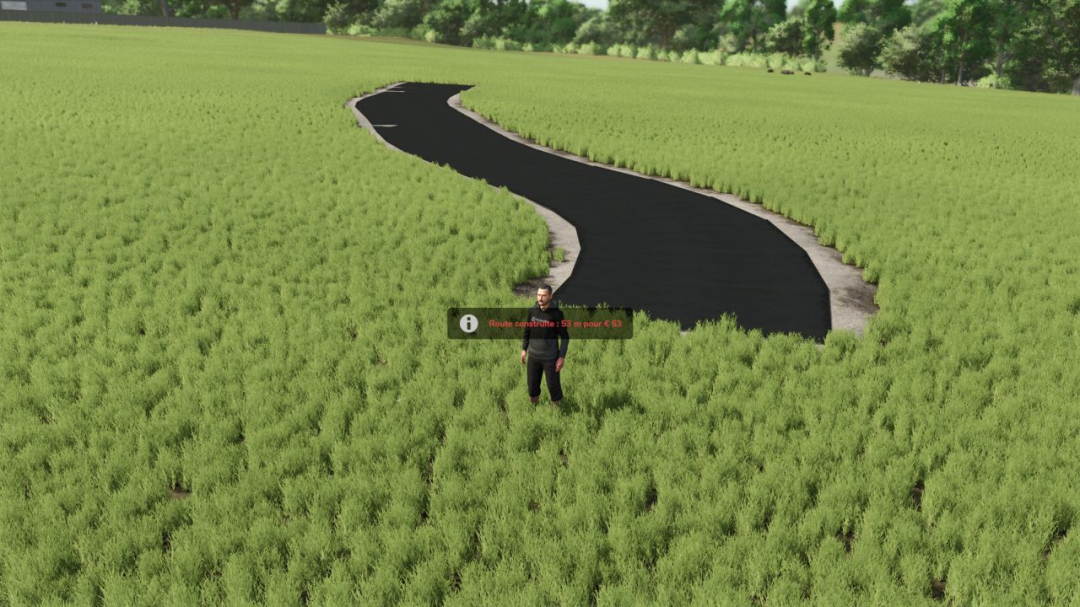
Road Builder – FS25 Tired of dirt paths? Create your own paved roads directly in-game, anywhere on the map!Features Road that follows the natural terrain with minimal earthwork Flat turns, without racing-style banking Adjustable width from 3 to 8 meters Grass, rocks, and crops automatically removed beneath the road Realistic cost: €1 per meter Can be removed with a 75% refund Roads are saved with the game Multiplayer compatible (landscaping rights required)Controls (in road mode) Alt+R: activate / exit road mode Alt+E: place a point Alt+X: remove the last point Alt+W: change the width Alt+B: build Alt+Delete (press twice): remove the nearby roadGood to know When a road is removed, the terrain remains flattened and the ground is painted with grass. It is not possible to build through a building. The road geometry is inspired by the SplineToRoad script (Spline-Road-Toolkit) by XPModder. Many thanks to him for sharing his work with the community: without him, this mod would not exist. Have fun, everyone, and feel free to leave your feedback and screenshots of your finest roads.
Ino MKM Pack V1.0
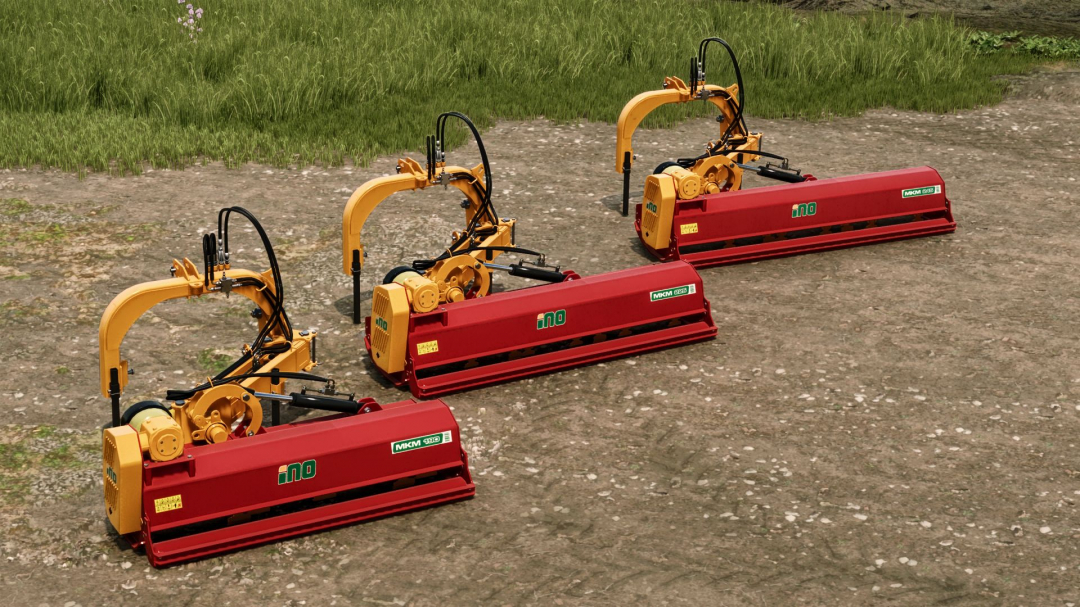
Ino MKM on hand mulchers pack: different working widths movable hydraulic armsMKM 190: Working width: 1.9m Required power: 75hp Weight: 684kgMKM 225: Working width: 2.25m Required power: 100hp Weight: 765kgMKM 245: Working width: 2.45m Required power: 110hp Weight: 890kgMade in Slovenia by Poharski kmjet


FS25 Texture eyedropper v2.2.0.0
FS25 Texture eyedropper v2.2.0.0 Terrain Texture And Object Picker expands the build menu with an eyedropper feature for ground textures, foliage, bushes, trees and supported placeable objects. The pipette can be used to capture already used painting textures, visible foliage such as grasses, flowers and bushes, placeable trees and supported objects directly on the map and find them again in the construction menu. For mixed areas, multiple matching hits can be displayed. Application: 1. Open the “Pipette” tab in the build menu. 2. Press the “Activate pipette” button. 3. Click on a ground texture, foliage, bush, tree, or supported object. 4. Confirm the desired hit in the construction menu. 5. Paint or build as usual. The pipette can be reactivated at any time if necessary. The active brush is reset before recording. The mod takes into account available ground textures and suitable foliage of the respective map. Map foliage is recognized without loading additional entries into the normal build menu without checking. Credits: Thanks to PeterPwn247 for “All Decorative Foliage” and to modelleicher (Farming Agency) for “All The Ground Textures Ingame”. Both mods helped to understand how map content can be usefully made available in the build menu. Changelog 2.0.0.0: – Name changed to Terrain Texture And Object Picker. – Detection of bushes and trees expanded. – Detection improvements for ground textures, foliage and supported construction menu items. – Improved map foliage detection for additional map content. – The previous debug mode was removed because it led to extensive log entries in normal use. V2.2.0.0 – Fixed error messages in the log during pipetting that could occur on maps with incorrectly entered foliage layers. – Internal revision: removed a no longer needed diagnostic code and adapted error handling to current GIANTS specifications. V2.1.0.0 Version 2.1.0.0 – New tab “Search” in the construction menu: searches all categories for keywords, regardless of the order, sorted by relevance. – First related object groups recognized for the search: trees and animal husbandry are found even without a literal name hit. – StoreItems from new prefab/card templates are now found reliably, even if paths differ in spelling. – Trees without a clear assignment to a construction menu entry are no longer incorrectly displayed as tiles, but only as information text. Version 2.0.0.0 – Name changed to Terrain Texture And Object Picker. – Detection of bushes and trees expanded. – Detection improvements for ground textures, foliage and supported construction menu items. – Improved map foliage detection for additional map content. – The previous debug mode was removed because it led to extensive log entries in normal use.

FS22 MTZ 50-52
FS22 MTZ 50-52 FS22 MTZ 50-52 Author: BearFarm,Ricsi modding,Patyesz modding,Unorby,Patrik With countless configuration options: – Headlights – Front and rear fenders – Battery – Engine – Engine housing – Weight – Crash bars – Exhausts – Wheel configuration – etc… This was an unfinished project that fell into the wrong hands and became an object of profiteering, which is why I am forced to share it in this incomplete state. I hope you can still make use of it. As for those specific mod-flippers—they can go to hell; there will be NO MORE profiting off my work! Cheers, Unorby
Texture eyedropper FS25
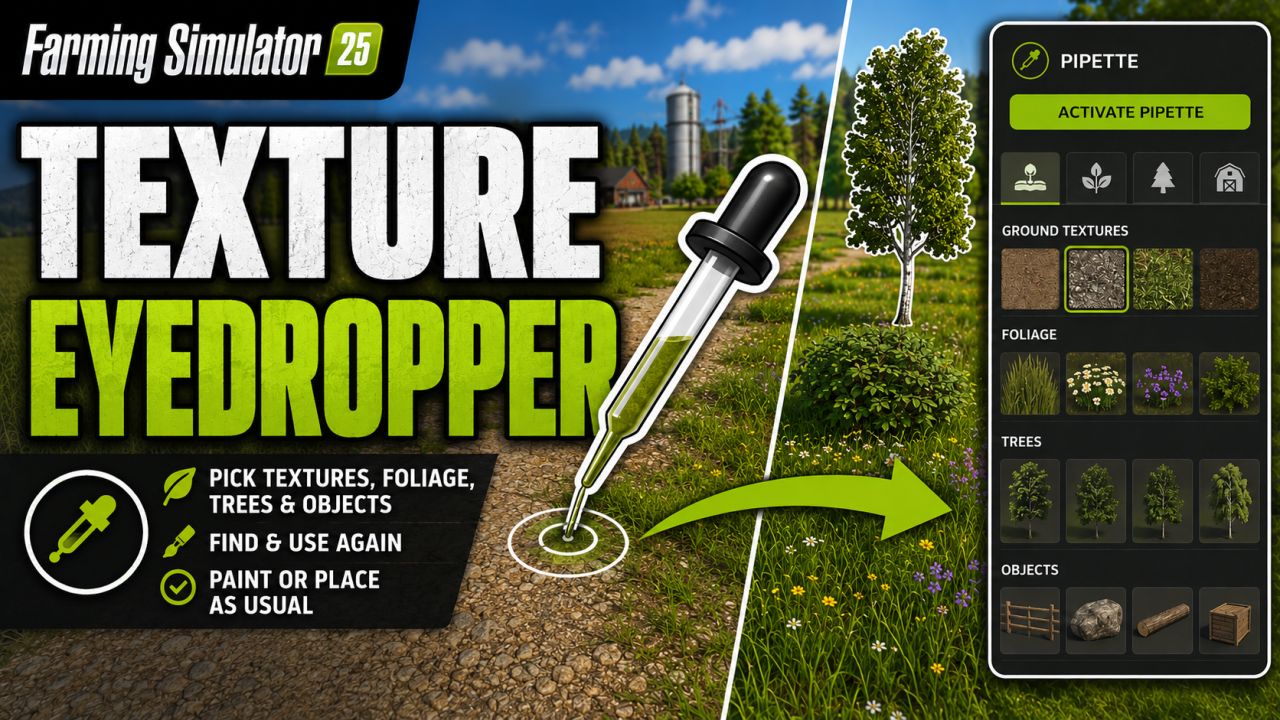
Terrain Texture And Object Picker expands the build menu with an eyedropper feature for ground textures, foliage, bushes, trees and supported placeable objects. The pipette can be used to capture already used painting textures, visible foliage such as grasses, flowers and bushes, placeable trees and supported objects directly on the map and find them again in the construction menu. For mixed areas, multiple matching hits can be displayed. Application: 1. Open the “Pipette” tab in the build menu. 2. Press the “Activate pipette” button. 3. Click on a ground texture, foliage, bush, tree, or supported object. 4. Confirm the desired hit in the construction menu. 5. Paint or build as usual. The pipette can be reactivated at any time if necessary. The active brush is reset before recording. The mod takes into account available ground textures and suitable foliage of the respective map. Map foliage is recognized without loading additional entries into the normal build menu without checking. Credits: Thanks to PeterPwn247 for “All Decorative Foliage” and to modelleicher (Farming Agency) for “All The Ground Textures Ingame”. Both mods helped to understand how map content can be usefully made available in the build menu. Changelog 2.0.0.0: - Name changed to Terrain Texture And Object Picker. - Detection of bushes and trees expanded. - Detection improvements for ground textures, foliage and supported construction menu items. - Improved map foliage detection for additional map content. - The previous debug mode was removed because it led to extensive log entries in normal use. - Fixed error messages in the log during pipetting that could occur on maps with incorrectly entered foliage layers. - Internal revision: removed a no longer needed diagnostic code and adapted error handling to current GIANTS specifications. Version 2.1.0.0 - New tab “Search” in the construction menu: searches all categories for keywords, regardless of the order, sorted by relevance. - First related object groups recognized for the search: trees and animal husbandry are found even without a literal name hit. - StoreItems from new prefab/card templates are now found reliably, even if paths differ in spelling. - Trees without a clear assignment to a construction menu entry are no longer incorrectly displayed as tiles, but only as information text. Version 2.0.0.0 - Name changed to Terrain Texture And Object Picker. - Detection of bushes and trees expanded. - Detection improvements for ground textures, foliage and supported construction menu items. - Improved map foliage detection for additional map content. - The previous debug mode was removed because it led to extensive log entries in normal use.
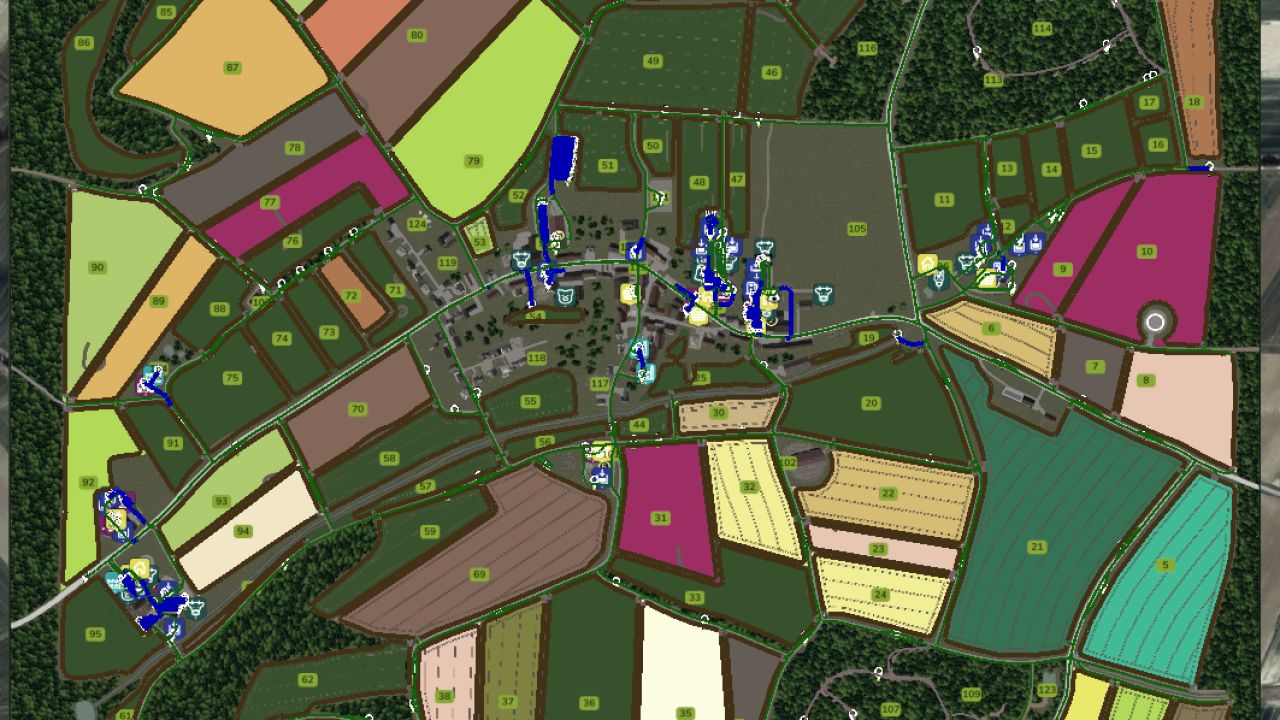
Autodrive Beuren FS25
There are new courses again, this time for the Beuren map. As far as the map allowed, I've driven everything I could, wherever the space permitted. The following routes were driven: All main and secondary routes All courtyards All productions All sales and shopping points Forest access points All fields including catch The courses are suitable for small to medium-sized vehicles at most, as everything is very intricate. I also don't guarantee that it will work for every vehicle combination or that things won't get stuck. Various combinations have been tested.
- 15 per page
- 30 per page
- 45 per page
- 60 per page
-
See more per page
Bigger pages, fewer clicks - and no ads anywhere.
Go Pro