1 / 4
Additional Vehicle Info V1.0.0.0
Additional Vehicle Info V1.0.0.0
Extends the vehicle/implement info box shown near a vehicle with lots of additional information – cleanly grouped into sections that can each be shown/hidden individually in the settings menu.
Always visible: – Shop categor(y/ies) of the vehicle/implement – Diesel/methane tank: current fill level AND capacity (instead of just the fill level)
Section “Condition”: – Damage (%) – Paint wear (%) – Net weight and total weight (including attached implements)
Section “Operating data”: – Age – Operating hours – Odometer
Section “Capacity”: – Every tank, numbered, with its capacity – The currently loaded good shown directly under its tank (useful for implements with several differently filled tanks) – Bale net/twine rolls on balers shown as a count (current/maximum)
Section “Performance data”: – Motor power and max. speed (on motorized vehicles) – Power required, working width and working speed (on implements)
Section “Weights”: – Wheel weights required (yes/no) – Ballast weight required
Section “Tab info”: – Whether the vehicle can be cycled through with Tab (yes/no) – Whether it is excluded from the Tab order (yes/no, requires the mod “FS25_SortableVehicleTabbing”)
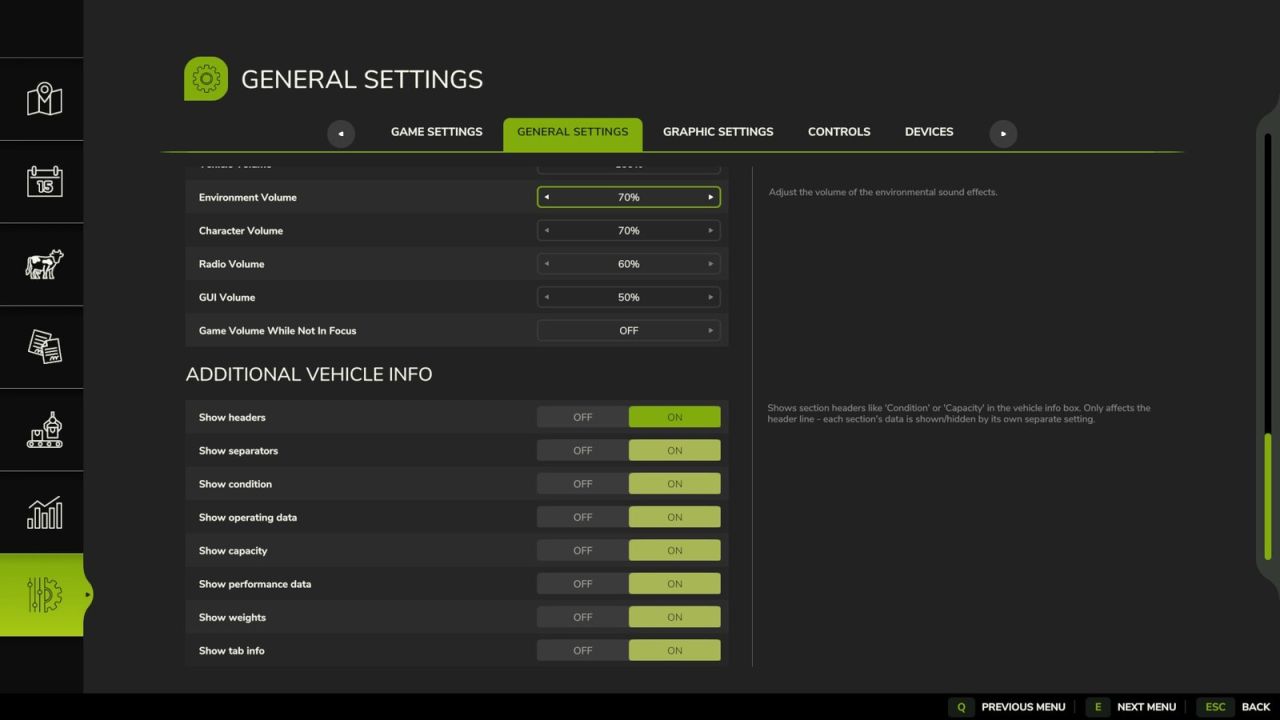
Settings (Game settings > General): – Show headers on/off (global) – Show separators on/off (global) – Each of the five sections above can be switched on/off individually
Compatibility: – Automatically detects the mod “Info Display Extension” and hides its overlapping lines to avoid duplicates
Extends the vehicle/implement info box shown near a vehicle with lots of additional information – cleanly grouped into sections that can each be shown/hidden individually in the settings menu.
Always visible: – Shop categor(y/ies) of the vehicle/implement – Diesel/methane tank: current fill level AND capacity (instead of just the fill level)
Section “Condition”: – Damage (%) – Paint wear (%) – Net weight and total weight (including attached implements)
Section “Operating data”: – Age – Operating hours – Odometer
Section “Capacity”: – Every tank, numbered, with its capacity – The currently loaded good shown directly under its tank (useful for implements with several differently filled tanks) – Bale net/twine rolls on balers shown as a count (current/maximum)
Section “Performance data”: – Motor power and max. speed (on motorized vehicles) – Power required, working width and working speed (on implements)
Section “Weights”: – Wheel weights required (yes/no) – Ballast weight required
Section “Tab info”: – Whether the vehicle can be cycled through with Tab (yes/no) – Whether it is excluded from the Tab order (yes/no, requires the mod “FS25_SortableVehicleTabbing”)
Settings (Game settings > General): – Show headers on/off (global) – Show separators on/off (global) – Each of the five sections above can be switched on/off individually
Compatibility: – Automatically detects the mod “Info Display Extension” and hides its overlapping lines to avoid duplicates
Download Links
Report a problem
Additional Vehicle Info V1.0.0.0
Advertisement
Remove ads