Euro Truck Simulator 2 mods
177,263 results- 15 per page
- 30 per page
- 45 per page
- 60 per page
-
See more per page
Bigger pages, fewer clicks - and no ads anywhere.
Go Pro
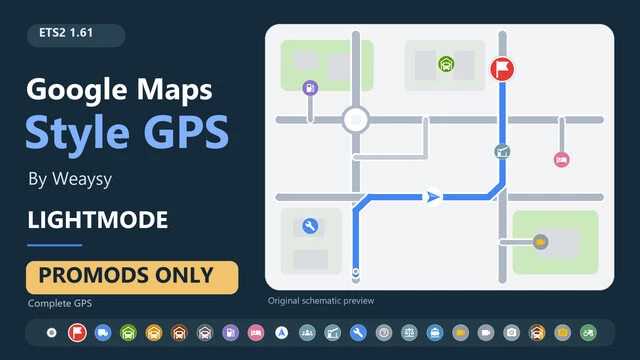
Styl GPS Map Google w trybie jasnym (tylko PROMODS) v0.2.1 ETS2
Styl GPS Map Google w trybie jasnym (tylko PROMODS) v0.2.1 ETS2 Wersja 0.2.1: Kompletny moduł GPS dla ProMods Europe 2.84 i ETS2 1.61. WSZECHSTRONNY GPS Wszystko, czego potrzebujesz do tego GPS-a, znajduje się w tym jednym modzie. Nie są wymagane żadne dodatkowe mody GPS, poprawki kompatybilności ani tła map od innych twórców. Tylko ProMods Europe i wymagane dodatki DLC należy zainstalować osobno. INSTALACJA Aktywuj GPS nad pakietami ProMods i utrzymuj ProMods w zalecanej kolejności. Używaj jednego motywu GPS na raz: trybu jasnego lub ciemnego. Ta aktualizacja zastępuje poprzednią małą łatkę koloru. Wyłącz stary lokalny test GPS, oddzielną bazę GPS Weaysy i wszelkie inne kolorowe łatki GPS. DOWL i inne dodatkowe tła map nie są wymagane. Wyłącz je na potrzeby tej konfiguracji. DOŁĄCZONY Motyw HUD i GPS kabiny Weaysy, pełny zestaw ikon, niebieska trasa i ograniczenia kamery w rozmiarze ProMods. Motyw ze statycznym oświetleniem. Nie wymaga wtyczki, ustawień SDK, trybu programisty ani zewnętrznego skryptu. ZGODNOŚĆ Zaprojektowano dla ProMods Europe 2.84 z ETS2 1.61. Drogi, miasta i tekstury tła ProMods są dostarczane w ramach osobnej instalacji ProMods. Inne kombinacje map i opcjonalne tła map nie są obsługiwane przez ten pakiet. Mogą one zastąpić te same ustawienia mapy, a kompatybilność z każdą kombinacją nie jest gwarantowana. Pakiet ten nie dodaje automatycznego przełączania trybu dzień/noc ani raportów o zdarzeniach na żywo.
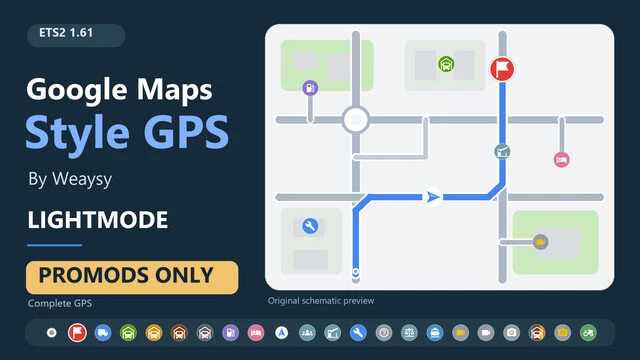
Mode clair GPS style Google Maps (PROMOTIONS uniquement) v0.2.1 ETS2
Mode clair GPS style Google Maps (PROMOTIONS uniquement) v0.2.1 ETS2 Version 0.2.1 : GPS léger complet pour ProMods Europe 2.84 et ETS2 1.61. GPS TOUT-EN-UN Ce mod unique inclut tout le nécessaire pour ce GPS. Aucun autre mod GPS, correctif de compatibilité ou fond de carte d'autres créateurs n'est requis. Seuls ProMods Europe et ses DLC requis doivent être installés séparément. INSTALLATION Activez ce GPS au-dessus des packs ProMods et conservez les ProMods dans l'ordre recommandé. Utilisez un seul thème GPS à la fois : mode clair ou mode sombre. Cette mise à jour remplace l'ancien petit patch de couleur. Désactivez l'ancien test GPS local, la base GPS Weaysy séparée et tout autre patch de couleur GPS. DOWL et autres arrière-plans de carte supplémentaires ne sont pas nécessaires. Désactivez-les pour cette configuration. COMPRIS Thème Weaysy HUD et GPS de cabine, ensemble complet d'icônes, itinéraire bleu et limites de caméra de carte de taille ProMods. Thème clair statique. Aucun plugin, paramètre SDK, mode développeur ou script externe n'est requis. COMPATIBILITÉ Conçu pour ProMods Europe 2.84 avec ETS2 1.61. Les routes, villes et textures d'arrière-plan de ProMods sont fournies par votre installation ProMods séparée. Les autres combinaisons de cartes et les arrière-plans optionnels ne sont pas pris en charge par ce pack. Ils peuvent remplacer les mêmes paramètres de carte, et la compatibilité avec toutes les combinaisons n'est pas garantie. Ce pack n'inclut pas la commutation automatique jour/nuit ni les rapports d'incidents en direct.


Halloween Trailer Skin v1.0
Here’s a skin perfectly suited to the current season: a Halloween skin. Credits: Grigouille_Off

Danish Map Addon v1.0
This Danish map add-on expands the world of Euro Truck Simulator 2 by adding custom locations in Denmark, including buildings, a workshop, a garage, and a transport terminal. Hirtshals, Denmark: Adds a custom building/workshop. Aalborg, Denmark: Adds a garage/terminal. Between Esbjerg and Varde, Denmark: Adds a Jysk Andel location. Designed to work with all versions of Euro Truck Simulator 2 (ETS2). Adds custom Danish locations to the ETS2 map. Includes a workshop in Hirtshals, a garage/terminal in Aalborg, and a Jysk Andel location between Esbjerg and Varde.

Guerra Oscar Gamer 2‑Axle Trailer (v1.61) – ETS2
Features A single‑axle‑pair trailer built for regional runs and long‑haul hauls. The chassis is reinforced and offers both standard and arched suspension setups, letting you tune ride comfort. The whole body is paintable, so you can match any livery, and you can add custom tarps, reflective strips, and rear mudguards. Choose from toolboxes, side guards, or wheel kits as accessories. Marker lights come in several colours, plus updated tail lights for a modern look. The model works with bulk, dry and refrigerated cargo, handling weight distribution and physics realistically. Clean, detailed 3D mesh and high‑resolution textures round out the package.

Mercedes‑Benz Atego 2428 – Updated for ETS2 v1.61
Step into the cab of a Mercedes‑Benz Atego 2428, now fully compatible with ETS2 1.61. Choose between high or low roof cabs and switch between 4×2 and 6×2 chassis for tractor, tipper, box, bulk, hay or livestock bodies. Under the hood sit OM‑906 engines ranging from a modest 250 cv all the way up to a monstrous 800 cv (3 950 Nm), each with its own authentic sound. The 12‑gear Power Shift gearbox can be run in manual or automatic mode. Power: OM‑906 options 250‑800 cv, standard or ‘direct’ exhaust note. Chassis: 4×2 and 6×2 layouts, multiple body types. Lighting: halogen or LED headlights plus extra load‑platform lamps. Paintwork: eight factory colours – from crisp white to metallic red. Interior: seat covers, floor mats, three steering‑wheel styles (standard, GTI, Actros), AC and GPS. Accessories: grilles, bumpers, mudguards, exhausts, horns, aerials, Argentine and Uruguayan plates. Extras: matte and kitchen accessories, coloured tarps and ADR‑compatible loads.

Halloween Trailer Skin v1.0 for ETS2
Get your convoy in the spooky spirit with this Halloween‑themed trailer skin for Euro Truck Simulator 2. The paint job swaps the usual livery for a bold orange‑and‑black scheme, complete with pumpkins, bats and subtle cobweb accents. Perfect for hauls through foggy autumn nights, it’s a quick visual upgrade that makes every delivery feel like a trick‑or‑treat road trip. Credits: Grigouille_Off

Turkish Companies Logos v1.0 (ETS2)
Add a splash of Turkish flair to your fleet! This mod drops the official logos of Turkey’s most recognizable companies and brands straight into Euro Truck Simulator 2. It’s active for brand‑new careers and profiles – just start a fresh profile, complete your first load, then head to the company‑logo selection screen and pick the Turkish badge you like. Your truck will instantly sport the new emblem. Credits: @toprakkaleibrhm

Île-de-France (Paris Suburbs) 1:1 Map v0.1.6e – ETS2
A faithful 1:1 recreation of the Paris suburbs for ETS2. The map covers Rosny‑sous‑Bois, Charenton‑le‑Pont, Saint‑Mandé, Vincennes, Bagnolet and Villiers‑sur‑Marne, plus the 12th and 20th arrondissements. All major motorways—A3, A4, A86, A103 and A186—are modeled, and interchanges feel spot‑on. Real‑world businesses such as SNCF, Bercy 2, La Poste, Carrefour, Eiffage, SFCP, Westfield Rosny 2, Marché Grand Frais, Castorama and local farms populate the scenery. The landscape is rendered with authentic French foliage and architecture. Updated for ETS2 1.61 with a handful of bug fixes.

Danish Map Add‑on v1.0 (ETS2)
Features – Hirtshals, Denmark: a brand‑new workshop building where you can service your rigs. – Aalborg, Denmark: a full‑scale garage and transport terminal for quick stops. – Between Esbjerg and Varde, Denmark: a Jysk Andel depot adding more cargo options. Compatibility Works with every version of Euro Truck Simulator 2 – just enable it and you’re good to go. Installation Drop the extracted folder into your ETS2/mods directory and activate it through the in‑game mod manager. Changelog v1.0 – introduces the three custom Danish locations: workshop in Hirtshals, garage/terminal in Aalborg, and Jysk Andel site between Esbjerg and Varde.

SFX Volvo FH13 D13K 500 Euro6 v2.50.1
Changelog Version 2.50.1 Expect further updates to this sound pack next week. Other minor fixes. Information about the sound package True positioning of sound sources. Just like a real truck. Sounds work with Volvo FH4,5,6 Aero trucks from Scs software and Volvo FH5 Sanax Realistic sounds of the 13 litre D13k500 EUVI engine. Very accurate, natural and detailed audio recorded in a variety of driving modes. The mechanics of the real truck sound have been recreated, and the feel of the accelerator pedal is exactly like in a real truck. Multiple engine, gearbox and turbo load levels allow you to experience this to the fullest. All interior volume levels and distances are correctly adjusted for the engine, horns, gearbox and everything else. All of this is done in accordance with the real truck. What do I get in this package? Engine sounds for single player and multiplayer. All switches, buttons, signals, and levers in the interior are 101% authentic to the Volvo FH4. Electric window lifters. Real turbocharger sounds. The features of real truck operation, such as speed of acceleration and deceleration, the difference between full and partial load, are taken into account. Original Renault Trucks horn and air horn Renault Magnum. Real detailed audio of the Volvo I‑Shift AT2612F gearbox. A separate sound pack with all the necessary interior and exterior noises is also included: Noise from open windows, windshield and mirror aerodynamic noises, bumps, air seat squeaks, and much more. The list of sounds will grow with each update. Also in this package, you can choose from two variants of Michelin and Goodyear asphalt tire sounds. There are also gravel, snow, and wet road sounds. Game version: ETS2 1.61 Credits: Engine Voice Records

FormaMod v1.6
ETS2 Graphics Overhaul Every effect in the comparisons above has its own sliders and switch. You adjust them live, while driving, and see the change instantly – no game restart and no digging through files. Image, Scaling, Atmosphere, Night, Film & glass and Rain tabs, with a (?) description next to every feature. Right-click a slider to reset it to its default. Every section has a switch, and a slider at 0 turns the effect off completely. Save your look as a preset and share it as a single line of text. Ctrl + Alt + Plus opens the window, Ctrl + Alt + Minus is a quick before/after toggle in game. Custom hotkeys – a Hotkeys button at the bottom of the mod window. Change the shortcut that opens the window (default Ctrl + Alt + Plus) and the one that toggles the mod (default Ctrl + Alt + Minus). The mod remembers them permanently. Head motion (test) – Camera tab: the driver's head reacts to driving. It leans when braking and pulling away, gives in to corners and bumps, and glances into the bend. Mouse look works as usual, then the head smoothly returns. Off by default: turn it on in the Camera tab and restart the game. If you use TrackIR or opentrack, the mod leaves them alone. Effects work at any scaling – below 100% scaling (e.g. 75%), fog, shadows and light work across the whole world again. Motion blur only in the cab – in outside cameras the tractor and trailer are no longer smeared. Blur works in the cab view, where it looks best. Nicer cab with FSR / DLSS – the cab interior no longer smears when the head moves. Structure off by default – on some settings it made the image too sharp. Add it with a slider in the Image tab.
- 15 per page
- 30 per page
- 45 per page
- 60 per page
-
See more per page
Bigger pages, fewer clicks - and no ads anywhere.
Go Pro