1 / 2
Driver Hands Mod v1.3 (1.61.x) Mod
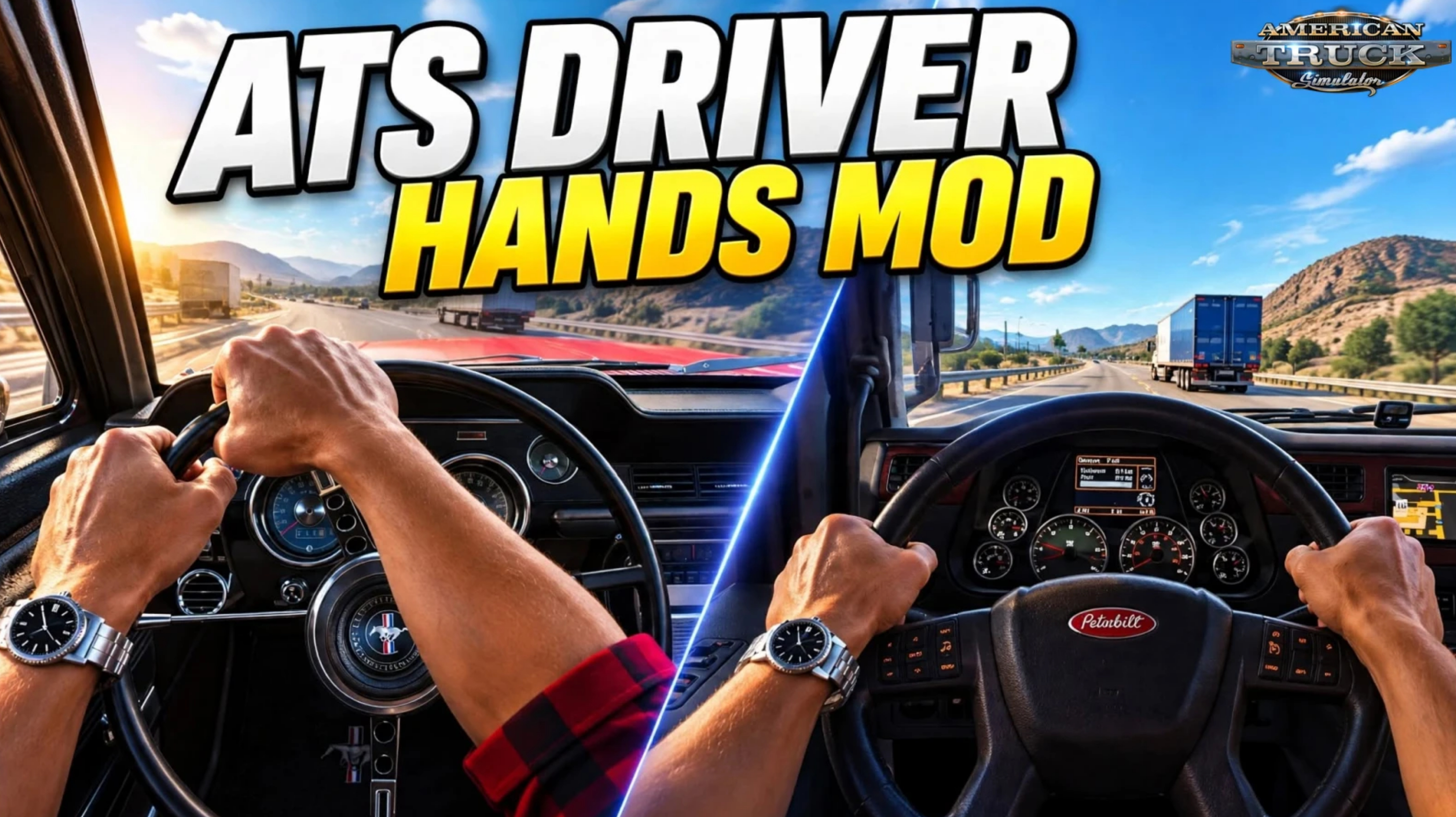
Driver Hands Mod by NecroCX for ATS – this advanced mod adds fully animated realistic driver hands and arms to **every stock truck** in American Truck Simulator plus the Road Trip cars. The driver wears a classic red/black flannel shirt with rolled-up sleeves. ETS2 version can be found here.
Features Driver Hands Mod: – 🖐️ Animated hands for all stock ATS trucks + Road Trip cars – 👕 Classic American trucker look (red/black flannel shirt) – 🔄 Hands follow the steering wheel from the first movement – ✋ Hand-over-hand and palm steering on big turns – ➡️ Indicator lever reach animation – 📯 Horn and air horn hand animation – 😌 Rest pose (one hand by the door above 50 km/h) – 📏 Two hand sizes: BIG (original) or SLIM (12% smaller) – 🎨 5 skin colour options (Fair, Medium, Tan, Brown, Dark) – 🎮 Fully automatic – no keys needed (plugin reads steering, indicators & horn) – 🛠️ Supports 24 cab models and 281 interiors
Supported vehicles: – All cab/interior variants of Freightliner Cascadia, International, Kenworth, Mack, Peterbilt, Volvo, Western Star + Road Trip cars (Ford Bronco, F-150, Mustang, Crown Victoria).
How to Install – 🛑 Close American Truck Simulator completely. – 📥 Download the file: NecroCX_Driver_Hands_ATS_v1.3_ALL_TRUCKS.zip – 📦 Extract the entire folder anywhere (Desktop is fine). – 🖱️ Double-click Install.bat. It will automatically find your game and copy all files. – 🛡️ If Windows asks for administrator permission $rightarrow$ Click Yes. – 🚛 Start ATS $rightarrow$ Click OK when the “Advanced SDK features” message appears. – 📂 Go to Mod Manager and activate: – One hand version only: – ➡️ NecroCX Driver Hands ATS v1.3 BIG OR – ➡️ NecroCX Driver Hands ATS v1.3 SLIM – 🎨 Optional: Enable one skin colour add-on (place it above the hands mod). – ✅ Confirm changes and load your profile. – ⏱️ Start the engine and wait about 15 seconds the first time — the hands will appear and start working.
Important Notes – ❌ Never activate BIG and SLIM at the same time. – ❌ Never activate more than one skin colour. – 📋 Recommended load order (from top):Skin colour $rightarrow$ Hands mod $rightarrow$ Other interior mods – 📁 Copy all .scs files from the 1_BIG_hands, 2_SLIM_hands and 3_Skin_colours folders into:DocumentsAmerican Truck Simulatormod – 📂 Copy NecroCXHands.dll + NecroCXHands.ini into:American Truck Simulatorbinwin_x64plugins (create the plugins folder if it doesn’t exist)
👉️ Tested on game version 1.61.x
Features Driver Hands Mod: – 🖐️ Animated hands for all stock ATS trucks + Road Trip cars – 👕 Classic American trucker look (red/black flannel shirt) – 🔄 Hands follow the steering wheel from the first movement – ✋ Hand-over-hand and palm steering on big turns – ➡️ Indicator lever reach animation – 📯 Horn and air horn hand animation – 😌 Rest pose (one hand by the door above 50 km/h) – 📏 Two hand sizes: BIG (original) or SLIM (12% smaller) – 🎨 5 skin colour options (Fair, Medium, Tan, Brown, Dark) – 🎮 Fully automatic – no keys needed (plugin reads steering, indicators & horn) – 🛠️ Supports 24 cab models and 281 interiors
Supported vehicles: – All cab/interior variants of Freightliner Cascadia, International, Kenworth, Mack, Peterbilt, Volvo, Western Star + Road Trip cars (Ford Bronco, F-150, Mustang, Crown Victoria).
How to Install – 🛑 Close American Truck Simulator completely. – 📥 Download the file: NecroCX_Driver_Hands_ATS_v1.3_ALL_TRUCKS.zip – 📦 Extract the entire folder anywhere (Desktop is fine). – 🖱️ Double-click Install.bat. It will automatically find your game and copy all files. – 🛡️ If Windows asks for administrator permission $rightarrow$ Click Yes. – 🚛 Start ATS $rightarrow$ Click OK when the “Advanced SDK features” message appears. – 📂 Go to Mod Manager and activate: – One hand version only: – ➡️ NecroCX Driver Hands ATS v1.3 BIG OR – ➡️ NecroCX Driver Hands ATS v1.3 SLIM – 🎨 Optional: Enable one skin colour add-on (place it above the hands mod). – ✅ Confirm changes and load your profile. – ⏱️ Start the engine and wait about 15 seconds the first time — the hands will appear and start working.
Important Notes – ❌ Never activate BIG and SLIM at the same time. – ❌ Never activate more than one skin colour. – 📋 Recommended load order (from top):Skin colour $rightarrow$ Hands mod $rightarrow$ Other interior mods – 📁 Copy all .scs files from the 1_BIG_hands, 2_SLIM_hands and 3_Skin_colours folders into:DocumentsAmerican Truck Simulatormod – 📂 Copy NecroCXHands.dll + NecroCXHands.ini into:American Truck Simulatorbinwin_x64plugins (create the plugins folder if it doesn’t exist)
👉️ Tested on game version 1.61.x
Download Links
Report a problem
Driver Hands Mod v1.3 (1.61.x) Mod
Advertisement
Remove ads