1 / 3
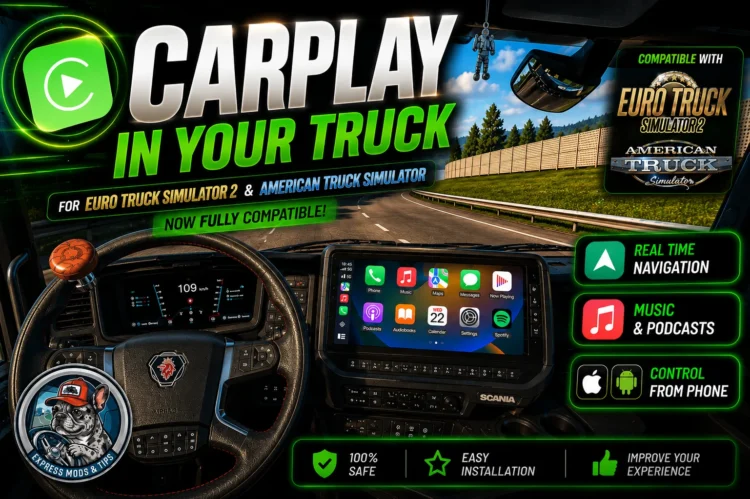
CarPlay Mod v1.2 – GPS, Spotify, YouTube & Phone Control | ETS2 + ATS 1.60
CARPLAY FOR EURO TRUCK SIMULATOR 2 & AMERICAN TRUCK SIMULATOR – v1.2 by Express Mods & Tips
>>> WATCH THE VIDEO FIRST. THIS IS NOT OPTIONAL. << Language if you want. Your phone uses ITS OWN language, so your co-driver can be on a different one at the same time. – Rebuilt icons: no more blurry taskbar icon. – Detects ReShade even when it lives in a subfolder, so it coexists with graphics mods like SnowyMoon (see COMPATIBILITY below).
REQUIREMENTS
You do NOT need Python installed. It ships portable.
HOW TO INSTALL (summary – the video shows it properly)
2. Installer: double click CarPlay-Setup, accept the admin prompt, follow the wizard. It picks your Windows language automatically. Tick the guided-step box at the end.
Portable: unzip anywhere and double click INICIAR. Do NOT run it from inside the ZIP and do NOT put it in “Program Files”. Desktop or D: are fine.
5. ReShade is the only manual step and the launcher walks you through it: hit the guided step, install ReShade WITH add-on support, and it applies the menu configuration to the game for you.
6. Press START CARPLAY and launch the game. The screen appears on its own in the truck’s radio display.
7. Phone: the launcher shows a link and a QR code. Scan it with your camera. PC and phone must be on the SAME WiFi network.
INCLUDED EXTRA – AUTOBLINKER
Automatic turn signals: the indicator switches on by itself when you turn the wheel past ~70 degrees and switches off when you straighten up. Works with any truck including mods, because it uses the official SCS telemetry SDK instead of faking keypresses. Optional checkbox in the installer – take it or leave it.
COMPATIBILITY – SNOWYMOON AND OTHER GRAPHICS MODS
If you use SnowyMoon, Lighting Improvements or any mod that also needs dxgi.dll, you do NOT have to choose between them. Those mods take dxgi.dll in the root folder and load ReShade from a subfolder:
1. Create the folder: binwin_x64reshade (the launcher’s guided step creates it for you if it detects the other mod) 2. In the ReShade installer, at the folder step, pick THAT folder – not the root. 3. Tick add-on support as usual.
The launcher searches subfolders too, so the add-on, the menu config and the Diagnostics tab all end up in the right place by themselves. Diagnostics will show it as “Installed in the reshade subfolder”.
Credits: Express Mods & Tips
>>> WATCH THE VIDEO FIRST. THIS IS NOT OPTIONAL. << Language if you want. Your phone uses ITS OWN language, so your co-driver can be on a different one at the same time. – Rebuilt icons: no more blurry taskbar icon. – Detects ReShade even when it lives in a subfolder, so it coexists with graphics mods like SnowyMoon (see COMPATIBILITY below).
REQUIREMENTS
You do NOT need Python installed. It ships portable.
HOW TO INSTALL (summary – the video shows it properly)
2. Installer: double click CarPlay-Setup, accept the admin prompt, follow the wizard. It picks your Windows language automatically. Tick the guided-step box at the end.
Portable: unzip anywhere and double click INICIAR. Do NOT run it from inside the ZIP and do NOT put it in “Program Files”. Desktop or D: are fine.
5. ReShade is the only manual step and the launcher walks you through it: hit the guided step, install ReShade WITH add-on support, and it applies the menu configuration to the game for you.
6. Press START CARPLAY and launch the game. The screen appears on its own in the truck’s radio display.
7. Phone: the launcher shows a link and a QR code. Scan it with your camera. PC and phone must be on the SAME WiFi network.
INCLUDED EXTRA – AUTOBLINKER
Automatic turn signals: the indicator switches on by itself when you turn the wheel past ~70 degrees and switches off when you straighten up. Works with any truck including mods, because it uses the official SCS telemetry SDK instead of faking keypresses. Optional checkbox in the installer – take it or leave it.
COMPATIBILITY – SNOWYMOON AND OTHER GRAPHICS MODS
If you use SnowyMoon, Lighting Improvements or any mod that also needs dxgi.dll, you do NOT have to choose between them. Those mods take dxgi.dll in the root folder and load ReShade from a subfolder:
1. Create the folder: binwin_x64reshade (the launcher’s guided step creates it for you if it detects the other mod) 2. In the ReShade installer, at the folder step, pick THAT folder – not the root. 3. Tick add-on support as usual.
The launcher searches subfolders too, so the add-on, the menu config and the Diagnostics tab all end up in the right place by themselves. Diagnostics will show it as “Installed in the reshade subfolder”.
Credits: Express Mods & Tips
Download Links
Report a problem
CarPlay Mod v1.2 – GPS, Spotify, YouTube & Phone Control | ETS2 + ATS 1.60
Advertisement
Remove ads