1 / 3
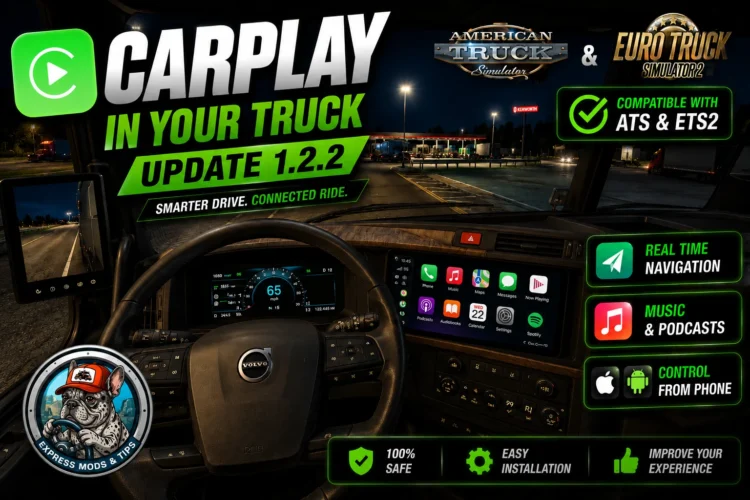
CarPlay Mod ¡NEW UPDATE 1.2.2✅! – GPS, Spotify, YouTube & Phone Control | ETS2 + ATS 1.60
CARPLAY FOR EURO TRUCK SIMULATOR 2 & AMERICAN TRUCK SIMULATOR – v1.2.2 by Express Mods & Tips
>>> WATCH THE VIDEO FIRST. IT IS NOT OPTIONAL. Fix, game closed. Both DLLs are backed up, so install order no longer matters. Tested with SnowyMoon 10.2.02 + ReShade 6.7.3. No such mod? That row never appears. The old v1.2 “reshade subfolder” workaround is gone: it gave no image and no error.
AUTOBLINKER FROM THE LAUNCHER. Automatic turn signals, any truck including mods, through the official SCS telemetry SDK. Only the Setup wizard could install it, so portable users had the file and no way to use it. Settings now has Install / Remove; your autoblinker.ini survives both.
VIDEO CONTROLS. Its own volume, apart from Windows (arrow up/down, M to mute). It ducks to 15% while Spotify plays, the pause key really pauses now, and a video left paused 20 seconds closes itself and frees the screen.
DIAGNOSTICS no longer goes blank and freezes when a row fails (with SnowyMoon that happened every time), it explains the green screen as the add-on’s “no signal” colour and not a broken install, and a new row reads “the add-on is receiving frames” in-game: what tells ReShade LOADED from ReShade WORKING.
ALSO: the language follows Windows now, not Chrome (your phone still follows the phone). The game is found even if its folder is renamed or on another drive. One file to run, START.bat. Welcome screen, Changes tab, new icons.
REQUIREMENTS
Windows 10/11 64-bit. ETS2 or ATS. Chrome or Edge. ReShade 6.7.3 WITH ADD-ON SUPPORT – included, the launcher installs it with you. Internet on the first run only (~110 MB). Python NOT needed, it ships portable.
IF SOMETHING FAILS
Open DIAGNOSTICS: everything wrong has a button and an explanation. – No screen, or no “TexMod” in the ReShade menu: installed without add-on support. Reinstall with the file in the sdk folder, ticking that box. – Green screen: Diagnostics -> “Video output” -> Retry. – Image on the tachometer: enable “AUTO infotainment by IMAGE”, or LOCK the thumbnail with the orange map. – Everything green but nothing on the dashboard: another mod holds dxgi.dll. – Old trucks (International LT, VNL 2018): in game press HOME -> Add-ons -> CarPlay -> “AUTO detect screen size”, then “Force static GPS texture”. – SmartScreen: expected, it is not signed with a paid certificate. Full guide in 9 languages in the ZIP.
Known: a thin white border around the screen. Cosmetic. Uninstall: delete the folder or use Windows uninstall. Two files stay in bin/win_x64: texture_overlay.addon64 and plugins/scs-telemetry.dll
VIDEO (WATCH IT): https://youtu.be/brnYlJkdF04 More mods: https://www.youtube.com/@ExpressModsTips
Free. Reselling forbidden. If you reupload it, credit the channel and link the video. ReShade by crosire (reshade.me). Telemetry SDK by SCS.
Credits: Express Mods & Tips
>>> WATCH THE VIDEO FIRST. IT IS NOT OPTIONAL. Fix, game closed. Both DLLs are backed up, so install order no longer matters. Tested with SnowyMoon 10.2.02 + ReShade 6.7.3. No such mod? That row never appears. The old v1.2 “reshade subfolder” workaround is gone: it gave no image and no error.
AUTOBLINKER FROM THE LAUNCHER. Automatic turn signals, any truck including mods, through the official SCS telemetry SDK. Only the Setup wizard could install it, so portable users had the file and no way to use it. Settings now has Install / Remove; your autoblinker.ini survives both.
VIDEO CONTROLS. Its own volume, apart from Windows (arrow up/down, M to mute). It ducks to 15% while Spotify plays, the pause key really pauses now, and a video left paused 20 seconds closes itself and frees the screen.
DIAGNOSTICS no longer goes blank and freezes when a row fails (with SnowyMoon that happened every time), it explains the green screen as the add-on’s “no signal” colour and not a broken install, and a new row reads “the add-on is receiving frames” in-game: what tells ReShade LOADED from ReShade WORKING.
ALSO: the language follows Windows now, not Chrome (your phone still follows the phone). The game is found even if its folder is renamed or on another drive. One file to run, START.bat. Welcome screen, Changes tab, new icons.
REQUIREMENTS
Windows 10/11 64-bit. ETS2 or ATS. Chrome or Edge. ReShade 6.7.3 WITH ADD-ON SUPPORT – included, the launcher installs it with you. Internet on the first run only (~110 MB). Python NOT needed, it ships portable.
IF SOMETHING FAILS
Open DIAGNOSTICS: everything wrong has a button and an explanation. – No screen, or no “TexMod” in the ReShade menu: installed without add-on support. Reinstall with the file in the sdk folder, ticking that box. – Green screen: Diagnostics -> “Video output” -> Retry. – Image on the tachometer: enable “AUTO infotainment by IMAGE”, or LOCK the thumbnail with the orange map. – Everything green but nothing on the dashboard: another mod holds dxgi.dll. – Old trucks (International LT, VNL 2018): in game press HOME -> Add-ons -> CarPlay -> “AUTO detect screen size”, then “Force static GPS texture”. – SmartScreen: expected, it is not signed with a paid certificate. Full guide in 9 languages in the ZIP.
Known: a thin white border around the screen. Cosmetic. Uninstall: delete the folder or use Windows uninstall. Two files stay in bin/win_x64: texture_overlay.addon64 and plugins/scs-telemetry.dll
VIDEO (WATCH IT): https://youtu.be/brnYlJkdF04 More mods: https://www.youtube.com/@ExpressModsTips
Free. Reselling forbidden. If you reupload it, credit the channel and link the video. ReShade by crosire (reshade.me). Telemetry SDK by SCS.
Credits: Express Mods & Tips
Download Links
Report a problem
CarPlay Mod ¡NEW UPDATE 1.2.2✅! – GPS, Spotify, YouTube & Phone Control | ETS2 + ATS 1.60
Advertisement
Remove ads